# Shapes
The graphical elements are divided in 4 categories:
* [Shapes](#shape) that define the actual curves but have no styling information
* [Grouping](#grouping), used to organize collections of graphic elements
* [Styles](#shape-style), that define the visual appearance of shapes
* [Modifiers](#modifier) alter the curves of the shapes
## Shape Rendering Model
### Grouping and Ordering Rules
* **Shapes** are rendered in reverse order, bottom->top. Shapes at the beginning of the array
are rendered on top of shapes with larger indices.
* **Groups** offer a scoping mechanism for transforms, styles, modifiers, and shapes. All group
children, including sub-groups and their children, are considered part of the group's scope.
* **Transforms** adjust the coordinate system for all elements within their group, and transitively
for all other group-nested elements.
* **Styles** and **modifiers** apply to all preceding shapes within the current scope,
including subgroup-nested shapes.
* When **multiple styles** apply to the same shape, the shape is rendered repeatedly for each style,
in reverse order.
* When **multiple modifiers** apply to the same shape, they are composed in reverse order
(e.g. $Trim(Trim(shape))$).
* When **multiple transforms** apply to the same shape due to scope nesting, they compose in group
nesting order (transforms are additive).
* **Group opacity** (property of the group transform) applies atomically to all elements in scope -
i.e. opacity applies to the result of compositing all group content, and not to individual
elements.
More formally:
* for each $(shape, style)$ tuple, where $Index(shape) < Index(style)$ and $shape \in Scope(style)$:
* for each $modifier$, in increasing index order, where $Index(shape) < Index(modifier)$ and
$shape \in Scope(modifier)$:
* $shape = modifier(shape)$
* compute the total shape transformation by composing all transforms within the shape scope chain:
$T_{shape} = \prod_{n=0}^{Scope(shape)} Transform(scope_n)$
* compute the total style transformation by composing all transforms within the style scope chain:
$T_{style} = \prod_{n=0}^{Scope(style)} Transform(scope_n)$
* $Render(shape \times T_{shape}, style \times T_{style})$
### Notes
1. Certain modifier operations (e.g. sequential $Trim$) may require information about shapes
from different groups, thus $Render()$ calls cannot always be issued based on single-pass local
knowledge.
2. Transforms can affect both shapes and styles (e.g. stroke width). For a given $(shape, style)$,
the shape and style transforms are not necessarily equal.
3. Shapes without an applicable style are not rendered.
4. This rendering model is based on AfterEffects' Shape Layer semantics.
## Rendering Convention
Shapes defined in this section contain rendering instructions.
These instructions are used to generate the path as a bezier curve.
Implementations MAY use different algorithms or primitives to render
the shapes but the result MUST be equivalent to the paths defined here.
Some instructions define named values for clarity and illustrative purposes,
implementations are not required to have them explicitly defined in
their rendering process.
When referencing animated properties, the rendering instruction will
use the same name as in the JSON but it's assumed they refer to their
value at a given point in time rather than the property itself.
For {link:values/vector} values, $value.x$ and $value.y$ in
the instructions are equivalent to `value[0]` and `value[1]` respectively.
All paths MUST be closed unless specified otherwise in the rendering instructions.
When instructions call for an equality comparison between two values,
implementations MAY consider similar values to be equal to overcome numerical instability.
### Bezier Conversions
This documents includes algorithms to convert parametric shapes into bezier curves.
Implementations MAY use different implementations than the algorithms provided here
but the output shape MUST be visually indistinguishable from the output of these algorithms.
Furthermore, when drawing individual shapes the stroke order and direction is not importand
but implementations of Trim Path MUST follow the stroke order as defined by these algorithms.
Drawing instructions will contain the following commands:
* _Add vertex_: Adds a vertex to the bezier shape in global coordinates
* _Set in tangent_: Sets the cubic tangent to the last added vertex, with coordinates relative to it. If omitted, tangents MUST be $(0, 0)$.
* _Set out tangent_: Sets the cubic tangent from the last added vertex, with coordinates relative to it. If omitted, tangents MUST be $(0, 0)$.
### Approximating Ellipses with Cubic Bezier
An elliptical quadrant can be approximated by a cubic bezier segment
with tangents of length $radius * E_t$.
Where
$$E_t \approx 0.5519150244935105707435627$$
See [this article](https://spencermortensen.com/articles/bezier-circle/) for the math behind it.
When implementations render elliptical arcs using bezier curves, they SHOULD
use this constant, a similar approximation, or elliptical arc drawing primitives.
Graphic Element
{schema_string:shapes/graphic-element/description}
{schema_object:shapes/graphic-element}
The `ty` property defines the specific element type based on the following values:
{schema_subtype_table:shapes/all-graphic-elements:ty}
Hidden shapes (`hd: True`) are ignored, and do not contribute to rendering nor modifier operations.
Shapes
{schema_string:shapes/shape/description}
{schema_object:shapes/shape}
Ellipse
{schema_string:shapes/ellipse/description}
{schema_object:shapes/ellipse}
Example
lottie.layers[0].shapes[0].it[0]
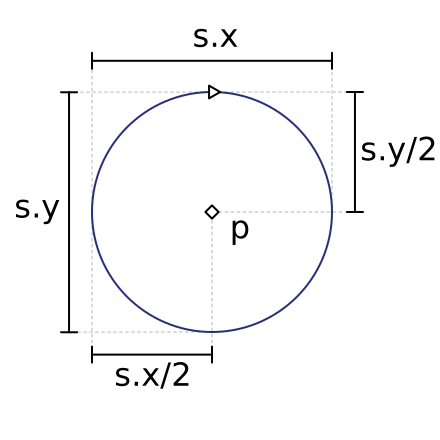
def ellipse(shape: Bezier, p: Vector2D, s: Vector2D):
# An ellipse is drawn from the top quadrant point going clockwise:
radius = s / 2
tangent = radius * ELLIPSE_CONSTANT
x = p.x
y = p.y
shape.closed = True
shape.add_vertex(Vector2D(x, y - radius.y))
shape.set_in_tangent(Vector2D(-tangent.x, 0))
shape.set_out_tangent(Vector2D(tangent.x, 0))
shape.add_vertex(Vector2D(x + radius.x, y))
shape.set_in_tangent(Vector2D(0, -tangent.y))
shape.set_out_tangent(Vector2D(0, tangent.y))
shape.add_vertex(Vector2D(x, y + radius.y))
shape.set_in_tangent(Vector2D(tangent.x, 0))
shape.set_out_tangent(Vector2D(-tangent.x, 0))
shape.add_vertex(Vector2D(x - radius.x, y))
shape.set_in_tangent(Vector2D(0, tangent.y))
shape.set_out_tangent(Vector2D(0, -tangent.y))
Implementations MAY use elliptical arcs to render an ellipse.
Rectangle
{schema_string:shapes/rectangle/description}
{schema_object:shapes/rectangle}
Example
lottie.layers[0].shapes[0].it[0]
Rendering algorithm:
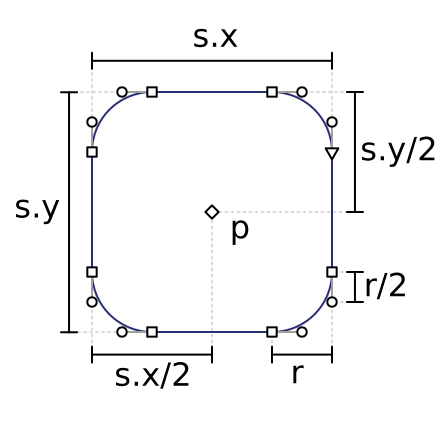
def rectangle(shape: Bezier, p: Vector2D, s: Vector2D, r: float):
left: float = p.x - s.x / 2
right: float = p.x + s.x / 2
top: float = p.y - s.y / 2
bottom: float = p.y + s.y / 2
shape.closed = True
if r <= 0:
# The rectangle is rendered from the top-right going clockwise
shape.add_vertex(Vector2D(right, top))
shape.add_vertex(Vector2D(right, bottom))
shape.add_vertex(Vector2D(left, bottom))
shape.add_vertex(Vector2D(left, top))
else:
# Rounded corners must be taken into account
rounded: float = min(s.x/2, s.y/2, r)
tangent: float = rounded * ELLIPSE_CONSTANT
shape.add_vertex(Vector2D(right, top + rounded))
shape.set_in_tangent(Vector2D(0, -tangent))
shape.add_vertex(Vector2D(right, bottom - rounded))
shape.set_out_tangent(Vector2D(0, tangent))
shape.add_vertex(Vector2D(right - rounded, bottom))
shape.set_in_tangent(Vector2D(tangent, 0))
shape.add_vertex(Vector2D(left + rounded, bottom))
shape.set_out_tangent(Vector2D(-tangent, 0))
shape.add_vertex(Vector2D(left, bottom - rounded))
shape.set_in_tangent(Vector2D(0, tangent))
shape.add_vertex(Vector2D(left, top + rounded))
shape.set_out_tangent(Vector2D(0, -tangent))
shape.add_vertex(Vector2D(left + rounded, top))
shape.set_in_tangent(Vector2D(-tangent, 0))
shape.add_vertex(Vector2D(right - rounded, top))
shape.set_out_tangent(Vector2D(tangent, 0))
Path
{schema_string:shapes/path/description}
{schema_object:shapes/path}
Example
lottie.layers[0].shapes[0].it[0]
PolyStar
{schema_string:shapes/polystar/description}
{schema_object:shapes/polystar}
Example
lottie.layers[0].shapes[0].it[0]
def polystar(shape: Bezier, p: Vector2D, pt: float, r: float, or_: float, os: float, sy: int, ir: float, is_: float):
points: int = int(round(pt))
alpha: float = -r * math.pi / 180 - math.pi / 2
theta: float = -math.pi / points
tan_len_out: float = (2 * math.pi * or_) / (4 * points) * (os / 100)
tan_len_in: float = (2 * math.pi * ir) / (4 * points) * (is_ / 100)
shape.closed = True
for i in range(points):
beta: float = alpha + i * theta * 2
v_out: Vector2D = Vector2D(or_ * math.cos(beta), or_ * math.sin(beta))
shape.add_vertex(p + v_out)
if os != 0 and or_ != 0:
# We need to add bezier tangents
tan_out: Vector2D = v_out * tan_len_out / or_
shape.set_in_tangent(Vector2D(-tan_out.y, tan_out.x))
shape.set_out_tangent(Vector2D(tan_out.y, -tan_out.x))
if sy == 1:
# We need to add a vertex towards the inner radius to make a star
v_in: Vector2D = Vector2D(ir * math.cos(beta + theta), ir * math.sin(beta + theta))
shape.add_vertex(p + v_in)
if is_ != 0 and ir != 0:
# We need to add bezier tangents
tan_in = v_in * tan_len_in / ir
shape.set_in_tangent(Vector2D(-tan_in.y, tan_in.x))
shape.set_out_tangent(Vector2D(tan_in.y, -tan_in.x))
Grouping
Group
{schema_string:shapes/group/description}
{schema_object:shapes/group}
A group defines a [[render stack]], elements within a group MUST be
rendered in reverse order (the first object in the list will appear on
top of elements further down).
1. Apply the transform
1. Render Styles and child groups in the transformed [[local coordinates|coordinate system]].
{schema_string:shapes/transform/description}
{schema_object:shapes/transform}
Transform shapes MUST always be present in the group and they MUST be
the last item in the `it` array.
They modify the group's [[local coordinates|coordinate system]] the same way as Layer {link:helpers/transform}.
Style
{schema_string:shapes/shape-style/description}
{schema_object:shapes/shape-style}
Shapes styles MUST apply their style to the [[collected shapes]] that
come before them in [[stacking order]].
Fill
{schema_string:shapes/fill/description}
{schema_object:shapes/fill}
Example
lottie.layers[0].shapes[0].it[1]
Stroke
{schema_string:shapes/stroke/description}
{schema_object:shapes/stroke}
Example
lottie.layers[0].shapes[2]
Stroke Dashes
{schema_string:shapes/stroke-dash/description}
A stroke dash array consists of `n` dash entries, `[n-1,n]` gap entries and `[0-1]` offset entries.
Dash and gap entries MUST all be in a continuous order and alternate between dash and gap, starting with dash. If there are an odd number of dashes + gaps, the sequence will repeat with dashes and gaps reversed. For example a sequence of `[4d, 8g, 16d]` MUST be rendered as `[4d, 8g, 16d, 4g, 8d, 16g]`.
If any of the dash or gap entries are less than 0, or if the total sum of all their values is 0, the whole dash array is ignored, and the stroke MUST be treated as if the dash was not set.
Offset entry, if present, MUST be at the end of the array.
{schema_object:shapes/stroke-dash}
Example
lottie.layers[0].shapes[2]
Gradient Fill
{schema_string:shapes/gradient-fill/description}
{schema_object:shapes/gradient-fill}
Example
lottie.layers[1].shapes[0].it[1]
Gradient Stroke
{schema_string:shapes/gradient-stroke/description}
{schema_object:shapes/gradient-stroke}
Example
lottie.layers[1].shapes[1]
Modifiers
{schema_string:shapes/modifier/description}
Modifiers replace shapes in the [[render stack]] by applying operating
on the bezier path of to the [[collected shapes]] that
come before it in [[stacking order]].
Trim Path
{schema_string:shapes/trim-path/description}
{schema_object:shapes/trim-path}
lottie.layers[0].shapes[4]
When rendering trim path, the order of bezier points MUST be the same as
rendering instructions given for each shape in this section.
Rendering trim path can be rather complex.
Given
$$
\begin{align*}
offset & =
\begin{cases}
\frac{o}{360} - \lfloor \frac{o}{360} \rfloor & o \ge 0 \\
\frac{o}{360} - \lceil \frac{o}{360} \rceil & o < 0
\end{cases} \\
start & = offset + \min\left(1, \max\left(0, \frac{\min(s, e)}{100}\right)\right) \\
end & = offset + \min\left(1, \max\left(0, \frac{\max(s, e)}{100}\right)\right) \\
\end{align*}
$$
If $s$ and $e$ are equal, implementations MUST NOT render any shapes.
If $s = 0$ and $e = 1$, the input shape MUST be rendered as-is.
To render trim path, implementations MUST consider the actual length of
each shape (they MAY use approximations). Once the shapes are collected,
the segment to render is given by the percentages $start$ and $end$.
When trim path is applied to multiple shapes, the `m` property MUST
be considered when applying the modifier:
* When `m` has a value of `1` (Parallel), each shape MUST be considered
separately, $start$ and $end$ being applied to each shape.
* When `m` has a value of `2` (Sequential), all the shapes MUST be considered
as following each other in render order. $start$ and $end$ refer to the whole
length created by concatenating each shape.
Rounded Corners
{schema_string:shapes/rounded-corners/description}
{schema_object:shapes/rounded-corners}
This modifier looks at the underlying shape, at each vertex it checks if the two
segments before and after the vertex are linear. A segment is linear if the
tangents are lay on the line between the two vertices. Implementations MUST
take into account floating point inaccuracies when making this determination.
If both bezier segmets around the vertex are linear, the initial
vertex is replaced by two vertices `r` distance away from the original along
the corresponding segment. These new vertices MUST merge with existing vertices
if the line segments are shorter than the `r` distance.
The new vertices have the tangents towards the old initial vertex whose lengths
are the distance to said vertex multiplied by the elliptical constant $E_t$.
The first and last vertex in an open path MUST NOT be affected.
If `r` is 0, the modifier MUST keep the target shapes unchanged.
Follows a guide on how the modifier works:
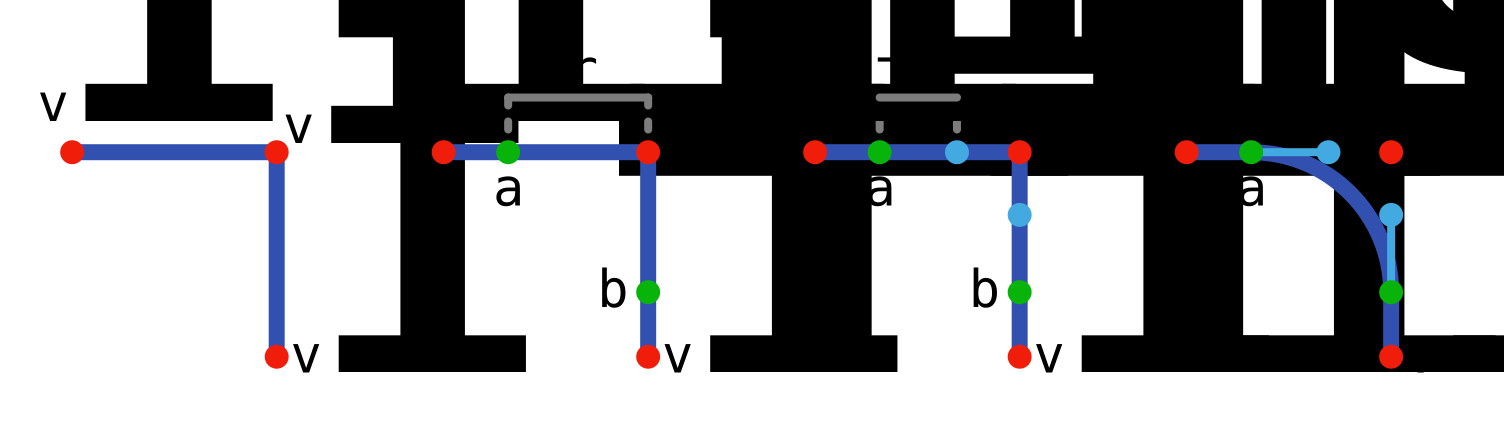
Note that $a - v_i$ is generally equal to `r` but it might not be in the case
where the line segment is shorter than `r`.
lottie.layers[0].shapes[0].it[1]
Pucker / Bloat
{schema_string:shapes/pucker-bloat/description}
{schema_object:shapes/pucker-bloat}
When `a` is `0`, nothing changes.
When `a` is positive, the vertices are pulled towards the center, with `100` being at the center. And the tangents are pushed away.
When `a` is negative the vertices are pushed away from the center with `100` being twice far away from the center. And the tangents are pulled towards the center.
The center is defined as the mean of the bezier vertices.
lottie.layers[0].shapes[0].it[1]
def pucker_bloat(shape: Bezier, a: float) -> Bezier:
shape_out: Bezier = Bezier()
amount: float = a / 100
if len(shape) == 0:
return shape
# Find the center (arithmetic mean of all the points)
center: Vector2D = Vector2D(0, 0)
for point in shape:
center += point.vertex
center /= len(shape)
# Move the points
for point in shape:
vertex: Vector2D = lerp(point.vertex, center, amount)
shape_out.add_vertex(vertex)
shape_out.set_in_tangent(lerp(point.absolute.in_tangent, center, -amount) - vertex)
shape_out.set_out_tangent(lerp(point.absolute.out_tangent, center, -amount) - vertex)
shape_out.closed = shape.closed
return shape_out