
Picobot
The AI agent that runs anywhere — even on a $5 VPS.






---
Love the idea of open-source AI agents like [OpenClaw](https://github.com/openclaw/openclaw) but tired of the bloat? **Picobot** gives you the same power — persistent memory, tool calling, skills, Telegram and Discord integration — in a single ~9MB binary that boots in milliseconds.
No Python. No Node. No 500MB container. Just one Go binary and a config file.
## Why Picobot?
| | Picobot | Typical Agent Frameworks |
|---|---|---|
| **Binary size** | ~9MB | 200MB+ (Python + deps) |
| **Docker image** | ~29MB (Alpine) | 500MB–1GB+ |
| **Cold start** | Instant | 5–30 seconds |
| **RAM usage** | ~10MB idle | 200MB–1GB |
| **Dependencies** | Zero (single binary) | Python, pip, venv, Node… |
Picobot runs happily on a **$5/mo VPS**, a Raspberry Pi, or even an old Android phone via Termux.
## Quick Start — 30 seconds
### Docker Run
```sh
docker run -d --name picobot \
-e OPENAI_API_KEY="your-key" \
-e OPENAI_API_BASE="https://openrouter.ai/api/v1" \
-e PICOBOT_MODEL="openrouter/free" \
-e PICOBOT_MAX_TOKENS=8192 \
-e PICOBOT_MAX_TOOL_ITERATIONS=100 \
-e TELEGRAM_BOT_TOKEN="your-telegram-token" \
-v ./picobot-data:/home/picobot/.picobot \
--restart unless-stopped \
louisho5/picobot:latest
```
All config, memory, and skills are persisted in `./picobot-data` on your host.
### Docker Compose
Create a `docker-compose.yml`:
```yaml
services:
picobot:
image: louisho5/picobot:latest
container_name: picobot
restart: unless-stopped
environment:
- OPENAI_API_KEY=your-key
- OPENAI_API_BASE=https://openrouter.ai/api/v1
- PICOBOT_MODEL=openrouter/free
- PICOBOT_MAX_TOKENS=8192
- PICOBOT_MAX_TOOL_ITERATIONS=100
- TELEGRAM_BOT_TOKEN=your-telegram-token
- TELEGRAM_ALLOW_FROM=your-user-id
volumes:
- ./picobot-data:/home/picobot/.picobot
```
Then run:
```sh
docker compose up -d
```
### From Source
```sh
go build -o picobot ./cmd/picobot
./picobot onboard # creates ~/.picobot config + workspace
./picobot agent -m "Hello!" # single-shot query
./picobot channels login # login to channels (Telegram, Discord, Slack, WhatsApp)
./picobot gateway # long-running mode with Telegram
```
## Architecture
Actually the logic is simple and straightforward. Messages flow through a **Chat Hub** (inbound/outbound channels) into the **Agent Loop**, which builds context from memory/sessions/skills, calls the LLM via OpenAI-compatible API, and executes tools (filesystem, exec, web, etc.) before sending replies back through the hub.
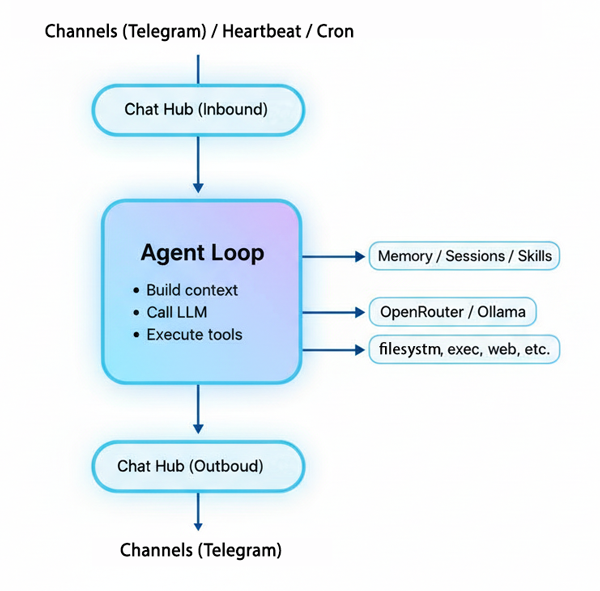
Notes: Channel refers to communication channels (e.g., Telegram, Discord, Slack, WhatsApp, etc.).
## Features
### 16 Built-in Tools + MCP Extensions
The agent can take real actions — not just chat:
| Tool | What it does |
|------|-------------|
| `filesystem` | Read, write, list files |
| `exec` | Run shell commands |
| `web` | Fetch web pages and APIs |
| `web_search` | Search the web via DuckDuckGo |
| `message` | Send messages to channels |
| `spawn` | Launch background subagents |
| `cron` | Schedule recurring tasks |
| `write_memory` | Persist information across sessions |
| `list_memory` | List all memory files |
| `read_memory` | Read a specific memory file |
| `edit_memory` | Find and replace text in a memory file |
| `delete_memory` | Delete a daily memory file |
| `create_skill` | Create reusable skill packages |
| `list_skills` | List available skills |
| `read_skill` | Read a skill's content |
| `delete_skill` | Remove a skill |
**MCP Servers:** extend the agent with any [MCP-compliant](https://modelcontextprotocol.io) server — `npx`, `uvx`, a plain binary, `docker run`, or an HTTP endpoint. Tools are registered automatically as `mcp_{server}_{tool}` at startup. See [CONFIG.md](docs/CONFIG.md#mcpservers).
### Persistent Memory
Picobot remembers things between conversations:
- **Daily notes** — auto-organized by date
- **Long-term memory** — survives restarts
- **Ranked recall** — retrieves the most relevant memories for each query
```sh
picobot memory recent --days 7 # what happened this week?
picobot memory rank -q "meeting" # find relevant memories
```
### Skills System
Teach your agent new tricks. Skills are modular knowledge packages that extend the agent:
```sh
You: "Create a skill for checking weather using curl wttr.in"
Agent: Created skill "weather" — I'll use it from now on.
```
Skills are just markdown files in `~/.picobot/workspace/skills/`. Create them via the agent or manually.
### Telegram Integration
Chat with your agent from your phone. Set up in 2 minutes:
1. Message [@BotFather](https://t.me/BotFather) — `/newbot` — copy the token
2. Add the token to config or pass as `TELEGRAM_BOT_TOKEN` env var
3. Start the communication gateway
See [HOW_TO_START.md](docs/HOW_TO_START.md) for a detailed BotFather walkthrough.
### Discord Integration
Connect your agent to Discord servers:
1. Go to [Discord Developer Portal](https://discord.com/developers/applications)
2. Create a new application and bot
3. Enable **Message Content Intent** in Bot settings
4. Copy the bot token
5. Add to config under `channels.discord` in your `config.json`
The bot will respond when mentioned in servers, or to all messages in DMs.
See [HOW_TO_START.md](docs/HOW_TO_START.md) for a detailed Discord Bot walkthrough.
### Slack Integration
Connect your agent to Slack via Socket Mode:
1. Go to [Slack API Apps](https://api.slack.com/apps) and create an app
2. Enable **Socket Mode** and generate an App-Level Token (`xapp-...`)
3. Add Bot Token scopes: `app_mentions:read`, `chat:write`, `channels:history`, `groups:history`, `im:history`, `mpim:history`, `files:read`
4. Enable Event Subscriptions and subscribe to: `app_mention`, `message.im`
5. Install the app to your workspace and copy the Bot Token (`xoxb-...`)
6. Add to config under `channels.slack` in your `config.json`
The bot responds when mentioned in channels, and responds to all DMs from allowed users (DMs ignore the channel allowlist).
### Heartbeat
A configurable periodic check (default: 60s) that reads `HEARTBEAT.md` for scheduled tasks — like a personal cron with natural language.
## Configuration
Picobot uses a single JSON config at `~/.picobot/config.json`:
```json
{
"agents": {
"defaults": {
"model": "google/gemini-2.5-flash",
"maxTokens": 8192,
"temperature": 0.7,
"maxToolIterations": 200
}
},
"providers": {
"openai": {
"apiKey": "sk-or-v1-YOUR_KEY",
"apiBase": "https://openrouter.ai/api/v1"
}
},
"channels": {
"telegram": {
"enabled": true,
"token": "YOUR_TELEGRAM_BOT_TOKEN",
"allowFrom": ["YOUR_TELEGRAM_USER_ID"]
},
"discord": {
"enabled": true,
"token": "YOUR_DISCORD_BOT_TOKEN",
"allowFrom": ["YOUR_DISCORD_USER_ID"]
}
}
}
```
Supports any **OpenAI-compatible API** (OpenAI, OpenRouter, Ollama, etc.). See [CONFIG.md](docs/CONFIG.md) for more details.
## CLI Reference
```
picobot version # print version
picobot onboard # create config + workspace
picobot agent -m "..." # one-shot query
picobot agent -M model -m "..." # query with specific model
picobot channels login # login to channels (Telegram, Discord, Slack, WhatsApp)
picobot gateway # start long-running agent
picobot memory read today|long # read memory
picobot memory append today|long -c "" # append to memory
picobot memory write long -c "" # overwrite long-term memory
picobot memory recent --days N # recent N days
picobot memory rank -q "query" # semantic memory search
```
## Run on Minimal Hardware
Picobot was designed for constrained environments:
```sh
# Raspberry Pi / ARM device
GOARCH=arm64 CGO_ENABLED=0 go build -ldflags="-s -w" -o picobot ./cmd/picobot
# Old x86 VPS
GOARCH=amd64 CGO_ENABLED=0 go build -ldflags="-s -w" -o picobot ./cmd/picobot
```
Works on any Linux with 256MB RAM. No runtime dependencies. Just copy the binary and run.
## Tech Stack
| Layer | Technology |
|-------|------------|
| Language | [Go](https://go.dev/) 1.26+ |
| CLI framework | [Cobra](https://github.com/spf13/cobra) |
| LLM providers | OpenAI-compatible API (OpenAI, OpenRouter, Ollama, etc.) |
| Telegram | Raw Bot API |
| Discord | [discordgo](https://github.com/bwmarrin/discordgo) library |
| WhatsApp | [whatsmeow](https://github.com/tulir/whatsmeow) and [modernc.org/sqlite](https://gitlab.com/cznic/sqlite) |
| Container | Alpine Linux 3.20 (multi-stage Docker build) |
Picobot is written **100%** in pure Go, without any CGO dependencies. All required libraries and assets are statically embedded into the final binary. This design ensures zero external runtime dependencies, fast cold start times, and full portability across all platforms supported by Go.
## Project Structure
```
cmd/picobot/ CLI entry point
embeds/ Embedded assets (sample skills)
internal/
agent/ Agent loop, context, tools, skills
chat/ Chat message hub
channels/ Telegram, Discord, Slack, WhatsApp
config/ Config schema, loader, onboarding
cron/ Cron scheduler
heartbeat/ Periodic task checker
memory/ Memory read/write/rank
providers/ OpenAI-compatible provider
session/ Session manager
docker/ Dockerfile, compose, entrypoint
```
## Roadmap
| Task | Status |
|----------------------------------------|--------------|
| Add Telegram support | ✔️ Completed |
| Add Discord support | ✔️ Completed |
| Add Slack support | ✔️ Completed |
| Add WhatsApp support | ✔️ Completed |
| AI agent with skill creation capability | ✔️ Completed |
| Integrate with MCP Servers | ✔️ Completed |
| Integrate useful default skills | 🔄 In Progress|
| Add more tools (file processing, etc.) | 🔄 In Progress|
Want to contribute? **Open an issue** or **PR** with your ideas!
## Docs
- [HOW_TO_START.md](docs/HOW_TO_START.md) — step-by-step getting started guide
- [CONFIG.md](docs/CONFIG.md) — full configuration reference
- [DEVELOPMENT.md](docs/DEVELOPMENT.md) — development, testing, and Docker publishing
- [docker/README.md](docker/README.md) — Docker deployment guide
## License
MIT — use it however you want.