# ROS MCP Server 🧠⇄🤖









ROS-MCP-Server connects large language models (such as Claude, GPT, and Gemini) to robots, enabling bidirectional communication with no changes to existing robot source code.
### Why ROS-MCP?
- **No robot source code changes** → just add the `rosbridge` node to your existing ROS setup.
- **True two-way communication** → LLMs can both *control* robots and *observe* everything happening on the Robot.
- **Full context** → publish & subscribe to topics, call services & actions, set parameters, read sensor data, and monitor robot state in real time.
- **Deep ROS understanding** → guides the LLM to discover available topics, services, actions, and their types (including custom ones) — enabling it to use them with the right syntax without manual configuration.
- **Works with any MCP client** → built on the open [MCP standard](https://modelcontextprotocol.io/), supporting Claude Code, Codex CLI, Gemini CLI, Claude Desktop, ChatGPT, Cursor, and more.
- **Works across ROS versions** → compatible across ROS 2 (Jazzy, Humble, and others) and ROS 1 distros.
## 🎥 Examples in Action
🖥️ **Example - Controlling the MOCA mobile manipulator in NVIDIA Isaac Sim**
Commands are entered into Claude Desktop, which uses the MCP server to control the simulated robot.

---
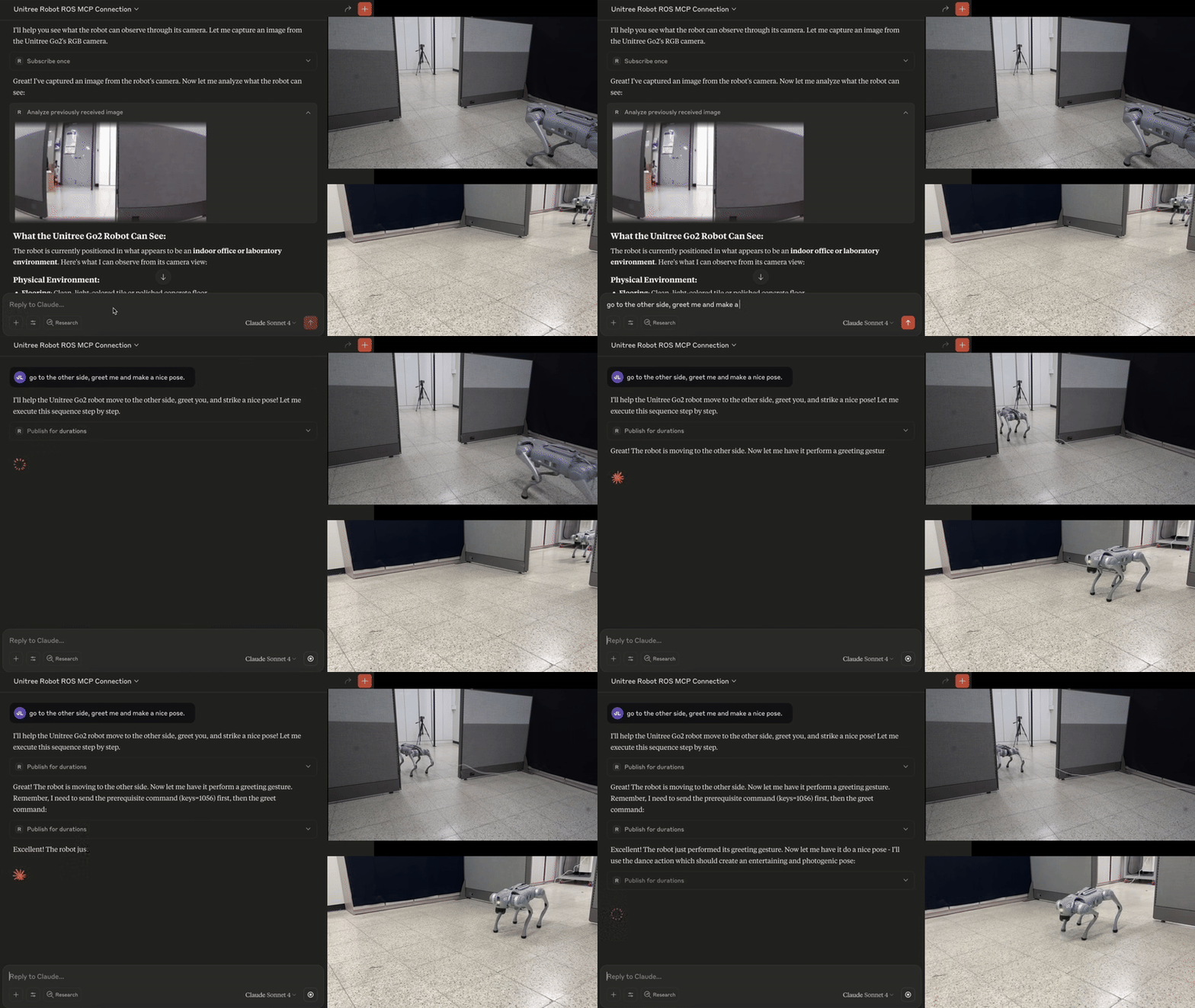
🐕 **Example - Controlling Unitree Go2 with natural language** ([video](https://youtu.be/RW9_FgfxWzs?si=8bdhpHNYaupzi9q3))
The MCP server enables Claude to interpret images from the robot's cameras, and then command the robot based on human natural language commands.
---
🏭 **Example - Debugging an industrial robot** ([Video](https://youtu.be/SrHzC5InJDA))
- Connecting to an industrial robot enables the LLM to browse all ROS topics and services to assess the robot state.
- With no predefined context, the MCP server enables the LLM to query details about custom topic and service types and their syntax (00:28).
- Using only natural language, the operator calls the custom services to test and debug the robot (01:42).

---
## 🛠 Getting Started
Follow the [installation guide](docs/install/installation.md) to get started.
ROS-MCP works with Claude Code, Codex CLI, Gemini CLI, Claude Desktop, ChatGPT, Cursor, or any MCP-compatible client.

---
## 📚 More Examples & Tutorials
Browse our [examples](examples) to see the server in action.
We welcome community PRs with new examples and integrations!
---
## 🤝 Contributing
We love contributions of all kinds:
- Bug fixes and documentation updates
- New features (e.g., Action support, permissions)
- Additional examples and tutorials
Check out the [contributing guidelines](docs/contributing.md) and see issues tagged **good first issue** to get started.
---
## 📜 License
This project is licensed under the [Apache License 2.0](LICENSE).