# dsh-workspace-plus **Folder hierarchy, browser-style session tabs, unified status dots and a plugin settings page for the DSH sidebar** [![GitHub release](https://img.shields.io/github/v/release/lsdt45/dsh-workspace-plus?color=2ea043&label=release)](https://github.com/lsdt45/dsh-workspace-plus/releases) [![GitHub downloads](https://img.shields.io/github/downloads/lsdt45/dsh-workspace-plus/total?color=2ea043&label=downloads)](https://github.com/lsdt45/dsh-workspace-plus/releases) [![DSH](https://img.shields.io/badge/DSH-0.2.x-4c6ef5)](https://github.com/lsdt45/dsh-workspace-plus) [![license](https://img.shields.io/badge/license-MIT-blue.svg)](LICENSE) [![Awesome DSH Plugin](https://awesome-dsh-plugin.com/badge.svg)](https://awesome-dsh-plugin.com) [简体中文](README.md) · [English](README_EN.md)
--- A DSH plugin that gives the [DeepSeek Harness (DSH)](https://www.npmjs.com/package/@deepseek-ai/dsh) sidebar workspace list a **folder system** — a workspace is still one directory, but every `/` in its title becomes hierarchy, so `web/frontend` and `web/backend` group under one virtual `web` folder — plus **browser-style session tabs**, unified **status dots** and a **plugin settings page**. - 🗂️ **Hierarchical tree** — every `/` in a workspace or session title becomes a virtual folder, arbitrarily deep; sections, pinning, time buckets and drag ordering included - 📑 **Session tabs** — a click opens the session in its own tab (Shift+click replaces the current one; the settings can swap the two gestures), a `+` at the end of the row starts a new session, an unsent New-session tab stays open when you switch away, right-click for the same session menu, drag to reorder live; too many tabs shrink first, then scroll, with an "All tabs" list as the fallback; order survives restarts, at most 12 tabs - 🌿 **Bubble details** — hovering a session row or a tab shows "project · current git branch · time" in its bubble, dropping the branch segment when it cannot be resolved - 🔍 **Full-text search** — a floating panel centred in the window: instant title matching plus message-body search on a plugin-owned fault-tolerant index (unreadable logs are skipped one by one), a "Content" switch and ⌃1–9 shortcuts. **The first content search builds that index in the background (tens of seconds); title matching keeps working meanwhile** - 🔴 **Status dots** — one 6px dot per row: running orange breathing / pending amber / done green, mirrored in the tab strip - 🎛️ **Plugin settings page** — switches for "Show session tabs" and "Enable status dots"; turning them off restores the shell's native header and status lights - 📦 **Install and go** — prebuilt artifacts ship with the repo and the Release, so git installs need no build step > **Updating**: `dsh plugin --profile desktop update @lsdt45-dal/dsh-workspace-plus` (use `web` for the Web profile) and restart DSH; tabs and status dots can each be toggled from Settings → Plugins → Better Workspaces. > Fork of [KannaKuron/dsh-better-workspace](https://github.com/KannaKuron/dsh-better-workspace) **Contents**: [Features & preview](#features--preview) · [Install](#install) · [How it works](#how-it-works) · [Develop](#develop) · [Release notes](https://github.com/lsdt45/dsh-workspace-plus/releases) · [License](#license)
Section index - [Hierarchical tree](#hierarchical-tree) - [Add workspace: click a section and a group](#add-workspace-click-a-section-and-a-group) - [Folder create and delete](#folder-create-and-delete) - [Session tabs](#session-tabs) - [Search](#search) - [Workspace and session sections](#workspace-and-session-sections) - [View settings](#view-settings) - [Plugin settings page](#plugin-settings-page) - [Session pinning](#session-pinning) - [Status at a glance](#status-at-a-glance) - [Appearance customization](#appearance-customization) - [Single-chain collapse](#single-chain-collapse) - [Drag & drop](#drag--drop) - [Context menu](#context-menu) - [Native capabilities kept](#native-capabilities-kept)
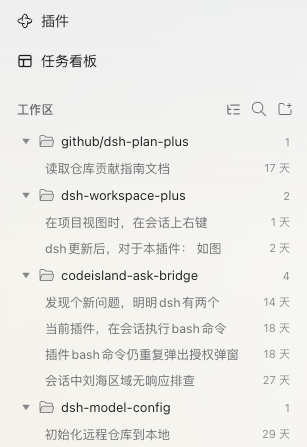
``` github/ ← virtual folder (naming only, not a real directory) └─ dsh-plan-plus ← workspace "github/dsh-plan-plus" dsh-workspace-plus ← single-root workspaces sit at root codeisland-ask-bridge dsh-model-config ``` ## Features & preview ### Hierarchical tree
Hierarchical workspace tree Hierarchical tree (Projects view)
Every / in a workspace title creates a virtual folder: github/dsh-plan-plus automatically groups under github, arbitrarily deep; workspaces without a / (like dsh-workspace-plus) stay at the root. Renaming a workspace re-derives the tree instantly — folders are a projection of names, there is no second source of truth.
### Add workspace: click a section and a group After you pick a directory, the small dialog offers two destinations that are both **clicked out of a real list** — no typing-only native datalist: - **Section**: the trigger opens the section list, one click selects one (including "No section (Projects)"), and "New section…" creates one inline with the workspace — cancelling the dialog never leaves an empty section behind. - **Name-path group**: free text (e.g. `web`) with clickable suggestions for existing levels, a "New group “…”" row, and a "No nesting (root)" row. Both controls now share one shape — a box with the chevron INSIDE its right edge — and both lists are floating panels: the dialog keeps its height while one is open, the modal card's rounded clip cannot crop them, and the bottom "name-path group" field opens upward when space is tight so the footer buttons stay visible. With a list open, Escape closes only that list; a click or ↑/↓/Home/End selects. A live preview under the fields shows the resulting title and whether the workspace joins a section. On confirm the plugin creates the workspace, writes the group prefix into its title, and places it in the chosen section. The conversation empty-state "Add workspace" menu uses the same interaction. > **Remote / headless hosts**: DSH may serve the in-app `browse` capability instead of an OS chooser. The add flow then switches to the plugin's built-in directory browser: walk levels, reveal hidden folders, create a folder inline, and pick the current one before the section/group dialog. When a native chooser is available it is still tried first; that path is unchanged. ### Folder create and delete Right-click any folder row: new subfolder (parent prefix pre-filled), new workspace here (the add-flow group field pre-fills with this folder), rename folder, delete empty folder — no standalone header button. Explicit empty folders persist in the browser until workspaces live inside them. ### Session tabs

Session tabs in the conversation header: status dot, title, close button, brand underline on the active chip

Each open session owns a tab in the conversation header, above the view switcher: every chip carries a **status dot**, its title and a close button; the active chip gets a **brand-colored underline and a bold title**. - **Opening**: a plain click on a sidebar session **opens its own tab**, so it never throws away the page you are reading; **Shift + click** instead replaces the session inside the current tab. Settings → Plugins → Better Workspaces → "Open sidebar clicks in a new tab" swaps the two: turning it off restores replace-in-place and makes Shift open a new tab. **New session** (the `+` at the end of the strip, the workspace `+`, the shortcut, or any host entry point) opens its own tab — the strip's `+` calls the shell's own new-session entry point, so the shell picks the workspace (current, else most recent) exactly as the shortcut does — labelled "New session" until the first prompt lands and the real title arrives. **An unsent New-session tab is never closed for you**: switching to another session keeps its chip, and clicking it brings the page back. Tabs live in the header's leading slot; the strip measures the header's real free width (52vw is only the fallback before that first measurement), so it never pushes the host's top-right controls away. - **Hover for details**: hovering a chip opens a bubble right below it with the **full title** and "project · current git branch · updated time" — the same bubble the sidebar session rows use, so a truncated title stays readable. The branch is the one checked out in the chip's project directory (the session's `cwd`); a directory outside any git work tree, a detached HEAD or an unavailable lookup simply drops that segment and leaves the rest unchanged. - **Chips size to their titles**: every chip is as wide as its own label needs (200px cap, 72px floor) instead of being stretched to an equal share; the row as a whole is capped 12px short of the right-hand utilities, so long or many tabs shrink to the floor and then scroll without ever squeezing the host's top-right controls. - **Too many tabs (overflow)**: chips first **shrink** to a readable floor, browser-style; past that the row scrolls horizontally — the wheel/trackpad scrolls it, both edges **fade** to show there is more, and a **▾ All tabs** button appears at the end. It lists every open tab (including the ones scrolled out of view) with its status dot, a check on the current one, a per-row close on hover, and the same session menu on right-click; ↑/↓ + Enter switch, Esc closes. Switching tabs (including from the list) scrolls the current chip **back into view**, so the last tab can no longer be cut off out of reach. - **Context menu**: right-click a tab for the **exact same menu** as the sidebar session row (rename / archive / section / pin / fork / delete / customize / refresh…, see the Context menu section below); it reuses the sidebar's menu state instead of duplicating it. - **Drag to reorder**: drag a chip left or right and the strip **reorders live** (the same HTML5 drag mechanism the sidebar rows use — the dragged chip is dimmed, the others step aside, and the drop only ends the gesture). - **Persistence and limit**: tab order and the open-tab list persist in the current browser (`dsh.betterWorkspace.tabs.v1`) and return after a refresh/restart; at most 12 tabs, and the oldest retires beyond that. - **Closing and cleanup**: closing the active tab hands over to its neighbour; tabs of archived sessions are removed automatically. A New-session tab that was never sent **survives** switching to another session (only closing it removes it) — the session being switched to opens a tab of its own instead of taking that slot over. - **Can be turned off entirely**: switching "Show session tabs" off in the plugin settings page hides the strip and restores the shell's native header; switching it back on brings the same tab list back.
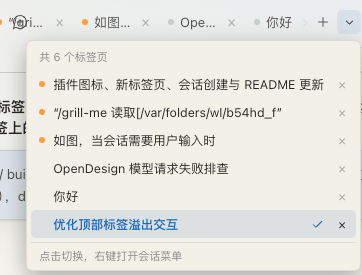
The All tabs panel while the strip overflows: status dots, a check on the active tab, per-row close When the chips run out of room: shrink, scroll, then list them all
Chips shrink to a readable floor browser-style; past that the row scrolls (wheel or trackpad) with both edges fading. The ▾ button at its end lists every open tab — including the ones scrolled out of view — with its status dot, project, a check on the active one, a per-row close and the same session menu on right-click; ↑/↓ + Enter to switch, Esc to close.
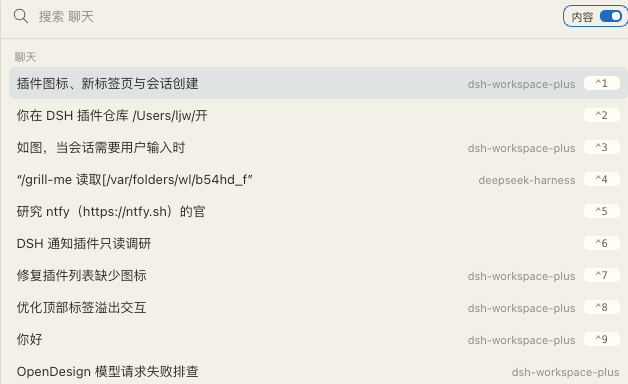
### Search The sidebar search button (header icon, or the magnifier in the collapsed rail) opens a **floating search panel centred in the window**, in the Codex App style:
The floating search panel: title and content matches, ⌃1–9 shortcuts, the content switch
- **Title matches (instant)**: sessions whose title or workspace label contains the query, newest first; - **Content matches (plugin-owned index)**: after a short debounce the panel also searches message history; sessions that only matched message text are appended with their snippet on a second line; - **Content switch**: the "Content" switch in the field row controls whether message history is searched; off keeps title matching and stops searches. The choice persists in the current browser; - **Keyboard**: ↑/↓ to move, Enter to open, Esc to close, ⌃/⌘ + 1–9 to open one of the first nine results; hovering and clicking work too; - Opening lists **recent sessions** first; when the content index is unavailable the panel degrades to title-only matching and says why. > **The first search that reaches message bodies is slow — once.** The "Content" switch is **on by default**, so from the second character onward the plugin builds a local index for `~/.dsh/sessions` in the background; the panel says "Building the content index (slow the first time)…". A large corpus (tens of thousands of messages) takes **tens of seconds**, but the panel never blocks — **title matching and the recent list keep working**. Once built, the index lives at `~/.dsh/storages/workspace-plus-search.db` and refreshes **incrementally** by file mtime/size, so normal searches answer in milliseconds. Deleting that file only costs one more slow first search. > This replaces the old inline filter row. The panel rides the shell's `shell.overlay` seat, so the sidebar width never clips it. **Performance and resilience**: title matching is per-keystroke and instant; content search is debounced (180 ms), skipped below two code points and during IME composition, cached per open (so backspacing never repeats a search), and capped at 20 results. The index is owned by the plugin: it reads the stored logs under `~/.dsh/sessions` directly, and **skips an unreadable or legacy log per session** instead of failing the whole pass (the Host's strict index aborts on such logs, which is why the panel does not use it). See the notice above for build and incremental-refresh behaviour. **Matching semantics**: English matches by word; CJK is tokenized per character, so a CJK substring (for example "模型") matches. Only user and assistant message bodies are indexed — no reasoning, tool calls or tool outputs. **When the index is unavailable**: the panel shows "Content search failed: `{reason}`" while title matching and the recent list keep working; reopen the panel to retry. ### Workspace and session sections
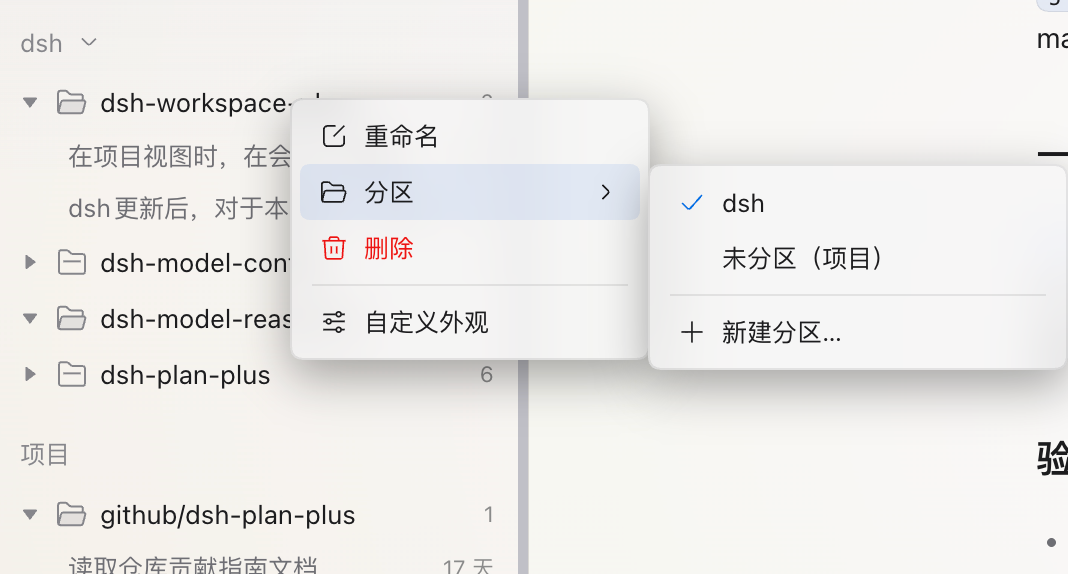
Workspace and session sections menu Sections: one place for workspaces and sessions
Right-click a workspace or session → Section, then pick an existing section, Ungrouped (Projects) or New section…. Creation files the right-clicked object into the new section; a section heading's own menu can create an empty one.

Sections are a single level shared by workspaces and sessions: a separately sectioned session sits directly under its section with a workspace badge. Headings collapse, accept drops, and can be renamed or deleted (with confirmation).
- **Move granularity**: a session action moves only that session; a workspace action moves the workspace and all its sessions, including previously sectioned ones. Sessions can choose **Follow workspace** to undo their own section. - **Drop targets**: drag a workspace or session onto a section heading to move it, or onto Projects to ungroup it. Empty and collapsed sections accept drops and expand afterwards; pinned, archived and unassigned sessions can be sectioned too. - **View scope**: sections appear in the workspace tree and workspace views; flat and time views still flatten sessions. Title-based folders stay under Projects, while custom sections show full workspace names. - **Sorting exception**: with recency sorting you can still move items between sections, but display order keeps following recency. **Storage**: membership is stored per ID for workspaces and sessions alike, without touching names, directories or the Host's workspace-session association. Deleting a section moves its workspaces back to Projects and its individually sectioned sessions back to following their workspace. Section membership and collapse state persist in the current browser. ### View settings
Time view timeline Sidebar view switch menu

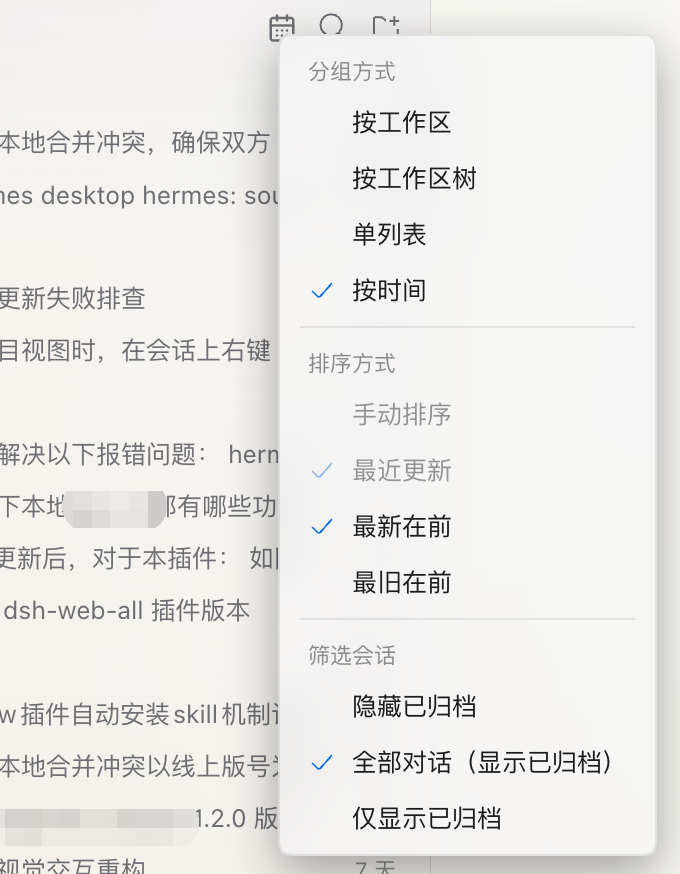
One-click view switching
The header button previews the active workspace, tree, list or calendar view. Its menu separates grouping, sorting and archive filters; **Settings → Plugins → Better Workspaces** exposes the same choices (see the Plugin settings page section below).

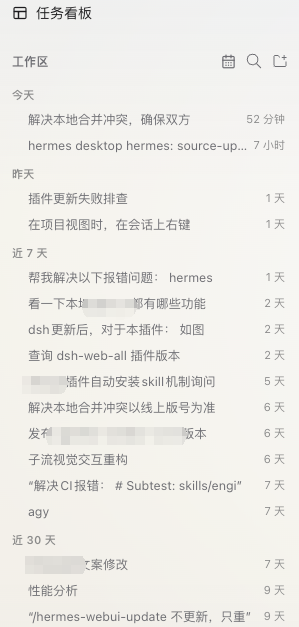
Time view (Global timeline)
ONE global timeline across all projects — every visible session joins the same stream, bucketed by today / yesterday / last 7 days / last 30 days / earlier (local calendar days), empty buckets hidden; direction is latest / oldest first. On hover, the relative timestamp swaps for its workspace badge (and the pin button appears), with a Codex-style hover card pinned to the row's right edge and vertically centred on it (full title on the first line, project · git branch · absolute time on the second, a missing segment omitted; it flips to the left when short of room and only falls back below/above in a very narrow window); the plugin owns that bubble, so it withdraws the moment the pointer leaves, the row re-sorts away or the list scrolls.
- **Workspace tree** (default): title-based folders, single-chain merging and custom appearance. - **Workspace**: full workspace names displayed flat within independent groups and Projects. Switching views or reordering across name groups never renames a workspace. - **Single list**: sessions across workspaces, with a workspace badge on hover. Manual order follows host workspace and session order; drag in a workspace view to adjust it. - **Time**: global date buckets with latest-first or oldest-first ordering across buckets. - **Sorting**: manual or recently updated, independent of grouping. Recency sorts workspaces, folders and sessions by visible session activity without changing host order; manual mode restores that order. Automatic sorting, flat and time views disable drag reordering. The pinned tray keeps pin-recency order. - **Archive filter**: hide archived (default), all conversations, or archived only; shared by every view and the floating search panel. Archived-only mode omits empty workspaces and folders, with a show-all action for empty results. Archived rows have a badge and hover/context-menu restore actions; unarchive before opening. Restore is disabled when an older host lacks the action. - Preferences persist per browser; legacy projects/time and sorting preferences remain compatible. ### Plugin settings page
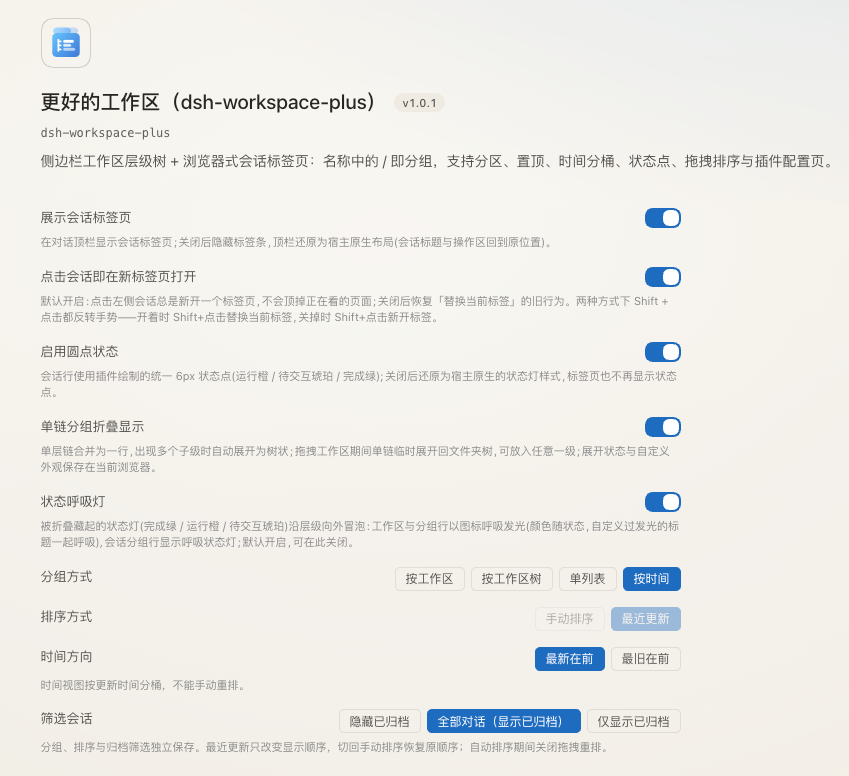
Settings → Plugins → Better Workspaces Settings → Plugins → Better Workspaces
The plugin owns a configuration page in Settings (the plugin version sits next to its name), so nothing has to be hunted down in a sidebar menu:

Display: five switches — Show session tabs (off restores the shell's native header layout completely), Open sidebar clicks in a new tab (on by default; off restores replace-in-place and makes Shift+click open a new tab), Enable status dots (off hands the sidebar back to the host's native status lights and hides the dots in the tab strip), single-chain collapsing, and the status breathing light.

View: grouping (workspace / workspace tree / flat list / time), sorting (manual / recently updated), time direction (latest / oldest first, only in the time view), and archive filter (hide archived / all conversations / archived only).

It reads and writes the same preferences as the sidebar's view menu — a change on either side applies immediately and persists in the current browser.
### Session pinning
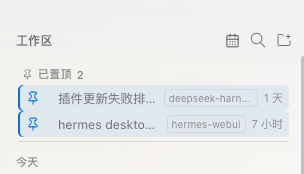
Global pinned section Global Pinned Tray
Right-click → Pin / Unpin, or click the pin button on row hover, for any session including ungrouped ones.

The global Pinned section stays at the very top: cross-workspace aggregation, most-recent pin first, each row tagged with its workspace name, click opens it directly (switching workspaces); a pinned session is hidden inside its workspace / the ungrouped area (tray-only — unpinning restores it), and a collapsed workspace row keeps a pin-count badge.

Pinned rows carry a small brand-colored pin glyph, subtle tint and a left accent bar, stacking cleanly with the current-session highlight. Pure display-layer projection (never alters titles or host order), persists across restarts, auto-unpins hard-deleted sessions, and keeps archived pins out of the tray. When archives are shown, they appear as ordinary rows; unarchiving restores their saved pin.
### Status at a glance
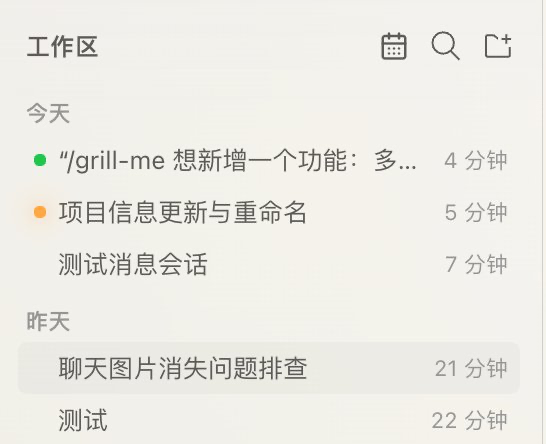
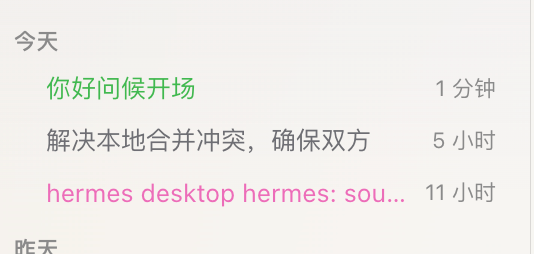
Status dots and the current-session highlight One 6px status dot for every state
Running: the plugin-drawn orange #ff9f45 breathing dot, also covering "{n} subagent(s) running"; waiting for approval / plan review / answer: amber #d29922; completed, unread: green #3fb950. Read sessions draw no dot, and the session on screen never shows the green completion reminder, even the moment it finishes. All three dots share one diameter, so a status change never makes rows jump, and orange never reads as the amber "waiting for you" dot next to it. Sessions with active scheduled tasks show an alarm-clock badge (matching official rows). The current session additionally gets a row highlight that stacks with the pin accent.

Can be turned off entirely: switching "Enable status dots" off in the plugin settings page restores the host's native status-light style and hides the dots in the tab strip; switching it back on brings the unified 6px dots back.

Status breathing light (toggleable in the plugin settings page): status dots hidden by a collapse bubble outward — workspace/folder rows breathe on their icon in the status color (custom-glow labels breathe along), session-group rows show a breathing dot; the running orange breathes only on the session row itself and never relays, and with the light off it is a static orange dot.
### Appearance customization
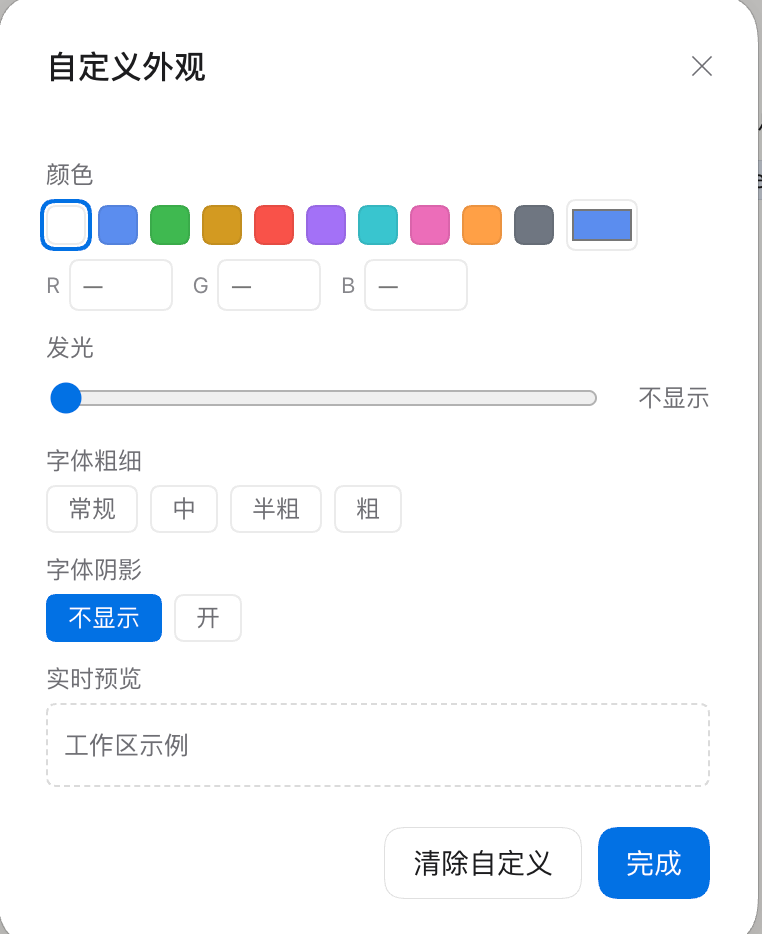
Appearance dialog with live preview Appearance customization
Right-click any row (workspace folder / workspace / session / session group) → Customize: color (9 swatches + native picker + RGB input), glow strength (0–14 slider, text glow only), font weight (regular/medium/semibold/bold), font shadow toggle, an icon grid (71 icons: solid / outline / hidden — three folder icon styles — plus 68 dsh primitives icons; icons apply to workspace & workspace-folder rows only), with a live preview at the bottom. Reset returns to default in one click.
Custom appearance result Applied immediately
Color, text glow, font weight, shadow and icon apply per row and persist, together with expansion state, via the dsh client store in the current browser.
### Single-chain collapse A toggle in the plugin settings page (on by default): a level with exactly one child merges into one row (e.g. `level1` holding `AI trade` renders as `level1/AI trade`); with multiple children it re-expands into a tree; during workspace drags it temporarily re-expands so any level is a drop target. ### Drag & drop Drag a workspace row above/below another to reorder (writes back the host order) or onto a folder row to move it into that group; drag session rows to reorder within the same workspace, or onto a session group to move. While dragging a workspace, merged single-chain rows temporarily re-expand into folder rows — every level of the path becomes a drop target, and chains merge back when the drag ends. Display order = host manual order, drag results are visible immediately (automatic sorting, flat/time views, archived rows and pinned rows never act as reorder surfaces). ### Context menu
Session context menu Session context menu
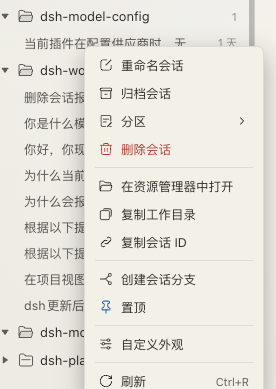
Context menus organize operations into structured sections:
  • Session lifecycle: Rename, archive, section (move to section / new section / follow workspace), delete session (permanent deletion with red highlight and confirmation).
  • Paths & files: Open in file manager, copy working directory, copy session ID.
  • Fork & persistence: Fork session (opens the new branch immediately), pin (quick toggle to the pinned section).
  • Custom appearance: Customize appearance (per-session color, text glow, font weight, and text shadow).
  • Utilities: Refresh (labelled Ctrl+R on the right — that is the browser's own reload, not a plugin binding).
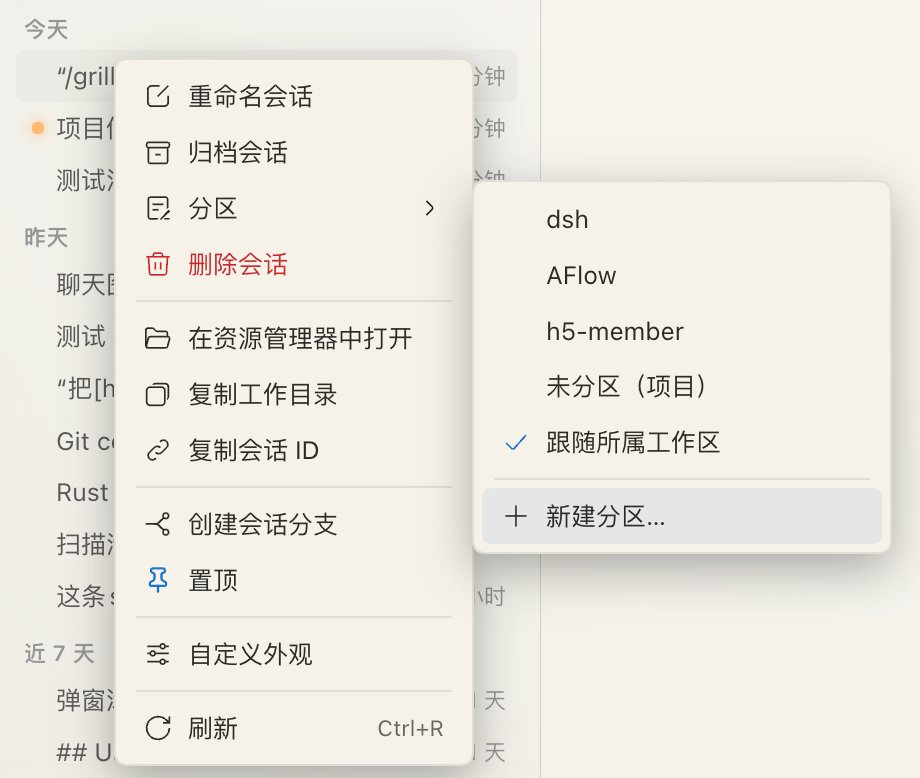
Session context menu with the section submenu "Section" is a second-level menu
The Section entry opens a submenu: move into an existing section, Follow workspace (drop the independent section), or New section… inline. Sections share the same data as the sidebar and the tree header, and the check mark shows the current membership.
Workspace context menus offer rename, delete and customize. Folder menus offer new subfolder, new workspace here, rename group (updates all descendant workspaces), delete empty group and customize. Session groups offer rename and customize. Directory actions prefer the target session's `cwd`, falling back to its workspace path; unassigned sessions can use their own directory. Archived sessions offer restore, delete, directory and copy actions. Permanent deletion is implemented by this plugin's own host half (`POST /dsh-workspace-plus/delete-session`; DSH ships archive but no delete RPC), so no third-party plugin is required. After the confirmation the host stops a running task, detaches the live session, and removes only a directory that sits under the session persistence root (usually `DSH_HOME/sessions`) and is named exactly after the session id, then cleans the projection cache and workspace accounting. Successful deletion clears the plugin's pin entry and refreshes the session list; a refusal (missing directory, subagent session, no persistence service, out-of-root path) reports the failing step and reason. ### Native capabilities kept - Session rows: open / rename / fork / archive; per-workspace new session (the + button always expands the workspace first so the new session is immediately visible, and the tab strip opens a tab for it); current-session highlight; ungrouped-session fallback. - **Slash-bearing titles never nest from URLs**: when a host-generated session title lands containing `/` (e.g. echoing a pasted URL), it is auto-wrapped in `“”` and shown verbatim — only for sessions **created after this launch**, and only once the name stays stable for ~20s (letting the native AI naming land first); pre-existing sessions and your manually named `/` groupings are never touched. Quotes (manual ones too) never split on `/`, and a lone quote is just an ordinary character; unquoted URL tails still fall back flat. - zh/en localization follows the UI language; session rows show a relative time at the tail (yields on hover). ## Install Install the plugin into your active DSH profile. Typically `desktop` for desktop builds or `web` for web builds. **Installing from npm is recommended** — prebuilt artifacts, versioned updates, and the only form the plugin market's Discover index can list: ```bash # DSH Desktop dsh plugin --profile desktop add @lsdt45-dal/dsh-workspace-plus # DSH Web dsh plugin --profile web add @lsdt45-dal/dsh-workspace-plus ``` Installing from the GitHub repository also works (clones the whole repo, slower): ```bash dsh plugin --profile desktop add https://github.com/lsdt45/dsh-workspace-plus.git ``` Restart DSH after installing. > **Package rename (from 1.2.0)**: the package moved from `dsh-workspace-plus` to **`@lsdt45-dal/dsh-workspace-plus`**. The unscoped name on npm belongs to an unrelated project by another author (Sen70s — workspace multi-directory + Windows notifications), so publishing under a scope is what makes an npm release and a Discover listing possible. **An existing install must be removed and re-added**: > > ```bash > dsh plugin --profile desktop remove dsh-workspace-plus > dsh plugin --profile desktop add @lsdt45-dal/dsh-workspace-plus > ``` > > Browser-side state — views, sections, pins, tabs and appearance — lives under the `dsh.betterWorkspace.*` namespace, which does **not** follow the package name, so it carries over unchanged. > The plugin declares DSH `>=0.2.0-rc.1 <0.3.0-0` in [package.json](package.json) → `engines.dsh`; on a mismatched runtime DSH reports it as incompatible at install/load time (an exact-version exemption can be granted with `dsh plugin allow-version`). ### WARN lines during install `dsh plugin add` reinstalls the whole profile, so pnpm often prints these two lines. They are **not about the plugin you installed** — they aggregate the profile's own dependency tree and do not affect the plugin: ```text [WARN] 1 deprecated subdependencies found: domexception@4.0.0 [WARN] Issues with peer dependencies found. Run "pnpm peers check" to list them. ``` - **domexception@4.0.0** comes from `ds-harness-remote` → `@roamhq/wrtc` as an optionalDependency; upstream marks it deprecated and `@roamhq/wrtc` has no newer release to upgrade to. - **peer dependencies** are reported for packages the host (DSH itself) provides at runtime and never installs into the profile's `node_modules` (`@deepseek-ai/dsh-*`, `react-dom`, …). Plugins are expected to declare them with `peerDependenciesMeta.optional`, so these are known false positives. To silence them, add this to `pnpm-workspace.yaml` in the profile directory (e.g. `~/.dsh/profiles/desktop`): ```yaml allowedDeprecatedVersions: domexception: '*' peerDependencyRules: # version conflicts are recorded as "missing" too, so list both kinds ignoreMissing: - '@deepseek-ai/*' - 'react-dom' allowAny: - '@deepseek-ai/*' - '@omdsh/*' ``` > Do not use a blanket `'*'` in either list: that also swallows real `react` / `cordis` version conflicts. Run `pnpm peers check` inside the profile directory to list the current ones. ### Update Update per profile (the same command works for npm and Git installs): ```bash dsh plugin --profile desktop update @lsdt45-dal/dsh-workspace-plus ``` If using a web profile, replace `desktop` with `web`. Restart DSH after updating. ### Local source preview Replace the path with the absolute path to your local repository: ```bash dsh plugin --profile desktop add /absolute/path/to/dsh-workspace-plus ``` The local folder is linked into the profile as a `link:` dependency. Edits take effect on restart. For web profiles, use `--profile web`. ### Uninstall ```bash dsh plugin --profile desktop remove @lsdt45-dal/dsh-workspace-plus ``` Restart DSH after removal. For web profiles, use `--profile web`. ## How it works The sidebar browsing region is the public `sidebar.workspaces` slot; this plugin registers the same slot with a lower priority and replaces the shipped browser with the tree. All data flows through the slot's standard snapshot hooks and injected host actions — no private APIs. The add flow lands in the seam dsh designed for third parties: the two `directoryFlow` holes. The trigger and busy semantics stay official; this plugin owns everything between the trigger and the adopted path — exactly enough room for pick → section/group popup → create → prefixed rename → section placement. When the Host only serves `browse`, that segment switches to the plugin's built-in directory browser (see above). Both hosts must reach the section and group data: besides passing the store directly whenever this plugin occupies `sidebar.workspaces`, each directory-flow seat now declares the same store seat (`store: viewStore`, all at root scope, so the renderer reuses one instance per handle+scope). A flow hosted by the official shell therefore still lists sections and existing groups. Session tabs stay on public API too: the strip lives in the conversation header's public `conversation.header.leading` slot (root scope — nothing session-specific, so switching sessions does not remount it), and the tab list persists in the plugin's own tiny store. "Which session is on screen" is not read from the session-list snapshot (it has no `current` field): it comes from the `mainView` retention count on each session summary — the same marker the shipped sidebar uses. That is what lets the strip follow **every** navigation path — new session, shortcut, command palette, fork — so a fresh blank session gets a new tab while ordinary navigation swaps the current one. **Leaving an unsent New-session page opens a tab for the session being switched to** rather than replacing the blank chip that must stay. The plugin's own session clicks write the list before navigating (`tabsForClick`: a new tab by default, Shift to replace), and navigation the plugin does not own keeps replacing — the strip never grows behind your back. The bubble's git branch does not touch a private DSH API either: the host half adds one same-origin, read-only JSON route (`POST /dsh-workspace-plus/git-branch`) that runs `git -C symbolic-ref --short -q HEAD` for the requested project directories — no shell, no repository writes, an unreadable path omitted instead of failing the request, answers cached for about 20 seconds. The client half asks it only for directories a bubble is about to show, and falls back to the old "project · time" bubble when the route is unavailable. View state (folder collapse, session expansion, explicit empty folders, tab order), custom styling and plugin settings persist browser-side (`dsh.betterWorkspace.view.v1`, `dsh.betterWorkspace.tabs.v1`). Note: the view store's hydration replaces the whole value without merging defaults — after an upgrade, a stale state keeps its old shape and missing keys fall back to defaults. ## Develop ### Build The whole plugin is a TypeScript project: the browser half's sources live in `src/client/**` (`src/client/index.ts` is the bundle entry) and the host half in `src/index.ts`. `scripts/build.ts` uses esbuild to produce `dist/client.js` (+ sourcemap) and `dist/index.js`. The DSH client module table accepts exactly one bundle per package (`exports["./client"]`, flat module graph), so split sources must be bundled back into one artifact. The artifacts are committed, which keeps git/tarball installs build-free. Development requires Node ≥ 22.18: the build script and the tests run `.ts` directly through the native type-stripping support (no ts-node / tsx). ```bash npm run build # sources -> dist/client.js (+ .map) + dist/index.js, atomic replace npm run dev # watch src/client/** and src/index.ts, repackage on change (the host polls the artifact; HMR reloads it) npm run check # fail when the committed dist/ is out of sync with the TypeScript sources npm run typecheck # tsc --noEmit: full type check over src / tests / scripts npm test # node --test: pure-logic units + artifact contract + render smoke + architecture guards npm run verify # typecheck + build + check + test npm pack # tarball for local install verification (prepack builds and checks first) ``` **Never edit anything under `dist/` by hand** — edit `src/**/*.ts` and run `npm run dev` (or `npm run build`). ### Stale-artifact guards Because `dist/` is committed, two guards stop a forgotten build from shipping old code: - **Local pre-commit hook** (`.githooks/pre-commit`, versioned with the repo): runs `npm run check` on commit and **blocks the commit** when `dist/` no longer matches the TypeScript sources, printing the fix. With no installed dependencies (no esbuild) it warns and skips instead of blocking a fresh clone. Enable once per clone: ```bash git config core.hooksPath .githooks ``` Emergency bypass: `git commit --no-verify`. Disable: `git config --unset core.hooksPath`. - **CI** (`.github/workflows/verify.yml`, push / PR): `npm install` → `npm run check` (**before any build**, comparing the committed artifacts) → `npm run typecheck` → `npm test`. Both guards cover sync and tests only; `npm run verify` remains the full local check. ### Plugin display metadata The card title and one-line description in Settings → Plugins come from the plugin package itself, not from this README: - `meta.title` / `meta.description` in `locale/en.json` and `locale/zh.json` are the **localized display metadata** (DSH picks the UI language); absent fields fall back to `package.json`'s `name` / `description`. - DSH **only reads exported package resources**, so `package.json` `exports` must include `"./locale/*.json"` and `"./package.json"`. Without them the plugins list shows the name with an empty description — exactly what 1.0.0 fixes. - `files` must list `locale` too, or an npm-installed copy would miss both files. - `package.json` `icon` points at the package-root `icon.svg` (a standalone SVG on a 36×36 viewBox); DSH inlines it as a data URL inside the 48px artwork frame of a plugin card (and the 40px frame of a row). A missing field or a failed decode silently falls back to the default artwork, so `icon.svg` must stay in `files`, guarded by `tests/icon.manifest.test.ts`: the field exists, the file is inside the package, it is a namespaced standalone SVG, and it carries no script, no external reference and no duplicate gradient id. ### Module map | Path | Responsibility | |---|---| | `src/client/index.ts` | bundle entry + the `BetterBrowser` component (probes, state, wiring); destructures each module factory's result back into the previous names | | `src/client/platform.ts` | **the only platform boundary**: `installPlatform(hostRequire)` installs react / client-store / ui-primitives; every other module imports the handles from here | | `src/client/core/*` | pure logic (text splitting, time buckets, view rules, virtual tree + chain compression), no React/DOM, unit-tested directly | | `src/client/browser/*` | `model`, `dnd`, `actions`, `tree-view`, `menu`, `layout` — all `createX(input)` factories whose dependencies arrive through an explicit input object | | `src/client/{store,host,icons,styles}.ts`, `ui/*`, `rows.ts`, `customize.ts`, `settings.ts` | view store, host calls, icons, stylesheet, row components, appearance and settings | | `src/client/git-branch.ts`, `src/client/ui/branch.ts` | branch cache behind the bubbles (one microtask batch per hover burst, TTL and failure cooldown, disabled when the route is missing) plus the `useGitBranch` hook | | `src/client/{tabs,tabs-strip}.ts` | tab rules (pure: open / replace / reorder / close / reconcile) and the header strip component (HTML5 drag reordering, context-menu bridge) | | `src/index.ts` | host half (Node): three exact routes — permanent session delete, content search and git branch lookup | | `src/search-index.ts` | content index: multi-frame zstd decoding, per-CJK-glyph tokenizing, incremental by path + mtime + size (SQLite FTS5) | | `src/git-branch.ts` | read-only git branch lookup: `execFile` runs `git symbolic-ref` (no shell), with path validation and a short TTL cache | | `scripts/build.ts` | build/check entry: esbuild emits `dist/client.js` (browser bundle) and `dist/index.js` (host half) | | `dist/` | **committed artifacts** (bundle + sourcemap + host half); never hand-edit them — `npm run check` proves they match `src/**/*.ts` | `tests/architecture.test.ts` guards those boundaries (only the entry/platform layer may request platform modules; core/i18n/styles/host may not touch platform handles; cross-module references — including type references — need an import; component-scope names must arrive through `input`). `tests/browser.render.test.ts` really renders the sidebar with a stub React — all four views, the archive filter, the pinned tray, sections and custom styling — so a module that lost an input fails here immediately. The tests and the build script are `.ts` files executed by Node 22's native type stripping (no ts-node/tsx dependency); the strict `tsconfig.json` type check covers `src/`, `tests/` and `scripts/`. The shell's seeded platform modules ship no type declarations, so they are the documented `any` boundary in `platform.ts`; every other module declares its props and data shapes explicitly. ### Local verification Install the tarball into a profile, or link the repository path directly: ```bash dsh plugin --profile web add /absolute/path/to/dsh-workspace-plus # linked directory: source edits apply after a restart ``` Checklist: hierarchy tree, add-workspace dialog, rename with instant re-sort, new group, time buckets, pinned tray, drag reordering, context menus, session tabs (click opens a tab / Shift+click replaces / the + starts a session / an unsent tab survives switching away / context menu / drag reorder / restored after refresh), the git branch in the hover bubbles, appearance customisation, settings toggles, the permanent session delete round-trip, and the fallback to the shipped browser after uninstall. > Note: a profile that installed this plugin as a **copy** (rather than a `link:`) keeps serving that copy — only a > `link:` install picks up freshly built artifacts. ## License [MIT](./LICENSE)