
dsh-reel
A modern media library and immersive gallery plugin crafted for dsh Web.
Multi-directory aggregation · Zero build step · HTTP Range streaming · Real-time remuxing · Dynamic live wallpaper · Swipe-to-next reels player







简体中文 · English
---
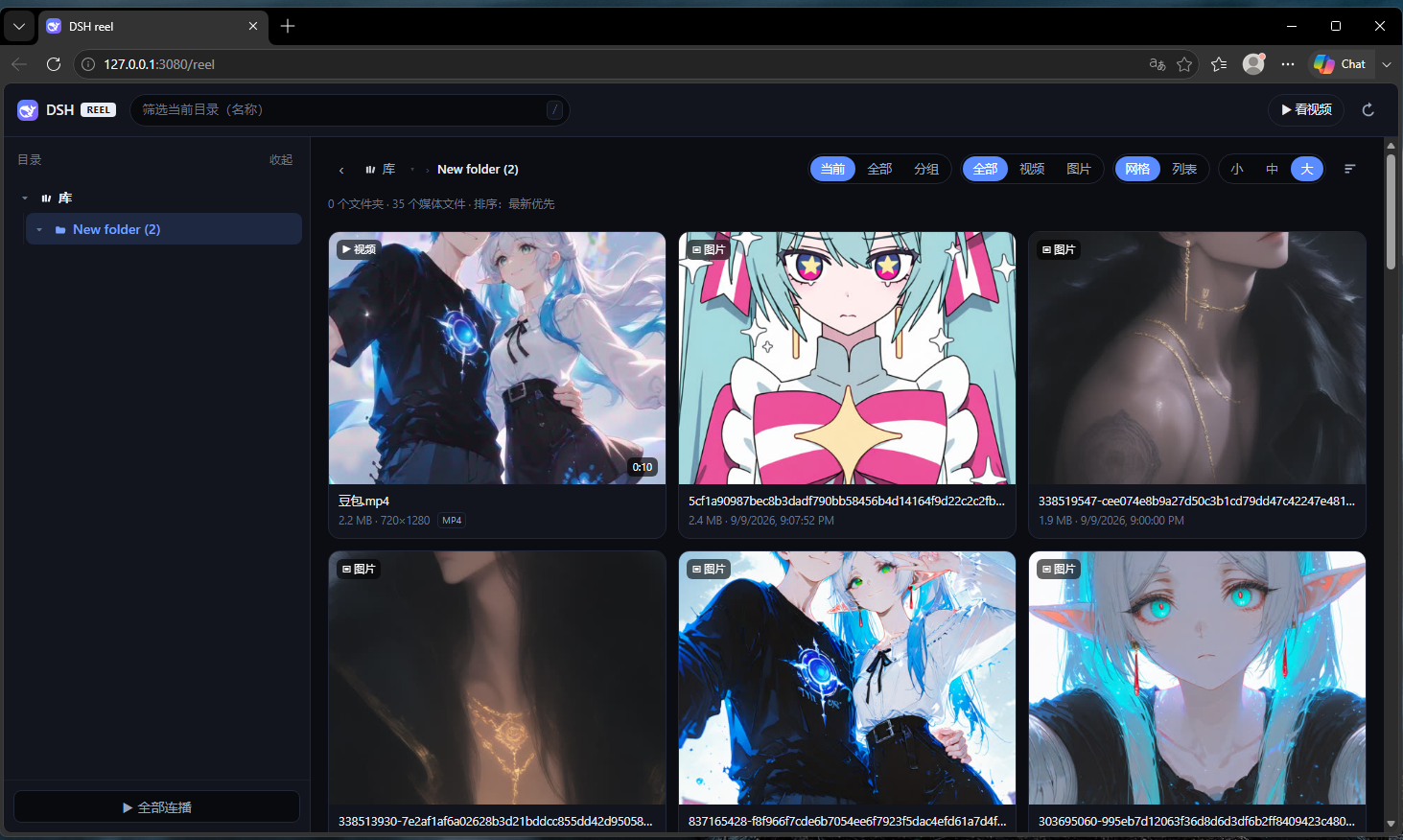
## Overview
**dsh-reel** adds an all-in-one media library and audio-visual streaming experience to [dsh Web](https://github.com/deepseek-ai) (requires dsh [v0.2.0-rc.1](https://github.com/deepseek-ai/deepseek-harness/releases/tag/dsh-v0.2.0-rc.1) or later). Without spawning a secondary server process or opening new ports, simply configure local disk folders to instantly browse high-performance image galleries and stream video collections straight from your browser.
Quick access URL:
```
http://127.0.0.1:3080/reel
```
---
## Key Features
- **Zero-Overhead Embedded Architecture**: Shares the same port and origin with dsh Web. Injects only a single Cordis composition row with read-only routes under `/reel`—no daemon process, no compilation/bundling required.
- **Strict Read-Only Sandbox**: Only inspects and reads files inside explicitly allowed root directories. Completely path-traversal proof.
- **Multi-Directory Aggregation & Multi-Dimensional Views**:
- Top-level virtual "Library" aggregates all mounted directories with lazy subtree loading.
- Three viewing scopes (cycle with G): **Current** folder only, **All** (recursively flattened), or **Grouped** (collapsible folder hierarchy).
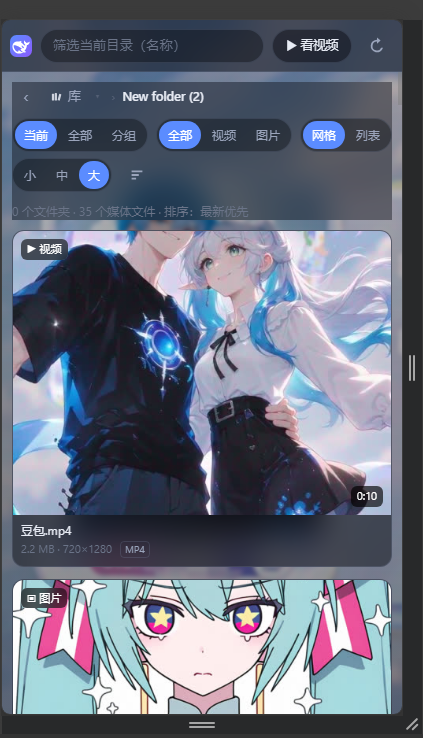
- Responsive Grid layout (Small / Medium / Large tile sizes) and compact List view.
- **Instant HTTP Range Streaming**: Native chunked streaming via HTTP Range requests; drag the progress slider and start playback immediately without waiting for buffer downloads.
- **Real-Time On-The-Fly Remuxing**: Legacy or browser-incompatible containers (AVI, WMV, FLV, RMVB, etc.) are remuxed in memory to fragmented MP4 via FFmpeg on the fly, zero temporary disk space used. Seeking simply initiates a fresh stream from the target timestamp.
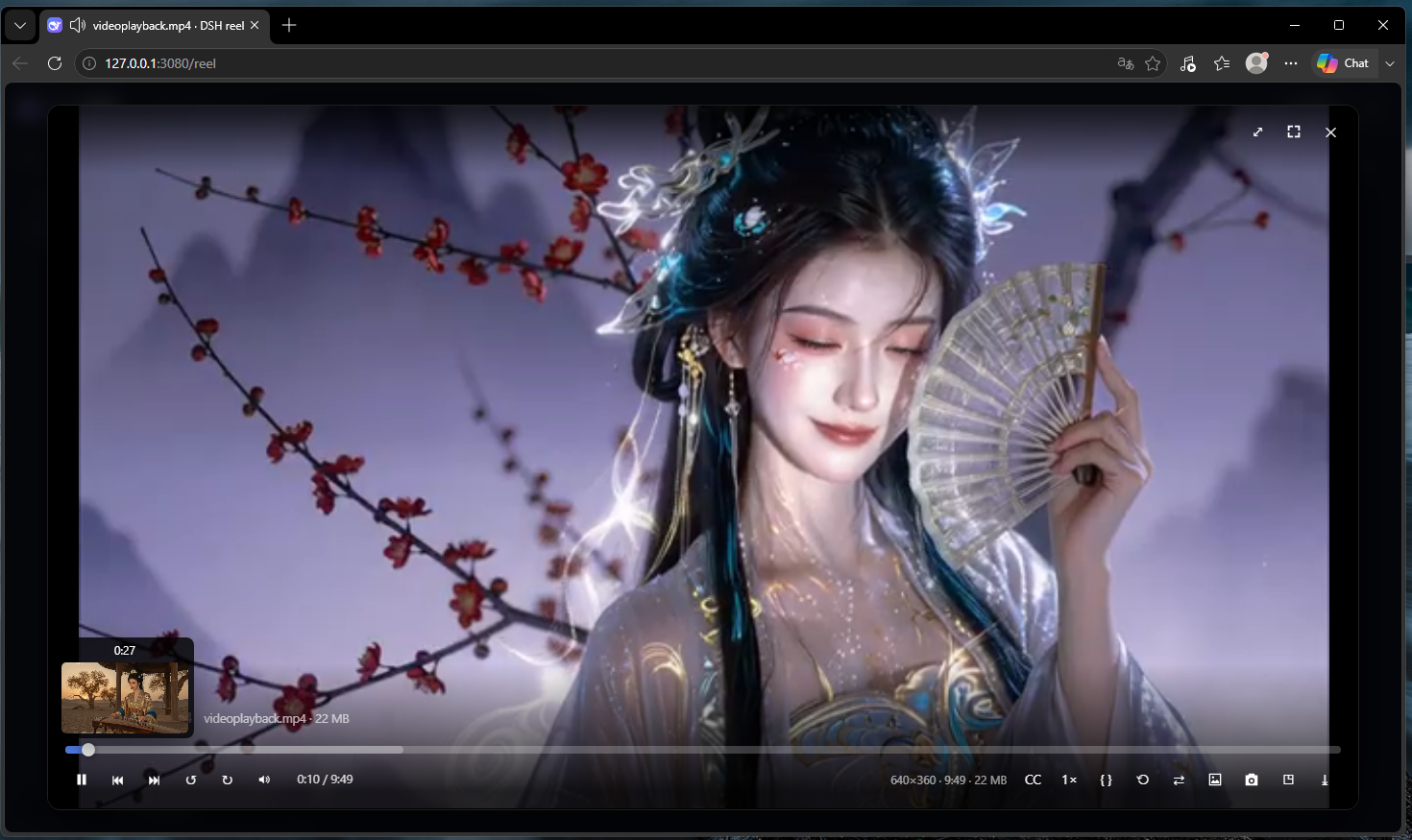
- **Hover Timeline Preview & Frame Probing**: Hover over the scrubber bar to view miniature thumbnail previews and accurate timestamps. Ships with built-in FFmpeg & FFprobe to auto-extract duration, resolution, and poster cards.
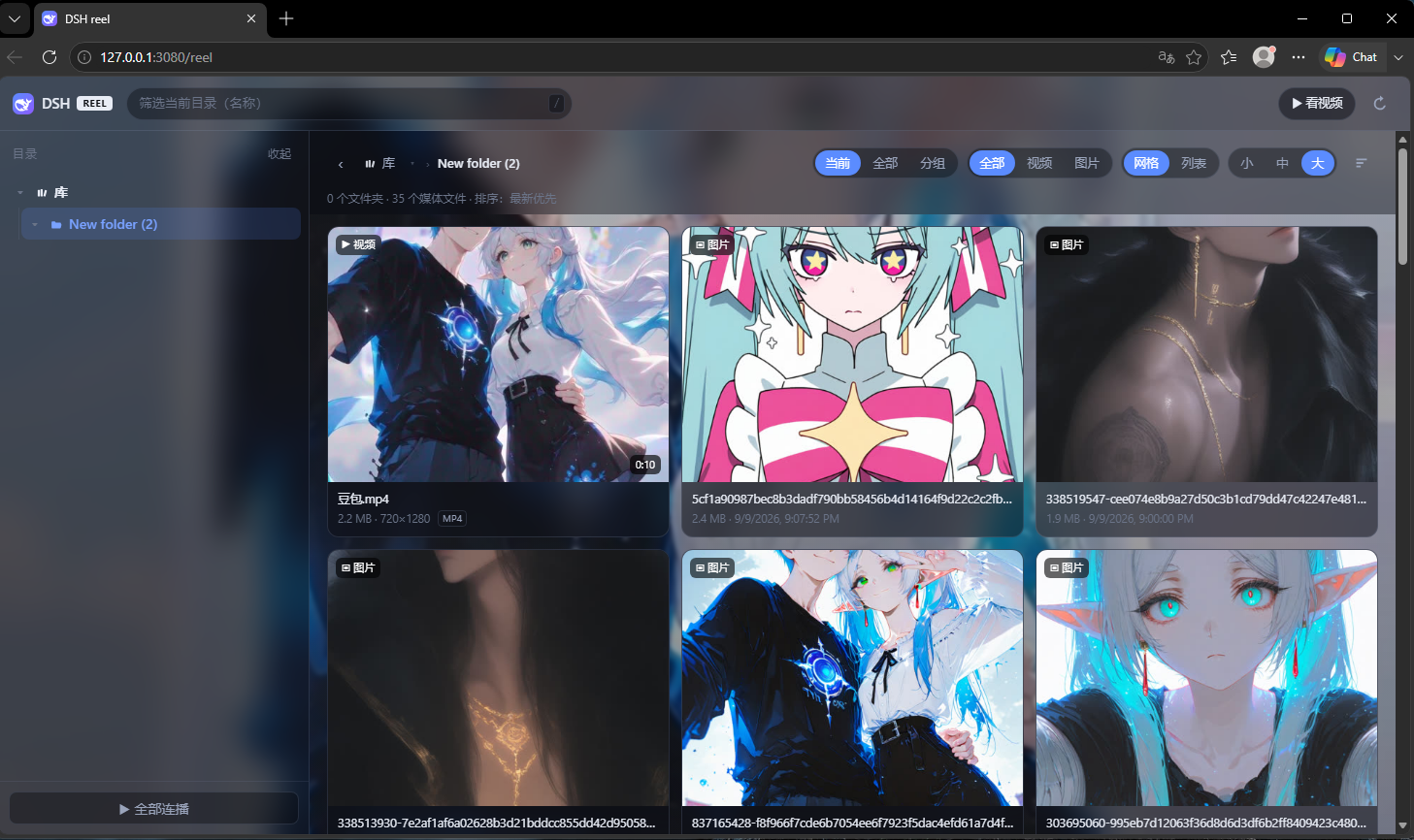
- **Immersive Dynamic Live Wallpaper**:
- Set any video or photo as a full-page live wallpaper with a single click (videos loop silently, auto-pause when unfocused to conserve resources).
- Frosted-glass translucent UI styling brings a fluid, stunning visual ambience.
- **Reels-Style Swipe Navigation & Mobile Optimized**:
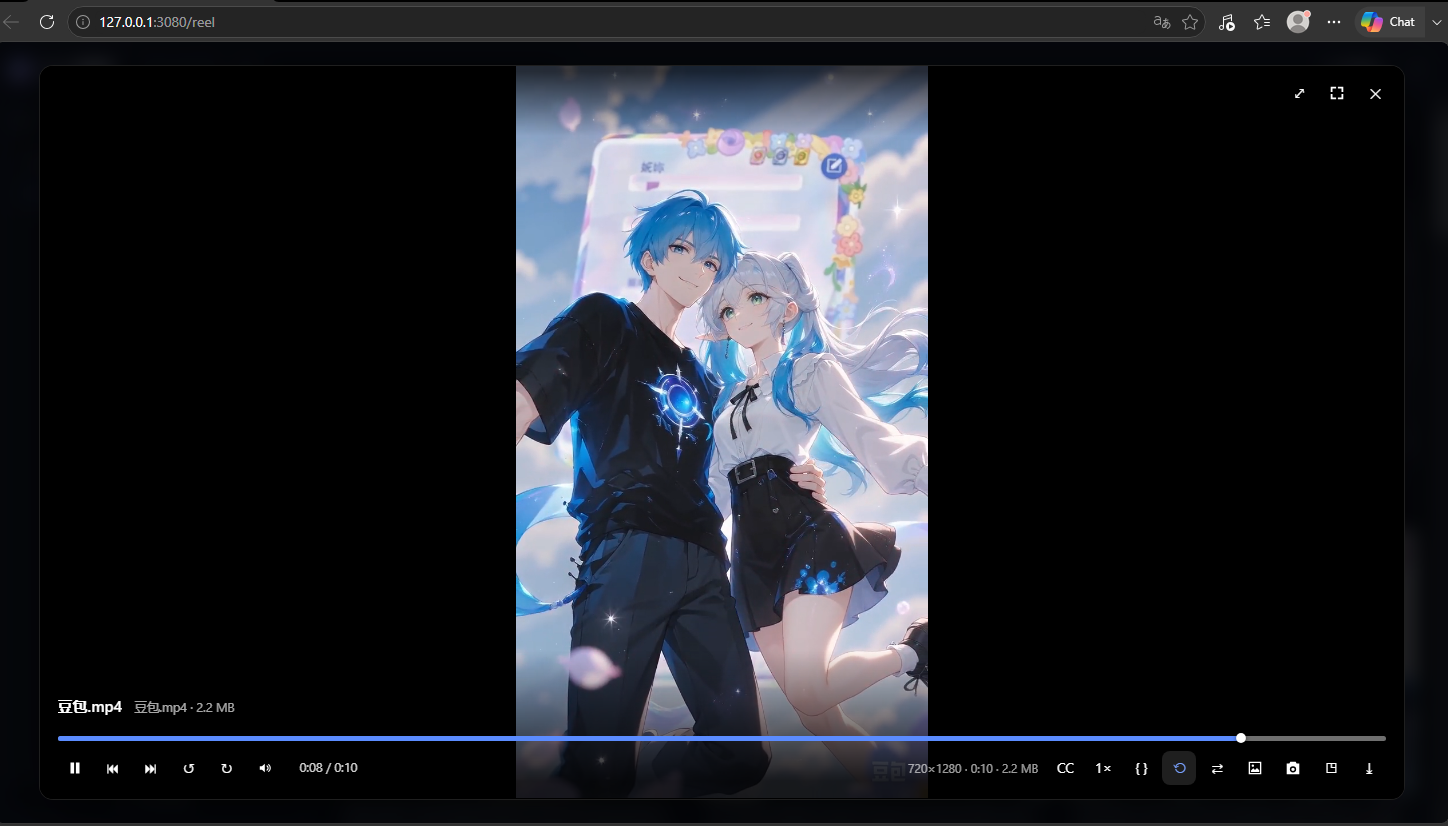
- Touch-optimized responsive UI with smooth vertical swipe gestures to jump to next/previous videos (similar to TikTok & Instagram Reels).
- Continuous playlist playback, shuffle mode, playback position memory, 2× hold-to-speed-up, auto-loading subtitles, and one-click frame snapshots.
- **Native dsh UI Settings Card**: Integrated directly into the dsh Settings page; edits are applied hot without restarting the service.
---
## Screenshots
### Immersive Live Wallpaper Mode
Turn your favorite media into a vibrant dynamic background while keeping the interface translucent:
### Feature-Rich Media Player
Page-fullscreen player with hover scrubbing thumbnails, media inspector, playback speeds, screenshot exporter, and loop modes:
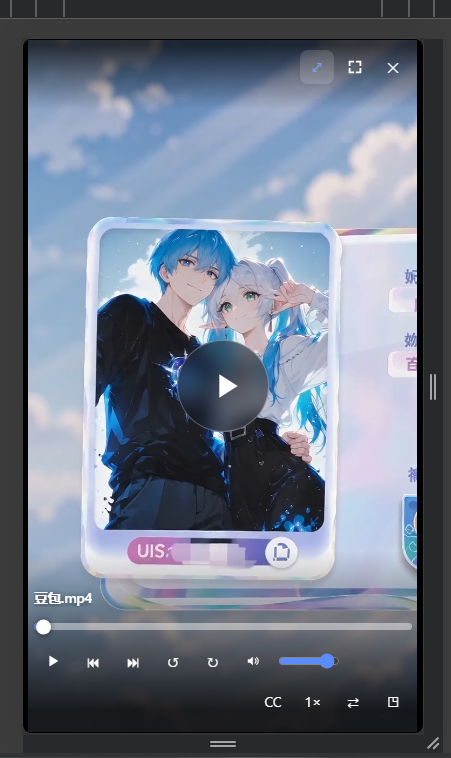
### Vertical Videos & Mobile Swipe Experience
Vertical videos are centered with ambient lighting or fullscreened for an intuitive Reels-like experience:
### Responsive Mobile Gallery
Streamlined single-column grid view and touch-friendly controls:
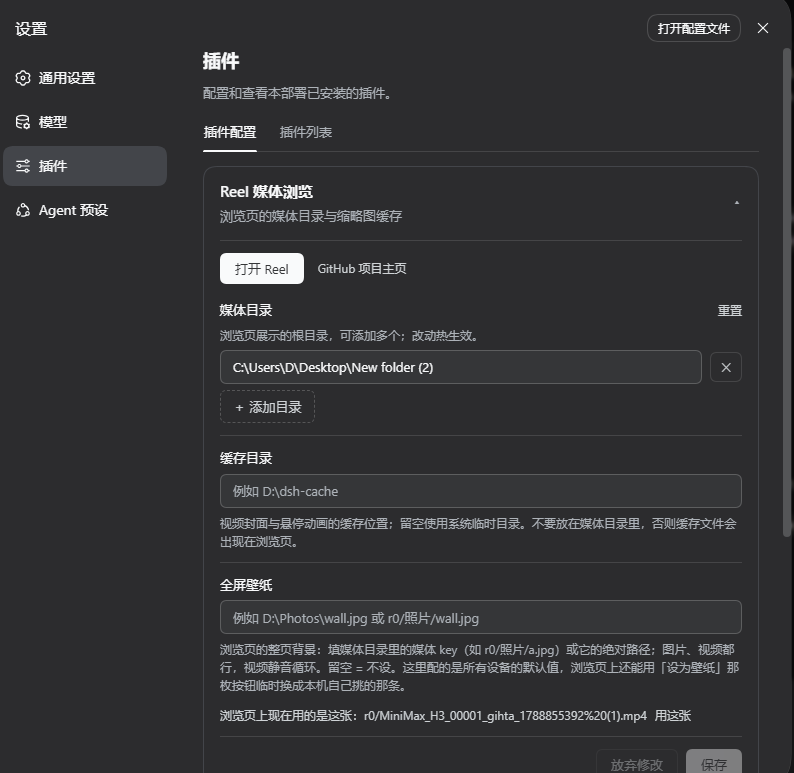
### Native dsh Settings Integration
Configure roots, cache paths, and global wallpapers straight from the graphical settings panel:
---
## Installation
### Prerequisites
- **dsh**: Minimum version [v0.2.0-rc.1](https://github.com/deepseek-ai/deepseek-harness/releases/tag/dsh-v0.2.0-rc.1) or later (the settings client contract changed in 0.2.0; earlier versions are no longer compatible)
- **Node.js**: `>= 20`
### Standard Install
Run the following command inside your dsh installation:
```powershell
dsh plugin --profile web add dsh-reel
```
Restart `dsh web`, and open in your browser:
```
http://127.0.0.1:3080/reel
```
### Install Pre-release / Local Development Link
```powershell
# Install latest build directly from GitHub
dsh plugin --profile web add "github:lsjspl/dsh-reel"
# Soft-link local source code for live development
dsh plugin --profile web add "link:C:\path\to\dsh-reel"
```
### Uninstallation
```powershell
dsh plugin --profile web remove dsh-reel
```
---
## Configuration
Settings live under the `reel` namespace in your profile's `cordis.patch.yml` — the same layer the settings panel writes.
### Method 1: Graphical Settings UI (Recommended)
Navigate to **the sidebar's Plugins panel → Installed → dsh-reel**; the configuration sits just below the package description:
- **Media Directories**: Click "+ Add Directory" to mount local storage paths (e.g. `D:\Photos`, `E:\Videos`).
- **Cache Directory**: Choose where poster frames and hover thumbnails are cached.
- **Fullscreen Wallpaper**: Define default wallpaper image or video.
These three fields are **hot**: saving them takes effect on the running service, with no `dsh web` restart.
> [!NOTE]
> The configuration lives on this bundle's page in the **Plugins panel**, not under Settings → Built-in plugins. The latter is a read-only inventory and offers no configuration.
### Method 2: YAML Configuration / `cordis.patch.yml`
Configure in `cordis.patch.yml`:
```yaml
- id: reel
config:
roots:
- D:\Photos
- E:\Movies
# cacheDir: 'D:\dsh-cache' # Thumbnail cache dir; defaults to OS tempdir
# wallpaper: 'D:\Photos\wallpaper.jpg' # Default wallpaper path
# ffmpegPath: 'D:\ffmpeg\bin\ffmpeg.exe' # Custom ffmpeg binary path
# requireTrustedRequest: true # LAN trust fence; false permits non-loopback clients
# maxScanEntries: 20000 # Max scanned items (50 ~ 200000)
```
> [!NOTE]
> `roots`, `cacheDir`, and `wallpaper` apply hot. `ffmpegPath`, `requireTrustedRequest`, and `maxScanEntries` steer process-level decisions, so changing them requires a `dsh web` restart.
> [!NOTE]
> - If `roots` is empty, fallback priority is: `REEL_ROOTS` environment variable (semicolon-separated) followed by `$DSH_HOME/media`.
> - Keep `cacheDir` outside of your media roots to prevent cache files from cluttering your library.
---
## FFmpeg & FFprobe Resolution Strategy
`dsh-reel` bundles `@ffmpeg-installer/ffmpeg` and `@ffprobe-installer/ffprobe` as runtime dependencies, **requiring zero external setup out of the box**.
To leverage newer hardware acceleration or newer codecs, you can optionally install system-wide FFmpeg:
```powershell
# Windows (WinGet / Scoop / Chocolatey)
winget install ffmpeg
# macOS (Homebrew)
brew install ffmpeg
# Linux (Debian / Ubuntu)
sudo apt update && sudo apt install ffmpeg
```
### Binary Resolution Order:
1. User-configured `ffmpegPath`
2. `$DSH_HOME/reel/bin/` directory
3. System environment `PATH` and package manager bins (WinGet, Scoop, `/usr/local/bin`, etc.)
4. Embedded fallback installer dependencies
---
## Keyboard Shortcuts
### Gallery & Library Navigation
| Key | Action |
|:---:|:---|
| G | Cycle content scope (Current → All Flat → Grouped) |
| V | Toggle Grid vs. List view |
| S | Toggle sort criteria (Newest, Name, Size) |
| R | Reload and refresh library |
| / | Focus instant search box |
| Backspace / Ctrl+↑ | Go up one directory level |
| Esc | Close lightbox viewer / blur search |
### Video Player
| Key | Action |
|:---:|:---|
| Space / K | Play / Pause |
| ← / → | Seek backward / forward 5s |
| J / L | Seek backward / forward 10s |
| ↑ / ↓ | Volume step (±5%) |
| M | Mute / Unmute |
| F | Fullscreen / Exit fullscreen |
| Q | Toggle Picture-in-Picture (PiP) |
| C | Open / Close subtitles menu |
| I | Toggle Stats for Nerds |
| U | Toggle Single Loop / Queue autoplay |
| P | Capture current frame snapshot as PNG |
| D | Download original media file |
| [ / ] | Decrease / Increase playback speed (0.25× ~ 3×) |
| 0 | Reset playback speed to 1.0× |
| Home / End | Jump to video start / end |
| Esc | Exit fullscreen / Close menus / Exit player |
| **Mouse Left Hold** | 2.0× Rapid fast-forward (restores on release) |
| **Mouse Wheel / Touch Swipe** | Switch to previous / next video (Reels swipe navigation) |
---
## Friendly Links
- [linux.do](https://linux.do/) - 新的理想型社区。
---
## License
This project is licensed under the [MIT License](LICENSE).