# Shutdown Guard · Shut down when tasks finish
[中文](README.md) · **English** · [Русский](README.ru.md)
[](CHANGELOG.md)
[](https://ltayshark0637.github.io/dsh-Shutdown-Guard/demo.html)
[](https://github.com/deepseek-ai)
[](#constraints)
[](LICENSE)
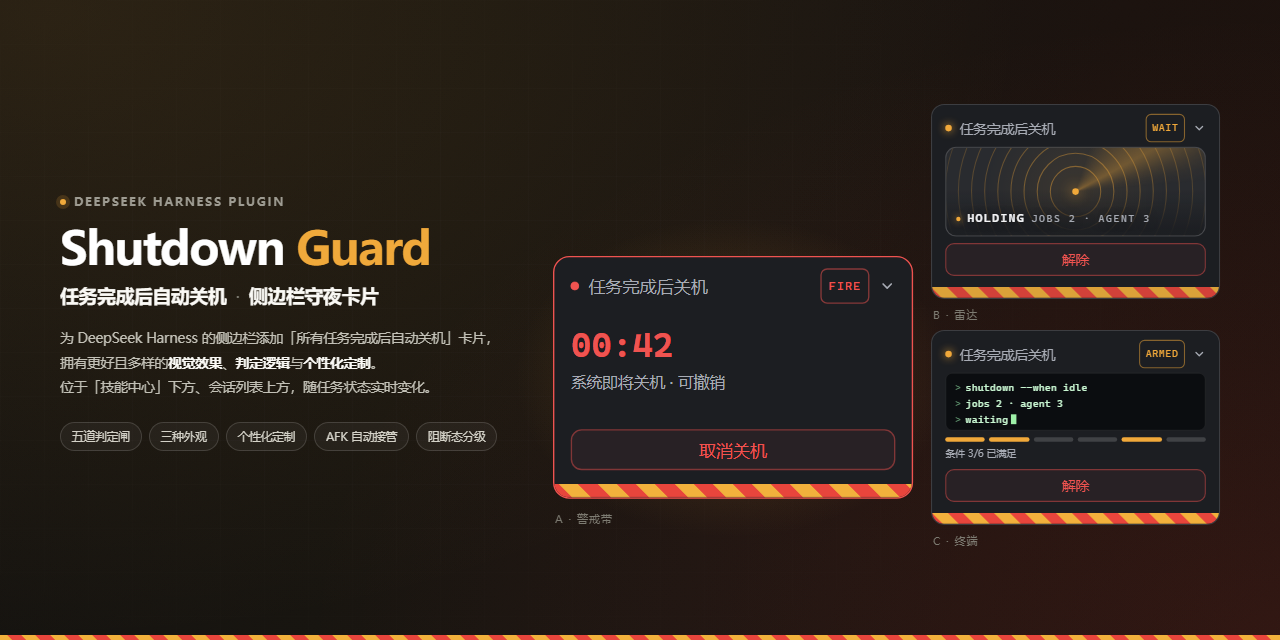
Adds a "shut down automatically when all tasks finish" card to the DeepSeek Harness sidebar, with a more varied and polished visual treatment, decision logic, and customization. It sits below Skill Center and above the session list, and updates in real time with task state.
**▶ [Interactive demo](https://ltayshark0637.github.io/dsh-Shutdown-Guard/demo.html)** — no installation needed; see what it looks like and how it decides. Two panes: **Learn** (rules, appearance, states) and **Try** (a random scenario where you arm the guard, cancel it, and release it yourself, all the way to a shutdown or a block). All data is generated locally at random; nothing is sent over the network.
## Why you need it
People who run long tasks know this scene: you hand the agent a batch of work in the evening, want the machine to shut down when it is done, and you are not at the desk.
But "task finished" does not mean "safe to shut down" — background jobs may still be running, a session may have errored, the agent may be waiting for your answer, or you may have stopped it halfway. Shutting down in any of those cases is an incident. The plugin blocks each of these situations and shuts down only when it is genuinely safe.
## Rules: when it actually shuts down
In a blocked state (see below) nothing is sent at all; otherwise all five gates must pass before `shutdown /s` is issued:
1. **Armed** — you turned it on manually
2. **No countdown already running** — avoids duplicate issuance
3. **All root sessions idle** — no agent is still working
4. **No running or stopping background jobs** — `blockOnJobs`, on by default
5. **No session error in this batch** — `onlyOnSuccess`, on by default
If any one is missing, it does not shut down and writes the reason on the card and in the settings page.
## Three looks
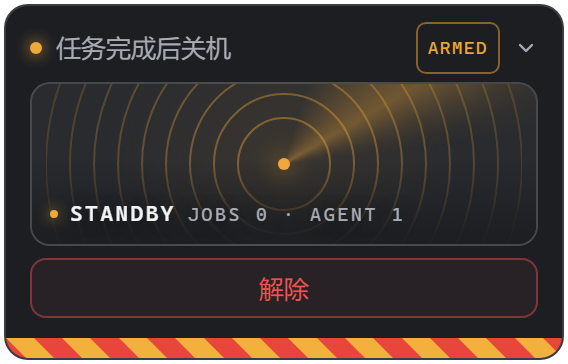
| A · Hazard tape | B · Radar | C · Terminal |
|:----------------------------------------------------------------------:|:---------------------------------------------------------------:|:------------------------------------------------------------------------------------:|
|  |
 |
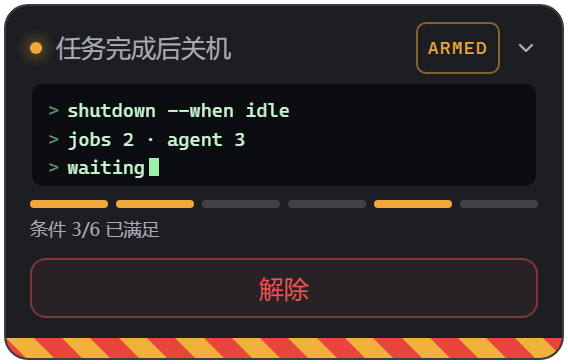 |
| Large status text + scrolling red-and-yellow stripes at the bottom | Concentric rings + a scanning beam, sessions and background jobs shown as dots | Command-line summary + six indicator lights for the gate conditions |
Dots in the radar are added and removed, never reordered: when the count changes, the dots you are looking at do not jump.
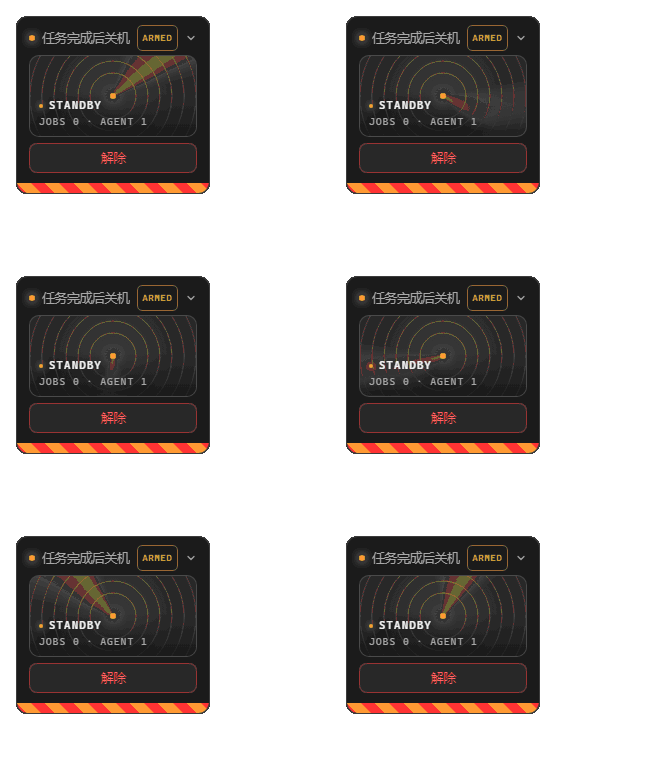
Switch in settings; takes effect immediately, no restart needed.
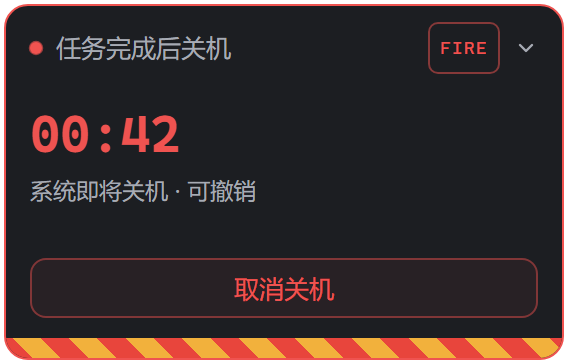
## Six runtime states
| Off | Standby | Waiting on background jobs |
|:---------------------------------------------------:|:-----------------------------------------------------:|:----------------------------------------------------------------------:|
|  | |
 |
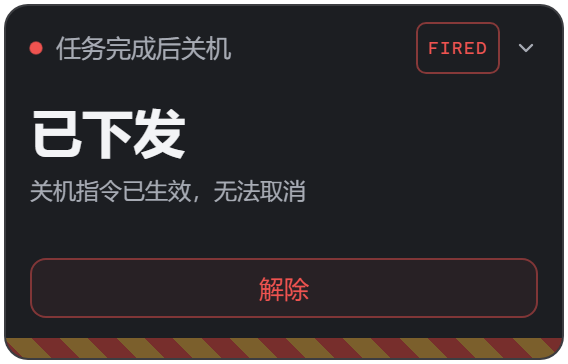
| Countdown | Issued | Blocked |
|:----------------------------------------------------:|:-----------------------------------------------------------------------:|:------------------------------------------------------------------------:|
|
 |
 |
 |
`Off` → `Standby` → `Waiting on background jobs` → `Countdown` → `Issued`; a blocking error at any stage moves it to `Blocked`. You can cancel at any point during the countdown; **cancelling leaves it armed** — the next batch will still shut down.
Want to flip through all six states? In section 04 of the demo's Learn pane, the three capsules `A` `B` `C` at the top right switch which look the preview uses.
## Blocked states
| halted · needs manual action | waiting · retries automatically |
|:--------------------------------------------------------------:|:---------------------------------------------------------------------------------:|
| |
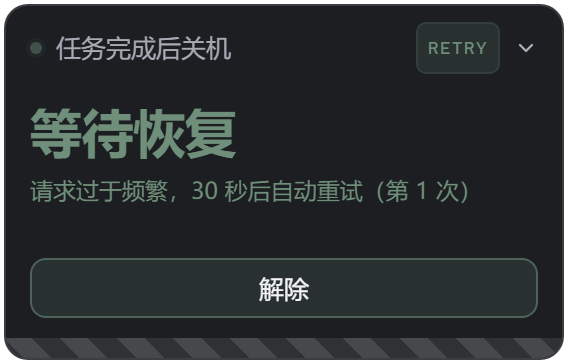 |
For errors that cannot be handled as ordinary failures, the plugin **stays armed**, changes the card's colour, and writes out the reason:
- **`halted`** (slate blue) — insufficient quota, invalid credentials, context overrun, unsupported capability, disk full. Only a human can resolve it; click "disarm and retry".
- **`waiting`** (slate green, a breathing dot) — rate limiting, 5xx, network interruption, empty response, timeout, image offload. Retried automatically according to policy; at the right moment a "continue the original plan" instruction is injected.

Retry cadence is configured per failure type; see [Retry policies](#retry-policies).
## AFK auto-pilot
When nobody is at the desk, the plugin covers three things for you:
- **Auto-answer questions** (on by default): when the agent asks something, it replies "The user is AFK. Finish the tasks already assigned, write up a summary report to disk, and do not touch branches that were not assigned." It returns `selected: []` plus custom text, so **it never selects an option for you**; turn this off and questions come to you as usual.
- **Error recovery**: when a session errors, the agent is first asked to investigate and continue the original plan; a second failure in the same session switches to "stop retrying and write up a report".
- **Interruption protection**: if you stop a task yourself midway, that does not trigger a shutdown.
## Where it lives
| Armed: below Skill Center, above the session list | Countdown: same spot, the whole strip turns red |
|:-------------------------------------------------------------------------------------------:|:---------------------------------------------------------------------------------------:|
|  |
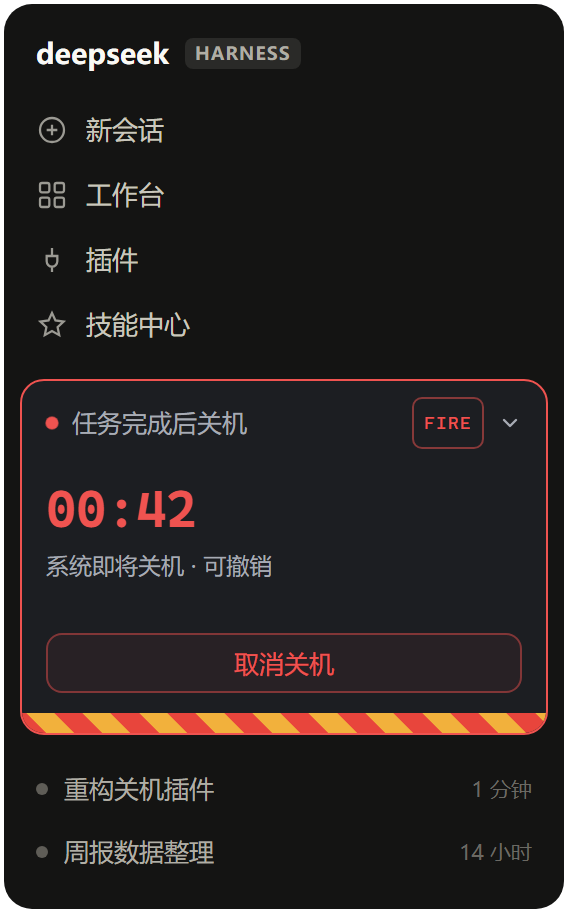 |
The card is currently pinned to this sidebar slot. A future version plans to make it available as a standalone widget (with a switch in settings); this section will be updated then.
## Other details
- **Vertical collapse**: collapsed it keeps only the title and status; click the title to expand.
 - **Theme adaptation**: the card carries its own `--dsp-*` palette and picks light or dark automatically from the host surface's brightness; you can also force dark / light / Claude Style.
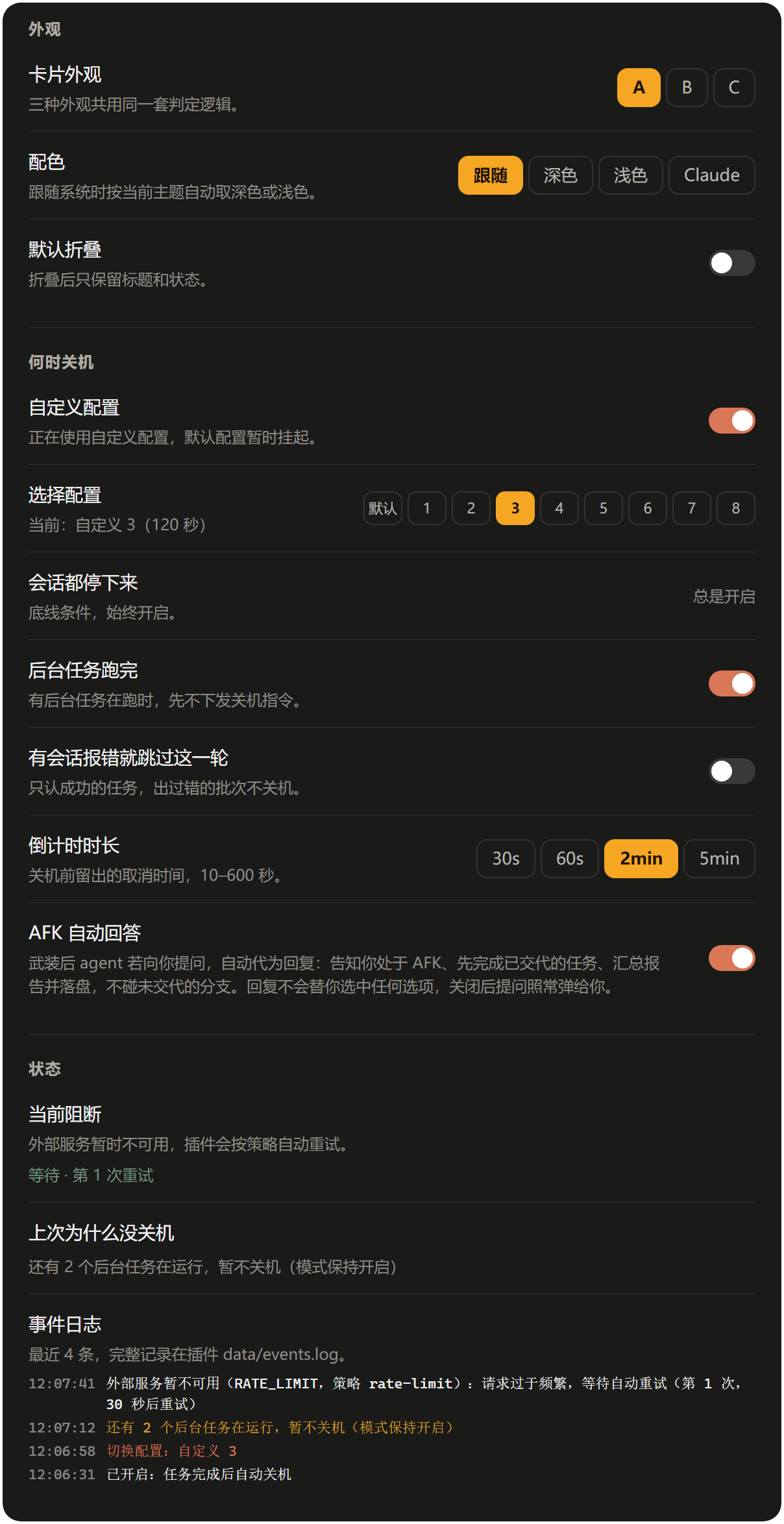
- **Event log**: the settings page shows recent events and "why it did not shut down last time"; the full stream is in `data/events.log`.
## Settings page
| Dark | Light |
|:---------------------------------------------------------------------------------------------:|:----------------------------------------------------------------------------------------------:|
|  |
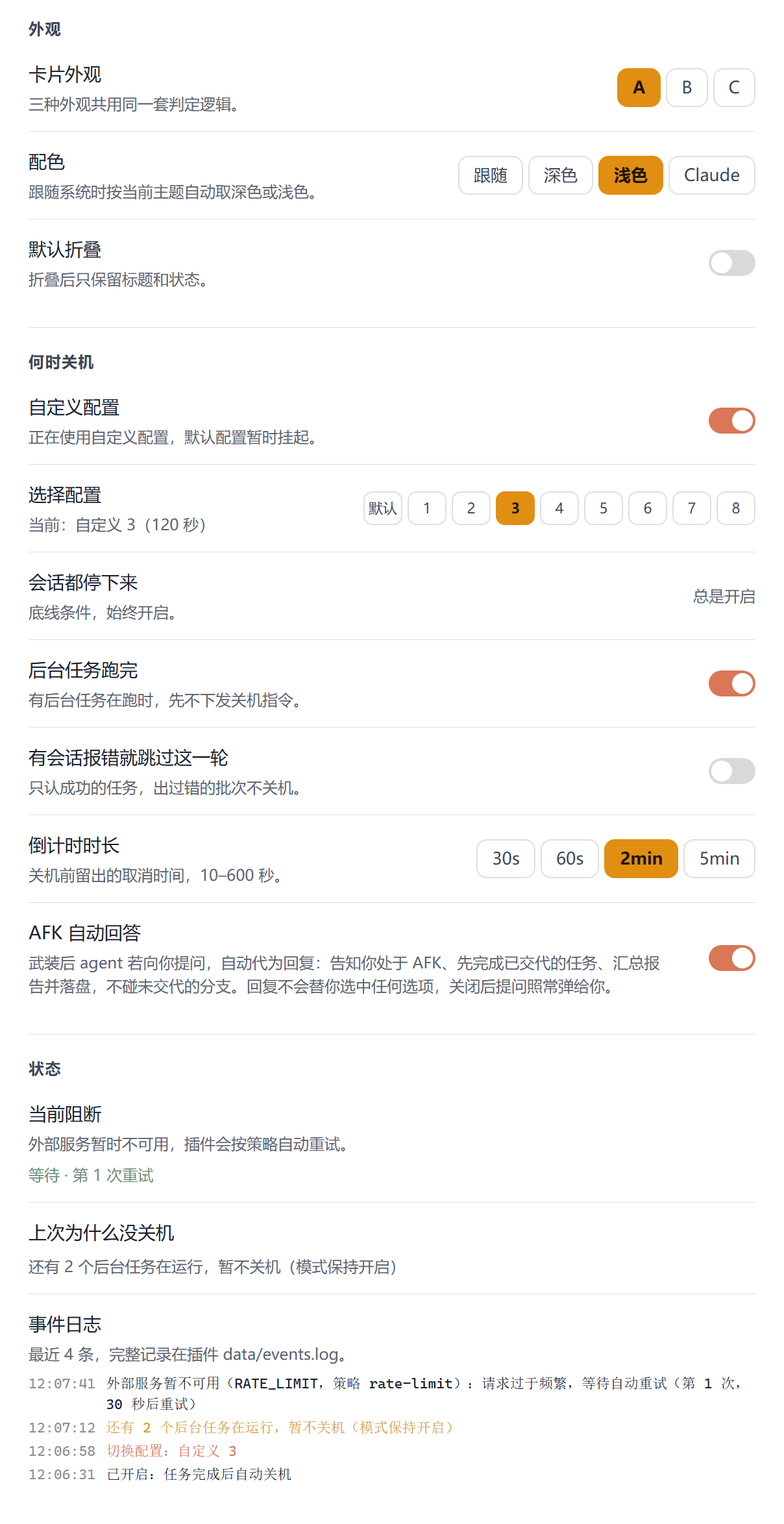 |
Three groups: Appearance / When to shut down / Status. Every switch takes effect immediately.
- **Default profile** is locked at 60 seconds and cannot be changed; there are 8 custom slots you can tune freely.
- "All sessions idle" is the floor condition, always on and not switchable.
- "Background jobs finished" blocks background jobs; "skip this round if any session errored" blocks erroring batches.
- "AFK auto-answer" controls whether questions are answered for you while armed; the description states "replies never select an option for you; turn this off and questions come to you as usual."
## Light and third-party themes
| Light card | Claude Style |
|:-----------------------------------------------------:|:------------------------------------------------------:|
|
 |
 |
The card does not inherit the host palette; it brings its own, while the settings page follows the host theme. The third-party Claude Style theme has a matching palette too.
## Installation
Published on npm; recommended:
```bash
dsh plugin --profile web add dsh-shutdown-guard
```
Or install straight from GitHub:
```bash
dsh plugin --profile web add github:ltayshark0637/dsh-Shutdown-Guard
```
Then **restart DSH**.
> ⚠️ **The client bundle is only wired into the module graph at DSH startup**: after editing `lib/client.js` you must restart; refreshing the page does nothing. The same applies to the server side.
**On a restricted network**: the GitHub command is essentially `pnpm add github:...` and needs a clone. If cloning fails, prefer the npm command (it goes through the registry); if neither works, install from a local path — DSH Settings → Plugins → Add, enter the **absolute path** of this directory → Install → restart.
**Manual fallback**: create a symlink `node_modules\dsh-shutdown-guard` under `profiles\web` pointing at this directory, then:
- add `link:` to `dependencies` and `pnpm.overrides` in `profiles\web\package.json`
- append `dsh-shutdown-guard` to `dsh.profile.bundles`
## Permissions and impact
Once installed, the plugin does the following:
| Area | Concrete behaviour |
| --- | --- |
| **Command execution** | Calls Windows `shutdown.exe` through `subprocess`: `/s /t ` schedules the shutdown, `/a` cancels it. **Only invoked when armed and all five gates pass** |
| **File access** | Only `data/` inside the plugin directory: `config.json` (configuration) and `events.log` (event log) |
| **Events** | `agent/status`, `agent/error`, `session/event`, `user-questions/request` |
| **HTTP routes** | Under the local DSH Web server, `/api/dsh-shutdown-guard/`: `GET /state`, `GET /events`, `POST /arm`, `POST /disarm`, `POST /cancel`, `POST /config`; POST validates that Origin is `127.0.0.1` or `localhost` |
| **Network** | **No external requests at all**, no data collection |
| **Platform** | **Windows only**. On anything other than `win32` the plugin silently does not load |
While AFK auto-pilot is on, the plugin answers the agent's questions and injects recovery instructions into erroring sessions during armed periods; you can switch this off at any time in settings.
## Configuration
Written in `cordis.patch.yml` (the patch inside the plugin package), or changed at runtime via `POST /config`.
| Key | Range | Default | Description |
| --------------- | ------ | ------ | ----------------------------------------- |
| `countdownSec` | 10–600 | 60 | Seconds of countdown before shutdown (fixed at 60 in the default profile, not editable) |
| `marginSec` | 0–60 | 5 | Extra margin passed to `shutdown /t` |
| `onlyOnSuccess` | bool | `true` | Skip the shutdown when any session in this batch errored |
| `blockOnJobs` | bool | `true` | Skip the shutdown while background jobs are running |
| `afkAutoAnswer` | bool | `true` | Answer questions and perform error recovery for the user while armed |
| `language` | enum | `auto` | UI language; `auto` follows the system language, or pin it to `zh` / `en` / `ru` |
### Retry policies
Each error code is assigned a policy name; the policies themselves are configurable:
| Policy | Default cadence | Assigned to |
| ------------ | -------------------------------------- | ---------------------------------- |
| `rate-limit` | backoff 30 → 60 → 120 → 240 → 300, capped | `RATE_LIMIT` |
| `transient` | fixed 20 seconds | `SERVER` / `TRANSPORT` / `TIMEOUT` |
| `empty` | fixed 30 seconds | `EMPTY_RESPONSE` |
| `offload` | fixed 5 seconds | `IMAGE_OFFLOAD_REQUIRED` |
Rate limiting uses backoff rather than a fixed interval because hammering a rate-limited service **extends** the limit rather than just wasting requests. 5xx and network failures recover on a predictable timescale, so a fixed interval is simply faster. Image offload is a local disk operation and is almost immediately retryable, hence 5 seconds.
Override a single error code:
```yaml
retryAssign:
RATE_LIMIT: slow-limit
retryPolicies:
slow-limit: { mode: backoff, base: 60, max: 900 }
```
An unknown `code` falls back to `transient`; malformed policies are dropped and the defaults are kept. The currently effective assignments are available from `retryAssign` and `retryPolicies` in `/state`.
UI preferences live in the browser's `localStorage`: `dsh-shutdown-guard.variant` / `.theme` / `.folded`.
## HTTP API
Prefix `/api/dsh-shutdown-guard`, used by the card's own same-origin polling:
| Method | Path | Description |
| ---- | -------------------------- | -------------------------------------------------------------------------------- |
| GET | `/state?since=` | Full state plus incremental events |
| POST | `/arm` `/disarm` `/cancel` | Arm / disarm / cancel this countdown |
| POST | `/config` | Change configuration: `customEnabled`, `activeProfileId`, `profileId`+`patch`, `afkAutoAnswer`, `language` |
| GET | `/events?since=&limit=` | Event stream |
POSTs from a non-local Origin return 403; non-POST returns 405.
## Logs
- `\data\events.log` — human-readable event stream (categories `config` / `afk` / `skip`); the settings page's "Event log" reads it
- `\dsh-shutdown-guard.log` — process-level append log
## Development
```bash
node test/host.test.mjs # server: 26 assertions, mock ctx, never actually shuts down
node test/client.test.cjs # client bundle smoke test
node scripts/gen-gallery.cjs # generate the screenshot page from the real CSS in lib/client.js
powershell -NoProfile -ExecutionPolicy Bypass -File scripts/screenshot.ps1 # headless Edge renders PNGs (transparent background + auto crop)
node scripts/gen-gif.cjs # generate the three animated GIFs used in the README
node scripts/gen-banner.cjs # generate the 1280x640 social preview image
node scripts/gen-demo.cjs # generate docs/demo.html (the interactive demo)
```
All screenshots are generated from the real CSS in `lib/client.js`, so they cannot drift from the product. The animations work the same way: CSS animations are frozen at several points in time via `animation-delay`, captured frame by frame, and assembled with a built-in GIF89a encoder — no ffmpeg or ImageMagick needed on the machine.
The Learn section of the demo page is rendered live too: the six states are generated on the spot with the same `card()` markup as the product, not captured as screenshots.
## FAQ
**Q: Why does changing a setting do nothing?**
A: Both the server and the client need DSH restarted to load new code. Local HMR does not apply to locally linked plugins.
**Q: Why didn't it shut down after arming?**
A: Check "why it did not shut down last time" in settings; it names the specific reason (background jobs, errors, not armed, etc.).
**Q: Can I change my mind during the countdown?**
A: Yes. Use "Cancel shutdown" on the card or just run `shutdown /a`; cancelling keeps it armed, so the next batch still applies.
**Q: Can it shut down by mistake?**
A: With the default configuration, the plugin acts only when all four hold — all sessions idle, no background jobs, no errors, and you armed it manually. Breaking any one of them cancels or skips the shutdown. Manual task termination is also detected and excluded.
**Q: Does it work outside Windows?**
A: Not yet; that is planned for later.
## Constraints
- Windows only: exits early on anything other than `win32` and mounts nothing.
- Zero runtime dependencies: the server uses only `node:fs` / `node:path` / `node:crypto`, the browser only `require('react')`.
- Does not modify `app.asar` or DSH source.
## License
[MIT](LICENSE)