# sanmu-skills
**Sanmu's Agent Skills collection for research**
Document conversion · paper reading · literature search: working methods from day-to-day research, packaged as installable, reusable skills.
[](https://github.com/luffysolution-svg/sanmu-skills/releases/latest)
[](https://github.com/luffysolution-svg/sanmu-skills/actions/workflows/tests.yml)
[](https://agentskills.io)
[](LICENSE)
[简体中文](README.md) · **English**
[Skills](#skills) · [Visual Tour](#visual-tour) · [Installation](#installation) · [Usage](#usage) · [Contributing](#contributing)
## Skills
| Skill | In one sentence | Typical requests |
| --- | --- | --- |
| [**sanmu-doc2md**](skills/sanmu-doc2md/README.en.md) | Turns papers, textbooks and slides into a Markdown knowledge base that keeps formulas, high-resolution figures and source page numbers | "Convert this scanned textbook to Markdown, one file per chapter" "Turn this paper into an Obsidian note without breaking the formulas" |
| [**sanmu-paper-reader**](skills/sanmu-paper-reader/README.en.md) | Reads papers and SI closely; every conclusion can be traced back to its location in the source and its experimental conditions | "Read this paper closely and explain Fig. 4" "Can the hydrogen evolution performance of these three papers be compared directly?" |
| [**sanmu-paper-search**](skills/sanmu-paper-search/README.en.md) | Finds literature from a topic, paper or author, and records honestly where it searched and what it missed | "Find papers on FLP photothermal hydrogen evolution" "Has this paper been retracted?" "Download the original figures from its SI" |
The three skills can be used separately or chained: **search** → get the PDF / SI → **convert** → **read**. If one of them is not installed, the other two still work.
### sanmu-doc2md
- **Route by document type**: textbooks are split by chapter, slides are organized by lecture, and papers become standalone notes with two-way links to their SI.
- **Formulas and figures stay intact**: every formula goes through a KaTeX preflight check; figures are taken from the source file's original images first, and fragmented multi-panel figures can be recropped from the source.
- **Errors can be traced back**: original page numbers are kept, and every correction is written to a repairs file with a guard on the original value; the raw OCR output is left untouched.
- **Zotero integration**: syncs metadata, reading notes and PDF annotations; writes go through the official MCP and are read back to confirm.
### sanmu-paper-reader
- **Five scenarios**: single-paper close reading, cross-paper comparison, interdisciplinary transfer, cross-topic organization, and knowledge-base questions.
- **Traceable evidence**: each claim records its source location, units and operating conditions; the authors' conclusions, your interpretation and hypotheses still to be tested are written separately.
- **Materials and chemistry checks**: synthesis and characterization, catalysis and electrochemistry, DFT, spectroscopy and mechanisms, performance comparison, selected according to what the paper actually contains.
- **Optional extras**: figure-text alignment, Mermaid mechanism diagrams, draft SOPs for reproduction preparation, benchmark tables, targeted SI search.
### sanmu-paper-search
- **Multi-source search**: OpenAlex, Semantic Scholar and Crossref, with optional SciVerse (structured metadata, full-text semantic RAG and citation relations), AI4Scholar (S2, Google Scholar, patents and PubMed), Serper and Exa semantic search.
- **Venue ranks and research tools**: easyScholar journal ranks, impact factors, CCF and warning labels; SciVerse Paper Schema structured analysis and reproduction material packs; AI4Scholar scientific drawing, vectorization and automatic citations.
- **Citation expansion and author disambiguation**: references, citing papers and similar papers are recorded separately; authors with the same name are pinned with stable IDs and topic filters.
- **Full text, excerpts and SI**: Europe PMC provides JATS full text and supplementary original-figure bundles without a key and checks retractions and errata; SciVerse reads original Markdown slices by Unicode code-point offset and downloads high-resolution figures.
- **Honest reporting**: success, zero results, truncation and failure are recorded separately; "nothing found" is never reported as "does not exist".
## Visual Tour
> Click any category below to expand high-resolution screenshots and interactive animations (32 previews covering graph, search, doc2md, reader, and host integration):
🌌 Citation Graph & Timeline Analysis — View galaxy overview, 20-year lineage & bridge papers
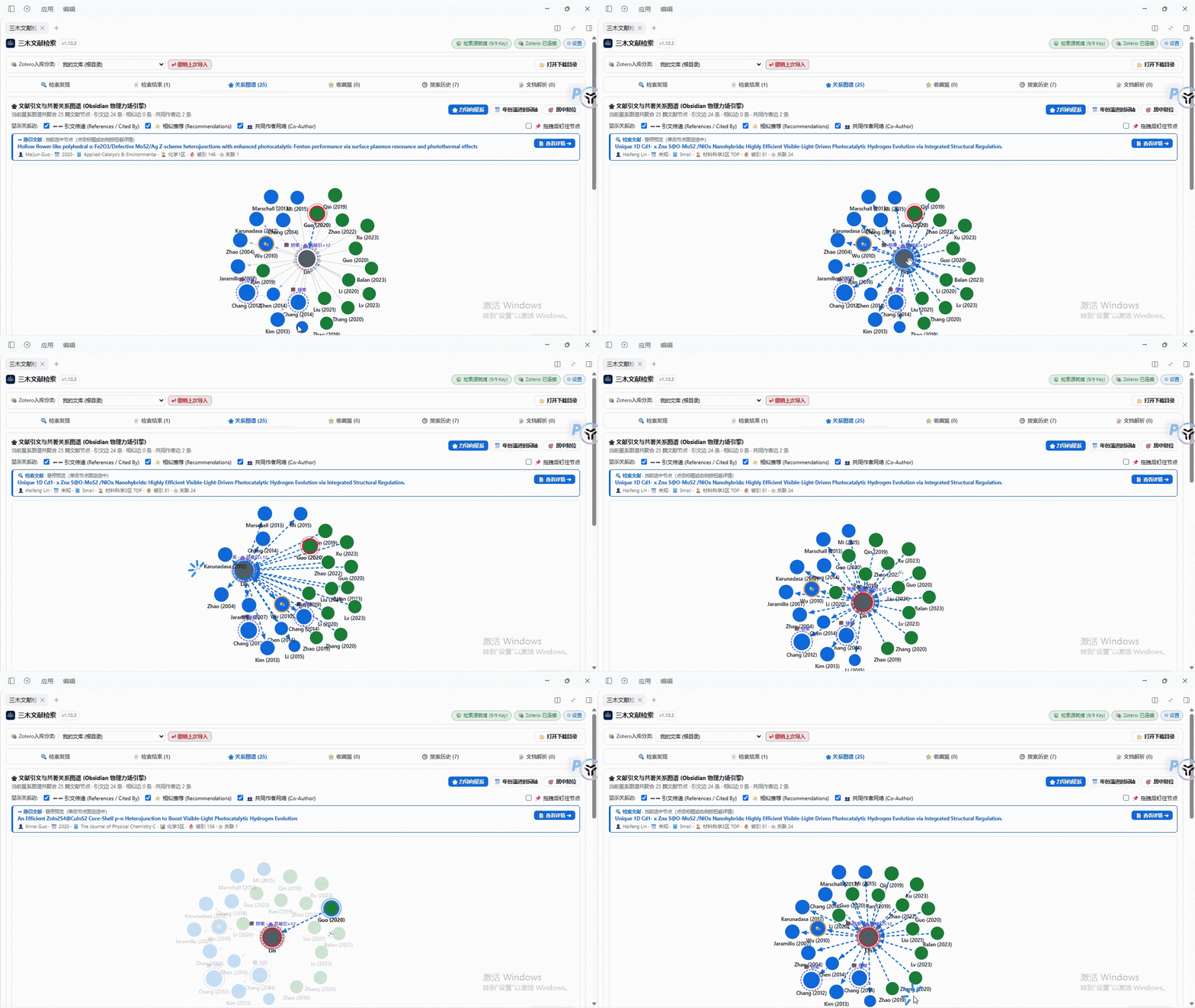
#### 1. Live Force-Directed Star-Cluster Graph (GIF Demo)
> Built on Obsidian-grade physics simulation, supporting drag collisions, elastic bounce, and hover previews for instant paper metadata.
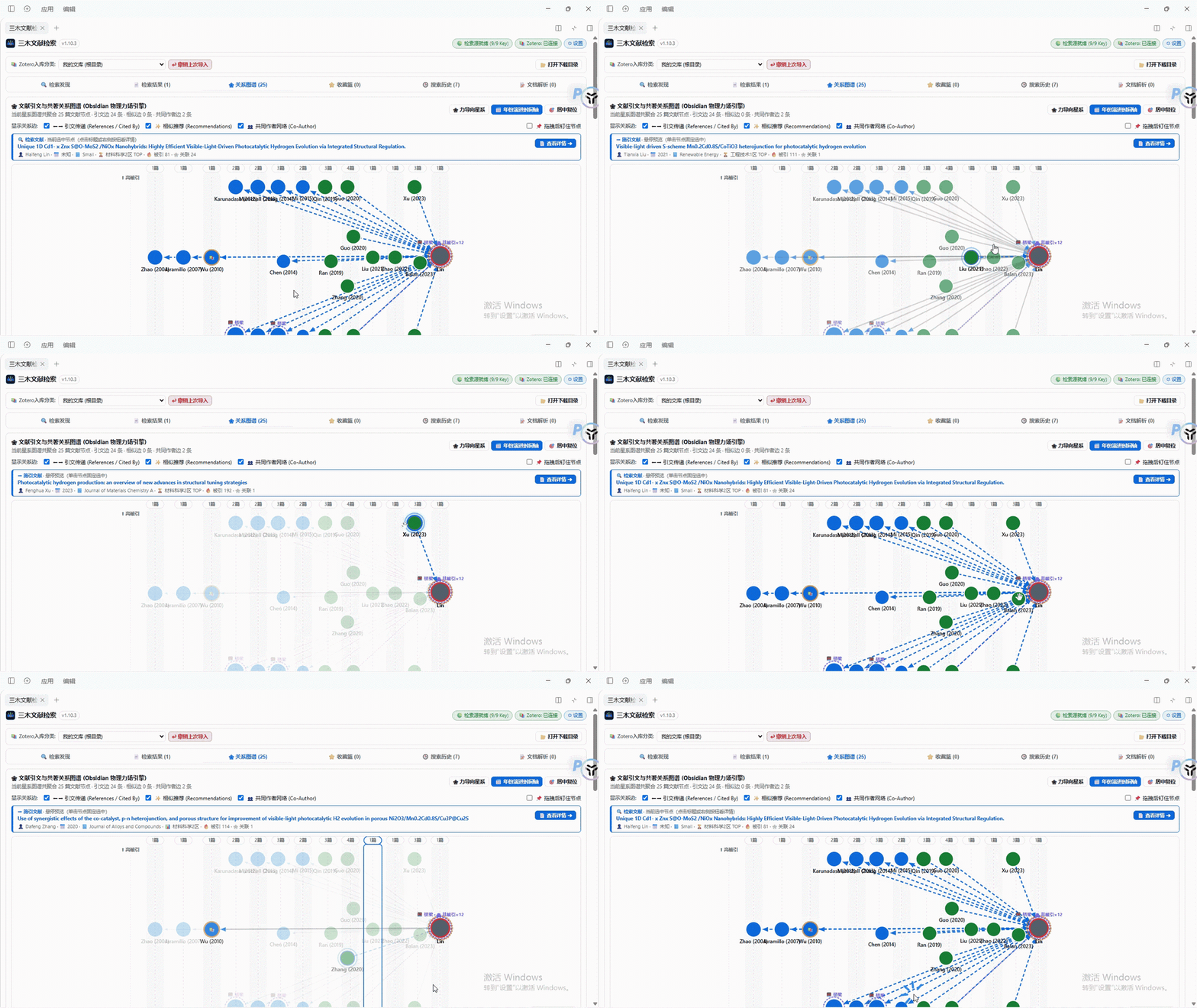
#### 2. Year Evolution Timeline (GIF Demo)
> Expands paper lineage horizontally across publication years, scaling by citation weight vertically, with real-time citation-flow highlighting.
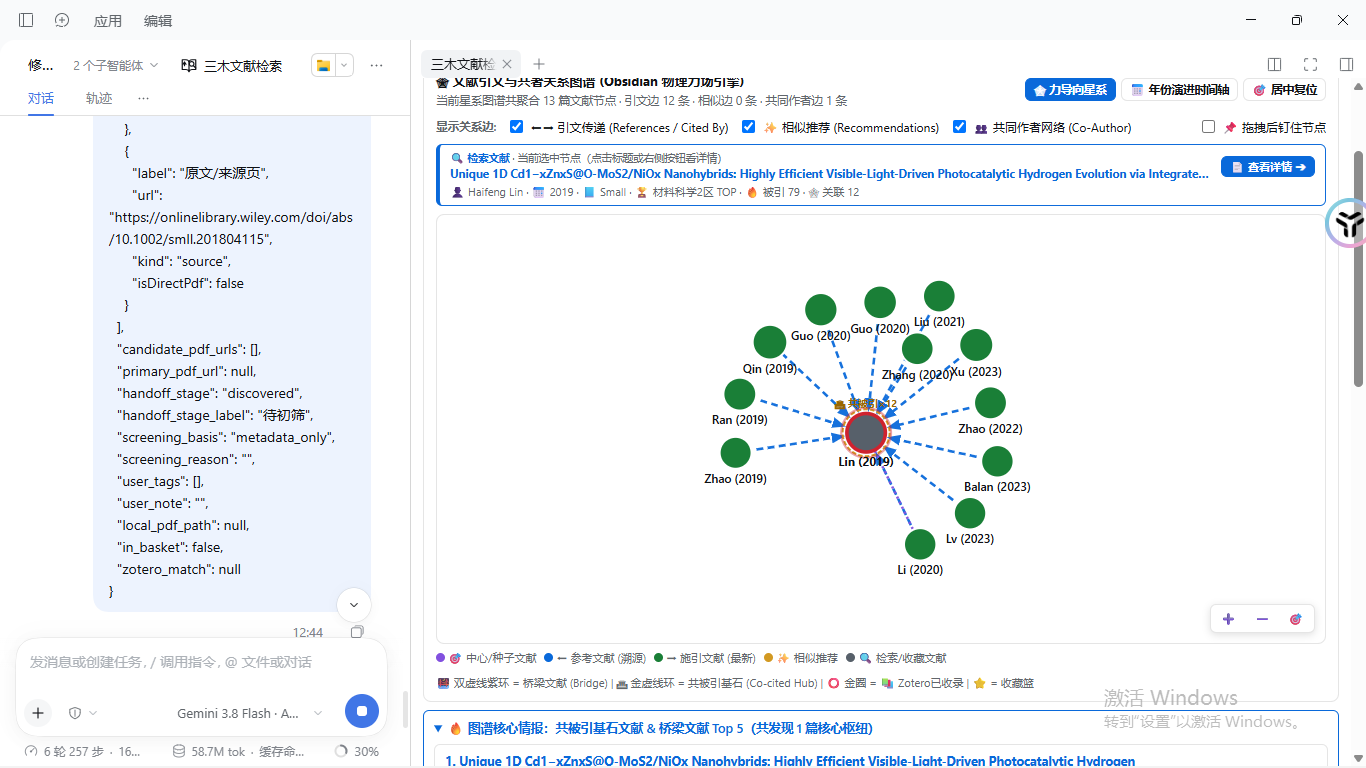
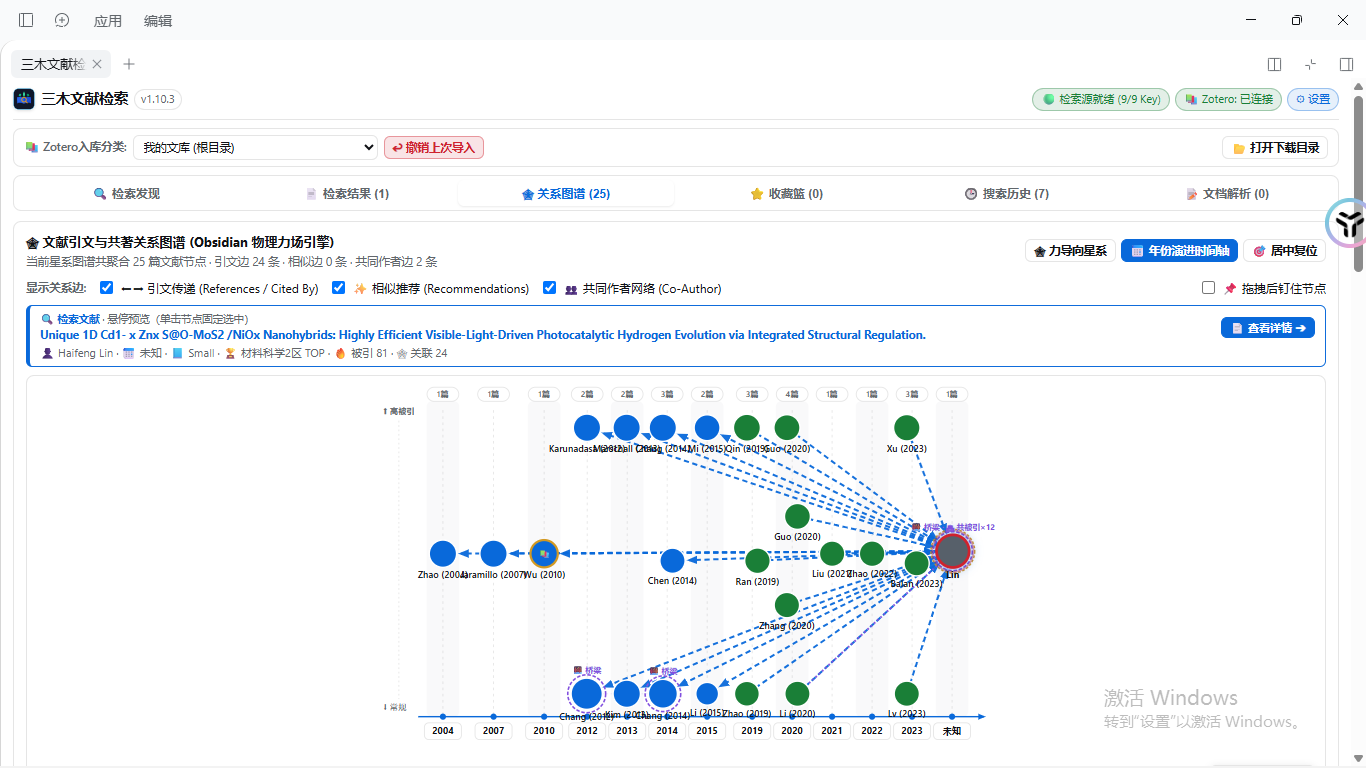
#### 3. Force-Directed Galaxy Overview & Key Intelligence
> Radiates outward from seed papers, automatically detecting "Co-cited Hubs" and "Bridge Papers" with core topological intelligence statistics.
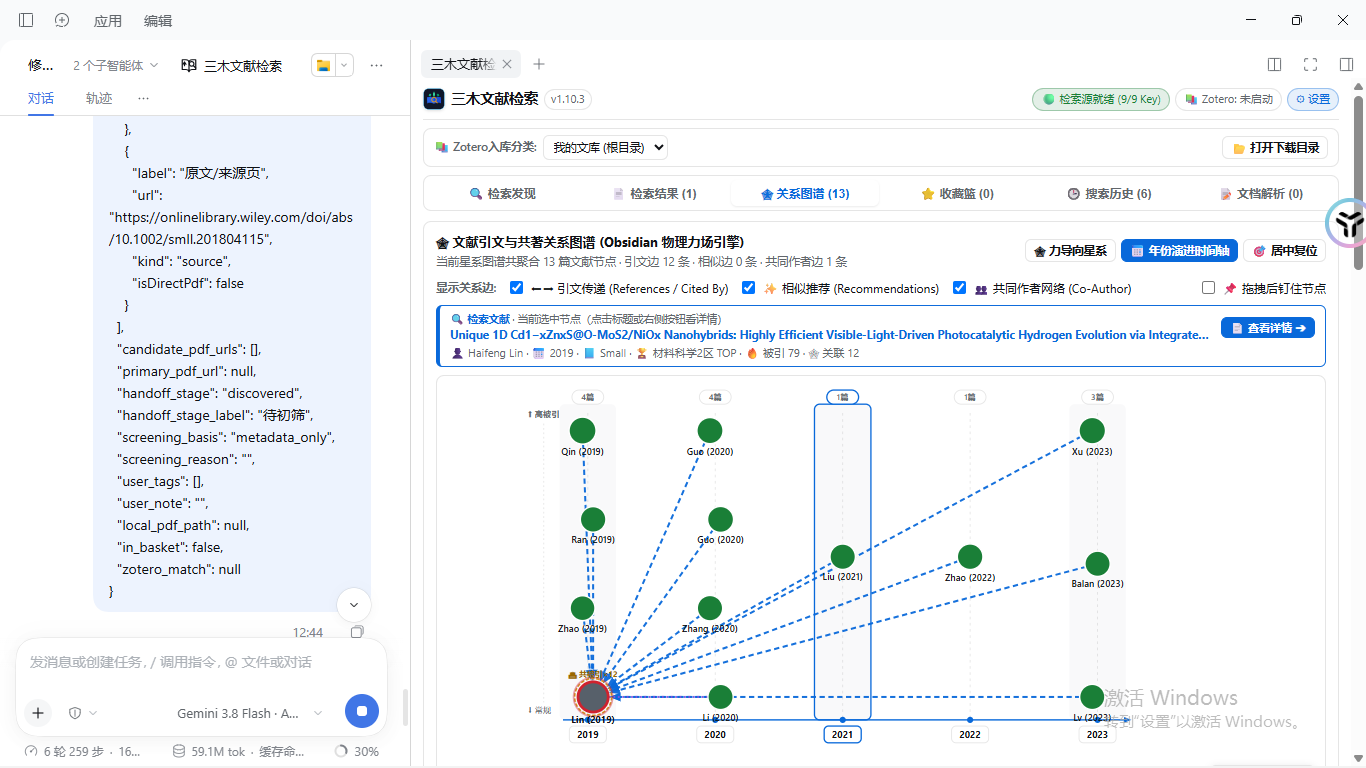
#### 4. Evolution Timeline Panoramic Views
> Visualizes 20 years of research lineage from 2004 to 2023, tracking technology evolution and seminal works over time.
🔍 Multi-Source Literature Search & In-Place Citation Chasing (sanmu-paper-search) — Click to expand search channels, inline drawers & diff
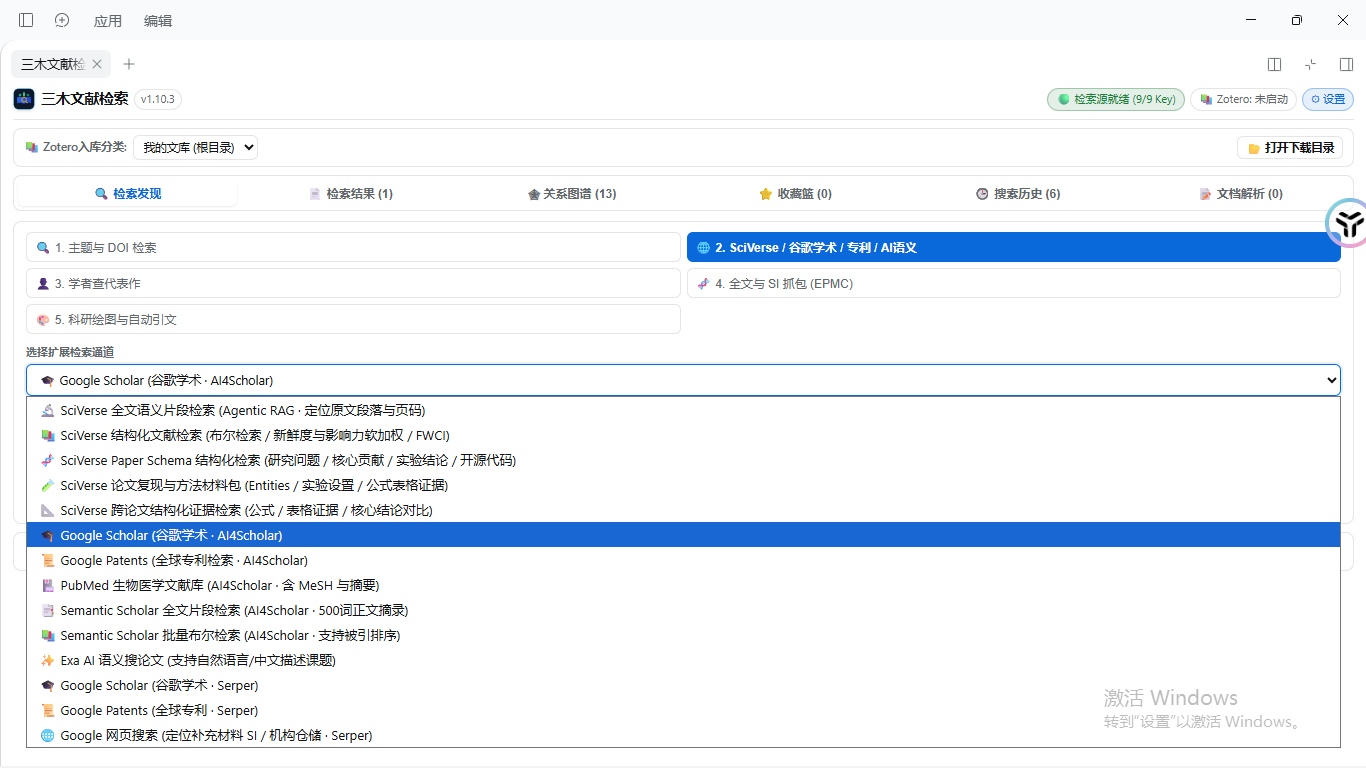
#### 1. 14+ Extended Scholarly Search Channels
> Supports SciVerse full-text semantic RAG, Google Scholar, Google Patents, PubMed, Semantic Scholar snippets, and Exa AI semantic search.
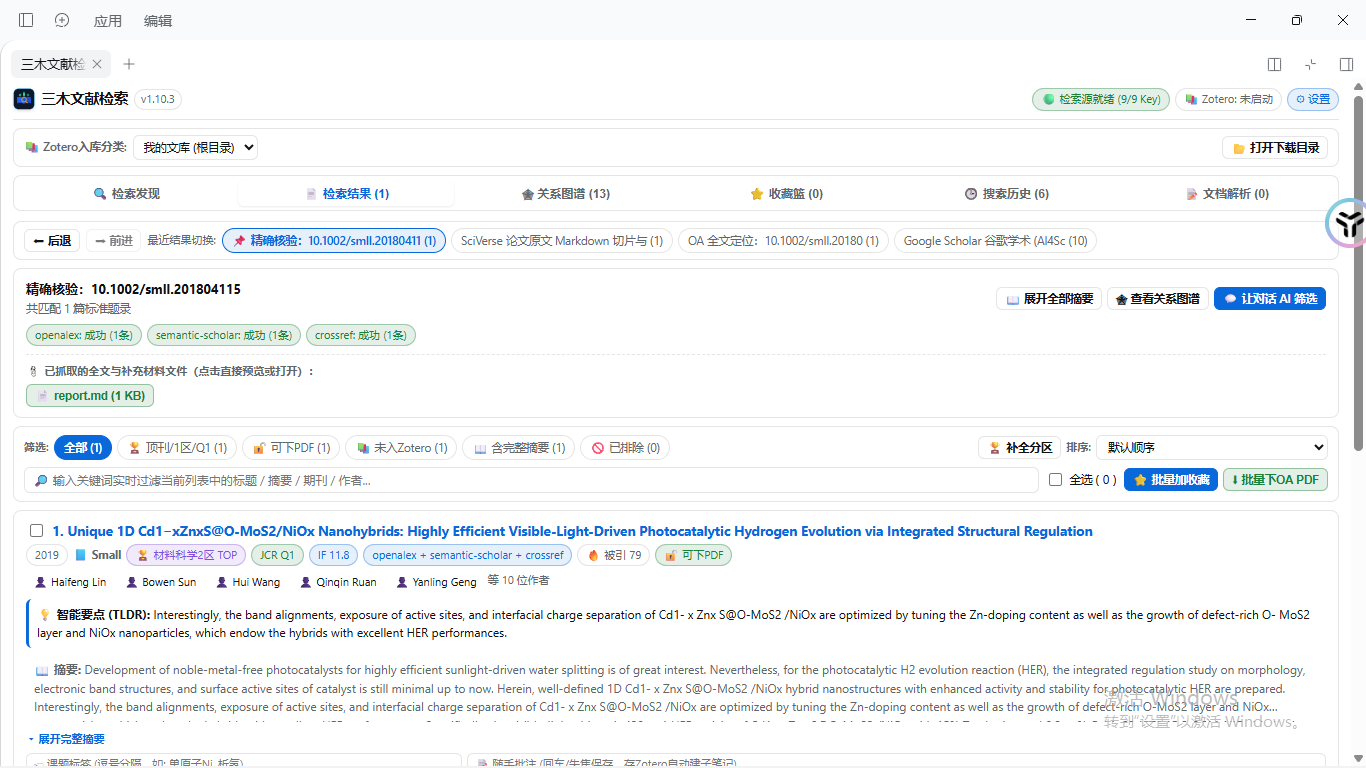
#### 2. Multi-Source Exact Verification
> Cross-verifies paper identity across OpenAlex, Semantic Scholar, and Crossref, detecting Open Access (OA) full-text and downloadable PDFs.
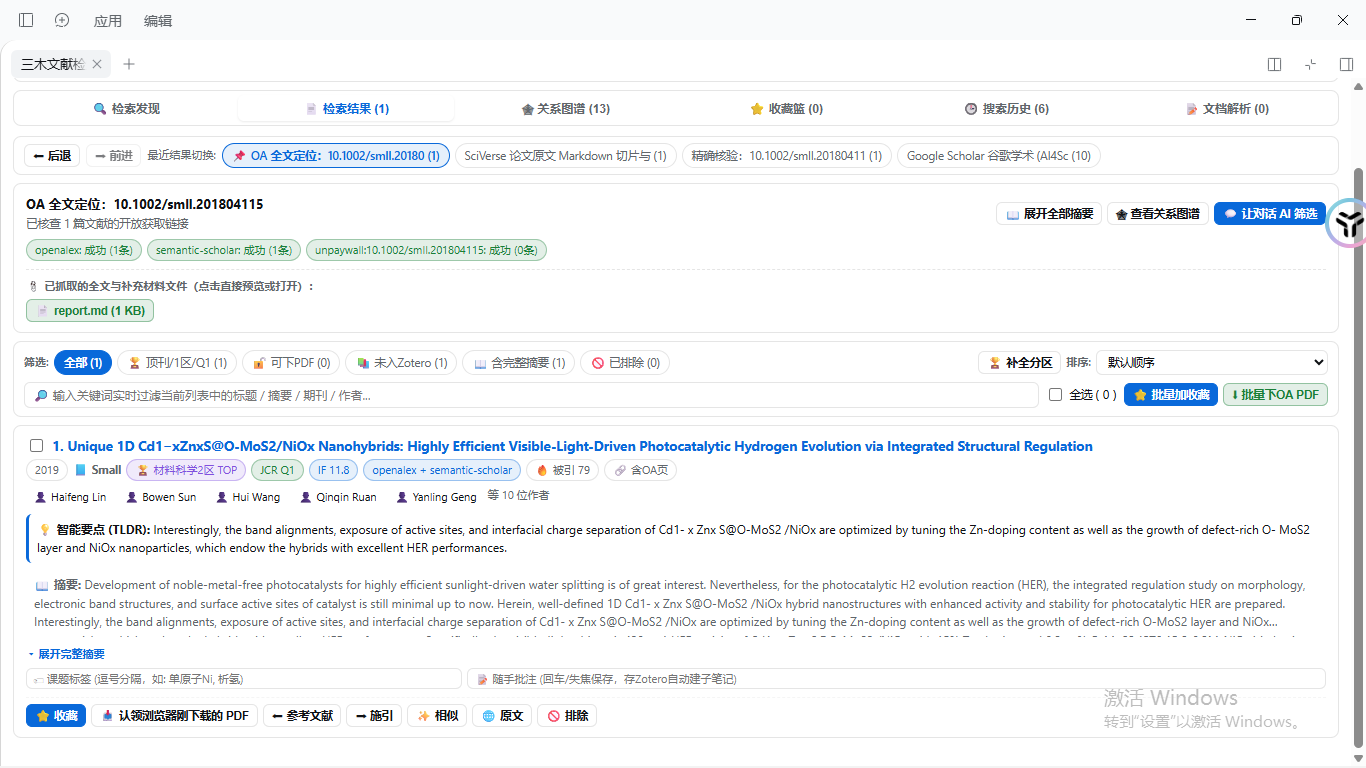
#### 3. Paper Cards with Venue Ranks & AI Summaries
> Displays CAS/JCR Q1, Impact Factor, warning status, AI TLDR summaries, inline notes, and topic tags.
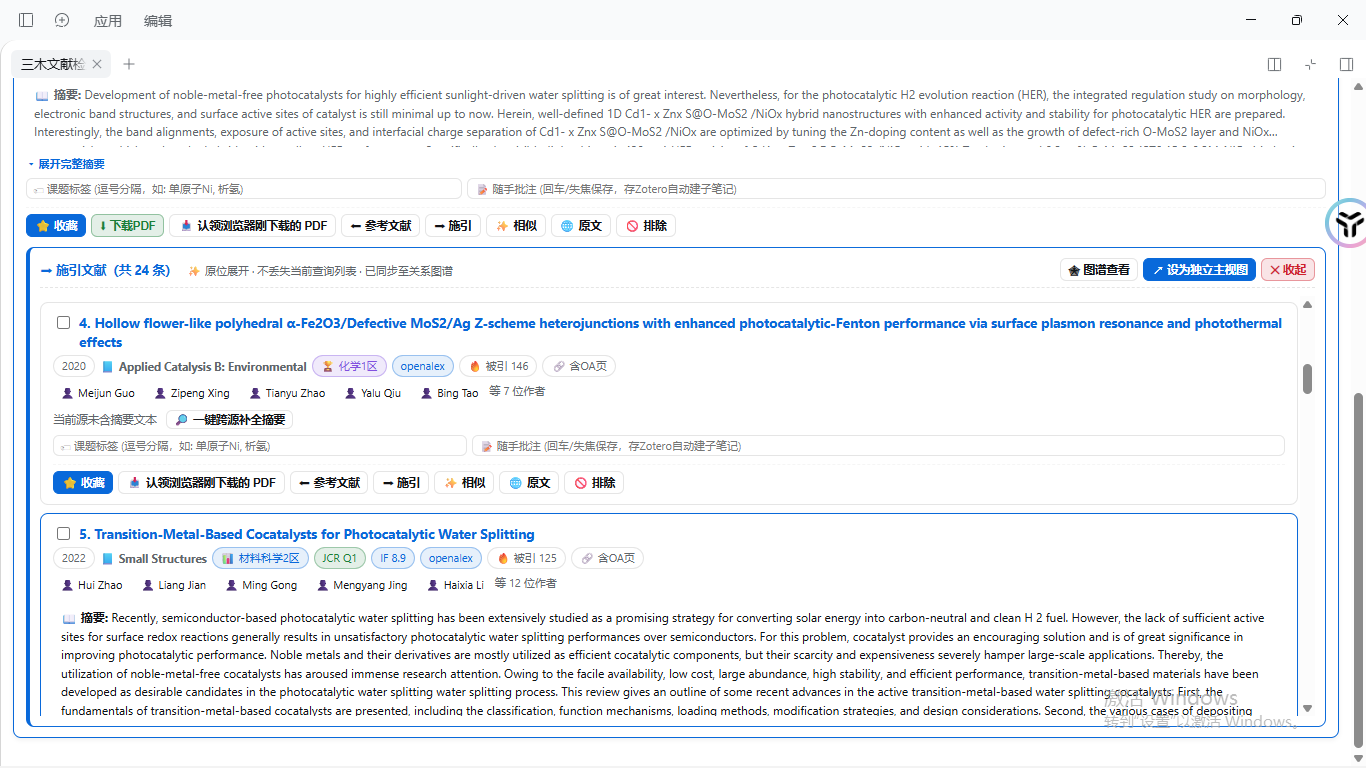
#### 4. Inline Citing Papers Drawer (Forward Tracking)
> Clicking "Citations" expands citing papers directly within the current card without navigating away or losing query context.
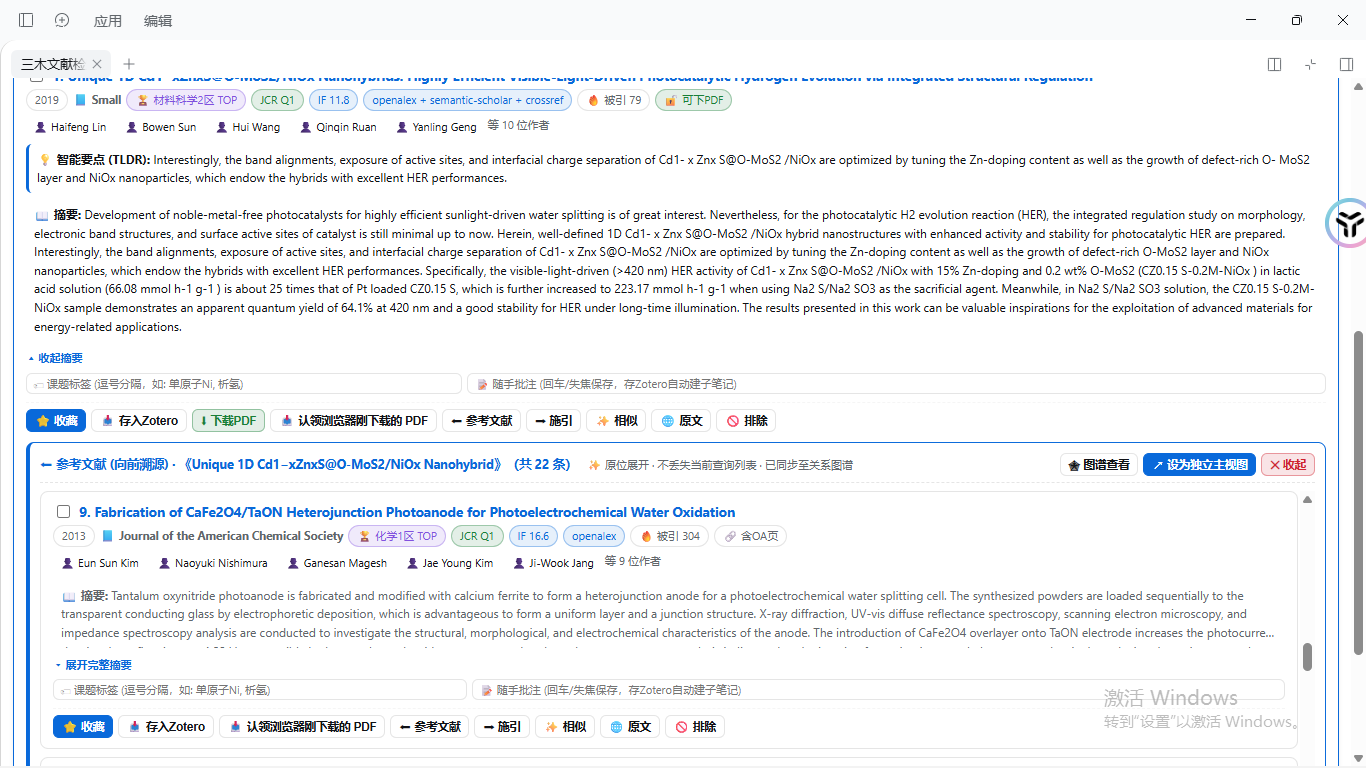
#### 5. Inline References Drawer (Backward Chasing)
> Clicking "References" traces backward to foundation works in place, supporting one-click abstract enrichment and Zotero sync.
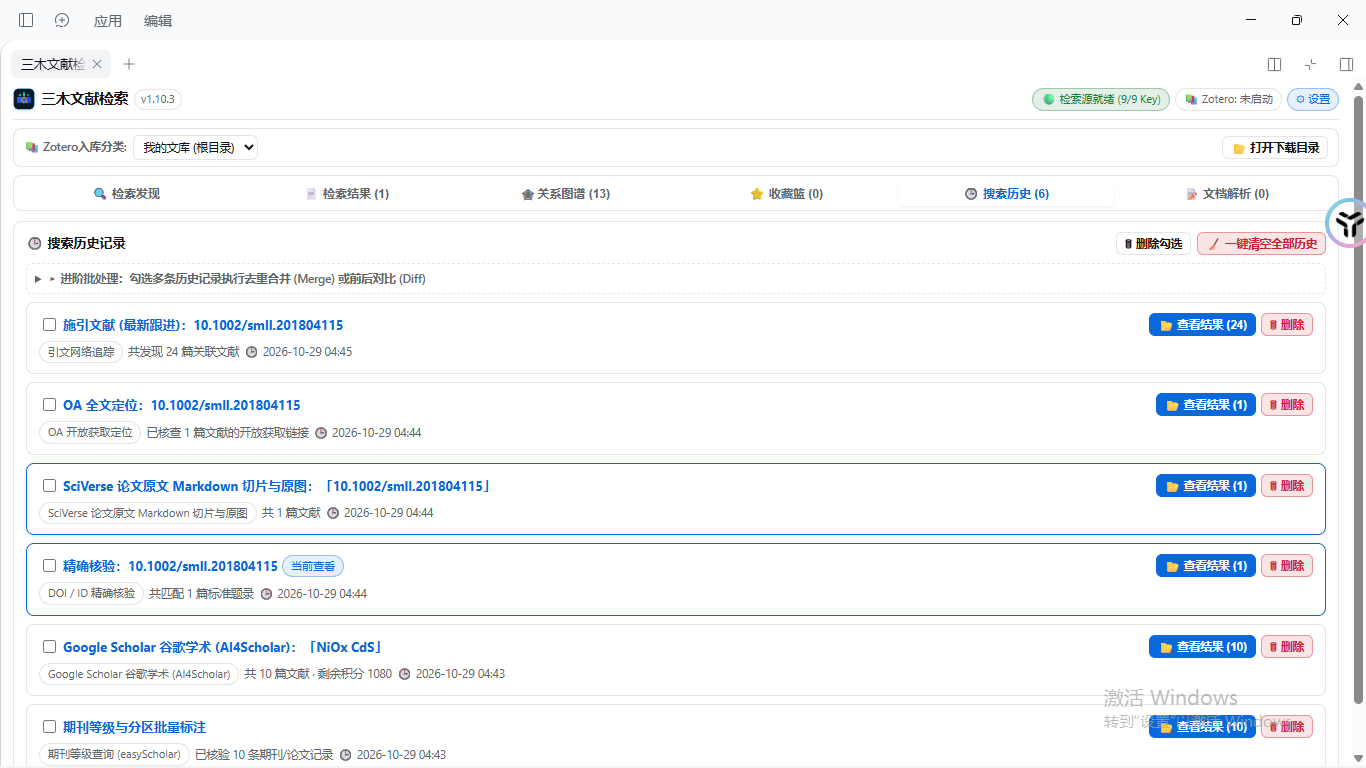
#### 6. Search History & Advanced Batch Operations
> Keeps a full record of previous search runs; supports multi-run deduplicated Merge and historical Diff comparisons.
📝 Academic Document Parsing to Obsidian Knowledge Base (sanmu-doc2md) — Click to expand textbook slicing & formula rendering
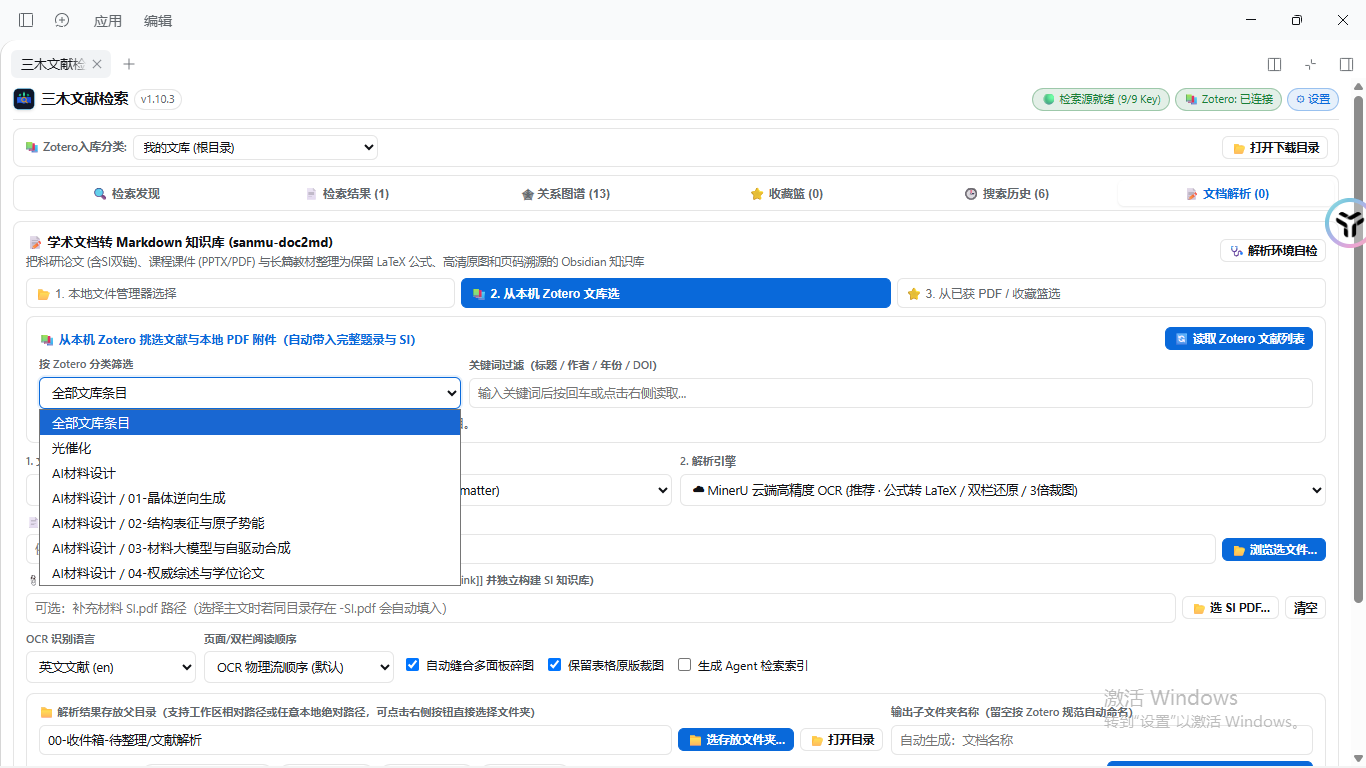
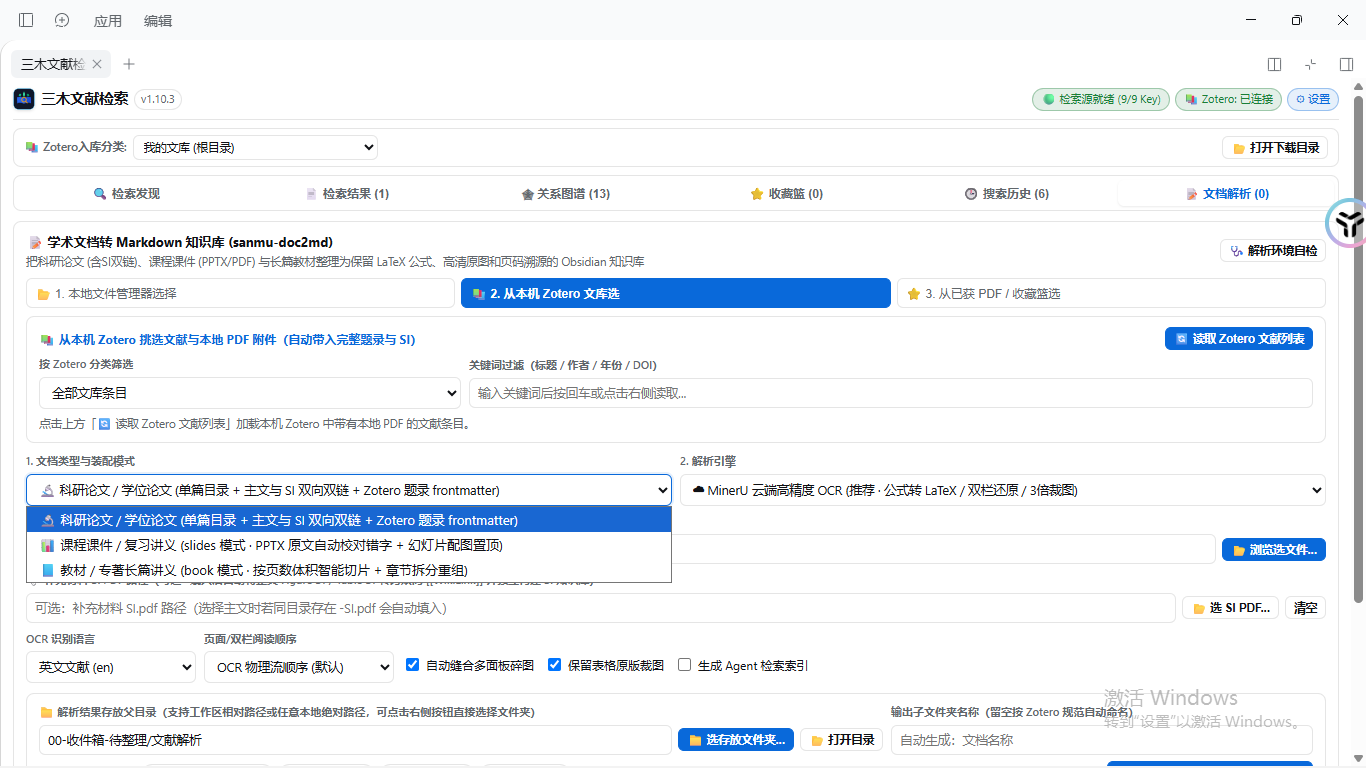
#### 1. Direct Document Selection from Local Zotero Collections
> Browses Zotero collections directly, importing complete metadata and local PDF/SI attachments into the conversion pipeline.
#### 2. Specialized Packaging Modes
> Supports research papers with two-way SI links, course slides restructuring, and long textbook chunked slicing by chapter.
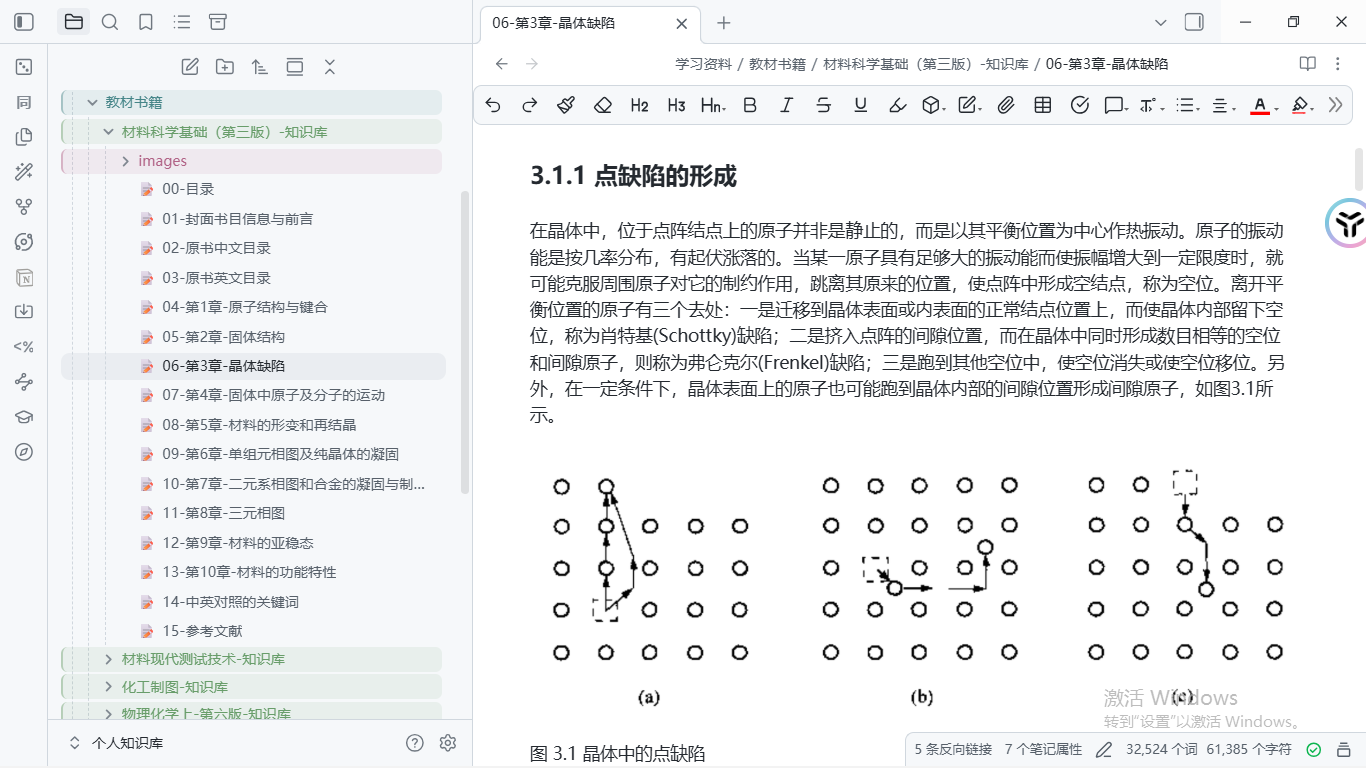
#### 3. Textbook Slicing in Action: Materials Science Fundamentals
> Splits long volumes into clean chapter notes with high-resolution crystal defect schematics inside Obsidian.
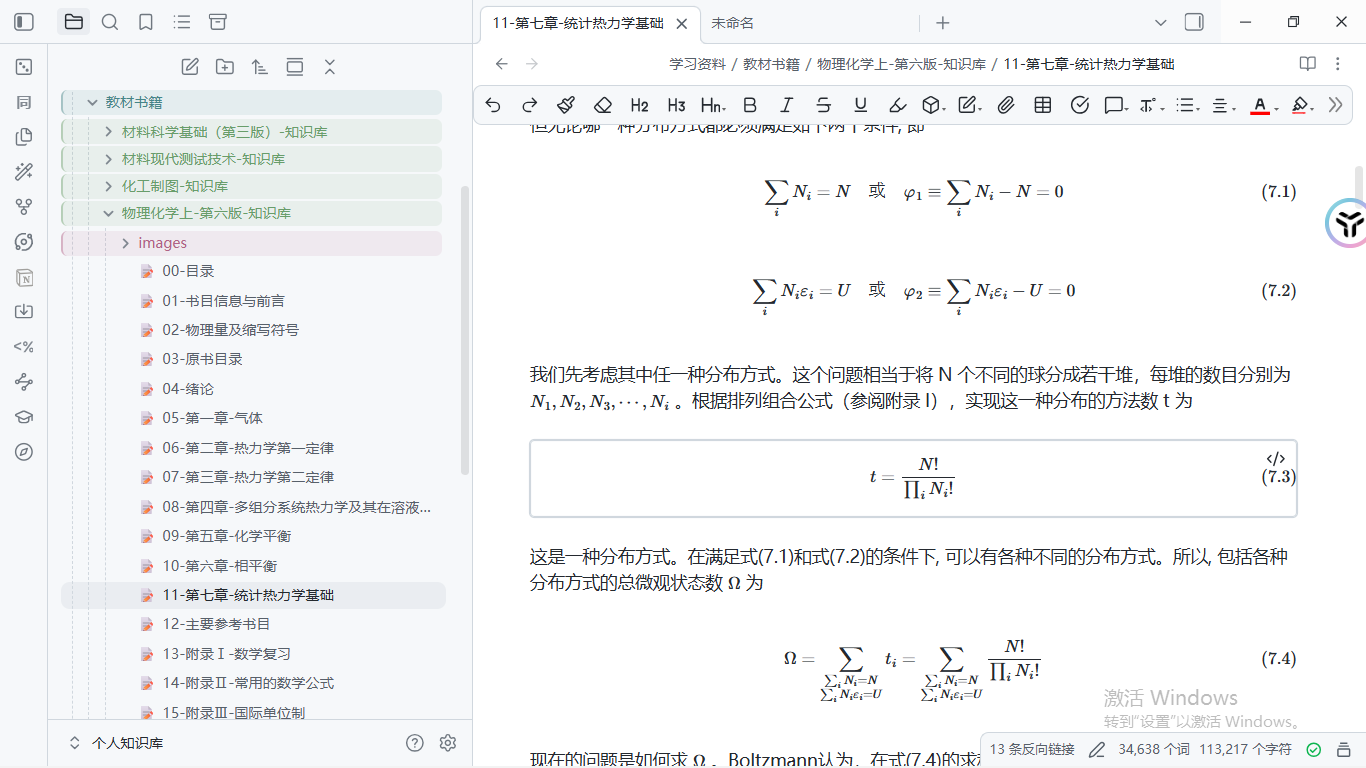
#### 4. Flawless LaTeX Math Rendering: Physical Chemistry Statistical Thermodynamics
> Complex mathematical formulas compile with a 100% KaTeX pass rate without artifacts or corrupt symbols.
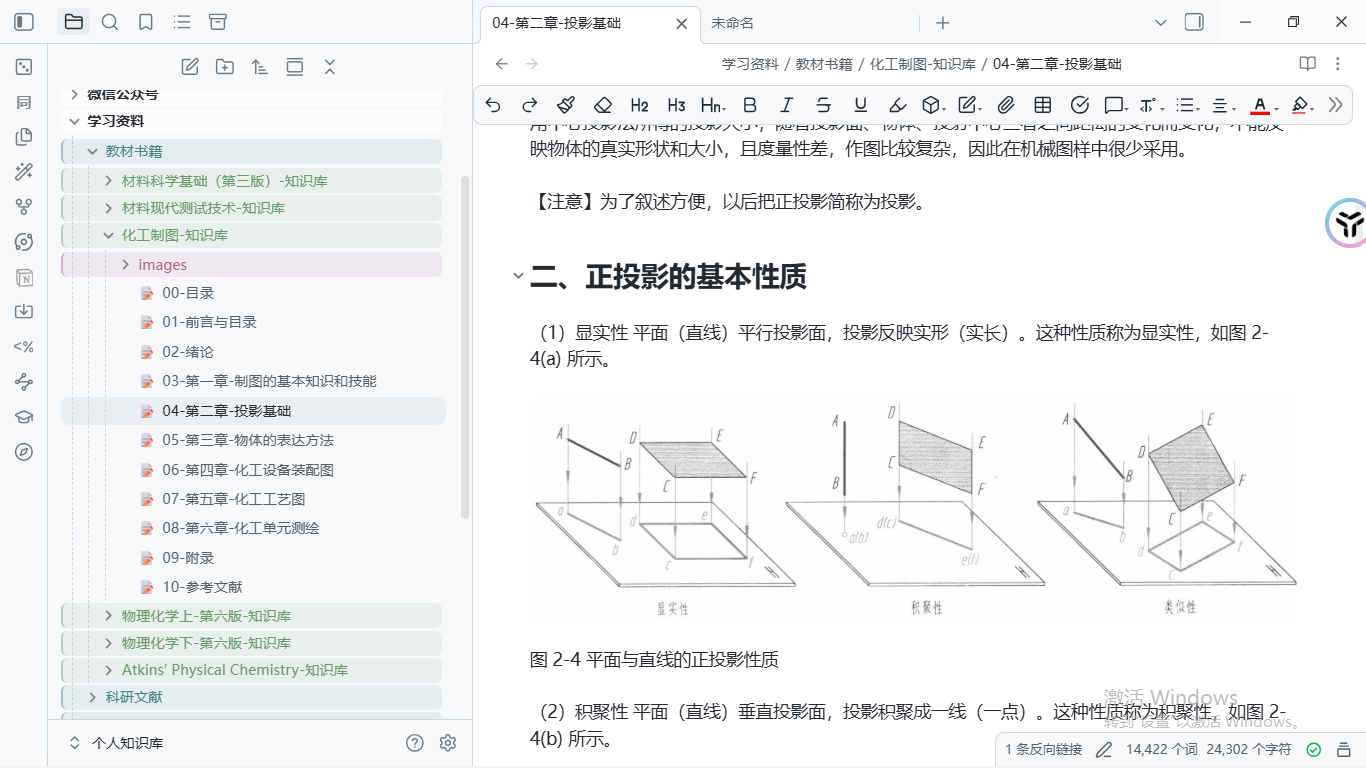
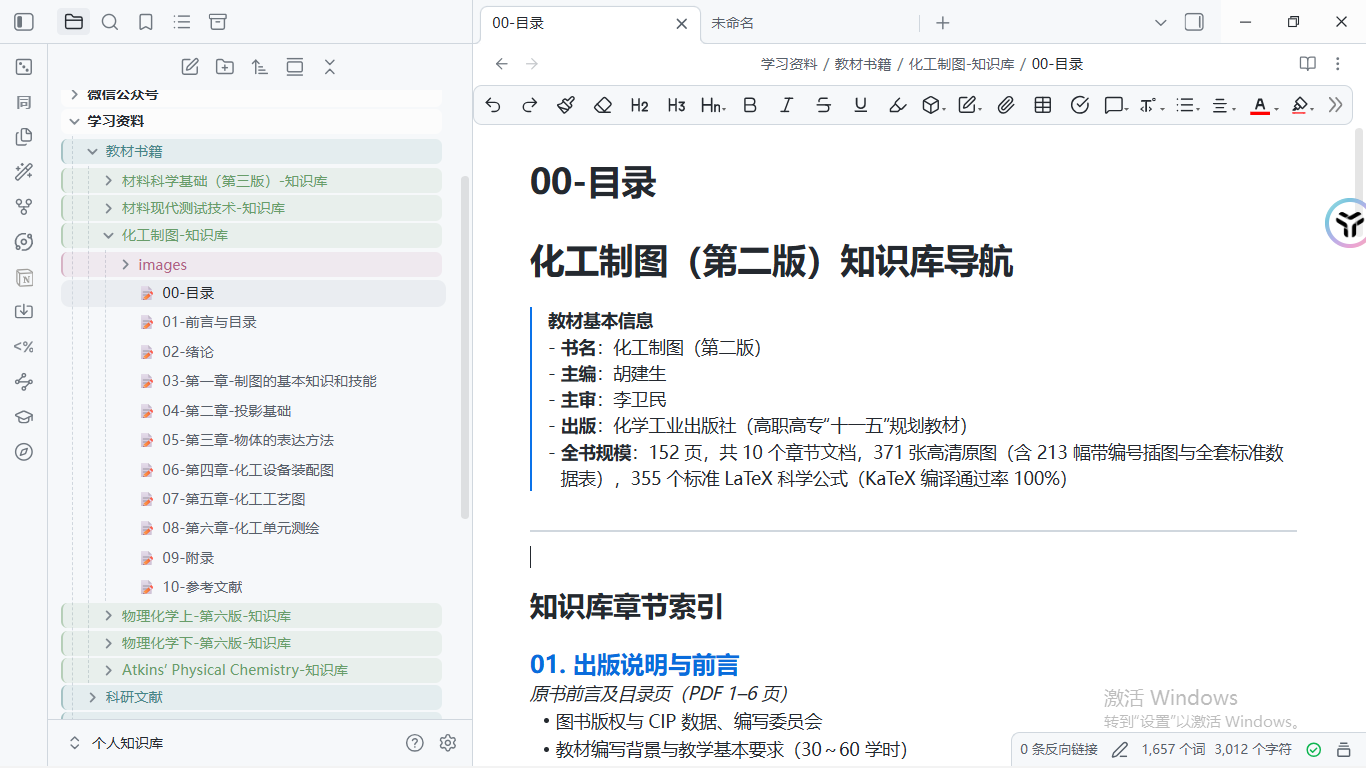
#### 5. High-Resolution Engineering Drawings: Chemical Engineering Graphics
> Preserves intricate technical diagrams, projection drawings, and standard data tables with 3x resolution crops.
#### 6. Auto-Generated Knowledge Base Navigation Index
> Builds structured navigation pages containing book details, chapter tables of contents, and figure indices.
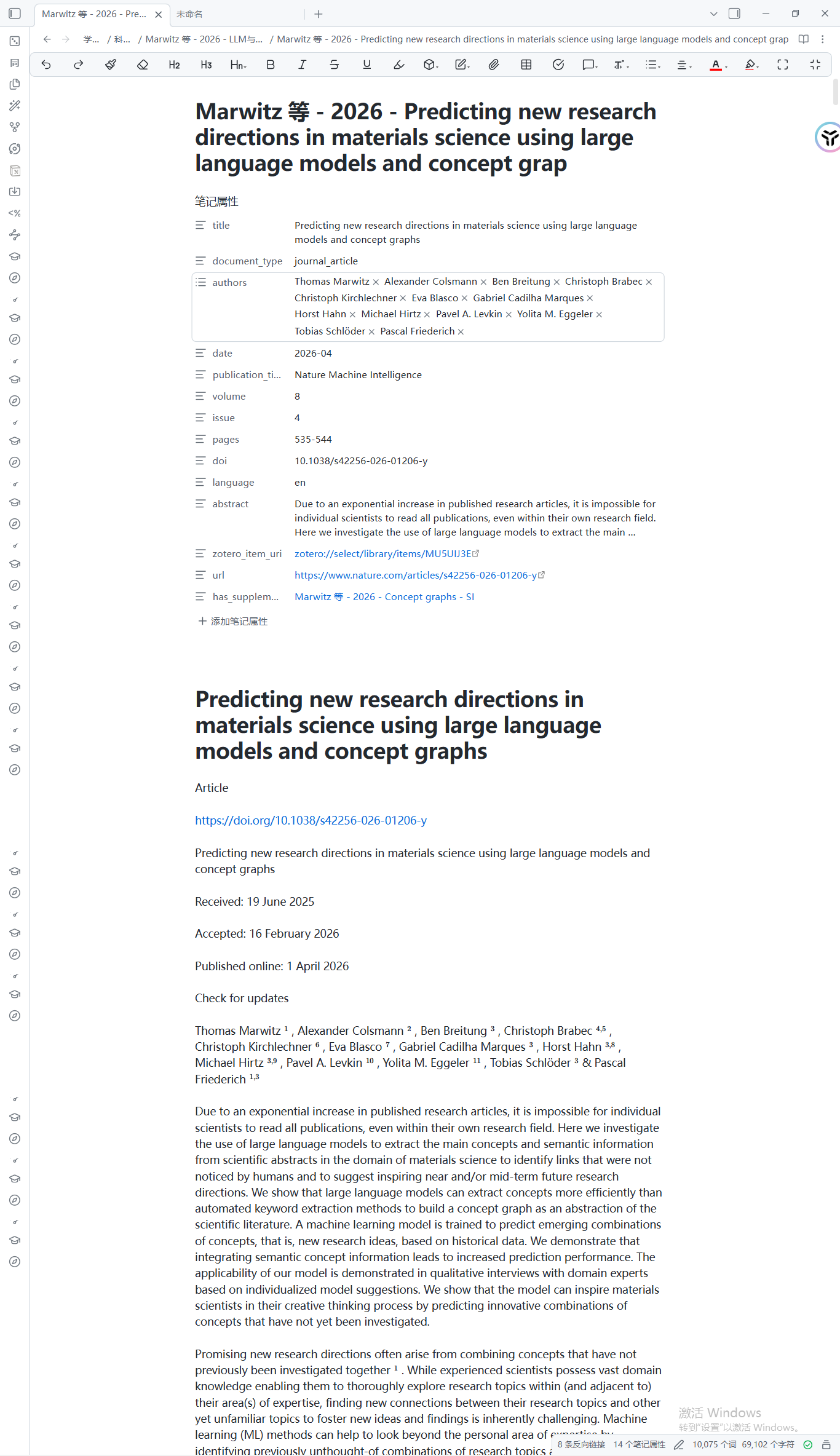
#### 7. Top-Journal Paper Integration: Nature Machine Intelligence
> Generates structured Obsidian properties, bidirectional links to supplementary material, and elegant typography.
📖 Evidence-Grounded Paper Reading & Deep Reports (sanmu-paper-reader) — Click to expand review reports, mechanism charts & citations
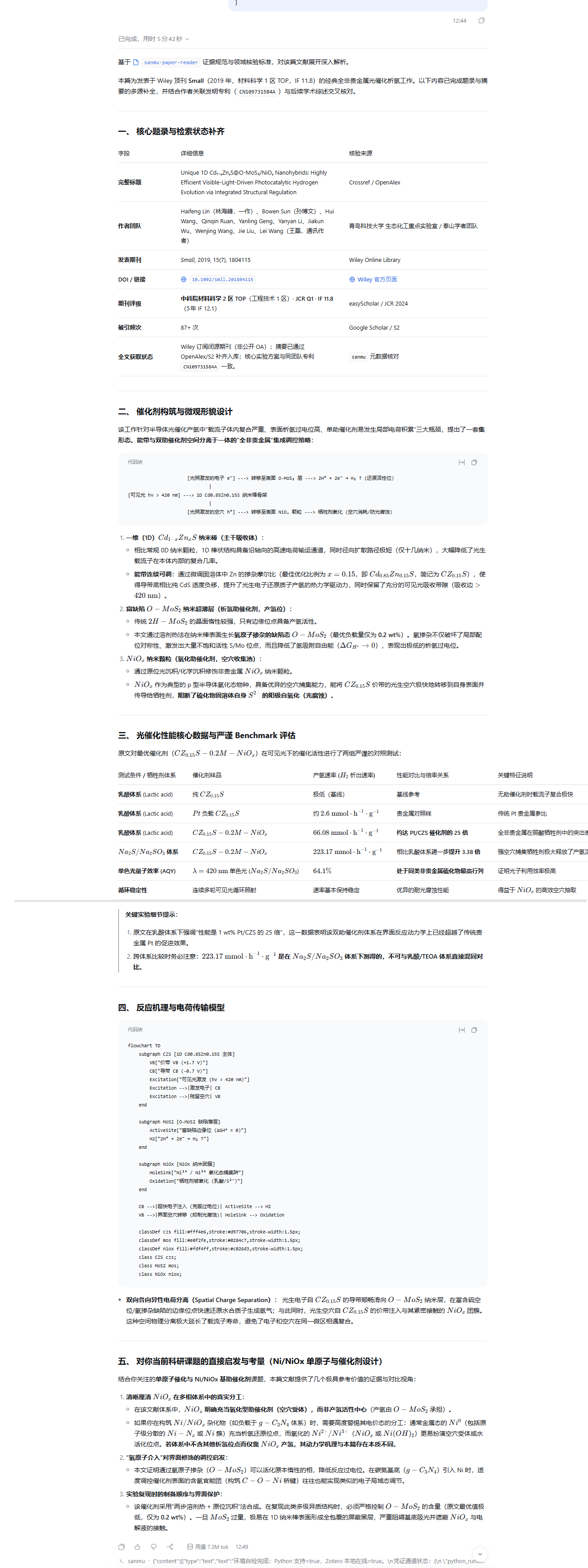
#### 1. Peer-Review-Grade Deep Reading Reports
> Generates comprehensive analyses including core metadata, catalyst morphology, hydrogen evolution benchmarks, and research insights.
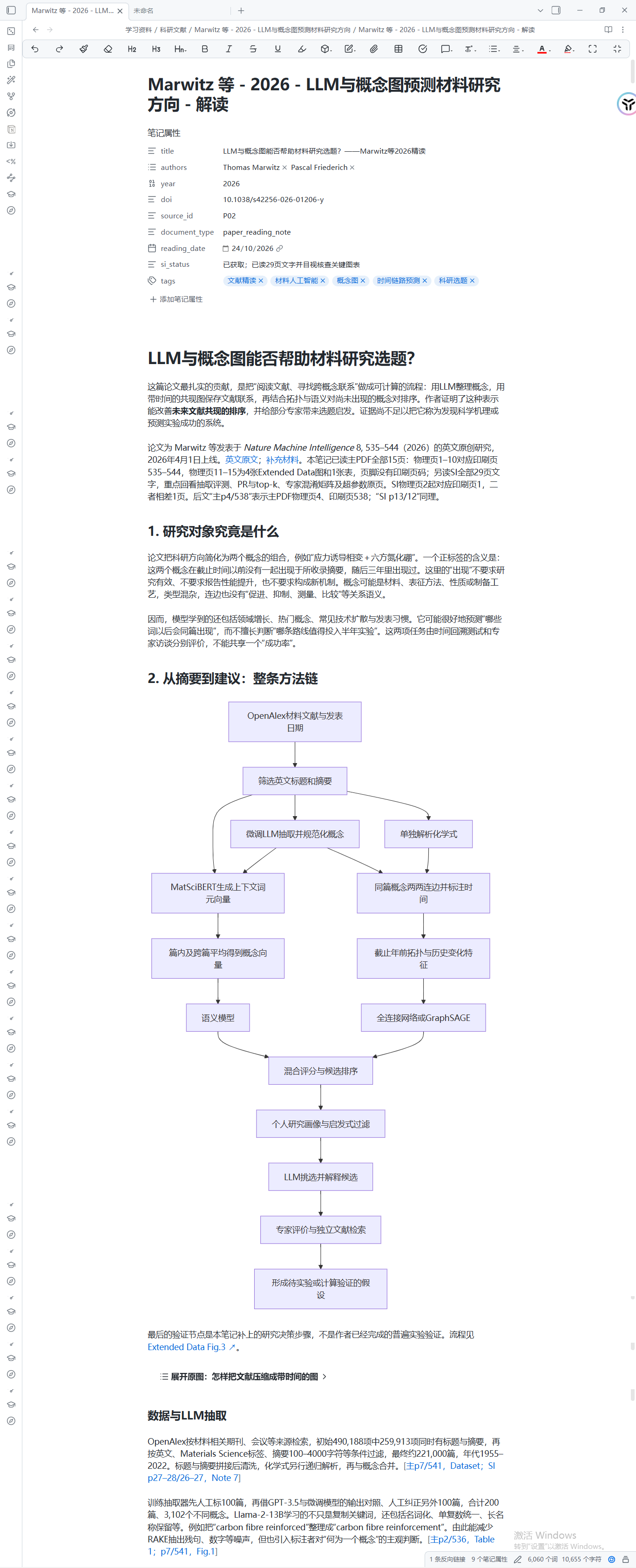
#### 2. Structured Obsidian Reading Notes & Method Chains
> Integrates fine-tuned LLM concept extraction, graph neural network flows, Mermaid pipelines, and testable hypotheses.
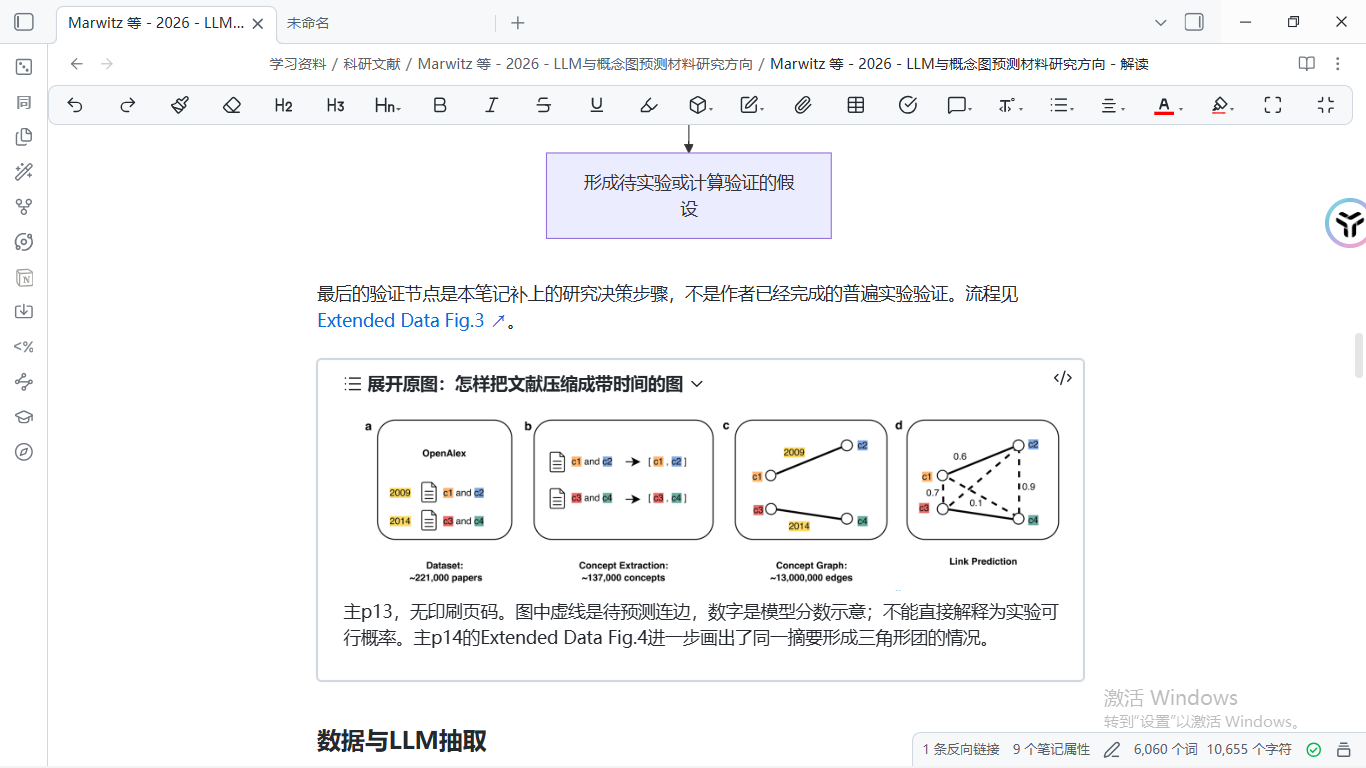
#### 3. Collapsible Figure-Text Alignment & Source Page Verification
> Embeds collapsible callouts comparing conclusions directly with source figures and verifies unprinted physical page numbers.
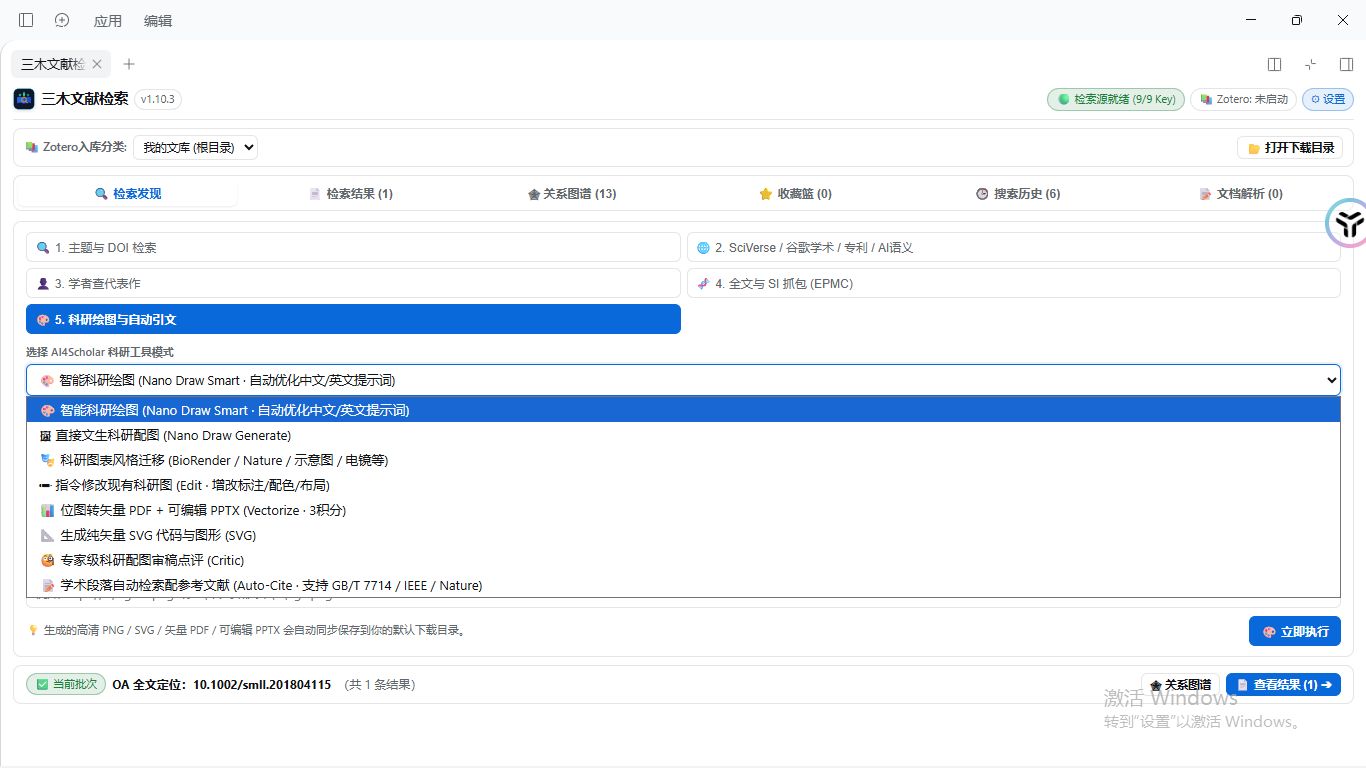
🎨 Scientific Drawing, Vectorization & Auto-Citations (AI4Scholar Toolbox) — Click to expand scientific drawing & styles
#### 1. AI4Scholar Scientific Capability Matrix
> Features smart diagram generation, style transfer, prompt edits, bitmap-to-vector PDF/PPTX, SVG output, diagram review, and auto-citation matching.
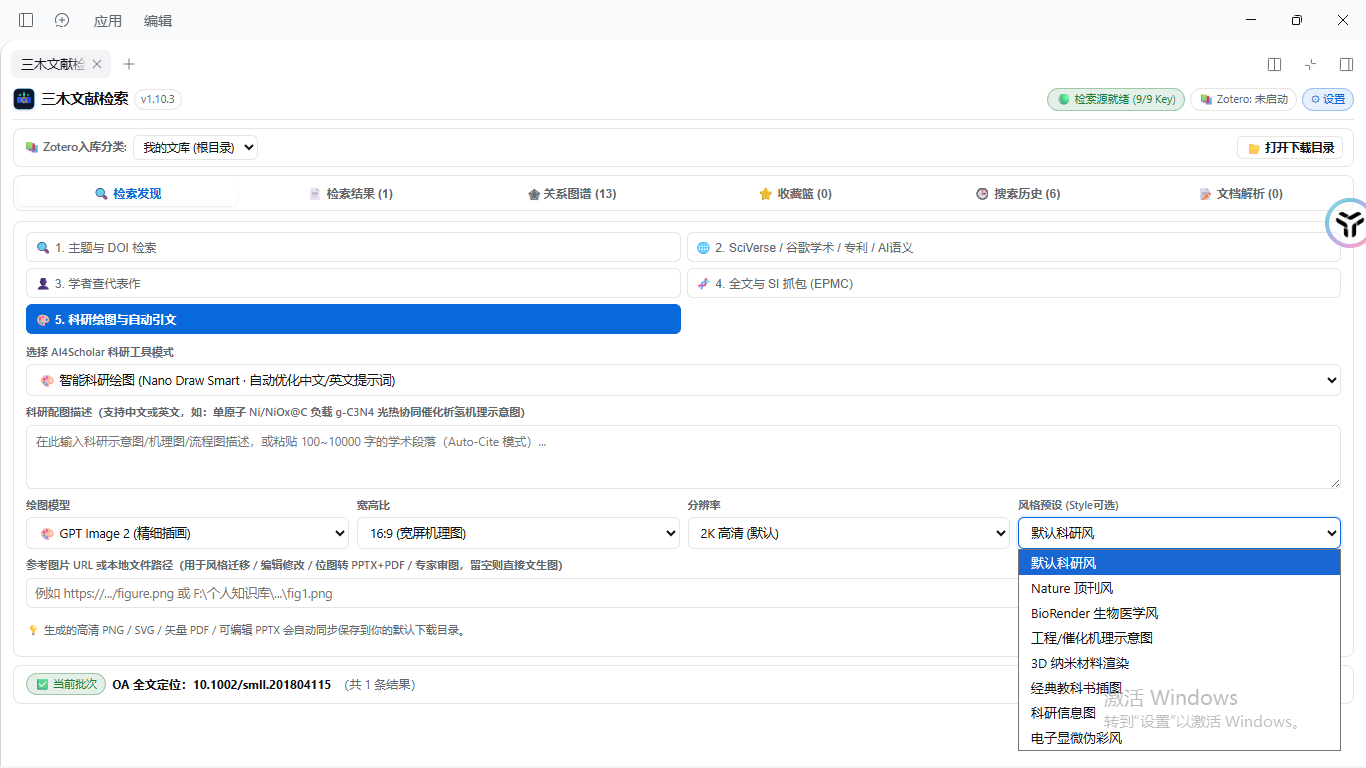
#### 2. Journal Style Presets & Parameter Tuning
> Supports 16:9 / 1:1 aspect ratios, 2K resolution, and built-in presets including Nature style, BioRender style, catalytic mechanisms, and 3D nanomaterials.
🖥️ Native Cross-Host Workbench & Settings (DeepSeek Harness / ZCode / Zotero) — Click to expand client setup & unified settings
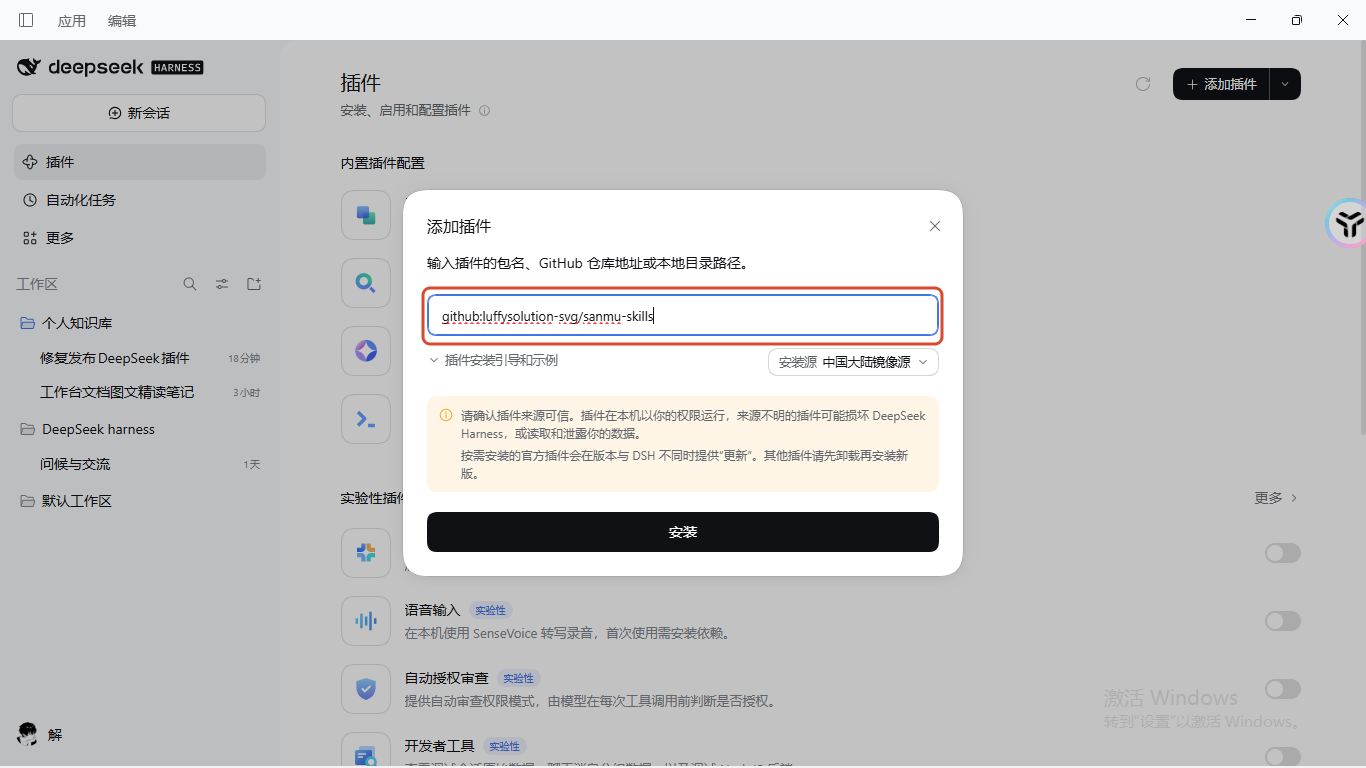
#### 1. DeepSeek Harness Desktop: Add Plugin
> Enter `github:luffysolution-svg/sanmu-skills` in DSH to install directly.
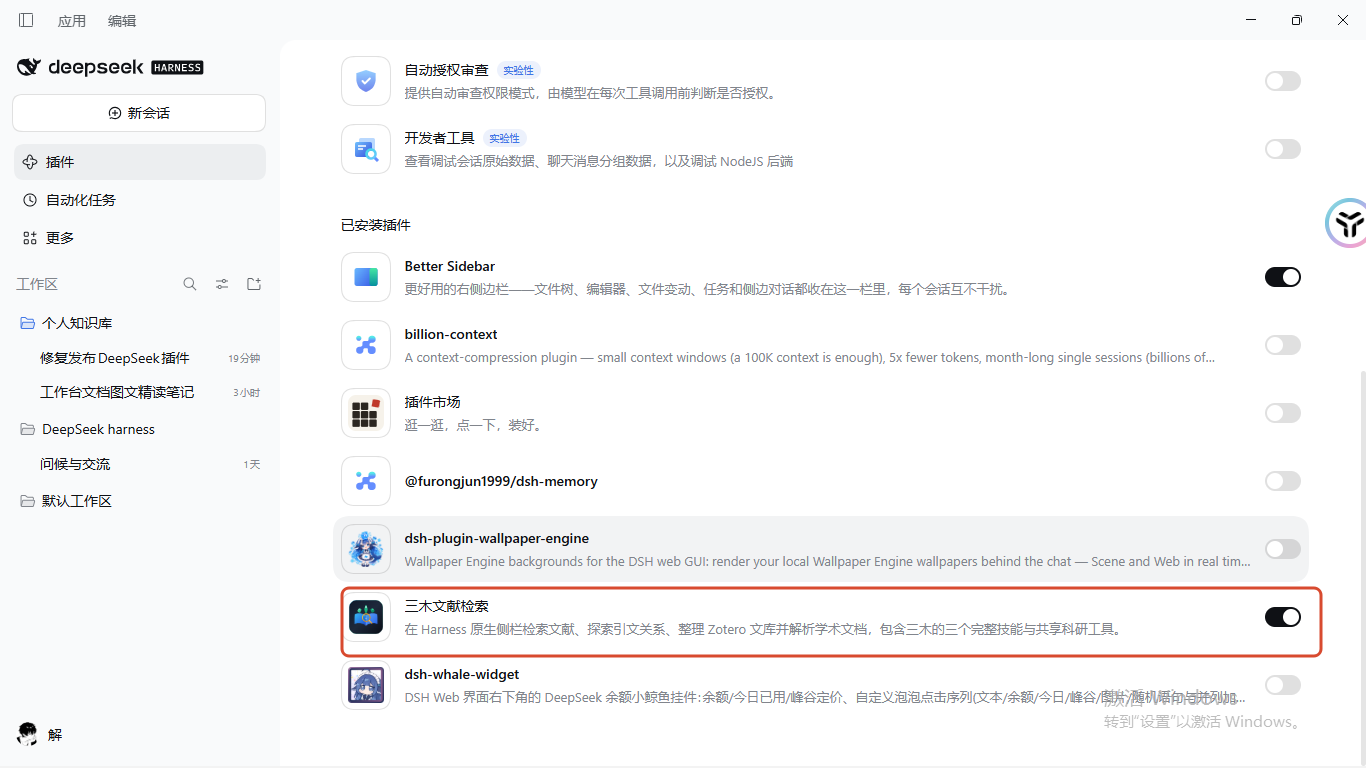
#### 2. DeepSeek Harness Desktop: Enable Plugin
> Toggle on "Sanmu Paper Search" in the plugin list to mount all 3 skills and 24 MCP tools.
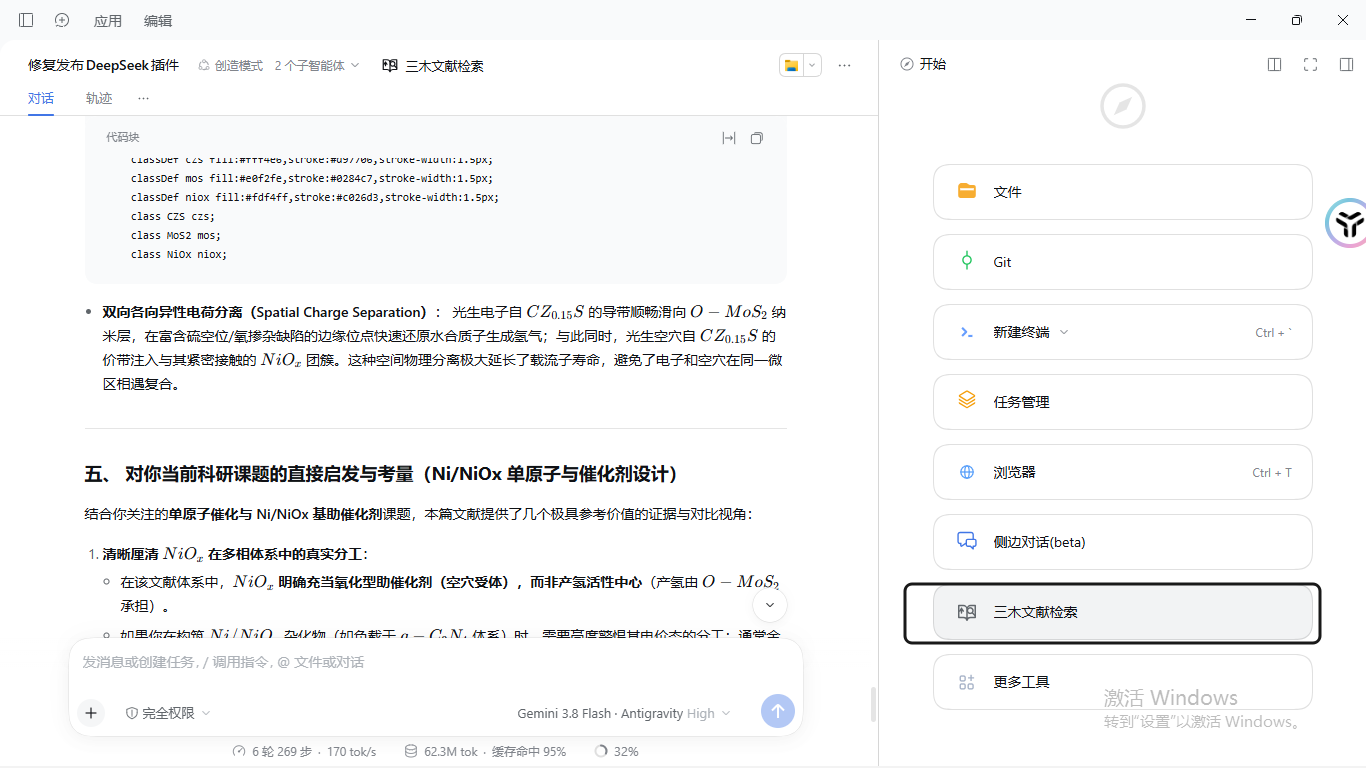
#### 3. DeepSeek Harness Desktop: Permanent Sidebar Entry
> Open the 1:1 complete research workbench directly from the right sidebar without opening external ports.
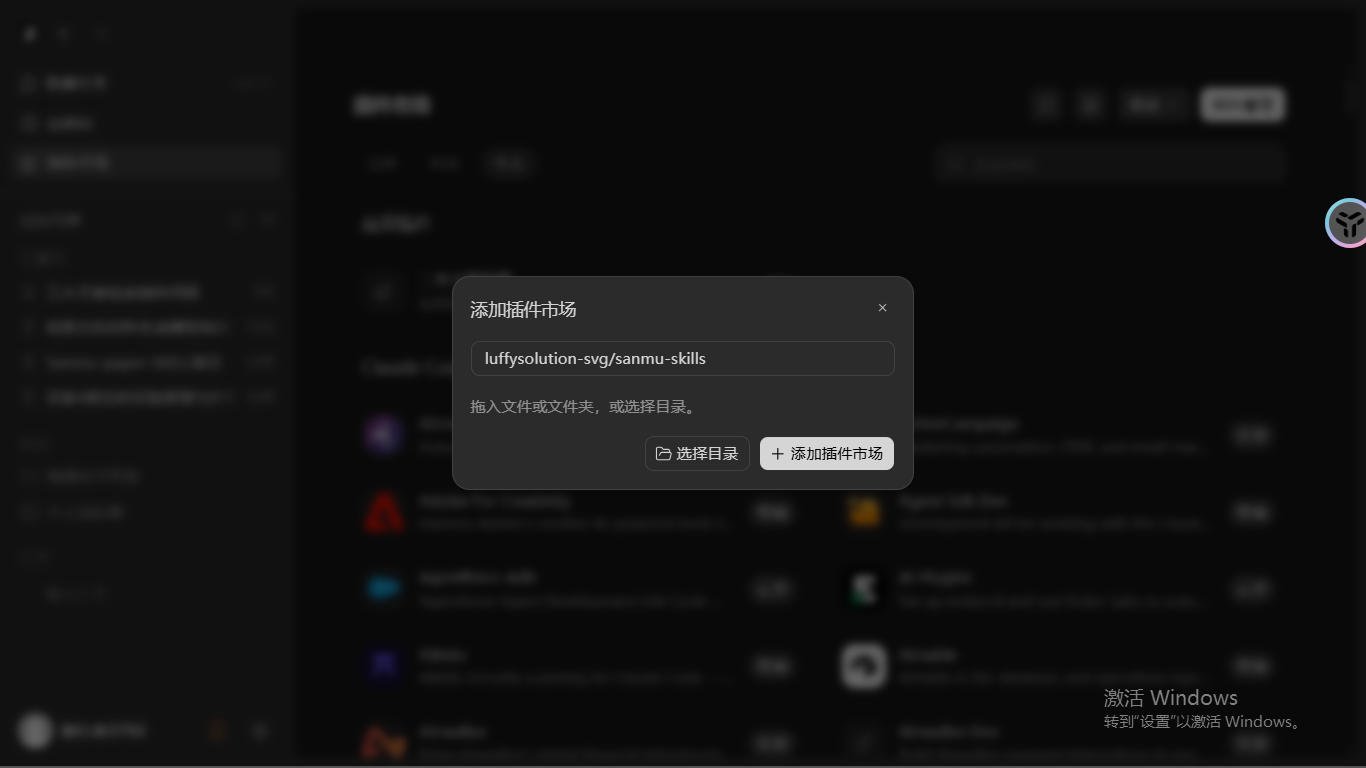
#### 4. ZCode Desktop: Add Plugin Marketplace
> Add the repository in the ZCode Plugin Marketplace with a single click.
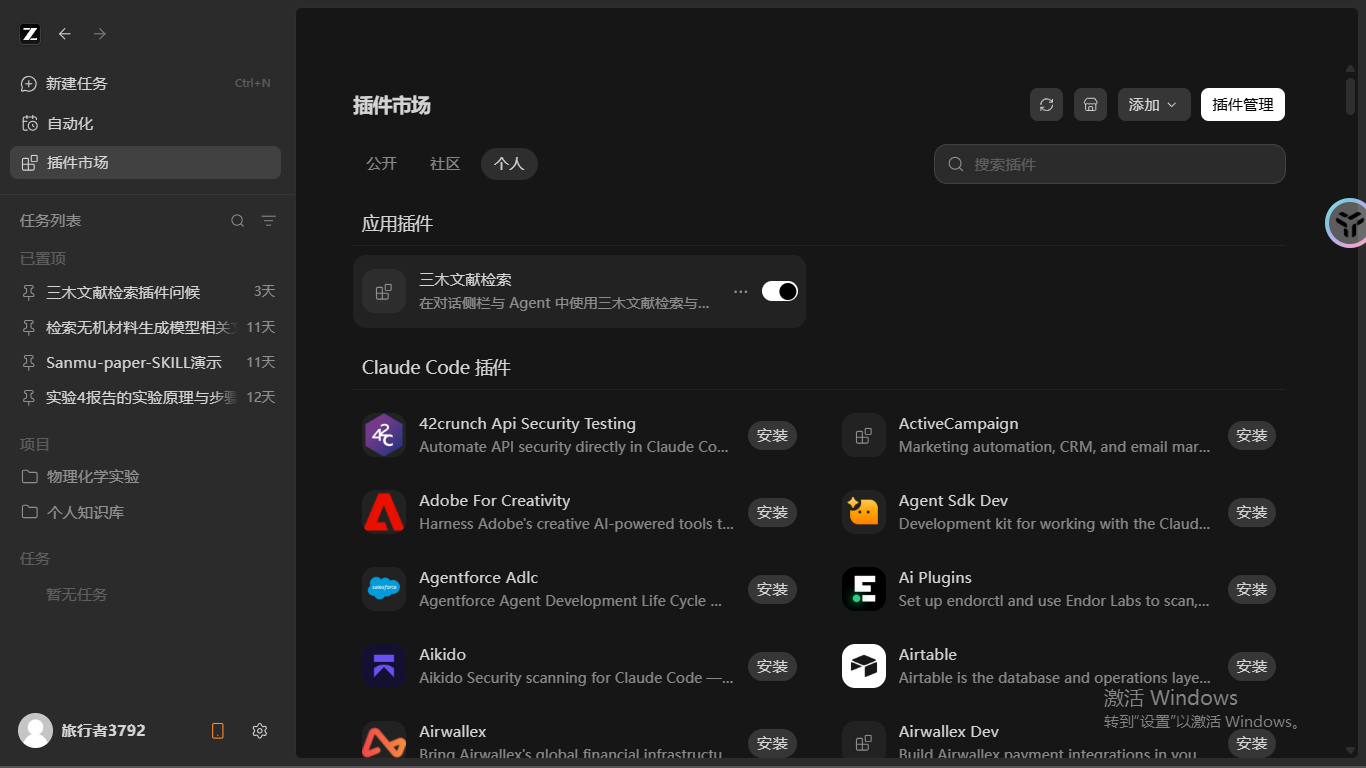
#### 5. ZCode Desktop: Plugin Management
> Manage and update installed plugins effortlessly from your personal library.
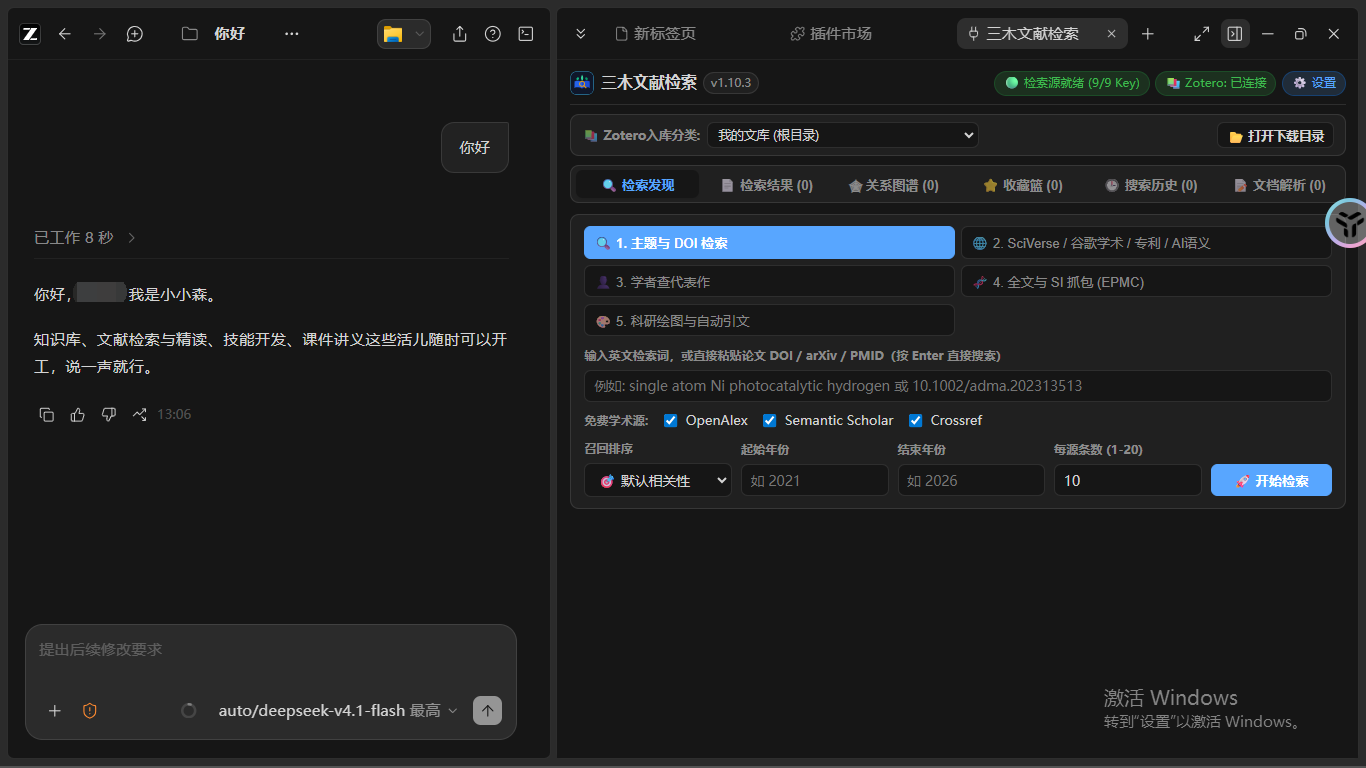
#### 6. ZCode Desktop: Native Workbench & Chat Synergy
> Chat with AI models on the left while interacting with the visual graph, literature search, and Zotero on the right.
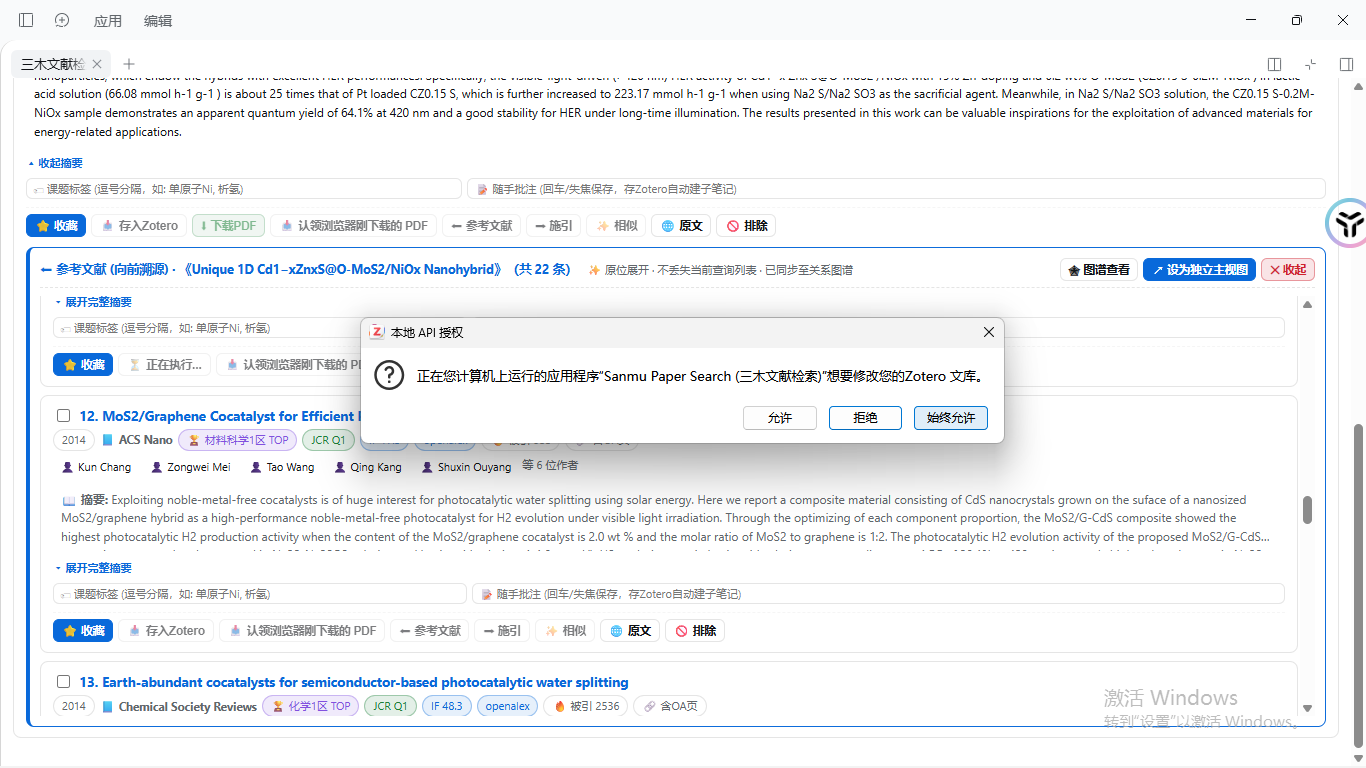
#### 7. Zotero Local API Authorization
> Follows secure local API protocols, requesting official user authorization to keep literature libraries safe.
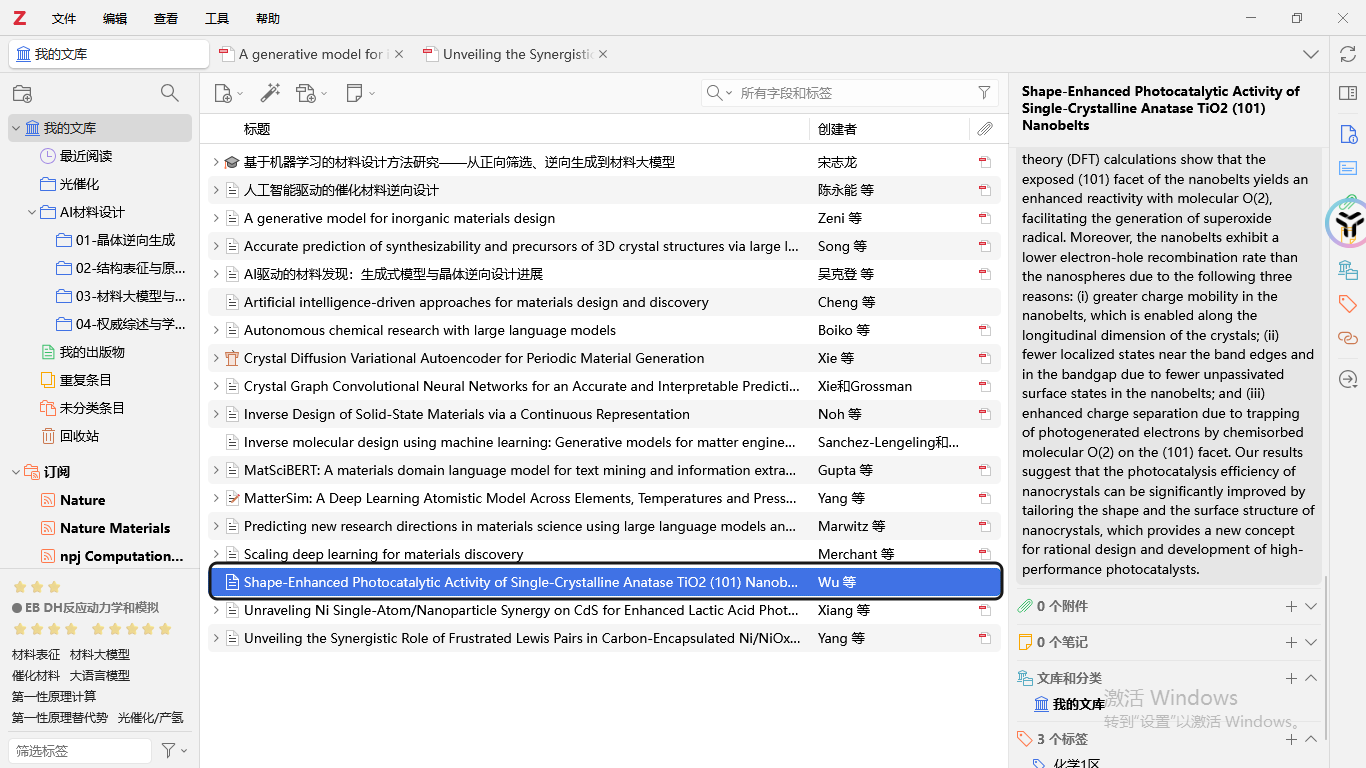
#### 8. Sync into Zotero Library & Tags
> Syncs paper metadata, journal ranks, and personal annotations directly into target Zotero collections.
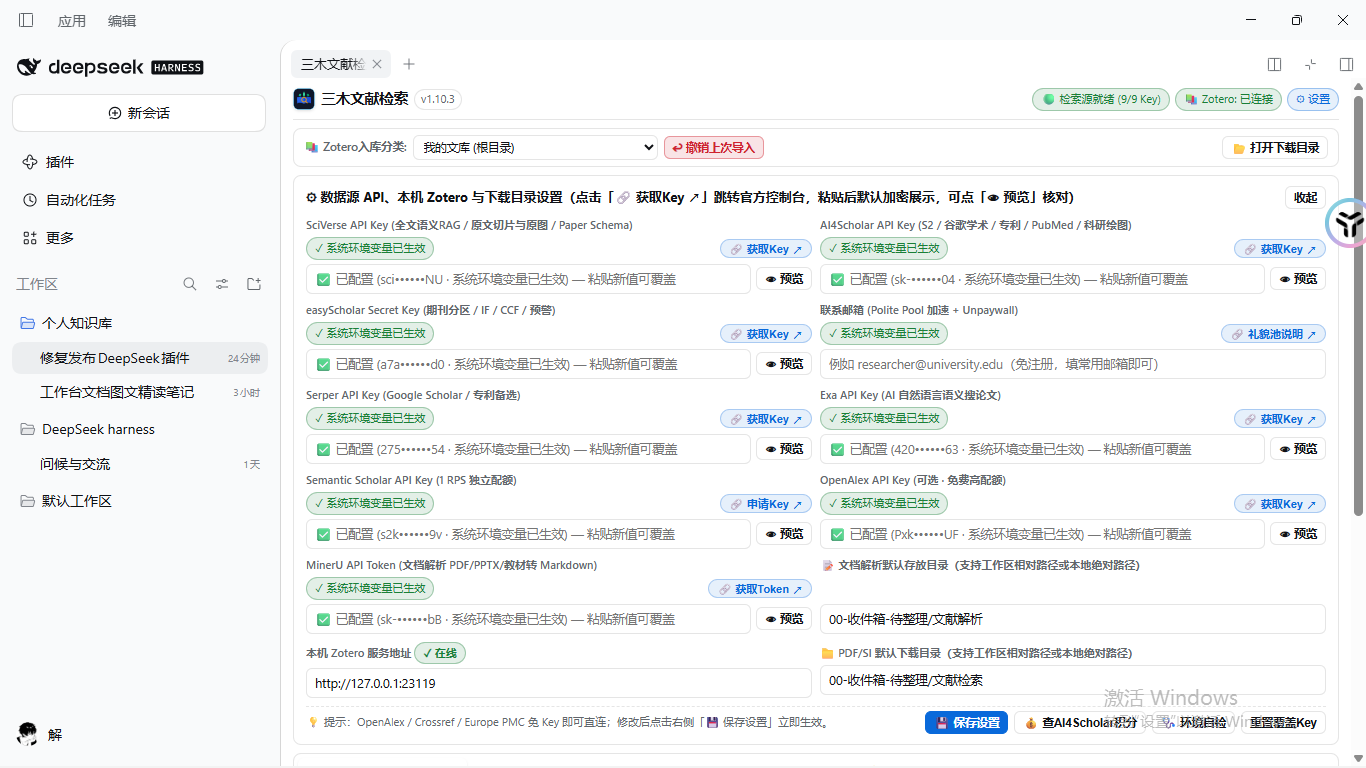
#### 9. Unified API Credentials & Settings Center
> Configures 9 scholarly/AI API keys, Zotero endpoints, and local storage paths in one visual panel with diagnostics.
## Installation
Version 1.10.3 packages **three complete skills, a portable CLI and 24 MCP tools**, with the complete ZCode workbench embedded through native DeepSeek Harness entry points and a browser workbench for terminal hosts. Requirements: Node.js ≥22.20 and Python ≥3.10; Git is needed for Git installation. DSH Desktop 0.2.1-rc.3 is supported with its Electron Node.js 22.20.0 runtime.
### Installation channels
| Channel | How to install | Contents |
| --- | --- | --- |
| **npm / npx skills** (general) | Global install (`npm i -g skills`) or run directly via `npx skills add luffysolution-svg/sanmu-skills --all -g --copy` | Three skills, can be selected individually |
| **Claude Code** | Repository marketplace, see below | Three skills + CLI + MCP + browser workbench |
| **Codex** | Repository marketplace, see below | Three skills + CLI + MCP + browser workbench |
| **Pi ≥1.4** | `pi install git:github.com/luffysolution-svg/sanmu-skills` | Three skills + CLI + native MCP + browser workbench |
| **DeepSeek Harness** | Search "三木文献检索" in plugin market for one-click install/update, or add via GitHub specifier / TGZ URL | Three skills + CLI + MCP + complete embedded workbench |
| **ZCode** | Plugin marketplace or Release plugin bundle, see below | Collection plugin / side-panel search plugin |
| **Tencent SkillHub** | [doc2md](https://skillhub.cn/skills/sanmu-doc2md) · [reader](https://skillhub.cn/skills/sanmu-paper-reader) · [search](https://skillhub.cn/skills/sanmu-paper-search) | Individual skills |
| **WorkBuddy** | Search for "三木" in the client under 专家·技能·连接器 → 技能 (Experts · Skills · Connectors → Skills) | Individual skills |
| **skills.sh / SkillsMP** | [Collection page](https://skills.sh/luffysolution-svg/sanmu-skills); install with the npx command | Three skills |
| **GitHub Release** | [Download ZIP](https://github.com/luffysolution-svg/sanmu-skills/releases/latest) | Collection package and per-platform packages |
Pick one method to avoid duplicate skills. The complete plugin prepares Python dependencies and KaTeX in a private data directory on first document conversion; `node "/scripts/sanmu.mjs" setup` prepares them in advance, and `doctor` only checks status. `npx skills add` installs standalone skills and their scripts; it does not register the complete MCP/workbench. API keys, a MinerU token for cloud OCR, and Zotero 8+ write authorization still come from each user. A repository marketplace or Git package is independent of inclusion in an official directory.
### Ask your AI assistant to install it (recommended)
Send the following to the AI coding assistant you are using:
```text
Please install and configure Sanmu's sanmu-skills collection:
https://github.com/luffysolution-svg/sanmu-skills
1. Check Node >=22.20, Python >=3.10 and Git; DSH Desktop 0.2.1-rc.3 supports Electron Node 22.20.0.
Check existing installations for local modifications. Choose the current host's complete package:
Claude: claude plugin install sanmu-skills --marketplace luffysolution-svg/sanmu-skills
Codex: codex plugin marketplace add luffysolution-svg/sanmu-skills && codex plugin add sanmu-skills@sanmu-skills
Pi >=1.4: pi install git:github.com/luffysolution-svg/sanmu-skills
DSH Desktop: use the existing Plugins → Add Plugin UI with github:luffysolution-svg/sanmu-skills or the complete Release TGZ URL.
Manage the reserved desktop profile in the Desktop UI; CLI is for other existing profiles. Open the complete embedded workbench from the conversation header or right-sidebar + menu.
2. Locate the installed root and run node "/scripts/sanmu.mjs" doctor.
Use setup to prepare private Python/KaTeX dependencies in advance; document conversion can prepare them automatically.
3. In DSH, open Sanmu Paper Search in the conversation header or right-sidebar + menu. On terminal hosts, use open_panel or sanmu panel for the browser workbench.
4. Check credential presence without displaying values. Free search can start without keys.
Cloud OCR requires MINERU_API_TOKEN; paid providers require their own account and quota.
Zotero writes require local authorization in Zotero 8+.
5. If the host supports only skills, use npx skills add luffysolution-svg/sanmu-skills --all -g --copy
(or skills add luffysolution-svg/sanmu-skills --all -g --copy if skills CLI is installed via npm install -g skills),
and explain that this installs standalone skills, not the complete MCP/browser workbench.
6. Report the installed location, checks, workbench entry and remaining user configuration.
```
Full installation instructions for each skill: [doc2md](skills/sanmu-doc2md/README.en.md#installation) · [reader](skills/sanmu-paper-reader/README.en.md#installation) · [search](skills/sanmu-paper-search/README.en.md#installation)
### Command line
Available via the [skills installer](https://github.com/vercel-labs/skills) as a globally installed npm CLI or directly via npx:
```bash
# Option A: Install skills CLI globally via npm (recommended for regular Agent skill users)
npm install -g skills
skills add luffysolution-svg/sanmu-skills --all -g --copy
# Option B: Run directly via npx without global installation
npx skills add luffysolution-svg/sanmu-skills --all -g --copy
# A single skill (e.g., doc2md)
skills add luffysolution-svg/sanmu-skills --skill sanmu-doc2md -g
# Or via npx: npx skills add luffysolution-svg/sanmu-skills --skill sanmu-doc2md -g
# List and update
skills add luffysolution-svg/sanmu-skills --list
skills update
# Clone repository manually
git clone https://github.com/luffysolution-svg/sanmu-skills.git
```
Requires Git and a Node.js version supported by the [skills installer](https://github.com/vercel-labs/skills). Standalone skills only install SKILL instructions and scripts. Prepare private dependencies per skill guide: [doc2md](skills/sanmu-doc2md/README.en.md#installation) · [reader](skills/sanmu-paper-reader/README.en.md#installation) · [search](skills/sanmu-paper-search/README.en.md#installation).
### Claude Code
```bash
claude plugin marketplace add luffysolution-svg/sanmu-skills
claude plugin install sanmu-skills@sanmu-skills
```
You can also do it in one step inside a session: `/plugin install sanmu-skills --marketplace luffysolution-svg/sanmu-skills`
### Codex
```bash
codex plugin marketplace add luffysolution-svg/sanmu-skills
codex plugin add sanmu-skills@sanmu-skills
```
Requires a recent Codex CLI that supports `plugin marketplace`. Start a new session after installation; you can manage plugins under `/plugins`.
### Pi
```bash
pi install git:github.com/luffysolution-svg/sanmu-skills
```
Pi ≥1.4 uses its native `registerMcpServer` API. No third-party MCP bridge is required.
### DeepSeek Harness (DSH)
Supports **DSH Desktop 0.2.1-rc.3**, including its **Electron Node.js 22.20.0** runtime. Standalone Node.js must be **≥22.20**; document conversion also needs Python ≥3.10.
#### Desktop installation
You can search for "三木文献检索" or `sanmu-skills` in the DSH plugin market for one-click installation and automatic updates. Alternatively, in the DSH Desktop application, open **Plugins → Add Plugin** and enter the GitHub specifier:
```text
github:luffysolution-svg/sanmu-skills
```
You can also enter the complete TGZ download URL from [GitHub Release](https://github.com/luffysolution-svg/sanmu-skills/releases/latest), for example:
```text
https://github.com/luffysolution-svg/sanmu-skills/releases/download/v1.10.3/sanmu-skills-1.10.3.tgz
```
Confirm installation and enable `sanmu-skills` to open the complete workbench directly from the conversation header or right sidebar. Manage the reserved `desktop` profile through this UI; the ordinary `dsh` CLI does not manage that profile. For an existing profile with another name, use:
```bash
# Direct marketplace/repo add
dsh plugin --profile add luffysolution-svg/sanmu-skills
# Or via GitHub specifier
dsh plugin --profile add github:luffysolution-svg/sanmu-skills
```
### ZCode
Use **Plugin Marketplace → Add → Add Plugin Marketplace** in ZCode Desktop. Add this repository, or extract `sanmu-paper-search-zcode-plugin-.zip` from [GitHub Release](https://github.com/luffysolution-svg/sanmu-skills/releases/latest) and add a local marketplace for the extracted plugin. The ZCode artifact also includes all three complete skills. Ordinary Desktop users do not need a global `zcode` CLI.
### Complete-package runtime and UI
`SANMU_DATA_DIR` selects private storage, `SANMU_PYTHON` selects a Python executable, and `SANMU_NO_AUTO_SETUP=1` disables automatic dependency installation. Use MCP `open_panel` or `node "/scripts/sanmu.mjs" panel` for the workbench. Terminal hosts keep the existing search, graph, basket, history and conversion UI in the browser; reading handoffs are copied back to the AI conversation. Saved API settings also apply to CLI `search`, `fetch-pdf`, `doc2md`, and `reader`. The portable `zotero_library` tool supports readback-verified metadata and note synchronization without a separate Zotero plugin. Full Pi/DSH tarballs are built at `npm/sanmu-skills-.tgz`; GitHub Release availability does not imply an npm registry publication.
### Manual installation
```bash
git clone https://github.com/luffysolution-svg/sanmu-skills.git
```
Copy or link the complete skill directories you need from `skills/` into your assistant's skill directory, for example `~/.agents/skills/sanmu-doc2md`.
## Usage
After installation, describe the task in plain language and the assistant picks the matching skill:
> Turn this scanned textbook into a Markdown knowledge base, organized by chapter, keeping formulas and high-resolution figures, and run the full validation.
> Read this photocatalysis paper closely, explain Fig. 4 and Fig. 5, and separate experimental observations from mechanistic inferences.
> Starting from the MatterGen paper, find its references, citing papers and similar studies separately, and check which ones are already in my Zotero.
Each skill's guide covers its runtime environment, commands and scope.
## Contributing
Use [Issues](https://github.com/luffysolution-svg/sanmu-skills/issues) to report problems, submit reproducible cases or suggest improvements. Pull requests are welcome.
- Each skill lives in `skills//`, and the `name` in `SKILL.md` matches the directory name.
- When changing an existing skill, keep its practical notes and pitfalls, and change only what is directly related to the issue.
- Run tests from the repository root:
```bash
python tests/sanmu-doc2md/_selftest.py # requires doc2md's Python and Node dependencies first
python -m unittest discover -s tests/sanmu-paper-reader -v
python -m unittest discover -s tests/sanmu-paper-search -v
python -m unittest discover -s distribution/tests -v
node --test tests/zcode-paper-search/test_mcp_server.mjs tests/zcode-paper-search/test_panel.mjs
```
Packaging, versioning and per-channel publishing are described in the [distribution guide](distribution/README.en.md).
## License
[MIT](LICENSE)