
# Cordial
Runs Roblox's official Android build natively on Linux, with no emulator,
container or virtual machine, on x86-64 or aarch64. GPL-3.0-or-later.


Documentation: **[cordial.mintlify.app](https://cordial.mintlify.app)**, built
from [`docs/`](docs/README.md).
## Demo
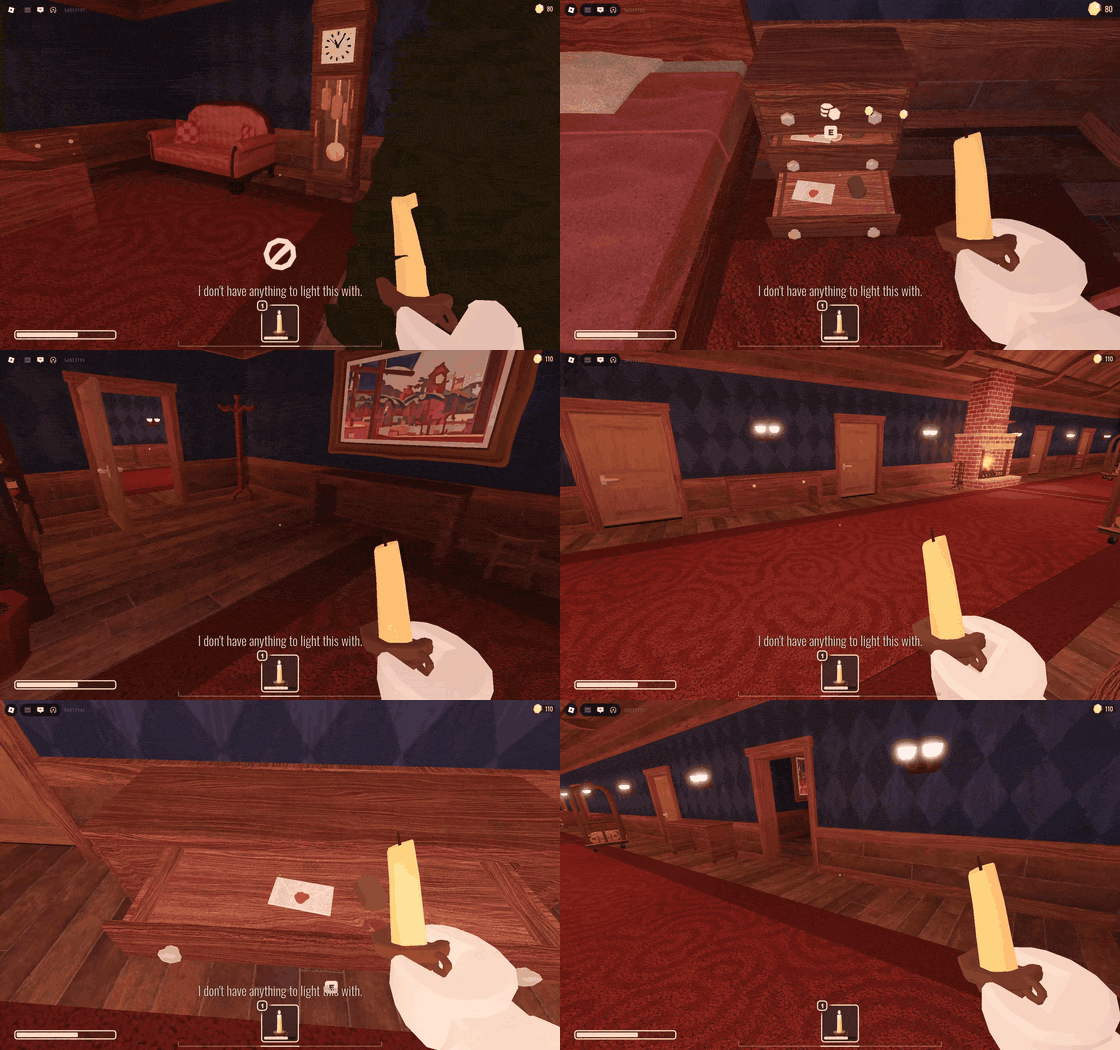
Roblox **DOORS**, unmodified, on Cordial.
[Full size](https://raw.githubusercontent.com/luohoa97/cordial/main/docs/media/cordial-doors.mp4),
more in [`docs/media`](docs/media).

Roblox's **Meta Quest** build in VR on Linux, playing
[TUNNELER](https://www.roblox.com/games/4635669637/TUNNELER).
[Full size](https://raw.githubusercontent.com/luohoa97/cordial/main/docs/media/cordial-vr.mp4);
setting it up is in [`docs/vr.md`](docs/vr.md).
## Why Cordial
I used Sober for a year, and it worked really well. Cordial started off as a weekend project because I was bored, and I believe a project like this is something people have the right to read, modify, and learn from.
Credit to sober for making android Roblox runtimes possible
## Status
Experimental. Full table in [`docs/status.md`](docs/status.md).
**Works:** loading an experience, sign-in, keyboard and mouse, camera, text
entry with IME preedit, audio, voice chat, pointer capture, fullscreen, two
accounts side by side, asset overlays, joining a public server from a game's
Servers list, and joining a private server (0.19.0).
**Known broken**, with issue numbers:
| | |
|---|---|
| Roblox can stop drawing on the loading screen after sign-in (the launcher restarts it, up to twice) | [#92](https://github.com/luohoa97/cordial/issues/92) |
| No window on some COSMIC, KWin and wlroots setups (it opens on KWin on a Steam Deck) | [#38](https://github.com/luohoa97/cordial/issues/38) |
Controller buttons and sticks work on common pads; the brand of glyph Roblox
draws may be wrong, and a pad with an unusual layout may have a stick misread
([`docs/controllers.md`](docs/controllers.md)). No force feedback.
Roblox's own Record Video button does nothing on Android. Cordial can record
the session itself, with `ffmpeg`, with or without the game's own sound. Press
F9 in the game window to start and stop ([`docs/recording.md`](docs/recording.md)).
Frame-rate numbers are not quoted here because the two measurements in this
repo contradict each other; see [`docs/status.md`](docs/status.md).
**Tested platforms.** Development happens on Fedora with GNOME and Mesa. There
is no systematic test matrix — other compositors and GPU vendors are reported
working or broken through issues, not verified here.
## How it works
Cordial mmaps and relocates Roblox's unmodified `libroblox.so` with a ported
AOSP bionic linker rather than the system one. Every symbol the engine imports
resolves as **cordial** (an Android behaviour implemented here), **host**
(forwarded to glibc), or **stub** — and a stub reports failure rather than
faking success, so a gap stays visible instead of surfacing later as an
unrelated bug. `libjnivm` stands in for Android's ART, and a framework layer
answers the JNI calls the client makes into the platform. Symbol resolution
reads the engine's own ELF imports rather than a checked-in list, so an
ordinary libc import resolves from the host automatically
([`docs/adr/ADR-034-symbol-resolution-asks-the-library.md`](docs/adr/ADR-034-symbol-resolution-asks-the-library.md)).
Compatibility gaps are fixed at that framework layer, never by patching the
binary ([`docs/adr/ADR-001-in-process-hooking.md`](docs/adr/ADR-001-in-process-hooking.md)).
Diagram and data flow: [`docs/architecture.md`](docs/architecture.md).
## Install
x86-64 or aarch64 Linux. Wayland is the primary backend and X11 is supported
([`docs/adr/ADR-024-x11-is-supported-again.md`](docs/adr/ADR-024-x11-is-supported-again.md)).
aarch64 is new and untested on real ARM64 hardware — see
[`docs/multiarch.md`](docs/multiarch.md) for what has and has not been
checked. The Arch package is x86-64 only; Arch Linux itself does not build for
aarch64.
You also need Roblox's Android build. Cordial does not ship it. First run has a
**Download Roblox** button that fetches it from APKPure, refuses anything not
signed by Roblox's own certificate, and keeps its own copy. If
[Sober](https://sober.vinegarhq.org/) is installed, you can copy its build in
instead; Cordial does not follow Sober's updates afterwards. Details in
[`docs/install.md`](docs/install.md).
**Flatpak (recommended):** it runs on the same GNOME 50 runtime everywhere, with
the GTK, WebKit, Vulkan loader and audio libraries Cordial is built and tested
against. Most compatibility problems reported with the other packages, from a
distribution's own versions of those libraries, do not happen in it.
```bash
flatpak remote-add --if-not-exists cordial https://luohoa97.github.io/cordial/cordial.flatpakrepo
flatpak install cordial io.github.luohoa97.Cordial
flatpak run io.github.luohoa97.Cordial
```
The remote is signed. Its key fingerprint, and what to do if you added it before
it was, are in
[`docs/install.md`](docs/install.md#check-what-you-downloaded).
A plain install lands on `stable`, which moves only when a release is tagged.
`master` follows every commit to `main`:
```bash
flatpak install cordial io.github.luohoa97.Cordial//master
```
**AppImage**, from the [releases page](https://github.com/luohoa97/cordial/releases).
Newer and less proven than the Flatpak; its web-view path fix has been measured
on a stand-in, not on a real machine without WebKitGTK, and not outside Fedora
([`docs/install.md`](docs/install.md#appimage)):
```bash
chmod +x Cordial-*.AppImage && ./Cordial-*.AppImage # -x86_64 or -aarch64
```
**Packages** on the releases page, each with a cosign signature:
```bash
sudo apt install ./cordial_*_amd64.deb # or _arm64.deb
sudo dnf install ./cordial-*.x86_64.rpm # or .aarch64.rpm; Fedora 44 only
sudo pacman -U cordial-*-x86_64.pkg.tar.zst # x86-64 only -- see above
```
Signed apt, dnf and pacman repositories are published too; the setup commands
are in [`docs/install.md`](docs/install.md). The `cordial`,
`cordial-bin` and `cordial-git` packages on the AUR are maintained by someone
outside this project and were last updated at 0.17.0.
**From source:**
```bash
git clone --recursive https://github.com/luohoa97/cordial
cd cordial
cargo build --release
```
Needs Clang — AOSP bionic uses C11 `_Atomic` in C++ headers and GCC rejects it
— plus GTK4 >= 4.12 and libadwaita >= 1.5 development packages. PipeWire and
WebKitGTK-6.0 headers are optional and probed at build time; without them the
binary is quietly less capable. Play in VR needs `--features cordial-runtime/vr`
and Boost's headers. The Nix flake's package builds and runs
`--help` and `--diagnostics`, but has never run a game
([CONTRIBUTING.md](CONTRIBUTING.md#or-use-the-flake)). Full list:
[`docs/install.md`](docs/install.md#from-source).
## Configuration
**FastFlags** live in `~/.local/share/cordial/profiles//flags.json`, or
wherever `CORDIAL_FLAGS` points. Settings → FastFlags → Import reads a
Bloxstrap, Fishstrap or Sober list (`cordial --import-flags` does it from a
terminal). Layering, syntax and import: [`docs/fastflags.md`](docs/fastflags.md).
**VR (experimental, x86-64).** Settings → VR → Play in VR runs the Meta Quest build of Roblox,
copied from your own headset, through an OpenXR runtime such as WiVRn. See
[`docs/vr.md`](docs/vr.md).
**Something not working?** `cordial --doctor` checks the display, GPU and
Vulkan, sound, keyring and the Roblox build, with what to do about each; Report
a Problem in the main menu shows the same. [`docs/doctor.md`](docs/doctor.md).
**Mouse acceleration** is a Settings control — cursor and camera (the
default), or cursor only for raw camera movement — stored in `$XDG_CONFIG_HOME/cordial/shell.json`.
**Shaders**, sharpening and anti-aliasing over the game through
[vkBasalt](https://github.com/DadSchoorse/vkBasalt)'s Vulkan layer, are a
Settings switch offered once vkBasalt is installed: install per distro, the
Flatpak extension, the generated config's path and its toggle key are all in
[`docs/shaders.md`](docs/shaders.md).
**MangoHUD**, a frame rate and load overlay, is a Settings switch offered once
MangoHud's Vulkan layer is installed. Install routes and what it shows:
[`docs/mangohud.md`](docs/mangohud.md).
**PartyDeck and gamescope.** Several windows side by side, one profile each,
started with `cordial --profile P1 --play`: [`docs/partydeck.md`](docs/partydeck.md).
**NVIDIA graphics** have not been tested on NVIDIA hardware. What is known from
people running the same engine, what Cordial does about it, and the Flatpak
driver-extension trap: [`docs/nvidia.md`](docs/nvidia.md).
**Profiles** are picked from the button at the left of the header bar. Its menu also holds New Profile… and
Delete Profile…, which removes the shown one, its keyring sign-in included, after a confirmation.
**Frame rate limit**, under Settings → Graphics, holds the engine's own frame cap at 90 to 480 fps in a running
game; Display refresh (the default) follows your monitor's rate above 60 Hz. Any FastFlag you set now also stays set across Roblox's
two-minute settings refresh. Details: [`docs/fastflags.md`](docs/fastflags.md).
**Separate data roots** per instance come from `XDG_DATA_HOME`, which moves both
the profile root and the client's data directory. `CORDIAL_PROFILE_ROOT` moves
only the profile root and not the client.
**Plugins** install from a `.tar.zst` archive through **Settings → Plugins →
Install from a file** and unpack to `~/.local/share/cordial/plugins//`.
They run as separate processes on Deno with named capabilities, default-deny,
granted per profile in `plugin-grants.json`. Four ship with Cordial; only FPS
Flex starts switched off.
Installing, updating, removing, enabling, disabling or granting one reaches an
already-running client within a second or two, no restart needed.
[`docs/plugins.md`](docs/plugins.md),
[`docs/adr/ADR-007-host-resources-are-brokered.md`](docs/adr/ADR-007-host-resources-are-brokered.md),
[`docs/adr/ADR-038-plugin-hot-swap.md`](docs/adr/ADR-038-plugin-hot-swap.md).
Runtime knobs — monitor, resolution, DPI scale, frame pacing, pointer lock,
controller glyphs — are environment variables listed in
[`docs/install.md`](docs/install.md).
## What Cordial is not
**Not affiliated with Roblox Corporation**, not endorsed by it, and not
approved by it. Roblox does not support third-party clients and bans accounts
for using them, in waves, including false positives. If your account matters to
you, do not use it here.
**Does not ship Roblox's client.** You supply the Android build.
**Not a cheat, exploit or mod injector.** There is no script execution, no
hooking and no memory access into the Roblox process — absent from the API
rather than disabled, so there is no primitive to re-enable in a fork
([`docs/adr/ADR-001-in-process-hooking.md`](docs/adr/ADR-001-in-process-hooking.md),
[`docs/adr/ADR-003-plugin-isolation.md`](docs/adr/ADR-003-plugin-isolation.md)).
Requests for it are declined. Plugins extend Cordial, not Roblox.
Also permanently out of scope: client-side integrity flags, watermarks, and
obfuscation-as-security.
## AI disclosure
Implementation leans heavily on Claude Code. Architecture decisions, including
the ones that were reversed, are written down in [`docs/adr/`](docs/adr).
## Contributing
[`CONTRIBUTING.md`](CONTRIBUTING.md). Bugs and feature requests go on
[GitHub](https://github.com/luohoa97/cordial/issues/new/choose), not Discord —
every template needs a Diagnostics block from the main menu's **Report a
Problem** or `cordial --diagnostics`, and the bug templates want its **Save
logs…** archive attached. Security issues go through
[a private advisory](https://github.com/luohoa97/cordial/security/advisories/new).
Questions and help: [Discord](https://discord.gg/qJzU3Xfr9b).
## Licence
GPL-3.0-or-later. See [`LICENSE`](LICENSE). The one exception is
[`crates/cordial-protocol`](crates/cordial-protocol), the wire protocol other
launchers and runtimes implement, which is `MIT OR Apache-2.0`.
Third-party components keep their own licences, reproduced in
[`THIRD-PARTY-NOTICES.md`](THIRD-PARTY-NOTICES.md): `third_party/libbadcpu`
(MIT, from Sober OSS), `third_party/mocktail-webview` (Apache-2.0, from
mocktail), `mcpelauncher-linker` (MIT), AOSP bionic (Apache-2.0 and BSD),
`libjnivm` (MIT).
**Sober** is why anyone believes a Roblox client can run natively on Linux. Its
public issue tracker is a research corpus here
([`docs/adr/ADR-017-sober-issue-corpus.md`](docs/adr/ADR-017-sober-issue-corpus.md))
and watching it run corrected a claim made here about text input. Sober's code
was never read; it is not source-available.
**mocktail** is Apache-2.0 and settled more here than a line in a list conveys:
the web-view policy is derived from it, the permission bridge follows its
discovery pattern, the Settings performance tables are adapted from its own,
and it established the field order of Roblox's `NativeTextBoxInfo` along with
several flag values. Each is credited at the point of use.