WeChat MCP
一款基于 WeChatFerry 的聊天 MCP 工具
借助本工具你可以在使用 MCP 客户端在 **Windows 版本** 的微信上执行操作:检查登录状态、发送消息、下载附件、浏览联系人或群聊等。
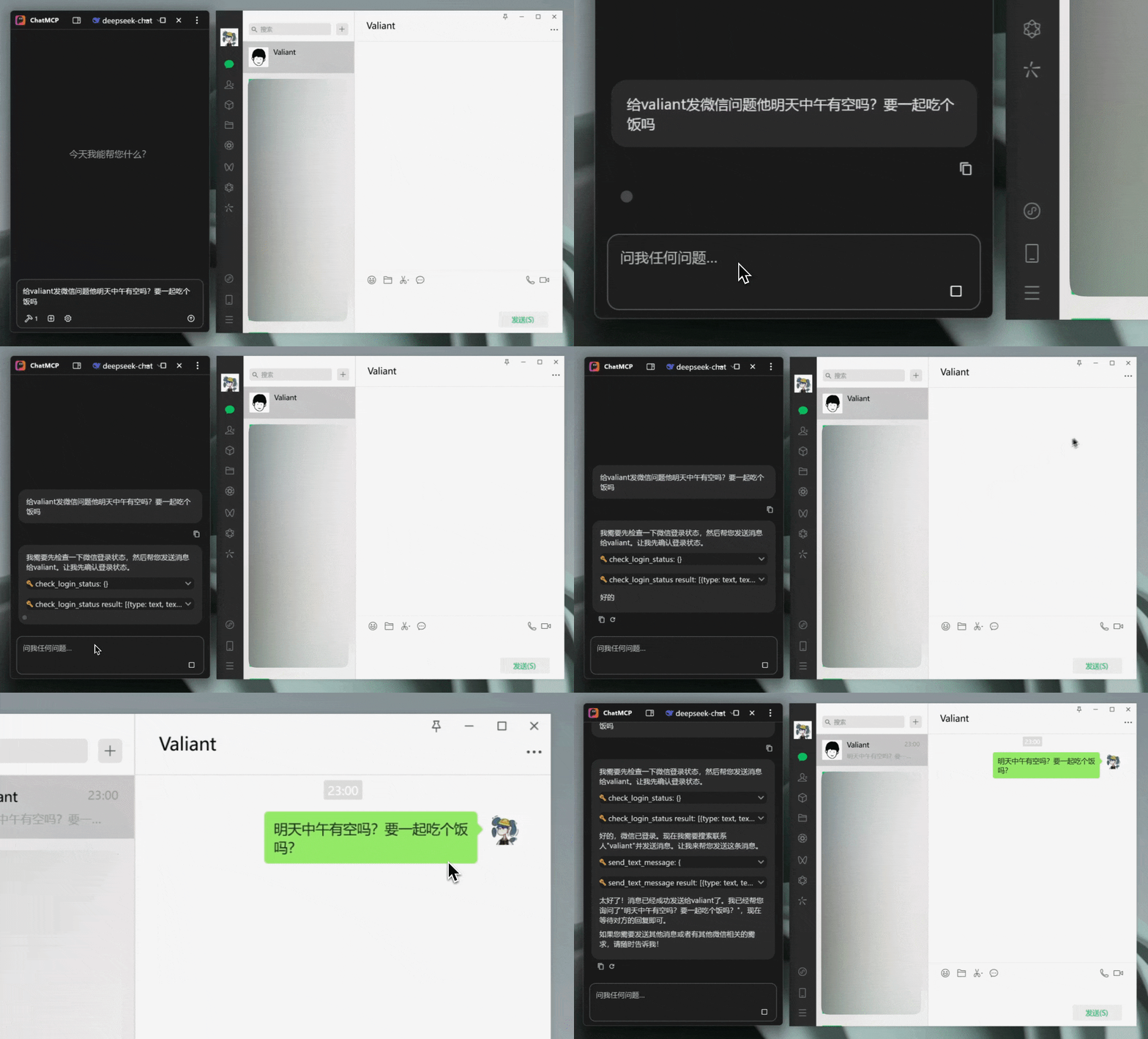
## 项目演示
## 安装指南
### 方法一: 下载预编译版本
访问 [Releases](https://github.com/lw396/wechat-mcp/releases) 页面下载编译版本。
### 方法二: 从源码编译
1. 克隆本仓库:
```bash
git clone https://github.com/lw396/wechat-mcp.git
cd wechat-mcp
```
2. 安装依赖:
```bash
go mod tidy
```
3. 编译:
```bash
GOOS=windows GOARCH=amd64 go build -o wechat-mcp.exe .
```
4. 运行:
```bash
./wechat-mcp.exe
```
## MCP 客户端接入教程
在配置客户端之前,请确保 `wechat-mcp` 服务已按“安装指南”运行,并根据实际部署修改示例中的端口或主机名。以下示例使用的地址默认为 `http://localhost:10888/mcp`。
Codex CLI
```bash
# 添加 HTTP MCP 服务器
codex mcp add --url http://localhost:10888/mcp wechat-mcp
# 检查 MCP 是否添加成功(确保 MCP 已经启动的前提下,运行下面命令)
codex mcp list
```
Claude Code CLI
```bash
claude mcp add --transport http wechat-mcp http://localhost:10888/mcp
claude mcp list
```
VSCode
1. 从扩展商店安装 `Model Context Protocol` 客户端扩展。
2. 打开命令面板输入 “MCP: Edit Servers”,或手动在 `settings.json` 中维护:
```json
"modelcontextprotocol.servers": [
{
"id": "wechat-mcp",
"transport": {
"type": "http",
"url": "http://localhost:10888/mcp"
}
}
]
```
3. 保存后通过命令 “MCP: Reload Servers” 重新加载。
其他支持 HTTP MCP 的客户端
任何支持 HTTP MCP 协议的客户端都可以连接到:http://localhost:18060/mcp
基本配置模板:
```json
{
"name": "wechat-mcp",
"url": "http://localhost:10888/mcp",
"type": "http"
}
```
### MCP 工具列表
| 工具名称 | 作用 |
| -------------------------- | ------------------------------------------------ |
| `check_login_status` | 查询当前微信是否已登录。 |
| `get_self_wxid` | 获取当前登录账号的 `wxid`。 |
| `send_text_message` | 发送文本、卡片、网络图片或文件消息到个人或群聊。 |
| `get_self_info` | 获取当前登录账号的详细信息。 |
| `get_message_types` | 查看微信客户端支持的消息类型字典。 |
| `get_chat_rooms` | 列出账号加入的所有群聊。 |
| `get_chat_room_members` | 查询指定群聊的成员列表。 |
| `get_chat_room_alias` | 查询群聊中某位成员的群昵称。 |
| `invite_chat_room_members` | 通过邀请方式将成员加入群聊。 |
| `add_chat_room_members` | 直接拉取联系人加入群聊。 |
| `remove_chat_room_members` | 将指定成员移出群聊。 |
| `revoke_message` | 根据消息 ID 撤回已发送的消息。 |
| `forward_message` | 将历史消息转发给指定联系人或群聊。 |
| `send_pat_message` | 在群聊中拍一拍指定成员。 |
| `get_contacts` | 获取完整通讯录。 |
| `get_friends` | 获取好友列表。 |
| `get_info_by_wxid` | 通过 `wxid` 查询联系人信息。 |
| `refresh_moments` | 刷新朋友圈数据。 |
| `accept_new_friend` | 根据好友申请参数通过请求。 |
| `receive_transfer` | 接收好友发起的转账。 |
## 常见问题
- **“暂不支持 macOS/linux 系统”**:目前仅在 Windows 环境下使用
- **“该项目仅支持微信版本 v3.9.12.55”**, 可前往 [wechat-windows-versions](https://github.com/tom-snow/wechat-windows-versions/releases/tag/v3.9.12.55) 下载该版本微信安装包
## 免责声明
**本工具为开源项目,仅提供基础功能,供用户进行合法的学习、研究和非商业用途**。禁止将本工具用于任何违法或侵权行为。
## License
本项目基于 [MIT 许可证](./LICENSE) 开源。
## 鸣谢
- 感谢 [WeChatFerry](https://github.com/lich0821/WeChatFerry) 项目
- 感谢 [xiaohongshu-mcp](https://github.com/xpzouying/xiaohongshu-mcp) 项目