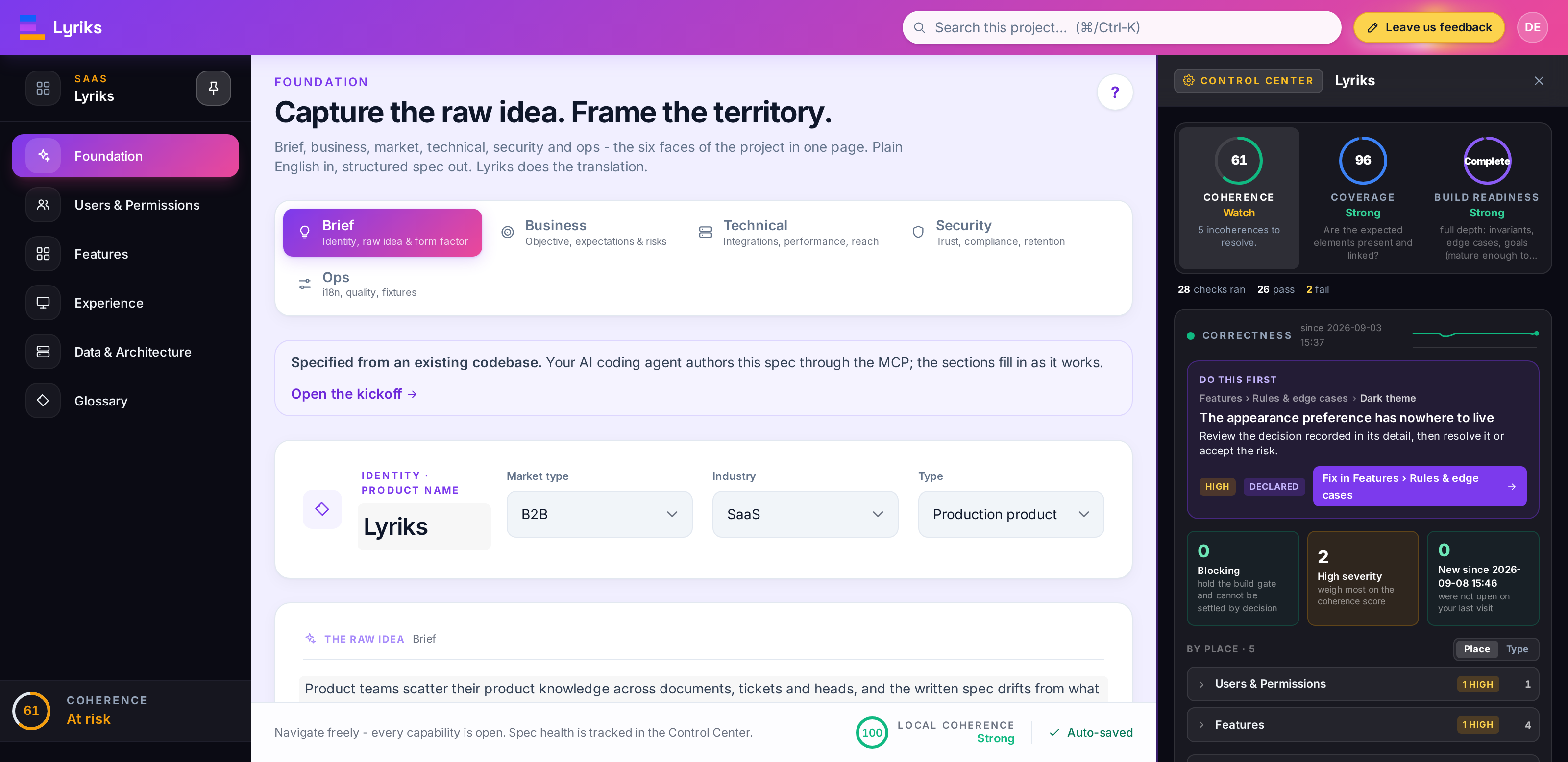
Lyriks # Lyriks Community Edition **Turn code into specs. Find gaps. Understand what a change affects.** [![ci](https://github.com/lyriks-io/lyriks-community/actions/workflows/ci.yml/badge.svg)](https://github.com/lyriks-io/lyriks-community/actions/workflows/ci.yml) [![publish-image](https://github.com/lyriks-io/lyriks-community/actions/workflows/publish-image.yml/badge.svg)](https://github.com/lyriks-io/lyriks-community/actions/workflows/publish-image.yml) A Lyriks project open on its Foundation page with the Control Center panel: Coherence, Coverage and Build Readiness scores, the checks that ran, and the first incoherence to fix The Control Center, open from any page: the scores, the checks behind them, and the next thing to fix.
Lyriks is a self-hosted workspace that connects a product's features, rules, screens and data in one specification. Your AI coding client reads the code and writes the spec through MCP (Model Context Protocol). You review it in the browser and use Lyriks to check for gaps and contradictions. ## What you can do with it Each of these works from the spec and evidence recorded so far. None of them replaces tests of the running application. ### Code to spec You need to know what a product does, and only its code can tell you. Lyriks turns what your AI client reads in that code into a spec, with links back to the source. ### Coherence You need to know whether features, permissions and rules contradict each other or leave gaps. Lyriks checks the recorded spec and reports the issues to review and fix. ### Impact analysis You need to know what to review before changing a feature or rule. Lyriks exposes the links between features, screens, rules and data, so you and your AI client can see what the change may affect. ### Implementation analysis You need to know how much of the spec is reflected in the code. Lyriks uses the code evidence supplied by your AI client to report mapped elements, missing implementation and changes since the last sync. ## What leaves your machine Lyriks stores your projects locally and makes no automatic calls to public services by default. Activation uses an email address supplied on . A connected AI client may send the code and spec it reads to its provider; its data policy applies. Optional external integrations require separate configuration. ## Quick start ### 1. Install The installer sets up the database, app and MCP gateway on your machine. Internet access is needed to download them and obtain a Community key. Linux and macOS: ```bash curl -fsSL https://get.lyriks.io | sh ``` Windows, in PowerShell: ```powershell irm https://get.lyriks.io/windows | iex ``` Open the address printed by the installer. The first user activates the install with the Community key sent to their email address and chooses the operator password. The key is verified locally. Lyriks then runs without a connection to the licensing service. The published images target `linux/amd64`. Native arm64 images and Apple Silicon installation have not been validated by the release workflow. ### 2. Connect your AI client Point the client at your install's address followed by `/mcp`. With Claude Code: ```bash claude mcp add --scope user --transport http lyriks http://localhost:3000/mcp ``` Then run `/mcp` in Claude Code and sign in with the operator password. Cursor and other clients take the same URL in their MCP settings: ```json { "mcpServers": { "lyriks": { "url": "http://localhost:3000/mcp" } } } ``` The [MCP guide](docs/mcp.md) covers authentication and the gateway itself. ### 3. Create your first spec Open the client in the repository you want to describe and ask it: > Using the Lyriks MCP and the lyriks-retrospec guide, create a project named > "First spec" from this codebase. Use the source code as evidence and link > the modelled behaviour back to it. Do not change the application's code. The client reads your checkout and writes the spec through MCP. Open the project in Lyriks to review it. [Getting started](docs/getting-started.md) walks through this first pass and how to check the result against the product. ## Community and Enterprise Community provides the specification workspace with one operator account. Enterprise adds team access and formal verification. | | Community | Enterprise | |---|---|---| | Accounts and access | one operator account, password-protected | workspaces, members, invitations, roles, per-project grants | | The workspace | all of it: foundation, users, features and behaviour, journeys and screens, rules, data, architecture, coherence, roadmap | the same, shared across a team | | Checking the spec | coherence checks, behaviour checks and scores | plus formal verification of the whole spec | | Hosting | self-hosted | self-hosted | | Licence | AGPL-3.0-only, open source | commercial | See [Editions](docs/editions.md) for the full comparison. ## Other ways to run it With Docker and Docker Compose available, you can run the stack directly: ```bash git clone https://github.com/lyriks-io/lyriks-community.git cd lyriks-community cp .env.example .env # Generate two values, then uncomment and set the matching entries in .env: openssl rand -hex 16 # POSTGRES_PASSWORD openssl rand -hex 32 # LYRIKS_JWT_SECRET docker compose up -d ``` Open and activate it as described above. The Compose file pins the images to the version you cloned. Updating means backing up the volumes and moving to a newer checkout, as described in [Updates and backups](docs/getting-started.md#updates-and-backups). The installer automates that, with rollback and diagnostics. ## Work on the code Requirements: Node 22, pnpm 10.6.3 (`corepack enable`), PostgreSQL 16. ```bash git clone https://github.com/lyriks-io/lyriks-community.git cd lyriks-community corepack enable pnpm install cp .env.example .env # set LYRIKS_PG_URL to your PostgreSQL pnpm dev:community # the app; the URL is printed (8173 under WSL) ``` In a second terminal, run `pnpm dev:mcp`. If the app uses a port other than 5173, set `LYRIKS_BASE_URL` to its address in that terminal first. Under WSL, use `export LYRIKS_BASE_URL=http://localhost:8173`. Development needs no licence key or login with the default configuration. Run `pnpm check && pnpm test` before submitting a change; [.github/workflows/ci.yml](.github/workflows/ci.yml) is the full sequence CI runs on pull requests and pushes to `main`. ## Documentation The [docs](docs/README.md) cover getting started, every configuration variable, the architecture, the MCP gateway and its skills, what each score means, when a project is finished, and the release process. [CHANGELOG.md](CHANGELOG.md) lists what each version changed. ## Contributing and support Bug reports, documentation fixes and code contributions are welcome. Read [CONTRIBUTING.md](CONTRIBUTING.md) and the engineering rules in [AGENTS.md](AGENTS.md) before starting. Each commit needs a DCO sign-off (`git commit -s`). Contributors also accept the [CLA](CLA.md) with their first pull request. It lets the maintainers distribute contributions under other terms, including the proprietary Enterprise licence. Everyone taking part follows the [Code of Conduct](CODE_OF_CONDUCT.md). [SUPPORT.md](SUPPORT.md) says where a question, a bug or an install problem goes. Security issues go through [SECURITY.md](SECURITY.md), never through a public issue. ## Licence Copyright (C) 2026 Lyriks. Licensed under the GNU Affero General Public License v3.0 only (`AGPL-3.0-only`), see [LICENSE](LICENSE). "Lyriks" is a trademark; the licence covers the code, not the name.