# Member Berries
**'Member when AI assistants felt like friends?**
Member Berries 'members.
Your AI assistant (Claude, ChatGPT, Cursor or any MCP client) gets local memory of Calendar, Notes and Reminders — so it actually 'members your day.
[](LICENSE)
[](https://www.typescriptlang.org)
[](https://github.com/M-Pineapple/member-berries-apple-mcp/stargazers)
[](https://glama.ai/mcp/servers/M-Pineapple/member-berries-apple-mcp)
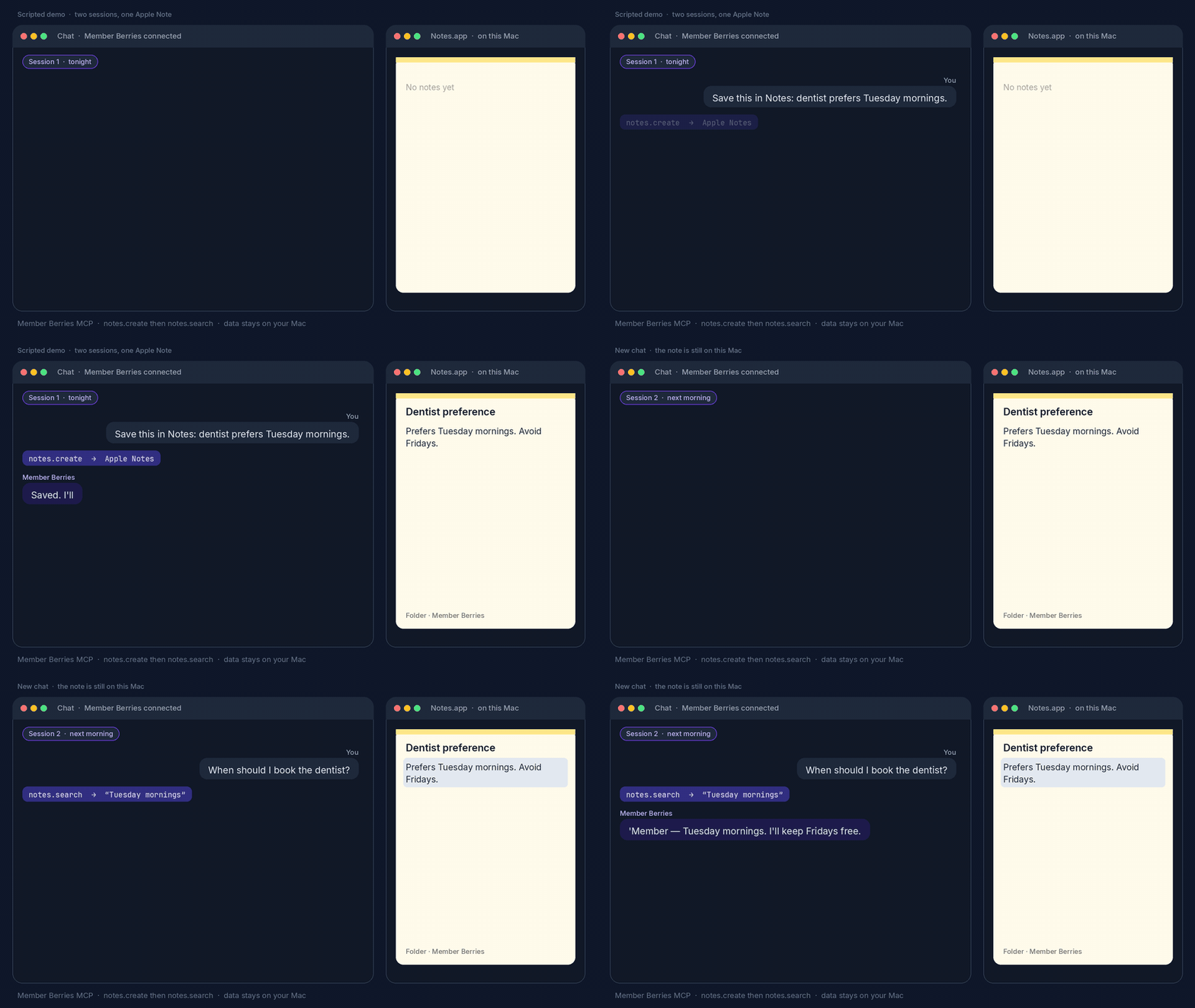
Scripted demo, not a live Mac recording. Tonight notes.create writes to Apple Notes. Next morning a new chat notes.search reads it back. Calendar and Reminders use the same local loop. Nothing in this GIF is a real capture. Your data stays on your Mac.
A fun macOS MCP that makes your assistant feel like a helpful friend who actually remembers your day. Named in **homage to South Park’s Member Berries** — those nostalgic little berries that go *“'Member …?”* — this server brings that same playful “remember when…” energy to your calendar, notes, and reminders.
Not affiliated with South Park or Comedy Central. Just a wink, a berry cluster, and a local memory file.
**v2.1.4** · [MCP](https://modelcontextprotocol.io) · MIT · Bun or npm · data stays on your Mac
---
> **macOS only.** Member Berries drives Apple Calendar, Reminders and Notes through macOS automation, so its tools only work on a Mac. It installs on Linux or Windows, but the tools there will fail.
## Quick start
Three steps. Then ask *“What's on today?”* Bun runs a clone of the source. npm runs the published package.
1. **Install the server**
**Bun**
```bash
brew install bun
git clone https://github.com/M-Pineapple/member-berries-apple-mcp.git
cd member-berries-apple-mcp/member-berries
bun install
```
**npm**
Node.js 18 or later is enough. The package on npm is [`member-berries-apple-mcp`](https://www.npmjs.com/package/member-berries-apple-mcp) (current release 2.1.4). The bin is `member-berries-mcp`.
```bash
npm install -g member-berries-apple-mcp
```
`npx` can fetch and run that same bin. It starts the stdio server, which is what an MCP host does:
```bash
npx -y member-berries-apple-mcp
```
2. **Point your MCP client at it**
**Bun**
Claude Desktop example (same `bun run …/index.ts` command works in ChatGPT, Cursor, Claude Code or any other MCP host):
```json
{
"mcpServers": {
"member-berries": {
"command": "bun",
"args": ["run", "/ABSOLUTE/PATH/member-berries-apple-mcp/member-berries/index.ts"]
}
}
}
```
Restart the host after saving.
**npm**
Claude Desktop example (same `npx` command works in ChatGPT, Cursor, Claude Code or any other MCP host):
```json
{
"mcpServers": {
"member-berries": {
"command": "npx",
"args": ["-y", "member-berries-apple-mcp"]
}
}
}
```
`npx -y member-berries-apple-mcp` runs the `member-berries-mcp` bin. Restart the host after saving. When `member-berries-mcp` is on your PATH, set `command` to `member-berries-mcp` and `args` to `[]`.
3. **Talk to it**
Grant macOS automation / Calendar / Reminders / Notes access when prompted. Keep Reminders open for reminder tools. Then ask *“What's on today?”*
**Optional but tasty:** paste [`member-berries/CLAUDE_PROMPT_SETUP.md`](member-berries/CLAUDE_PROMPT_SETUP.md) into custom instructions for the full Member Berries personality. Built-in starters still work without it.
---
## What is Member Berries?
A personality-first fork of [apple-mcp](https://github.com/dhravya/apple-mcp), stripped to Calendar / Notes / Reminders and wrapped in a local day-memory layer:
- **"How did your dentist appointment go?"** — remembers completed events
- **"Don't forget about that presentation at 2pm!"** — proactive reminders
- **"I see you created that project outline"** — tracks your notes
- **"What's on today?"** — one-shot `briefing` tool
Same tools, friendlier vibe. The assistant stops sounding like a robot reading a database and starts sounding like someone who 'members your day.
---
## Who is this for?
| You are… | Start here |
|---|---|
| A macOS user who wants an assistant with *personality* | Install above, paste the optional prompt, ask *“What's on today?”* |
| On Cursor, ChatGPT, Claude Code or another MCP host | Bun or npm. See [Quick start](#quick-start) |
| Privacy-first | Local `~/.member-berries-memory.json` (mode 600). No cloud sync from this server |
| Already using Memory Service / other Apple MCPs | This is **fun day-memory + Apple surfaces**, not general conversation memory |
---
## Features
- **Briefing** — one `briefing` / `today` call for calendar, due reminders, note titles, starters
- **Calendar memory** — search, list, open, create
- **Notes** — title + snippet by default; full body on demand
- **Reminders** — list, search, create, complete, delete, listById
- **Member Berries memory** — built-in conversation starters ('member energy included)
- **Focused scope** — Calendar, Notes, Reminders only (no Messages / Mail / Contacts)
---
## Usage
Once the host has the server running, talk to it in natural language:
- "What's on today?"
- "How did the dentist appointment go?"
- "Don't forget about that presentation at 2pm"
- "Search my notes for the project outline"
- "Create a reminder to buy milk"
The `briefing` tool is the one-shot day summary. Calendar, Notes and Reminders cover the rest. See [MCP tools](#mcp-tools) and [`member-berries/README.md`](member-berries/README.md) for operation names.
---
## MCP tools
| Tool | Operations |
|---|---|
| `briefing` | `today` — day summary with a side of 'member |
| `calendar` | `search`, `list`, `open`, `create` |
| `notes` | `search`, `list`, `get`, `create` (`includeBody`, `folderName`) |
| `reminders` | `list`, `search`, `open`, `create`, `listById`, `complete`, `delete` |
| `memberberries` | `get_starters`, `get_memories`, `check_events` |
More detail: [`member-berries/README.md`](member-berries/README.md).
---
## More MCP servers by M-Pineapple
Other MCP servers in this portfolio:
- [Claude Project Coordinator](https://github.com/M-Pineapple/Claude-Project-Coordinator). Track Xcode projects, status, tech stack and health.
- [CryptoAnalysisMCP](https://github.com/M-Pineapple/CryptoAnalysisMCP). Cryptocurrency technical analysis for Claude Desktop.
- [Warp Command Runner](https://github.com/M-Pineapple/warp-command-runner). Give any chat AI a real terminal.
- [Msty Admin MCP](https://github.com/M-Pineapple/msty-admin-mcp). Administer Msty Studio Desktop.
- [SeaShell](https://github.com/M-Pineapple/seashell). Talk to Claude from any terminal block.
- [TextEdit MCP](https://github.com/M-Pineapple/TextEdit-MCP). Formatted RTF documents via macOS TextEdit.
- [HubSpot Auditor](https://github.com/M-Pineapple/hubspot-auditor). Read-only HubSpot portal audit.
---
## Support this project
If Member Berries has made your assistant feel more like a helpful friend who remembers your day, consider buying me a coffee:
 Your support helps keep the berries fresh: Apple integrations, personality polish, and compatibility with host updates.
Thank you for helping it 'member!
If this saves you time, a [star](https://github.com/M-Pineapple/member-berries-apple-mcp/stargazers) helps others find it.
---
## License
MIT. See [LICENSE](./LICENSE). Fork lineage: [apple-mcp](https://github.com/dhravya/apple-mcp); its copyright notice is kept in [THIRD_PARTY_NOTICES.md](./THIRD_PARTY_NOTICES.md).
Member Berries is an independent project. The name pays homage to South Park’s Member Berries; no affiliation or endorsement is implied.
---
*'Member when AI assistants felt like friends? Member Berries 'members.*