



# Ghostex
Cross-platform Ghostty-based desktop app (not using Electron or Tauri) for running agent CLIs with persistent terminals, GUI panes, browser panes, notifications, mobile access, and a lightweight code editor.
Ghostex is built for developers who keep multiple agents and terminals alive at once. It combines low-RAM Ghostty terminals, a native Rust/GPUI interface, T3 Code GUI panes, Chromium CEF browser panes, and React Native Android session access in one workspace.
> Looking for contributors. Join the Discord if you want to help: https://discord.gg/df7b3G92CS
## Install
### macOS
The Homebrew cask installs the Apple Silicon build automatically.
```bash
brew trust maddada/tap && brew install --cask maddada/tap/ghostex
```
You can also download the latest DMG from GitHub Releases.
### Windows (WSL2 beta)
> **The Windows app is a beta intended for WSL2 workflows only and may still have bugs.** Install and use it with an existing WSL2 distribution; native Windows shell workflows are not the intended setup yet. Please report problems on the [Ghostex Discord](https://discord.gg/df7b3G92CS).
Download the x64 or ARM64 installer EXE from [GitHub Releases](https://github.com/maddada/Ghostex/releases). Ghostex manages its terminals, gxserver, Source editor, and T3 Code runtime inside the selected WSL2 distribution.
Starting with 7.0.0, Windows installations receive automatic updates from GitHub Releases. If you installed a 6.x Windows beta, install the 7.0.0 Setup EXE once to move to the new updater; later releases can be downloaded and applied from inside Ghostex.
### Linux
Download the x64 DEB for Debian/Ubuntu or the x64 RPM for Fedora/RHEL from [GitHub Releases](https://github.com/maddada/Ghostex/releases).
### Android
Use the React Native Android app to connect live to your Ghostex agent CLI sessions. APKs are in GitHub Releases.
#### Click the button to get the app:
[](https://github.com/maddada/Ghostex/releases/latest/download/ghostex-android.apk)
## Gallery
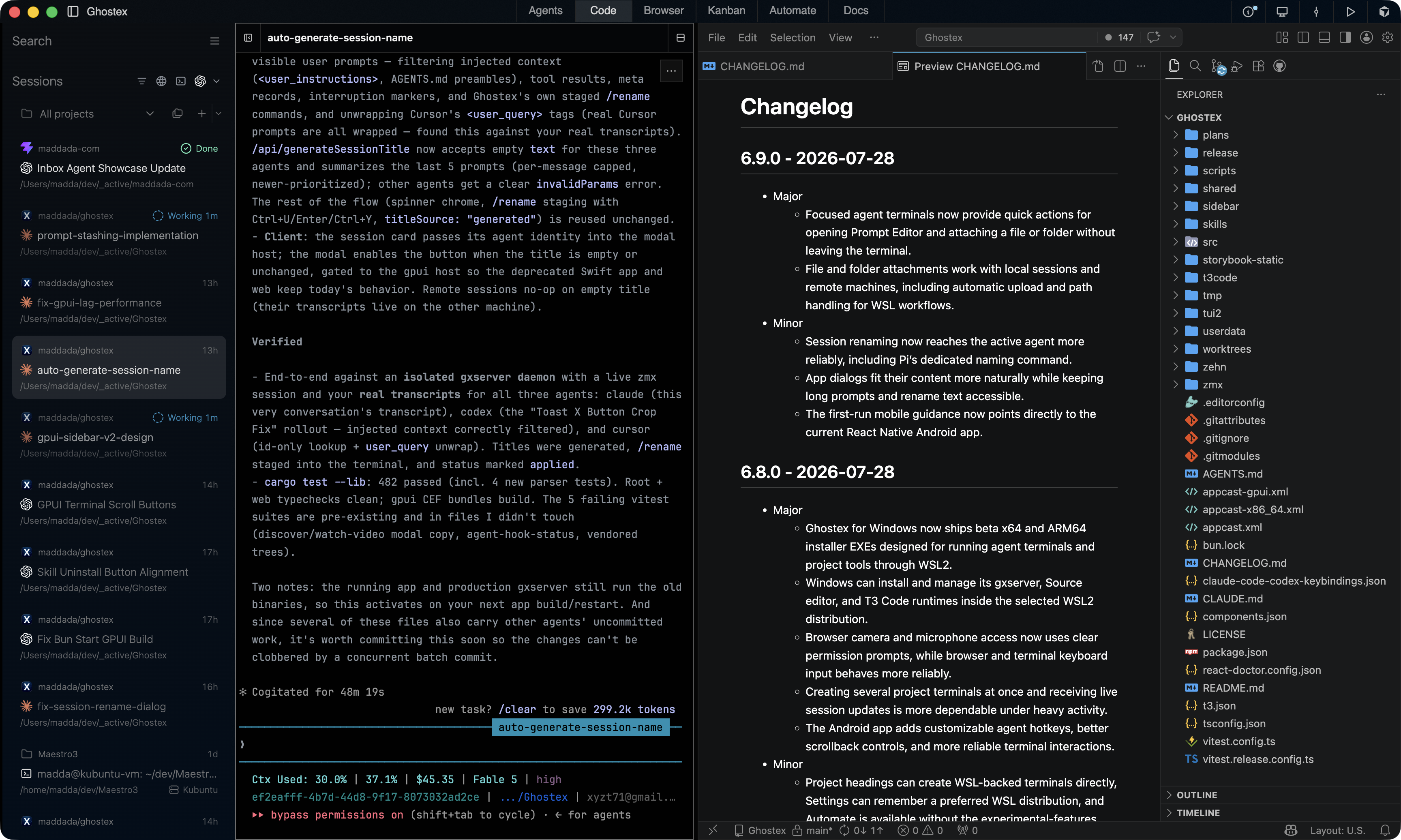
### Embedded VS Code based editor
Loads on demand for working with markdown, reviewing code, and checking PRs.
Supports all extensions. Sleeps when not in use to same resources (configurable).
 ### Inbox Based Agent Management
Inspired by Theo & T3 Code's Sidebar V2, this optional inbox moves work beyond individual sessions.
### Inbox Based Agent Management
Inspired by Theo & T3 Code's Sidebar V2, this optional inbox moves work beyond individual sessions.
Organize around threads and worktrees, focus on one project or see every project together, then snooze or settle threads as needed.
 ### Split your terminals and use keyboard hotkeys to jump between them in the Agents view
Exact same hotkeys flow that you're used to from terminals like Ghostty & Cmux. Full configurable.
### Split your terminals and use keyboard hotkeys to jump between them in the Agents view
Exact same hotkeys flow that you're used to from terminals like Ghostty & Cmux. Full configurable.
cmd + t for new terminal, cmd + d to split, cmd + option + arrows to switch around, etc.
 ### Supports all of the popular Agent CLIs
Ghostex works with Claude Code, Codex CLI, OpenCode, Pi Agent, Gemini, and all other Agent CLIs.
### Supports all of the popular Agent CLIs
Ghostex works with Claude Code, Codex CLI, OpenCode, Pi Agent, Gemini, and all other Agent CLIs.
Also supports T3code GUI panes if you prefer those (feature is fully hibernated when not used)
 ### Embedded Chromium Browser
Comes with Annotations, Chrome Devtools MCP for Agents, Profiles.
### Embedded Chromium Browser
Comes with Annotations, Chrome Devtools MCP for Agents, Profiles.
/ghostex-browser-use to let the agent control your browser tabs without an approval prompt!
 ### Rich Prompt Editor with Ctrl+G
Edit your agent prompts with full hotkeys support and image previews!
### Rich Prompt Editor with Ctrl+G
Edit your agent prompts with full hotkeys support and image previews!
No more uneditable "[Pasted 50+ lines]" text! Press F1 for all commands.
 ### Kanban board based on beads!
Put all your thoughts here then let an orchestrator agent manage subagents to tackle them
### Kanban board based on beads!
Put all your thoughts here then let an orchestrator agent manage subagents to tackle them
(Ghostex supports cross Agent CLI orchestration, your Claude Code can launch and steer Codex agents!)
 ### Docs view for working with HTML/MD/Excalidraw!
#### Collaborate with your agent on HTML prototypes, mockups, and explainers! Annotations system included!
### Docs view for working with HTML/MD/Excalidraw!
#### Collaborate with your agent on HTML prototypes, mockups, and explainers! Annotations system included!
 #### Full markdown editor + annotations that you can send to your agent to collaborate!
 #### Or even ask the Agent to draw an .excalidraw UI or diagram in the /docs folder:
 ### Search Previous Sessions from All Agent CLIs in 1 place
Fuzzy search in all your previous sessions accross agents by typing a few words from your prompts
Press enter to resume that session! Lots of filters available. Start it from the sidebar or run `ghostex find / gx f` to start it
### Search Previous Sessions from All Agent CLIs in 1 place
Fuzzy search in all your previous sessions accross agents by typing a few words from your prompts
Press enter to resume that session! Lots of filters available. Start it from the sidebar or run `ghostex find / gx f` to start it
 Also see list of all previous sessions from all agents by title/tag/last active so you can resume any of them
 ### Extensible Architecture (client apps <-> gxserver daemon <-> zmx persistence)
The client/server split allows your to install just the gxserver daemon on any remote machine then control the agents on that machine from any client device
### Extensible Architecture (client apps <-> gxserver daemon <-> zmx persistence)
The client/server split allows your to install just the gxserver daemon on any remote machine then control the agents on that machine from any client device
Supported clients: macOS, Linux, Windows WSL2 beta, React Native Android, TUI (based on herdr)
Supported hosts: macOS and linux (tested on ubuntu x64 and arm64)
 ### Cross-agent orchestration built in
Agents can launch other agent session using the "ghostex" cli command.
You can ask Claude Code to launch Codex sub-agents and send prompts there/read their output.
Write your own skills that use the /ghostex-agent-orchestration skill.
### Cross-agent orchestration built in
Agents can launch other agent session using the "ghostex" cli command.
You can ask Claude Code to launch Codex sub-agents and send prompts there/read their output.
Write your own skills that use the /ghostex-agent-orchestration skill.
 ### Notifications and status
Ghostex supports notification sounds, pets, menu bar indicators (running/done agents), and phone app notifications.
### Notifications and status
Ghostex supports notification sounds, pets, menu bar indicators (running/done agents), and phone app notifications.
See how many agents are running with just a glance at your menu bar. Click to jump to an agent!

 ## Highlights
| Feature | What it gives you |
| --- | --- |
| Ghostty terminals | Lower RAM use, better battery life, and stable agent CLI sessions. |
| Native desktop shell | Rust/GPUI UI for performance-sensitive desktop behavior. |
| T3code GUI panes | Graphical panes alongside terminal agents. |
| Chromium CEF browser | Embedded browser panes with DevTools, profiles, and MCP access. |
| Lightweight code editor | VS Code-based editor for Markdown, PR review, files, and git work. |
| Mobile access | React Native Android app for checking and controlling live sessions. |
| TUI mode | Use `ghostex` or `gx` to attach from another machine. |
## Comparison
| Feature | Ghostex | Codex app | cmux |
| --- | --- | --- | --- |
| Open source | Yes | - | Yes |
| Ghostty terminal | Yes | - | Yes |
| Chromium Browser | Yes | Yes | No |
| Fully featured IDE| Yes | - | - |
| Built-in Computer use | Yes | Yes | - |
| Built-in Browser use | Yes | Yes | Yes |
| Use any model | Yes | - | Yes |
| Cross Model Orchestration | Yes | - | Yes |
| Rich Prompt Editor | Yes | N/A | - |
| Android | Yes | Yes | - |
| Pets | Yes | Yes | - |
| Appshots | Yes | Yes | - |
| Automations | Yes | Yes | - |
## Main Features
- Git workflows with Sync with Main, split Git menus, prompt-agent PR review, and persistent running toasts.
- First-prompt title generation for auto-naming new agent sessions.
- Pinned sessions and assigning tags to sessions.
- Auto-sleep for unused terminal, browser, and project panes.
- Live React Native Android access to agent CLI sessions.
- All sessions are persistant and attachable by default (uses zmx).
- Rich prompt editor with image insert and preview support.
- Auto session naming for popular agents.
- App restart resumes existing agent CLI sessions.
- Menu bar working/done indicators and notification sounds for most agent CLIs.
- Multi-pane and multi-group project layouts.
- Scheduled messages and automation through the Ghostex CLI.
- Install gxserver daemon on remote. Connect over SSH in settings. Remote machines show in sidebar.
- Create worktrees and merge them back easily.
- Find previous threads by keyword and continue with context.
- Sync session titles and status into the UI.
- Run multiple panes and multiple groups per project with split and tab layouts.
## Contributing
Ghostex is moving quickly, and help is welcome on platform ports, missing agent CLI integrations, docs, testing, and feature polish.
Join the Discord: https://discord.gg/df7b3G92CS
## Credits
Ghostex builds on open source work from these projects and communities:
- [CEF Project](https://github.com/chromiumembedded/cef) — embedded Chromium browser panes
- [Agentation](https://github.com/benjitaylor/agentation) — browser annotation and feedback tooling
- [CMUX](https://github.com/manaflow-ai/cmux) — agent hook patterns and notification integration
- [T3 Code](https://github.com/pingdotgg/t3code) — GUI editor panes for coding agents
- [VS Code](https://github.com/microsoft/vscode) and [code-server](https://github.com/coder/code-server) — embedded IDE surfaces
- [zehn](https://github.com/al3rez/zehn) by [al3erz](https://github.com/al3rez) — searching sessions by prompt
- [vvterm](https://github.com/vivy-company/vvterm) — source of terminal ideas ported into the React Native mobile app
- [Termux](https://github.com/termux/termux-app) — Android terminal components ported into the React Native mobile app
- [Codex on Linux](https://github.com/ilysenko/codex-desktop-linux) — pets implementation
- [Pierre Computer Company](https://github.com/pierrecomputer/pierre) — diffs and file rendering components
- [Beads](https://github.com/steveyegge/beads) by [Steve Yegge](https://github.com/steveyegge) — kanban project board
- [Beads Viewer](https://github.com/Dicklesworthstone/beads_viewer) by [doodlestein](https://github.com/Dicklesworthstone) — kanban view reference
## Highlights
| Feature | What it gives you |
| --- | --- |
| Ghostty terminals | Lower RAM use, better battery life, and stable agent CLI sessions. |
| Native desktop shell | Rust/GPUI UI for performance-sensitive desktop behavior. |
| T3code GUI panes | Graphical panes alongside terminal agents. |
| Chromium CEF browser | Embedded browser panes with DevTools, profiles, and MCP access. |
| Lightweight code editor | VS Code-based editor for Markdown, PR review, files, and git work. |
| Mobile access | React Native Android app for checking and controlling live sessions. |
| TUI mode | Use `ghostex` or `gx` to attach from another machine. |
## Comparison
| Feature | Ghostex | Codex app | cmux |
| --- | --- | --- | --- |
| Open source | Yes | - | Yes |
| Ghostty terminal | Yes | - | Yes |
| Chromium Browser | Yes | Yes | No |
| Fully featured IDE| Yes | - | - |
| Built-in Computer use | Yes | Yes | - |
| Built-in Browser use | Yes | Yes | Yes |
| Use any model | Yes | - | Yes |
| Cross Model Orchestration | Yes | - | Yes |
| Rich Prompt Editor | Yes | N/A | - |
| Android | Yes | Yes | - |
| Pets | Yes | Yes | - |
| Appshots | Yes | Yes | - |
| Automations | Yes | Yes | - |
## Main Features
- Git workflows with Sync with Main, split Git menus, prompt-agent PR review, and persistent running toasts.
- First-prompt title generation for auto-naming new agent sessions.
- Pinned sessions and assigning tags to sessions.
- Auto-sleep for unused terminal, browser, and project panes.
- Live React Native Android access to agent CLI sessions.
- All sessions are persistant and attachable by default (uses zmx).
- Rich prompt editor with image insert and preview support.
- Auto session naming for popular agents.
- App restart resumes existing agent CLI sessions.
- Menu bar working/done indicators and notification sounds for most agent CLIs.
- Multi-pane and multi-group project layouts.
- Scheduled messages and automation through the Ghostex CLI.
- Install gxserver daemon on remote. Connect over SSH in settings. Remote machines show in sidebar.
- Create worktrees and merge them back easily.
- Find previous threads by keyword and continue with context.
- Sync session titles and status into the UI.
- Run multiple panes and multiple groups per project with split and tab layouts.
## Contributing
Ghostex is moving quickly, and help is welcome on platform ports, missing agent CLI integrations, docs, testing, and feature polish.
Join the Discord: https://discord.gg/df7b3G92CS
## Credits
Ghostex builds on open source work from these projects and communities:
- [CEF Project](https://github.com/chromiumembedded/cef) — embedded Chromium browser panes
- [Agentation](https://github.com/benjitaylor/agentation) — browser annotation and feedback tooling
- [CMUX](https://github.com/manaflow-ai/cmux) — agent hook patterns and notification integration
- [T3 Code](https://github.com/pingdotgg/t3code) — GUI editor panes for coding agents
- [VS Code](https://github.com/microsoft/vscode) and [code-server](https://github.com/coder/code-server) — embedded IDE surfaces
- [zehn](https://github.com/al3rez/zehn) by [al3erz](https://github.com/al3rez) — searching sessions by prompt
- [vvterm](https://github.com/vivy-company/vvterm) — source of terminal ideas ported into the React Native mobile app
- [Termux](https://github.com/termux/termux-app) — Android terminal components ported into the React Native mobile app
- [Codex on Linux](https://github.com/ilysenko/codex-desktop-linux) — pets implementation
- [Pierre Computer Company](https://github.com/pierrecomputer/pierre) — diffs and file rendering components
- [Beads](https://github.com/steveyegge/beads) by [Steve Yegge](https://github.com/steveyegge) — kanban project board
- [Beads Viewer](https://github.com/Dicklesworthstone/beads_viewer) by [doodlestein](https://github.com/Dicklesworthstone) — kanban view reference