Croesus # Croesus **Open-source net worth tracking, without giving your financial data to anyone else.** [![Release](https://img.shields.io/github/v/release/maelbel/croesus?include_prereleases)](https://github.com/maelbel/croesus/releases) [![Downloads](https://img.shields.io/github/downloads/maelbel/croesus/total)](https://github.com/maelbel/croesus/releases) [![CI](https://github.com/maelbel/croesus/actions/workflows/ci.yml/badge.svg)](https://github.com/maelbel/croesus/actions/workflows/ci.yml) [![License: AGPL v3](https://img.shields.io/badge/license-AGPL--3.0-blue.svg)](./LICENSE) [![Python](https://img.shields.io/badge/python-3.13+-3776AB.svg)](./backend/pyproject.toml) [![FastAPI](https://img.shields.io/badge/FastAPI-009688.svg)](https://fastapi.tiangolo.com/) [![Vue 3](https://img.shields.io/badge/Vue-3-4FC08D.svg)](https://vuejs.org/) [![Tauri 2](https://img.shields.io/badge/Tauri-2-24C8DB.svg)](https://tauri.app/) [![Docker](https://img.shields.io/badge/Docker-2496ED.svg)](https://docs.docker.com/) Self-hosted · Desktop (Windows/macOS/Linux) · Your data, your server
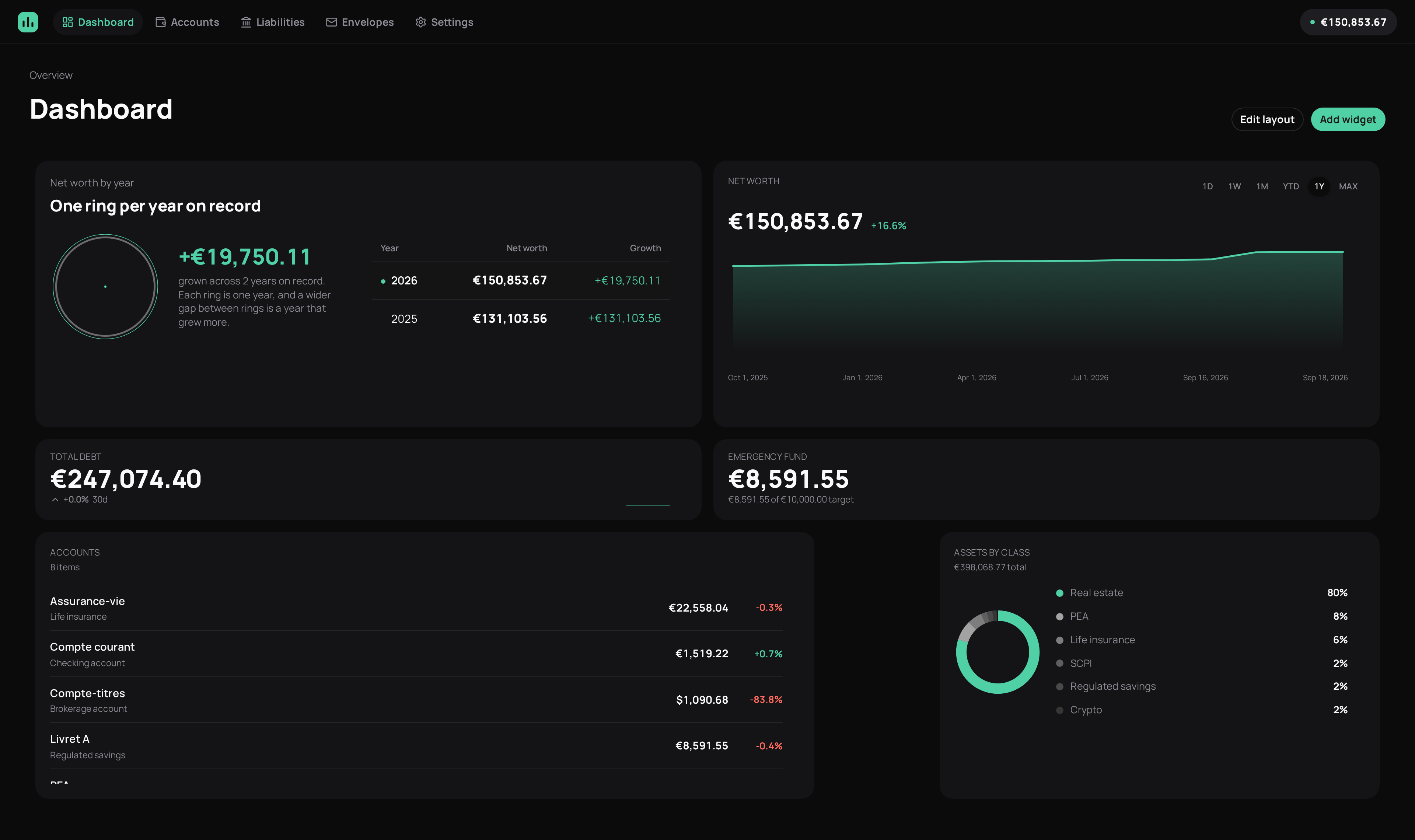
Croesus dashboard — net worth over time, asset breakdown, and account list
--- Croesus consolidates your full financial picture — bank accounts, brokerage accounts, French tax wrappers (PEA, life insurance, regulated savings), real estate, SCPI, crypto — and your debts, into a single net worth view over time. Run it as a self-hosted web app, or as a standalone desktop app with a local database. See [ROADMAP.md](./ROADMAP.md) for the full vision and where the project currently stands. ### Contents [Why "Croesus"?](#why-croesus) · [Features](#features) · [Screenshots](#screenshots) · [Architecture](#architecture) · [Project structure](#project-structure) · [Prerequisites](#prerequisites) · [Self-hosted deployment](#self-hosted-deployment-docker) · [Local development](#local-development) · [Stack](#stack) · [Contributing](#contributing) · [License](#license) ## Why "Croesus"? **Croesus** was the king of Lydia in the 6th century BC, famed across the ancient world for his immense wealth — so much so that his name outlived his kingdom. English still uses the idiom *"rich as Croesus"* today, over 2,500 years later. A net worth tracker doesn't need a cute mascot name. It needs a name that means exactly one thing: **wealth, tracked over the long run.** ## Features - 📊 **Net worth over time** — a single number, built from valuation history across every account, with the maths handled by `pandas`. - 🇫🇷 **French tax wrappers modeled properly** — PEA, assurance-vie, Livret A and friends aren't shoehorned into generic "brokerage" or "savings" buckets. - 🏠 **Beyond the stock market** — real estate and SCPI sit alongside your brokerage accounts, not bolted on as an afterthought. - 💹 **Automatic price tracking** — give a stock, ETF, fund, or crypto holding a symbol and its market value (and the account it's in) updates itself from Yahoo Finance/CoinGecko, on a schedule or on demand. Multi-currency accounts are converted to your reference currency using exchange rates from Frankfurter (ECB daily rates). - 🆘 **Emergency fund tracking** — a target goal with a progress bar, not just another line in a spreadsheet. - ✉️ **Budget envelopes** — YNAB-style allocation buckets, kept distinct from account/tax-wrapper types. - 🖥️ **Self-hosted or desktop** — run it on your own server behind Docker, or as a native Windows/macOS/Linux app with a local database. Same codebase, your choice. - 🌐 **English + French UI** — full interface translation, switchable per-user in Settings, with locale-aware number and date formatting. - 🔓 **AGPL-3.0** — if someone runs a modified version of Croesus as a service, they owe the community those modifications back. ## Screenshots
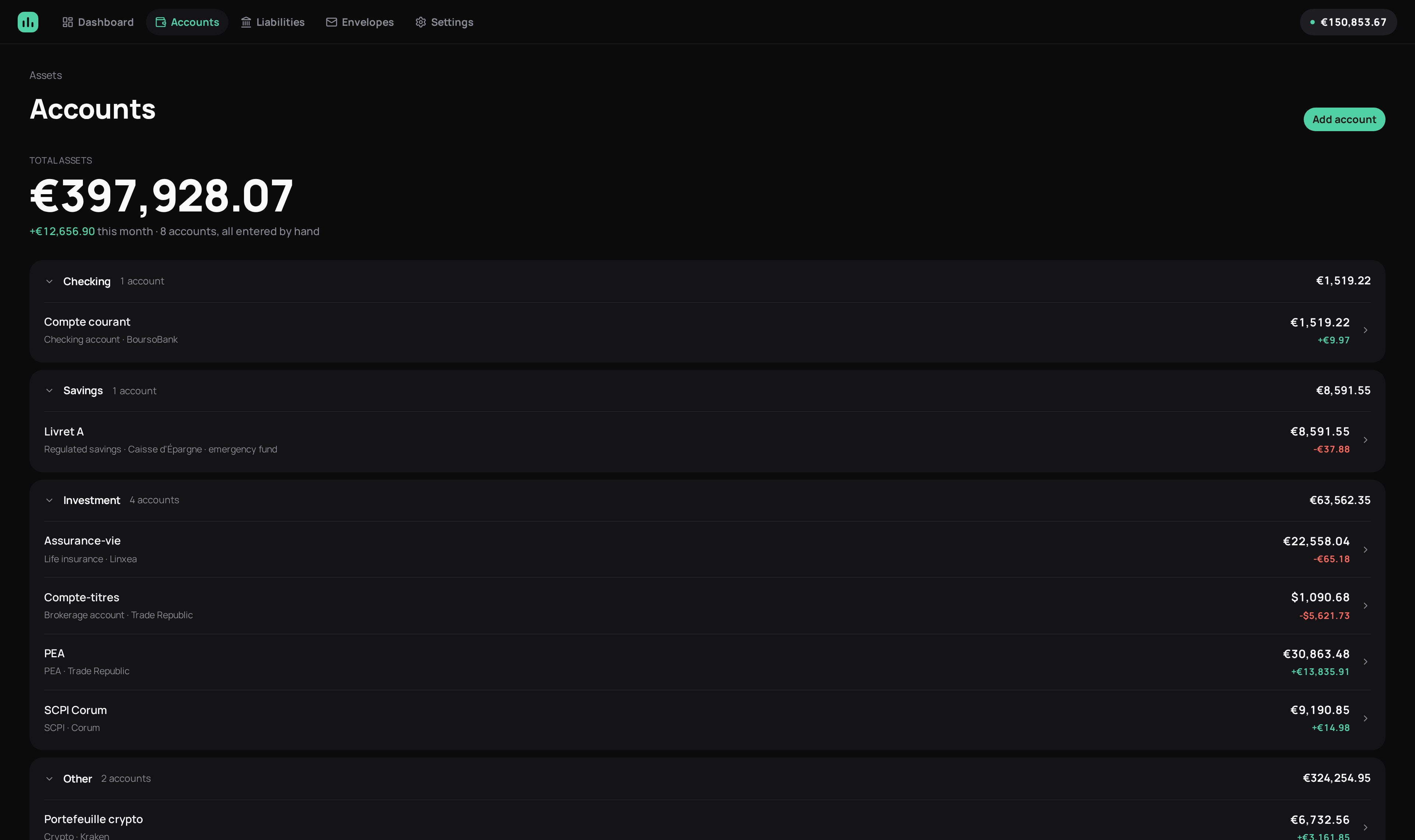
Accounts page — grouped by type, with per-account balances and 30-day change Accounts, grouped by type — checking, savings, investment, and beyond
## Architecture Same Vue frontend, two ways to run the backend behind it: ```mermaid flowchart LR subgraph SH["Self-hosted (Docker)"] direction LR B1["Browser"] --> F1["Frontend\n(Vue 3 SPA)"] F1 --> A1["Backend\n(FastAPI)"] A1 --> D1[("PostgreSQL")] end subgraph DT["Desktop (Tauri)"] direction LR F2["Native window\n(same Vue 3 SPA)"] --> A2["Embedded sidecar\n(FastAPI)"] A2 --> D2[("SQLite")] end ``` The desktop app can also skip its embedded sidecar entirely and point at an existing self-hosted instance instead ("remote mode" — see [Desktop (Tauri)](#desktop-tauri) below) — same frontend, talking to someone else's backend over HTTPS. ## Project structure | Path | What's there | |-----------------------|------------------------------------------------------------------| | `backend/` | FastAPI API, SQLAlchemy/Alembic models & migrations, financial calculations (`pandas`, `numpy-financial`) | | `frontend/` | Vue 3 + Vite + Nuxt UI single-page app | | `src-tauri/` | Desktop shell (Tauri) — Windows/Linux/macOS | | `docker-compose.yml` | Self-hosted deployment (backend + Postgres + frontend) | ## Prerequisites | For | You need | |------------------------|---------------------------------------------------------------------------| | Backend | Python 3.13+, [uv](https://docs.astral.sh/uv/) | | Frontend | Node 22+, pnpm (version pinned via `packageManager` — `corepack enable` picks up the right one) | | Desktop (Tauri) | Rust stable (1.77.2+, via [rustup](https://rustup.rs)) + platform build deps, see below | | Self-hosted (Docker) | Docker + Docker Compose |
Desktop build dependencies, by platform
- **Linux**: `libwebkit2gtk-4.1-dev`, `libssl-dev`, `librsvg2-dev`, `libgtk-3-dev`, `libayatana-appindicator3-dev`, `patchelf`, `libdbus-1-dev`, `pkg-config` - **macOS**: Xcode Command Line Tools (`xcode-select --install`) - **Windows**: Microsoft C++ Build Tools and the WebView2 runtime (already installed on most Windows 10/11 machines) To build Windows/macOS binaries, use CI (GitHub Actions) rather than building locally — there is no reliable cross-compilation path from Linux ARM.
## Self-hosted deployment (Docker) ```bash pnpm setup ``` Walks you through generating `POSTGRES_PASSWORD`, enabling login by default (`ADMIN_USERNAME`/`ADMIN_PASSWORD` + a generated `JWT_SECRET` — needed if you want to connect to this instance from the desktop app's remote mode; you can opt out if you'd rather run without one), optionally setting up OIDC SSO (see below), and setting `CORS_ORIGINS` correctly if so, then runs `docker compose up -d --build`. Safe to re-run — it never overwrites a value you've already set in `.env`. By default this publishes the frontend on port `8080` and the API on port `8000` directly — no reverse proxy required to get started. `pnpm setup` defaults to requiring login; setting up `.env` by hand instead (below) leaves the API open with no login unless you set `ADMIN_USERNAME`/ `ADMIN_PASSWORD` yourself. Prefer doing it by hand instead? ```bash cp .env.example .env # set a real POSTGRES_PASSWORD, and the rest as needed docker compose up -d --build ``` Running behind a reverse proxy (Traefik, Caddy, nginx...) instead? See [docs/REVERSE_PROXY.md](./docs/REVERSE_PROXY.md) for `docker-compose.override.yml` examples of each. Whatever you set `CORS_ORIGINS` to, make sure it still includes `tauri://localhost` (and `http://tauri.localhost` for Windows builds) if you want desktop remote mode to keep working — those are the origins a packaged desktop app is served from, and they're easy to drop when overriding the value for a custom domain.
Single Sign-On (OIDC)
Croesus works with any OIDC-compliant provider — Authentik, Keycloak, Zitadel, or your own — via standard discovery (no provider-specific code). It's independent of `ADMIN_USERNAME`/`ADMIN_PASSWORD`: run OIDC alone, the password login alone, or both side by side. 1. In your IdP, create an OIDC/OAuth2 provider and application for Croesus (a "confidential"/server-side client, not public/SPA), with its redirect URI set to this backend's own public URL + `/auth/oidc/callback` — e.g. `https://api.example.com/auth/oidc/callback`. 2. Set `OIDC_ISSUER`, `OIDC_CLIENT_ID`, `OIDC_CLIENT_SECRET`, and `OIDC_REDIRECT_URI` (matching what you registered in step 1) in `.env` — `pnpm setup` will prompt for these, or set them by hand per `.env.example`. `OIDC_DISPLAY_NAME` controls the login button's label (e.g. "Sign in with Authentik"). 3. Restart (`docker compose up -d --build`). The login screen picks it up automatically — a password form, an SSO button, or both, depending on what's configured. Access control is entirely up to your IdP: whoever it lets authenticate against the Croesus client is trusted — Croesus doesn't keep a separate allow-list on top. Scope who can sign in via your IdP's own application/policy bindings (e.g. Authentik's "Bindings" on the application, or Keycloak's client scopes/group membership). The desktop app's remote mode picks up SSO with no extra desktop-side config: it opens the sign-in flow in your system browser (some IdPs refuse to authenticate inside an embedded app window) and catches the redirect on a short-lived local port — no custom URL scheme or extra IdP configuration needed beyond the one redirect URI from step 1.
## Local development Want everything (backend, frontend, and the desktop sidecar) set up in one shot? Run: ```bash pnpm setup:dev ``` It checks for the tools above, installs both the root and `frontend/` dependencies (they have separate lockfiles), builds the sidecar binary, applies backend migrations, and — only on a brand-new local database — seeds it with sample data (see `backend/scripts/seed.py`); re-running it later leaves an existing local database untouched. The sections below are the same steps broken out individually, if you only need one piece or want to see what's happening. ### Backend ```bash cd backend cp .env.example .env # defaults to SQLite, nothing to change to get started uv sync uv run alembic upgrade head uv run uvicorn app.main:app --reload ``` API available at http://localhost:8000 (interactive docs at `/docs`). ### Frontend ```bash cd frontend cp .env.example .env pnpm install pnpm dev ``` App available at http://localhost:5173. ### Desktop (Tauri) Run `pnpm setup:dev` first (see above), then: ```bash pnpm tauri dev # launches the frontend + a native window ``` The desktop app runs fully standalone: the sidecar binary embeds the backend and serves it on `localhost:8000` against a SQLite database in the OS's per-user app data directory — no Docker/Postgres required. Re-run `build-sidecar.sh` after backend code changes. On first launch you'll be asked to choose Local or Remote. Instead of the local database, the desktop app can point at an existing self-hosted instance: pick "Remote" (or later, in Settings → Connection), enter that server's **backend API** URL, and restart. If the self-hosted instance has `ADMIN_USERNAME`/`ADMIN_PASSWORD` configured (see above), you'll be prompted to log in. If your deployment serves the frontend and the API on separate hosts (e.g. behind a reverse proxy with `app.example.com` routed to the frontend and `api.example.com` routed to the backend), make sure you enter the **API** host here — pointing the desktop app at the frontend's URL will fail with a CORS/404-looking error, since the frontend server doesn't proxy or set CORS headers for API paths. If the app can't reach the backend, the screen it shows includes the sidecar's own log output — check there first (this only ever contains local output, never anything from a remote server you've connected to). ## Stack FastAPI · SQLAlchemy · Alembic · pandas / numpy-financial · Vue 3 · Vite · Nuxt UI · Pinia · Tauri · PostgreSQL · Docker ## Contributing Contributions are welcome — see [CONTRIBUTING.md](./CONTRIBUTING.md) for the workflow and commit message conventions. Releases are fully automated; see [docs/RELEASING.md](./docs/RELEASING.md) if you're a maintainer. Found a security issue? See [SECURITY.md](./SECURITY.md) for how to report it privately. ## License [AGPL-3.0-or-later](./LICENSE)