# llm-proxy
[English](./README.md) | [简体中文](./README.zh.md)
A local LLM proxy server — single port serving both admin UI and AI API, with multi-protocol routing, protocol translation, streaming SSE conversion, token tracking, and protocol capture debugging.
## Features
- 🔀 **Multi-Protocol**: Anthropic, OpenAI, and OpenAI Responses on a single port
- 🔄 **Protocol Translation**: Bidirectional conversion across all three protocols (streaming + non-streaming)
- 📸 **External Vision**: Image-to-text fallback for non-multimodal models — auto-converts images via a configured vision model, with persistent LRU cache
- 🖥️ **macOS App**: Native menu bar app with built-in proxy — zero dependencies, drag & drop install
- 📊 **Admin UI**: Alpine.js SPA with dashboard, provider management, adapter config, vision settings, and capture debugger
- 🎯 **Virtual Adapters**: Custom endpoints with model remapping (`/{adapter-name}/v1/...`)
- 📡 **SSE Streaming**: 4 bidirectional stream converters with per-line timestamps
- 🔍 **Protocol Capture**: Ring buffer recording raw request/response pairs with side-by-side diff
- 🔥 **Hot Reload**: Atomic config swap without dropping in-flight requests
- 📈 **Token Tracking**: Per-provider token usage statistics
## Screenshots
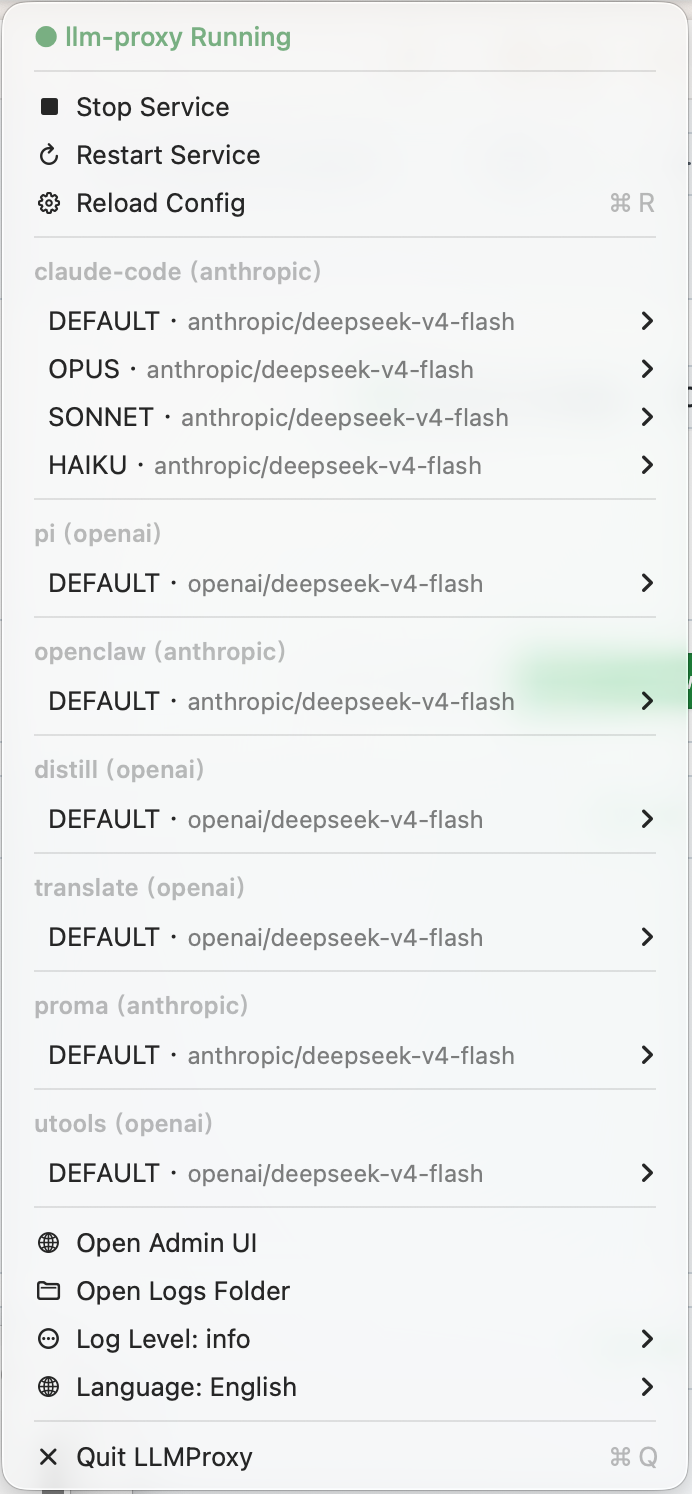
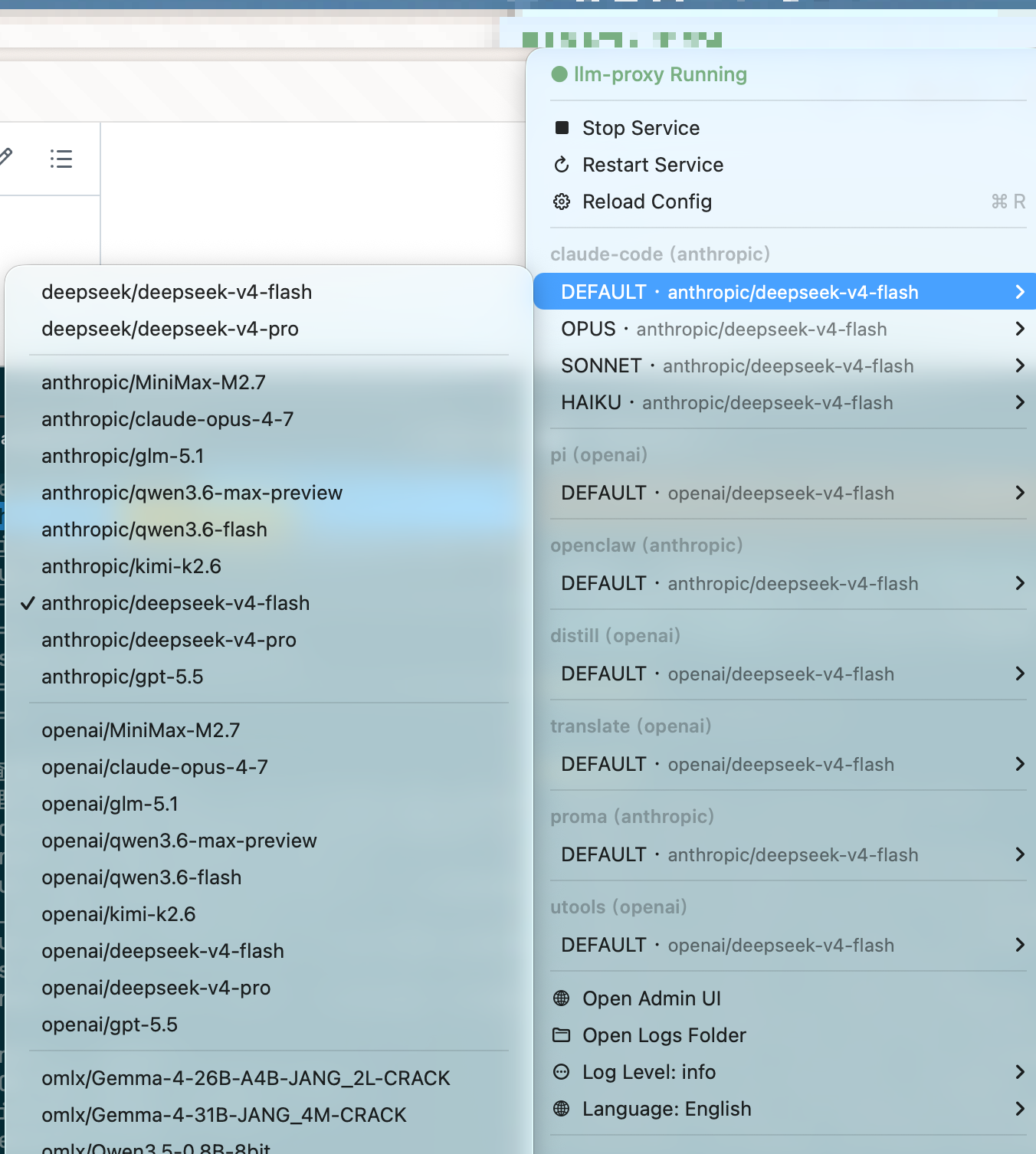
macOS menu bar — service control, adapter switching, language settings | adapter list & model mapping
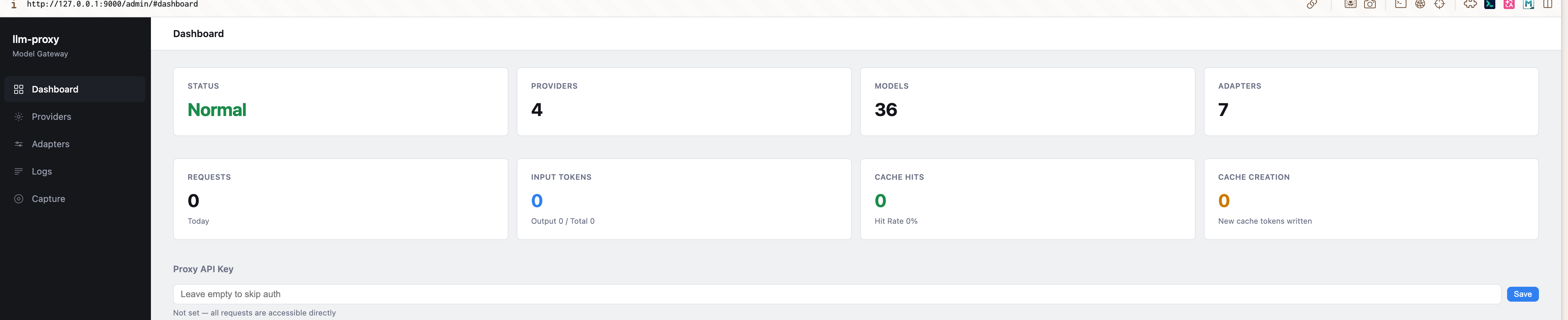
Admin dashboard — provider status, token usage, proxy key management

Provider management — add/edit/delete AI providers, pull model lists, set input modalities
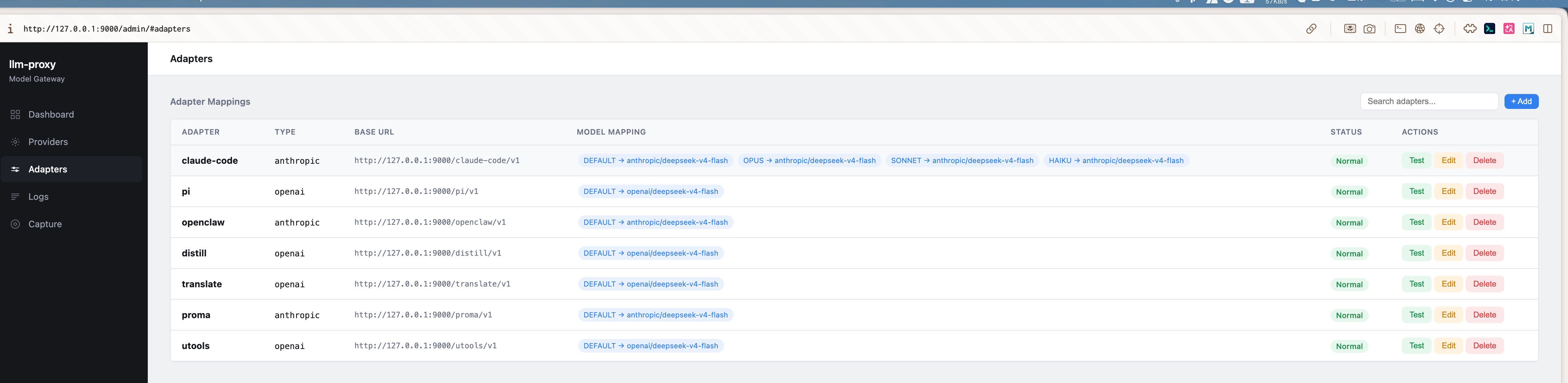
Adapter configuration — virtual endpoints with model remapping
## Install
**macOS (recommended):**
Download `LLMProxy.dmg` from [Releases](https://github.com/maplezzk/llm-proxy/releases), drag to `/Applications`. If macOS blocks the app, run:
```bash
xattr -cr /Applications/LLMProxy.app
```
Then open again. Includes everything — CLI, proxy, and admin UI.
**macOS (Homebrew):**
```bash
brew tap maplezzk/tap && brew install --cask llm-proxy
```
**CLI only:**
```bash
npm install -g @maplezzk/llm-proxy
```
## Quick Start
```bash
# Start proxy
llm-proxy start
# Open admin UI → http://127.0.0.1:9000/admin/
```
On first launch, the config directory is created automatically. Open the admin UI to configure everything in your browser — no manual YAML editing needed.
The admin UI supports:
- **Provider management**: Add/edit/delete AI providers, pull model lists from APIs, declare input modalities (text/image)
- **Adapter config**: Create virtual endpoints with model remapping and protocol adaptation
- **Vision settings**: Enable external vision (image-to-text) for non-multimodal models, view cache stats
- **Proxy key**: Set API authentication key
- **Live test**: Send test requests directly to verify configuration
- **Protocol capture**: Real-time request/response inspection
## Configuration
`~/.llm-proxy/config.yaml`:
```yaml
log_level: debug # debug | info | warn | error
port: 9000 # Optional: default 9000
max_body_size: 10485760 # Optional: max request body in bytes (default 10MB)
proxy_key: sk-xxx # Optional: if set, /v1/* requires auth
providers:
- name: deepseek
type: openai # anthropic | openai | openai-responses
api_key: ${DEEPSEEK_API_KEY}
api_base: https://api.deepseek.com
models:
- id: deepseek-chat
- name: anthropic
type: anthropic
api_key: ${ANTHROPIC_API_KEY}
models:
# Multimodal model — declare image input modality
- id: claude-sonnet-4
input: [text, image]
thinking:
budget_tokens: 10000
# Non-multimodal model — images will be auto-converted via vision provider
- id: deepseek-reasoner
# input omitted → defaults to [text]; image requests trigger vision fallback
# MiniMax adaptive thinking passthrough (non-standard thinking.type)
- id: MiniMax-M2
thinking:
type: enabled
adapters:
- name: my-tool
type: anthropic
models:
- sourceModelId: claude-sonnet-4
provider: anthropic
targetModelId: claude-sonnet-4-20250514
# External Vision — image-to-text for non-multimodal models
vision:
provider: anthropic # Required: vision-capable provider
model: claude-sonnet-4 # Required: multimodal model ID
prompt: | # Optional: custom prompt (default shown below)
请详细描述这张图片的内容,包括其中的文字、物体、场景、颜色等关键信息。
```
API keys use environment variable interpolation (`${VAR}`) — never stored in plain text.
## External Vision
When the routed model **does not** declare `input: image`, llm-proxy can automatically convert image content to text using a configured vision model:
1. Inbound request contains an image block (Anthropic `image`, OpenAI Chat `image_url`, or OpenAI Responses `input_image`)
2. llm-proxy extracts each image and calls the configured vision provider/model via the proxy itself (recursive routing)
3. The image is replaced with a `...` text block
4. The non-multimodal model receives text and "sees" the image content
**Vision cache** (`~/.llm-proxy/vision-cache.json`):
- Keys: `md5:` for base64 images, `url:` for URLs
- LRU eviction at 1000 entries (configurable via `vision_cache.max_entries`)
- 5s debounced flush to disk; sync flush on process exit
- Stats: hits / misses / hit-rate exposed at `/admin/vision-cache/stats`
Cache storage location: `~/.llm-proxy/vision-cache.json`
## CLI
```bash
llm-proxy start # Start proxy server
llm-proxy stop # Stop proxy server
llm-proxy restart # Restart
llm-proxy reload # Hot-reload config
llm-proxy status # Show status
```
## Admin API
| Endpoint | Method | Description |
|----------|--------|-------------|
| `/admin/config` | GET | Current config (keys redacted) |
| `/admin/config/reload` | POST | Hot-reload config |
| `/admin/health` | GET | Health check |
| `/admin/status/providers` | GET | Provider stats |
| `/admin/logs` | GET | Request logs |
| `/admin/logs/stats` | GET | Log statistics |
| `/admin/token-stats` | GET | Token usage stats |
| `/admin/log-level` | GET / PUT | Read / update log level |
| `/admin/locale` | GET / PUT | Read / update UI locale (zh / en) |
| `/admin/port` | GET / PUT | Read / update listening port (requires restart) |
| `/admin/proxy-key` | GET / PUT | Read / update proxy auth key |
| `/admin/vision` | GET / PUT | Read / update external-vision config |
| `/admin/vision-cache/stats` | GET | Vision cache hit / miss / size |
| `/admin/vision-cache/clear` | POST | Clear vision cache |
| `/admin/adapters` | GET / POST / PUT / DELETE | Adapter CRUD |
| `/admin/providers` | POST / PUT / DELETE | Provider CRUD |
| `/admin/providers/:name/pull-models` | POST | Pull remote model list |
| `/admin/test-model` | POST | Send a test request to a provider/model |
| `/admin/test-adapter` | POST | Send a test request through an adapter |
| `/admin/debug/captures/*` | GET / POST | Protocol capture ring buffer + SSE stream |
## Protocol Translation Matrix
| Source | Target | Non-streaming | Streaming (SSE) |
|--------|--------|:---:|:---:|
| Anthropic | OpenAI | ✅ | ✅ |
| OpenAI | Anthropic | ✅ | ✅ |
| Anthropic | OpenAI Responses | ✅ | ✅ |
| OpenAI Responses | Anthropic | ✅ | ✅ |
## Architecture
```
Client → POST /v1/{messages|chat/completions|responses}
→ server.ts (regex route match)
→ pipeline.ts (unified request pipeline)
→ parseAndAuth() (body, JSON, auth, model extraction)
→ vision.ts (image → text fallback for non-multimodal models, with cache)
→ router.ts (modelName → Provider)
→ translation.ts (protocol conversion, thinking injection)
→ provider.ts (fetch upstream)
→ stream-converter.ts (SSE transform)
→ capture.ts (ring buffer + SSE push)
→ token-tracker (per-provider usage stats)
→ Response
```
- **Runtime**: Node.js >= 20, TypeScript ESM
- **Frontend**: Alpine.js SPA (admin UI)
- **Build**: `tsc` + `esbuild` (admin-app.js)
- **Testing**: Node.js native test runner + tsx (280 tests)
## Development
See [DEVELOPMENT.md](./DEVELOPMENT.md) for full development workflow.
```bash
# CLI
npm run dev # Start proxy in dev mode
npm test # Run 280 tests
# macOS app
npm run build:app # Build .app + .dmg
```
## FAQ
**Homebrew shows old version?** Refresh tap:
```bash
brew upgrade --cask llm-proxy
```
If that fails, uninstall first and reinstall:
```bash
brew uninstall --cask llm-proxy
brew untap maplezzk/tap && brew tap maplezzk/tap && brew install --cask llm-proxy
```
**macOS blocks the app?** Remove quarantine:
```bash
xattr -cr /Applications/LLMProxy.app
```
**How do I clear the vision cache?** Either delete the cache file:
```bash
rm ~/.llm-proxy/vision-cache.json
```
or call `POST /admin/vision-cache/clear` (or use the **Clear** button in the Admin UI → Vision settings).
**Where is vision cache stored?** `~/.llm-proxy/vision-cache.json` — survives restarts and is debounced-flushed every 5s.
**How do I enable image input for a model?** In Admin UI → Providers → edit a model → check **图片 (Image)** under **输入模态 (Input modalities)**, or in `config.yaml` add `input: [text, image]`. Models without image declared will trigger vision fallback if `vision:` is configured.