
A reactive Python notebook that's reproducible, git-friendly, and deployable as scripts or apps.
Docs · Discord · Examples · Gallery · YouTube
English | 繁體中文 | 简体中文 | 日本語 | Español





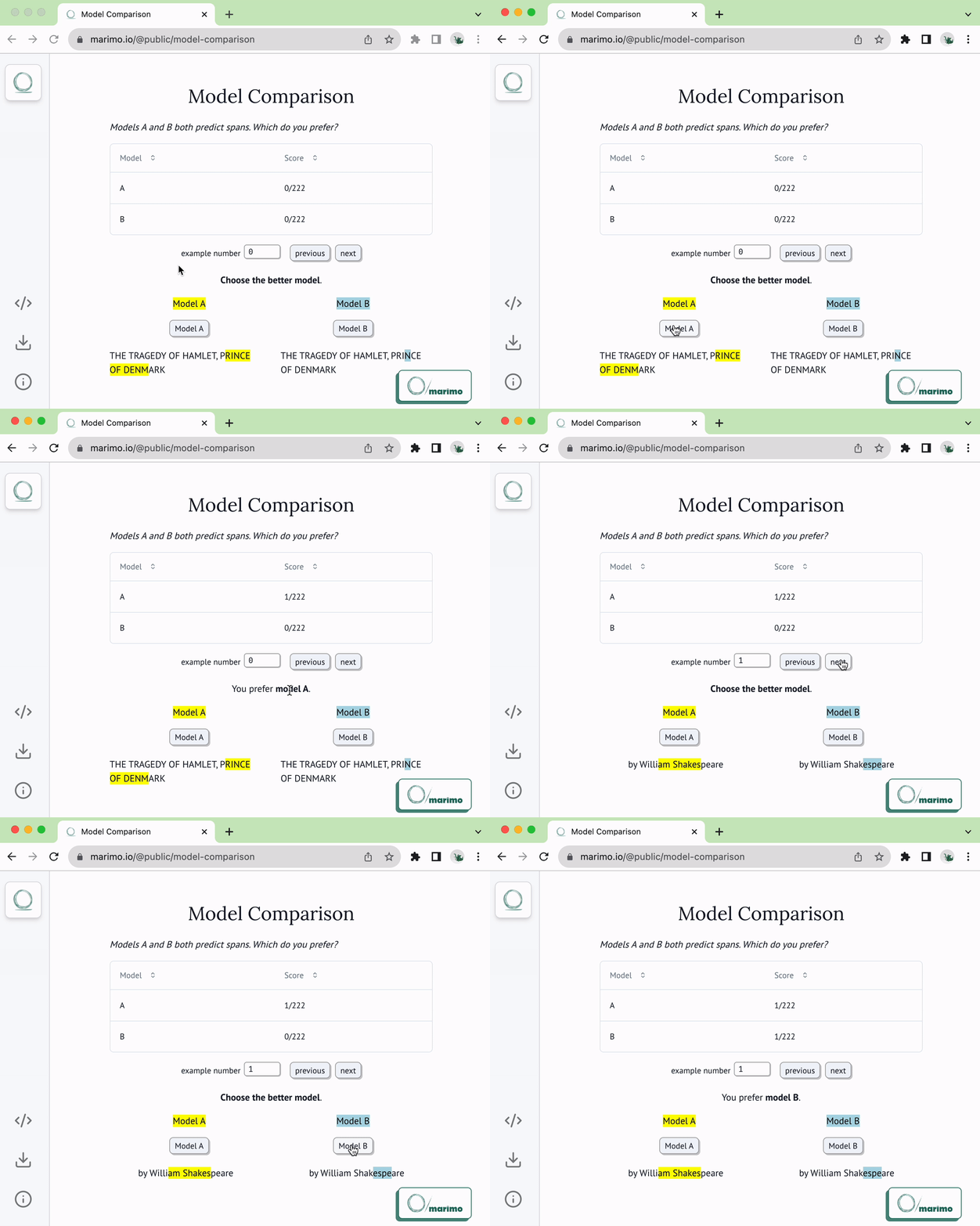
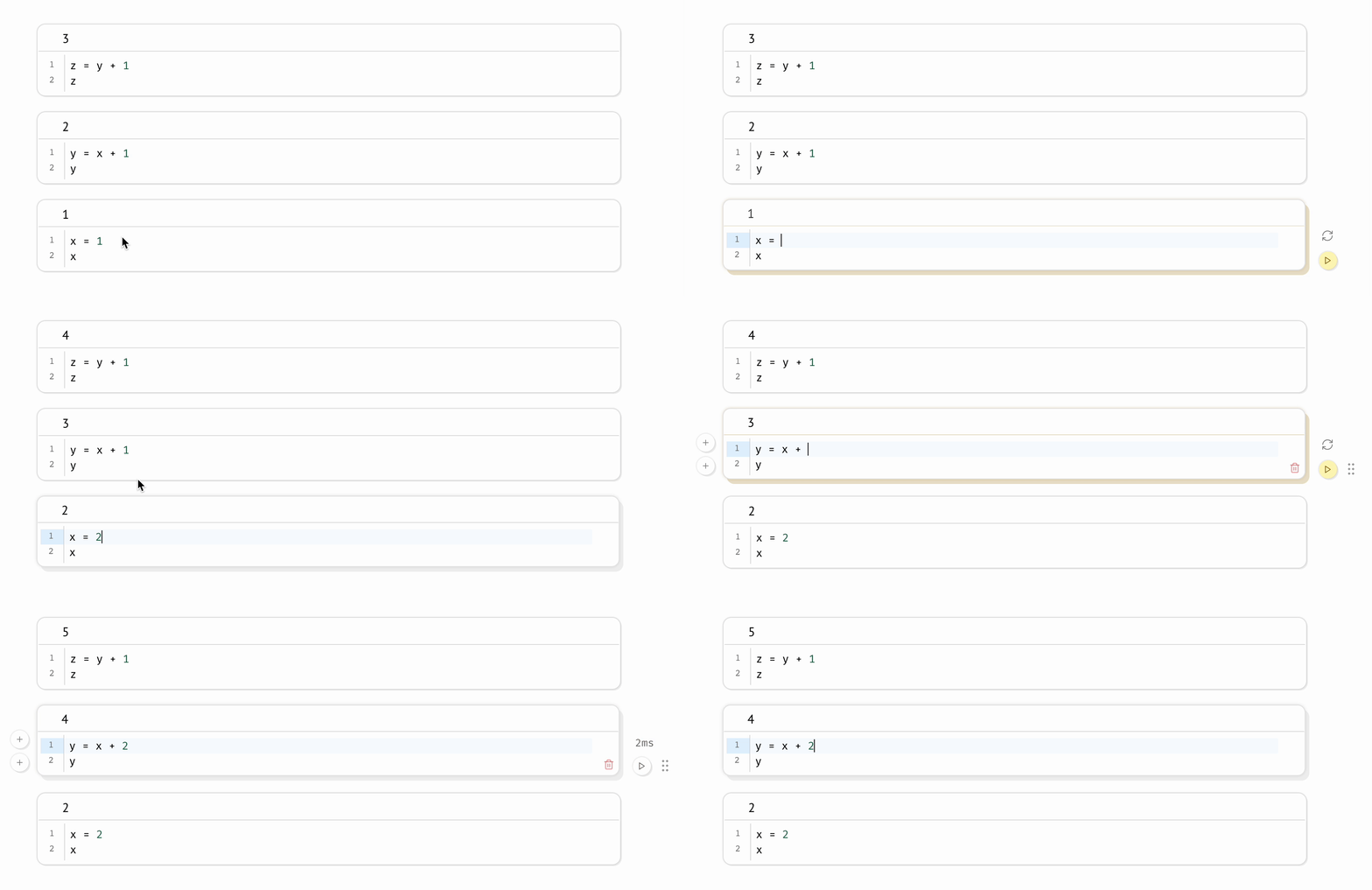 **Compatible with expensive notebooks.** marimo lets you [configure the runtime
to be
lazy](https://docs.marimo.io/guides/configuration/runtime_configuration.html),
marking affected cells as stale instead of automatically running them. This
gives you guarantees on program state while preventing accidental execution of
expensive cells.
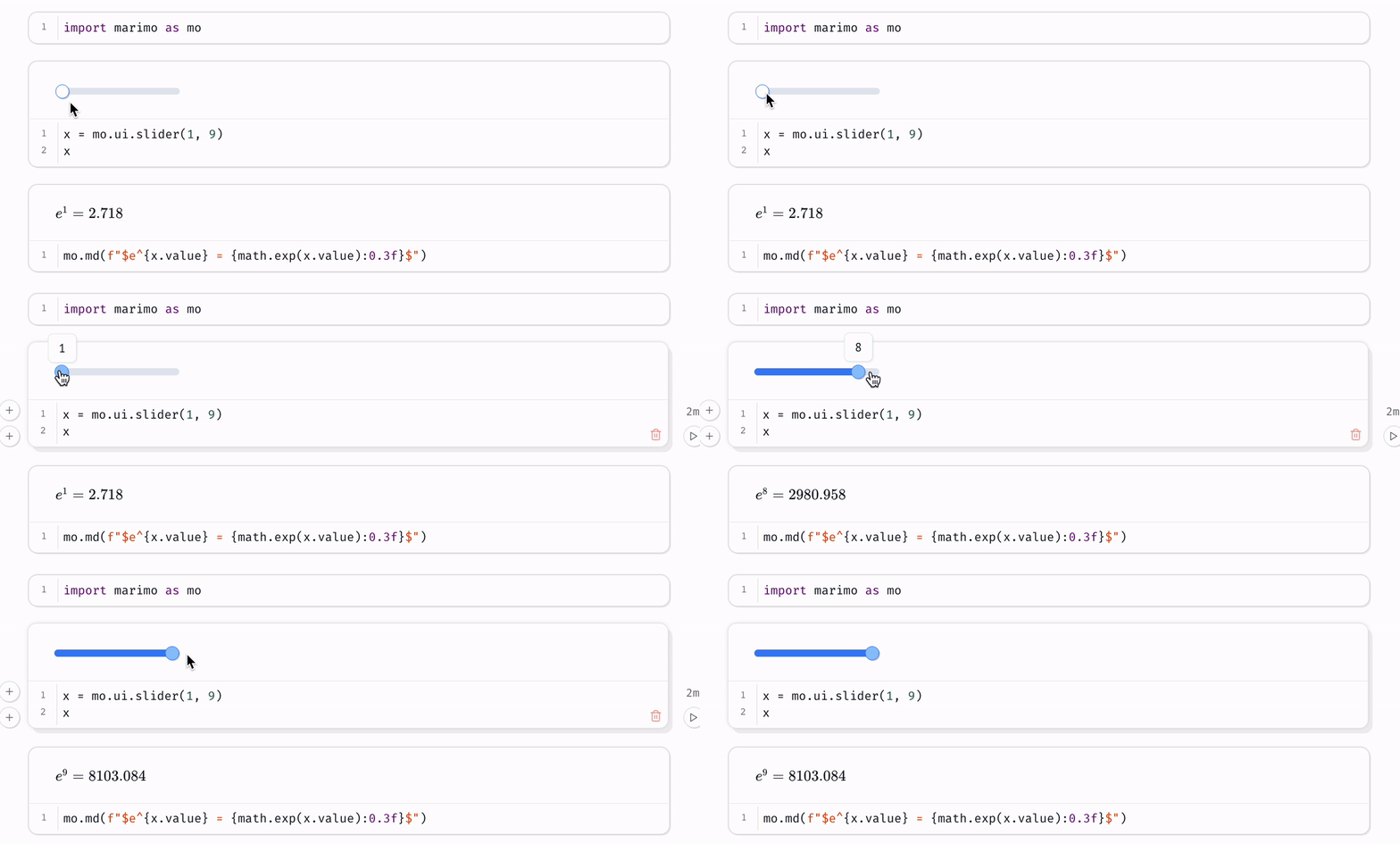
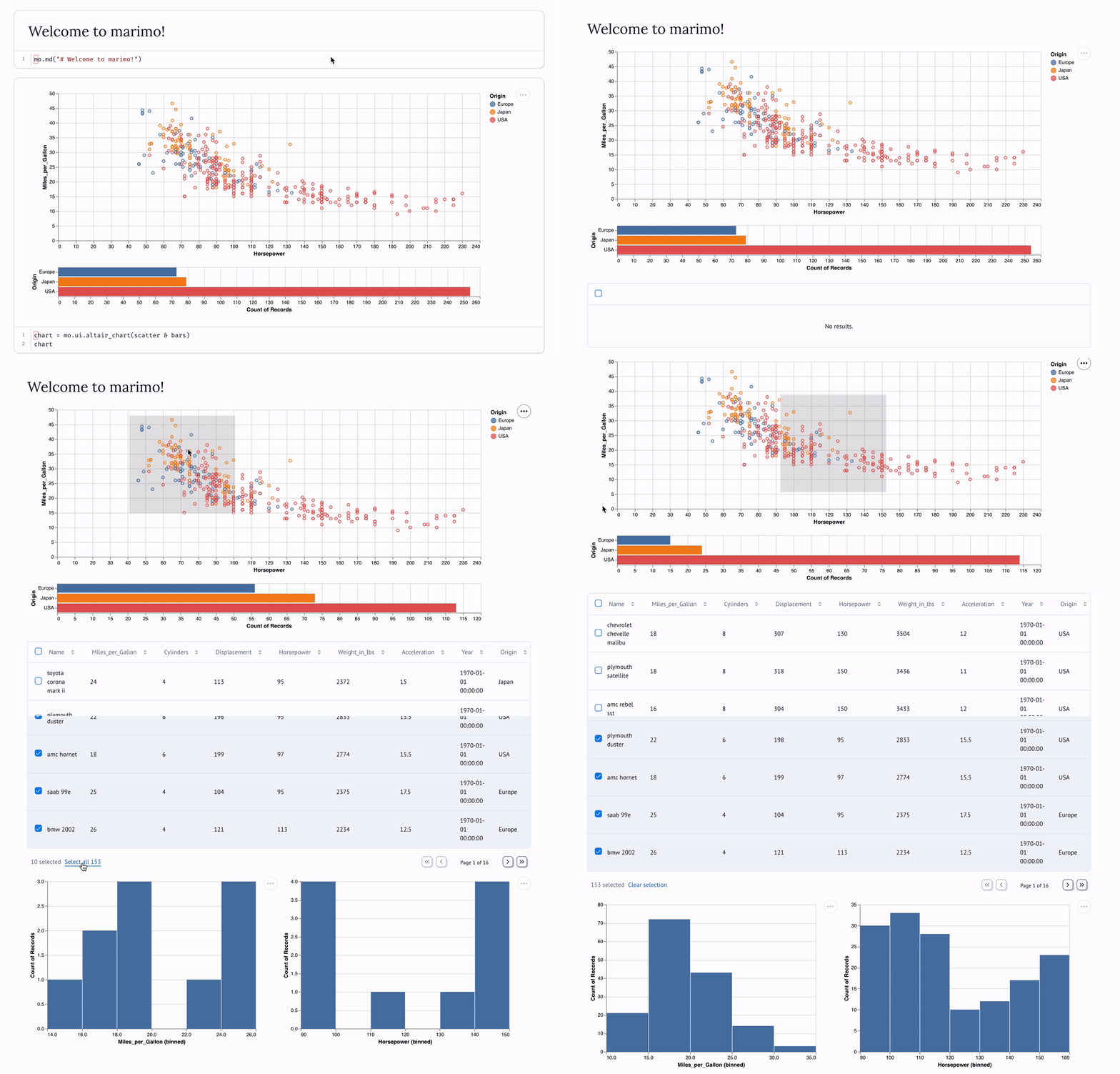
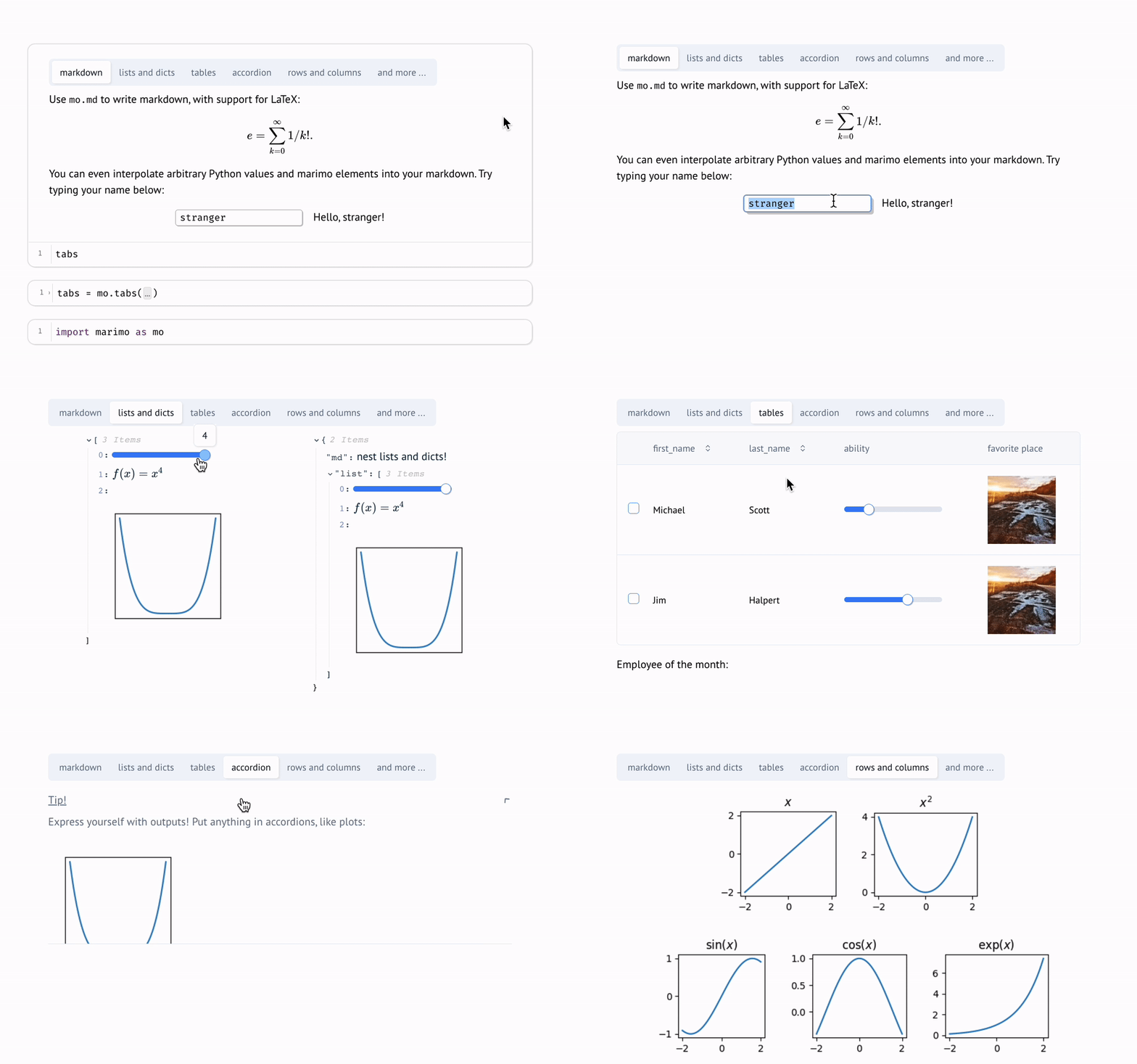
**Synchronized UI elements.** Interact with [UI
elements](https://docs.marimo.io/guides/interactivity.html) like [sliders](https://docs.marimo.io/api/inputs/slider.html#slider),
[dropdowns](https://docs.marimo.io/api/inputs/dropdown.html), [dataframe
transformers](https://docs.marimo.io/api/inputs/dataframe.html), and [chat
interfaces](https://docs.marimo.io/api/inputs/chat.html), and the cells that
use them are automatically re-run with their latest values.
**Compatible with expensive notebooks.** marimo lets you [configure the runtime
to be
lazy](https://docs.marimo.io/guides/configuration/runtime_configuration.html),
marking affected cells as stale instead of automatically running them. This
gives you guarantees on program state while preventing accidental execution of
expensive cells.
**Synchronized UI elements.** Interact with [UI
elements](https://docs.marimo.io/guides/interactivity.html) like [sliders](https://docs.marimo.io/api/inputs/slider.html#slider),
[dropdowns](https://docs.marimo.io/api/inputs/dropdown.html), [dataframe
transformers](https://docs.marimo.io/api/inputs/dataframe.html), and [chat
interfaces](https://docs.marimo.io/api/inputs/chat.html), and the cells that
use them are automatically re-run with their latest values.
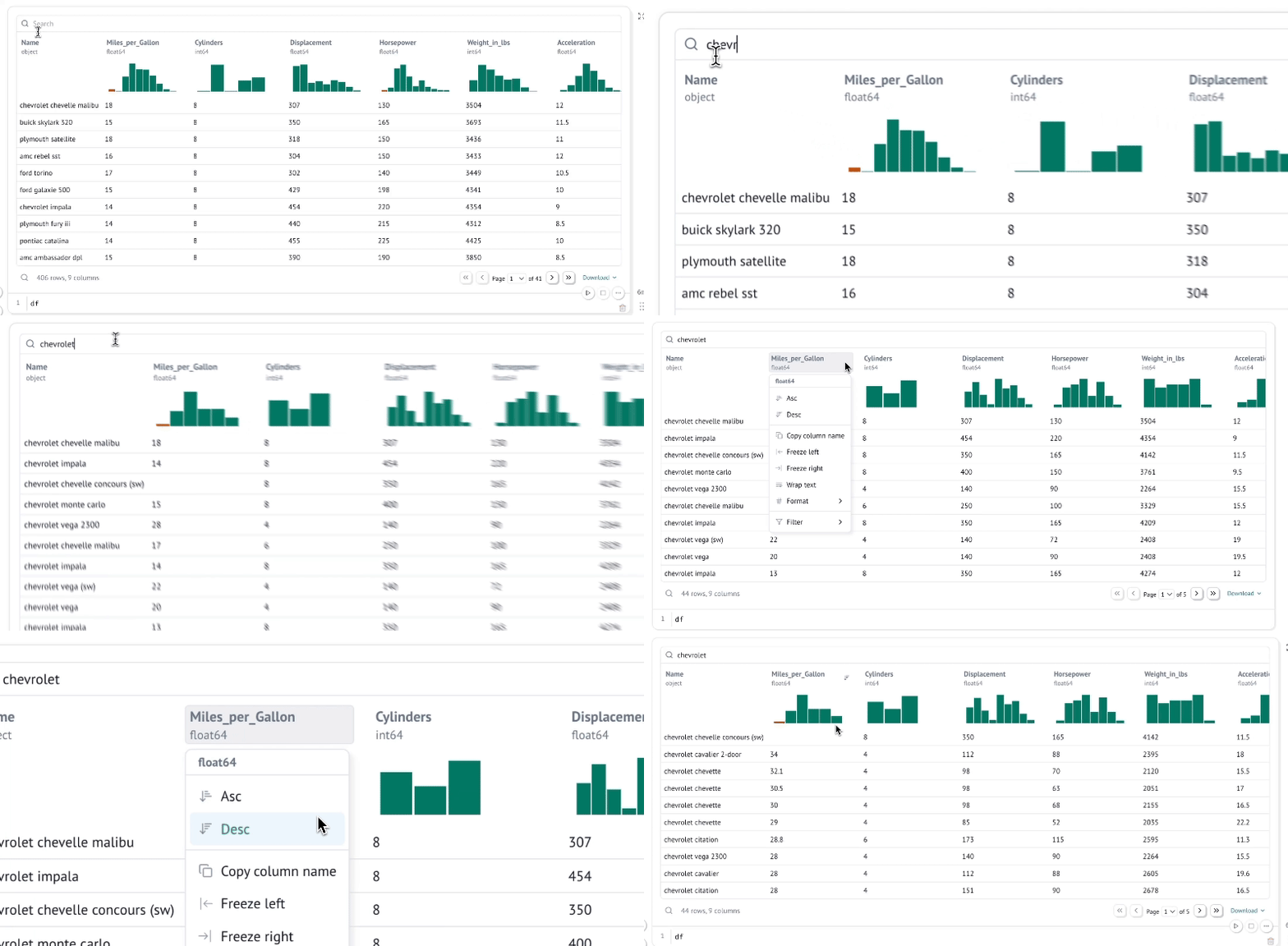
 **Interactive dataframes.** [Page through, search, filter, and
sort](https://docs.marimo.io/guides/working_with_data/dataframes.html)
millions of rows blazingly fast, no code required.
**Interactive dataframes.** [Page through, search, filter, and
sort](https://docs.marimo.io/guides/working_with_data/dataframes.html)
millions of rows blazingly fast, no code required.
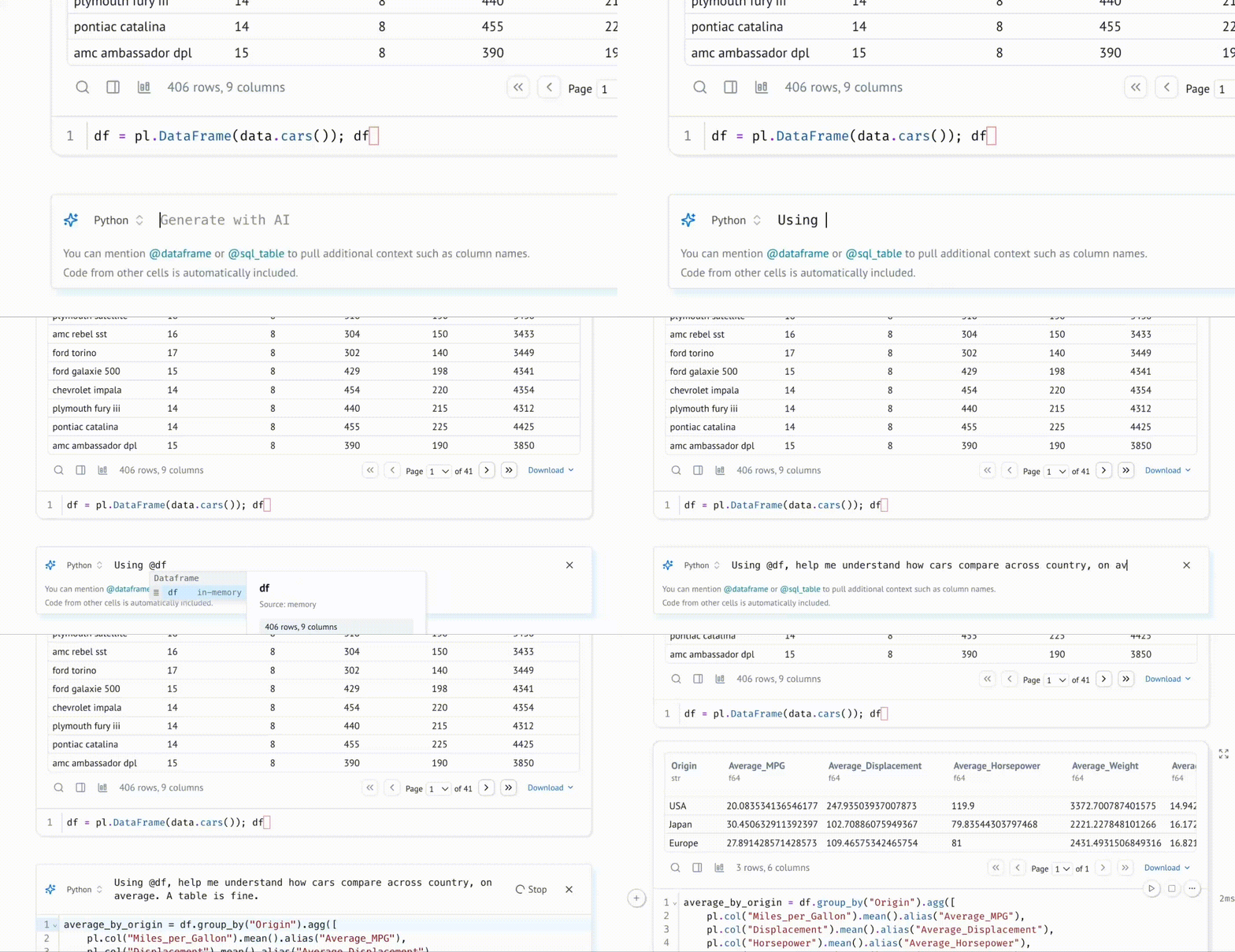
 **Generate cells with data-aware AI.** Collaborate on marimo notebooks with
your favorite agent, such as Claude Code, Codex, or OpenCode, using [marimo
pair](https://docs.marimo.io/guides/generate_with_ai/marimo_pair/). Or,
generate code [in the marimo editor with an AI
assistant](https://docs.marimo.io/guides/editor_features/ai_completion/) that
is highly specialized for working with data, with context about your variables
in memory. Customize the system prompt, bring your own API keys, or use local
models.
**Generate cells with data-aware AI.** Collaborate on marimo notebooks with
your favorite agent, such as Claude Code, Codex, or OpenCode, using [marimo
pair](https://docs.marimo.io/guides/generate_with_ai/marimo_pair/). Or,
generate code [in the marimo editor with an AI
assistant](https://docs.marimo.io/guides/editor_features/ai_completion/) that
is highly specialized for working with data, with context about your variables
in memory. Customize the system prompt, bring your own API keys, or use local
models.
 **Query data with SQL.** Build [SQL](https://docs.marimo.io/guides/working_with_data/sql.html) queries
that depend on Python values and execute them against dataframes, databases, lakehouses,
CSVs, Google Sheets, or anything else using our built-in SQL engine, which
returns the result as a Python dataframe.
**Query data with SQL.** Build [SQL](https://docs.marimo.io/guides/working_with_data/sql.html) queries
that depend on Python values and execute them against dataframes, databases, lakehouses,
CSVs, Google Sheets, or anything else using our built-in SQL engine, which
returns the result as a Python dataframe.
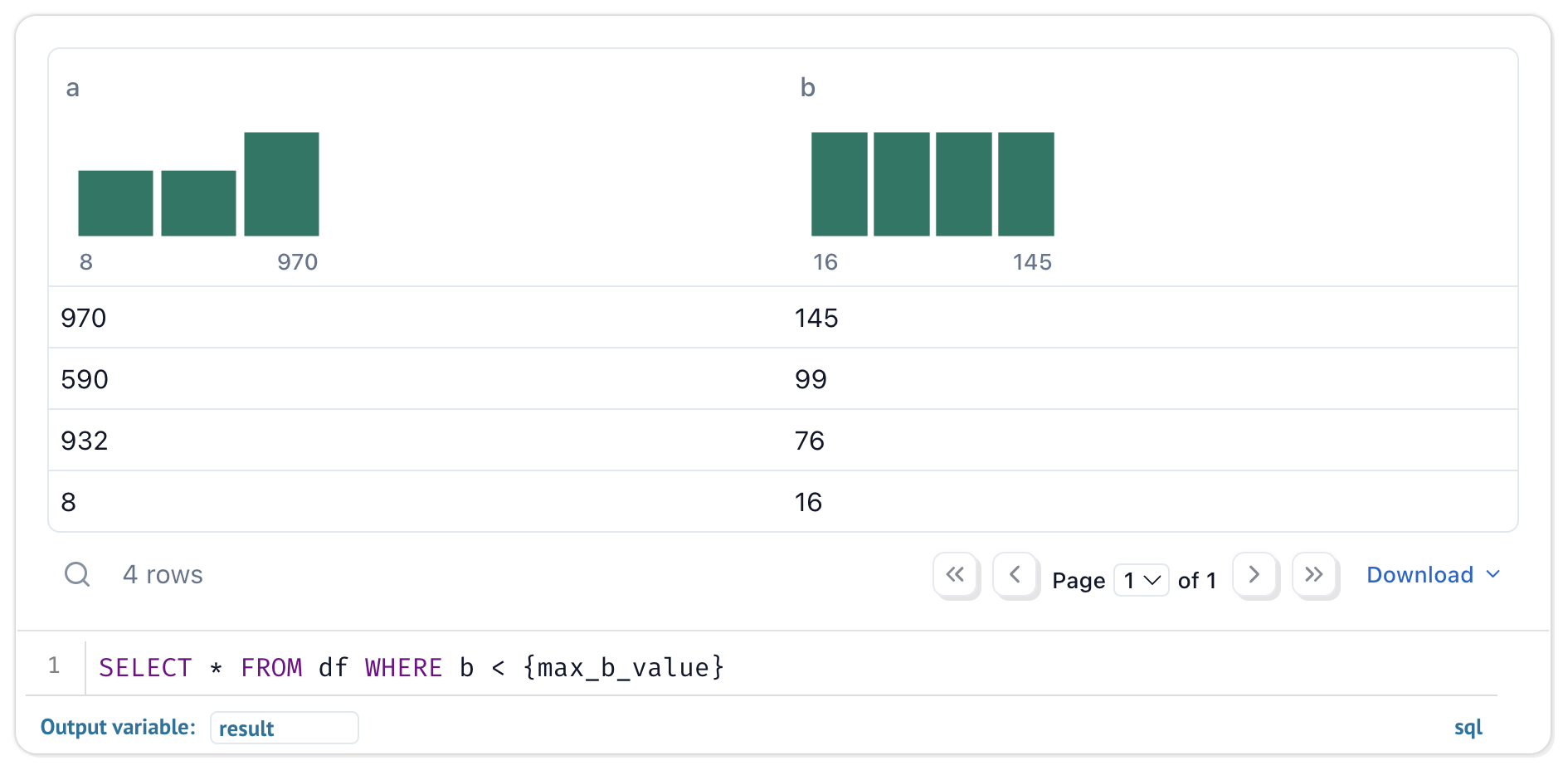 Your notebooks are still pure Python, even if they use SQL.
**Dynamic markdown.** Use markdown parametrized by Python variables to tell
dynamic stories that depend on Python data.
**Built-in package management.** marimo has built-in support for all major
package managers, letting you [install packages on import](https://docs.marimo.io/guides/editor_features/package_management.html). marimo can even
[serialize package
requirements](https://docs.marimo.io/guides/package_management/inlining_dependencies/)
in notebook files, and auto install them in
isolated venv sandboxes.
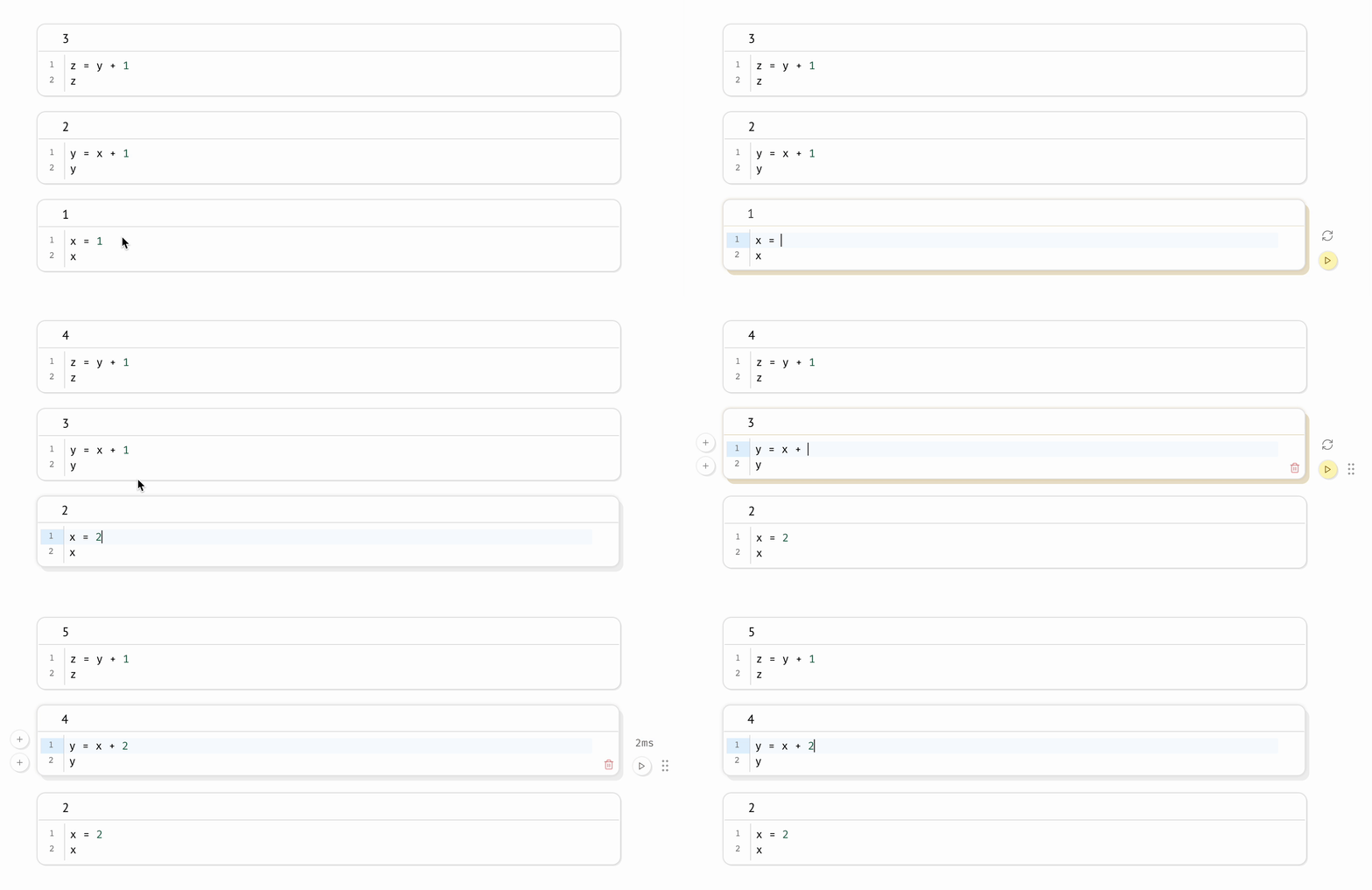
**Deterministic execution order.** Notebooks are executed in a deterministic
order, based on variable references instead of cells' positions on the page.
Organize your notebooks to best fit the stories you'd like to tell.
**Performant runtime.** marimo runs only those cells that need to be run by
statically analyzing your code.
**Batteries-included.** marimo comes with GitHub Copilot, AI assistants, Ruff
code formatting, HTML export, fast code completion, a [VS Code
extension](https://marketplace.visualstudio.com/items?itemName=marimo-team.vscode-marimo),
an interactive dataframe viewer, and [many more](https://docs.marimo.io/guides/editor_features/index.html)
quality-of-life features.
## Quickstart
_The [marimo concepts
playlist](https://www.youtube.com/watch?v=3N6lInzq5MI&list=PLNJXGo8e1XT9jP7gPbRdm1XwloZVFvLEq)
on our [YouTube channel](https://www.youtube.com/@marimo-team) gives an
overview of many features._
**Installation.** In a terminal, run
```bash
pip install marimo # or conda install -c conda-forge marimo
marimo tutorial intro
```
To install with additional dependencies that unlock SQL cells, AI completion, and more,
run
```bash
pip install "marimo[recommended]"
```
**Create notebooks.**
Create or edit notebooks with
```bash
marimo edit
```
**Run apps.** Run your notebook as a web app, with Python
code hidden and uneditable:
```bash
marimo run your_notebook.py
```
Your notebooks are still pure Python, even if they use SQL.
**Dynamic markdown.** Use markdown parametrized by Python variables to tell
dynamic stories that depend on Python data.
**Built-in package management.** marimo has built-in support for all major
package managers, letting you [install packages on import](https://docs.marimo.io/guides/editor_features/package_management.html). marimo can even
[serialize package
requirements](https://docs.marimo.io/guides/package_management/inlining_dependencies/)
in notebook files, and auto install them in
isolated venv sandboxes.
**Deterministic execution order.** Notebooks are executed in a deterministic
order, based on variable references instead of cells' positions on the page.
Organize your notebooks to best fit the stories you'd like to tell.
**Performant runtime.** marimo runs only those cells that need to be run by
statically analyzing your code.
**Batteries-included.** marimo comes with GitHub Copilot, AI assistants, Ruff
code formatting, HTML export, fast code completion, a [VS Code
extension](https://marketplace.visualstudio.com/items?itemName=marimo-team.vscode-marimo),
an interactive dataframe viewer, and [many more](https://docs.marimo.io/guides/editor_features/index.html)
quality-of-life features.
## Quickstart
_The [marimo concepts
playlist](https://www.youtube.com/watch?v=3N6lInzq5MI&list=PLNJXGo8e1XT9jP7gPbRdm1XwloZVFvLEq)
on our [YouTube channel](https://www.youtube.com/@marimo-team) gives an
overview of many features._
**Installation.** In a terminal, run
```bash
pip install marimo # or conda install -c conda-forge marimo
marimo tutorial intro
```
To install with additional dependencies that unlock SQL cells, AI completion, and more,
run
```bash
pip install "marimo[recommended]"
```
**Create notebooks.**
Create or edit notebooks with
```bash
marimo edit
```
**Run apps.** Run your notebook as a web app, with Python
code hidden and uneditable:
```bash
marimo run your_notebook.py
```
 **Execute as scripts.** Execute a notebook as a script at the
command line:
```bash
python your_notebook.py
```
**Automatically convert Jupyter notebooks.** Automatically convert Jupyter
notebooks to marimo notebooks with the CLI
```bash
marimo convert your_notebook.ipynb > your_notebook.py
```
or use our [web interface](https://marimo.io/convert).
**Tutorials.**
List all tutorials:
```bash
marimo tutorial --help
```
**Share cloud-based notebooks.** Use
[molab](https://molab.marimo.io/notebooks), a cloud-based marimo notebook
service similar to Google Colab, to create and share notebook links.
## Questions?
See the [FAQ](https://docs.marimo.io/faq.html) at our docs.
## Learn more
marimo is easy to get started with, with lots of room for power users.
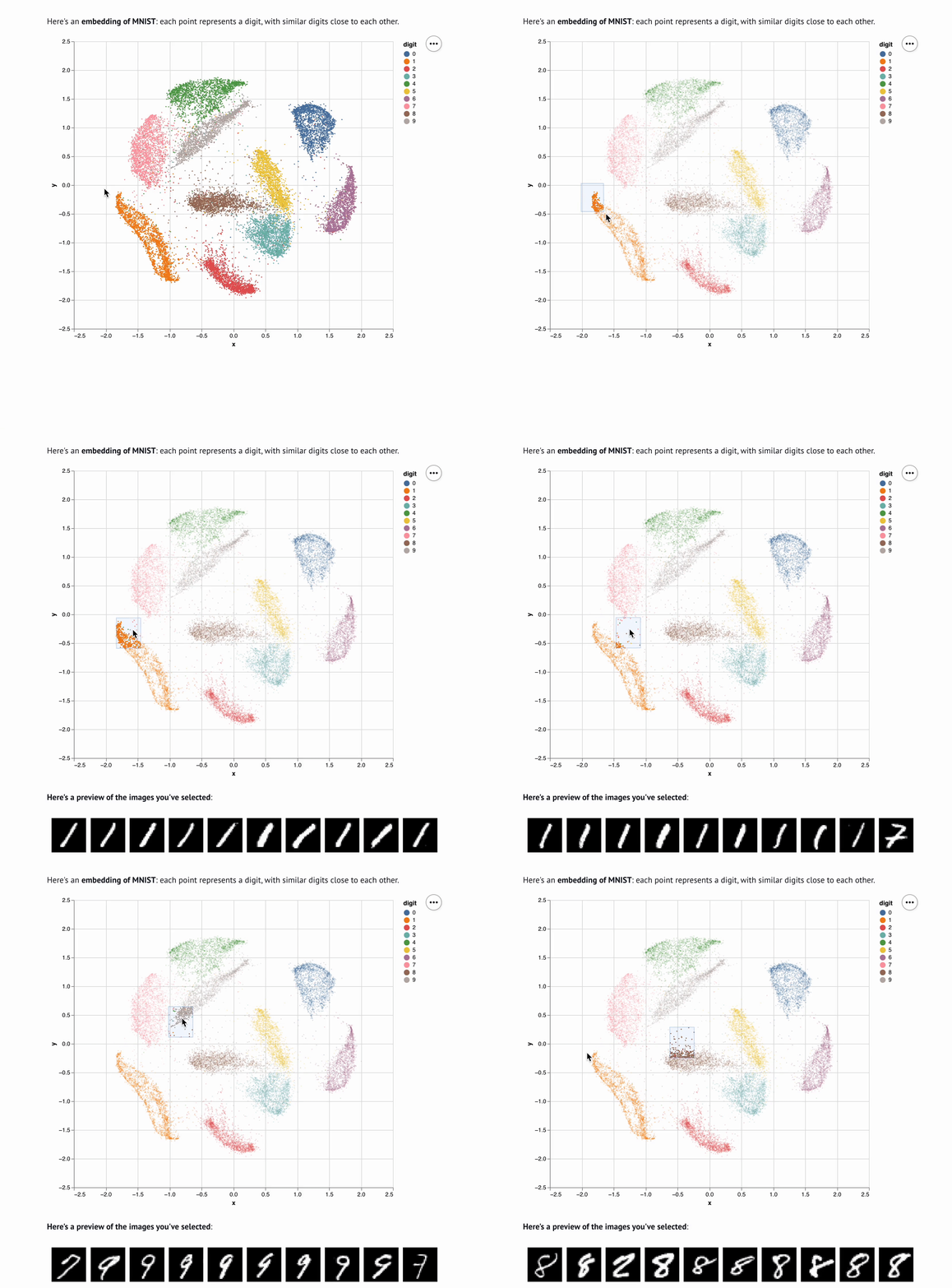
For example, here's an embedding visualizer made in marimo
([try the notebook live on molab!](https://molab.marimo.io/notebooks/nb_jJiFFtznAy4BxkrrZA1o9b/app?show-code=true)):
**Execute as scripts.** Execute a notebook as a script at the
command line:
```bash
python your_notebook.py
```
**Automatically convert Jupyter notebooks.** Automatically convert Jupyter
notebooks to marimo notebooks with the CLI
```bash
marimo convert your_notebook.ipynb > your_notebook.py
```
or use our [web interface](https://marimo.io/convert).
**Tutorials.**
List all tutorials:
```bash
marimo tutorial --help
```
**Share cloud-based notebooks.** Use
[molab](https://molab.marimo.io/notebooks), a cloud-based marimo notebook
service similar to Google Colab, to create and share notebook links.
## Questions?
See the [FAQ](https://docs.marimo.io/faq.html) at our docs.
## Learn more
marimo is easy to get started with, with lots of room for power users.
For example, here's an embedding visualizer made in marimo
([try the notebook live on molab!](https://molab.marimo.io/notebooks/nb_jJiFFtznAy4BxkrrZA1o9b/app?show-code=true)):
 Check out our [docs](https://docs.marimo.io),
[usage examples](https://docs.marimo.io/examples/), and our [gallery](https://marimo.io/gallery) to learn more.
Check out our [docs](https://docs.marimo.io),
[usage examples](https://docs.marimo.io/examples/), and our [gallery](https://marimo.io/gallery) to learn more.
|
|
|
|
| Tutorial | Inputs | Plots | Layout |

|
|
|
|
 ## Inspiration ✨
marimo is a **reinvention** of the Python notebook as a reproducible, interactive,
and shareable Python program, instead of an error-prone JSON scratchpad.
We believe that the tools we use shape the way we think — better tools, for
better minds. With marimo, we hope to provide the Python community with a
better programming environment to do research and communicate it; to experiment
with code and share it; to learn computational science and teach it.
Our inspiration comes from many places and projects, especially
[Pluto.jl](https://github.com/fonsp/Pluto.jl),
[ObservableHQ](https://observablehq.com/tutorials), and
[Bret Victor's essays](http://worrydream.com/). marimo is part of
a greater movement toward reactive dataflow programming. From
[IPyflow](https://github.com/ipyflow/ipyflow), [streamlit](https://github.com/streamlit/streamlit),
[TensorFlow](https://github.com/tensorflow/tensorflow),
[PyTorch](https://github.com/pytorch/pytorch/tree/main),
[JAX](https://github.com/google/jax), and
[React](https://github.com/facebook/react), the ideas of functional,
declarative, and reactive programming are transforming a broad range of tools
for the better.
Finally, we would like to acknowledge [Bennet
Meyers](https://bmeyers.github.io/about/) and [David
Chassin](https://www.chassin.org/about/) for believing in marimo from the very
beginning: this work was supported in part by U.S. DOE Office of Critical
Minerals and Energy Innovation (CMEI) Integrated Energy Systems Office (IESO),
Agreement 34368.
## Inspiration ✨
marimo is a **reinvention** of the Python notebook as a reproducible, interactive,
and shareable Python program, instead of an error-prone JSON scratchpad.
We believe that the tools we use shape the way we think — better tools, for
better minds. With marimo, we hope to provide the Python community with a
better programming environment to do research and communicate it; to experiment
with code and share it; to learn computational science and teach it.
Our inspiration comes from many places and projects, especially
[Pluto.jl](https://github.com/fonsp/Pluto.jl),
[ObservableHQ](https://observablehq.com/tutorials), and
[Bret Victor's essays](http://worrydream.com/). marimo is part of
a greater movement toward reactive dataflow programming. From
[IPyflow](https://github.com/ipyflow/ipyflow), [streamlit](https://github.com/streamlit/streamlit),
[TensorFlow](https://github.com/tensorflow/tensorflow),
[PyTorch](https://github.com/pytorch/pytorch/tree/main),
[JAX](https://github.com/google/jax), and
[React](https://github.com/facebook/react), the ideas of functional,
declarative, and reactive programming are transforming a broad range of tools
for the better.
Finally, we would like to acknowledge [Bennet
Meyers](https://bmeyers.github.io/about/) and [David
Chassin](https://www.chassin.org/about/) for believing in marimo from the very
beginning: this work was supported in part by U.S. DOE Office of Critical
Minerals and Energy Innovation (CMEI) Integrated Energy Systems Office (IESO),
Agreement 34368.