# Open DesktopUI






**Claude Desktop, but for your own self-hosted Open WebUI server**
[](https://github.com/markusbegerow/open-desktopui/actions/workflows/release.yml)
[Screenshots](#screenshots) • [Features](#features) • [Installation](#installation) • [Getting Started](#getting-started) • [Development](#development) • [Known Limitations](#known-limitations)
---
A native, cross-platform desktop chat client that talks directly to your own **Open WebUI** server's REST API - not an embedded webview of Open WebUI's own frontend. It combines a fully custom React chat UI with **oikb**, Open WebUI's incremental Knowledge Base sync tool, so folders, GitHub repos, Confluence spaces, S3 buckets, Zotero libraries, and 40+ other source types can be kept in sync with your Knowledge Bases from right inside the app.
## Screenshots
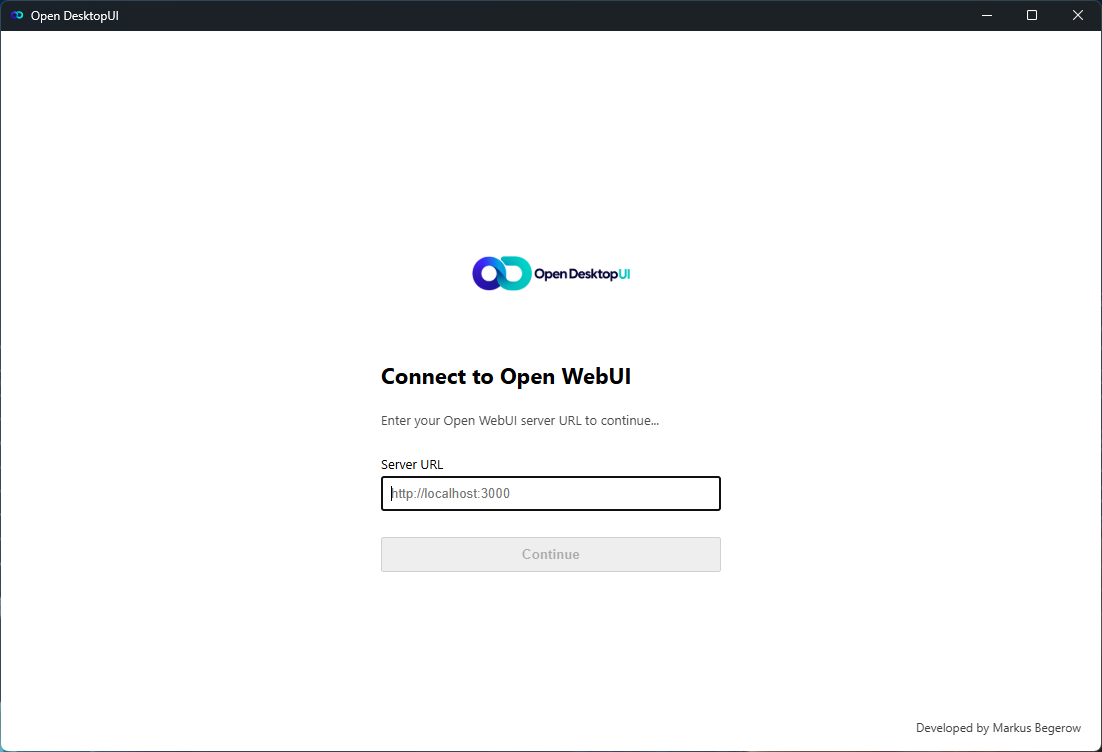 |
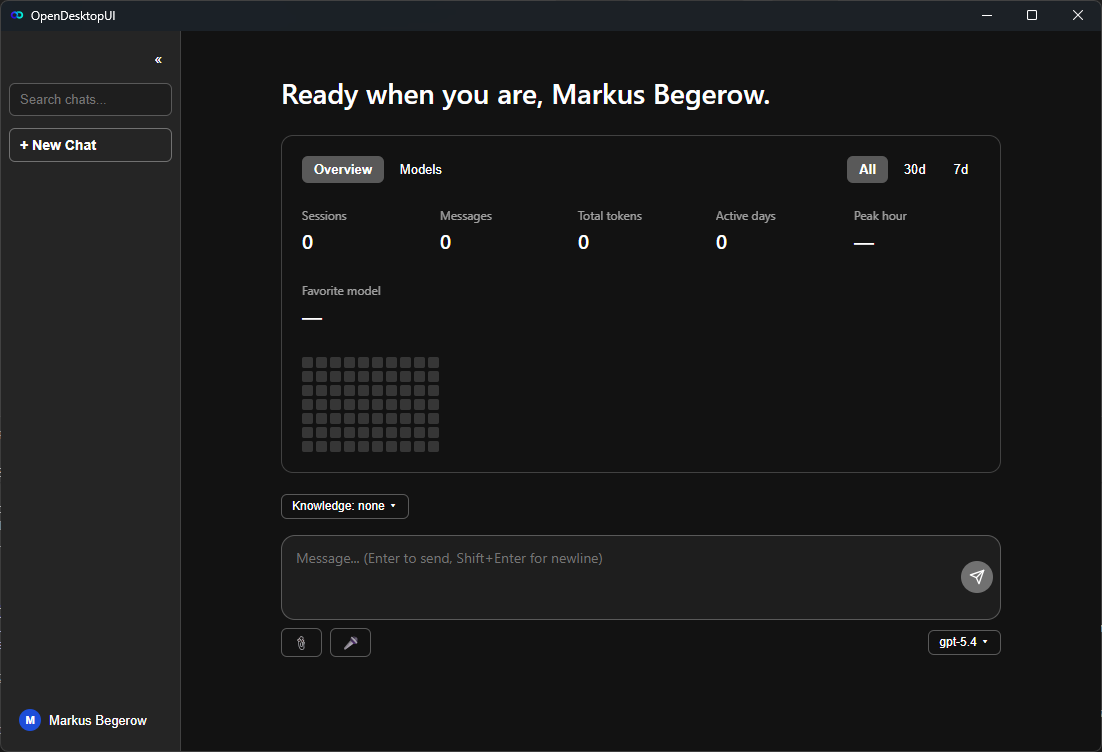 |
| Sign in |
Home |
## Features
### 💬 Chat
- Streaming responses straight from your Open WebUI server (no cloud middleman)
- One **"+" menu** for everything that goes into a message: upload files (or drag and drop them), take a **screenshot**, attach a **web page**, pick files already on your server, attach your **notes**, reference other **chats**, and choose **Knowledge Bases** for the chat
- **Voice input**: push-to-talk or click-to-toggle, transcribed via your own server - no third-party cloud speech service involved
- Per-message actions: copy, edit-and-resend, regenerate, read-aloud, and thumbs up/down feedback
- Pin, mark unread, archive, and group conversations; open any chat in its own window
- Chats are grouped by activity (Today, Yesterday, previous 7 and 30 days, then by month)
- **Two-way sync with your Open WebUI account**: every chat - messages, ratings, attachments, knowledge bases, folders, pinned/archived/unread state - is cloned locally and kept in step. The server wins conflicts, and everything stays readable offline
- Replies show their **sources** (knowledge-base documents, web pages), the model's **reasoning** in a collapsible block, **formulas** (KaTeX) and **Mermaid diagrams**
- Per-chat **system prompt and parameters** (temperature, top-p, max tokens, seed, stop words), plus switches for **web search, image generation, code interpreter, memory** and server **tools** - all behind one **options menu** in the message box, and offered only where the model and your server support them
- **Tags**, AI-written chat titles, and a search that also looks inside message texts (works offline)
- A **prompt library**: type `/` in the message box to insert your server's prompts, including `{{variables}}`
- **Notes** and **memory** of your Open WebUI account, readable offline and edited through the server
- Export a conversation as Markdown, or your whole local history as JSON
- Copy a shareable link to a chat, or an app link (`opendesktopui://chat/`) that opens it in this app
- Paste images from the clipboard; click an attachment to open it
- One compact message box: "+" and options on the left, model, microphone and send on the right
- Light/dark/system theme, adjustable chat text size, collapsible sidebar
### 🖥️ Desktop
- **Quick chat**: a global shortcut (default `Ctrl+Alt+Space`, changeable in Settings → System) opens a small chat window from any application
- In-app shortcuts: `Ctrl+N` new chat, `Ctrl+K` search, `Ctrl+,` settings
- `opendesktopui://` links: `chat/` opens a chat, `new?q=` starts one with the text filled in
- Remembers window size and position, lives in the tray, optional start with the system
- Looks for new versions shortly after start and then once a day in the background, and tells you in the sidebar - a version found earlier shows right at start (switch off in Settings → System)
### 📚 Knowledge Base Sync (powered by [oikb](https://github.com/open-webui/oikb))
- Add local folders (and 40+ other source types oikb supports) as sync sources for your Open WebUI Knowledge Bases
- Per-source sync interval, one-click manual sync, live status and history
- The app manages the oikb daemon for you - no separate terminal window to keep open
## Requirements
- Windows 10/11, macOS 11+, or a modern Linux desktop
- A running [Open WebUI](https://github.com/open-webui/open-webui) server you have a URL and account for
- For Knowledge Base Sync: nothing extra with the prebuilt installers, which ship oikb. When building from source, Python 3.11+, [uv](https://docs.astral.sh/uv/) and a local checkout of [`oikb`](https://github.com/open-webui/oikb) - see [Known Limitations](#known-limitations)
## Installation
**Prebuilt installers**: grab the latest `.msi`/`.exe` (Windows), `.dmg` (macOS), or `.deb`/`.rpm`/`.AppImage` (Linux) from the [Releases page](https://github.com/markusbegerow/open-desktopui/releases).
Installers aren't code-signed (see [Known Limitations](#known-limitations)), so your OS will warn you on first launch - that's expected, not a sign of a bad download. It's completely fine to run anyway:
- **Windows**: SmartScreen will say "Windows protected your PC" - click **More info**, then **Run anyway**.
- **macOS**: Gatekeeper will refuse to open it normally - right-click (or Control-click) the app and choose **Open**, then confirm in the dialog that appears. (Alternatively, run `xattr -cr /Applications/Open DesktopUI.app` in Terminal.)
- **Linux**: no equivalent warning - nothing extra to do.
You only need to do this once per install.
**From source**: see [Development](#development) below.
## Getting Started
1. Launch the app and sign in with your Open WebUI server's URL and your account (or paste a static API key for SSO-only servers, in Settings → Account).
2. Pick a model and start chatting from Home, or create a new chat from the sidebar.
3. To sync Knowledge Bases: open Settings → Knowledge and add a source folder. (From-source builds: point Settings → Knowledge at an `oikb` checkout first.)
## Development
```bash
git clone https://github.com/markusbegerow/open-desktopui.git
cd open-desktopui/apps/desktop
npm install
```
```bash
npm run dev # Vite dev server only (frontend, no Tauri window)
npm run tauri dev # full app: Rust build + Vite + native window, with HMR for the frontend
npm run build # tsc typecheck + vite build (frontend production bundle)
npm run tauri build # full native installer for your current OS
npx tsc --noEmit # typecheck only
```
Rust side, from `apps/desktop/src-tauri/`:
```bash
cargo check
cargo build
```
There's no configured linter. Run the tests with `npm test` (Vitest) from `apps/desktop/` and `cargo test --lib` from `apps/desktop/src-tauri/`; `tsc --noEmit` and `cargo check` are the other correctness gates. See [`docs/RELEASING.md`](docs/RELEASING.md) for how the cross-platform release pipeline works.
### Project structure
```
oikb-desktop/
├── apps/desktop/ # the Tauri app - React/TS frontend (src/) + Rust backend (src-tauri/)
├── oikb-main/ # oikb Python project, vendored unmodified as an external dependency
├── packaging/ # PyInstaller packaging that freezes oikb into the sidecar the release workflow bundles
└── docs/ # additional docs (release pipeline, etc.)
```
## Known Limitations
- **Installers aren't code-signed.** There's no plan to buy a Windows/Apple code-signing certificate right now - see [Installation](#installation) above for the (one-time, per-install) steps to run the app anyway.
- **The bundled oikb is untested on some platforms.** The release workflow freezes oikb with PyInstaller and bundles it, and the app starts it first; if it can't be started (a connector that doesn't freeze cleanly, a platform nobody has tried), the app falls back to `uv run oikb daemon` from the `oikb` checkout set in Settings → Knowledge. Development builds always use that fallback.
- **Local data isn't encrypted at rest.** Chat history and settings are stored as a plain SQLite database and JSON file on disk (path shown in Settings → Account → Data).
- **The account sync is written from Open WebUI's source, not checked against every server version.** Chat list and messages, tags, titles, ratings (`/api/v1/evaluations/feedback`), per-chat settings, prompts, notes and memory use the routes and data shapes found in Open WebUI's code. Different versions may differ in details; if something doesn't sync with your server, please [open an issue](https://github.com/markusbegerow/open-desktopui/issues) with what you see. Chat, models, knowledge bases, sign-in, file upload and transcription were verified against a live server earlier.
- **Reading a chat here doesn't mark it read in the web interface.** Open WebUI learns about reading through its websocket, which this app doesn't use. "Mark as unread" does reach the server.
- **Search ignores case only for ASCII letters.** Searching "KÜNDIGUNG" won't find "kündigung".
## Contributing
Contributions are welcome!
1. Fork the repository
2. Create your feature branch (`git checkout -b feature/amazing-feature`)
3. Commit your changes (`git commit -m 'Add amazing feature'`)
4. Push to the branch (`git push origin feature/amazing-feature`)
5. Open a Pull Request
`oikb-main/` is vendored unmodified - please don't send PRs that edit its Python source directly; changes there belong upstream at [open-webui/oikb](https://github.com/open-webui/oikb).
## License
This project is licensed under the **GPL-3.0** - see [`LICENSE`](LICENSE) for the full text. The vendored `oikb-main/` subtree keeps its own **MIT** license (see [`oikb-main/LICENSE`](oikb-main/LICENSE)) - it's an unmodified external dependency, not covered by this project's license.
## Acknowledgments
- The [Open WebUI](https://github.com/open-webui) team, for Open WebUI itself and for `oikb`
- The [Tauri](https://tauri.app) team, for making a native desktop shell this pleasant to build
## 🙋♂️ Get Involved
If you encounter any issues or have questions:
- 🐛 [Report bugs](https://github.com/markusbegerow/open-desktopui/issues)
- 💡 [Request features](https://github.com/markusbegerow/open-desktopui/issues)
- ⭐ Star the repo if you find it useful!
## ☕ Support the Project
If you like this project, support further development with a repost or coffee:
 [](https://paypal.me/MarkusBegerow?country.x=DE&locale.x=de_DE)
## 📬 Contact
- 🌐 [Website](https://www.markus-begerow.de)
- 🧑💻 [LinkedIn](https://linkedin.com/in/markusbegerow)
- 💾 [GitHub](https://github.com/markusbegerow)
- ✉️ [Twitter](https://x.com/markusbegerow)