# 🏭 Maximo MCP Server
### AI-Powered Development for IBM Maximo
[](https://nodejs.org/)
[](https://modelcontextprotocol.io/)
[](https://www.ibm.com/products/maximo)
[](LICENSE)
[](package.json)
*Transform your Maximo development workflow with AI-driven schema discovery, live data querying, intelligent code generation, and full write-back capabilities.*
**Author:** Markus van Kempen
**Email:** mvankempen@ca.ibm.com | markus.van.kempen@gmail.com
**Date:** 16 September 2026
[Getting Started](#-quick-start) • [Documentation](#-documentation) • [Live Demo](#-live-demo) • [Use Cases](#-use-cases)
---
## 🎯 What is This?
The **Maximo MCP Server** is a [Model Context Protocol](https://modelcontextprotocol.io/) server that connects AI assistants (like Antigravity, Cursor, or VS Code Copilot) directly to your IBM Maximo environment. Instead of manually copying API documentation, the AI can:
| Capability | Description |
|------------|-------------|
| 🔍 **Discover APIs** | Find available Object Structures (MXWO, MXASSET, etc.) |
| 📋 **Inspect Schemas** | Get exact field names, types, and descriptions |
| 📊 **Query Live Data** | Execute OSLC REST queries and see real results |
| 🎨 **Generate UI** | Create Carbon Design System tables and dashboards |
| ✅ **Validate Instantly** | Test queries before generating final code |
| ✏️ **Create Records** | Create Work Orders, Assets, Service Requests via AI |
| 🔄 **Update Records** | Partially update any Maximo record by ID |
| ⚡ **Run Actions** | Trigger Maximo business workflows (status changes, approvals) |
---
## 📚 Documentation
### Core Guides
| Document | Description |
|----------|-------------|
| 📖 [**Maximo MCP Server Guide**](docs/Maximo_MCP_Server_Guide.md) | Complete setup, configuration, and tool reference |
| 🔌 [**Maximo API Interaction Guide**](docs/Maximo_API_Interaction_Guide.md) | OSLC query syntax, code generation patterns, troubleshooting |
| 🎬 [**Asset Manager Case Study**](docs/Asset_Manager_App_Case_Study.md) | Step-by-step walkthrough of building a complete app |
| 🧩 [**Maximo API Explorer Guide**](docs/Maximo_API_Explorer_Guide.md) | VS Code extension: install, connect, explore, generate apps |
### French Translations
| Document | Description |
|----------|-------------|
| 📖 [Guide du Serveur MCP Maximo](docs/Maximo_MCP_Server_Guide_FR.md) | Version française du guide complet |
| 🔌 [Guide d'Interaction API Maximo](docs/Maximo_API_Interaction_Guide_FR.md) | Version française du guide API |
### Word Documents
All guides are also available in `.docx` format in the `docs/` folder for offline reading and sharing.
---
## ⚡ Quick Start
### Prerequisites
- **Node.js** v18 or higher
- **Maximo API Key** with read access
- AI IDE with MCP support (Antigravity, Cursor, VS Code + Continue)
### Installation
### Installation
**Method 1: Run directly with npx (Recommended)**
```bash
npx maximo-mcp-server
```
**Method 2: Clone from Source**
```bash
# Clone the repository
git clone https://github.com/markusvankempen/maximo-mcp-ai-integration-options.git
cd maximo-mcp-ai-integration-options
# Install dependencies
npm install
# Set up environment variables
cp .env.example .env
# Edit .env with your Maximo credentials
```
### Environment Configuration
Edit the `.env` file with your Maximo credentials:
```bash
# .env (never commit this file!)
MAXIMO_URL=https://your-maximo-host.com/maximo/api
MAXIMO_HOST=https://your-maximo-host.com
MAXIMO_API_KEY=your-api-key-here
MAXIMO_OPENAPI_PATH=./maximo_openapi.json
PORT=3002
```
### Download the OpenAPI Schema (Recommended)
The OpenAPI schema file enables offline schema lookups for faster AI responses:
```bash
# Download from your Maximo instance
curl -X GET "https://your-maximo-host.com/maximo/oslc/oas/api" \
-H "apikey:your-api-key-here" \
-o maximo_openapi.json
```
Alternatively, download via Swagger UI at: `https://your-host/maximo/oslc/oas/api.html` (Click "Explore" or "Download")
**Method 3: Direct Browser Download (Manual)**
If `curl` fails (e.g., due to SSL/network errors), you can manually download the file:
1. Open this URL in your browser:
`https://[YOUR_MAXIMO_HOST]/maximo/oslc/oas/api`
*(Replace `[YOUR_MAXIMO_HOST]` with your actual server address)*
2. You may be prompted to log in to Maximo.
3. Once the JSON loads, right-click the page and select **"Save Page As..."**.
4. Save the file as `maximo_openapi.json` in your project root folder.
> **Note**: This file is ~12MB and contains all Object Structure definitions for your Maximo instance.
### IDE Configuration
#### VS Code with GitHub Copilot (Recommended)
**Option 1: Install from the MCP Server Gallery**
1. Enable `chat.mcp.gallery.enabled` in VS Code settings
2. Open the Extensions view (`⇧⌘X`)
3. Type `@mcp maximo` in the search field
4. Click **Install** to add the Maximo MCP server
**Option 2: Add manually via `mcp.json`**
1. Open the Command Palette (`⇧⌘P`) → **MCP: Open Workspace Folder Configuration**
2. Add the following configuration:
```json
{
"inputs": [
{
"type": "promptString",
"id": "maximo-url",
"description": "Maximo REST API Base URL (e.g., https://your-host/maximo/api)"
},
{
"type": "promptString",
"id": "maximo-api-key",
"description": "Maximo API Key",
"password": true
},
{
"type": "promptString",
"id": "maximo-host",
"description": "Maximo Host URL (e.g., https://your-host)"
}
],
"servers": {
"maximo-mcp-server": {
"type": "stdio",
"command": "npx",
"args": ["-y", "maximo-mcp-server"],
"env": {
"MAXIMO_URL": "${input:maximo-url}",
"MAXIMO_API_KEY": "${input:maximo-api-key}",
"MAXIMO_HOST": "${input:maximo-host}"
}
}
}
}
```
3. VS Code will prompt you for your Maximo credentials when the server starts.
> 💡 **Tip:** This project includes a `.vscode/mcp.json` file. If you clone the repo, VS Code will auto-detect the MCP server configuration.
#### Google Antigravity (Manual Setup Required)
> ⚠️ **Note:** The Antigravity MCP Store is curated and does not auto-discover servers from the registry. You must add this server manually.
1. Open Antigravity
2. Click "**...**" dropdown at the top of the Agent panel
3. Select "**MCP Servers**" → "**Manage MCP Servers**" → "**View raw config**"
4. Add to your `mcp_config.json`:
```json
{
"mcpServers": {
"maximo-mcp-server": {
"command": "npx",
"args": ["-y", "maximo-mcp-server"],
"env": {
"MAXIMO_URL": "https://your-maximo-host/maximo/api",
"MAXIMO_API_KEY": "your-api-key-here",
"MAXIMO_HOST": "https://your-maximo-host"
}
}
}
}
```
5. Save and click **Refresh**
#### Cursor / Claude Desktop
```bash
# Copy the template
cp config/mcp_config.json.example ~/.cursor/mcp.json
# Or for Claude Desktop:
cp config/mcp_config.json.example ~/Library/Application\ Support/Claude/claude_desktop_config.json
```
Edit with your Maximo credentials:
```json
{
"mcpServers": {
"maximo-mcp-server": {
"command": "npx",
"args": ["-y", "maximo-mcp-server"],
"env": {
"MAXIMO_URL": "https://your-maximo-host/maximo/api",
"MAXIMO_API_KEY": "your-api-key-here"
}
}
}
}
```
### Verify Connection
In your AI IDE, ask:
> "Is the Maximo MCP server connected?"
The AI will call `get_instance_details` and confirm connectivity.
---
## 🎬 Live Demo
### Asset Manager Application
We built a complete **Maximo Asset Manager** web application using only natural language prompts and the MCP server.
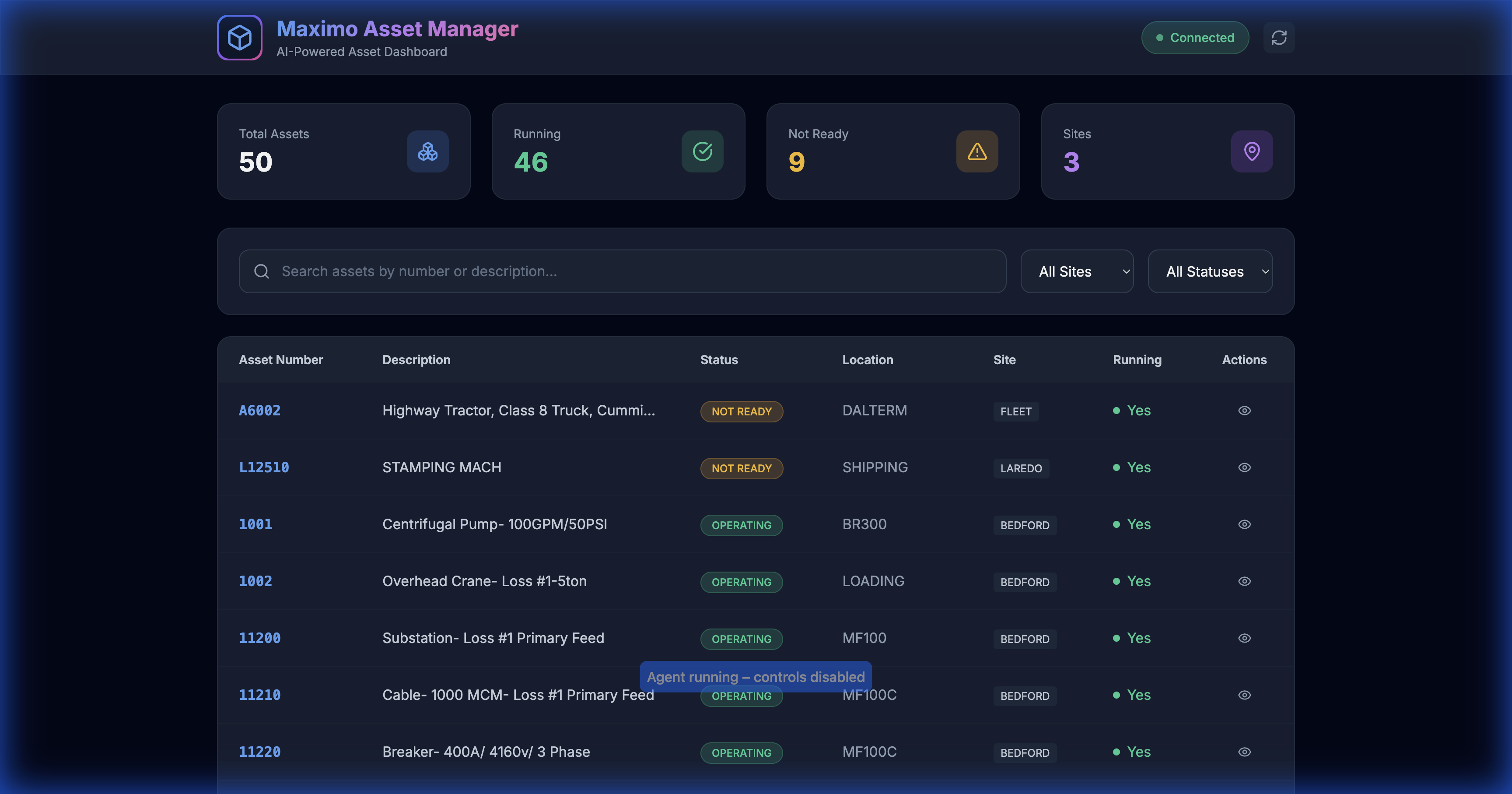
*50 assets loaded with real-time filtering and search*
#### Demo Features
| Feature | Screenshot |
|---------|------------|
| **Full Dashboard** | 50 assets, 4 stat cards, 3 sites |
| **Search Filter** | 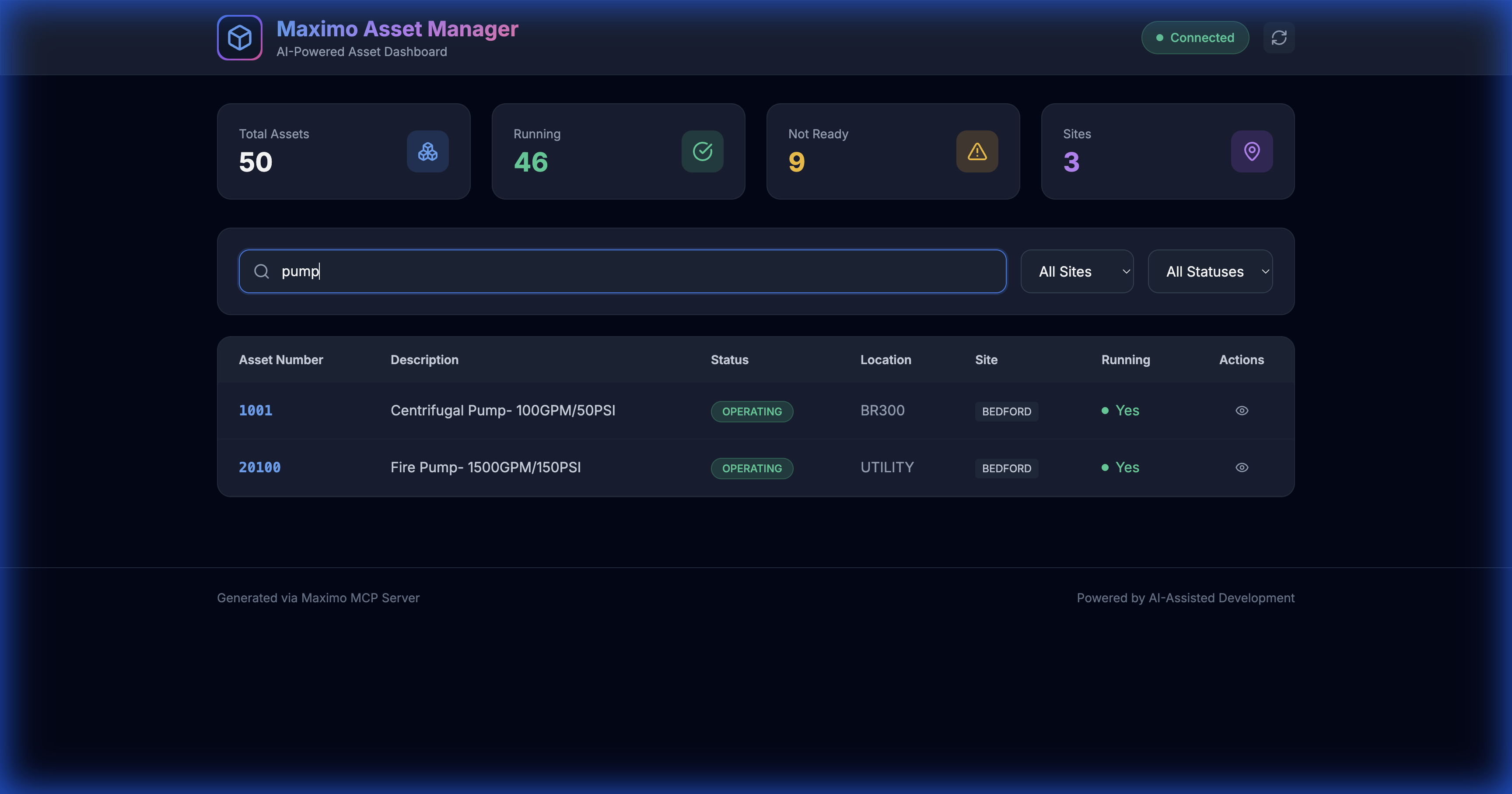 |
| **Site Filter** | 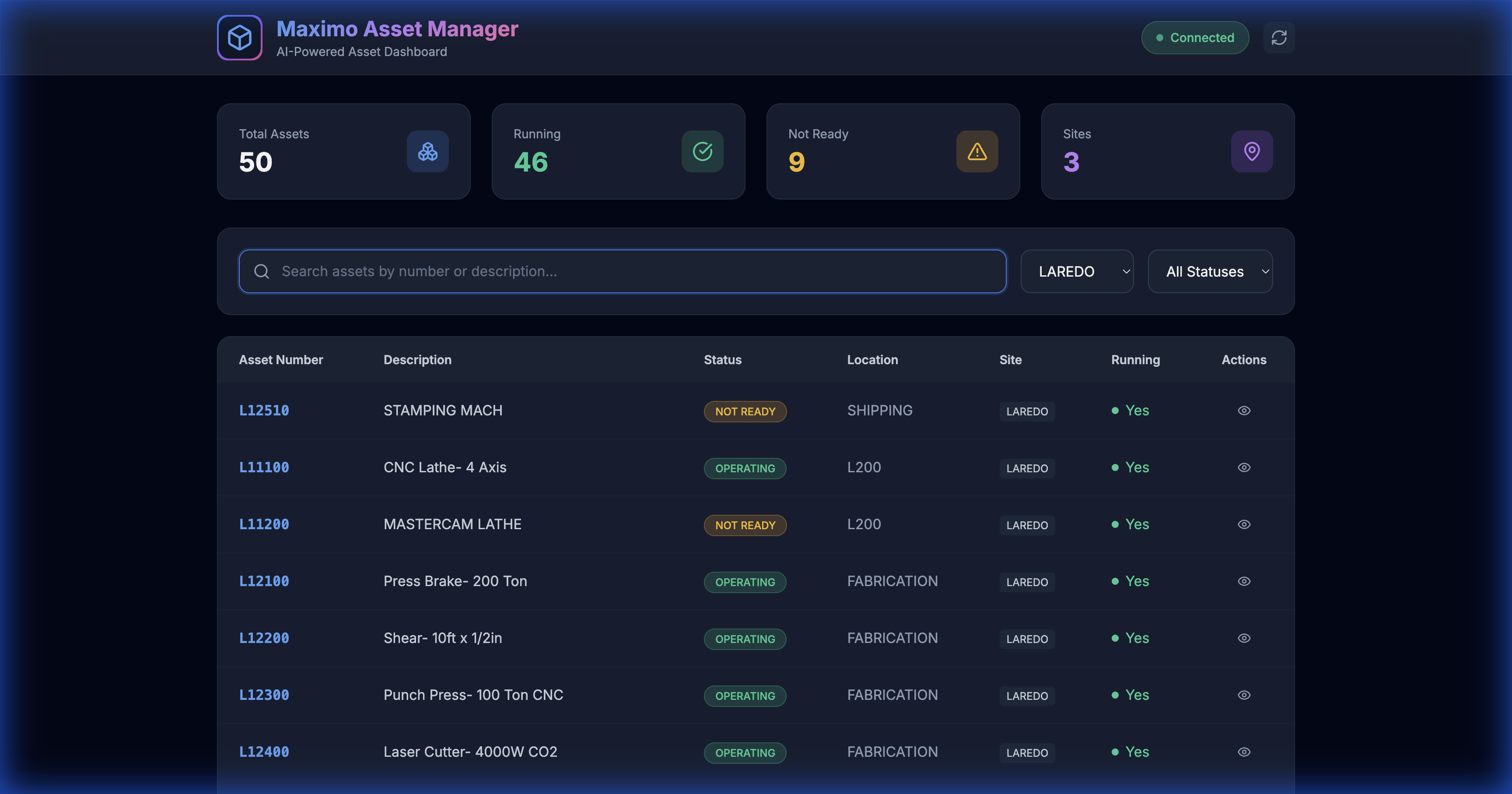 |
#### 🎥 Screen Recording
A complete video demonstration is available: [`assets_demo_recording.webp`](images/assets_demo_recording.webp)
#### Try It Yourself
```bash
# Start the local proxy server
node server.js
# Open in browser
open http://localhost:3002/demos/assets.html
```
---
## 🛠 Available MCP Tools
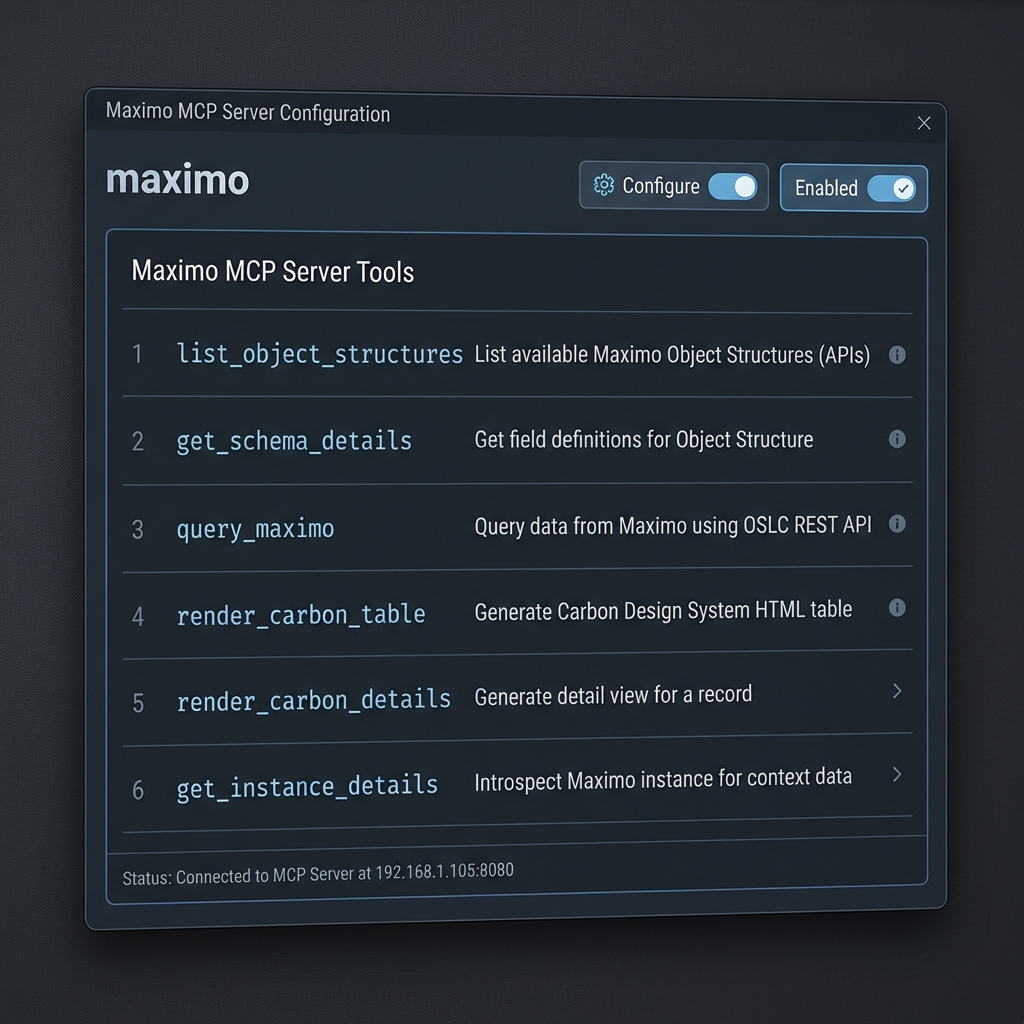
The server exposes **9 tools** to the AI — 6 read tools and 3 write/CRUD tools:
### Read Tools
| Tool Name | Description |
| :--- | :--- |
| `list_object_structures` | List available Maximo Object Structures (APIs) |
| `get_schema_details` | Get field definitions for an Object Structure |
| `query_maximo` | Execute OSLC REST queries |
| `render_carbon_table` | Generate Carbon Design HTML tables |
| `render_carbon_details` | Generate detail view for a record |
| `get_instance_details` | Check server connectivity |
### Write Tools (CRUD)
> ⚠️ **Write tools modify live data.** Use a read-only API key for exploration; only enable write access for known workflows.
| Tool Name | Description |
| :--- | :--- |
| `create_record` | Create a new record in any Maximo Object Structure |
| `update_record` | Partially update fields on an existing record by ID |
| `run_action` | Execute Maximo business actions (status changes, approvals) |
---
## 💡 Use Cases
### 1. Generate API Calls
> "Get me the last 10 approved work orders from BEDFORD site"
The AI calls `get_schema_details(MXWO)`, understands the fields, and generates:
```http
GET /maximo/api/os/mxwo
?oslc.where=status="APPR" and siteid="BEDFORD"
&oslc.select=wonum,description,status,reportdate
&oslc.orderBy=-reportdate
&oslc.pageSize=10
&lean=1
```
### 2. Generate Python Scripts
> "Write a Python script to export all Priority 1 work orders to CSV"
```python
import requests
import csv
response = requests.get(
"https://your-host/maximo/api/os/mxwo",
params={"oslc.where": "wopriority=1", "lean": 1},
headers={"apikey": "YOUR_KEY"}
)
with open("priority1_workorders.csv", "w") as f:
writer = csv.DictWriter(f, fieldnames=["wonum", "description"])
writer.writeheader()
writer.writerows(response.json()["member"])
```
### 3. Generate SQL Queries
> "Write SQL to find overdue work orders"
```sql
SELECT wonum, description, status, targcompdate
FROM workorder
WHERE status NOT IN ('COMP', 'CLOSE', 'CAN')
AND targcompdate < CURRENT_DATE;
```
### 4. Build Complete Applications
> "Create an HTML dashboard to display assets"
**Result:** A complete web application with:
- Dark theme with glassmorphism
- Search and filter functionality
- Interactive detail panels
- Pre-loaded data from Maximo
See the [Asset Manager Case Study](docs/Asset_Manager_App_Case_Study.md) for the full walkthrough.
### 5. Create & Update Records (CRUD)
> "Create a corrective maintenance work order for the BEDFORD site, priority 1, description 'Pump failure inspection'."
The AI calls `get_schema_details(MXWO)` to confirm field names, then `create_record`:
```http
POST /maximo/api/os/MXWO?lean=1
apikey: YOUR_KEY
Content-Type: application/json
{ "description": "Pump failure inspection", "siteid": "BEDFORD", "worktype": "CM", "wopriority": 1 }
```
> "Now approve work order 1025 with memo 'Reviewed and approved'."
```http
POST /maximo/api/os/MXWO/1025?action=changeStatus&lean=1
apikey: YOUR_KEY
Content-Type: application/json
{ "status": "APPR", "memo": "Reviewed and approved" }
```
See the full guide: [**Maximo MCP Server Guide — CRUD Workflows**](docs/Maximo_MCP_Server_Guide.md#65-crud-workflows-write-back-to-maximo)
---
## 🧩 VS Code Extensions
This project includes two VS Code extensions for interactive Maximo API development — **no AI agent required**.
### Maximo API Explorer
A full-featured VS Code extension for discovering, testing, and generating code for Maximo REST APIs.
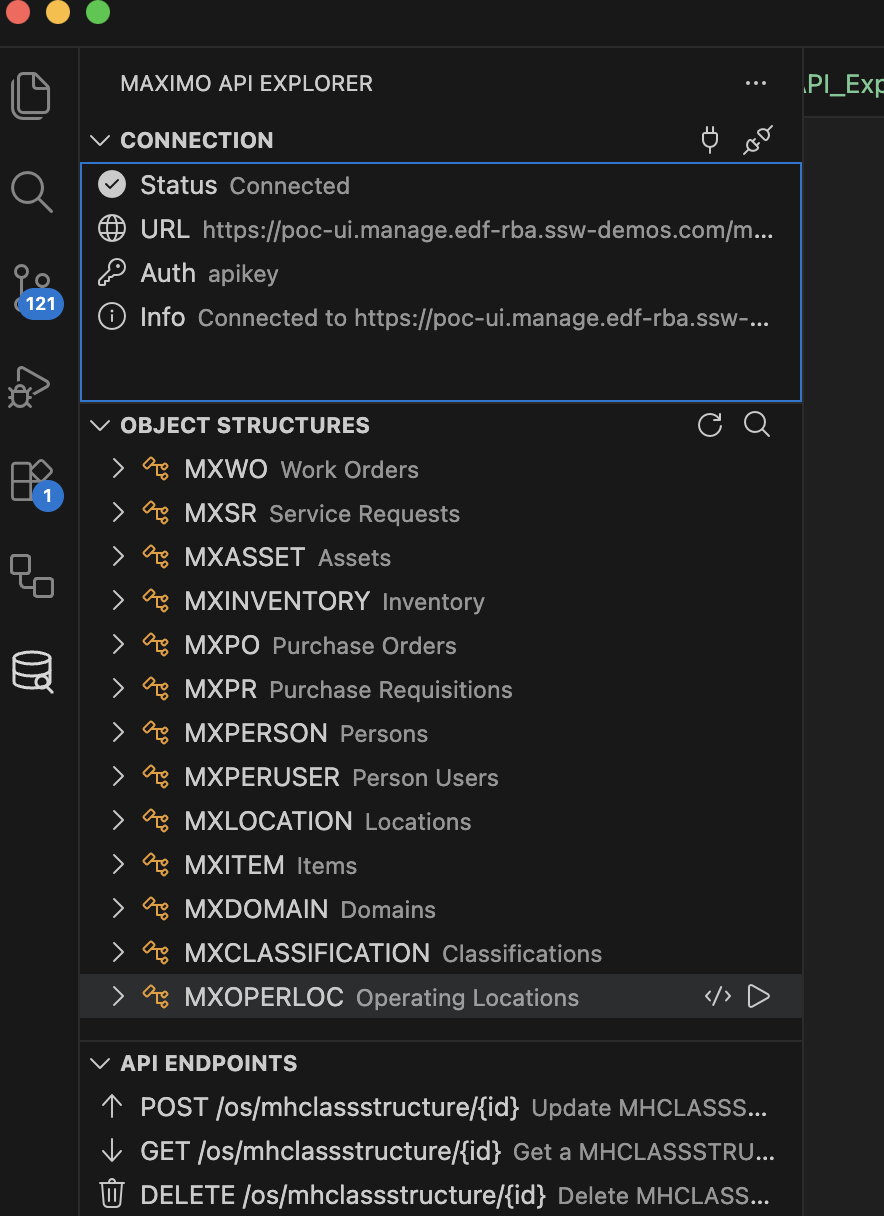
*Connected to a live Maximo instance showing Object Structures (MXWO, MXSR, MXASSET, etc.) and API Endpoints.*
| Feature | Description |
|---------|-------------|
| **Sidebar Tree View** | Browse all Object Structures (MXWO, MXASSET, MXSR, etc.) with attributes, types, and relationships |
| **Interactive API Tester** | Build OSLC queries visually, send raw requests, inspect schemas — all in a WebView panel |
| **Code Snippet Generator** | Generate ready-to-use API calls in cURL, Python, JavaScript, TypeScript, and Java |
| **Carbon App Generator** | Scaffold complete Work Order Browser and Asset Manager web apps with one click |
| **Export for AI Agents** | Export schemas and docs to `.maximo/` for use with Copilot, Cursor, or any AI assistant |
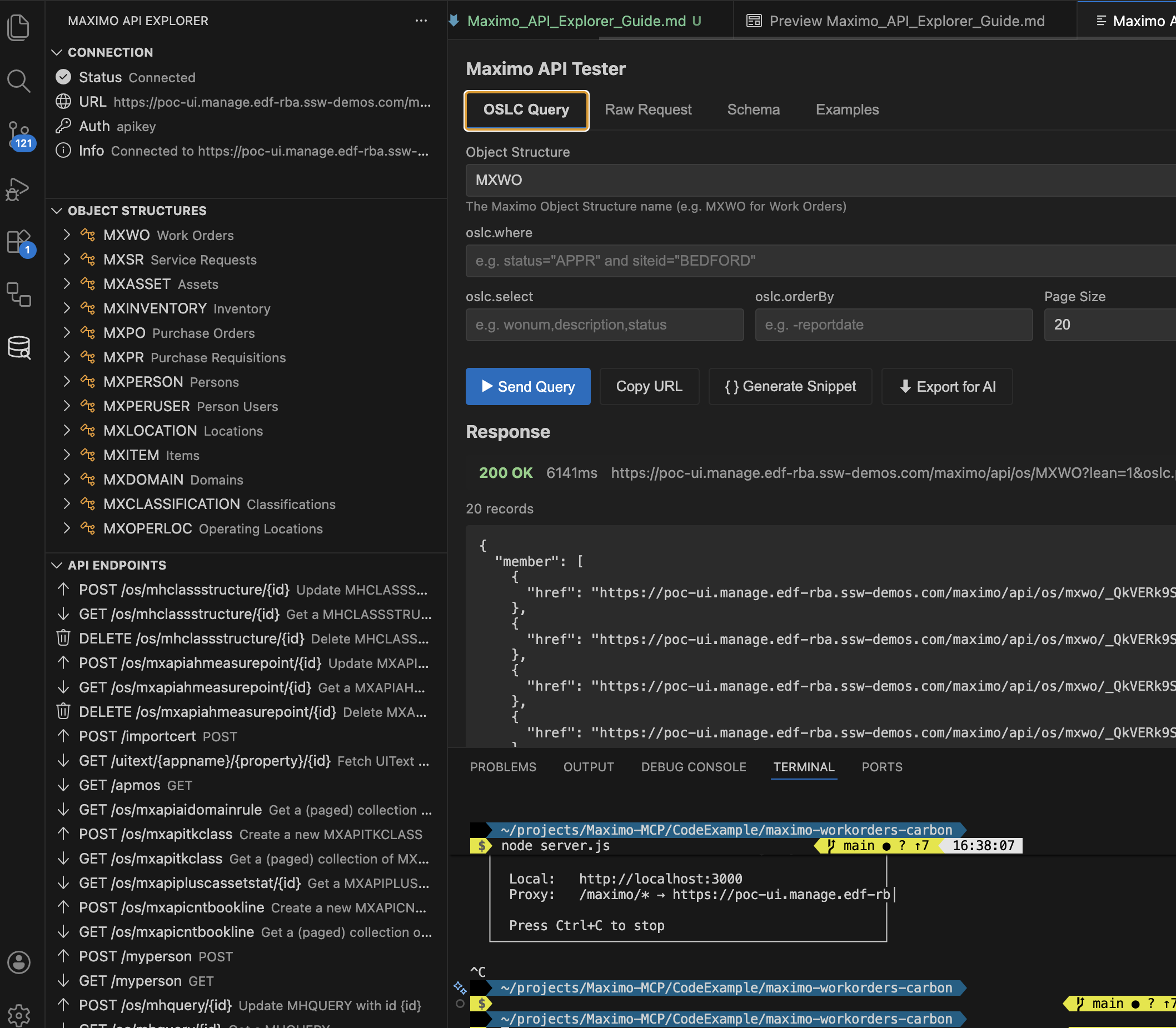
*OSLC Query Builder with live JSON response (200 OK, 20 records from MXWO).*
#### Quick Start
```bash
cd maximo-api-explorer
npm install && npm run compile
# Press F5 in VS Code to launch the Extension Development Host
```
See the full guide: [**Maximo API Explorer Guide**](docs/Maximo_API_Explorer_Guide.md)
### Maximo Cursor Explorer
A fork of the API Explorer optimized for [Cursor](https://cursor.com)'s AI features:
| Feature | Description |
|---------|-------------|
| **.cursorrules Generator** | Auto-generate rules giving Cursor AI deep Maximo API knowledge |
| **AI Context Export** | Export schemas to `.cursor/context/` for use with `@file` references |
| **Prompt Templates** | Pre-built prompts for OSLC queries, CRUD services, dashboards, and more |
| **All Standard Features** | Everything from the API Explorer, plus a dedicated Cursor AI tab |
```bash
cd maximo-cursor-extension
npm install && npm run compile
# Press F5 in VS Code to launch
```
---
## 📁 Project Structure
```
Maximo-MCP/
├── maximo-mcp-server.js # 🔌 MCP Server implementation
├── server.js # 🌐 Local proxy server for CORS
├── package.json # 📦 Dependencies & scripts
├── README.md # This file
├── .env.example # Environment template
│
├── docs/ # 📚 Documentation
│ ├── Maximo_MCP_Server_Guide.md # Complete MCP guide
│ ├── Maximo_API_Interaction_Guide.md # API interaction patterns
│ ├── Asset_Manager_App_Case_Study.md # Build walkthrough
│ ├── Maximo_API_Explorer_Guide.md # VS Code extension guide
│ ├── Maximo_MCP_Server_Guide_FR.md # French translation
│ └── Maximo_API_Interaction_Guide_FR.md # French translation
│
├── maximo-api-explorer/ # 🧩 VS Code Extension
│ ├── package.json # Extension manifest
│ ├── src/extension.ts # Activation & commands
│ ├── src/api/ # API client & discovery
│ ├── src/auth/ # Authentication manager
│ ├── src/views/ # Sidebar tree & WebView panel
│ ├── src/snippets/ # Multi-language code generator
│ ├── src/templates/ # Carbon app generators
│ └── src/export/ # AI context exporter
│
├── maximo-cursor-extension/ # 🤖 Cursor-Optimized Extension
│ ├── package.json # Extension manifest
│ ├── src/extension.ts # Activation & commands
│ ├── src/cursor/ # .cursorrules, prompts, context
│ └── src/... # Same structure as api-explorer
│
├── CodeExample/ # 📦 Standalone Carbon App Example
│ └── maximo-workorders-carbon/ # Work Order Browser (reference)
│
├── demos/ # 🎨 Demo Applications
│ ├── assets.html # Asset Manager app
│ ├── carbon_workorders.html # Carbon table demo
│ └── index.html # API visualization demo
│
├── images/ # 📸 Screenshots & Recordings
│ ├── assets_demo_recording.webp # Full demo recording
│ ├── assets_loaded.png # Dashboard screenshot
│ ├── api-explorer-sidebar.png # Extension sidebar & tree view
│ ├── api-explorer-tester.png # OSLC Query Builder & JSON response
│ ├── api-explorer-carbon-app.png # Generated Work Order Browser app
│ ├── api-explorer-snippets.png # Carbon App Templates (Examples tab)
│ └── ... # More screenshots
│
└── config/ # ⚙️ Configuration Templates
└── mcp_config.json.example # MCP config template
```
---
## 🔒 Security Best Practices
| Practice | Description |
|----------|-------------|
| 🔐 **Local Execution** | MCP server runs on your machine; API keys never leave your environment |
| 📖 **Read-Only Keys for Dev** | Use limited-permission API keys for exploration and development |
| ✏️ **Separate Write Keys** | Only enable write permissions on API keys used for known CRUD workflows |
| 🔒 **Environment Variables** | Never hardcode credentials in config files |
| 🌐 **HTTPS Only** | Always use encrypted connections to Maximo |
| 🧪 **Test Non-Production First** | Always validate CRUD operations on a dev/test instance before production |
---
## 🤝 Contributing
Contributions are welcome! Please read our contributing guidelines before submitting PRs.
1. Fork the repository
2. Create a feature branch (`git checkout -b feature/amazing-feature`)
3. Commit your changes (`git commit -m 'Add amazing feature'`)
4. Push to the branch (`git push origin feature/amazing-feature`)
5. Open a Pull Request
---
## 📄 License
This project is licensed under the Apache License 2.0 - see the [LICENSE](LICENSE) file for details.
---
## 🙏 Acknowledgments
- [Model Context Protocol](https://modelcontextprotocol.io/) for the MCP specification
- [IBM Maximo](https://www.ibm.com/products/maximo) for the enterprise asset management platform
- [Carbon Design System](https://carbondesignsystem.com/) for the UI components