---
layout: default
title: "The Show Page"
---
# The Show Page
The Show view displays the details of a single record.
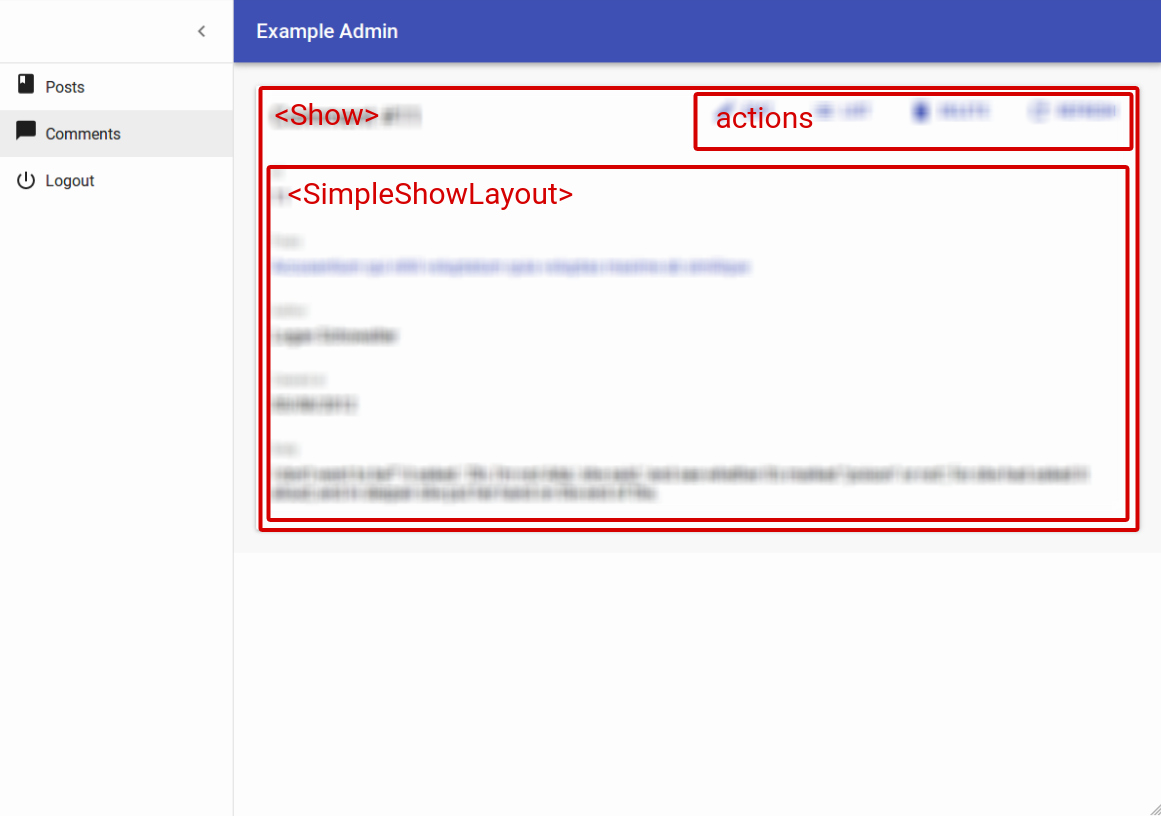
## From Pure React To React-Admin
The Show view is the simplest view in an admin: it fetches and displays the fields of a single record. You've probably developed such pages a dozen times, and they're not rocket science. But the data fetching logic and presentation code can be long and tedious to write, and hide the business logic. That's why, even for such simple pages, react-admin can help a lot.
To better understand how to use the various react-admin hooks and components dedicated to the show view, let’s start by building such a view by hand.
### A Show View Built By Hand
Here is how you could write a simple book show view, leveraging react-admin's [data fetching hooks](./DataProviders.md):
{% raw %}
```jsx
import { useGetOne, useRedirect, Title, useParams } from 'react-admin';
import { Card, Stack, Typography } from '@mui/material';
/**
* Fetch a book from the API and display it
*/
const BookShow = () => {
const { id } = useParams(); // this component is rendered in the /books/:id path
const redirect = useRedirect();
const { data, isPending } = useGetOne(
'books',
{ id },
// redirect to the list if the book is not found
{ onError: () => redirect('/books') }
);
if (isPending) { return ; }
return (
Title
{data.title}
Publication Date
{new Date(data.published_at).toDateString()}
);
};
```
{% endraw %}
You can pass this `BookShow` component as the `show` prop of the ``, and react-admin will render it on the `/books/:id/show` path.
This example uses the `useGetOne` hook instead of `fetch` because `useGetOne` already contains the authentication and request state logic. But you could totally write a Show view with `fetch`.
### `` Displays Labels Over Fields
When you build Show views like the one above, you have to repeat quite a lot of code for each field. React-admin Field components can help avoid that repetition. The following example leverages the ``, ``, and `` components for that purpose:
```diff
-import { useGetOne, useRedirect, Title } from 'react-admin';
+import { useGetOne, useRedirect, Title, Labeled, TextField, DateField, useParams } from 'react-admin';
-import { Card, Stack, Typography } from '@mui/material';
+import { Card, Stack } from '@mui/material';
const BookShow = () => {
const { id } = useParams();
const redirect = useRedirect();
const { data, isPending } = useGetOne(
'books',
{ id },
{ onError: () => redirect('/books') }
);
if (isPending) { return ; }
return (
-
- Title
- {data.title}
-
+
+
+
-
- Publication Date
- {new Date(data.published_at).toDateString()}
-
+
+
+
);
};
```
### `` Exposes The `record`
Field components require a `record` to render, but they can grab it from a `RecordContext` instead of the `record` prop. Creating such a context with `` allows to reduce even more the amount of code you need to write for each field.
```diff
-import { useGetOne, useRedirect, Title, Labeled, TextField, DateField } from 'react-admin';
+import { useGetOne, useRedirect, RecordContextProvider, Title, Labeled, TextField, DateField, useParams } from 'react-admin';
import { Card, Stack } from '@mui/material';
const BookShow = () => {
const { id } = useParams();
const redirect = useRedirect();
const { data, isPending } = useGetOne(
'books',
{ id },
{ onError: () => redirect('/books') }
);
if (isPending) { return ; }
return (
+
-
+
-
+
+
);
};
```
### `` Displays Fields In A Stack
Displaying a stack of fields with a label is such a common task that react-admin provides a helper component for that. It's called [``](./SimpleShowLayout.md):
```diff
-import { useGetOne, useRedirect, RecordContextProvider, Title, Labeled, TextField, DateField } from 'react-admin';
+import { useGetOne, useRedirect, RecordContextProvider, SimpleShowLayout, Title, TextField, DateField, useParams } from 'react-admin';
-import { Card, Stack } from '@mui/material';
+import { Card } from '@mui/material';
const BookShow = () => {
const { id } = useParams();
const redirect = useRedirect();
const { data, isPending } = useGetOne(
'books',
{ id },
{ onError: () => redirect('/books') }
);
return (
-
+
-
-
-
-
+
-
);
};
```
`` renders nothing as long as the `data` is not loaded (`record` is `undefined`), so the `isPending` variable isn't needed anymore.
### `useShowController`: The Controller Logic
The initial logic that grabs the id from the location and fetches the record from the API is also common, and react-admin exposes [the `useShowController` hook](./useShowController.md) to do it:
```diff
-import { useGetOne, useRedirect, RecordContextProvider, SimpleShowLayout, Title, TextField, DateField, useParams } from 'react-admin';
+import { useShowController, RecordContextProvider, SimpleShowLayout, Title, TextField, DateField } from 'react-admin';
import { Card } from '@mui/material';
const BookShow = () => {
- const { id } = useParams();
- const redirect = useRedirect();
- const { data, isPending } = useGetOne(
- 'books',
- { id },
- { onError: () => redirect('/books') }
- );
+ const { data } = useShowController();
return (
);
};
```
Notice that `useShowController` doesn't need the 'books' resource name - it relies on the `ResourceContext`, set by the `` component, to guess it.
### ``: Component Version Of The Controller
As calling the Show controller and putting its result into a context is also common, react-admin provides [the `` component](./ShowBase.md) to do it. So the example can be further simplified to the following:
```diff
-import { useShowController, RecordContextProvider, SimpleShowLayout, Title, TextField, DateField } from 'react-admin';
+import { ShowBase, SimpleShowLayout, Title, TextField, DateField } from 'react-admin';
import { Card } from '@mui/material';
const BookShow = () => {
- const { data } = useShowController();
return (
-
+
+
-
);
};
```
### `` Renders Title, Fields, And Actions
`` is a headless component: it renders only its children. But almost every show view needs a wrapping `
`, a title, and a ``. That's why react-admin provides [the `` component](./Show.md), which includes the `` component, a title built from the resource name, and even an "Edit" button if the resource has an edit component:
```diff
-import { ShowBase, SimpleShowLayout, Title, TextField, DateField } from 'react-admin';
+import { Show, SimpleShowLayout, TextField, DateField } from 'react-admin';
-import { Card } from '@mui/material';
const BookShow = () => (
-
-
-
-
+
+
-
-
-
);
```
**Tip**: Actually, `` does more than the code it replaces in the previous example: it redirects to the List view if the call to `useGetOne` returns an error, it sets the page title, and stores all the data it prepared in a ``.
**Tip**: Don't mix up the `RecordContext`, which stores a Record (e.g. `{ id: '1', title: 'The Lord of the Rings' }`), and the ``, which stores a resource name (e.g. `'book'`).
### A Typical React-Admin Show View
Now the code only expresses business logic. You only need 6 lines to express with react-admin what required 26 lines with React alone:
```jsx
import { Show, SimpleShowLayout, TextField, DateField } from 'react-admin';
const BookShow = () => (
);
```
React-admin components are not magic, they are React components designed to let you focus on the business logic and avoid repetitive tasks.
## Accessing the Record
Using the `` component instead of calling `useGetOne` manually has one drawback: there is no longer a `data` object containing the fetched record. Instead, you have to access the record from the `` using [the `useRecordContext` hook](./useRecordContext.md).
The following example illustrates the usage of this hook with a custom Field component displaying stars according to the book rating:
```jsx
import { Show, SimpleShowLayout, TextField, DateField, useRecordContext } from 'react-admin';
import StarIcon from '@mui/icons-material/Star';
const NbStarsField = () => {
const record = useRecordContext();
return <>
{[...Array(record.rating)].map((_, index) => )}
;
};
const BookShow = () => (
);
```
Sometimes you don't want to create a new component just to be able to use the `useRecordContext` hook. In these cases, you can use [the `` component](./WithRecord.md), which is the render prop version of the hook:
```jsx
import { Show, SimpleShowLayout, TextField, DateField, WithRecord } from 'react-admin';
import StarIcon from '@mui/icons-material/Star';
const BookShow = () => (
<>
{[...Array(record.rating)].map((_, index) => )}
} />
);
```
## Using Another Layout
When a Show view has to display a lot of fields, the `` component ends up in very long page that is not user-friendly. You can use [the `` component](./TabbedShowLayout.md) instead, which is a variant of the `` component that displays the fields in tabs.
```jsx
import { Show, TabbedShowLayout, TextField, DateField, WithRecord } from 'react-admin';
import StarIcon from '@mui/icons-material/Star';
import FavoriteIcon from '@mui/icons-material/Favorite';
import PersonPinIcon from '@mui/icons-material/PersonPin';
const BookShow = () => (
}>
}>
<>
{[...Array(record.rating)].map((_, index) => )}
} />
);
```
## Building a Custom Layout
In many cases, neither the `` nor the `` components are enough to display the fields you want. In these cases, pass your layout components directly as children of the `` component. As `` takes care of fetching the record and putting it in a ``, you can use Field components directly.
For instance, to display several fields in a single line, you can use Material UI's `` component:
{% raw %}
```jsx
import { Show, TextField, DateField, ReferenceField, WithRecord } from 'react-admin';
import { Grid } from '@mui/material';
import StarIcon from '@mui/icons-material/Star';
const BookShow = () => (
<>
{[...Array(record.rating)].map((_, index) => )}
} />
);
```
{% endraw %}
**Tip**: With `emptyWhileLoading` turned on, the `` component doesn't render its child component until the record is available. Without this flag, the Field components would render even during the loading phase, and may break if they aren't planned to work with an empty record context. You could grab the `isPending` state from the `ShowContext` instead, but that would force you to split the `` component into two.
You can also split the list of fields into two stacks, and use the `` in the main panel:
{% raw %}
```jsx
import { Show, SimpleShowLayout, TextField, DateField, WithRecord } from 'react-admin';
import StarIcon from '@mui/icons-material/Star';
const BookShow = () => (
<>
{[...Array(record.rating)].map((_, index) => )}
} />
Details
);
```
{% endraw %}
## Third-Party Components
You can find components for react-admin in third-party repositories.
- [ra-compact-ui](https://github.com/ValentinnDimitroff/ra-compact-ui#layouts): plugin that allows to have custom styled show layouts.