---
layout: default
title: "TanStack Start Integration"
---
# TanStack Start Integration
[TanStack Start](https://tanstack.com/start) is a full-stack React framework built on top of TanStack Router. React-admin supports [TanStack Router](https://tanstack.com/router/latest) as an alternative to react-router, so you can use react-admin in a TanStack Start application.
## Setting Up TanStack Start
Let's start by creating a new TanStack Start project. Run the following command:
```bash
npm create @tanstack/start@latest
# or
yarn create @tanstack/start
```
This script will ask you for more details about your project. The prompts include:
- What would you like to name your project? (example: `tanstack-admin`)
- Select toolchain
- Select deployment adapter
- What add-ons would you like for your project?
- Would you like an example?
- Initialize git repository
- Install dependencies
For this tutorial, we used the following choices in our local setup: `ESLint` toolchain, `Nitro (agnostic)` deployment adapter, `Query` add-on, and `None` for the example. You can pick different options depending on your needs.
If you want to see the current list of add-ons, run:
```bash
npm create @tanstack/start@latest --list-add-ons
# or
yarn create @tanstack/start --list-add-ons
```
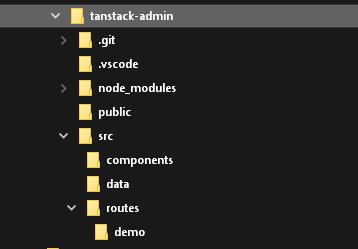
The project structure should look like this:
## Setting Up React-Admin In TanStack Start
Add the `react-admin` and `ra-router-tanstack` packages, as well as a data provider package. In this example, we'll use `ra-data-json-server` to connect to a test API provided by [JSONPlaceholder](https://jsonplaceholder.typicode.com).
```bash
cd tanstack-admin
npm install react-admin ra-router-tanstack ra-data-json-server
# or
yarn add react-admin ra-router-tanstack ra-data-json-server
```
## Adding React-Admin In A Sub Route
TanStack Start uses file-based routing. React-admin generates dynamic routes for each resource (e.g. `/admin/users`, `/admin/users/:id`). To avoid creating one TanStack route per react-admin page, use a single splat route.
First, create the admin route at `src/routes/admin.$.tsx`:
```tsx
// in src/routes/admin.$.tsx
import { createFileRoute } from '@tanstack/react-router';
import {
Admin,
Resource,
ListGuesser,
EditGuesser,
} from 'react-admin';
import jsonServerProvider from 'ra-data-json-server';
import { tanStackRouterProvider } from 'ra-router-tanstack';
const dataProvider = jsonServerProvider('https://jsonplaceholder.typicode.com');
export const Route = createFileRoute('/admin/$')({ component: App });
function App() {
return (
);
}
export default App;
```
Then keep the root route as a simple link to the admin:
```tsx
// in src/routes/index.tsx
import { createFileRoute, Link } from '@tanstack/react-router';
function Home() {
return (
TanStack Start + React-Admin
Go to the admin at /admin
);
}
export const Route = createFileRoute('/')({ component: Home });
```
You can now start the app in `development` mode:
```bash
npm run dev
# or
yarn dev
```
The admin should render at `/admin` on your dev server.
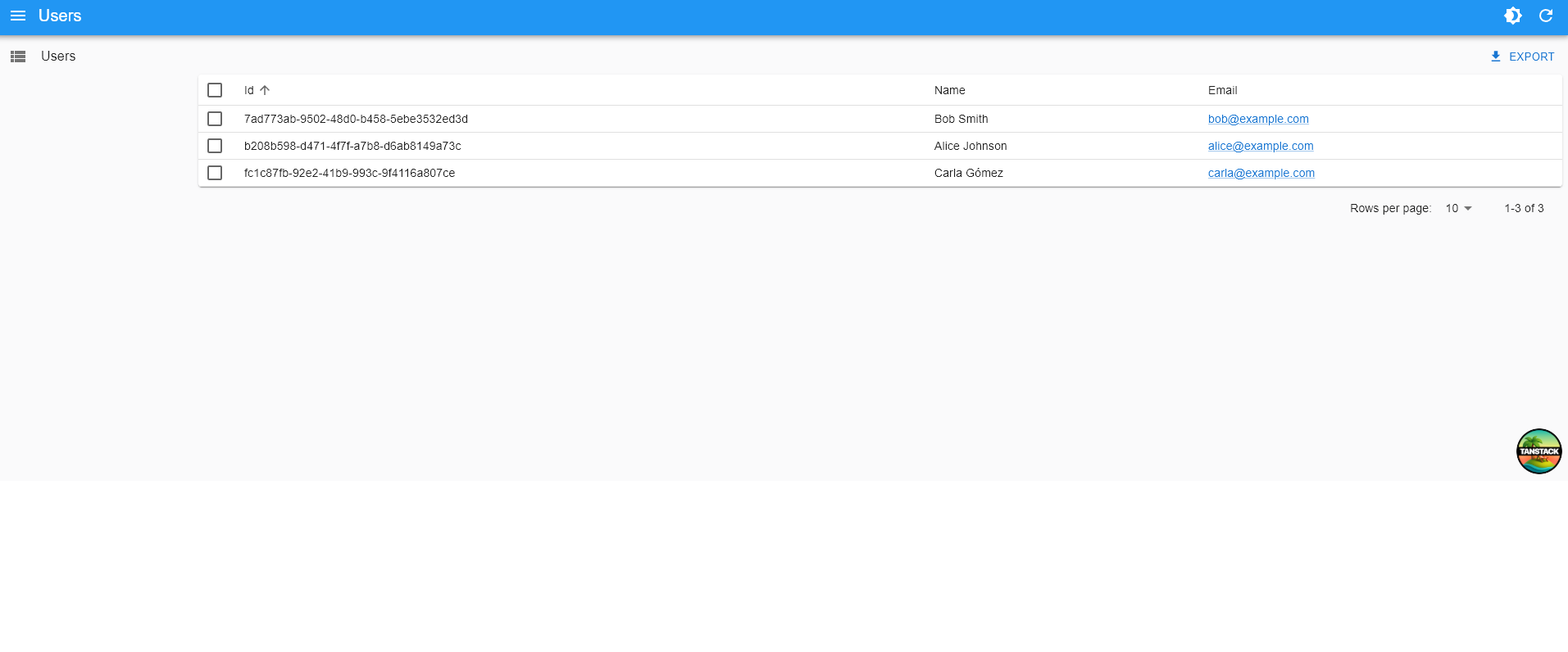
**Tip**: With the `/admin/$` route, you don't need to create one TanStack Start route file per react-admin page.
## Removing The TanStack Header
TanStack Start adds a default header in the root layout. If you want the admin to render without that header, edit `src/routes/__root.tsx` and remove the `` component from `RootDocument`.
## Adding an API
TanStack Start doesn't force a specific backend. If you need an API for your admin, you can:
- Use an external CRUD backend like Supabase or PostgREST
- Proxy requests through your app's server runtime (if your deployment includes one)
For example, you can create a REST API with Supabase and proxy it through TanStack Start so you don't expose service keys to the browser.
First, create a Supabase REST API and its associated PostgreSQL database directly on the [Supabase website](https://app.supabase.com/) (it's free for tests and low usage). Once the setup is finished, use the Supabase manager to add the following table:
- `users` with fields: `id`, `name`, and `email`
You can populate these tables via the Supabase UI if you want.
Supabase exposes a REST API at `https://YOUR_INSTANCE.supabase.co/rest/v1`.
Next, create a configuration to let the TanStack Start app connect to Supabase. Create a `.env` file:
```sh
# In `.env`
SUPABASE_URL="https://MY_INSTANCE.supabase.co"
SUPABASE_SERVICE_ROLE="MY_SERVICE_ROLE_KEY"
```
**Tip**: This example uses the **service role key** here and not the anonymous role. This allows mutations without dealing with authorization. **You shouldn't do this in production**, but use the [Supabase authorization](https://supabase.com/docs/guides/auth) feature instead.
Time to bootstrap the API Proxy. Create a new TanStack Start route at `src/routes/api.$.ts`:
```ts
// in src/routes/api.$.ts
import { createFileRoute } from '@tanstack/react-router'
export const Route = createFileRoute('/api/$')({
server: {
handlers: {
GET: ({ request }) => proxy(request),
POST: ({ request }) => proxy(request),
PUT: ({ request }) => proxy(request),
DELETE: ({ request }) => proxy(request),
},
},
})
const API_PREFIX = '/api'
const proxy = (request: Request) => {
const apiUrl = getSupabaseUrlFromRequestUrl(request.url)
return fetch(apiUrl, {
method: request.method,
body: request.body,
headers: {
prefer: request.headers.get('prefer') ?? '',
accept: request.headers.get('accept') ?? 'application/json',
'Accept-Encoding': '',
apiKey: `${process.env.SUPABASE_SERVICE_ROLE}`,
Authorization: `Bearer ${process.env.SUPABASE_SERVICE_ROLE}`,
},
})
}
const getSupabaseUrlFromRequestUrl = (url: string) => {
const startOfRequest = url.indexOf(API_PREFIX)
const query = url.substring(startOfRequest + API_PREFIX.length)
return `${process.env.SUPABASE_URL}/rest/v1${query}`
}
```
**Tip**: Some of this code is PostgREST-specific. The `prefer` header is required to let PostgREST return one record instead of an array containing one record in response to `getOne` requests. A proxy for another CRUD API will require different parameters.
Update the react-admin data provider to use the Supabase adapter instead of the JSON Server one. As Supabase provides a PostgREST endpoint, we'll use [`ra-data-postgrest`](https://github.com/raphiniert-com/ra-data-postgrest):
```sh
npm install @raphiniert/ra-data-postgrest
# or
yarn add @raphiniert/ra-data-postgrest
```
Finally, update your Admin dataProvider:
```tsx
// in src/routes/admin.$.tsx
import { Admin, Resource, ListGuesser, fetchUtils } from 'react-admin';
import postgrestRestProvider from '@raphiniert/ra-data-postgrest';
import { tanStackRouterProvider } from 'ra-router-tanstack';
const dataProvider = postgrestRestProvider({
apiUrl: '/api',
httpClient: fetchUtils.fetchJson,
defaultListOp: 'eq',
schema: () => '',
});
// ... keep the rest of the file the same
```
## Next Steps
For standalone vs embedded setups, see the [TanStack Router Integration](./TanStackRouter.md).