---
layout: default
title: "The CheckForApplicationUpdate component"
---
# `CheckForApplicationUpdate`
When your admin application is a Single Page Application, users who keep a browser tab open at all times might not use the most recent version of the application unless you tell them to refresh the page.
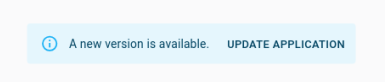
This component regularly checks whether the application source code has changed and prompts users to reload the page when an update is available. To detect updates, it fetches the current URL at regular intervals and compares the hash of the response content (usually the HTML source). This should be enough in most cases as bundlers usually update the links to the application bundles after an update.
## Usage
Include this component in a custom layout:
```tsx
// in src/MyLayout.tsx
import type { ReactNode } from 'react';
import { CheckForApplicationUpdate, Layout } from 'react-admin';
export const MyLayout = ({ children }: { children: ReactNode}) => (
{children}
);
// in src/App.tsx
import { Admin, ListGuesser, Resource } from 'react-admin';
import { MyLayout } from './MyLayout';
export const App = () => (
);
```
## Props
`` accepts the following props:
| Prop | Required | Type | Default | Description |
| --------------- | -------- | -------------- | ------------------ |-------------------------------------------------------------------- |
| `interval` | Optional | `number` | `3600000` (1 hour) | The interval in milliseconds between two checks |
| `disabled` | Optional | `boolean` | `false` | Whether the automatic check is disabled |
| `notification` | Optional | `ReactNode` | | The notification to display to the user when an update is available |
| `onNewVersion Available` | Optional | `function` | | The effect to execute when a new version is detected. |
| `url` | Optional | `string` | Current URL | The URL to download to check for code update |
| `fetchOptions` | Optional | `RequestInit | undefined` | `undefined` | The options passed to `fetch` when checking for an update |
## `interval`
You can customize the interval between each check by providing the `interval` prop. It accepts a number of milliseconds and is set to `3600000` (1 hour) by default.
```tsx
// in src/MyLayout.tsx
import type { ReactNode } from 'react';
import { CheckForApplicationUpdate, Layout } from 'react-admin';
const HALF_HOUR = 30 * 60 * 1000;
export const MyLayout = ({ children }: { children: ReactNode}) => (
{children}
);
```
## `disabled`
You can dynamically disable the automatic application update detection by providing the `disabled` prop. By default, it's only enabled in `production` mode.
```tsx
// in src/MyLayout.tsx
import type { ReactNode } from 'react';
import { CheckForApplicationUpdate, Layout } from 'react-admin';
export const MyLayout = ({ children }: { children: ReactNode}) => (
{children}
);
```
## `notification`
You can customize the notification shown to users when an update is available by passing your own element to the `notification` prop.
Note that you must wrap your component with `forwardRef`.
```tsx
// in src/MyLayout.tsx
import { forwardRef, ReactNode } from 'react';
import { Layout, CheckForApplicationUpdate } from 'react-admin';
const CustomAppUpdatedNotification = forwardRef((props, ref) => (
window.location.reload()}
>
Update
}
>
A new version of the application is available. Please update.
));
const MyLayout = ({ children }: { children: ReactNode}) => (
{children}
}/>
);
```
If you want to customize the behavior when a new version is available, checkout the [`onNewVersionAvailable` section](#onnewversionavailable). If you just want to customize the notification texts, including the button, check out the [Internationalization section](#internationalization).
## `onNewVersionAvailable`
Advanced users who wish to customize the handling function other than just displaying a notification can leverage the `onNewVersionAvailable` prop:
```tsx
import { CheckForApplicationUpdate, useNotify } from "react-admin";
export const MyCheckForApplicationUpdate = () => {
const notify = useNotify();
const onNewVersionAvailable = () => {
// Perform a backup of user preference in localStorage in case bad things happen
const preference1 = localStorage.getItem("preference1");
const preference2 = localStorage.getItem("preference2");
const checkpointData = {
preference1,
preference2,
};
localStorage.setItem(
`checkpoint_${new Date().toISOString()}`,
JSON.stringify(checkpointData),
);
// Notify user
notify("New Version Ready to Update");
};
return (
);
};
```
## `url`
You can customize the URL fetched to detect updates by providing the `url` prop. By default, it's the current URL.
```tsx
// in src/MyLayout.tsx
import type { ReactNode } from 'react';
import { CheckForApplicationUpdate, Layout } from 'react-admin';
const MY_APP_ROOT_URL = 'https://admin.mycompany.com';
export const MyLayout = ({ children }: { children: ReactNode}) => (
{children}
);
```
## `fetchOptions`
You can also customize the request [options](https://developer.mozilla.org/en-US/docs/Web/API/fetch#options) passed along to fetch function when detecting updates.
Tip: Depending on your server-side HTTP cache settings, you may want to set the fetchOptions to `{ cache: "no-cache" }` to check if the resource has changed.
## Internationalization
You can customize the texts of the default notification by overriding the following keys:
* `ra.notification.application_update_available`: the notification text
* `ra.action.update_application`: the reload button text