# ReverseExtension
[](http://cocoapods.org/pods/ReverseExtension)
[](https://developer.apple.com/swift)
[](http://cocoapods.org/pods/ReverseExtension)
[](http://cocoapods.org/pods/ReverseExtension)
[](https://github.com/Carthage/Carthage)
UITableView extension that enabled to insert cell from bottom of tableView.
 ## Concept
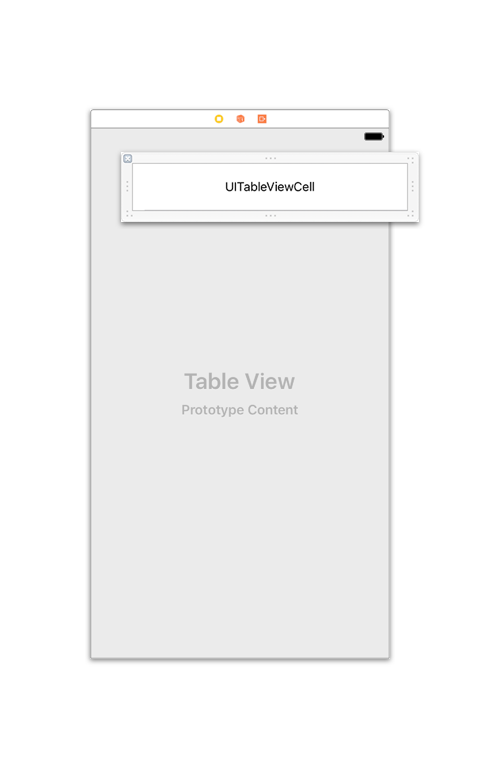
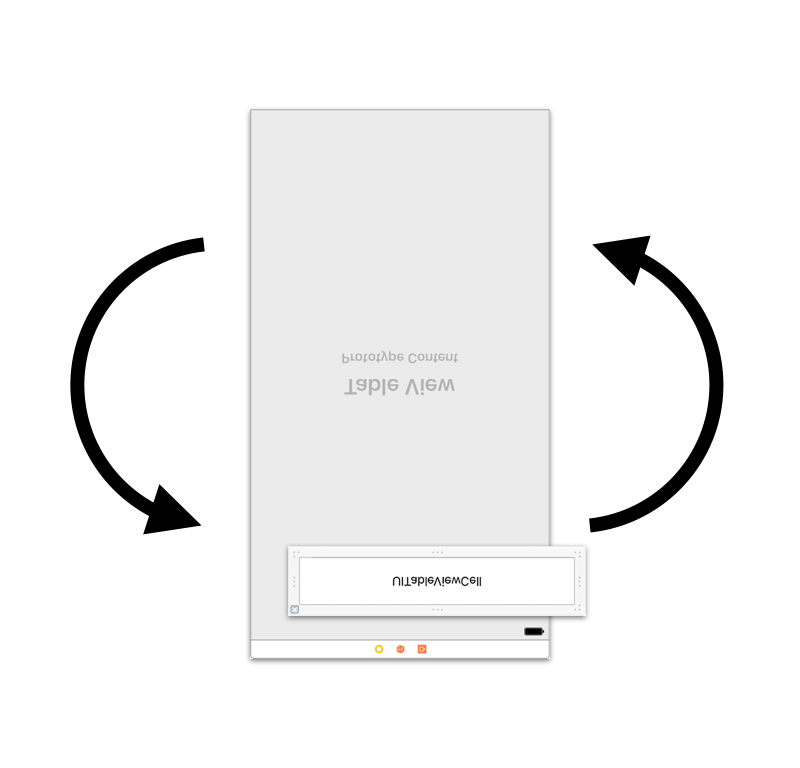
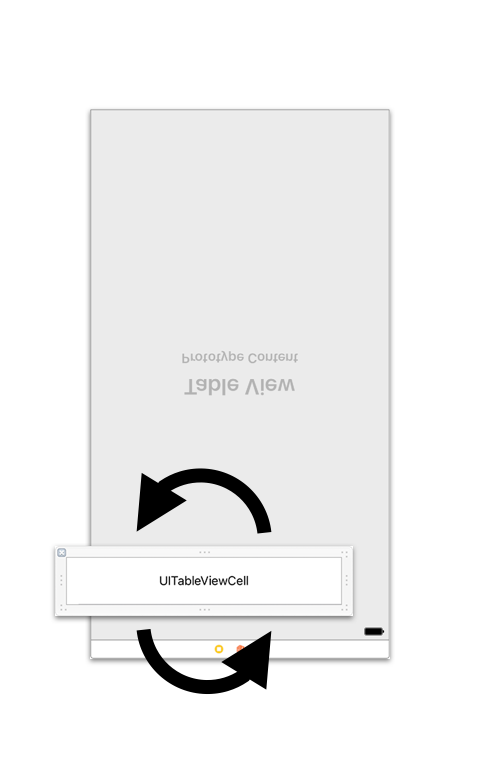
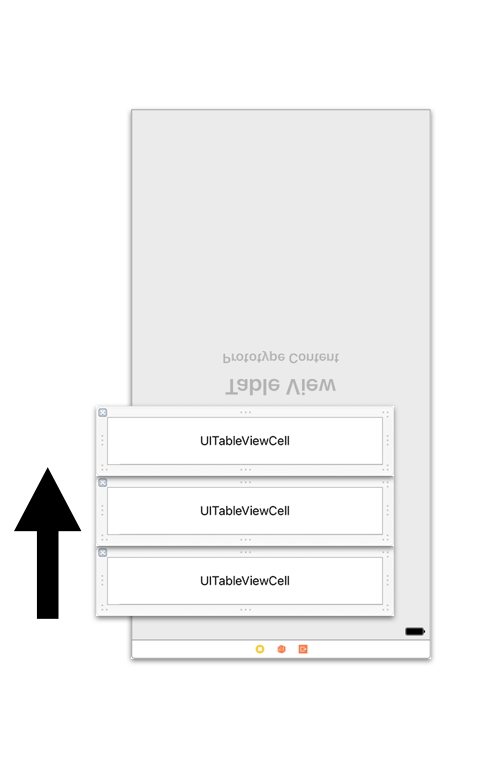
It is difficult to fill a tableview content from bottom.
So, ReverseExtension rotate both of UITableView and UITableViewCell like this images.
## Concept
It is difficult to fill a tableview content from bottom.
So, ReverseExtension rotate both of UITableView and UITableViewCell like this images.
 If you implement those in ViewController, it will have been fat.
So, escaping those implementation to `re` namespace property, and hiding those complex implementation.
In addition, you can rollback to normal behaviour, only removing `re` namespace.
## Example
```swift
import UIKit
import ReverseExtension
class ViewController: UIViewController {
@IBOutlet weak var tableView: UITableView!
override func viewDidLoad() {
super.viewDidLoad()
tableView.re.dataSource = self
tableView.register(UITableViewCell.self, forCellReuseIdentifier: "Cell")
//You can apply reverse effect only set delegate.
tableView.re.delegate = self
tableView.re.scrollViewDidReachTop = { scrollView in
print("scrollViewDidReachTop")
}
tableView.re.scrollViewDidReachBottom = { scrollView in
print("scrollViewDidReachBottom")
}
}
}
extension ViewController: UITableViewDelegate {
//ReverseExtension also supports handling UITableViewDelegate.
func scrollViewDidScroll(_ scrollView: UIScrollView) {
print("scrollView.contentOffset.y =", scrollView.contentOffset.y)
}
}
```
## Requirements
- Swift 5
- Xcode 12 or greater
- iOS 10 or greater
## Installation
#### CocoaPods
ReverseExtension is available through [CocoaPods](http://cocoapods.org). To install
it, simply add the following line to your Podfile:
```ruby
pod "ReverseExtension"
```
#### Carthage
If you’re using [Carthage](https://github.com/Carthage/Carthage), simply add
ReverseExtension to your `Cartfile`:
```
github "marty-suzuki/ReverseExtension"
```
Make sure to add `ReverseExtension.framework` to "Linked Frameworks and Libraries" and "copy-frameworks" Build Phases.
## Special Thanks
[TouchVisualizer](https://github.com/morizotter/TouchVisualizer) (Created by [@morizotter](https://github.com/morizotter))
## Author
marty-suzuki, s1180183@gmail.com
## License
ReverseExtension is available under the MIT license. See the LICENSE file for more info.
If you implement those in ViewController, it will have been fat.
So, escaping those implementation to `re` namespace property, and hiding those complex implementation.
In addition, you can rollback to normal behaviour, only removing `re` namespace.
## Example
```swift
import UIKit
import ReverseExtension
class ViewController: UIViewController {
@IBOutlet weak var tableView: UITableView!
override func viewDidLoad() {
super.viewDidLoad()
tableView.re.dataSource = self
tableView.register(UITableViewCell.self, forCellReuseIdentifier: "Cell")
//You can apply reverse effect only set delegate.
tableView.re.delegate = self
tableView.re.scrollViewDidReachTop = { scrollView in
print("scrollViewDidReachTop")
}
tableView.re.scrollViewDidReachBottom = { scrollView in
print("scrollViewDidReachBottom")
}
}
}
extension ViewController: UITableViewDelegate {
//ReverseExtension also supports handling UITableViewDelegate.
func scrollViewDidScroll(_ scrollView: UIScrollView) {
print("scrollView.contentOffset.y =", scrollView.contentOffset.y)
}
}
```
## Requirements
- Swift 5
- Xcode 12 or greater
- iOS 10 or greater
## Installation
#### CocoaPods
ReverseExtension is available through [CocoaPods](http://cocoapods.org). To install
it, simply add the following line to your Podfile:
```ruby
pod "ReverseExtension"
```
#### Carthage
If you’re using [Carthage](https://github.com/Carthage/Carthage), simply add
ReverseExtension to your `Cartfile`:
```
github "marty-suzuki/ReverseExtension"
```
Make sure to add `ReverseExtension.framework` to "Linked Frameworks and Libraries" and "copy-frameworks" Build Phases.
## Special Thanks
[TouchVisualizer](https://github.com/morizotter/TouchVisualizer) (Created by [@morizotter](https://github.com/morizotter))
## Author
marty-suzuki, s1180183@gmail.com
## License
ReverseExtension is available under the MIT license. See the LICENSE file for more info.