
massCode
A free, open-source developer workspace.
Snippets, notes, HTTP requests, calculations, drawings, and dev tools in one local-first app.
Your data stays on your machine as plain Markdown files.




Download |
Documentation |
Changelog
Extensions:
VS Code |
Raycast
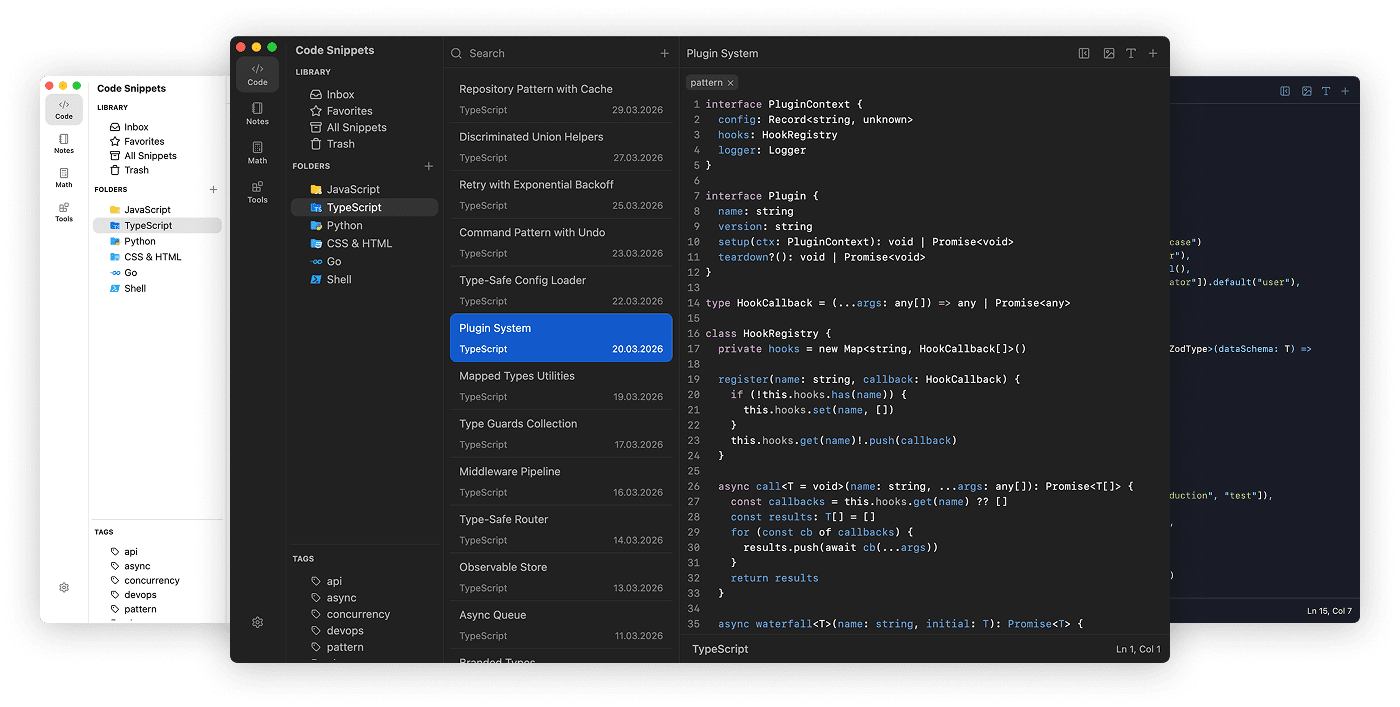
Available for macOS, Windows, and Linux
## Support
massCode is free and open source. But building and maintaining a quality tool takes time. Your support helps keep development going and new features coming.
[](https://opencollective.com/masscode)
[](https://paypal.me/antongithub)
[](https://antonreshetov.gumroad.com/l/masscode)
[](https://buy.polar.sh/polar_cl_bpDmjg079kfiAVtdtrtBwxyRXN6NK8B4Bvqdk2QXdx7)
SPONSORS


## About
Originally a snippet manager, massCode now brings together snippets, notes, HTTP requests, calculations, drawings, and developer tools in one desktop app, so everyday work stays in one place.
## Features
### Code Snippets
Use massCode as a focused snippet workspace with multi-level folders, tags, and fragments for organizing reusable code across projects and languages.
- 160+ syntax grammars out of the box (600+ supported via `.tmLanguage`)
- Integrated [Prettier](https://prettier.io) for code formatting
- Real-time HTML & CSS preview for quick prototyping
- JSON Visualizer for exploring nested structures as interactive graphs
- Export snippets as polished images with customizable themes
### Notes
Write longer markdown documents right next to your snippets: project docs, drafts, research notes, and personal knowledge bases.
- Task notes with status, priority, due dates, and Today / Upcoming / Completed views
- Completed task cleanup and auto-clean scheduling
- Dashboard with activity overview, recent notes, top linked notes, and a notes graph preview
- Editor, Live Preview, and Preview modes
- Editable markdown tables with row and column controls
- Fullscreen notes graph for exploring internal links between notes
- Integrated [Mermaid](https://mermaid-js.github.io/mermaid/#) diagrams
- Mind maps generated from markdown heading structure
- Fullscreen presentation mode for demos and meetings
- Callout blocks and image embedding
### HTTP Client
Keep API requests close to your code snippets and project notes with a lightweight HTTP client built into massCode.
- Organize requests with folders and custom folder icons
- Use environments and `{{variables}}` for local, staging, and production APIs
- Edit params, headers, body, auth, and markdown descriptions
- Preview requests as raw HTTP or cURL before sending
- Inspect response status, time, size, body, and headers
- Send the current request with Cmd+Enter on macOS or Ctrl+Enter on Windows and Linux
### Math Notebook
A calculator-style notebook for natural-language calculations, conversions, and date math without leaving your workflow.
- Arithmetic, percentages, unit conversions, and date/time math
- 166+ fiat currencies, 21 cryptocurrencies with live exchange rates
- Variables, functions, and aggregates for quick iterative calculations
- Finance calculations (compound interest, ROI, loan repayment)
### Drawings
Sketch diagrams, wireframes, and whiteboard ideas on an [Excalidraw](https://excalidraw.com)-powered canvas next to your snippets and notes.
- Searchable list of drawings with keyboard navigation
- Pan and zoom remembered per drawing, with fit-to-content to recenter
- Export drawings as images
- Embed drawings directly in your markdown notes
### Developer Tools
Built-in utilities for the small tasks that usually send you to a browser tab:
- **Compare:** JSON Diff
- **Text:** Case Converter, Slug Generator, URL Parser, Line Break Normalizer
- **Crypto:** Hash/HMAC Generator, Password Generator, UUID
- **Encoders:** URL, Base64, JSON to TOML/XML/YAML, Color Converter
- **Generators:** JSON Generator, Lorem Ipsum
### Command Palette
Jump to spaces, snippets, notes, HTTP requests, and common actions from anywhere with a keyboard-first command palette.
- Open with Cmd+P on macOS or Ctrl+P on Windows and Linux
- Search across snippets, notes, HTTP requests, spaces, and commands
- Run create actions for snippets, notes, HTTP requests, and folders
- Scope search to a space with `@` or open command mode with `>`
### Imports
Bring existing work into your vault with preview-first imports for snippets, notes, and API collections.
- Import snippets from VS Code, Raycast, SnippetsLab, and public GitHub Gists
- Import markdown notes from Obsidian folders
- Import HTTP collections from OpenAPI, Postman, and Bruno
- Review detected items, folders, tags, environments, and warnings before writing anything
### Browser Clipper
Save web content from Chrome, Firefox, or Safari into the local massCode app.
- Install the Chrome version from the [Chrome Web Store](https://chromewebstore.google.com/detail/masscode-clipper/fkaaogdifollkhjbfoabbiocecehaaii)
- Save selected code as snippets
- Save selected text or readable page content as notes
- Save pages or links as HTTP `GET` requests
- Connect through the local Integration API with an API token
## Markdown Vault
Your snippets, notes, and HTTP requests live as plain `.md` files on disk with frontmatter metadata, so the data stays readable and portable.
- **Git-friendly** - track changes and sync via any Git remote
- **Cloud sync** - works with iCloud, Dropbox, Google Drive, Syncthing
- **Live sync** - massCode watches the vault and picks up external changes in real time
- **No vendor lock-in** - your data is always yours
## Custom Themes
Customize the app UI and editor syntax highlighting with JSON theme files. Supports light and dark themes with live reload. See the [theme docs](https://masscode.io/documentation/themes.html).
## Build Locally
Instructions for building from source
### Prerequisites
- Node.js (>=20.16.0)
- pnpm (>= 9.0.0)
### Install Dependencies
```bash
pnpm install
```
### Build
To build for current platform:
```bash
pnpm build
```
To build for a specific platform:
```bash
pnpm build:mac # macOS
pnpm build:win # Windows
pnpm build:linux # Linux
```
### Development
To run in development mode:
```bash
pnpm dev
```
## Follow
- News and updates on [X](https://x.com/anton_reshetov)
- [Discussions](https://github.com/massCodeIO/massCode/discussions)
## License
[AGPL-3.0](https://github.com/massCodeIO/massCode/blob/master/LICENSE)
Copyright (c) 2019-present, [Anton Reshetov](https://github.com/antonreshetov).