# MathCode
### MathCode: A Frontier Mathematical Coding Agent
```
███╗ ███╗ █████╗ ████████╗██╗ ██╗ ██████╗ ██████╗ ██████╗ ███████╗
████╗ ████║██╔══██╗╚══██╔══╝██║ ██║██╔════╝██╔═══██╗██╔══██╗██╔════╝
██╔████╔██║███████║ ██║ ███████║██║ ██║ ██║██║ ██║█████╗
██║╚██╔╝██║██╔══██║ ██║ ██╔══██║██║ ██║ ██║██║ ██║██╔══╝
██║ ╚═╝ ██║██║ ██║ ██║ ██║ ██║╚██████╗╚██████╔╝██████╔╝███████╗
╚═╝ ╚═╝╚═╝ ╚═╝ ╚═╝ ╚═╝ ╚═╝ ╚═════╝ ╚═════╝ ╚═════╝ ╚══════╝
```
**Project Page:** [math-ai-org/mathcode](https://github.com/math-ai-org/mathcode)
English | 中文
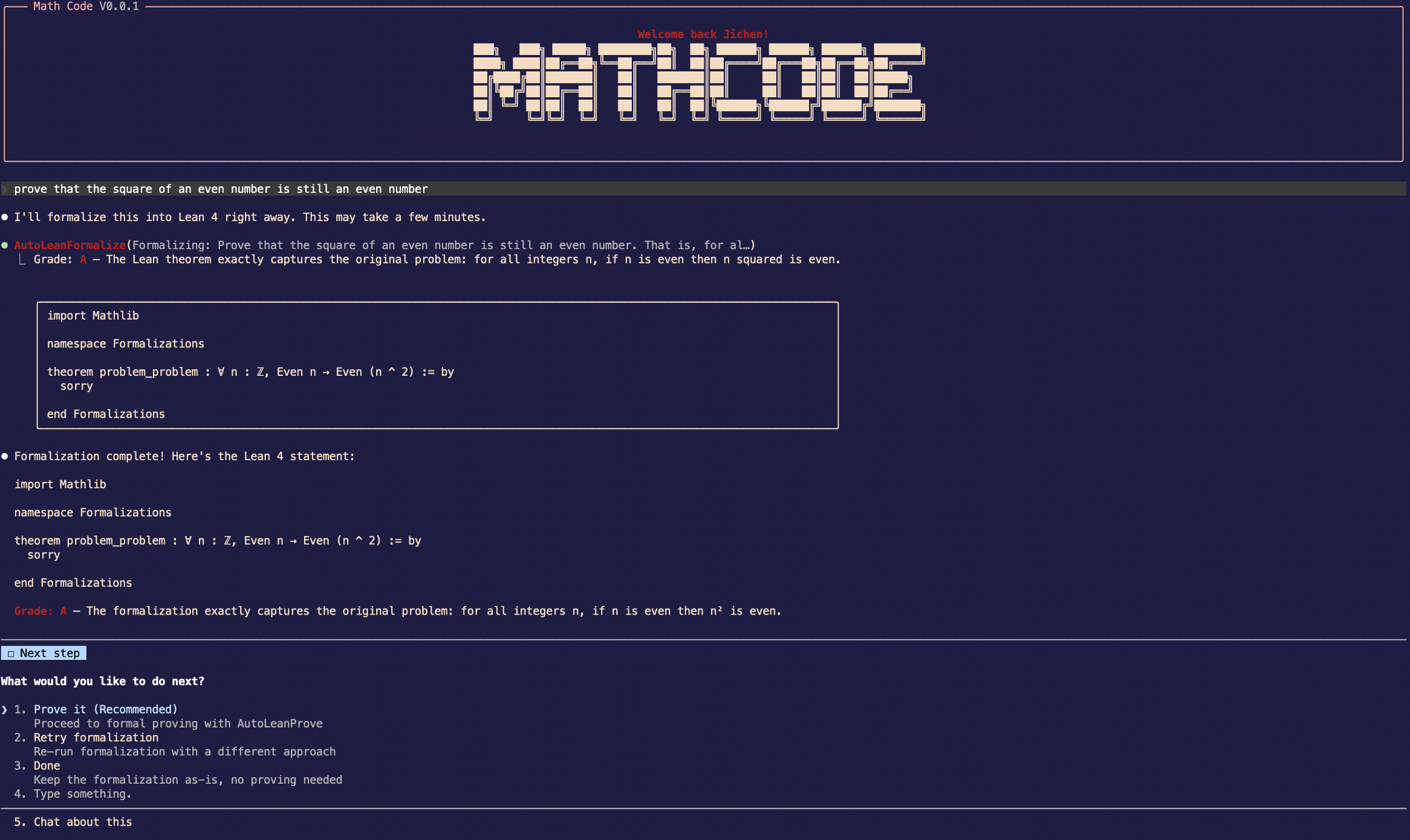
MathCode is a terminal AI coding assistant with built-in Lean capabilities. The
agent can inspect goals, check candidates, search declarations, and verify a
finished proof interactively.
## Quick Start
```bash
git clone https://github.com/math-ai-org/mathcode.git
cd mathcode
bash setup.sh --with-lean
codex auth login
mathcode
```
For a smaller installation without Lean/Mathlib, use
`bash setup.sh --without-lean`. You can add it later with
`bash setup.sh --install-lean`; the first approved local Lean feature call also
offers to install it. Running `bash setup.sh` interactively asks which mode to
use and defaults to the full installation.
`setup.sh` prepares the release checkout for daily use. It downloads or repairs
the bundled runtime, prepares local configuration, and installs a user-local
`mathcode` launcher for future shells. On Linux it also requires `bwrap`
(package `bubblewrap`) and `socat` before bootstrapping the Lean workspace.
If your current shell has not reloaded its profile yet, use `./run` as the
bundle-local fallback.
### Setup Responsibilities
Runtime files:
- downloads the matching `mathcode-vX.Y.Z--.tar.gz` asset when
bundled runtime files are missing, stale, unverified, or invalid for the
current platform
- restores `./mathcode`, `./mathcode-webui`, and `vendor/ripgrep/` from that
archive when repair is needed
- verifies the current-platform `SHA256SUMS.txt` entry with `shasum` or
`sha256sum`
- validates downloaded runtime files before replacing an existing working
install
- records release metadata for the CLI and WebUI helper so later `setup.sh` and
`setup.sh --status` runs can detect stale or unverified binaries
Local configuration:
- creates `.env` from `.env.example` when needed
- installs a managed user-local `mathcode` launcher in `~/.local/bin/` by
default
- creates `tools/` and `plugins/` extension directories plus the bundled
`skills/` reference-doc directory; project skills load from
`.mathcode/skills//SKILL.md`
- ships a bundled `rg` binary under `vendor/ripgrep/` for MathCode's internal
search paths
Lean toolchain:
- can be installed with `--with-lean`, deferred with `--without-lean`, and
added later with `--install-lean` or on the first approved local Lean use
- ships the versioned `lean-workspace/lake-manifest.json` so setup and local
runs use the dependency graph locked by the release
- setup materializes an empty managed `VaultLibs/UserVaultLibs/` skeleton when
needed; source-host local vault mirrors, test fixtures, and scratch Lean files
are not packaged
- materializes that locked graph during setup without running `lake update` or
rewriting the manifest
- requires a local `MathCodeLean` readiness build after the optional Mathlib
cache fetch; cache skips and download failures fall back to that build, and a
build failure aborts setup
- uses a complete bundle-local `.local/elan` Lean/Lake pair by default
- accepts `lean.exe` / `lake.exe` pairs from Git Bash/MSYS
- repairs partial local elan tool-file installs before bootstrapping the Lean
workspace
- uses system Lean/Lake only when `MATHCODE_SETUP_USE_SYSTEM_LEAN=1` and both
tools are available, preserving your existing `ELAN_HOME`
### Launcher And PATH Behavior
Setup only overwrites launcher files it previously created. This avoids
clobbering an unrelated existing `mathcode` command.
If `MATHCODE_INSTALL_BIN_DIR` is set, setup resolves relative paths against the
bundle root before writing the launcher, recorded state, or managed PATH block.
It also refreshes the managed profile block even when the chosen directory is
already on the current shell's `PATH`, so future shells keep resolving
`mathcode`.
If the selected launcher directory cannot be used, setup skips only the
launcher step and continues the rest of the installation.
When `MATHCODE_SETUP_USE_SYSTEM_LEAN=1`, setup captures system `lean` and
`lake` before changing into the bundle root and records their validated absolute
paths in `.env`. Runtime resolution validates and uses that exact pair even when
a later process has a different `PATH`. These managed system paths use strict
`base64:` UTF-8 encoding so Bun dotenv parsing and `./run` shell sourcing both
preserve literal backslashes, quotes, and backticks. Without that opt-in, setup
removes any stale managed system-toolchain selection and `--status` reports the
default local `.local/elan` path instead of treating system Lean as installed.
Generated `.env` path values are shell-quoted, so bundle paths containing
characters such as `$` or single quotes remain literal when `./run` sources the
file; the managed system Lean/Lake values use the dual-parser encoding above.
### Maintenance Commands
```bash
bash setup.sh --install-lean # add or repair optional Lean/Mathlib support
bash setup.sh --status # check whether the binary/tooling look healthy
bash setup.sh --clean # remove install artifacts, keep proofs/vault data
bash setup.sh --help # show all setup flags
```
`setup.sh --status` checks that:
- `./mathcode --version` and checksum match this release tag's metadata
- `./mathcode-webui` matches the recorded release metadata
- the current platform's bundled `rg` is executable and reports a ripgrep
version banner
- optional Lean support is ready, deferred, incomplete, or not yet installed
`setup.sh --clean` preserves user outputs in `LeanFormalizations/`, vault
data, and the release's locked Lake manifest. If setup previously recorded a managed launcher, later `--status` and
`--clean` runs keep tracking it even when `MATHCODE_INSTALL_BIN_DIR` is unset.
## Requirements
- macOS (arm64) or glibc-based Linux (x86_64 with AVX2, built on Ubuntu 22.04)
- `curl` for setup/bootstrap downloads
- `shasum` or `sha256sum` for release archive verification and metadata
- enough disk space for the bundle, plus the Lean toolchain and Mathlib caches
when Lean support is enabled
- `codex` CLI if you want the default backend and default math flow
- Python 3.12+ (optional, only needed for analysis tools in `tools/`)
## Common Commands
### CLI
```bash
mathcode -p "prove that the square of an even number is even"
echo "hello" | mathcode -p
mathcode --help
```
MCP XAA IdP setup requires a nonblank HTTPS issuer URL.
`mathcode mcp xaa setup --issuer ...` rejects `http://`, including loopback
URLs, before writing settings.
If you have not reloaded your shell yet, use the bundle-local fallback:
```bash
./run -p "prove that the square of an even number is even"
echo "hello" | ./run -p
./run --help
```
The agent edits Lean files in the selected workspace. The atomic Lean tools do
not create a separate run directory or write proof-library artifacts.
### Browser UI
```bash
./run webui
```
`./run webui` sources the bundle `.env`, starts the local daemon, and prints the
browser authentication URL.
If launched directly, the packaged `./mathcode-webui` helper re-enters the
sibling `./run webui` wrapper first. Direct and wrapper launches therefore use
the same `.env`, local Lean toolchain, and bundle defaults. A present but
broken wrapper is reported as a launch failure.
Inside an interactive `./run` session, `/webui` and `/webUI` launch or manage
the same local daemon. The slash command supports `--no-browser`,
`--port `, `--status`, and `--stop`; source-only `--rebuild` is not
available in release bundles. The full authenticated URL is written only to the
local terminal, while command result/status text redacts it as
`token=`. For slash-command launches, the selected port and workspace
override same-named WebUI keys from the bundle `.env`.
### Goal And Command Limits
- `MATHCODE_GOAL_MAX_TOKEN_BUDGET` caps token budgets accepted by source
`/goal`, `/goal` daemon commands, and `/api/v1/sessions/:id/goal`. It accepts
the same positive integer, integer-valued decimal, and `k`/`m`/`b` compact
formats as `/goal`; unset or invalid values fall back to `1000000000`.
- `MATHCODE_MAX_CHAINED_COMMAND_INPUTS` caps nested local slash-command
next-input submissions before `QueryEngine` aborts. Unset or invalid values
fall back to `25`.
### Goal Command Syntax
Interactive release sessions support:
- `/goal `
- `/goal --budget `
- `/goal --budget=`
- optional `--max-continuations N` or `--max-continuations=`
- `/goal pause`, `/goal resume`, `/goal status`, and `/goal clear`
- bare `/goal`, `/goal help`, `/goal -h`, and `/goal --help`
The command continues the same session; it does not spawn a separate agent.
Objectives that begin with `/` are submitted as plain goal text, not parsed as
another slash command.
After a budget, `--help` can be the first objective token. Once objective
parsing has started, flag-looking tokens remain objective text unless a valid
later `--budget` is being used to supply the required explicit budget.
Invalid `--budget` values are rejected when `--budget` is parsed as the budget
option, including numeric-expression objectives like:
```text
1 + 1 ... --budget nope
```
### Model Effort
Use `--effort ` or interactive `/effort ` with `low`, `medium`,
`high`, `max`, or a positive integer; `/effort auto` and `/effort unset` return
the session to the model default.
For CLI model overrides, the reserved `default` value is matched
case-insensitively; custom model IDs keep their original casing.
### Custom Agents
Custom agent definitions trim `description`, JSON `prompt`, markdown prompt
bodies, `initialPrompt`, and JSON enum fields such as `effort`,
`permissionMode`, `memory`, and `isolation`; blank required
descriptions/prompts are rejected, and blank optional initial prompts are
ignored. JSON `skills` lists are normalized like markdown frontmatter.
### Session Diagnostics, Compaction, And Tasks
Interactive context displays keep diagnostic context intact:
- `/context` uses the same visible markdown transcript output in interactive and
non-interactive sessions
- `/config` includes a default-on `Show tool-use warnings` toggle. Disabling it
suppresses only non-error runtime warning transcript events that are not
stream parser/drop diagnostics; tool errors, permission denials, validation
failures, stream-json parser diagnostics, and actionable tool-call diagnostics
remain visible to the agent.
- markdown table cells are escaped
- slash-command and deferred built-in tool details remain visible
- MCP loaded/available status is shown
- deferred categories are excluded from current-usage tables
- manual compact reserve is shown as reserved buffer
- free/reserved rows stay visible when current usage is empty
- malformed token rows and zero-token synthetic windows do not produce invalid
suggestion percentages
- server-side and MCP tool blocks are counted in message breakdowns
Compact and autocompact paths:
- clamp malformed thresholds, token counts, legacy content shapes, and blank
tool IDs
- preserve singleton tool-result pairs
- scope statusline, away summary, survey, and sticky-prompt UI to the active
post-compact transcript
- suppress stale warnings after partial compact
- coalesce duplicate remote compacting statuses
Task handling:
- `/tasks`, `TaskStop`, and SDK `stop_task` do not count the selectable leader
row as a running teammate
- pending remote agents and running in-process teammates can be stopped
- task tools and SDK `stop_task` trim task IDs
- deprecated `shell_id` and TaskOutput `agentId`/`bash_id` aliases can backfill
blank `task_id` values
- legacy `wait_up_to` seconds are normalized
- legacy persisted task statuses are recovered across user-visible status shapes
- legacy `TaskUpdate` status aliases are accepted
- blank task text fields are rejected
- task metadata keys are trimmed, and blank or unsafe `__proto__` metadata keys
are rejected
- TaskOutput timeouts must be integer-valued
- idle in-process teammate output is treated as ready instead of waiting for
timeout
- mixed text/structured TaskOutput and TaskStop results replay correctly
- legacy TaskOutput output replay preserves tag-looking text such as ``
- trimming command whitespace does not create false TaskStop truncation markers
- recently completed rows expire on schedule, while hidden summaries remain
visible in very short terminals
Shell sleep auto-backgrounding and path validation recognize:
- decimal, suffixed, signed, exponent, and trailing-dot durations, such as
`sleep 2s`, `sleep 2m`, `sleep +2`, and `sleep 2e0`
- wrapped shell forms such as `env ... sleep 2s`
- PowerShell quoted, commented, redirected, and module-qualified sleep commands,
such as `& 'sleep' 2`, `Start-Sleep -Seconds:2 > $null`, and
`Microsoft.PowerShell.Utility\Start-Sleep -Seconds 2`
- TimeSpan `-Duration` values, PowerShell parameter abbreviations and common
parameters
- short, fractional, signed, and exponent `timeout` wrappers
## Features
### Persistent Lean feedback backends
Eligible generic compile callers can opt into the in-process Lean REPL:
```env
MATHCODE_LEAN_REPL=1
```
An external Kimina Lean Server can additionally serve atomic exploration:
```env
MATHCODE_KIMINA_SERVER=1
MATHCODE_KIMINA_CMD="/absolute/path/to/kimina-lean-server/.venv/bin/python -m server"
MATHCODE_KIMINA_CWD=/absolute/path/to/kimina-lean-server
MATHCODE_KIMINA_PROJECT_ROOT=/absolute/path/to/served-lean-project
```
On macOS, `LeanGoal` and `LeanCheck` reuse that server only when the declared project
matches the resolved project and a live guard confirms its Lean version.
Otherwise they fall back to the pinned subprocess and expose the reason as a
warning. Kimina feedback is not a completion certificate. `LeanVerify` and
isolated paper agents always use fresh isolated subprocesses. MathCode launches
Kimina loopback-only inside its fail-closed Lean sandbox, with a random bearer
key that never enters the Lean REPL environment, no provider credentials, and
scratch-only writes. A virtualenv, when used, must live below
`MATHCODE_KIMINA_CWD`, and `MATHCODE_KIMINA_CMD` must start directly with that
Python executable rather than a command wrapper. Manifest roots that contain the project or another
protected host scope are rejected, and remote-package storage stays inside the
project. A standard-library-only Python guardian lives in a separate read-only
support root and reuses the selected Kimina interpreter, so no MathCode source
tree or second runtime is exposed to the sandbox. Python site, `.pth`, and
`sitecustomize` loading are disabled before the handoff path enters that
interpreter. It mediates supported
`setsid` Lake launches, deletes the mode-0600 auth handoff and strips both
Kimina key names plus its private environment before Lean starts, and kills its
separately owned Lake group through an independent owner-pipe HUP observer, even
when Lake stops reading input. Parent exit and
`SIGINT`/`SIGTERM`/`SIGHUP`
also clean the complete owned tree. Current `/api/check` caller cancellation
preserves the shared service; legacy `/verify` cancellation or uncertain
backend/transport state cleans up the complete service tree before restart.
Linux and Windows use pinned subprocesses.
### Plan Files
`/plan` stores session plan markdown in the active user config-home `plans/`
slot by default (`~/.mathcode/plans/` unless `MATHCODE_CONFIG_DIR` relocates
the config home). To keep plan files under the project tree, set
`plansDirectory` in project or local settings to a custom directory relative to
the project root. Nested directories are created as needed, and symlink escapes
fall back to the user config-home `plans/` directory.
### Theorem Library
Manage an explicit library of proved theorems:
```bash
/theorem-store store # verify and store one theorem
/theorem-store sync # inspect candidates and ask which declarations to store
/theorem-store check # compile-check the assembled library
/theorem-store status # show stored count and vault info
```
`/theorem-store store` calls `LeanTheoremLibrary` for one explicit fully
qualified declaration. The tool performs fresh strict verification, rechecks
the source and dependency snapshot immediately before persistence, then
strictly verifies the exact renamed declaration in the assembled `Stored.lean`.
The elaborated proposition must remain identical, and success immediately
builds an importable workspace module. The library, workspace mirror, compiled
artifacts, and index update as one rollback-capable transaction.
Private theorem compilation and public Lake publication each have a separate
bounded 300-second build budget; a timeout still rolls the transaction back
without exposing incomplete artifacts.
`/theorem-store sync` is optional
agent guidance: it discovers candidates, asks which declarations to store, then
uses the same one-declaration tool call for each confirmed candidate. Atomic
Lean feedback tools never append to the theorem library as a hidden effect.
### Axiom Library
Store conversational assumptions as persistent, consistency-checked declarations:
```bash
/axiomatize "A is faster than B" # formalize + store
/axiomatize list # show all active axioms
/axiomatize check # consistency review
/axiomatize remove # remove a declaration
```
Axioms are stored per vault with Lean formalization and compile checks. Atomic
Lean tool calls do not inject them implicitly; import or reference the stored
declarations explicitly when they are part of the intended proof context.
### Obsidian Theorem Graph
Generate an Obsidian vault that visualizes theorem dependencies as a knowledge graph:
```bash
/obsidian on # enable + generate from existing formalizations
/obsidian off # disable
/obsidian generate # regenerate now
```
Use `/obsidian generate` after changing proofs to refresh the vault explicitly.
Atomic Lean tool calls never update it as a hidden side effect. Open it in
Obsidian and use Graph View to see theorem-to-lemma relationships.
Refreshes overwrite MathCode-managed notes and exact legacy MathCode projections
from before the managed marker existed; those legacy notes gain the marker. If
a theorem, lemma, index, or blueprint filename is occupied by any other user
note, generation fails and preserves that note.
Each lemma stub includes the full Lean definition queried from Mathlib via
`#print`.
### Agentic Lean
For ordinary Lean work, the agent can choose among four atomic tools:
- `LeanGoal` inspects one explicit source position.
- `LeanCheck` compiles a file or ephemeral candidate and returns structured feedback.
- `LeanSearch` queries one explicit provider without hidden fan-out.
- `LeanVerify` performs the strict final check for one fully qualified declaration; only `data.verified=true` certifies completion.
The optional `/lean` skill offers guidance without imposing a fixed phase,
tactic order, retry budget, or planner. The former fixed controllers have been
removed and are not release entrypoints or model-visible tools.
The fixed scheme is retired, not the useful methods: the agent may still choose
subgoal decomposition, helper lemmas, branching, milestones, stuck detection,
diagnostic repair, and theorem reuse, then reorder or abandon them freely.
Axiom and theorem libraries are separate explicit actions, never hidden effects
of an atomic Lean call.
Strict verification resolves Lean/Lake executables outside the project tree,
preserves Lake's canonical source/module context, and obtains target axiom
usage plus direct module axioms through Lean's environment API rather than
source-controlled macros or output.
### Scheduled Agent Loops
The bundled CLI ships with recurring prompt scheduling enabled out of the box.
Inside interactive MathCode sessions you can use:
```bash
/loop 10m check the deploy
/loop 1h /standup 1
```
Use short-lived loops for reminders and monitoring. When you want a schedule to survive restarts, create a durable schedule from the interactive session.
## Extensibility
MathCode supports three extension mechanisms:
### Skills (`.mathcode/skills/`)
Add project-local skills at `.mathcode/skills//SKILL.md`. Each skill
uses its own directory; standalone `skills/*.md` files are not loaded.
### Tools (`tools/`)
Drop Python `.py` scripts with YAML frontmatter to add analysis tools. Auto-discovered at startup.
3 analysis tools are included: `axiom-checker`, `lib-search`, and
`proof-stats`. They remain available when MathCode is launched from another
workspace; a workspace-local tool with the same normalized name overrides the
bundled copy. Python 3.12+ is required only if you use these tools.
### Plugins (`plugins/`)
Drop plugin folders with `.mathcode-plugin/plugin.json` manifests to add commands, skills, agents, MCP servers, hooks, and more. Load via `--plugin-dir` or install from Git repos via `/plugin`.
## Backend Setup
### Default Codex/OpenAI Path
No `.env` edits are required for the default path.
```bash
codex auth login
mathcode
```
If you are still in the same shell where setup just finished, `./run` is the immediate fallback until you reload your shell profile.
This repository's `.env.example` now selects GPT-6 Astra at medium reasoning effort.
To apply the same values to an existing `.env` created by an older release and
also select medium for the CLI effort level, set:
```env
OPENAI_MODEL=gpt-6-astra
OPENAI_SMALL_MODEL=gpt-6-astra
OPENAI_REASONING_EFFORT=medium
MATHCODE_EFFORT_LEVEL=medium
```
To use an Anthropic-compatible backend instead, set:
```env
MATHCODE_USE_OPENAI=0
ANTHROPIC_API_KEY=sk-ant-...
ANTHROPIC_MODEL=claude-sonnet-4-5
```
The release `./run` wrapper sources the bundle `.env` before launching
MathCode. For interactive `/webui` slash-command launches, the selected WebUI
port and workspace override same-named keys from that `.env`.
The WebUI route default is separate from the CLI `.env`. In WebUI settings,
select provider `openai`, model `gpt-6-astra`, and reasoning effort `medium`.
Existing saved routes are preserved. Fresh WebUI defaults and built-in Astra
capability metadata require a runtime binary containing the Astra update;
changing this checkout's template does not update installed binaries or
already-published release archives.
For separately launched paper tasks, explicitly set
`MATHCODE_PAPER_MODEL=gpt-6-astra` and
`MATHCODE_PAPER_REASONING_EFFORT=medium` in an existing `.env` as needed.
Lean compiler verification itself does not select a model.
### WebUI Provider Keys
In the WebUI settings panel, provider-key rows are limited to secrets the
daemon can pass to real child sessions today: `anthropic` and `openrouter`.
Codex/OpenAI routes use Codex OAuth, not an `OPENAI_API_KEY` row.
WebUI `minimal` reasoning effort is preserved for OpenAI/OpenRouter routes and
maps to the CLI's lowest available `low` effort on Anthropic-compatible routes.
### Bundled Provider Dependencies
The release binary bundles the provider SDKs used by the Anthropic-compatible,
Bedrock, Vertex, and Foundry branches, plus the MCPB/DXT plugin package; these
routes do not require a source checkout's `node_modules`. Bedrock, Vertex, and
Foundry use their provider-specific credentials rather than
Anthropic-compatible `ANTHROPIC_AUTH_TOKEN` / `apiKeyHelper` bearer headers.
## FAQ
**Q: `mathcode` is not found right after setup**
Open a new shell, or run:
```bash
source ~/.zshrc
```
If you want to keep working immediately before reloading your shell, use:
```bash
./run
```
**Q: `./run` fails with `exec format error`, `Bad CPU type in executable`, or a similar startup error**
You probably downloaded the wrong binary for your platform. Re-run `bash setup.sh`, or download the correct release asset manually from GitHub Releases.
**Q: Startup says Codex auth is missing**
Run:
```bash
codex auth login
```
**Q: Can I skip cloning and just download a release asset**
Yes. You can download and extract the `.tar.gz` bundle from GitHub Releases
directly.
The archive is self-contained; `bash setup.sh` only downloads from GitHub when
bundled runtime files are missing, stale, or unverified. The bootstrap repo just
makes `bash setup.sh` the default path.
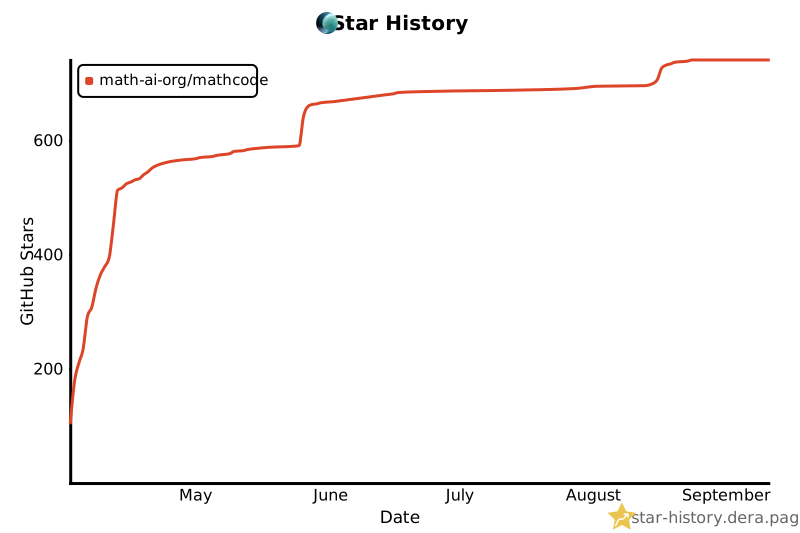
## Star History
Track the project's growth over time here:
[](https://star-history.dera.page/#math-ai-org/mathcode&Date)
## Citation
If you use MathCode in research, please cite it as:
```bibtex
@misc{mathcode2026,
title = {MathCode: A Frontier Mathematical Coding Agent},
author = {Team Math-AI},
journal = {math-ai-org.github.io},
year = {2026},
month = {April},
url = "https://github.com/math-ai-org/mathcode"
}
```
## Community
Join our Discord for help, feedback, and discussion: **[discord.gg/f2AFP9W5](https://discord.gg/f2AFP9W5)**
## Acknowledgments
MathCode preserves useful proof-search ideas as optional agent guidance while
Lean remains the proof authority.