

Note
Go to the end to download the full example code.
Blending and compositing artists#
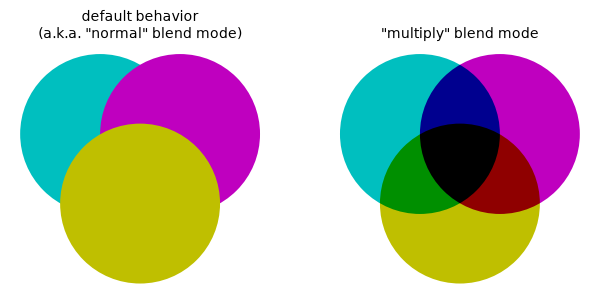
When an artist is drawn on top of existing elements, the default behavior is for the artist's colors to be blended with the colors underneath the artist using alpha-based transparency. An alpha value of 1 normally means that the underlying colors are completely hidden.
An example of an alternative to normal alpha blending is the "multiply" blend mode, where the RGB channel values (in the range [0, 1]) of the artist colors and the underlying colors are multiplied together. For this blend mode, the underlying colors can still affect the final color even when the alpha value is 1.
import matplotlib.pyplot as plt
from matplotlib.patches import Circle

fig, ax = plt.subplots(figsize=(6, 3), layout='constrained')

ax.text(1.5, 1.2, 'default behavior\n(a.k.a. "normal" blend mode)', ha='center')
ax.add_patch(Circle((1, 0), 1, color='c', ec='none'))
ax.add_patch(Circle((2, 0), 1, color='m', ec='none'))
ax.add_patch(Circle((1.5, -0.87), 1, color='y', ec='none'))

ax.text(5.5, 1.2, '"multiply" blend mode', ha='center')
ax.add_patch(Circle((5, 0), 1, color='c', ec='none'))
ax.add_patch(Circle((6, 0), 1, color='m', ec='none', blend_mode='multiply'))
ax.add_patch(Circle((5.5, -0.87), 1, color='y', ec='none', blend_mode='multiply'))

ax.set_xlim(-0.2, 7.2)
ax.set_ylim(-1.9, 1.5)
ax.set_aspect('equal')
ax.axis('off')
Matplotlib provides a wide range of alternative behaviors to the default ("normal") behavior:
(See also Blending and compositing groups of artists for the additional capability of blending groups of artists.)
These behaviors are specified via the artist's blend_mode property. You
can set the property when creating a new artist, or you can call
Artist.set_blend_mode on an existing artist. You can specify the behavior
either by string or by member of the BlendMode enumeration.
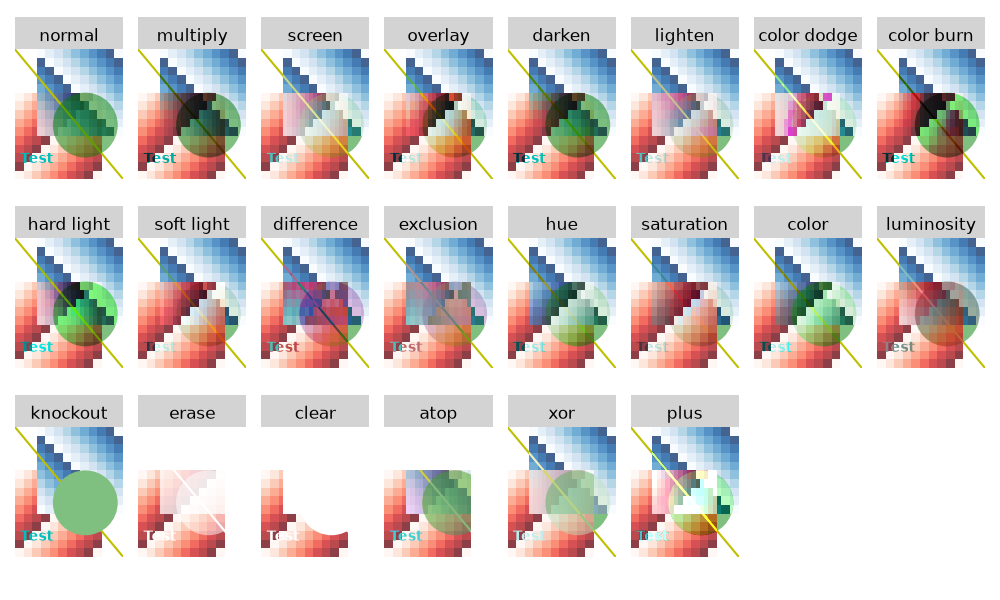
Below is a gallery illustrating the effect of each blend_mode option for a
variety of artists. Although each panel in the gallery has all of its artists
using the same blend mode, artists in the same axes can have different blend
modes from each other. Be aware that the background of the axes and the
background of the figure are artists as well, so their respective colors may
affect the blending result.
Backends using the Agg renderer (the default) or the Cairo renderer natively
support all of these blend_mode options. The vector backends do not
natively support some of the options, but one can use rasterization (see
Rasterization for vector graphics) to achieve the blending effect if the
fixed resolution of the result is acceptable.
import matplotlib.pyplot as plt
import numpy as np

from matplotlib.patches import Circle, Rectangle

N = 10
data = np.arange(N**2).reshape((N, N)) % (N-1)

fig, axs = plt.subplots(3, 8, figsize=(10, 6), layout='tight')
axs = axs.flatten()
fig.set_facecolor('none')

blend_modes = ['normal',

               # Blend modes
               'multiply', 'screen', 'overlay', 'darken', 'lighten',
               'color dodge', 'color burn', 'hard light', 'soft light',
               'difference', 'exclusion',
               'hue', 'saturation', 'color', 'luminosity',

               # Porter-Duff compositing operators
               'knockout', 'erase', 'clear', 'atop', 'xor', 'plus']

for ax in axs:
    ax.set_facecolor('none')
    ax.set_xlim(0, 1)
    ax.set_ylim(0, 1.2)
    ax.set_axis_off()

for i, blend_mode in enumerate(blend_modes):
    axs[i].imshow(data, cmap='Reds', alpha=0.75, extent=(0, 0.8, 0, 0.8))

    # Four different artist types drawn using this blend_mode setting
    axs[i].imshow(data[::-1, :], cmap='Blues', alpha=0.75, extent=(0.2, 1, 0.4, 1.2),
                  blend_mode=blend_mode)
    axs[i].text(0.05, 0.15, 'Test', weight='bold', color='c',
                blend_mode=blend_mode)
    axs[i].plot([0, 1], [1.2, 0], color='y',
                blend_mode=blend_mode)
    circ = Circle((.65, 0.5), .3, facecolor='g', alpha=0.5, zorder=2,
                  blend_mode=blend_mode)
    axs[i].add_artist(circ)

    rect = Rectangle((0, 1.2), 1, .3, facecolor='lightgray', clip_on=False)
    axs[i].add_artist(rect)
    axs[i].set_title(blend_mode)

plt.show()
This table shows by backend which options for blend_mode are supported
natively (✅) versus supported only through rasterization (🟡).
Option |
Agg |
Cairo |
SVG |
PGF |
PS |
|
|---|---|---|---|---|---|---|
normal [1] |
✅ |
✅ |
✅ |
✅ |
✅ |
✅ |
multiply, screen, overlay, darken, lighten, color dodge, color burn, hard light, soft light, difference, exclusion, hue, saturation, color, luminosity |
✅ |
✅ |
✅ |
✅ |
✅ |
🟡 |
✅ |
✅ |
🟡 |
🟡 |
🟡 |
🟡 |
Total running time of the script: (0 minutes 4.804 seconds)