Your Claude is coding blind. See everything it did.
The debugging tool for Claude Code. Read session transcripts, inspect tool calls, track token usage — directly from the Claude Code logs on your machine.
---
## The Problem
**Claude Code started hiding what it does.**
Since [v2.1.20](https://symmetrybreak.ing/blog/claude-code-is-being-dumbed-down/), Claude Code replaced detailed output with opaque summaries. `Read 3 files`. `Searched for 1 pattern`. `Edited 2 files`. No file paths. No content. No line numbers. The [community backlash was immediate](https://news.ycombinator.com/item?id=46978710).
But the problem goes deeper than collapsed file paths:
- **Thinking steps** — Claude's chain-of-thought reasoning is completely invisible in the terminal
- **Tool call details** — you see a one-line summary, not the actual input/output
- **Subagent activity** — agents spawn agents, but you only see the final result
- **Context window** — a three-segment progress bar with no breakdown of what's consuming your tokens
- **Team coordination** — teammate messages, task delegation, shutdown requests — all buried
The only workaround is `--verbose`, which dumps raw JSON, internal system prompts, and thousands of lines of noise. **There is no middle ground.**
## The Solution
**claude-devtools is the debugging tool for Claude Code.** It reads the Claude Code logs and session transcripts already saved to `~/.claude/` on your machine, and reconstructs *everything*.
| What the terminal hides | What claude-devtools shows |
|------------------------|---------------------------|
| `Read 3 files` | Exact file paths, syntax-highlighted content with line numbers |
| `Searched for 1 pattern` | The regex pattern, every matching file, matched lines |
| `Edited 2 files` | Inline diffs with added/removed highlighting |
| Three-segment context bar | Per-turn token attribution across 7 categories with compaction visualization |
| Collapsed subagent output | Full execution trees per agent with tool traces, tokens, duration, cost |
| Nothing about thinking | Extended thinking content, fully visible |
| `--verbose` JSON dump | Structured, filterable, navigable interface — no noise |
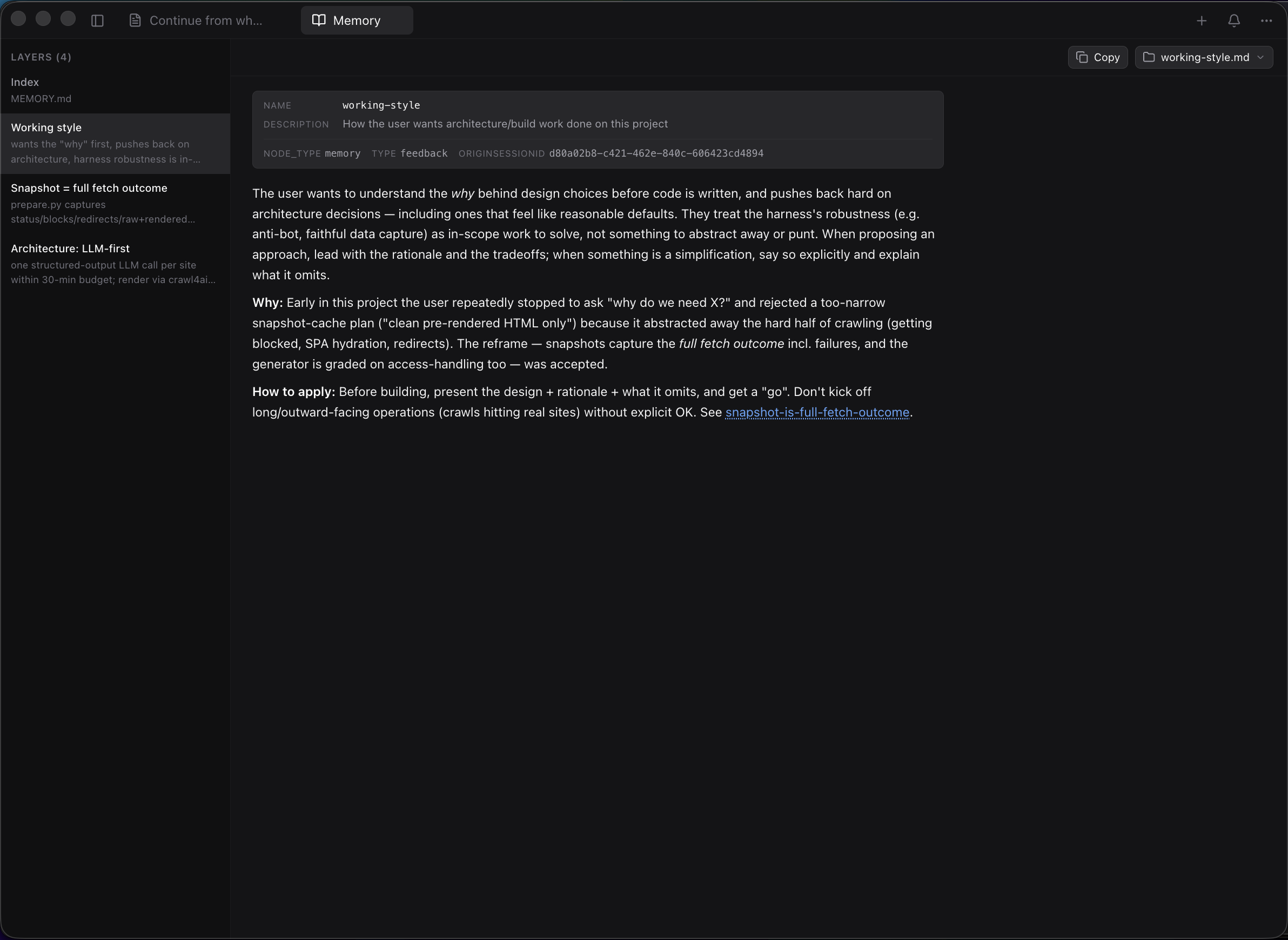
| Per-project Claude memory hidden in `~/.claude/projects/.../memory/` | `MEMORY.md` rendered as a clickable index of layers; open any layer in your editor |
| Copy from terminal = wrapped lines, ANSI codes, broken Markdown | Real selectable text, one-click copy on every message and code block |
**Zero configuration. No API keys. No wrappers. Works with every session you've ever run.**
> [!TIP]
> If claude-devtools saves you time debugging Claude Code, **leaving a ⭐ on the repo** is the single best way to support the project — it helps other developers find it.
---
## Installation
### Homebrew (macOS)
```bash
brew install --cask claude-devtools
```
### Direct Download
| Platform | Download | Notes |
|----------|----------|-------|
| **macOS** (Apple Silicon) | [`.dmg`](https://github.com/matt1398/claude-devtools/releases/latest) | Download the `arm64` asset. Drag to Applications. On first launch: right-click → Open |
| **macOS** (Intel) | [`.dmg`](https://github.com/matt1398/claude-devtools/releases/latest) | Download the `x64` asset. Drag to Applications. On first launch: right-click → Open |
| **Linux** | [`.AppImage` / `.deb` / `.rpm` / `.pacman`](https://github.com/matt1398/claude-devtools/releases/latest) | Choose the package format for your distro |
| **Windows** | [`.exe`](https://github.com/matt1398/claude-devtools/releases/latest) | Standard installer. May trigger SmartScreen — click "More info" → "Run anyway" |
| **Docker** | `docker compose up` | Open `http://localhost:3456`. See [Docker deployment](#docker--standalone-deployment) |
---
## Key Features
### [Context Reconstruction](https://claude-dev.tools/docs/token-usage)
Per-turn token attribution across 7 categories — **CLAUDE.md** (global, project, directory), **skills**, **@-mentioned files**, **tool I/O**, **thinking**, **team overhead**, **user text**. See exactly what's in the context window at any point.
### [Terminal-Friendly Copy & Paste](https://claude-dev.tools/docs/copy-paste)
Copying Claude Code output from the terminal mangles it — selection wraps at the terminal width, ANSI color codes leak into the clipboard, and code blocks lose their Markdown formatting. claude-devtools renders every message, tool call, and output as **real selectable text** with **one-click copy** on every code block, plus full-session **export to Markdown / JSON / plain text**.
### [Project Memory](https://claude-dev.tools/docs/memory)
Claude Code stores per-project memory at `~/.claude/projects//memory/` — a `MEMORY.md` index plus one `.md` file per layer (working style, architecture notes, etc.). claude-devtools surfaces this as a sidebar entry that opens a dedicated pane: layer list on the left, full markdown rendering on the right with frontmatter shown as a metadata card, Obsidian-style `[[wikilinks]]` for cross-layer navigation, and an icon-driven "Open in…" launcher that hands any layer (or the whole memory folder) off to Finder/Explorer, Cursor, VS Code, Zed, Xcode, iTerm, Ghostty, Terminal — or copies the absolute path.
### [Team & Subagent Trees](https://claude-dev.tools/docs/subagents)
Isolated execution trees per agent with tool traces, token metrics, duration, and cost. Nested agents render recursively.
### [Tool Call Inspector](https://claude-dev.tools/docs/tool-calls)
Every tool call expanded with specialized viewers — syntax-highlighted Read calls, inline Edit diffs, Bash output, and full subagent trees.
### [SSH Remote Sessions](https://claude-dev.tools/docs/ssh-remote)
Inspect sessions on any remote machine over SSH. Reads `~/.ssh/config`, supports agent forwarding and key auth.
### [Compaction Visualization](https://claude-dev.tools/docs/compaction)
See the moment your context hits the limit. Visualizes how context fills, compresses, and refills — so you know exactly what was lost. ([Why did Claude forget? — debugging walkthrough](https://claude-dev.tools/docs/why-claude-forgot))
### [Notification Triggers](https://claude-dev.tools/docs/notifications)
System notifications for `.env` access, tool errors, high token usage, and custom regex patterns on any field.
### Command Palette & Multi-Pane Layout
**Cmd+K** for cross-session search. Open multiple sessions side-by-side with drag-and-drop tabs.
📖 **Full documentation:** [claude-dev.tools/docs](https://claude-dev.tools/docs) · **Copy from Claude Code:** [claude-dev.tools/docs/copy-paste](https://claude-dev.tools/docs/copy-paste) · **JSONL format reference:** [claude-dev.tools/docs/jsonl-format](https://claude-dev.tools/docs/jsonl-format) · **`claude --verbose` comparison:** [claude-dev.tools/docs/verbose-vs-devtools](https://claude-dev.tools/docs/verbose-vs-devtools)
---
## Not a Wrapper
claude-devtools does **not** wrap, modify, or interfere with Claude Code. It reads session logs that already exist on your machine. Works with sessions from the terminal, IDEs, or any tool that uses Claude Code.
---
## Docker / Standalone Deployment
Run without Electron — in Docker, on a remote server, or anywhere Node.js runs.
```bash
docker compose up
# Open http://localhost:3456
```
Or manually:
```bash
docker build -t claude-devtools .
docker run -p 3456:3456 -v ~/.claude:/data/.claude:ro claude-devtools
```
| Variable | Default | Description |
|----------|---------|-------------|
| `CLAUDE_ROOT` | `~/.claude` | Path to the `.claude` data directory |
| `HOST` | `0.0.0.0` | Bind address |
| `PORT` | `3456` | Listen port |
The standalone server has **zero** outbound network calls. For maximum isolation: `docker run --network none -p 3456:3456 -v ~/.claude:/data/.claude:ro claude-devtools`. See [SECURITY.md](SECURITY.md).
---
## Development
Build from source
**Prerequisites:** Node.js 20+, pnpm 10+
```bash
git clone https://github.com/matt1398/claude-devtools.git
cd claude-devtools
pnpm install
pnpm dev
```
| Command | Description |
|---------|-------------|
| `pnpm dev` | Development with hot reload |
| `pnpm build` | Production build |
| `pnpm typecheck` | TypeScript type checking |
| `pnpm test` | Run all tests |
| `pnpm check` | Full quality gate (types + lint + test + build) |
---
## Community
- **Discussions** — share ideas, ask questions, and read what others are doing in [GitHub Discussions](https://github.com/matt1398/claude-devtools/discussions).
- **Issues** — bug reports and feature requests in [GitHub Issues](https://github.com/matt1398/claude-devtools/issues).
- **Changelog** — every release is documented in [CHANGELOG.md](CHANGELOG.md) and on [claude-dev.tools/changelog](https://claude-dev.tools/changelog).
## Contributing
See [CONTRIBUTING.md](CONTRIBUTING.md) for guidelines. Please read our [Code of Conduct](CODE_OF_CONDUCT.md).
## Security
IPC handlers validate all inputs with strict path containment checks. File reads are constrained to the project root and `~/.claude`. See [SECURITY.md](SECURITY.md).
## License
[MIT](LICENSE)
---
## Star History
Found this useful? ⭐ Star the repo — it’s the easiest way to help other developers discover claude-devtools.











 Claude Code stores per-project memory at `~/.claude/projects/