# dsh-usage-chart
> A usage, cost, and account-balance dashboard for DeepSeek Harness Web.
[中文](./README.md) · [Report an issue](https://github.com/Max-Samson/dsh-usage-chart/issues) · [Changelog (EN)](./CHANGELOG.md) · [更新日志(中文)](./CHANGELOG_ZH.md)
Interface preview: light English on the left and dark Simplified Chinese on the right.
Both variants follow the DSH theme and in-app language setting.
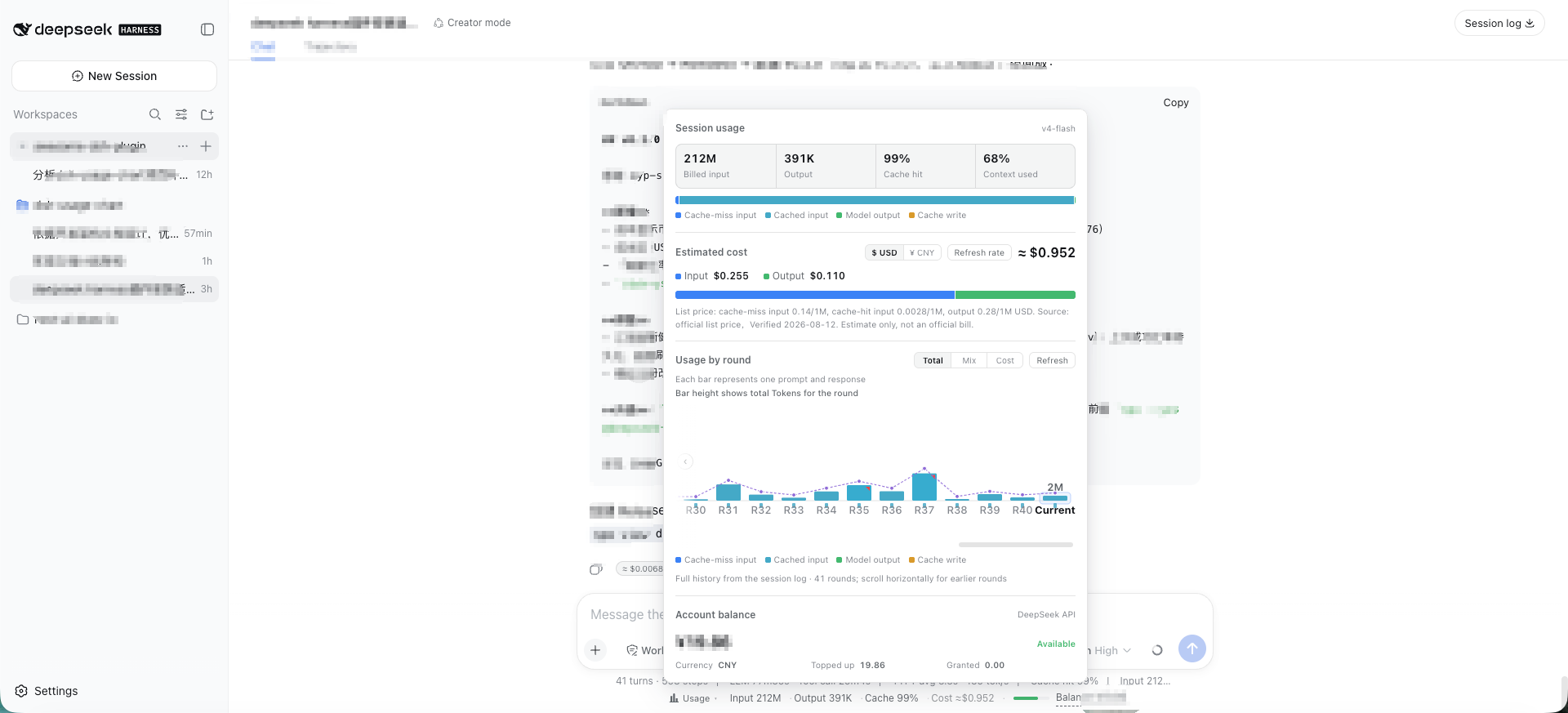
Light theme · English |
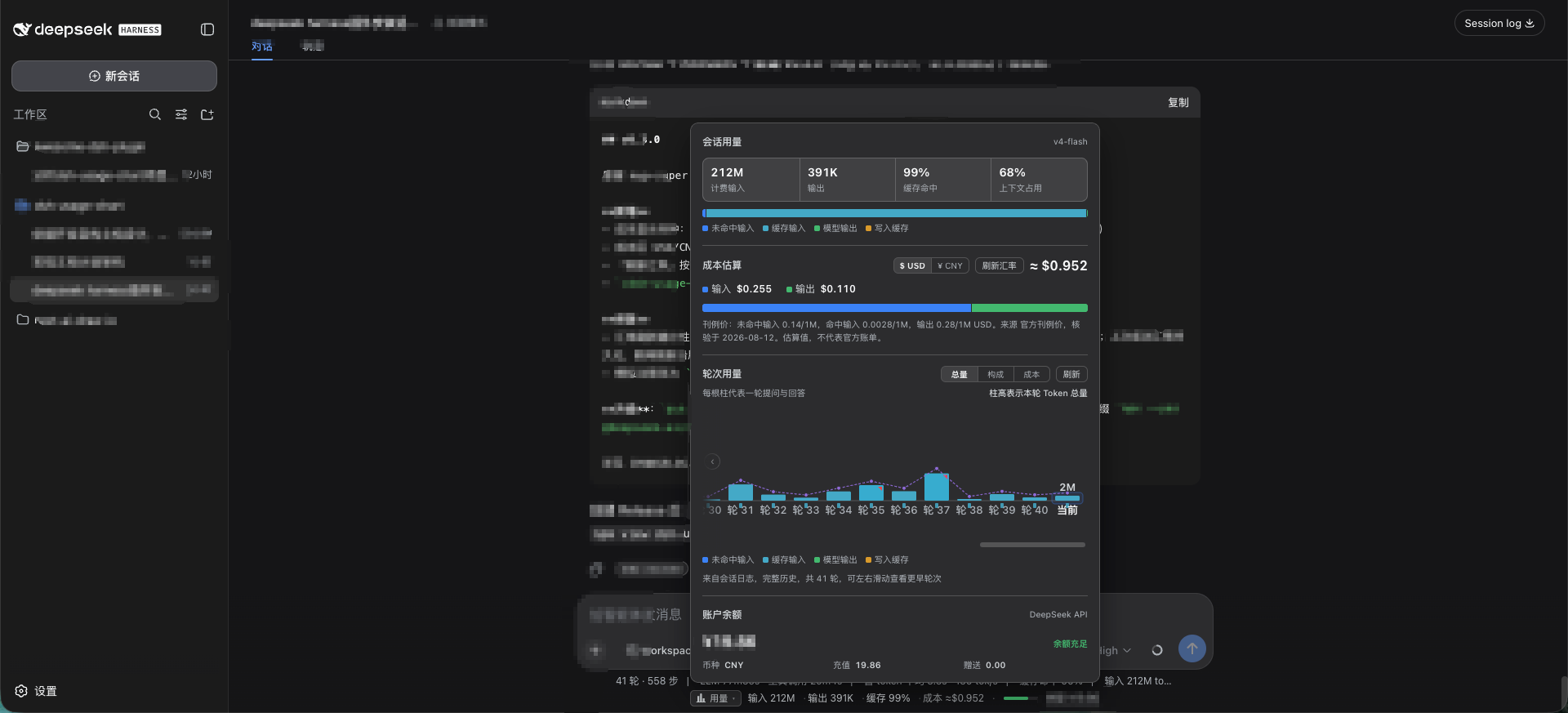
Dark theme · 简体中文 |
> Both screenshots use fictional demo data only. They contain no real session content,
> token counts, costs, balances, or API keys.
The plugin adds a compact indicator below the conversation composer. It shows input/output tokens, cache-hit ratio, estimated cost, active model, a slim context-pressure bar, and DeepSeek account balance. Click it to open a zero-dependency SVG dashboard with per-turn usage history — including a cost view (every bar shows its own cost value, not just the current round), a duration overlay, anomaly markers, an explainer tooltip (tokens + cost + model + billing tier + duration/TTFT/TPS + end reason), horizontally scrollable per-round bars (all rounds, fixed slim bar width, auto-scroll to latest), a dismissible `≈ ¥/$0.00xx` badge on each assistant message, peak/off-peak tiered billing with a live red/green billing-tier tag in the panel (red = peak, green = off-peak, v1.0.1), and official dual-currency pricing (CNY from the Chinese pricing page, USD from the English pricing page — no FX conversion, v1.0.1).
The interface supports Chinese and English and follows the DSH in-app language setting. Browser language seeds the initial display only when the Host has not exposed a setting yet. Language changes are applied without reloading the plugin.
## Install
Prerequisites: **[DeepSeek Harness](https://github.com/deepseek-ai/deepseek-harness) ≥ 0.1.0-rc.6** ·
**Node.js ≥ 20** · **[pnpm](https://pnpm.io/install) on PATH** (`dsh plugin` forwards installs to pnpm).
> If you get `dsh: command not found` (or PowerShell's `The term 'dsh' is not recognized…`),
> you only ran `npx @deepseek-ai/dsh` transiently — see FAQ item 1 (global install + new
> terminal, or prefix every `dsh ...` with `npx --yes @deepseek-ai/dsh`).
### Option 1: npm registry (recommended, prebuilt — no build tooling needed)
```sh
dsh plugin --profile web add dsh-usage-chart # installs and registers the profile plugin layer
dsh web --profile web # starts DSH Web (stop it first if already running)
```
To update (upgrade to a new version): pnpm may print `Already up to date` and skip the
upgrade when the dependency is already installed — use an **explicit version** (recommended)
or **remove then re-add**:
```sh
# Option ①: pin the target version explicitly
dsh plugin --profile web add dsh-usage-chart@0.3.0
# Option ②: remove, then re-add (back to latest)
dsh plugin --profile web remove dsh-usage-chart
dsh plugin --profile web add dsh-usage-chart
```
Then restart DSH Web.
> ⚠️ **Restarting the `dsh web` process is required after any upgrade.** The Host caches
> plugin code in memory (no hot reload): new routes (e.g. `/pricing`, `/meta`, `/rate`)
> are only served after a restart. See the [Changelog](./CHANGELOG.md).
> ⚠️ **No global `dsh` installed (`dsh: command not found` / PowerShell
> `The term 'dsh' is not recognized…`)?** Prefix every `dsh` above with
> `npx --yes @deepseek-ai/dsh`, e.g.
> `npx --yes @deepseek-ai/dsh plugin --profile web add dsh-usage-chart@0.3.0`
> (see FAQ item 1).
### Option 2: install from GitHub (source build)
```sh
dsh plugin --profile web add github:Max-Samson/dsh-usage-chart#
```
Git installs run the package `prepare` script (`node build.mjs`) to build from source.
pnpm ≥ 10 blocks `prepare` scripts by default — allow this package once in the profile's
`pnpm-workspace.yaml`, then re-run:
```yaml
allowBuilds:
dsh-usage-chart: true
```
> Allowing a build script lets that package execute code on your machine during install.
> Only do this for sources you trust, and pin the commit (`#`).
### Option 3: local directory (development)
```sh
git clone https://github.com/Max-Samson/dsh-usage-chart.git
cd dsh-usage-chart
npm ci && npm run build
dsh plugin --profile web add "$PWD" # links the current checkout
dsh web --profile web
```
### Verify the install
1. The composed profile should contain the plugin row:
```sh
dsh --profile web --dump-config | grep -A4 'id: dsh-usage-chart'
```
2. Open DSH Web and enter any existing session: the "Usage" indicator (tokens / cost / model)
appears below the composer, with the account balance on the right; click ▸ to open the dashboard.
The balance query needs a DeepSeek API key, resolved per request in this order (no restart needed):
1. **DSH Web settings (recommended, requires plugin ≥ 0.1.1)**: configure the DeepSeek API key
under Settings → Models. The plugin reads the same key through the DSH credentials service
(`.credentials.yaml` user layer); no extra setup is required.
2. **Environment variable**: `DEEPSEEK_API_KEY=sk-...` before starting `dsh web` (the credentials
service's `env` layer resolves it the same way).
3. **Plugin config**: override `config.apiKey` in the profile's `cordis.patch.yml` (stored in plain
text on disk — only recommended for a protected local profile).
> Plugin versions < 0.1.1 do not read the web-UI key: use the environment variable or
> `config.apiKey` instead.
The key stays in the Host process and is never sent to the browser.
```sh
export DEEPSEEK_API_KEY=sk-...
dsh web --profile web
```
### Price overrides (optional, v0.2+ / v1.0.1 dual-currency, tiered)
Costs are resolved with priority **user override file > builtin list price > fallback
estimate** (prices are resolved only on the Host; the client consumes the
`/dsh-usage-chart/pricing` snapshot — a single source of truth, ADR 2). The default
override file is `$DSH_HOME/data/dsh-usage-chart/pricing.json` (or `~/.dsh/...` without
`DSH_HOME`); both flat and `{ "models": { … } }` shapes are accepted and changes are
picked up live:
```json
{
"deepseek-v4-flash": {
"offPeak": {
"cny": { "cacheMissInput": 1.5, "cacheHitInput": 0.05, "output": 4.5 },
"usd": { "cacheMissInput": 0.22, "cacheHitInput": 0.007, "output": 0.66 }
},
"peak": {
"cny": { "cacheMissInput": 3.0, "cacheHitInput": 0.10, "output": 9.0 },
"usd": { "cacheMissInput": 0.44, "cacheHitInput": 0.014, "output": 1.32 }
},
"verifiedAt": 1755100800000
}
}
```
Unit prices are **dual-currency (CNY + USD) per 1M tokens**: `peak` covers the official
peak hours (Beijing time 09:00–12:00 and 14:00–18:00, i.e. UTC 01:00–04:00 and
06:00–10:00, charged at 2×), `offPeak` covers the rest. The legacy flat shape
`{ "cacheMissInput": …, "cacheHitInput": …, "output": … }` is still accepted and treated
as tier-independent, quoted in CNY (USD derived at the default rate 6.76). `verifiedAt`
(epoch ms) is optional and shown as the verification date in the panel. Models not
covered anywhere are explicitly marked "Unpriced model" in the UI — never silently billed
as zero. To point at another file, set `config.pricingFile` in `cordis.patch.yml`.
### Display currency and live FX rate (v0.3+ / v1.0.1 official dual-currency)
Costs are computed with the **official list price of the selected currency** (CNY quote
from the Chinese pricing page, USD quote from the English pricing page — **no FX
conversion**, consistent with the official bill). The cost section has a one-click
**CNY/USD** toggle (remembered in the browser); the indicator, panel, chart and badge all
follow it. `config.cnyPerUsd` (default 6.76) and the "Refresh rate" button (via the Host
`/dsh-usage-chart/rate` proxy) are used only for the informational "1 USD ≈ X CNY" note:
- **Multi-source fallback**: when the custom source (`config.fxUrl`) is unreachable, a
built-in fallback source (frankfurter.dev) is tried;
- **Offline resilience**: the last successful rate is persisted, so a refresh while
offline keeps the last real rate instead of the fixed default;
- **Config distribution**: the Host `/dsh-usage-chart/meta` route sends the display
currency and rate config to the client; price notes follow the display currency and
show the applied rate.
### Uninstall
> ⚠️ **No global `dsh` installed (`dsh: command not found` / PowerShell
> `The term 'dsh' is not recognized…`)?** Prefix every `dsh` below with
> `npx --yes @deepseek-ai/dsh`, e.g.
> `npx --yes @deepseek-ai/dsh plugin --profile web remove dsh-usage-chart`
> (see FAQ item 1).
```sh
dsh plugin --profile web remove dsh-usage-chart # removes the dependency and de-registers the layer
dsh web --profile web # restart; the indicator/dashboard disappear
```
`remove` also cleans the package out of `node_modules` and `dsh.profile.bundles` (no leftovers).
Optional thorough cleanup:
- Remove any `config.apiKey` / `baseUrl` override block you added to the profile's `cordis.patch.yml`;
- Remove the `dsh-usage-chart` entry under `allowBuilds` in `pnpm-workspace.yaml` (GitHub installs only);
- The DeepSeek API key configured in the web UI lives in the DSH credentials file
(`~/.dsh/.credentials.yaml`) — **do not delete it**: DSH's own model service still uses that key.
Only remove it if you are sure you no longer use DSH with DeepSeek.
## FAQ
**Q: `dsh` is not found (`command not found` / PowerShell `The term 'dsh' is not recognized`)?**
A: `npx @deepseek-ai/dsh` runs transiently and installs no global command. Run
`npm install -g @deepseek-ai/dsh` and open a new terminal (on Windows also make sure the
`npm config get prefix` directory is on PATH), or prefix every `dsh ...` with
`npx --yes @deepseek-ai/dsh ...`. Missing pnpm is the same: `npm install -g pnpm`.
**Q: Install shows `WARN missing peer react@^18.2.0`?**
A: Harmless — react is provided by the DSH Web platform in the browser; the profile does not
need it. Plugin ≥ 0.1.1 marks react as an optional peer and stops warning; on 0.1.0 the warning
can be ignored.
**Q: The balance still shows `–` / "not configured" after setting the API key in the web UI?**
A: Make sure the plugin is ≥ 0.1.1 (balance queries read the web-UI key through the DSH
credentials service from 0.1.1 on), then restart `dsh web`. As a stopgap, set
`DEEPSEEK_API_KEY` or `config.apiKey`.
**Q: `add` reports `dsh-usage-chart is not in the npm registry`?**
A: The package is not published to npm yet. Use "Option 3: local directory" to test, or wait
for the maintainer to publish.
## Data sources
| Value | Source | Notes |
|---|---|---|
| Token usage | DSH `tokenUsage` / `contextPressure` projections | Session-scoped, updated by the adapter |
| Per-round history | DSH Host session event log (`/usage` fold) | Duration / TTFT / TPS / model / end reason / per-round cost; falls back to page-observed deltas when unavailable |
| Cost | Published DeepSeek price (builtin + optional `pricing.json` override; dual-currency CNY/USD per 1M tokens, peak/off-peak tiers) × reported usage | Estimate, not an invoice; resolved once on the Host, consumed via the `/pricing` snapshot |
| Display currency / FX rate | Host `/meta` config + `/rate` live-rate proxy | Live rate with multi-source fallback and last-rate persistence |
| Balance | DeepSeek `GET /user/balance` | Proxied by the Host with `no-store` responses |
## Development
```sh
git clone https://github.com/Max-Samson/dsh-usage-chart.git
cd dsh-usage-chart
npm ci
npm run verify
npm pack --dry-run
```
The package contains two DSH halves: `lib/index.js` for the Node Host and `lib/client.js` for the Web client module loader. Type declarations are emitted to `lib/types`. `lib/client-test.js` is a small ESM bundle of client-side pure modules (e.g. the anomaly detector) consumed only by `tests/*.test.mjs`.
See [CONTRIBUTING.md](./CONTRIBUTING.md) before opening a pull request. Please report vulnerabilities privately as described in [SECURITY.md](./SECURITY.md).
## Maintainer releases
For the first release, complete npm account verification and run `npm publish --access public` locally. Once the package exists on npm, configure Trusted Publishing for this repository. Subsequent GitHub Releases publish new versions through the workflow. The workflow skips versions that already exist, so creating the initial `v0.1.0` Release will not publish it twice.
## Compatibility
| Component | Supported |
|---|---|
| DSH | ≥ 0.1.0-rc.6; built against the 0.1.x API |
| Node.js | ≥ 20 |
| Web UI | React 18, `conversation.composer.dock` and `conversation.chat.assistant-actions` |
| OS | macOS, Linux, Windows; no native dependencies |
## Community and open source
- [Contributing](./CONTRIBUTING.md)
- [Code of Conduct](./CODE_OF_CONDUCT.md)
- [Support](./SUPPORT.md)
- [Security reporting](./SECURITY.md)
- [Third-party notices](./THIRD_PARTY_NOTICES.md)
## License
MIT