# MKDropdownMenu
[](https://travis-ci.org/maxkonovalov/MKDropdownMenu)
[](http://cocoapods.org/pods/MKDropdownMenu)
[](http://cocoapods.org/pods/MKDropdownMenu)
[](http://cocoapods.org/pods/MKDropdownMenu)
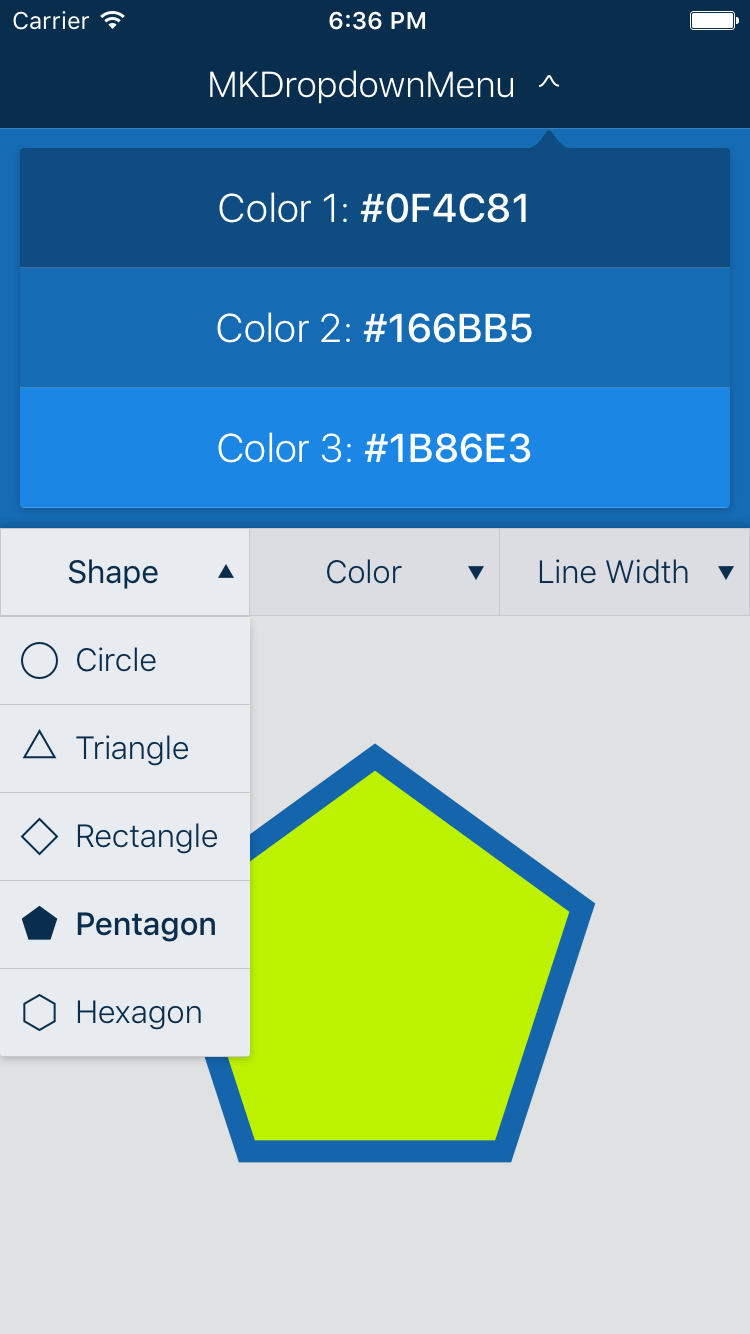
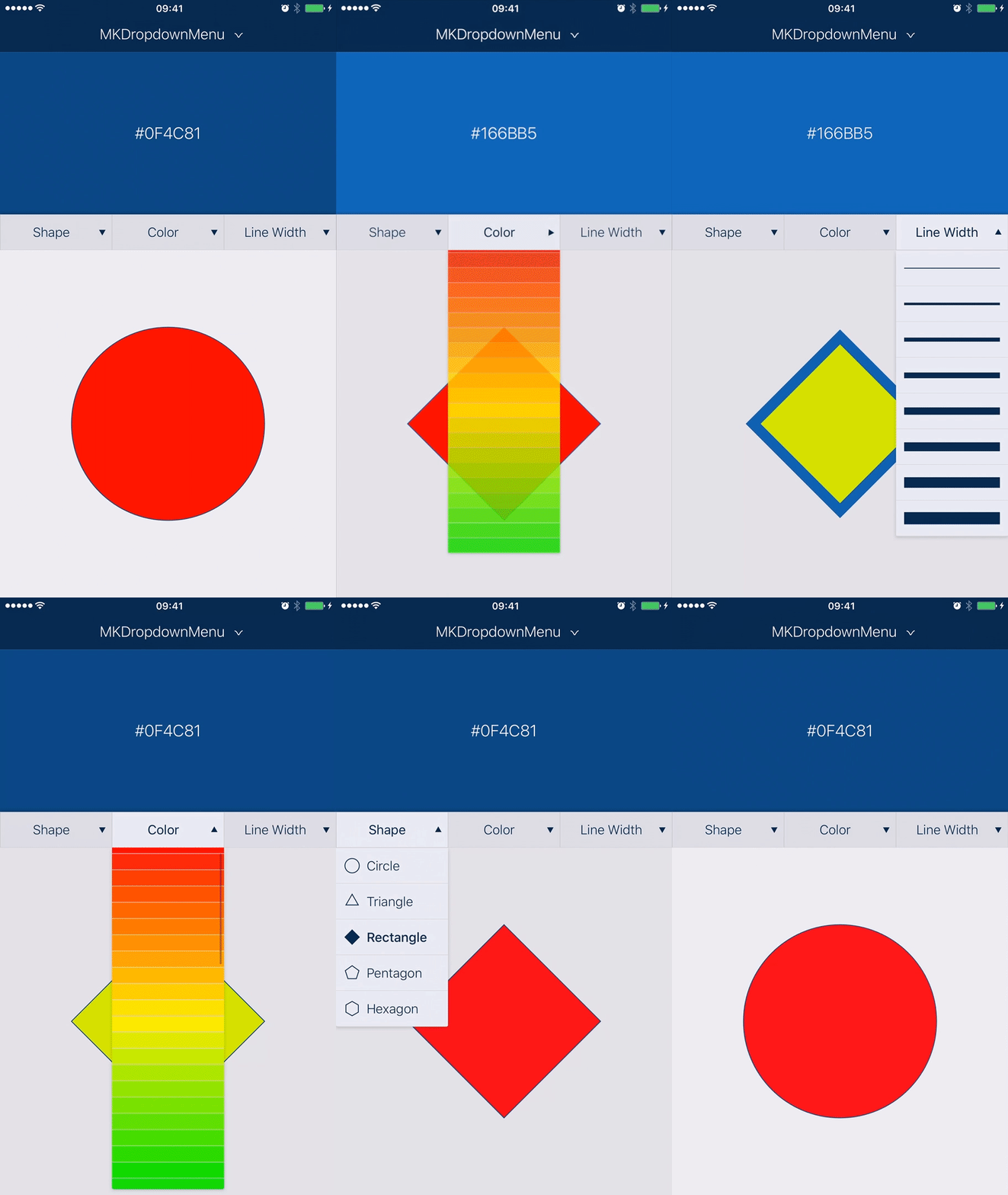
Dropdown Menu for iOS with many customizable parameters to suit any needs.
Inspired by UIPickerView.
 ## Installation
### CocoaPods
`MKDropdownMenu` is available through [CocoaPods](http://cocoapods.org). To install
it, simply add the following line to your Podfile:
```ruby
pod 'MKDropdownMenu'
```
### Manually
- Add `MKDropdownMenu` folder to your Xcode project.
- `#import "MKDropdownMenu.h"` in your code.
## Usage
See the example Xcode project.
### Basic setup
Create the `MKDropdownMenu` instance and add it as a subview to your view. Set the `dataSource` and `delegate` properties to your view controller implementing `MKDropdownMenuDataSource` and `MKDropdownMenuDelegate` protocols.
```objc
MKDropdownMenu *dropdownMenu = [[MKDropdownMenu alloc] initWithFrame:CGRectMake(0, 0, 320, 44)];
dropdownMenu.dataSource = self;
dropdownMenu.delegate = self;
[self.view addSubview:dropdownMenu];
```
### Interface Builder
You can also set up the `MKDropdownMenu` in Interface Builder.
- Add a `UIView` and set its class to `MKDropdownMenu` in the Identity inspector.
- Connect the `dataSource` and `delegate` outlets to your view controller.
### Populating the data
The `MKDropdownMenuDataSource` and `MKDropdownMenuDelegate` protocols APIs are inspired by the `UIPickerView` interface, so most of the methods should be familiar if you used it before.
Implement the following `dataSource` methods:
```objc
- (NSInteger)numberOfComponentsInDropdownMenu:(MKDropdownMenu *)dropdownMenu;
- (NSInteger)dropdownMenu:(MKDropdownMenu *)dropdownMenu numberOfRowsInComponent:(NSInteger)component;
```
and the `delegate` methods that suit your needs. The most simple way to get started is to provide the titles for the header components and the rows in the following `delagate` methods:
```objc
- (NSString *)dropdownMenu:(MKDropdownMenu *)dropdownMenu titleForComponent:(NSInteger)component;
- (NSString *)dropdownMenu:(MKDropdownMenu *)dropdownMenu titleForRow:(NSInteger)row forComponent:(NSInteger)component;
```
You can also provide an `NSAttributedString` or custom `UIView` as the display data for `MKDropdownMenu` in the corresponding `delegate` methods.
### Customizations
The appearance and behavior of the `MKDropdownMenu` can be customized by setting its property values or implementing the corresponding `delegate` methods.
The default menu appearance can be customized throughout the app using the available `UI_APPEARANCE_SELECTOR` properties.
## Requirements
- iOS 8+
- Xcode 8+
## License
`MKDropdownMenu` is available under the MIT license. See the LICENSE file for more info.
## Installation
### CocoaPods
`MKDropdownMenu` is available through [CocoaPods](http://cocoapods.org). To install
it, simply add the following line to your Podfile:
```ruby
pod 'MKDropdownMenu'
```
### Manually
- Add `MKDropdownMenu` folder to your Xcode project.
- `#import "MKDropdownMenu.h"` in your code.
## Usage
See the example Xcode project.
### Basic setup
Create the `MKDropdownMenu` instance and add it as a subview to your view. Set the `dataSource` and `delegate` properties to your view controller implementing `MKDropdownMenuDataSource` and `MKDropdownMenuDelegate` protocols.
```objc
MKDropdownMenu *dropdownMenu = [[MKDropdownMenu alloc] initWithFrame:CGRectMake(0, 0, 320, 44)];
dropdownMenu.dataSource = self;
dropdownMenu.delegate = self;
[self.view addSubview:dropdownMenu];
```
### Interface Builder
You can also set up the `MKDropdownMenu` in Interface Builder.
- Add a `UIView` and set its class to `MKDropdownMenu` in the Identity inspector.
- Connect the `dataSource` and `delegate` outlets to your view controller.
### Populating the data
The `MKDropdownMenuDataSource` and `MKDropdownMenuDelegate` protocols APIs are inspired by the `UIPickerView` interface, so most of the methods should be familiar if you used it before.
Implement the following `dataSource` methods:
```objc
- (NSInteger)numberOfComponentsInDropdownMenu:(MKDropdownMenu *)dropdownMenu;
- (NSInteger)dropdownMenu:(MKDropdownMenu *)dropdownMenu numberOfRowsInComponent:(NSInteger)component;
```
and the `delegate` methods that suit your needs. The most simple way to get started is to provide the titles for the header components and the rows in the following `delagate` methods:
```objc
- (NSString *)dropdownMenu:(MKDropdownMenu *)dropdownMenu titleForComponent:(NSInteger)component;
- (NSString *)dropdownMenu:(MKDropdownMenu *)dropdownMenu titleForRow:(NSInteger)row forComponent:(NSInteger)component;
```
You can also provide an `NSAttributedString` or custom `UIView` as the display data for `MKDropdownMenu` in the corresponding `delegate` methods.
### Customizations
The appearance and behavior of the `MKDropdownMenu` can be customized by setting its property values or implementing the corresponding `delegate` methods.
The default menu appearance can be customized throughout the app using the available `UI_APPEARANCE_SELECTOR` properties.
## Requirements
- iOS 8+
- Xcode 8+
## License
`MKDropdownMenu` is available under the MIT license. See the LICENSE file for more info.