---
---
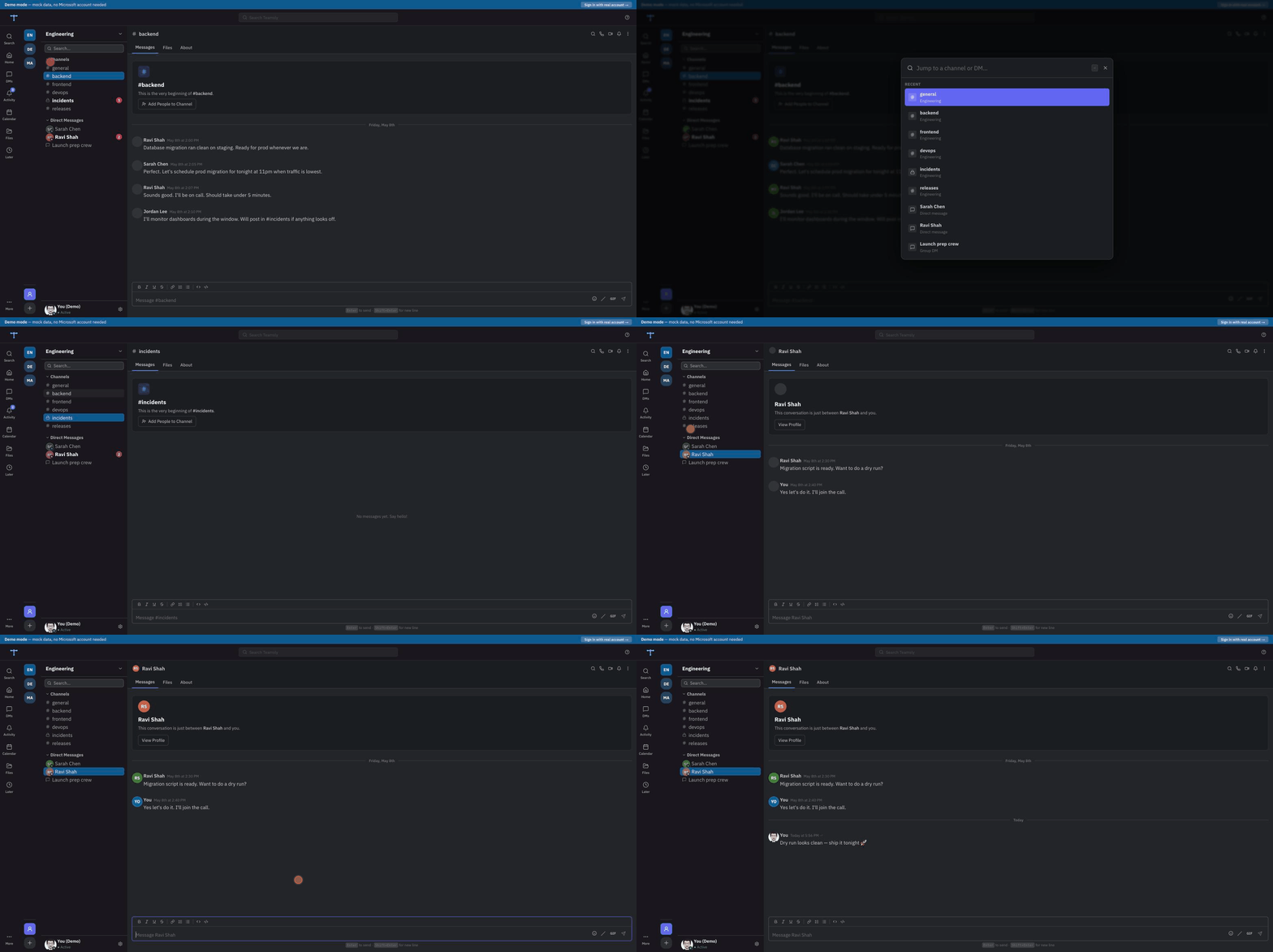
Teamsly is an open-source, third-party web client for Microsoft Teams. It reads and writes your real Teams data via the **official Microsoft Graph API** — no scraping, no reverse engineering. Your messages stay in Microsoft's infrastructure. Teamsly is just a better interface.
## Features
| | |
|---|---|
| **Clean message feed** | Threaded replies, reactions, file attachments, inline images |
| **Full DM & channel support** | All chats and channels from your Microsoft 365 account |
| **Fast keyboard navigation** | `Cmd/Ctrl+K` jump-to, search, keyboard-first message input |
| **AI catch-up** | Summaries, TL;DR, and extracted action items for long threads (opt-in, uses OpenAI) |
| **GIF search** | Tenor-powered GIF picker in the message composer |
| **File preview** | Open and preview shared files without leaving the app |
| **Smart notifications** | Browser notifications with mentions-only and keyword filtering |
| **Light & dark mode** | Follows OS preference or override in Settings |
| **MCP server** | Let any AI agent read and send Teams messages on your behalf |
| **Open source** | AGPL-3.0 — inspect the code, self-host, or contribute |
## Getting started
### Hosted (no setup required)
Go to **[teamsly.app](https://teamsly.app)** and sign in with your Microsoft 365 account. No credit card required.
### Self-hosting
[](https://vercel.com/new/clone?repository-url=https%3A%2F%2Fgithub.com%2Fmayurrawte%2Fteamsly&env=AZURE_AD_CLIENT_ID,AZURE_AD_CLIENT_SECRET,AZURE_AD_TENANT_ID,AUTH_SECRET&envDescription=Azure%20AD%20app%20registration%20values%20%2B%20a%20random%20AUTH_SECRET%20(openssl%20rand%20-base64%2032)&envLink=https%3A%2F%2Fgithub.com%2Fmayurrawte%2Fteamsly%2Fblob%2Fmain%2FSELF_HOSTING.md&project-name=teamsly&repository-name=teamsly)
```bash
# Docker
git clone https://github.com/mayurrawte/teamsly.git && cd teamsly
cp .env.example .env # fill in the Azure AD values (5 minutes, see SELF_HOSTING.md §1)
docker compose up -d # http://localhost:3000
```
See **[SELF_HOSTING.md](SELF_HOSTING.md)** for the full guide — Azure AD app registration, environment variables, and deployment to Vercel, Fly, Render, Docker, or any Node.js host.
> **Company account says "Need admin approval"?** Most tenants block users from consenting to third-party apps. Send your IT admin the link on the sign-in page (or self-host under your own Azure app, which admins can approve once for everyone).
Quick start for local development:
```bash
git clone https://github.com/mayurrawte/teamsly.git
cd teamsly
cp .env.example .env.local # fill in Azure AD credentials
npm install
npm run dev # http://localhost:3000
```
## MCP Server (AI agent integration)
Teamsly ships a [Model Context Protocol](https://modelcontextprotocol.io) server that lets any MCP-compatible AI client (Claude Desktop, Cursor, etc.) read and send messages in your Teams chats and channels.
### Configure Claude Desktop
Add to `~/Library/Application Support/Claude/claude_desktop_config.json`:
```json
{
"mcpServers": {
"teamsly": {
"command": "npx",
"args": ["-y", "@teamsly/mcp"]
}
}
}
```
On first run, the server prints a URL and short code to the Claude Desktop logs. Open the URL, enter the code, sign in with Microsoft. Tokens are saved to `~/.config/teamsly-mcp/tokens.json` and auto-refresh — no repeat setup needed.
**Cursor / Windsurf:** same config under Settings → MCP Servers.
**Claude Code CLI:**
```bash
claude mcp add teamsly -- npx -y @teamsly/mcp
```
### Available tools
| Tool | Description |
|---|---|
| `list_chats` | List your DM conversations |
| `get_chat_messages` | Read messages from a DM |
| `send_chat_message` | Send a DM |
| `list_teams` | List your joined teams |
| `list_channels` | List channels in a team |
| `get_channel_messages` | Read messages from a channel |
| `send_channel_message` | Post to a channel |
| `find_people` | Search your organization's directory for a person |
| `send_dm` | Send a direct message to someone by name or user ID |
To point the server at your own Azure app instead of the public Teamsly one, set `TEAMSLY_CLIENT_ID` and `TEAMSLY_TENANT_ID` (they default to Teamsly's app on the `common` tenant). Tokens are cached in `~/.config/teamsly-mcp/`; override the location with `TEAMSLY_TOKEN_DIR`.
## Architecture
```
src/
├── app/
│ ├── api/ # Next.js API routes — thin proxy to Graph API
│ │ ├── auth/ # Auth.js (NextAuth v5) handler
│ │ ├── teams/ # GET /api/teams
│ │ ├── messages/ # GET+POST channel messages
│ │ ├── chats/ # GET /api/chats + messages
│ │ ├── mcp/ # MCP-compatible HTTP endpoints
│ │ └── ... # presence, files, GIFs, activity scan
│ ├── workspace/ # Authenticated app shell
│ │ ├── t/[teamId]/[channelId]/ # Channel view
│ │ ├── dm/[chatId]/ # DM view
│ │ ├── activity/ # Notification feed
│ │ ├── files/ # File browser
│ │ ├── meetings/ # Calendar
│ │ └── later/ # Saved messages
│ ├── login/ # Sign-in page
│ └── page.tsx # Marketing landing page
├── components/
│ ├── layout/ # AppShell, Sidebar, LeftRail, SignInPage
│ ├── messages/ # ChannelView, ChatView, MessageFeed, MessageItem, MessageInput
│ └── modals/ # Search, JumpTo, Preferences, GIF picker
├── lib/
│ ├── auth/ # Auth.js config + token refresh
│ └── graph/ # Microsoft Graph API client
├── store/ # Zustand state (workspace, drafts, bookmarks, toasts)
└── types/ # TypeScript types (MSTeam, MSMessage, etc.)
```
Data flow: `Browser → Next.js API route → Microsoft Graph API → Microsoft's servers`
Nothing is stored in Teamsly. The API routes act as a thin authenticated proxy.
## Tech stack
- **Next.js 16** (App Router) + **TypeScript**
- **Tailwind CSS v4** + **Radix UI** primitives
- **Auth.js v5** with Microsoft Entra ID provider (OAuth 2.0)
- **Microsoft Graph API** via `@microsoft/microsoft-graph-client`
- **Zustand** for client-side state
- **OpenAI SDK** for optional AI catch-up (summaries + action items)
## Legal
Built entirely on the [Microsoft Graph API](https://learn.microsoft.com/en-us/graph/overview) (official, public). This project:
- Does **not** reverse-engineer the Teams client
- Does **not** use private or undocumented APIs
- Does **not** store user data outside Microsoft's infrastructure
- Is not affiliated with or endorsed by Microsoft Corporation
Users authenticate directly with Microsoft via OAuth 2.0. Teamsly never sees your password.
## Contributing
PRs welcome. Open areas:
- Graph change notifications (replace 5-second polling with webhooks)
- Richer markdown editor in the composer
- Emoji picker improvements
## Sponsor
Teamsly is free — no paywall, no feature gates. If it saves you from the official Teams client daily, consider [sponsoring](https://github.com/sponsors/mayurrawte) to cover hosting and AI-summary inference costs.
## License
[AGPL-3.0](LICENSE) — free to use, self-host, and modify. If you distribute a modified version as a hosted service, you must open-source your changes under the same license.
---
*Built by [@mayurrawte](https://github.com/mayurrawte) · Not affiliated with Microsoft*