[简体中文](README.md) | [English](README.en.md)
---
# tvhome-zh
An open-source **Apple TV (tvOS)-style home screen** for Android TV and Google TV — **install it and it just works, no tinkering**.
**This repository is an unofficial, community-run derivative** of
[Gathin23/tv-vibehack](https://github.com/Gathin23/tv-vibehack), under its MIT licence,
copyright (c) 2026 Gathin (see [LICENSE](LICENSE) and [NOTICE](NOTICE.md)). It is **not affiliated
with the original author or the upstream project.**
> Upstream is now **CleanYourTV** (site: [cleanyour.tv](https://cleanyour.tv)); old tv-vibehack links
> redirect there. It moves faster and has more features, but its premise is that you are comfortable
> letting an AI drive your TV. This fork solves a different problem.
Upstream's own summary is "a GitHub repo, an AI and ten minutes": it turns the whole TV-cleanup
workflow into a prompt and some scripts that you hand to Claude Code or a similar assistant, which
then drives your TV over ADB. **That approach assumes you enjoy tinkering.**
This fork takes a different road: **everything upstream asks you to change in a config file, recompile,
or push over ADB has become a button on the TV.** It suits you if:
- you want the ad-filled home screen gone but **don't want to install a JDK, compile anything, or type
commands**;
- someone at home uses the TV daily and it should simply work, with no "configure it first" step;
- your TV runs a Chinese system locale, or you would rather read a Chinese interface.
If you want upstream's full feature set (theme folders, module cards, the ~250 KB shrunk build), or you
enjoy doing this yourself, **use the [upstream project](https://github.com/Gathin23/tv-vibehack)** — it
moves faster and has more features.
## 📦 Download
**➜ [Download the latest tvhome-zh APK](https://github.com/mclhm8182/tvhome-zh/releases/latest)** · only **373 KB**, plain Java, no ad SDK
See the [Releases page](https://github.com/mclhm8182/tvhome-zh/releases) for every version.
> Upstream still ships **no binaries** — its releases carry source archives only, so you are expected
> to install a JDK/SDK and run `launcher/build-and-install.sh` yourself. This repository **ships a
> compiled APK**: one command and you are done. That is the single most practical difference between
> the two.
## What it is
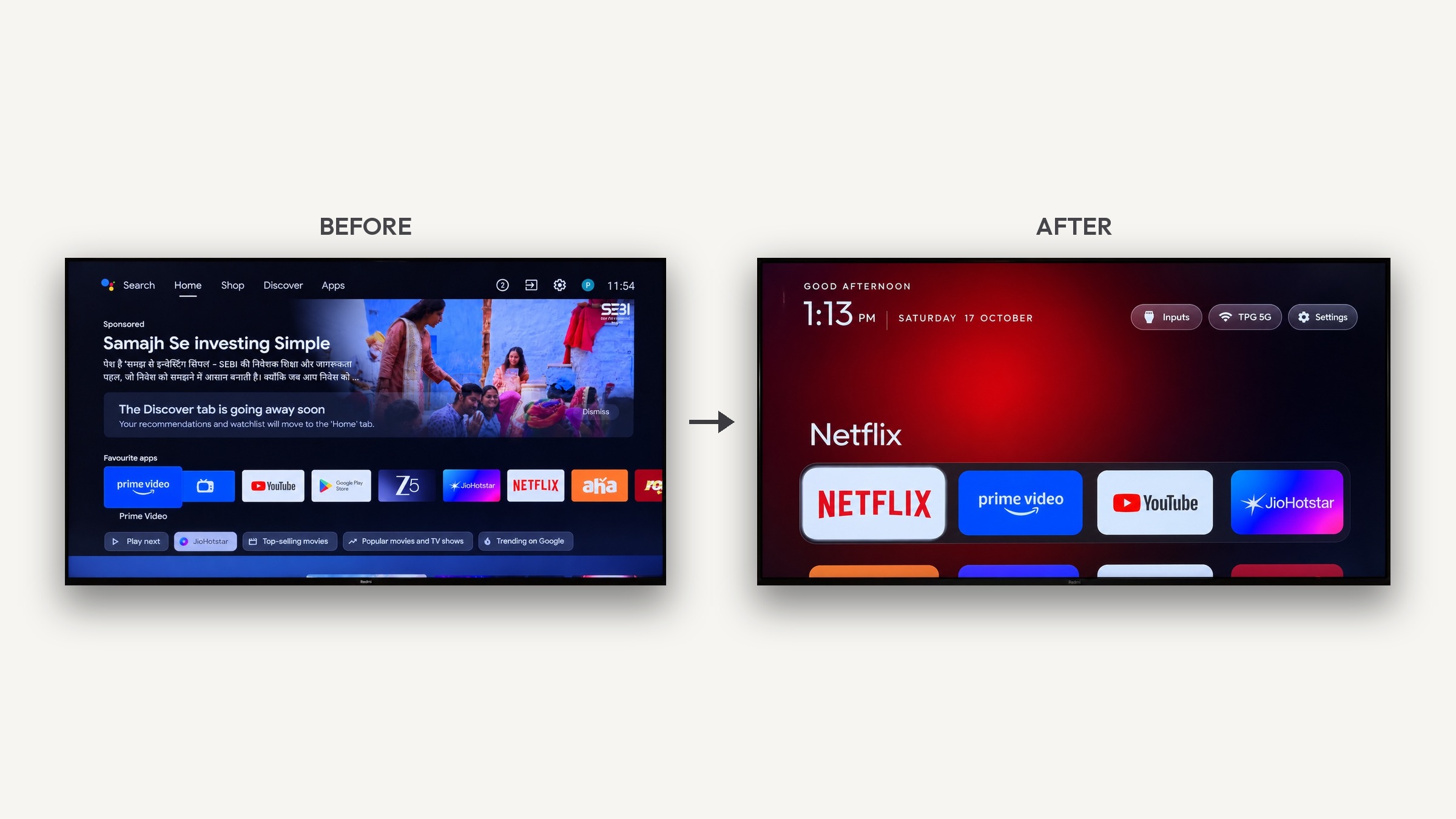
The same clean, tvOS-looking home screen, replacing whatever came with the box:
- **Pitch-black background with a dock of four favourite apps** in the rounded band where Apple TV puts it
- **The focused app's name in large type**, with an ambient glow taken from its own artwork
- **An app grid that slides up** when you press Down
- **A single floating glass highlight** that springs between tiles instead of each tile drawing its own frame
- **Four frosted pills**: desktop settings, favourites, inputs (HDMI / AV / live TV), Wi-Fi and settings
- **A greeting, a large thin clock and the date**, set in Outfit
- An optional **clock screensaver** to avoid burn-in
**No ads, no account, no root, no cable** — installed over ADB, reversible with one command.
### 📦 Lightweight
The APK is **373 KB** (R8-minified, resources shrunk). Plain Java, depending only on two light AndroidX libraries (`recyclerview`
and `dynamicanimation`), **with no Compose or Glance, no ad SDK and no recommendation engine**.
Measured on a 2 GB Chinese TV box it sits at about **107 MB resident (PSS)**.
Before: the stock ad-filled home (left) vs this launcher (right)
## How this differs from upstream
In one line: **upstream hands configuration to files and the command line; this fork hands it to the
remote control.**
### Only in this fork
| Feature | Upstream | Here |
|---|---|---|
| ⭐ **Editable dock** | edit `config.xml` and recompile | **Menu key** opens a checklist, or **long-press** a tile to pin/unpin. Stored on the TV |
| 🎨 **Wallpapers** | push `wallpaper.jpg` over ADB | Panel with a **Bing daily** toggle or **pick a picture on the TV**; a new picture always replaces the old one, so **space use never grows** |
| 🔢 **Icons per row, 3 to 8** | push `config.json` or recompile | Tap to cycle in the panel; first run **recommends a value from the actual screen width** |
| 🌓 **Adaptive dock band** | fixed opaque; a black slab over a bright wallpaper | Turns translucent over a wallpaper, stays as upstream drew it on plain black |
| 🌍 **Twenty-four languages** | has Chinese already | Simplified **and** Traditional Chinese, plus German, Spanish, French, Russian, Catalan, Thai, Arabic, Polish, Serbian, Turkish, Norwegian, Hebrew, Portuguese, Finnish, Vietnamese, Bengali, Czech, Italian, Indonesian, Dutch, Uzbek and Ukrainian |
| ⌨️ **Menu-key quick settings** | needs a config change, and the key mapping varies per TV | the **Menu button opens a glass panel** (TV settings / display / network / apps / favourites / desktop), optionally from other apps too |
| 🐢 **Low-end friendly** | reduced motion is just a config value; the desk keeps its tiles when memory runs short | **one switch on the remote** turns the tweens off (the zoom stays), and **the desk lets go of its artwork when the box is short**, rebuilding it on return |
| 🌤 **Weather** | a separate app, hung off the desk through module cards | **one line under the clock** (city, temperature, sky), and a glass panel on top of it: feels-like, air quality, **hourly**, three days, **50 common cities to pick from**, **locate my city** |
| 🔌 **Switching source on a Xiaomi TV** | not handled (the standard way does nothing on China's firmware) | **recognised by itself**, switching through Xiaomi's own player (HDMI 1/2/3, AV) with **nothing to configure**; sets sold elsewhere are left alone |
| 📦 **A compiled APK** | no binaries; build it yourself | downloaded straight from the Releases page (**373 KB** release build) |
### Only in upstream (not here)
Listed honestly so you can decide:
- theme-folder workflow (`themes/`), module cards other apps can plug into
- the ~250 KB shrunk build and first-launch AOT precompilation
- a "switch home app" shortcut tile, VPN app badge, Jalali calendar display
The rest — the tvOS look, the glass highlight, the clock screensaver, the `config.json` overlay, the
debloat and restore scripts — comes from upstream under its MIT licence.
**The defaults stay generic**: no pre-set app lists, nothing vendor-specific, suitable for any brand of
TV box.
### ⭐ Editing the dock
- **Press the remote's Menu key** (some remotes call it "Options") → a Favourites panel lists every
installed app, ticked ones are in the dock, tap to toggle;
- **Long-press any icon** → pin it to the dock; with a full dock it takes over the first slot.
Your choice is stored on the TV and survives a reboot. Remove them one by one to clear the dock.
### 🎨 The desktop settings panel
The first frosted pill on the top bar. Everything lives here, **no config files involved**:
- **Bing daily wallpaper** — switch it on and the picture changes every day. Switching it off stops the
daily change only; **the current wallpaper stays**. Removing it is a separate, explicit choice;
- **Icons per row** — tap to cycle through auto / 3 / 4 / 5 / 6; the value and where it came from are
always written under the label;
- **Choose a picture on this TV** — opens the system file picker; the picture is cropped and fitted
automatically;
- **Remove the wallpaper** — back to the plain black background.
### 🔧 Advanced: themes and pushed config
The launcher also reads this folder on the TV at start-up (`config.json` and/or `wallpaper.jpg`):
```
/sdcard/Android/data/com.gathin.tvhome/files/
```
- drop in a `wallpaper.jpg` → it becomes the background on restart (delete it to go back to black);
- drop in a `config.json` → overrides the dock, columns, background colour and other defaults.
[`tools/set-wallpaper.sh`](tools/set-wallpaper.sh) is a one-liner for the wallpaper
(`./tools/set-wallpaper.sh `). Pushing config files over ADB is there for advanced users;
the panel above is enough for everyone else.
## Device compatibility
### Android 11 package visibility (this project handles it)
On Android 11, many TV apps show only a handful of tiles in their app list — that is the **package
visibility** restriction: an app must declare `` to see others. This project targets SDK 29,
which keeps the old behaviour on Android 11 and therefore enumerates every app without extra
declarations. Most Chinese TV boxes still run Android 11, so this matters.
### Vendor firmware that refuses third-party launchers (this project cannot fix)
A few Chinese TV firmware builds **verify the launcher against their own stock launcher's signature**
and reject any APK signed differently. Over ADB this shows up as
`INSTALL_FAILED_VERIFICATION_FAILURE`, usually with a log line like
`verifier: signature does not match ... will not be installed!`.
Known case: **some China-market TCL sets** (e.g. `tcl_mt5879_cn`, the "falcon" 鹤 6). Upstream is
rejected too (upstream's README notes "A few China-market TCL sets refuse to install any launcher at
all").
**Most of them can be talked out of it**, though: what refuses the install is the verification step, not
the launcher. Turn it off before installing:
```bash
adb shell settings put global verifier_verify_adb_installs 0
adb install -r tvhome-zh.apk
```
Or on the TV itself: **Settings → Security → Install verification** (wording varies by firmware; on some
sets it sits under Developer options). Install again afterwards.
Only the models where that cannot be switched off have to keep their own home screen; the debloat half
of the upstream toolkit still works there.
## Language
The launcher **follows the TV's system language automatically**; nothing to configure. Twenty-four are
supported:
| | | | |
|---|---|---|---|
| English `en` | Simplified Chinese `zh-CN` | Traditional Chinese `zh-TW` | German `de` |
| Spanish `es` | French `fr` | Russian `ru` | Catalan `ca` |
| Thai `th` | Arabic `ar` | Polish `pl` | Serbian (Latin) `sr-Latn` |
| Turkish `tr` | Norwegian `nb` | Hebrew `iw` | Portuguese `pt` |
| Finnish `fi` | Vietnamese `vi` | Bengali `bn` | Czech `cs` |
| Italian `it` | Indonesian `in` | Dutch `nl` | Uzbek `uz` |
| Ukrainian `uk` | | | |
> The translations are done one string at a time, not batch-generated; corrections for the rarer
> languages are welcome as issues or pull requests.
The wording follows local convention rather than being machine-translated — Hong Kong and Taiwan
get 桌布 ("wallpaper") where mainland Chinese gets 壁纸, and the settings entry reads 桌面設定.
On Android 13+ you can also give the launcher a language of its own under
**Settings → Apps → tvhome → Language**, without changing the system language.
## Installing
### Option 1: install the APK on the TV directly (works on most boxes)
1. Copy `tvhome-zh.apk` to the TV (USB stick, network share, or a download on the TV);
2. Open it with a file manager on the TV and follow the prompts (you will be asked to allow
"install unknown apps");
3. Then look under **Settings → Apps → Default home** and pick it.
**Where this stalls**: plenty of Chinese ROMs hide or omit the "default home" entry in settings. When
that happens, use option 2.
### Option 2: over ADB (more reliable, recommended)
Same network, no cable:
```bash
# 1. On the TV: Settings → About → press Build seven times → Developer options → USB debugging
# 2. From the computer
adb connect :5555
# 3. Install
adb install -r tvhome-zh-debug.apk
# 4. Make it the home app (only needed when the TV's own settings cannot do it)
adb shell pm grant com.gathin.tvhome android.permission.ACCESS_FINE_LOCATION
adb shell cmd package set-home-activity com.gathin.tvhome/.MainActivity
# 5. Press Home
```
Upgrading from an older version is just `install -r` over the top — **your dock and wallpaper are kept**.
> **Upgrading from v1.2.0 needs one uninstall first.** v1.3.0 uses a different signing key (an ordinary
> consequence of debug signing, not a deliberate choice), so installing over v1.2.0 fails with
> `INSTALL_FAILED_UPDATE_INCOMPATIBLE`. Uninstall, then install; you will need to set your dock and
> wallpaper once more. **Every release from v1.3.0 onwards upgrades in place** — this happens once.
> If it will not install at all, read [Device compatibility](#device-compatibility) above first: if the
> vendor firmware refuses launchers, no launcher will install.
### Want the Home button to really go back to the top?
Android swallows the Home key when the launcher is already in front, so this needs one **accessibility
service**: **Settings → Accessibility → Downloaded services → "Home button" → turn it on.**
With it on: Home returns to the top of the desk, and the Menu button opens the quick settings panel
even from another app (that last one can be switched off under *Desktop settings → Menu button in
other apps too*). Without it the launcher works fine; those two simply do not happen.
### Cannot the input source be switched on a Xiaomi TV?
Some Xiaomi sets sold with China's firmware have this: the desk lists the HDMI ports, but
picking one does nothing — the standard way of switching a port is either unanswered on that
firmware or answered and ignored.
This version **recognises those sets by itself** and switches through Xiaomi's own player instead
(HDMI 1/2/3 are the vendor's numbers 23/24/25, AV is 2), with **nothing to configure**. The
recognition needs two things to be true: Xiaomi's China player (`com.xiaomi.mitv.tvplayer`) is
installed, and the other-market app (`com.mitv.livetv`) is not — so sets sold elsewhere keep the
standard route and are left alone.
The Live TV row opens Xiaomi's own analogue TV player on those sets as well.
### Does the weather use the network?
It does, and it is **off by default** — one row in the desktop settings turns it on. The data comes from
Open-Meteo:
- No account, no API key, **no location permission**, no background service, no telemetry, no ads
- Refreshed every 30 minutes while the desk is on screen, and **stops when it is not**
- What leaves the TV: the city name you typed (to find it), then that place's latitude and longitude
(for the forecast and the air quality)
- **Locate my city** is a button you press: one request to ipinfo.io for the coarse position, resolved
through the same geocoder into a proper place, all over HTTPS. Nothing is sent until you do.
### Restoring
```bash
adb shell cmd package set-home-activity
```
## Customising (for those changing the source)
**Day-to-day settings do not need any of this** — dock, wallpaper and icons-per-row are all in the
desktop settings panel on the TV.
For deeper changes, edit [`config.xml`](launcher/app/src/main/res/values/config.xml) and rebuild:
- `dock_apps` — apps pinned to the dock (empty by default; alphabetical order when empty; once set from
the TV, the TV's choice wins)
- `live_tv_package` — package name of the TV's tuner app (empty hides the entry)
- `hidden_apps` — apps kept out of the grid (empty by default)
- `columns` — icons per row (default 4; once set from the TV, the TV's choice wins)
To find a package name: `adb shell pm list packages` on the TV.
## Building from source
You need a **full JDK** (not a JRE — AGP needs `jlink`) and the Android SDK:
```bash
# JDK 21 (Temurin)
# Android SDK: platforms;android-34 (or 35) + build-tools
cd launcher
./gradlew assembleDebug
# Output: app/build/outputs/apk/debug/app-debug.apk
```
> **Gotcha**: if `$HOME/.android` is not writable (common on machines where Android tooling has been run
> as root), debug signing fails. Fix: generate a keystore and point a `signingConfigs.debug` entry at it
> in `app/build.gradle`.
## Known issues
- On some TV ROMs a transparent "starting" placeholder window (`APPLICATION_ATTACHED_DIALOG`) is left
behind when the launcher starts and swallows key presses, so the remote appears dead. Fix:
`adb shell am force-stop com.gathin.tvhome` and start it again.
- The Bing daily wallpaper needs the TV to be online; with no network it reports a failure and nothing
else is affected.
- "Choose a picture on this TV" relies on the system file picker; ROMs without one report it as
unavailable.
- The Bing wallpaper needs the `INTERNET` permission, which is only used while that feature is on and is
off by default.
## Credits
- **[Gathin23/tv-vibehack](https://github.com/Gathin23/tv-vibehack)** — the original project, MIT
licence, by Gathin. Most of the code here comes from it; thanks for the excellent open-source work.
This repository is an **unofficial derivative** and is not affiliated with the author or upstream.
- The German, Spanish, French, Russian, Catalan and Thai translations are upstream's, extended with this
fork's new strings.
- The **Outfit** typeface, SIL Open Font License (see `launcher/FONT-LICENSE-OFL.txt`).
## Licence
MIT. Original project copyright (c) 2026 Gathin; the changes in this repository are copyright
(c) 2026 mclhm8182.