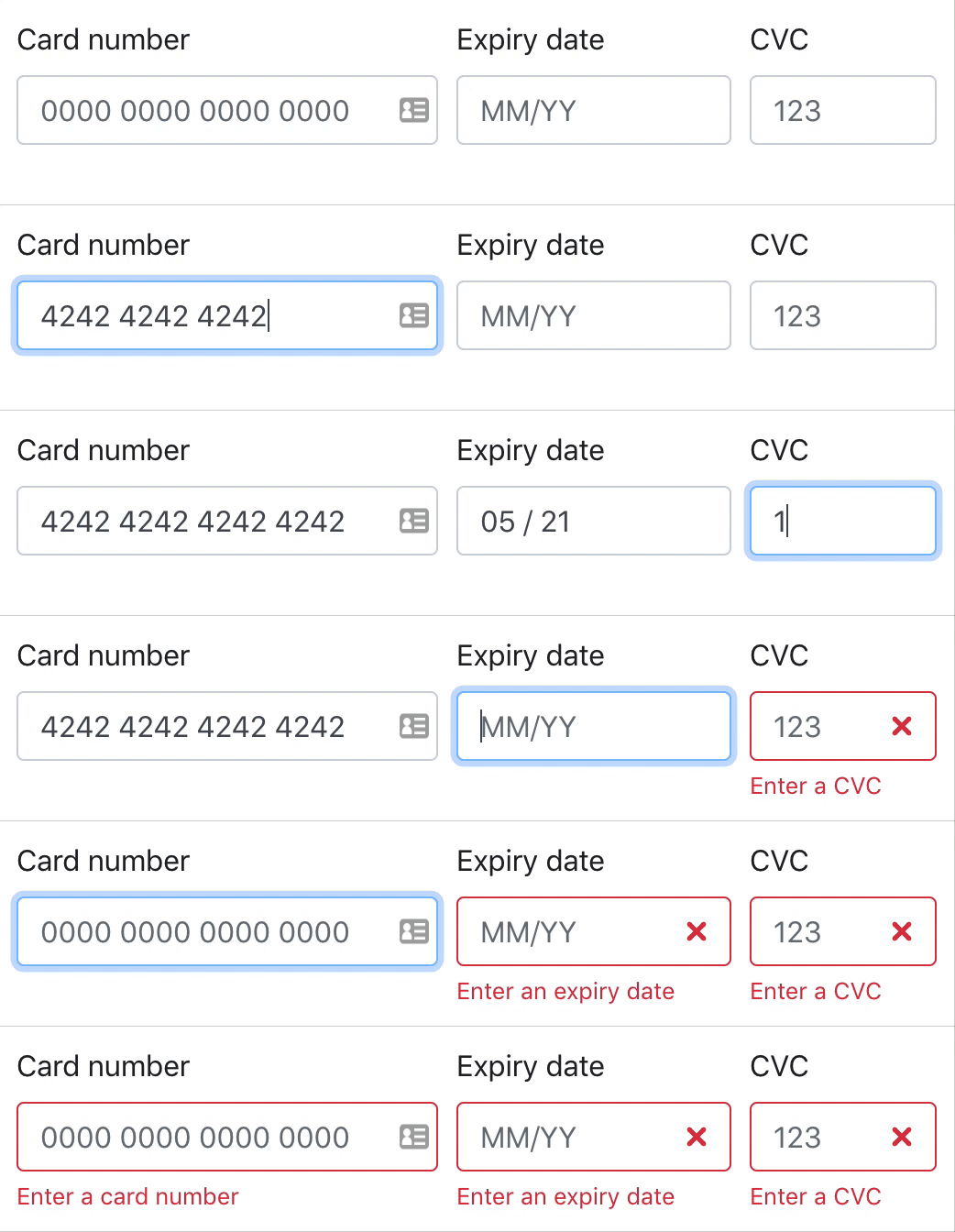
By default (as seen above), React Payment Inputs does not come with built-in styling meaning that you can easily adapt React Payment Inputs to your own design system.
However, if you would like to use the built-in styles as seen in the animation above, [read "Using the built-in styled wrapper"](#using-the-built-in-styled-wrapper).
### With hooks
If you'd like to use the hooks version of React Payment Inputs, you can import `usePaymentInputs` into your component.
```jsx
import React from 'react';
import { usePaymentInputs } from 'react-payment-inputs';
export default function PaymentInputs() {
const { meta, getCardNumberProps, getExpiryDateProps, getCVCProps } = usePaymentInputs();
return (
);
}
```
> By spreading the prop getter functions (e.g. `{...getCardNumberProps()}`) on the inputs as shown above, React Payment Inputs will automatically handle the formatting, focus & validation logic for you.
> **IMPORTANT:** You must place your event handlers (e.g. `onChange`, `onBlur`, etc) inside the prop getter function (e.g. `getCardNumberProps()`) so the default event handlers in React Payment Inputs don't get overridden.
### With render props
If you'd like to use the render props version of React Payment Inputs, you can import `PaymentInputsContainer` into your component.
The **props** of `` are the same as the hook [options](#options) and the **render props** are the same as the hook [data](#data).
```jsx
import React from 'react';
import { PaymentInputsContainer } from 'react-payment-inputs';
export default function PaymentInputs() {
return (
{({ meta, getCardNumberProps, getExpiryDateProps, getCVCProps }) => (
)}
);
}
```
> **IMPORTANT:** You must place your event handlers (e.g. `onChange`, `onBlur`, etc) inside the prop getter function (e.g. `getCardNumberProps()`) so the default event handlers in React Payment Inputs don't get overridden.
### Using the built-in styled wrapper
> Note: `` requires [styled-components](https://styled-components.com) to be installed as a dependency.
By default, React Payment Inputs does not have built-in styling for it's inputs. However, React Payment Inputs comes with a styled wrapper which combines the card number, expiry & CVC fields seen below:
```jsx
import React from 'react';
import { PaymentInputsWrapper, usePaymentInputs } from 'react-payment-inputs';
import images from 'react-payment-inputs/images';
export default function PaymentInputs() {
const {
wrapperProps,
getCardImageProps,
getCardNumberProps,
getExpiryDateProps,
getCVCProps
} = usePaymentInputs();
return (
);
}
```
### More examples
- [Storybook](https://medipass.github.io/react-payment-inputs)
- [Source](./stories/index.stories.js)
## `data = usePaymentInputs(options)`
> returns [an object (`data`)](#data)
### options
> `Object({ cardNumberValidator, cvcValidator, errorMessages, expiryValidator, onBlur, onChange, onError, onTouch })`
#### options.cardNumberValidator
> `function({cardNumber, cardType, errorMessages})`
Set custom card number validator function
##### Example
```js
const cardNumberValidator = ({ cardNumber, cardType, errorMessages }) => {
if (cardType.displayName === 'Visa' || cardType.displayName === 'Mastercard') {
return;
}
return 'Card must be Visa or Mastercard';
}
export default function MyComponent() {
const { ... } = usePaymentInputs({
cardNumberValidator
});
}
```
#### options.cvcValidator
> `function({cvc, cardType, errorMessages})`
Set custom cvc validator function
#### options.errorMessages
> `Object`
Set custom error messages for the inputs.
##### Example
```js
const ERROR_MESSAGES = {
emptyCardNumber: 'El número de la tarjeta es inválido',
invalidCardNumber: 'El número de la tarjeta es inválido',
emptyExpiryDate: 'La fecha de expiración es inválida',
monthOutOfRange: 'El mes de expiración debe estar entre 01 y 12',
yearOutOfRange: 'El año de expiración no puede estar en el pasado',
dateOutOfRange: 'La fecha de expiración no puede estar en el pasado',
invalidExpiryDate: 'La fecha de expiración es inválida',
emptyCVC: 'El código de seguridad es inválido',
invalidCVC: 'El código de seguridad es inválido'
}
export default function MyComponent() {
const { ... } = usePaymentInputs({
errorMessages: ERROR_MESSAGES
});
}
```
#### options.expiryDateValidator
> `function({expiryDate, errorMessages})`
Set custom expiry date validator function
#### options.onBlur
> `function(event)`
Function to handle the blur event on the inputs. It is invoked when any of the inputs blur.
#### options.onChange
> `function(event)`
Function to handle the change event on the inputs. It is invoked when any of the inputs change.
#### options.onError
> `function(error, erroredInputs)`
Function to invoke when any of the inputs error.
#### options.onTouch
> `function(touchedInput, touchedInputs)`
Function to invoke when any of the inputs are touched.
### `data`
#### getCardNumberProps
> `function(overrideProps)` | returns `Object`
Returns the props to apply to the **card number** input.
**IMPORTANT:** You must place your event handlers (e.g. `onChange`, `onBlur`, etc) inside the `getCardNumberProps()` so the default event handlers in React Payment Inputs don't get overridden.
##### Example snippet
```jsx
```
#### getExpiryDateProps
> `function(overrideProps)` | returns `Object`
Returns the props to apply to the **expiry date** input.
**IMPORTANT:** You must place your event handlers (e.g. `onChange`, `onBlur`, etc) inside the `getExpiryDateProps()` so the default event handlers in React Payment Inputs don't get overridden.
##### Example snippet
```jsx
```
#### getCVCProps
> `function(overrideProps)` | returns `Object`
Returns the props to apply to the **CVC** input.
**IMPORTANT:** You must place your event handlers (e.g. `onChange`, `onBlur`, etc) inside the `getCVCProps()` so the default event handlers in React Payment Inputs don't get overridden.
##### Example snippet
```jsx
```
#### getZIPProps
> `function(overrideProps)` | returns `Object`
Returns the props to apply to the **ZIP** input.
**IMPORTANT:** You must place your event handlers (e.g. `onChange`, `onBlur`, etc) inside the `getZIPProps()` so the default event handlers in React Payment Inputs don't get overridden.
##### Example snippet
```jsx
```
#### getCardImageProps
> `function({ images })` | returns `Object`
Returns the props to apply to the **card image** SVG.
This function only supports SVG elements currently. If you have a need for another format, please raise an issue.
You can also supply [custom card images](#custom-card-images) using the `images` attribute. The example below uses the default card images from React Payment Inputs.
##### Example snippet
```jsx
import images from 'react-payment-inputs/images';
```
#### meta.cardType
> Object
Returns information about the current card type, including: name, lengths and formats.
##### Example snippet
```jsx
const { meta } = usePaymentInputs();
Current card: {meta.cardType.displayName}
```
#### meta.error
> string
Returns the current global error between all rendered inputs.
##### Example snippet
```jsx
const { meta } = usePaymentInputs();
console.log(meta.error); // "Card number is invalid"
```
#### meta.isTouched
> boolean
Returns the current global touched state between all rendered inputs.
#### meta.erroredInputs
> Object
Returns the error message of each rendered input.
##### Example snippet
```jsx
const { meta } = usePaymentInputs();
console.log(meta.erroredInputs);
/*
{
cardNumber: undefined,
expiryDate: 'Enter an expiry date',
cvc: 'Enter a CVC'
}
*/
```
#### meta.touchedInputs
> Object
Returns the touch state of each rendered input.
##### Example snippet
```jsx
const { meta } = usePaymentInputs();
console.log(meta.touchedInputs);
/*
{
cardNumber: true,
expiryDate: true,
cvc: false
}
*/
```
#### meta.focused
> string
Returns the current focused input.
```jsx
const { meta } = usePaymentInputs();
console.log(meta.focused); // "cardNumber"
```
#### wrapperProps
> Object
Returns the props to apply to ``.
## `` props
### styles
> Object
Custom styling to pass through to the wrapper. Either a styled-component's `css` or an Object can be passed.
#### Schema
```
{
fieldWrapper: {
base: css | Object,
errored: css | Object
},
inputWrapper: {
base: css | Object,
errored: css | Object,
focused: css | Object
},
input: {
base: css | Object,
errored: css | Object,
cardNumber: css | Object,
expiryDate: css | Object,
cvc: css | Object
},
errorText: {
base: css | Object
}
}
```
### errorTextProps
> Object
Custom props to pass to the error text component.
### inputWrapperProps
> Object
Custom props to pass to the input wrapper component.
## Using a third-party UI library
React Payment Inputs allows you to integrate into pretty much any React UI library. Below are a couple of examples of how you can fit React Payment Inputs into a UI library using `usePaymentInputs`. You can also do the same with ``.
### Fannypack
```jsx
import React from 'react';
import { FieldSet, InputField } from 'fannypack';
import { usePaymentInputs } from 'react-payment-inputs';
import images from 'react-payment-inputs/images';
export default function PaymentInputs() {
const {
meta,
getCardNumberProps,
getExpiryDateProps,
getCVCProps
} = usePaymentInputs();
const { erroredInputs, touchedInputs } = meta;
return (
);
}
```
### Bootstrap