melonJS 2
=========

[](https://github.com/melonjs/melonJS/actions/workflows/main.yml)
[](https://www.npmjs.com/package/melonjs)
[](https://www.npmjs.com/package/melonjs)
[](https://bundlephobia.com/result?p=melonjs)
[](https://bundlephobia.com/result?p=melonjs)
[](https://www.jsdelivr.com/package/npm/melonjs)
[](LICENSE.md)
[](https://discord.gg/aur7JMk)
[](CODE_OF_CONDUCT.md)
A modern & lightweight HTML5 game engine
-------------------------------------------------------------------------------
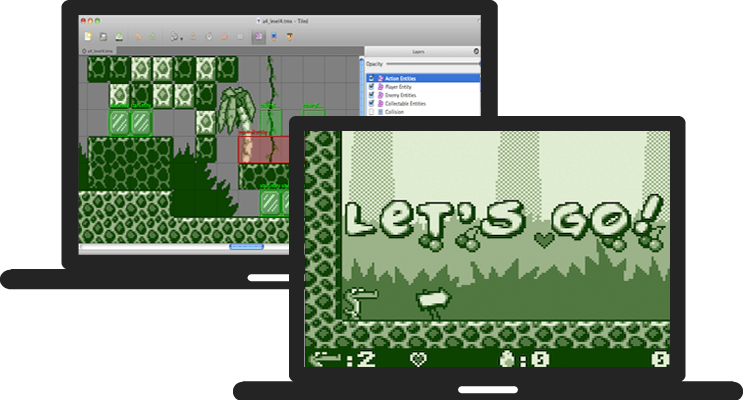
[melonJS](https://melonjs.org/) is an open-source 2.5D game engine designed for indie developers — perspective and orthogonal cameras, GPU-accelerated tilemap rendering, post-processing effects, custom shaders, 3D mesh support, polygon-accurate physics, modern Tiled workflows, and high performance. Runs on WebGL or Canvas2D with automatic fallback, tree-shakeable so you only pay for what you use, and the entire engine fits in ~150 KB minzipped of vanilla JS/TS with no toolchain lock-in. Built with ES6 classes and bundled with [esbuild](https://esbuild.github.io).
[melonJS](https://melonjs.org/) is licensed under the [MIT License](LICENSE.md) and actively maintained by the team at AltByte in Singapore.
Why melonJS
-------------------------------------------------------------------------------
melonJS is designed so you can **focus on making games, not on graphics plumbing**.
- **[Canvas2D-inspired rendering API](https://github.com/melonjs/melonJS/wiki/Rendering-API)** — If you've used the HTML5 Canvas, you already know melonJS. The rendering API (`save`, `restore`, `translate`, `rotate`, `setColor`, `fillRect`, ...) follows the same familiar patterns — no render graphs, no shader pipelines, no instruction sets to learn.
- **True renderer abstraction** — Write your game once, run it on WebGL or Canvas2D with zero code changes. The engine handles all GPU complexity behind a unified API, with automatic fallback when WebGL is not available. Designed to support future backends (WebGPU) without touching game code.
- **Complete engine, minimal footprint** — Physics, tilemaps, audio, input, cameras, tweens, particles, UI — a full game stack in a single tree-shakeable ES module. No dependency sprawl, no library stitching.
- **Scenes, loaded in one call** — `me.level.load(name)` brings an authored scene straight into your world. [Tiled](https://www.mapeditor.org) is a first-class citizen for **2D** — orthogonal, isometric, hexagonal & staggered maps, animated tilesets, collision shapes, object properties, compressed formats, with GPU-accelerated tile rendering under WebGL 2 — and **glTF / GLB** is the equivalent for **3D scenes**: author in Blender (or any DCC tool), export a `.glb`, and the whole scene — meshes, materials, cameras, and lights — loads under a `Camera3d`, no per-mesh wiring.
- **Batteries included, hackable by design** — Get started in minutes with minimal setup. When you need to go deeper: ES6 classes throughout, a plugin system for engine extensions, and a clean architecture that's easy to extend without fighting the framework.
About melonJS
-------------------------------------------------------------------------------
[melonJS](https://melonjs.org/) is a fully featured game engine :
Compatibility
- Standalone library (does not rely on anything else, except a HTML5 capable browser)
- Compatible with all major browsers (Chrome, Safari, Firefox, Opera, Edge) and mobile devices
Graphics
- Fast WebGL renderer for desktop and mobile devices with fallback to Canvas rendering
- Extensible batcher system for custom rendering pipelines
- High DPI resolution & Canvas advanced auto scaling
- Sprite with 9-slice scaling option and frame animation
- Built-in effects such as tinting, masking, and CSS-style blend modes (normal, additive, multiply, screen, darken, lighten)
- Standard spritesheet, single and multiple Packed Textures support
- Compressed texture support (DDS, KTX, KTX2, PVR, PKM) with automatic format detection and fallback
- 3D mesh rendering with OBJ/MTL model loading, multi-material support, hardware depth testing, and perspective projection via `Camera3d`
- Lighting, in 2D and 3D:
- **2D** — `Light2d` as a first-class `Renderable` (multiple dynamic lights, radial-gradient falloff, illumination-only mode, procedural rendering via `drawLight`), plus optional per-pixel normal-map shading on sprites for 3D-looking dynamic lights
- **3D** — directional lights via `Light3d` / `LightingEnvironment` (half-Lambert diffuse + ambient floor), auto-loaded from a glTF scene's authored sun
- Built-in shader effects (Flash, Outline, Glow, Dissolve, CRT, Hologram, etc.) with multi-pass chaining via `postEffects`, plus custom shader support via `ShaderEffect` for per-sprite fragment effects (WebGL)
- Trail renderable for fading, tapering ribbons behind moving objects (speed lines, sword slashes, magic trails)
- System & Bitmap Text with built-in typewriter effect
- Video sprite playback
Sound
- Web Audio support with 3D spatial audio and stereo panning based on [Howler](https://howlerjs.com)
- Built-in procedural audio primitives (envelope-shaped oscillators, white/pink/brown noise) for SFX without sample assets
- Direct `AudioContext` / master-gain accessors for custom WebAudio graphs that mix with the engine's master volume / mute
Physics
- Polygon (SAT) based collision algorithm for accurate detection and response
- Fast broad-phase collision detection using spatial partitioning (QuadTree in 2D, Octree in 3D, swapped automatically)
- Raycast, AABB and sphere region queries with precise entry geometry, including 3D raycasts (`raycast3d`)
- Collision lifecycle hooks on every `Renderable`
- Collision filtering for optimized automatic collision detection
- Multiple shapes per body for complex hitboxes
- Pluggable `PhysicsAdapter` interface for custom physics via official adapters
Input
- Mouse and Touch device support (with mouse emulation)
- Gamepad support with button and axes binding
- Keyboard event handling with key binding system
- Device motion & accelerometer support
Camera
- Multi-camera support (split-screen, minimaps, multiple viewports)
- Optional perspective camera (`Camera3d`) with frustum culling for 2.5D / 3D-projected scenes — drop-in subclass of the default 2D camera
- Camera follow with configurable deadzone and frame-rate-independent damping
- Built-in shake, fade, flash, and mask-based transition effects
- Per-camera post-processing pipeline with stackable shader effects and color grading (ColorMatrix)
UI
- `UIBaseElement` / `UISpriteElement` containers for clickable, hoverable and holdable elements with full pointer-event wiring
- `Draggable` / `DropTarget` for drag-and-drop with configurable overlap or contains-check
- `UITextButton` text button with hover, press, and key-bind support — built on `BitmapText`
Scenes
- Load a scene in one call with `me.level.load(name)` — 2D Tiled maps and 3D glTF scenes alike, auto-registered on preload
- [Tiled](https://www.mapeditor.org) map format [up to 1.12](https://doc.mapeditor.org/en/stable/reference/tmx-changelog/) built-in support for easy level design
- **GPU-accelerated tile rendering** for orthogonal maps under WebGL 2 — each layer draws as a single quad with no per-tile loop, ~5–8× faster than the legacy CPU renderer on dense maps. Honors animated tiles, flip bits, per-layer opacity/tint/blend, and oversized bottom-aligned tiles; falls back transparently to the CPU renderer on isometric/staggered/hexagonal layers or non-WebGL-2 contexts
- Uncompressed and [compressed](https://github.com/melonjs/melonJS/tree/master/packages/tiled-inflate-plugin) Plain, Base64, CSV and JSON encoded XML tilemap loading
- Orthogonal, Isometric, Hexagonal (both normal and staggered) and Oblique maps
- Multiple layers with per-layer alpha, tinting and blend modes (multiple background/foreground, collision and Image layers)
- Parallax scrolling via Image layers, with parallax origin support
- Animated and multiple Tileset support, tile sub-rectangles, embedded base64 images
- Native `.aseprite` / `.ase` tileset images (Tiled 1.11+ qaseprite plugin workflow), with frame tags auto-mapped to per-tile animations — no PNG export step required
- Tileset transparency settings
- Rectangle, Ellipse, Polygon, Polyline and Capsule (round-rect) object shapes
- Tiled Objects with custom properties (string, number, boolean, color, file, object, list/array and class-typed)
- Per-object opacity and visibility
- Concave collision polygons auto-decomposed via earcut triangulation
- Flipped & rotated Tiles
- Dynamic Layer and Object/Group ordering
- Dynamic Entity loading via an extensible object factory registry — register custom handlers for any Tiled class name without modifying engine code
- Shape based Tile collision support
- glTF / GLB 3D scenes — load an authored 3D scene with `me.level.load(...)`, the same one call as a Tiled map
- The whole scene loads at once — meshes, materials, cameras and lights — viewed under a `Camera3d`
- Automatically lit by the scene's directional lights (the sun set up in the authoring tool)
- Textured, solid-colored, and vertex-colored materials
- `.glb` and self-contained `.gltf` files
- Works with any glTF authoring tool (Blender, Maya, 3ds Max, Cinema 4D, …)
Assets
- Asynchronous asset loading with progress tracking
- A fully customizable preloader
- Support for images, JSON, TMX/TSX, glTF / GLB 3D scenes, `.aseprite` / `.ase` binary, audio, video, binary and fonts
Core
- `Application` class as the modern entry point with built-in pause, resume, and `freeze()` (hit-stop) primitives
- A state manager (to easily manage loading, menu, options, in-game state)
- Tween effects with multiple easing functions (Quadratic, Cubic, Elastic, Bounce, etc.) and Bezier/Catmull-Rom interpolation
- Transition effects
- Pooling support for object recycling
- Particle system with `ParticleEmitter` (emission rate, lifetime, velocity, gravity, blend modes)
- EventEmitter based event system
- Persistent data storage (save/load via localStorage)
- Plugin system for extending engine capabilities
Tools integration
-------------------------------------------------------------------------------
melonJS is supporting the below tools and frameworks natively or through our official plugin(s) :
[](http://free-tex-packer.com)
[](https://www.codeandweb.com/texturepacker)
[](https://www.codeandweb.com/spriteilluminator)
[](https://www.codeandweb.com/physicseditor)
[](https://renderhjs.net/shoebox/)
[](https://www.mapeditor.org)
[](https://cordova.apache.org)
[](https://capacitorjs.com)
[](http://esotericsoftware.com)
[](https://www.aseprite.org)
Tools integration and usage with melonJS is documented in our [Wiki](https://github.com/melonjs/melonJS/wiki#third-party-tools-usage).
Getting Started
-------------------------------------------------------------------------------
The fastest way to create a new game:
npm create melonjs my-game
cd my-game
npm install
npm run dev
This scaffolds a ready-to-run project with TypeScript, Vite, and the debug plugin. It also works with plain JavaScript — just rename `.ts` files to `.js`.
You can also start from the [boilerplate](https://github.com/melonjs/typescript-boilerplate) directly, or follow the step-by-step [Platformer Tutorial](https://melonjs.org/tutorial/).
For more details, check the wiki [Details & Usage](https://github.com/melonjs/melonJS/wiki#details--usage) guide.
Examples
-------------------------------------------------------------------------------
* [Platformer](https://melonjs.github.io/melonJS/examples/#/platformer) ([source](https://github.com/melonjs/melonJS/tree/master/packages/examples/src/examples/platformer))
* [Isometric RPG](https://melonjs.github.io/melonJS/examples/#/isometric-rpg) ([source](https://github.com/melonjs/melonJS/tree/master/packages/examples/src/examples/isometricRpg))
* [SVG Shapes](https://melonjs.github.io/melonJS/examples/#/svg-shapes) ([source](https://github.com/melonjs/melonJS/tree/master/packages/examples/src/examples/svgShapes))
* [Graphics](https://melonjs.github.io/melonJS/examples/#/graphics) ([source](https://github.com/melonjs/melonJS/tree/master/packages/examples/src/examples/graphics))
* [Hello World](https://melonjs.github.io/melonJS/examples/#/hello-world) ([source](https://github.com/melonjs/melonJS/tree/master/packages/examples/src/examples/helloWorld))
* [Whac-A-Mole](https://melonjs.github.io/melonJS/examples/#/whac-a-mole) ([source](https://github.com/melonjs/melonJS/tree/master/packages/examples/src/examples/whac-a-mole))
* [Compressed Textures](https://melonjs.github.io/melonJS/examples/#/compressed-textures) ([source](https://github.com/melonjs/melonJS/tree/master/packages/examples/src/examples/compressedTextures))
* [3D Mesh](https://melonjs.github.io/melonJS/examples/#/mesh-3d) ([source](https://github.com/melonjs/melonJS/tree/master/packages/examples/src/examples/mesh3d))
* [3D Mesh Material](https://melonjs.github.io/melonJS/examples/#/mesh-3d-material) ([source](https://github.com/melonjs/melonJS/tree/master/packages/examples/src/examples/mesh3dMaterial))
* [AfterBurner Clone](https://melonjs.github.io/melonJS/examples/#/after-burner) ([source](https://github.com/melonjs/melonJS/tree/master/packages/examples/src/examples/afterBurner)) — `Camera3d` + 3D Mesh arcade shooter
* [glTF Scene](https://melonjs.github.io/melonJS/examples/#/gltf) ([source](https://github.com/melonjs/melonJS/tree/master/packages/examples/src/examples/gltf)) — a Blender-authored, lit 3D scene loaded with `me.level.load`
* [Trail](https://melonjs.github.io/melonJS/examples/#/trail) ([source](https://github.com/melonjs/melonJS/tree/master/packages/examples/src/examples/trail))
* [Shader Effects](https://melonjs.github.io/melonJS/examples/#/shader-effects) ([source](https://github.com/melonjs/melonJS/tree/master/packages/examples/src/examples/shaderEffects))
* [Spine](https://melonjs.github.io/melonJS/examples/#/spine) ([source](https://github.com/melonjs/melonJS/tree/master/packages/examples/src/examples/spine))
Browse all examples [here](https://melonjs.github.io/melonJS/examples/)
-------------------------------------------------------------------------------
### Basic Hello World Example
```JavaScript
import { Application, Text } from "https://cdn.jsdelivr.net/npm/melonjs/+esm";
// create a new melonJS application
const app = new Application(1218, 562, {
parent: "screen",
scale: "auto",
backgroundColor: "#202020",
});
// set a gray background color
app.world.backgroundColor.parseCSS("#202020");
// add a font text display object
app.world.addChild(new Text(609, 281, {
font: "Arial",
size: 160,
fillStyle: "#FFFFFF",
textBaseline: "middle",
textAlign: "center",
text: "Hello World !",
}));
```
> Simple hello world using melonJS
Documentation
-------------------------------------------------------------------------------
* [Online API](https://melonjs.github.io/melonJS/)
Plugins
-------------------------------------------------------------------------------
melonJS provides a plugin system allowing to extend the engine capabilities.
Here is the list of official plugins maintained by the melonJS team:
- [debug-plugin](https://github.com/melonjs/melonJS/tree/master/packages/debug-plugin) - a debug panel for inspecting game objects
- [tiled-inflate-plugin](https://github.com/melonjs/melonJS/tree/master/packages/tiled-inflate-plugin) - enable loading and parsing of zlib, gzip and zstd compressed [Tiled](https://www.mapeditor.org/) maps
- [spine-plugin](https://github.com/melonjs/melonJS/tree/master/packages/spine-plugin) - [Spine](http://esotericsoftware.com) runtime integration to render Spine skeletal animations
- [capacitor-plugin](https://github.com/melonjs/melonJS/tree/master/packages/capacitor-plugin) - bridges [Capacitor](https://capacitorjs.com/)'s native lifecycle (pause/resume, hardware back-button, orientation lock, splash) for melonJS games wrapped as iOS / Android apps
If you wish to develop your own plugin, we also provide a [plugin template](https://github.com/melonjs/plugin-template) to help you get started.
Physics Adapters
-------------------------------------------------------------------------------
Since 19.5, melonJS exposes a `PhysicsAdapter` interface so the same game code can run on either the built-in SAT physics (default) or a third-party rigid-body engine, selected via the `physic` option on `Application`. Two official adapter packages, maintained by the melonJS team:
- **[@melonjs/matter-adapter](https://github.com/melonjs/melonJS/tree/master/packages/matter-adapter)** — [matter-js](https://brm.io/matter-js/) integration. Rotational dynamics, constraints (springs / hinges / pins), sleeping bodies, continuous collision detection, raycasts. Showcased by the [Matter Platformer](https://melonjs.github.io/melonJS/examples/#/platformer-matter) and [Pool (Matter)](https://melonjs.github.io/melonJS/examples/#/pool-matter) examples.
- **[@melonjs/planck-adapter](https://github.com/melonjs/melonJS/tree/master/packages/planck-adapter)** — [planck.js](https://piqnt.com/planck.js/) integration (faithful Box2D 2.3.0 port). Native joints, CCD bullet flag, sleeping bodies, native raycasts, per-body gravity scale. Showcased by the [Neon Plinko (Planck)](https://melonjs.github.io/melonJS/examples/#/plinko-planck) example.
See the [Migrating to the Physics Adapter API](https://github.com/melonjs/melonJS/wiki/Migrating-to-the-Physics-Adapter-API), [Switching Physics Adapters](https://github.com/melonjs/melonJS/wiki/Switching-Physics-Adapters), and [BuiltinAdapter Quirks](https://github.com/melonjs/melonJS/wiki/BuiltinAdapter-Quirks) wiki pages for migration guides and the per-adapter behaviour table.
Installation
-------------------------------------------------------------------------------
melonJS is distributed as a tree-shakeable ES6 module with TypeScript declarations included.
Install via [npm](https://www.npmjs.com/package/melonjs) :
npm install melonjs
Then import what you need in your project :
```JavaScript
import { Application, Sprite, loader } from 'melonjs';
```
Or use it directly via [jsDelivr](https://www.jsdelivr.com/package/npm/melonjs) CDN :
```html
```
> Note: the debug plugin is available separately as [`@melonjs/debug-plugin`](https://www.npmjs.com/package/@melonjs/debug-plugin)
Community
-------------------------------------------------------------------------------
Join us and get help or share your projects :
- [Discord](https://discord.gg/aur7JMk)
- [Wiki](https://github.com/melonjs/melonJS/wiki)
- [FAQ](https://github.com/melonjs/melonJS/wiki/FAQ)
Contributing
-------------------------------------------------------------------------------
We welcome contributions! Please read our [Contributing Guide](CONTRIBUTING.md) before submitting changes or new features.
 Sponsors
-------------------------------------------------------------------------------
Support the development of melonJS by [becoming a sponsor](https://github.com/sponsors/melonjs). Get your logo in our README with a link to your site or become a backer and get your name in the [BACKERS](BACKERS.md) list. Any level of support is really appreciated and goes a long way !
[](https://www.melongaming.com)
[](https://www.altbyte.com)
Sponsors
-------------------------------------------------------------------------------
Support the development of melonJS by [becoming a sponsor](https://github.com/sponsors/melonjs). Get your logo in our README with a link to your site or become a backer and get your name in the [BACKERS](BACKERS.md) list. Any level of support is really appreciated and goes a long way !
[](https://www.melongaming.com)
[](https://www.altbyte.com)