
Membase
One memory. Every AI. Only yours.
Teach it once. Every AI remembers.


Website ·
Docs ·
Web app ·
Discord ·
X
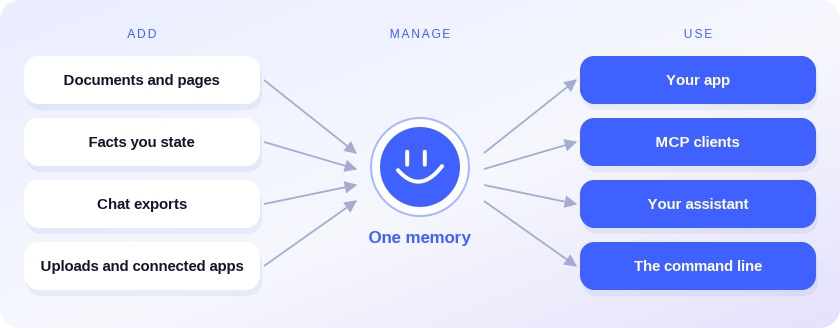
Membase is the memory layer for AI agents. It keeps one memory for everything you and your agents
know, and every AI you use reads it.
You stop re-explaining yourself each time you switch models or tools.
- **Add.** Facts, documents, web pages and chat exports from Claude or ChatGPT go into one memory.
- **Manage.** Memories keep projects apart; search them, ask them questions, forget what should go.
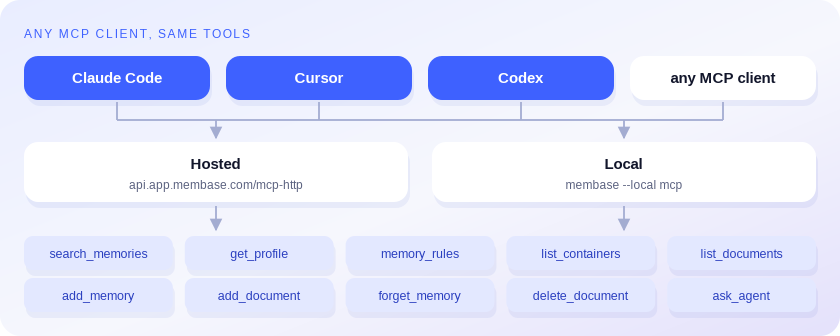
- **Use.** Your code, Claude Code, Cursor, Codex and ChatGPT read the same memory through the SDK or MCP.
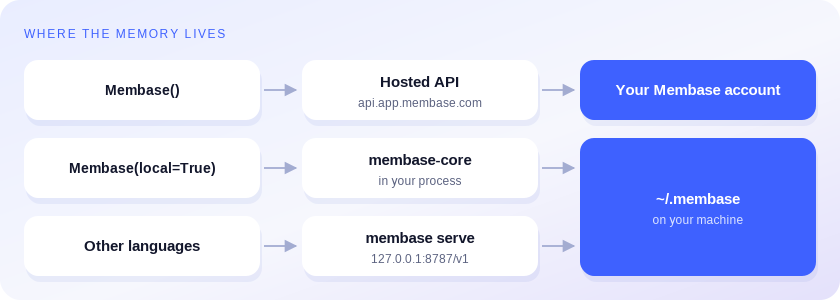
This repository is the developer side: Python and TypeScript clients, the `membase` command line
and an MCP server. The memory lives in your Membase account, which the
[web app](https://app.membase.com) and browser extension also fill, or on your machine with
`membase-ai[local]`.
## Write once, read from any AI
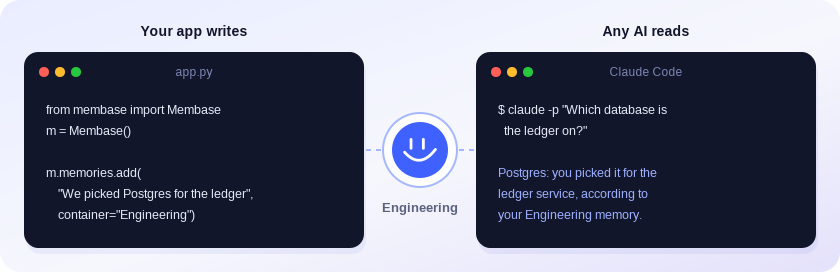
Recordings: [Python SDK](https://github.com/membaseai/membase/blob/main/assets/videos/sdk.mp4) (57 s) ·
[Claude Code](https://github.com/membaseai/membase/blob/main/assets/videos/switch-ai.mp4) (1 min 33 s). The answer above is illustrative.
## Accuracy

93.1% on LoCoMo, 92.6% on LongMemEval_S and 92.2% on DMR, using about 3× fewer tokens than the full
history on LoCoMo and 11× fewer on LongMemEval_S. Method and results: [membase.com/research](https://membase.com/research)
## Quickstart
```bash
pip install membase-ai # hosted · Python 3.10+ · needs MEMBASE_API_KEY
pip install 'membase-ai[local]' # local · Python 3.12 or 3.13 · needs OPENAI_API_KEY
pip install 'membase-ai[media]' # local + photos, videos and audio
npm install @membaseai/membase # TypeScript · Node 18+
npm install -g @membaseai/membase-cli # the `membase` command (hosted) without Python
```
```python
from membase import Membase
m = Membase() # hosted
# m = Membase(local=True) # local, in ~/.membase
m.memories.add("We picked Postgres for the ledger service.") # a fact
m.search("what database is the ledger on?") # {"items": [...], "partial": [...]}
m.add("Design notes …", custom_id="design-1") # a document
m.profile_facts.list() # who the user is (Your profile ticked)
m.capabilities() # what this key may do, and the rules
```
No call names a Memory: reads cover every Memory the key reaches, and writes land in its write
target (a key that reaches several Memories and has none is refused with `WriteTargetRequiredError`).
Ids are typed (`mem_…` a fact, `doc_…` a document, `med_…` a photo or video), lists are
`{items, has_more, partial}`, and a removal without `confirm=True` raises `ConfirmationRequiredError`.
Local memory answers the same routes with the same shapes.
Every method, its REST route and MCP tool, and the access it needs: [SDK reference](https://docs.membase.com/build/reference/sdk-quickstart/).
Upgrading from 0.3: see the [changelog](https://github.com/membaseai/membase/blob/main/CHANGELOG.md).
The Python package is `membase-ai` (import `membase`); `membase` on PyPI is unrelated.
## Command line
```bash
membase --local add "We picked Postgres for the ledger"
membase --local search "what did we pick for the ledger?"
membase --local memories list
membase --local ask "Which database is the ledger on?"
membase --local import ~/Downloads/claude-export.json # Claude, ChatGPT, markdown or JSON chats
membase --local agent ingest trace.json --agent coder
membase --local agent search "fix flaky deploy" --agent coder
membase --local media add ~/Movies/trip.mp4 # shots, speech and speakers
membase --local media search "someone skiing" # any language
```
Without `--local` (or `--store DIR`, both before the command) commands use the hosted API; `agent`,
`import` and `serve` need `membase-ai[local]`, and `media add` and `media ask` (local only)
need `membase-ai[media]`: see [Media memory](docs/reference.md#media-memory). A local store
with several Memories writes where `MEMBASE_WRITE_TARGET` names.
## MCP
```bash
claude mcp add membase -- membase --local mcp # local
claude mcp add --transport http membase https://api.app.membase.com/mcp-http \
--header "Authorization: Bearer $MEMBASE_API_KEY" # hosted
```
Hosted without the header, the connection signs you in and is read-only. Setup for Claude, ChatGPT,
Cursor, Codex and other clients: [Connect your AI](https://docs.membase.com/connect/).
Gemini CLI, as an extension (it signs you in on first use; `/mcp auth membase` signs in again):
```bash
gemini extensions install https://github.com/membaseai/membase
```
Cline: add the server to `cline_mcp_settings.json`; [llms-install.md](llms-install.md) has the
entry, with and without a developer key.
## Docs
- [SDK reference](https://docs.membase.com/build/reference/sdk-quickstart/): methods, REST routes, MCP tools, access levels
- [Memory operations](https://docs.membase.com/build/guides/memory-operations/): Memories, facts, documents, media, profile, ask
- [Authentication](https://docs.membase.com/build/reference/authentication/): keys and what each one can reach
- [Connect your AI](https://docs.membase.com/connect/): per-client MCP setup
- [Agent framework integrations](integrations/): LangChain, Microsoft Agent Framework, Dify, Hermes Agent, OpenClaw and Strands Agents
- [Local engine](https://github.com/membaseai/membase/blob/main/docs/reference.md): what it stores, `membase serve`, settings
## License
MIT; see [LICENSE](https://github.com/membaseai/membase/blob/main/LICENSE). `membase-ai[local]` also
installs membase-core, the compiled engine, under its own proprietary license (Membase Core License).