Memnox # Memnox runtime ### Your agents can already do the work.
Memnox makes it safe to let them **do it in your boundaries**. One boundary of **allow**, **ask** and **deny** over every agent on your machine,
ruled before each tool call runs. No model decides anything, and nothing leaves your machine. [![npm](https://img.shields.io/npm/v/memnox?color=37CD8F&label=npm%20memnox)](https://www.npmjs.com/package/memnox) [![Node 22+](https://img.shields.io/badge/node-%3E%3D22-5FA04E?logo=nodedotjs&logoColor=white)](package.json) [![macOS, Linux and Windows](https://img.shields.io/badge/runs%20on-macOS%20%7C%20Linux%20%7C%20Windows-555555)](#requirements) [![License Apache-2.0](https://img.shields.io/badge/license-Apache--2.0-37CD8F)](LICENSE)

Claude Code   Codex   Cursor   Cline   Hermes   OpenClaw

[Quick start](#quick-start) · [Inside a session](#what-you-get-inside-every-session) · [Agents](#supported-agents) · [Apps](#works-with-the-apps) · [Code fingerprint](#holding-agents-to-the-way-your-code-is-written) · [Terminal](#when-you-want-the-terminal) · [Docs](#documentation)
Memnox system architecture: your repository is read into a code fingerprint, the agent plans, reads, executes and observes in its own loop with Memnox in it, and every call to files, git, MCP tools, APIs and infrastructure comes back allow, ask or deny. Agents stay autonomous. Memnox sits in their loop rather than in front of it, and answers every call before it runs.
--- **Memnox is an open source runtime that tells you what you can safely let your AI coding agent do next.** It rules on every tool call Claude Code, Codex, Cursor, Gemini CLI or Windsurf makes, before the call runs, with one of three verdicts: **allow**, **ask** or **deny**. It runs on your machine and needs no account. What is allowed goes ahead. What is denied is refused with a way forward, so the agent finishes the task instead of stalling. What needs a person asks you in the prompt you are already looking at. Once you have said yes to the same thing often enough, `memnox next` names it as something you could stop being asked about. You do not learn a new tool to get that. You set it up once and keep working the way you work now. ## Quick start ```sh npm install -g memnox memnox setup ``` That is the last Memnox command you need. `setup` finds the agents on this machine and goes through them one at a time: what each can already reach, what you want to call it, and whether to put it under Memnox. Nothing is changed for an agent you say no to. ``` Claude Code claude-code id agt_claude-code config ~/.claude.json mcp github can use shell, filesystem, git, network, mcp can reach ~/.aws/credentials, network Call it something acme will recognise, or press Enter to keep "Claude Code" > Backend Coder Put Backend Coder under Memnox now? [Y/n] y ``` For each agent you accept, it puts a hook in front of every tool call, gives the agent a small MCP server (`memnox-session`) it can ask Memnox through, and adds a `/fingerprint` command. It also has the machine start the daemon that holds the rules. Then you open your agent the way you always do. There is nothing to launch and nothing to remember. Want to look before you change anything? `npx memnox` reads the agent configs on your machine and prints what each can reach. It changes nothing and needs no account, and [what your agents can reach](#what-your-agents-can-reach-before-you-decide-anything) shows what it finds. ### Requirements Node 22 or newer. Everything starts in **observe**, which records what every rule would have said and stops nothing, until you switch to enforce. | | The daemon is started by | It listens on | Kernel guard | |---|---|---|---| | **macOS** | launchd, as a user agent kept alive | a unix socket in `~/.memnox` | `sandbox-exec` | | **Linux** | systemd, as a user unit restarted on failure | a unix socket in `~/.memnox` | Landlock | | **Windows, natively** | Task Scheduler, at logon | a named pipe for your account | none yet | | **Windows, in WSL** | the same as Linux | the same as Linux | Landlock | `memnox setup` installs the daemon for you, and `memnox daemon --install`, `--status` and `--uninstall` manage it by hand. On Windows the MCP proxy, the interceptors and Claude Code's hook govern agents on the Windows side, but there is no kernel guard, a task is not restarted after a crash, and a named pipe is not the owner only boundary a socket is, so WSL is still the stronger choice. `memnox doctor` says which agents are governed natively, and [ADR 0003](docs/adr/0003-native-windows.md) says what is and is not verified there. ## What you get, inside every session | When | What Memnox does | What you typed | |---|---|---| | A session starts | The agent is told the boundary it works in, the rules in force, what your team has settled and how this repository is built, so it plans around them instead of walking into them | nothing | | The agent reaches for something your rules refuse | The call never runs. The agent is told why and what to use instead, so it finishes the task rather than stalling | nothing | | Something needs a person | You are asked in your agent's own permission prompt, in the conversation, on a paired app, or in your Slack or Discord DM. Yes once, yes for the session, or no | a yes or a no | | The agent writes code that breaks how this repository is built | Refused before it lands, or sent straight back to be put right, even when the agent switches from its edit tool to the shell | nothing | | Your prompt touches something your team already decided | The decision is put in front of the agent, with who confirmed it and where | nothing | | Two agents go for the same file | The second is told who holds it and what they have been doing | nothing | | You want to know why, what happened, or to undo it | Ask the agent in plain words: "why was that refused?", "what have you done this session?", "undo what you did" | a sentence |
One session, start to finish
You open Claude Code in a repository and ask it to add order cancellation. Before it reads a file, it has been told where it stands: ``` Memnox: Memnox rules on this session in enforce mode: a rule that refuses stops the call, and one that asks puts the question to the person. Project boundary: ~/work/shop. A write outside it asks first. Your workspace has settled 1 decision(s), policies and owners. Before you change code, ask the memnox-session "brief" tool about the paths, or "memory" about the subject, and cite what it says. This repository states how its code is written, in .memnox/code-fingerprint.yaml. Follow it; a write that breaks an enforced line is refused. ``` Your prompt mentions payment retries, which your team settled in Slack, so that decision is put in front of the agent too: ``` Your workspace settled this about payment retries: "Declined payments are never retried." (a decision, confirmed by ada@acme.com, on 2026-05-02, source https://acme.slack.com/archives/C01/p17). ``` In a hurry, the agent writes the update straight into the HTTP handler. The repository sends every database write through an Action, so the write never lands: ``` Memnox: This repository's code fingerprint: all database writes go through Actions, which own transactions and event persistence (rule fingerprint:writes-only-in-actions) Instead: call actionFactory.create(XAction.class).run(params) ``` It writes the Action instead, and when the work is done it tries to force push: ``` verdict DENY reason you chose to deny this: it rewrites history somebody else may already have pulled instead push a branch and open a PR ``` So it pushes a branch and opens a PR. You typed one prompt. Every one of those answers came back inside the conversation, and each is in the record when you ask the agent "why was that refused?"
## Supported agents Each agent's own hook asks Memnox before every tool call: a file read or write, a shell command, a web fetch, an MCP call. The answer comes back in the agent's own format, so the agent treats it like any other result. | Agent | Checked before it runs | A question goes to | Told at session start | |---|---|---|---| | **Claude Code** | every tool | its own permission prompt | yes | | **Codex** | every tool its hook reports | the conversation | yes | | **Gemini CLI** | every tool | the conversation | yes | | **Cursor** | commands, MCP calls, file reads and writes | its own prompt for commands and MCP calls | yes | | **Windsurf** | commands, MCP calls, file reads and writes | `memnox approve`, the workspace or your DM | no, only what `memnox-session` says when it connects | The scan also knows Claude Desktop, Cline and VS Code, and the three harnesses that run other agents: **Hermes**, **OpenClaw** and **Ruflo**. What those can reach through a shell, git or an MCP server meets the seams below, and [Harnesses](docs/harnesses.md) is the whole story. **When a rule refuses**, the call never runs and the agent is told why and what to use instead, so it carries on with the task rather than retrying. **When a rule asks**, Claude Code shows its own permission prompt with Memnox's reason in it. Say yes once, or for the rest of the session; a second yes to the same thing stops the asking for that session. An agent with no prompt of its own relays the question in the conversation, and you reply `yes`, `allow for this session` or `no`. Turn on `memnox config set approvals both` and it reaches your Slack or Discord DM too, where the first answer wins. **When your prompt names something the workspace already settled**, or just before the agent's first write to a file it covers, the decision is added to the conversation with who confirmed it and where.
Ask Memnox through the agent: the nine memnox-session tools
| You say | Tool | |---|---| | "Why was that refused?" | `why` | | "Where does Memnox stand?" | `status` | | "What have you done this session?" | `replay` | | "Would `git push --force` be allowed here?" | `decisions` | | "What did we decide about retries, and who said so?" | `memory` | | "Brief me on `src/payments` before you start" | `brief` | | "Read the brief your task names" | `work` | | "Record how this repository's code is written" | `fingerprint` | | "Undo what you did this session" | `rewind` | Every tool but `rewind` and `fingerprint` only reads. `rewind` waits for your yes before it moves a file, and `fingerprint` writes a repository's first fingerprint and never changes one that exists. None of them can allow, approve or change a rule, and an agent that tries `memnox allow`, `memnox mode off` or an edit to a rule file from its shell is refused before any rule is read, since an agent that could would approve itself.
The five seams below the hooks, which see an agent whether or not it cooperates
Each seam sits in the path an agent's action already takes, turns what the agent tried into an action a rule matches, and answers allow, ask or deny. | Agent action | Seam | How it is put in the path | Action a rule matches | What it cannot see | |---|---|---|---|---| | Calls a tool on an MCP server | MCP proxy | `memnox mcp wrap` repoints every MCP config on the machine, keeping a backup | `mcp.*` | a tool that lies about its name in `tools/list`, which is classified by the lie | | Runs `git`, `docker`, `kubectl`, `gh`, `npm` and the rest of the 19 classified binaries | PATH interceptors | `memnox setup` puts them on the agent's PATH, and offers your login PATH too | `shell.execute`, and per verb, such as `git.push-force` | a binary called by absolute path around the PATH | | Sends an HTTP request | Egress proxy | `memnox run` starts it on loopback and points the agent at it | `http.request` | the body inside HTTPS, and a tool that ignores `HTTPS_PROXY` | | Asks git for a credential before reaching a remote | Git credential helper | `memnox-git-credential`, which holds no secret and can hand none out | `git.credential` | a push over SSH, which never asks git for a credential | | Opens `chromium`, `chromedriver`, `geckodriver`, `google-chrome` or `msedgedriver` | Browser driver | the PATH interceptors, which rule on the host rather than the script | `browser.navigate` | what the page does once the host is allowed | A verdict of deny names what to use instead. A verdict of ask holds the call for a person, and for the browser that is once per host per session. The [threat model](docs/threat-model.md) states each limit in full. A change to your rules reaches an open session on its next tool call. MCP servers the agent already started, and the note it read at the start, catch up when you restart the agent. [Everything from inside the session](docs/use-cases.md#20-everything-from-inside-the-session) has the whole story.
## Works with the apps

macOS Windows Linux iPhone Android

The terminal is not the only place a question can reach you. Open source apps on five platforms sit on top of this runtime and give it a face, a voice and a signing key. None of them holds a rule of its own, because the daemon decides and the apps show, speak, listen and sign. - **[Memnox desktop](https://github.com/Memnox/memnox-desktop)** is an island at the top of the screen on [macOS](https://github.com/Memnox/memnox-desktop/tree/main/macos), [Windows](https://github.com/Memnox/memnox-desktop/tree/main/windows) and [Linux](https://github.com/Memnox/memnox-desktop/tree/main/linux). It listens, answers out loud, shows every working session with its latest steps, and asks about a held call with Deny, Allow this session and Allow once. Every allow that reaches outside the session is signed after Touch ID, Windows Hello or a polkit check. - **[Memnox mobile](https://github.com/Memnox/memnox-mobile)** puts the same calls on [iPhone](https://github.com/Memnox/memnox-mobile/tree/main/ios) and [Android](https://github.com/Memnox/memnox-mobile/tree/main/android). It pairs with your computer once (`memnox pair`), then carries held calls over an end to end encrypted Noise tunnel, and signs every remote yes after Face ID or a fingerprint.

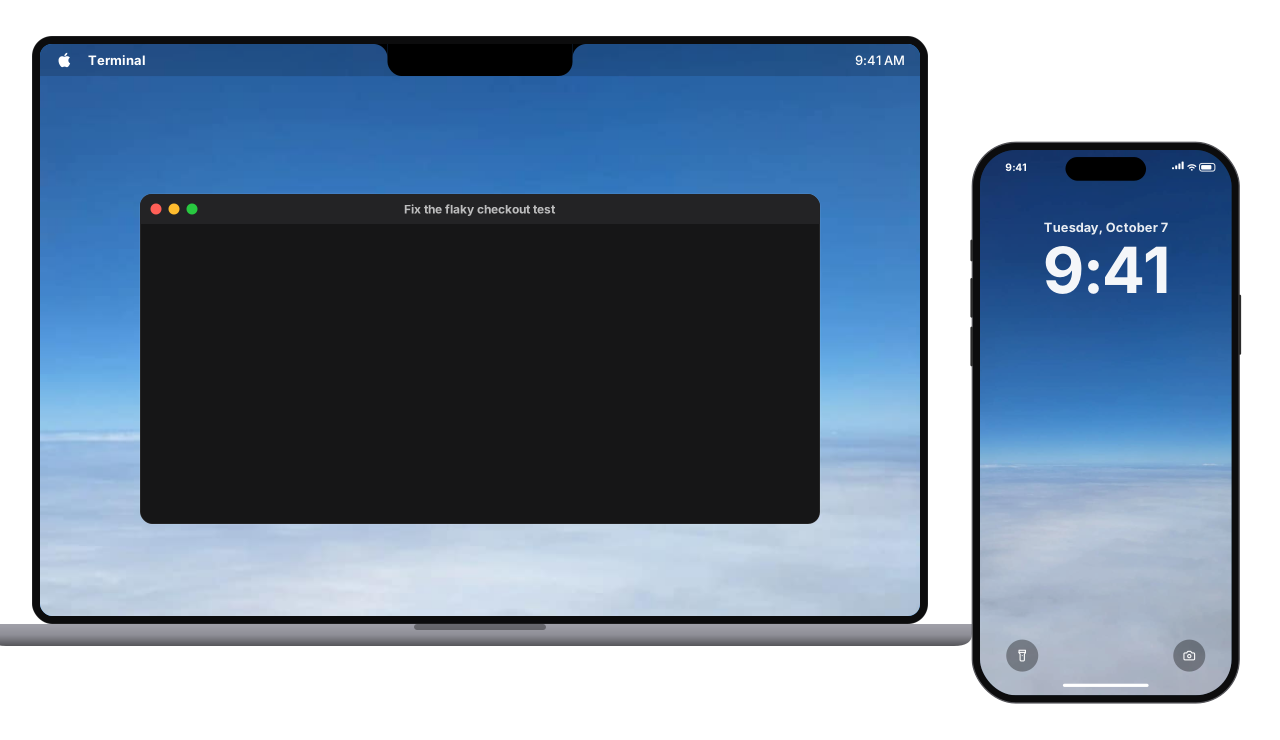
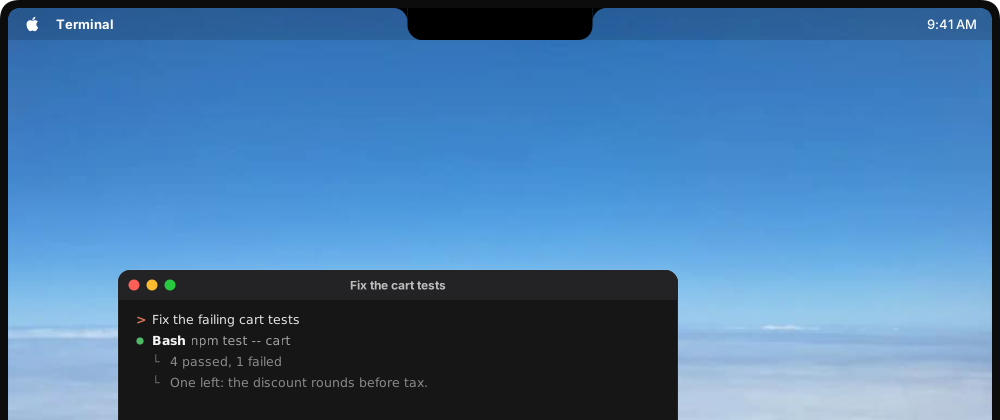
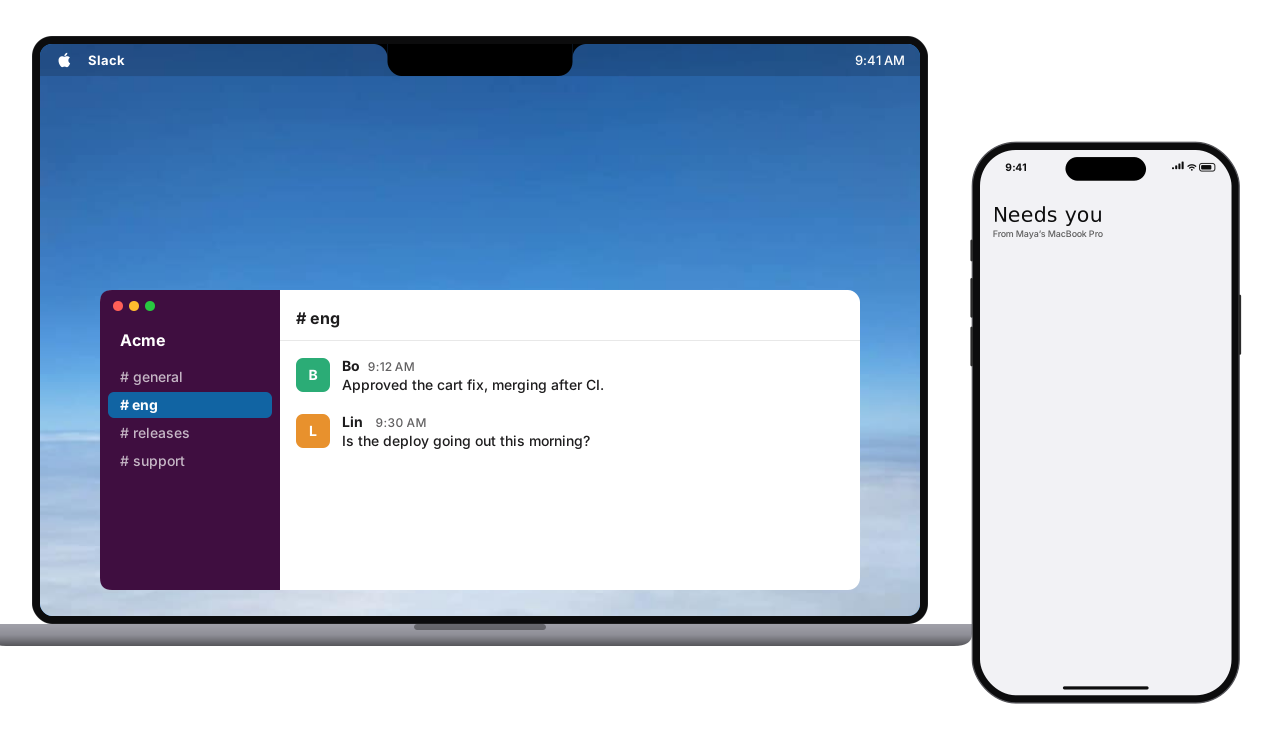
Claude Code works in a terminal on a Mac until a production deploy needs a person. The Memnox island grows out of the notch to ask, the same question appears on the iPhone lock screen, Face ID allows it, and both say it was allowed once.

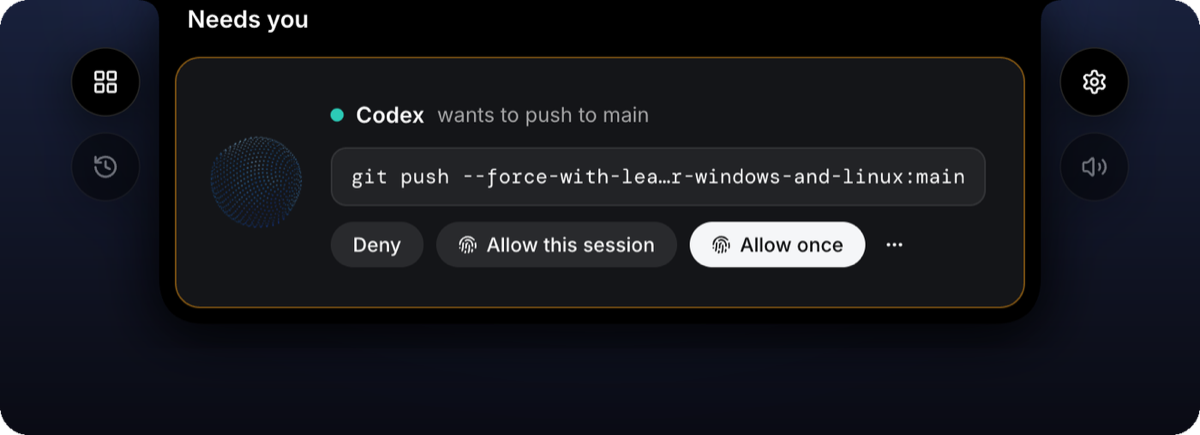
The Memnox island hanging from the top of the screen on Windows and Linux: Codex wants to push to main, the command is shown, and the three answers are Deny, Allow this session and Allow once.

A held call is one question wherever it is asked. The terminal, `memnox approve`, the island and the phone all answer the same call, and whichever answers first releases the agent. [docs/remote-contract.md](docs/remote-contract.md) is the wire spec for pairing, the relay and every remote method. The apps are previews, and each repository's README says how to install or build it today.
More of the apps: the notch, the Dynamic Island, and Slack or Gmail in your name
The Memnox island on a Mac grows out of the notch to listen to a question, answers it out loud, shows every working session with its latest steps, then asks before Codex runs a migration and settles green once it is allowed. On an iPhone, a held call shows in the Dynamic Island as the orb and an amber count, opens with Deny and Allow, Allow goes through Face ID, and the island then carries the voice.

On the Mac, Maya says tell #eng the deploy is out and thank Bo; the island drafts a Slack message as Maya to #eng, she sends it with Touch ID and it lands in the channel. On the iPhone, an email reply drafted on Gmail is sent with Face ID.

The apps can also work in your own Slack, Gmail, GitHub, Linear, Google Docs and Notion. A message or a reply arrives as a draft with the account, the recipients and the exact words, and the daemon sends it in your name only after a Send that is signed on your device.
## Holding agents to the way your code is written Every repository has rules nobody wrote down where an agent would read them: writes go through one layer, time is always UTC, nothing returns null. An agent new to the code breaks them in the first hour, and a reviewer catches it days later if at all. Memnox turns them into a **code fingerprint** the first agent records and every agent after it is held to. A real shape, from a Java backend where every database write goes through an Action: ```yaml enforce: - name: writes-only-in-actions files: ["app/src/main/java/com/acme/shop/http/**", "app/src/main/java/com/acme/shop/service/**"] forbid: ["*Repository.update(*", "*Repository.add(*", "*Repository.delete(*"] reason: all database writes go through Actions, which own transactions and event persistence instead: call actionFactory.create(XAction.class).run(params) ``` Asked to let a customer cancel an order, an agent in a hurry writes `orderRepository.update(...)` straight into the HTTP resource. It is caught three ways: | How the agent writes it | What Memnox does | |---|---| | The edit tool | Refused before it is written, with the reason and the `instead` | | A shell line that shows its text: `cat >> Resource.java < Why this is not another CLAUDE.md
`CLAUDE.md`, `AGENTS.md`, `GEMINI.md` and `.cursor/rules` tell an agent what it should do. They are loaded into the model's context, and following them is the agent's job. Nothing happens when it does not, until a reviewer notices. | | `CLAUDE.md`, `AGENTS.md`, `GEMINI.md`, `.cursor/rules` | `.memnox/code-fingerprint.yaml` | |---|---|---| | **Who reads it** | one agent each, from its own file | every agent Memnox hooks, from one file | | **How it reaches the agent** | loaded into the model's context | told at session start, and checked on every write | | **When the agent ignores it** | nothing happens until review | the write is refused before it lands, or sent back to put right | | **When the agent switches to the shell** | nothing checks it | `cat <
Recorded once, by the agent you already run
A session in a repository with no fingerprint says so on your screen: ``` SessionStart:startup says: Memnox: this repository has no code fingerprint yet. Type /fingerprint to record it now, or the agent records one before its first change here. ``` Type the command `setup` put into your agent, or just ask for a change: the first write of the session is held until the agent has read the code and recorded one. Memnox calls no model of its own. | Agent | Type | Written to | |---|---|---| | Claude Code | `/fingerprint` | `~/.claude/commands/fingerprint.md` | | Codex | `/prompts:fingerprint` | `~/.codex/prompts/fingerprint.md` | | Gemini CLI | `/fingerprint` | `~/.gemini/commands/fingerprint.toml` | | Cursor | `/fingerprint` | `~/.cursor/commands/fingerprint.md` | | Windsurf | `/fingerprint` | `~/.codeium/windsurf/global_workflows/fingerprint.md` | Each is written only where that agent has the `memnox-session` tools, never over a command of the same name you wrote, and taken out with the tools. The result is `.memnox/code-fingerprint.yaml`, a page a newcomer could work from alone: the stack and layout, which layer may call which, the steps to add a feature end to end, naming, errors, time and nulls, testing, and the commands to build and test. Under `enforce` it names the checks a machine runs on every line an agent adds. Every check is tested against your code before it is kept: one your code already breaks, or one that covers no file, is dropped with the reason, so what is enforced is what the code already does. It is yours to review and commit, and only a person changes it afterwards.
## What your agents can reach, before you decide anything One command reads the agent configs on your laptop, asks each MCP server what it holds, and prints what is reachable from where. It changes nothing and needs no account: ```sh npx memnox ``` On most machines one line is a surprise. Nobody granted that, because it accumulated.
A real laptop's scan, with the home directory shortened to ~
``` memnox scan On this machine agents claude-code, claude-desktop, cursor, codex-cli, hermes harnesses hermes 1 principal hermes: no roles defined yet mcp clients cursor, codex-cli, hermes mcp servers next-devtools, node_repl, computer-use, memnox tools git, docker, kubectl, psql, mongosh, gh, railway, npm Credentials these agents can read ! ~/.ssh/id_ed25519 4 agents ! ~/.config/gh/hosts.yml 4 agents github.com ! ~/.railway/config.json 4 agents ! ~/.docker/config.json 4 agents ! ~/.npmrc 4 agents What they can do with them, through a shell ! docker can push images to your registries · 2 destructive ! gh can merge pull requests and delete branches · 12 destructive github.com ! railway can deploy · 5 destructive ! npm can publish packages · 1 destructive Reachable from an agent right now ! ~/.ssh/id_ed25519 4 agents ! ~/.docker/config.json 4 agents ! ~/.npmrc 4 agents ! /var/run/docker.sock 4 agents ! network 5 agents unrestricted 14 execution surfaces. 135 capabilities can change something outside this laptop. 102 of them are governed by a policy. ```
Harnesses: Hermes, OpenClaw and Ruflo, and combined capability
The three harnesses route work, define roles, install hooks and, in two cases, hand work to machines you are not looking at, so one row on the roster is several principals at the seam: ``` On this machine agents hermes, ruflo harnesses hermes, ruflo 3 principals hermes: no roles defined yet ruflo: 2 roles · runs claude-code definitions 2 installed into claude-code 2 of them declare no tools, so each inherits every tool in the session mcp clients hermes 3 tools mcp servers crm 1 more hidden by the host's own filter, so it is not counted here Combined capability, where no single tool does this ! hermes: customer data can leave, in one session crm.read_customer → crm.create_customer_export → crm.send_customer_report Each of these tools is ordinary. Holding all of them is the path. ``` Every tool in that chain is ordinary and passes review on its own. Holding all three is a path, and a per call allow list is not shaped to notice it. Memnox does not replace what the harnesses enforce; what none of them can see is the other two, the credentials on the disk underneath, and the shell all three share. [Harnesses](docs/harnesses.md) is the whole story.
## When you want the terminal Nothing here is needed day to day. It is for when you want to look, tune or hand more over. ```sh memnox status # where this machine stands memnox why # why the last thing that did not simply proceed was decided that way memnox rewind # put the working tree back to before an agent touched it memnox doctor # what is risky here, and the one change that closes each memnox stop # turn protection off on purpose and on the record, e.g. --for 30m memnox start # turn it back on, in the mode it was stopped in memnox update # the latest version, verified as built by this repository, with the wiring pointed at it ``` `memnox help --all` lists every command, and [docs/commands.md](docs/commands.md) has every flag.
Start in observe, then enforce
A tool that denies something important on its first day gets uninstalled on its first day. Observe records the real verdict and applies nothing, and you switch when the verdicts look right: ```sh memnox timeline # what happened, and what would have been refused memnox protect --enforce # when the verdicts look right ```
Tune the rules, where every refusal names a way forward
```sh memnox protect # propose reversible steps; changes nothing memnox protect --apply # write them; the undo is printed first memnox policy test "git push --force origin main" ``` ``` git push --force origin main verdict DENY reason you chose to deny this: it rewrites history somebody else may already have pulled rule git-deny instead push a branch and open a PR DENY git push --force origin main Nothing was run, and nothing on this machine changed. ``` An agent told only "no" abandons the task. One told what to use instead finishes it. The rule file is `memnox.policies.toml`, and [Policies](docs/policies.md) describes it.
Leave it running: approvals, the breaker, budgets and leases
The point of a boundary is not that it refuses things. It is that you can walk away. An `ask` rule holds the call for a person, and you can answer from anywhere; five similar calls are one decision: ```sh memnox approvals # what is waiting, grouped memnox approve --group ``` The breaker watches outcomes, not requests: the same command failing the same way five times, eight failures with nothing succeeding between them, an action count far past what the task estimated, or work outside what was asked for. A pause names the count that produced it and can always be lifted, because a stop nobody can argue with is one people work around by uninstalling. ```sh memnox paused # a loop the breaker stopped, and how to lift it memnox budget # what is left in the window memnox lock --list # who holds which path memnox run --task "fix checkout" --paths 'src/checkout/**' -- claude ```
Hand over more with memnox next
`memnox next` reads what you have already approved and names the things you have said yes to often enough that being asked again is the tool wasting your attention. One refusal stops a recommendation, and destructive or outward actions never rise past supervised however routine they became. It prints counts, never hours.
On a server, and across a workspace
Nothing starts an agent through a shell profile on a server, so Memnox prints the lines a unit file or a container needs: ```sh memnox env --format systemd memnox env --format docker ``` With a workspace (`memnox login`), a question raised on a box nobody can reach travels up on the heartbeat and the answer comes back on the next one. Leases and budgets are counted across the fleet, and when the control plane cannot be reached each degrades to the local answer rather than blocking work.
## Three promises **No model decides anything.** Every verdict comes from a rule table and a matcher. A model is not consulted, so a prompt cannot talk one around. **A secret value never leaves the process that read it.** What is stored is a path, a kind and a fingerprint. The event schema refuses a digest field long enough to be a payload. **It comes off cleanly.** `memnox uninstall` removes the interceptors, the hooks and the wrapping, and `--purge` takes the history and rules too. A tool that cannot be removed is one people never install. ## What it deliberately does not do No code review. No risk score, because a single number is unarguable, and an unarguable number is one nobody acts on. There are counts by severity and a band that names every rule that fired. Memnox rules on an action an agent says it intends to take. It is not another agent: it does not do the work, and it has no opinion about yours beyond what your repository already does. ## Questions people ask
How do I make AI agents secure? Put a rule between each tool call and the thing it touches. Memnox hooks Claude Code, Codex, Cursor, Gemini CLI and Windsurf, holds five seams below them, and answers every call with allow, ask or deny before it runs, on your machine, with no account.
What is an AI agent proxy? A process an agent's calls pass through, so something other than the agent decides whether each one proceeds. Memnox runs two: an MCP proxy in front of every MCP server, and an egress proxy for HTTP. Both run on your own machine.
What are AI code safety rules? Rules an agent is held to rather than asked to follow. In Memnox they live in `memnox.policies.toml`, written by `memnox protect`, and in the `enforce` checks of the code fingerprint. Each matches an action and answers allow, ask or deny.
What is a code fingerprint? `.memnox/code-fingerprint.yaml`: how this repository is built, recorded from the code by the first agent. Its `enforce` checks are tested against the code before they are kept, then applied to every write any agent makes, through its edit tool or the shell.
What do allow, ask and deny mean? The only three verdicts. **Allow**: the call runs. **Ask**: it waits for a person, in the agent's own prompt, the conversation, a paired app or your DM. **Deny**: it never runs, and the agent is told why and what to use instead, so it finishes the task.
How do I run an AI agent safely? Start in observe, which records what every rule would have said and stops nothing. Read `memnox timeline`, then switch with `memnox protect --enforce`. Every denied call names its alternative, and `memnox rewind` puts the working tree back. [Coding agent permissions](https://docs.memnox.com/guides/agent-permissions) compares this with each agent's own permission modes.
What can I safely let my agent do next? Run `memnox next`. It reads what you have already approved and names what you have said yes to often enough to stop being asked. One refusal removes a recommendation, and it prints counts, never hours.
Does Memnox call an LLM? No. Every verdict comes from a rule table and a matcher, so a prompt cannot talk one around. Your code and your secrets never leave your machine.
## Documentation | Read | For | |---|---| | [Quickstart](docs/quickstart.md) | the first scan and setup, with no account | | [Commands](docs/commands.md) | every command and flag | | [Harnesses](docs/harnesses.md) | Hermes, OpenClaw, Ruflo, and combined capability | | [Policies](docs/policies.md) | the rule file | | [Risk bands](docs/risk-bands.md) | how a band is decided, rule by rule | | [Event schema](docs/event-schema.md) | the frozen v1 row | | [Threat model](docs/threat-model.md) | what it stops, and where it would fail | | [Remote contract](docs/remote-contract.md) | pairing, the relay and every remote method the apps use | | [FAQ](docs/faq.md) | starting with "does it call an LLM?" (no) | | [ARCHITECTURE.md](ARCHITECTURE.md) | how the code is put together, as it is today | | [VISION.md](VISION.md) | where Memnox is going, which is intent rather than what has shipped | ## Contributing [ARCHITECTURE.md](ARCHITECTURE.md) is the map: the packages, one direction of dependency, and one path every decision travels down. It ends with a table of where to make each kind of change. [CONTRIBUTING.md](CONTRIBUTING.md) is how a change lands: every change ships with a test, and this has to pass: ```sh pnpm format && pnpm typecheck && pnpm test && pnpm deadcode ``` Before the first `pnpm test` on a fresh clone, build the native Noise addon the pairing tests load, which needs [Rust](https://rustup.rs): `pnpm --filter @memnox/noise build`. A clone ships without it, so those tests fail until it is built.
Repository layout
```text memnox-runtime/ ├── packages/ │ ├── core/ @memnox/core: the domain, the rules, discovery, the gate and the ledger │ ├── interceptors/ @memnox/interceptors: the hook, the shell and git seams, the egress proxy │ ├── proxy/ @memnox/proxy: the MCP proxy, over stdio or remote HTTP │ ├── guard/ @memnox/guard: allow, ask or deny for an agent running in the cloud │ ├── cli/ memnox: the commands and every binary that ships │ └── vscode/ the VS Code side of the voice, which is not published ├── native/ │ ├── noise/ @memnox/noise: the Noise tunnel the phones share, a binding over snow │ └── intercept/ the small Rust client that rules on a wrapped command through the daemon ├── docs/ the guides, the contracts and the ADRs └── vectors/ the protocol vectors every app is tested against ```
Working on it with the apps
The desktop apps expect this checkout beside them, named `memnox-runtime`. **The Mac app**, in [memnox-desktop/macos](https://github.com/Memnox/memnox-desktop/tree/main/macos), installs and runs this runtime itself, and where it gets it from is chosen when the app is built: ```sh cd packages/cli && npm link && cd ../.. # once: memnox on your PATH is this checkout cd ../memnox-desktop/macos && ./scripts/bundle.sh # builds this runtime, then the app against it open build/Memnox.app ``` - **Local**, the default. `bundle.sh` runs `pnpm install` and `pnpm build` here first, and restarts the daemon on that build when `memnox` on your PATH is this checkout. The app runs this checkout: it links it with `npm link` when `memnox` is some other copy, restarts a daemon older than itself on this build, and never replaces it with the published package. Set `MEMNOX_RUNTIME_DIR` when the checkout is not `../memnox-runtime`. - **npm**, for a release: `MEMNOX_RUNTIME_SOURCE=npm ./scripts/bundle.sh`. The app uses the `memnox` already installed, installs `memnox@latest` from npm when there is none, and runs `memnox update --yes` when the daemon is older than the app. So the version a release app needs has to be published first. **The Windows and Linux app**, in [memnox-desktop/shared/tauri-core](https://github.com/Memnox/memnox-desktop/tree/main/shared/tauri-core), runs `pnpm wire` to build this runtime's core and copy its wire format in. **The phone apps**, in [memnox-mobile](https://github.com/Memnox/memnox-mobile), reach the daemon through the relay, so they need nothing built here beyond a daemon to pair with (`memnox pair`). Every app is tested against the protocol vectors in [vectors/](vectors). After a change here, `pnpm build` is enough: a running daemon notices it was rebuilt and restarts on the new code.
## Licence Apache-2.0, as [LICENSE](LICENSE) says. Report a vulnerability as [SECURITY.md](SECURITY.md) asks, and see the [code of conduct](CODE_OF_CONDUCT.md). The Memnox name, the logo and the pictures are not under the Apache License: they are reserved, as [LICENSE-ASSETS.md](LICENSE-ASSETS.md) explains. Shipping your own fork? Give it your own name. The official package is the one Memnox publishes to npm as `memnox`.

Memnox is not another agent. It never writes the code and never does the work. It decides how much of it your agents may do on their own.

memnox.com · Docs · npm · Desktop · Mobile