Fast tools for simplex meshes.
[](https://pypi.org/project/meshplex/) [](https://pypi.org/project/meshplex/) [](https://github.com/nschloe/meshplex) [](https://pypistats.org/packages/meshplex) Compute all sorts of interesting points, areas, and volumes in simplex (triangle, tetrahedral, n-simplex) meshes of any dimension, with a focus on efficiency. Useful in many contexts, e.g., finite-element and finite-volume computations. ### Installation Install meshplex [from PyPI](https://pypi.org/project/meshplex/) with ``` pip install meshplex ``` For full usage of meshplex, you require a license. Licenses for personal and academic use can be purchased [here](https://buy.stripe.com/5kA3eV8t8af83iE9AE). For more info, see [here](https://github.com/meshpro). ### Quickstart meshplex can compute the following data: ```python import meshplex # create a simple Mesh instance # (could be tetrahedra or even higher dimensional simplices) points = [[0.0, 0.0], [1.0, 0.0], [0.0, 1.0]] cells = [[0, 1, 2]] mesh = meshplex.Mesh(points, cells) # or read it from a file # mesh = meshplex.read("pacman.vtk") # simplex volumes, heights print(mesh.cell_volumes) print(mesh.signed_cell_volumes) print(mesh.cell_heights) print(mesh.volume) print(mesh.surface_area) # centers of any kind print(mesh.cell_circumcenters) print(mesh.cell_centroids) print(mesh.cell_incenters) print(mesh.cell_monge_points) print(mesh.cell_nagel_points) print(mesh.cell_spieker_centers) print(mesh.cell_lemoine_points) print(mesh.center_of_gravity) # circumradius, inradius, cell quality print(mesh.cell_circumradius) print(mesh.cell_inradius) print(mesh.q_radius_ratio) # d * inradius / circumradius (min 0, max 1) # control volumes, centroids print(mesh.control_volumes) print(mesh.control_volume_centroids) # covolume/edge length ratios print(mesh.ce_ratios) # count Delaunay violations print(mesh.num_delaunay_violations) # get all boundary angles in radians print(mesh.outside_boundary_angles_radians) # removes some cells mesh.remove_cells([0]) ``` For triangular meshes (`MeshTri`), meshplex also has some mesh manipulation routines: ```python mesh.show() # show the mesh mesh.angles # compute angles mesh.flip_until_delaunay() # flips edges until the mesh is Delaunay ``` For a documentation of all classes and functions, see [readthedocs](https://meshplex.readthedocs.io/). (For mesh creation, check out [this list](https://github.com/nschloe/awesome-scientific-computing#meshing)). ### Plotting #### Triangles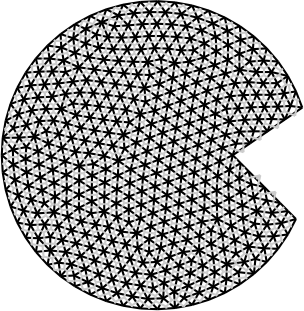 ```python
import meshplex
mesh = meshplex.read("pacman.vtk")
mesh.show(
# show_coedges=True,
# control_volume_centroid_color=None,
# mesh_color="k",
# nondelaunay_edge_color=None,
# boundary_edge_color=None,
# comesh_color=(0.8, 0.8, 0.8),
show_axes=False,
)
```
#### Tetrahedra
```python
import meshplex
mesh = meshplex.read("pacman.vtk")
mesh.show(
# show_coedges=True,
# control_volume_centroid_color=None,
# mesh_color="k",
# nondelaunay_edge_color=None,
# boundary_edge_color=None,
# comesh_color=(0.8, 0.8, 0.8),
show_axes=False,
)
```
#### Tetrahedra
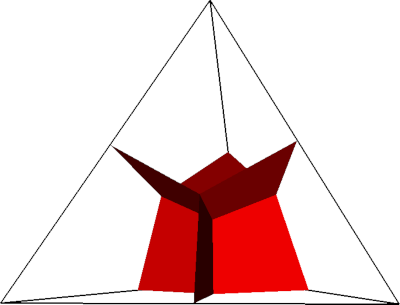 ```python
import numpy as np
import meshplex
# Generate tetrahedron
points = np.array(
[
[1.0, 0.0, -1.0 / np.sqrt(8)],
[-0.5, +np.sqrt(3.0) / 2.0, -1.0 / np.sqrt(8)],
[-0.5, -np.sqrt(3.0) / 2.0, -1.0 / np.sqrt(8)],
[0.0, 0.0, np.sqrt(2.0) - 1.0 / np.sqrt(8)],
]
) / np.sqrt(3.0)
cells = [[0, 1, 2, 3]]
# Create mesh object
mesh = meshplex.MeshTetra(points, cells)
# Plot cell 0 with control volume boundaries
mesh.show_cell(
0,
# barycenter_rgba=(1, 0, 0, 1.0),
# circumcenter_rgba=(0.1, 0.1, 0.1, 1.0),
# circumsphere_rgba=(0, 1, 0, 1.0),
# incenter_rgba=(1, 0, 1, 1.0),
# insphere_rgba=(1, 0, 1, 1.0),
# face_circumcenter_rgba=(0, 0, 1, 1.0),
control_volume_boundaries_rgba=(1.0, 0.0, 0.0, 1.0),
line_width=3.0,
)
```
```python
import numpy as np
import meshplex
# Generate tetrahedron
points = np.array(
[
[1.0, 0.0, -1.0 / np.sqrt(8)],
[-0.5, +np.sqrt(3.0) / 2.0, -1.0 / np.sqrt(8)],
[-0.5, -np.sqrt(3.0) / 2.0, -1.0 / np.sqrt(8)],
[0.0, 0.0, np.sqrt(2.0) - 1.0 / np.sqrt(8)],
]
) / np.sqrt(3.0)
cells = [[0, 1, 2, 3]]
# Create mesh object
mesh = meshplex.MeshTetra(points, cells)
# Plot cell 0 with control volume boundaries
mesh.show_cell(
0,
# barycenter_rgba=(1, 0, 0, 1.0),
# circumcenter_rgba=(0.1, 0.1, 0.1, 1.0),
# circumsphere_rgba=(0, 1, 0, 1.0),
# incenter_rgba=(1, 0, 1, 1.0),
# insphere_rgba=(1, 0, 1, 1.0),
# face_circumcenter_rgba=(0, 0, 1, 1.0),
control_volume_boundaries_rgba=(1.0, 0.0, 0.0, 1.0),
line_width=3.0,
)
```