# Video4j
Video4j is a highlevel library ontop of `org.openpnp:opencv` which provides APIs to handle video media in Java.
## Maven
```xml
io.metaloom.video
video4j
2.0.0-SNAPSHOT
```
## Usage - File
```java
// Load native lib libopencv_java460
Video4j.init();
// Open the video
try (VideoFile video = Videos.open(BIG_BUCK_BUNNY2_PATH)) {
// Video dimensions
video.width();
video.height();
// Configured FPS
video.fps();
// Total frames of the video
video.length();
// Seek to specific frame
video.seekToFrame(1020);
// Or just to the 50% point of the video
video.seekToFrameRatio(0.5d);
// Return the number of the current frame
video.currentFrame();
// Read the next frame as matrice (lower level access)
Mat mat = video.frameToMat();
// Read the next frame as image (mat gets automatically converted to image)
BufferedImage image = video.frameToImage();
// Read the frame and resize it to a width of 256 pixel.
BufferedImage image2 = video.boxedFrameToImage(256);
// Display the frame in a window
ImageUtils.show(image);
```
## Usage - Webcam
Opening a v4l webcam.
```java
Video4j.init();
// Open webcam via v4l device 0
try (VideoStream video = Videos.open(0)) {
video.setFrameRate(30);
video.enableFormatMJPEG();
video.setFormat(320, 240);
Stream frameStream = video.streamFrames();
VideoUtils.showVideoFrameStream(frameStream);
}
```
## Usage - Streaming of frames
Stream of raw OpenCV frame matrices.
```java
Video4j.init();
try (VideoFile video = Videos.open(BIG_BUCK_BUNNY2_PATH)) {
Stream frameStream = video.streamMat()
.skip(1000)
.map(CVUtils::toGrayScale)
.map(frame -> CVUtils.canny(frame, 50, 300));
VideoUtils.showMatStream(frameStream);
}
```
Stream of `VideoFrame`'s which contain the frame number and video reference.
```java
Video4j.init();
try (Video video = Videos.open(BIG_BUCK_BUNNY2_PATH)) {
Stream frameStream = video.streamFrames()
// Skip the first 1000 frames
.skip(1000)
// Only process every 10th frame
.filter(frame -> frame.number() % 10 == 0)
// Apply grayscale conversion
.map(CVUtils::toGrayScale)
// Apply the canny filter for edge detection
.map(frame -> CVUtils.canny(frame, 50, 300));
VideoUtils.showVideoFrameStream(frameStream);
}
```
## Preview Image Generation
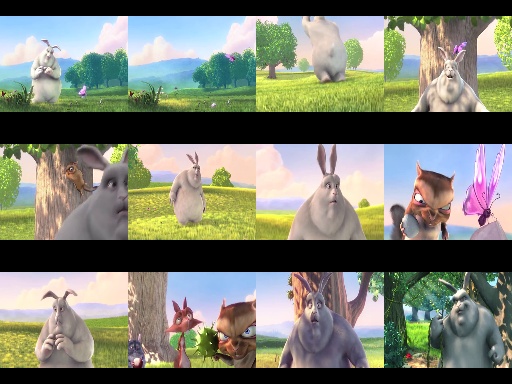
The `PreviewGenerator` can be used to generate preview images for a video.
Typical output:
Save preview image to disk
```java
int tileSize = 128;
int rows = 3;
int cols = 3;
PreviewGenerator gen = new PreviewGenerator(tileSize, rows, cols);
try (VideoFile video = Videos.open(BIG_BUCK_BUNNY2_PATH)) {
gen.save(video, new File("target/output.jpg"));
}
```
... Or just generate a buffered image to be used later on.
```java
PreviewGenerator gen = new PreviewGenerator(128, 3, 3);
try (VideoFile video = Videos.open(BIG_BUCK_BUNNY2_PATH)) {
ImageUtils.show(gen.preview(video));
}
```
## Utils
The `VideoUtils` contains methods to startup a very basic video player which can show the video.
The `CVUtils` contain utility methods that can be used to modify the frame image data (e.g blur, greyscale, canny filter, contrast..)
## Tips / Pitfalls
### Memory
Video frame data will be provided via opencv `Mat` objects. These objects are linked to JNI data which means they need to be manually released after usage. The `MatProvider` methods can be used to instantiate new `Mat` objects. The provider will in-turn keep track of the instances. The `CVUtils#free` methods can be used to `release` the mat objects after use.
For development the `MatProvider#printLeaks` method can be used to verify that all instances have been released.
```java
MatProvider.enableTracking();
…
Mat frame = MatProvider.mat();
// You OpenCV / Video4j Code
CVUtils.free(frame);
…
MatProvider.printLeaks();
assertFalse("There should not be any leaked mats", MatProvider.hasLeaks());
```
### Performance
When using `Mat` instances it is advised to reuse them if possible and to provide existing Mats to read frame data. This can for example be done by usage of the `Video#frame(Mat)` method.
```java
Mat frame = MatProvider.mat();
while (true) {
if (!video.frame(frame)) {
break;
}
…
```
## Requirements / Limitations
The library uses OpenCV via JNI. Thus the JNI library `libopencv406-jni` must be installed on the host system.
Currently only Linux is supported.
The JNI libraries need to be manually be loaded once via
```Video4j.init()```. This method will try its best to locate the library itself.
On Debian Linux the JNI library can be installed via the `libopencv406-jni` package. Version `4.6.0+dfsg-9+b1` has been used for testing. Video4j expects the library to be locatable in the library path. Or via `/usr/lib/jni/libopencv_java460.so`.
You can set `-Djava.library.path` for your application if the `libopencv_java460.so` file is located in a different directory.
The capabilities of the OpenCV code and thus this library is linked to the installed OpenCV library. If you are unable to open a specific video format this might be related to `libavcodec` library that was used to build the OpenCV library.
## Releasing
```bash
# Run tests
mvn clean package
# Invoke release to maven central
mvn clean deploy -Drelease
# Publish release on github
jreleaser config
jreleaser full:release
```