
🚀 Want to help improve this project?
Please fork the repository and open a pull request with your changes to here!
HVTools is MIT licensed, but please keep improvements in this repository so the community can continue building the most complete version together.
I’ll review contributions and merge quality improvements so we can build a great tool together.
Thank you for your support! 🙌










[//]: #https://img.shields.io/badge/C%23-239120
[//]: #https://img.shields.io/badge/PowerShell-5.1%2B-blue
**The RVTools for Hyper-V Environments**
## Table of Contents
- [Introduction](#introduction)
- [Contents](#contents)
- [Features](#features)
- [Download](#download)
- [Getting Started](#getting-started)
- [Prerequisites](#prerequisites)
- [Installation](#installation)
- [Usage](#usage)
- [Examples](#examples)
- [Contributing](#contributing)
- [Status](#status)
- [Support](#support)
- [License](#license)
- [Credits](#credit)
# Introduction
**HVTools** is a comprehensive inventory, documentation, and management tool for Microsoft Hyper-V environments - the equivalent of RVTools for VMware environments.
Just as [RVTools](https://www.dell.com/en-us/shop/vmware/sl/rvtools) helps VMware administrators document and inventory their vSphere, and Special thanks to Rob de Veij for creating RVTools, which has been an invaluable resource for VMware administrators for many years - HVTools aims to bring that same functionality to the Hyper-V community (and some more), providing a comprehensive view of your infrastructure in an easy-to-use interface to help administrators document and inventory their infrastructure, HVTools provides detailed information about your Hyper-V hosts, virtual machines, clusters, and configurations, with powerful export capabilities for reporting and documentation purposes.
🌐 **Visit [hvtools.app](https://hvtools.app)** for more information, documentation, and downloads.
### Why HVTools?
- **Complete Inventory** - Document your entire Hyper-V infrastructure
- **Cluster-Aware** - Full support for Failover Clusters and standalone hosts
- **Export Everything** - Export to Excel-ready CSV, JSON, XML, or formatted text
- **Detailed Insights** - Hardware specs, VM configurations, cluster status, and more
- **Remote Management** - Connect to both local and remote Hyper-V hosts
- **Visual Status Indicators** - Color-coded states for quick health assessment
- **Secure Credentials** - Encrypted credential storage for repeated connections
## Contents
Outline the file contents of the repository. It helps users navigate the codebase, build configuration and any related assets.
| File/folder | Description |
|-------------------|---------------------------------------------|
| `src` | Source code. |
| `landingpage` | Assets for the landing page. |
| `.gitignore` | Define what to ignore at commit time. |
| `CHANGELOG.md` | List of changes to the sample. |
| `CONTRIBUTING.md` | Guidelines for contributing to the HVTools. |
| `README.md` | This README file. |
| `SECURITY.md` | This README file. |
| `LICENSE` | The license for the HVTools. |
## 🚀 Features
### Connection & Authentication
- **Multiple Connection Types**: Connect to local Hyper-V hosts, remote standalone servers, or Failover Clusters (means **Azure Local** also)
- **Flexible Authentication**: Support for Windows Authentication (current session) or custom credentials
- **Secure Credential Storage**: Encrypted credential storage for repeated connections
- **IP Address Support**: Automatic hostname resolution when connecting via IP address
- **Domain Detection**: Smart domain/workgroup detection for both local and remote connections
### Virtual Machines
- **Comprehensive VM Inventory**:
- Complete VM configuration details (CPU, Memory, Disk, Network and more)
- State monitoring (Running, Off, Paused, Saved) with color-coded indicators
- Generation 1 & 2 VM support
- Integration Services status and monitoring
- Heartbeat status tracking
- Uptime monitoring
- Checkpoint information and management
- Replication status
- Creation dates and VM IDs
- **VM Groups (Hosts)**:
- Create and manage VM Groups (Management Collections, VM Collections)
- Add/remove VMs from groups
- Rename and delete groups
- Bulk VM organization
- **VM Checkpoints**:
- View all VM checkpoints across the environment
- Standard and Production checkpoint support
- Checkpoint age tracking and recommendations
- Storage consumption monitoring
- Delete checkpoints directly from the tool
- Detailed checkpoint properties (memory, disk, configuration)
- Parent-child checkpoint hierarchy visualization
### Cluster
- **Cluster Overview**:
- Cluster node status and health
- Highly Available VM distribution
- Cluster network information
- Shared Volume status
- Failover priorities and preferred owners
- Node weight and drain status
- Fault domain configuration
- **Multi-Node Operations**:
- Automatic cluster node detection
- Parallel data collection from all nodes
- Cluster-aware VM inventory
- Cross-node VM visibility
### Host Information
- **Detailed Host Inventory**:
- Hardware specifications (CPU, Memory, Model, Serial Number)
- Operating System version and build
- Licensing status and grace period
- Boot time and uptime
- Time zone and NTP configuration
- Hyper-V configuration paths
- Network adapter information with IP addresses
- SLAT and Hyper-Threading support
- NUMA spanning configuration
- Live Migration settings
- Enhanced Session Mode status
### Virtual Disk
- **Comprehensive Disk Inventory**:
- Disk type (Dynamic, Fixed, Differencing, PassThrough)
- Disk format (VHD, VHDX, Physical)
- Storage consumption analysis
- Space efficiency calculations
- Fragmentation monitoring
- Controller information (SCSI/IDE)
- QoS settings (Min/Max IOPS)
- Parent-child relationships for differencing disks
- Shared disk identification
- Cluster disk tracking
### Export & Reporting
- **Multiple Export Formats**:
- JSON (structured data with metadata)
- CSV (Excel-compatible, includes VM Groups in separate file)
- XML (hierarchical data structure)
- Formatted Text (human-readable reports)
- **Selective Export**:
- Checkbox-based VM selection for export
- Select all/deselect all functionality
- Export only the VMs you need
- **Export Metadata**:
- Export timestamp
- Exported by user information
- Host and connection type
- Total VM counts
- Application version tracking
### User Interface
- **Tabbed Interface**:
- VM Overview (primary inventory view)
- VM Groups (group management)
- Hosts (detailed host information)
- Clusters (cluster-specific data)
- Virtual Disks (storage inventory)
- Checkpoints (snapshot management)
- and more...
- **Visual Indicators**:
- Color-coded VM states (Green=Running, Red=Off, Yellow=Paused)
- Heartbeat status colors
- Checkpoint age highlighting
- Dynamic memory indicators
- Replication status
- **Smart Summaries**:
- One-click summary views for each section
- Statistical analysis and recommendations
- Capacity planning insights
- Health status overviews
### Advanced Features
- **Intelligent Recommendations**:
- Checkpoint cleanup suggestions
- Disk optimization recommendations
- Space efficiency improvements
- Fragmentation alerts
- VHD to VHDX migration suggestions
- **Connection Information Display**:
- Real-time title bar shows: Server, Username, Connection Type, Cluster Status
- Hostname resolution for IP-based connections
- Domain information display
- **Progress Tracking**:
- Visual progress indicators for long-running operations
- Background task execution
- Non-blocking UI during data collection
- **Context Menus**:
- Right-click operations on VMs
- Checkpoint management
- Detailed information views
- **Logging & Diagnostics**:
- Comprehensive file logging
- Event tracking with severity levels
- Quick access to logs from Help menu
- Troubleshooting support
## Download
**🌐 Official Website:** [hvtools.app/download](https://hvtools.app/index.html#download)
**📦 GitHub Releases:** [Download the latest version](../../releases/latest)
**📋 Version History:** [CHANGELOG.md](CHANGELOG.md)
## ⚡ Getting Started
### 🛠 Prerequisites
- [.NET 10.0 Desktop Runtime](https://dotnet.microsoft.com/en-us/download/dotnet/thank-you/runtime-desktop-10.0.2-windows-x64-installer?cid=getdotnetcore) installed on your system.
### Access Requirements
#### Local Hyper-V Access
- **Administrator privileges** required for local Hyper-V management (or membership in 'Hyper-V Administrators' group)
- **Hyper-V PowerShell Module** must be installed
- **Hyper-V Management Tools** must be available
#### Remote Hyper-V Access
- **Network connectivity** to target Hyper-V host
- **Windows Remote Management (WinRM)** enabled on target
- **PowerShell Remoting** enabled on target
- **Credentials** with Hyper-V Administrator rights
- **Firewall rules** allowing WinRM (TCP 5985/5986)
#### Cluster Access
- **Failover Clustering PowerShell Module** on cluster nodes
- **Cluster Administrator** or equivalent permissions
- **Network access** to all cluster nodes
- **CredSSP** may be required for certain multi-hop scenarios
# 🔧 How to Use
## Initial Setup
1. **Download and Install**
- Download the latest release from the [Releases page](../../releases/latest)
- Run the installer as Administrator
- Ensure .NET 10.0 Desktop Runtime is installed
2. **Launch HVTools**
- Run as Administrator for local Hyper-V access
- Or run with standard permissions for remote connections
## Connecting to Hyper-V
### Local Connection
1. Click **Connect** on the login screen
2. Leave server as "localhost" or "."
3. Select **Windows Authentication**
4. Click **Login**
### Remote Standalone Host
1. Enter the **server hostname or IP address**
2. Choose authentication method:
- **Windows Authentication**: Uses your current credentials
- **Custom Credentials**: Enter specific username/password
3. Optionally check **Remember credentials** for future connections
4. Click **Login**
### Remote Failover Cluster
1. Enter any **cluster node name or cluster name**
2. Provide credentials with cluster access
3. HVTools automatically detects cluster configuration
4. All cluster nodes are discovered and inventoried
## Using HVTools
### VM Overview
- **View all VMs** with detailed properties
- **Double-click a VM** to see complete details
- **Click column headers** to sort data
- **Check/uncheck VMs** for selective export
- **Click Summary** for statistical overview
### VM Groups
- **Create new groups** for VM organization
- **Add/remove VMs** from groups
- **Rename or delete groups** as needed
- **Export group membership** with VM data
### Host Information
- **View hardware specifications** for all hosts
- **Check licensing status** and activation
- **Monitor resource usage** (CPU, Memory)
- **Review network configuration** and IP addresses
- **Verify Hyper-V settings** and paths
### Cluster Management
- **View cluster health** and node status
- **Check Highly Available VMs** distribution
- **Review cluster networks** and shared storage
- **Monitor failover priorities** and preferred owners
### Virtual Disks
- **Inventory all VM disks** across environment
- **Analyze space efficiency** and potential savings
- **Identify disk types** (Dynamic, Fixed, Differencing)
- **Track disk fragmentation** and performance
- **Review QoS settings** and constraints
### VM Checkpoints
- **View all checkpoints** across all VMs
- **Monitor checkpoint age** and storage consumption
- **Delete old checkpoints** directly from the tool
- **View checkpoint details** and hierarchy
- **Track Standard vs Production** checkpoints
### Exporting Data
1. Navigate to the **VM Overview** tab
2. **Select VMs** using checkboxes (or click column header to select all)
3. Click **Export** button
4. Choose your format:
- **JSON**: For automation and scripting
- **CSV**: For Excel and reporting
- **XML**: For structured data exchange
- **TXT**: For documentation and printing
5. Select save location and click **Save**
## Common Use Cases
### 📋 Inventory & Documentation
- Generate complete VM inventory reports
- Document hardware specifications
- Track VM configurations and settings
- Maintain cluster documentation
### 📊 Capacity Planning
- Analyze resource allocation across hosts
- Identify over-provisioned VMs
- Track storage consumption trends
- Plan for growth and expansion
### 🔍 Health Monitoring
- Monitor VM states and health
- Check Integration Services status
- Verify heartbeat across all VMs
- Track cluster node health
### ✅ Compliance & Auditing
- Export VM configurations for audits
- Track licensing and activation status
- Document security settings
- Maintain change history
### 💾 Backup Verification
- Review checkpoint policies
- Monitor backup job effectiveness
- Identify VMs without checkpoints
- Track checkpoint age and cleanup needs
### 🔄 Migration Planning
- Document current infrastructure
- Analyze VM compatibility (Gen1 vs Gen2)
- Plan cluster migrations
- Export configuration for comparison
### ⚡ Resource Optimization
- Identify dynamic vs fixed disk inefficiencies
- Review memory allocation
- Optimize processor assignments
- Consolidate VM Groups
### 🛠️ Troubleshooting
- Quick VM status overview
- Integration Services troubleshooting
- Network adapter verification
- Disk configuration validation
## Tips & Best Practices
### Performance
- Use **cluster node iteration** for large clusters (automatic)
- Export runs in **background** without blocking UI
- **Refresh only when needed** to reduce server load
- Close and reconnect for long-running sessions
### Security
- Store credentials encrypted when using **Remember Me**
- Use **Windows Authentication** when possible
- Verify code signature on first run
- Review logs regularly for security events
### Data Management
- Export data regularly for **trending and comparison**
- Use **JSON format** for automated processing
- Use **CSV format** for Excel-based reporting
- Clean up old checkpoints to **save storage**
### Organization
- Create **VM Groups** for logical organization
- Use **consistent naming** across environments
- Document group purposes in external documentation
- Export group membership with VM data
# 📸 Screenshots
### Login Screen
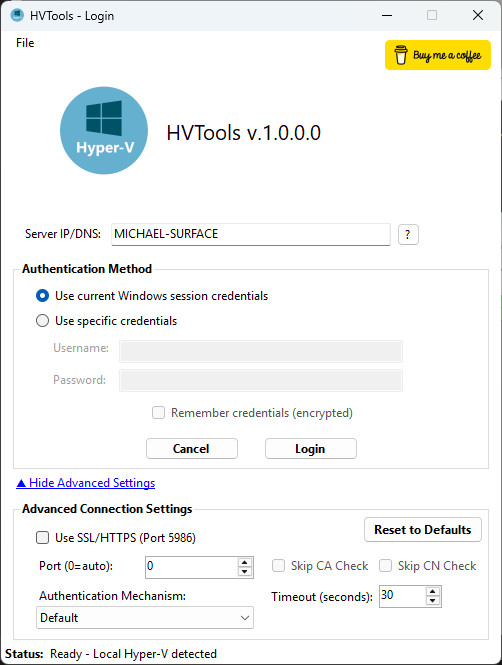
*Connect to local or remote Hyper-V hosts with flexible authentication options.*
### VM Overview
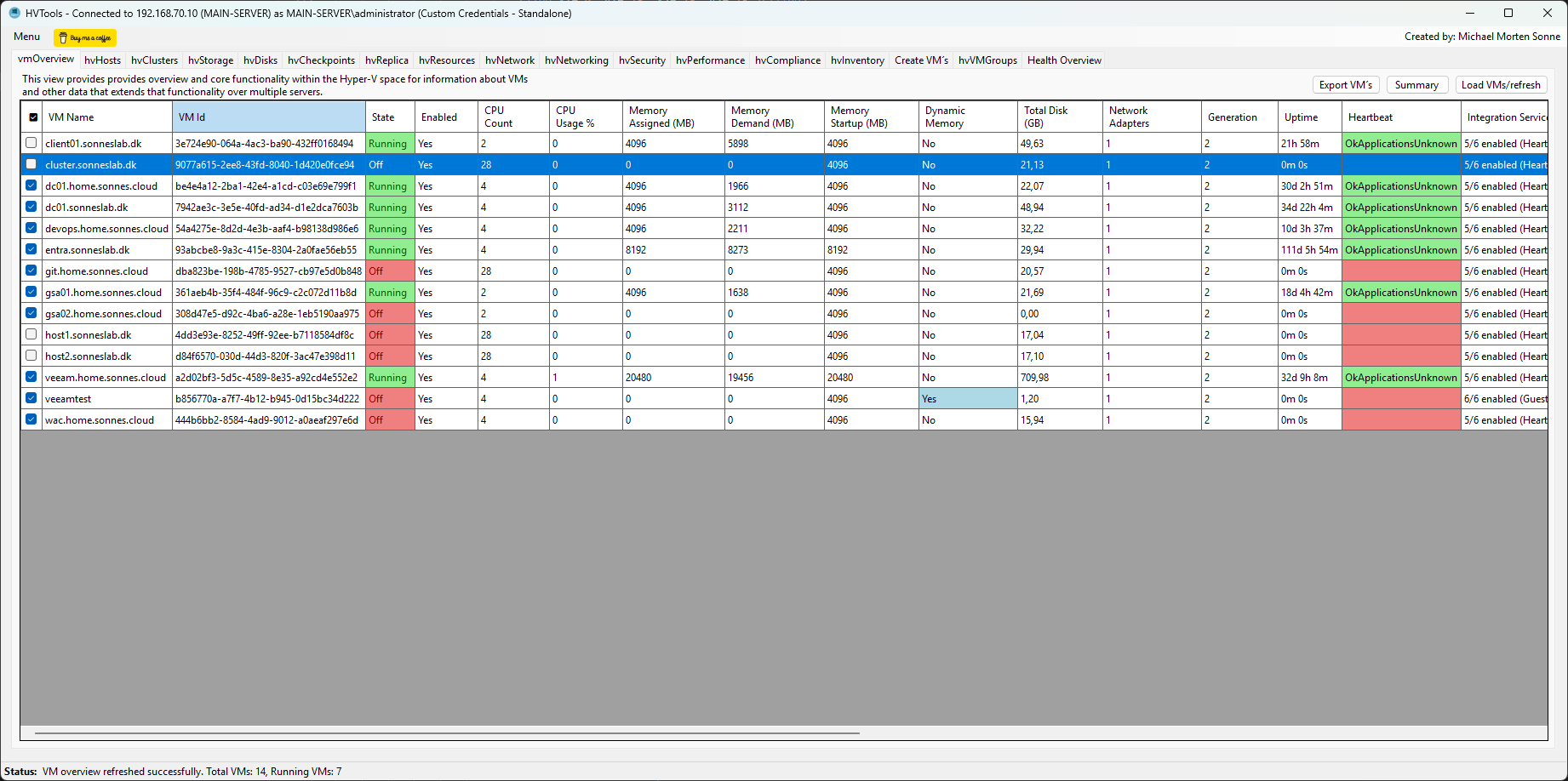
*Complete VM inventory with detailed properties, color-coded states, and export capabilities.*
### VM Groups Management
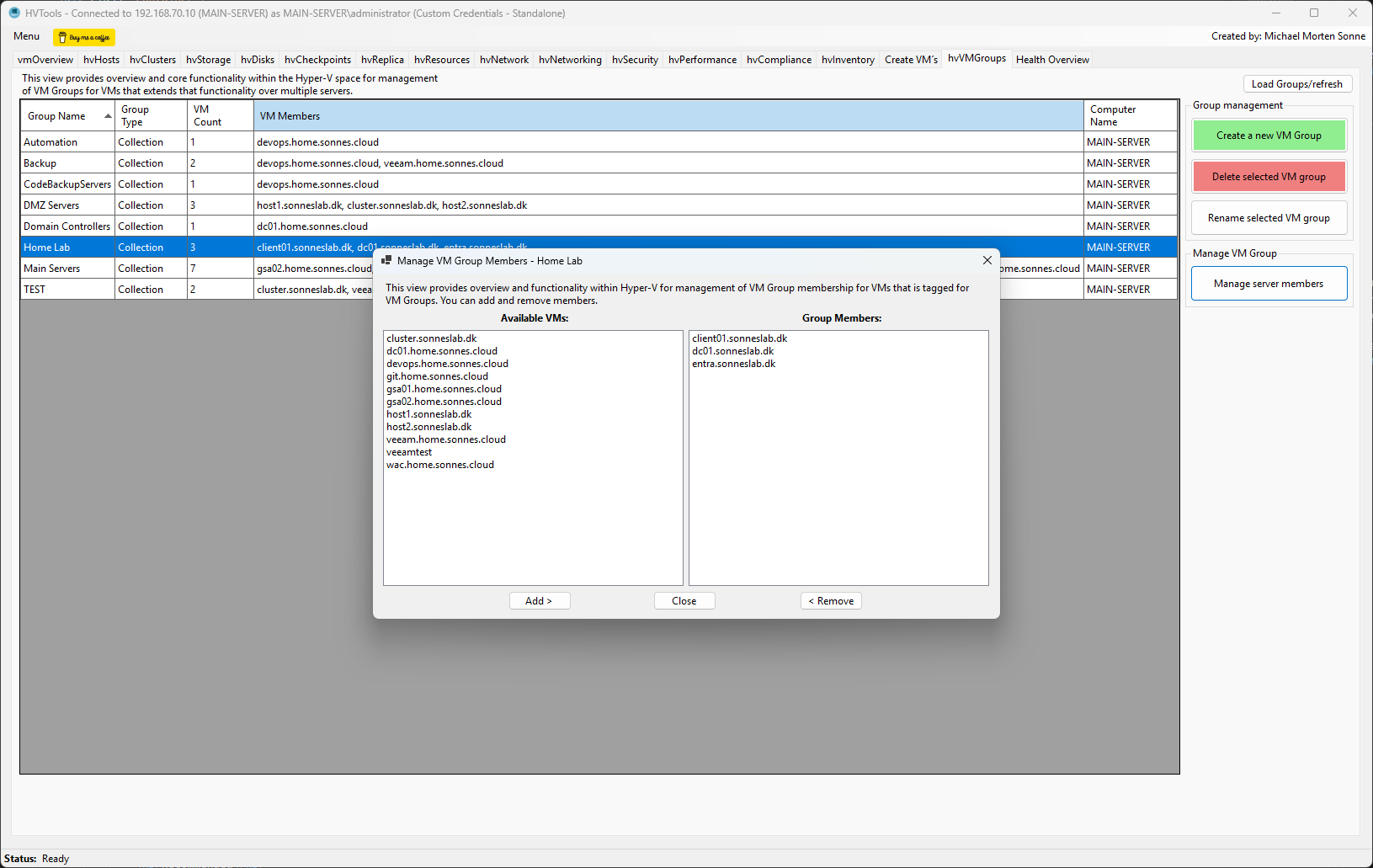
*Create and manage VM Groups for logical organization and bulk operations.*
### Host Information
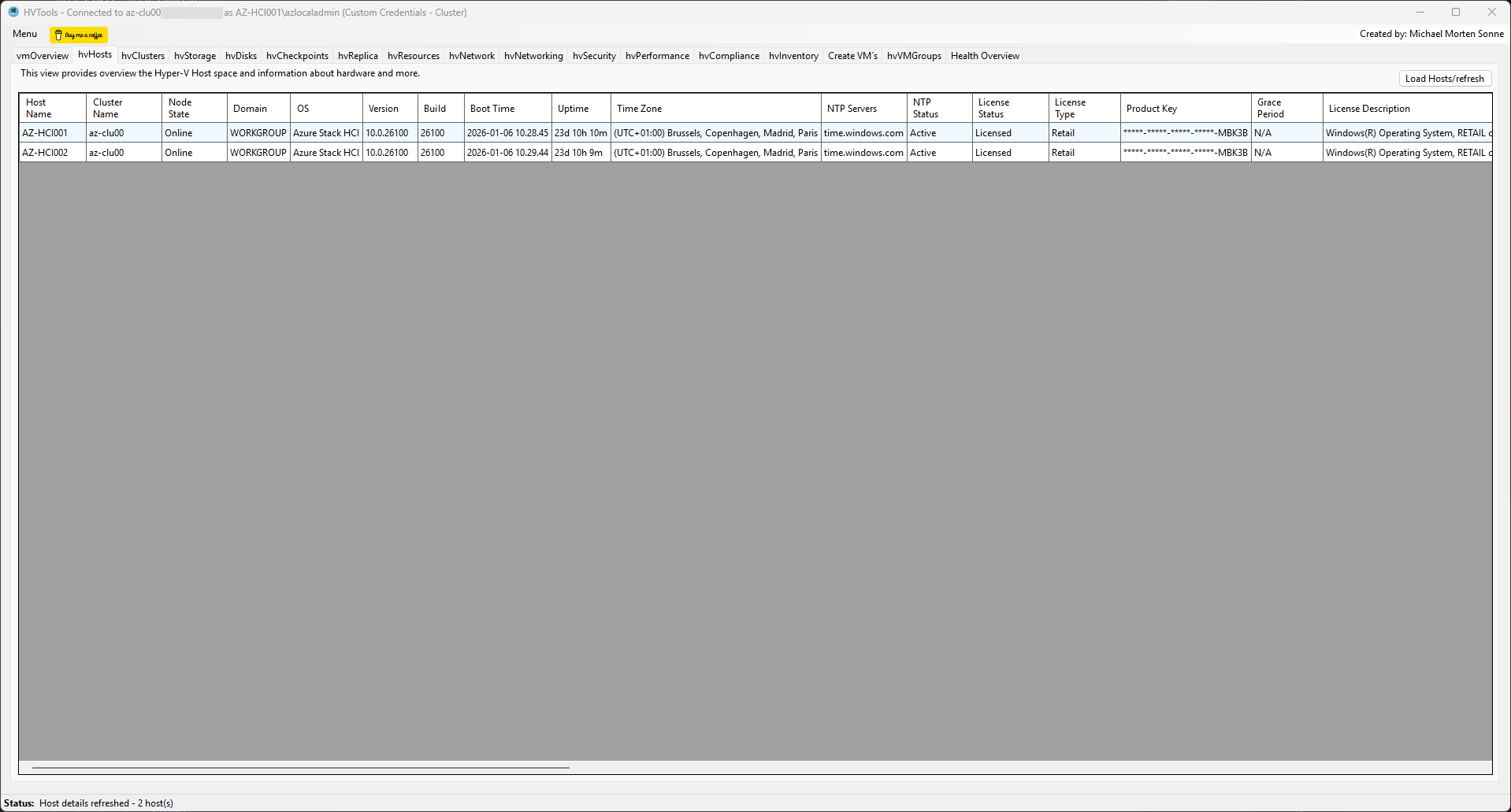
*Comprehensive hardware and software information for all hosts in your environment.*
### Cluster Management

*Cluster health, node status, and Highly Available VM distribution across nodes.*
### Virtual Disks
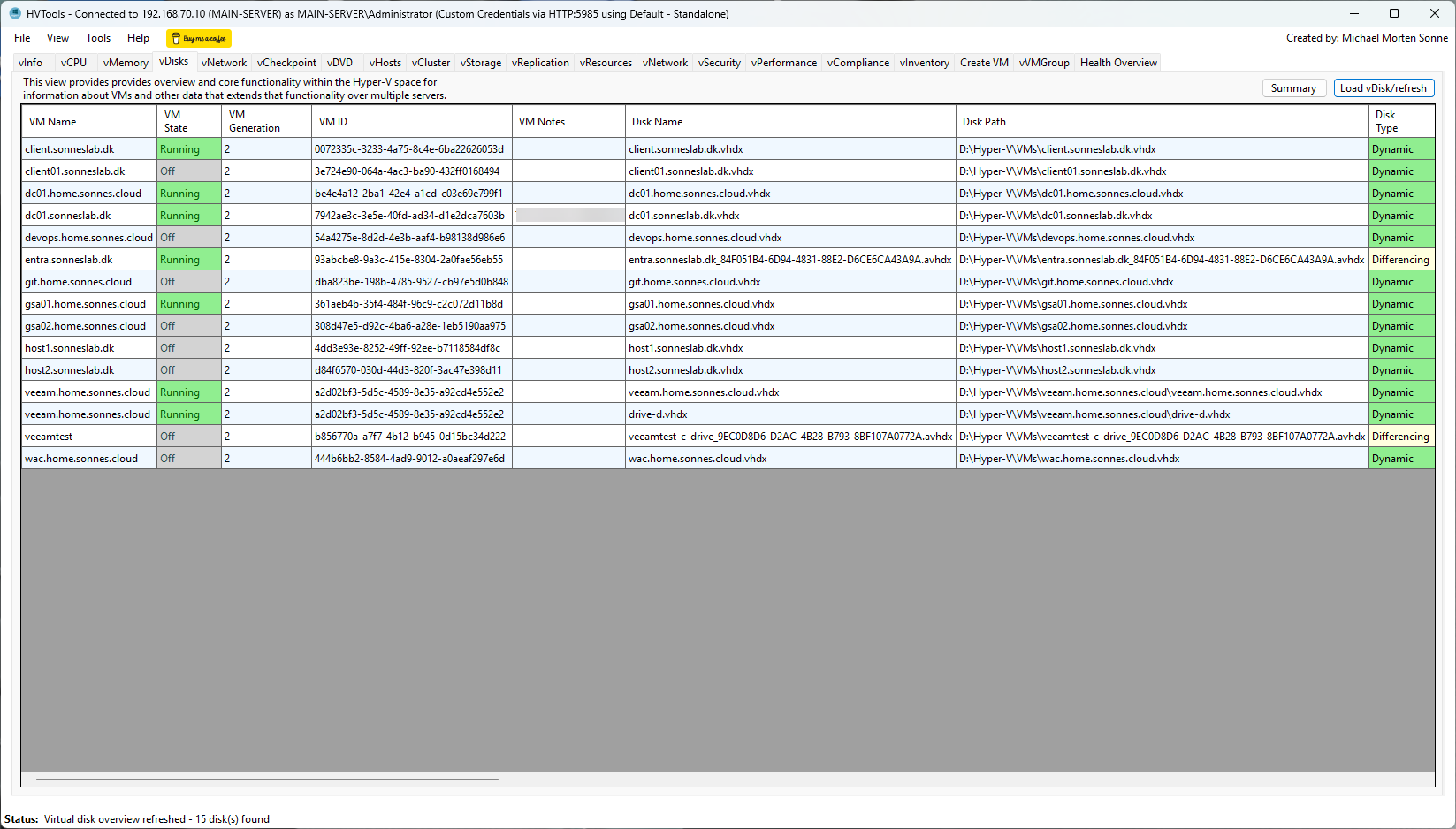
*Complete virtual disk inventory with space efficiency analysis and optimization recommendations.*
### VM Checkpoints
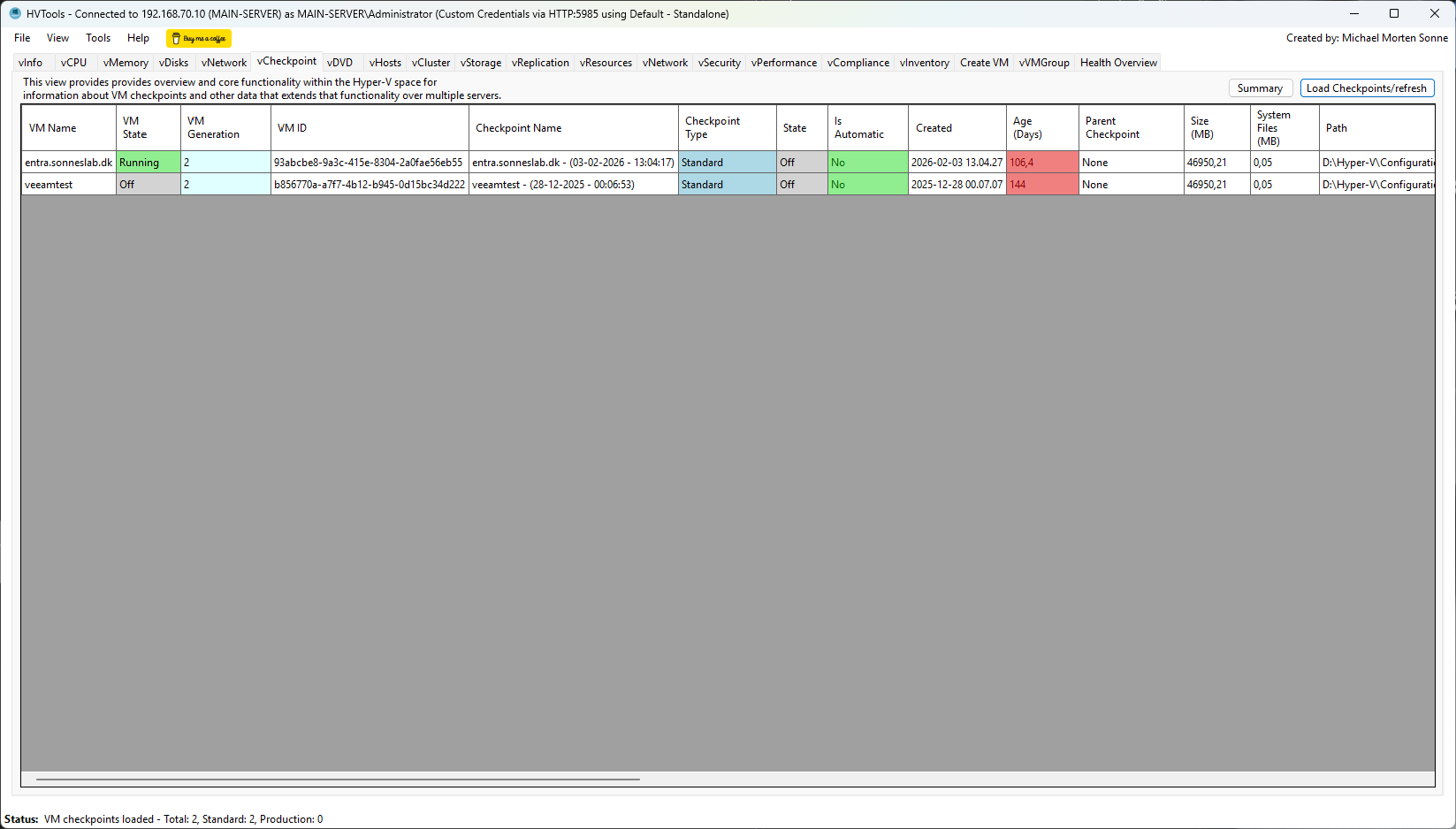
*Checkpoint management with age tracking and storage consumption monitoring.*
### Export Options

*Multiple export formats with selective VM export capabilities (JSON, CSV, XML, TXT).*
*...and more features coming soon!*
# 🧪 Testing
- Tested on **Windows 10** and **Windows 11** (Pro, Enterprise, and Server editions)
- Validated on systems joined to **Active Directory** and **Microsoft Entra ID (Azure AD)**
- Tested with **Failover Clusters** (2 node clusters)
- Verified on **standalone Hyper-V hosts** and **workgroup machines**
- Compatible with **Hyper-V Server** (free edition) and **Windows Server** (2022, 2025)
- Tested with **Generation 1** and **Generation 2** VMs
- Validated **remote connections** via hostname, FQDN, and IP address
- Tested **Windows Authentication** and **custom credentials**
## Building from Source
### Requirements
- **Visual Studio 2022** or later (17.12.0+)
- **.NET 10.0 SDK**
### Build Steps
1. Clone the repository:
```bash
git clone https://github.com/michaelmsonne/HVTools.git
```
2. Open solution in Visual Studio:
```bash
cd HVTools
start HVTools.sln
```
3. Restore NuGet packages:
- Visual Studio will automatically restore packages
- Or manually: `dotnet restore`
4. Build the solution:
- Press `Ctrl+Shift+B` in Visual Studio
- Or use: `dotnet build --configuration Release`
5. Run the application:
- Press `F5` to run with debugging
- Or find the executable in `bin\Release\net10.0-windows\`
### Build Configurations
- **Debug**: Development build with full symbols and logging
- **Release**: Optimized build for production use
## Dependencies & Libraries
### .NET Framework Components
- **System.Management.Automation** - PowerShell SDK for Hyper-V cmdlet execution and remote management
- **System.Security.Cryptography** - Secure credential storage and AES encryption
- **System.Text.Json** - Modern JSON serialization for data exports
- **System.Management** - WMI queries for system information and hardware details
- **System.Windows.Forms** - Windows Forms UI framework
- **System.Security.Cryptography.X509Certificates** - Code signature verification
### PowerShell Modules Required (On Target Hosts)
- **Hyper-V** - Core Hyper-V management cmdlets
- **FailoverClusters** - Cluster management (for clustered environments)
## Used 3rd party NuGet packages:
- [Microsoft.PowerShell.Commands.Diagnostics](https://www.nuget.org/packages/Microsoft.PowerShell.Commands.Diagnostics/) (v7.5.4) - PowerShell diagnostic commands
- [Microsoft.PowerShell.Commands.Management](https://www.nuget.org/packages/Microsoft.PowerShell.Commands.Management/) (v7.5.4) - PowerShell management cmdlets for Hyper-V and system administration
- [Microsoft.PowerShell.Commands.Utility](https://www.nuget.org/packages/Microsoft.PowerShell.Commands.Utility/) (v7.5.4) - PowerShell utility commands for data manipulation
- [Microsoft.PowerShell.ConsoleHost](https://www.nuget.org/packages/Microsoft.PowerShell.ConsoleHost/) (v7.5.3) - PowerShell console host for script execution
- [Microsoft.PowerShell.Security](https://www.nuget.org/packages/Microsoft.PowerShell.Security/) (v7.5.4) - PowerShell security cmdlets for credential management
- [Microsoft.WSMan.Management](https://www.nuget.org/packages/Microsoft.WSMan.Management/) (v7.5.4) - WS-Management cmdlets for remote PowerShell sessions
- [System.Management.Automation](https://www.nuget.org/packages/System.Management.Automation/) (v7.5.4) - PowerShell SDK for automation and scripting
# Contributing
If you want to contribute to this project, please open an issue or submit a pull request. I welcome contributions :)
HVTools is MIT licensed, but please keep improvements in this repository so the community can continue building the most complete version together.
See [CONTRIBUTING](CONTRIBUTING) for more information.
First off, thanks for taking the time to contribute! Contributions are what makes the open-source community such an amazing place to learn, inspire, and create. Any contributions you make will benefit everybody else and are **greatly appreciated**.
Feel free to send pull requests or fill out issues when you encounter them. I'm also completely open to adding direct maintainers/contributors and working together! :)
Please try to create bug reports that are:
- _Reproducible._ Include steps to reproduce the problem.
- _Specific._ Include as much detail as possible: which version, what environment, etc.
- _Unique._ Do not duplicate existing opened issues.
- _Scoped to a Single Bug._ One bug per report.´´
# Status
The project is actively developed and updated.
# Support
This project is open-source and I invite everybody who can and will to contribute, but I cannot provide any support because I only created this as a "hobby project" ofc. with tbe best in mind. For commercial support, please contact me on LinkedIn so we can discuss the possibilities. It’s my choice to work on this project in my spare time, so if you have commercial gain from this project you should considering sponsoring me.
Thanks.
Reach out to the maintainer at one of the following places:
- [GitHub discussions](https://github.com/michaelmsonne/HVTools/discussions)
- The email which is located [in GitHub profile](https://github.com/michaelmsonne)
# 📄 License
This project is licensed under the **MIT License** - see the LICENSE file for details.
See [LICENSE](LICENSE) for more information.
Freeware - Free for personal and commercial use - support is welcome 🙏
## 👨💻 Author
Made with ❤️ **Michael Morten Sonne**
- LinkedIn: [Connect with me](https://linkedin.com/in/michaelmsonne)
# 🙏 Credits / Acknowledgments
Special thanks to:
- **PowerShell Community** for excellent Hyper-V cmdlets and documentation
- **Inspired by RVTools** () by Rob de Veij for inspiration - the gold standard for VMware inventory tools
- **Microsoft Hyper-V Team** for the robust management APIs
- **Contributors** who help improve this project
- **Early adopters** who provided valuable feedback
And for the people who have tested and shared there take on my tool - thanks for that, it means a lot to me and I really appreciate it,
[Romain Serre - LinkedIn](https://www.linkedin.com/posts/romainserre_hyperv-audit-microsoft-activity-7447537833021485057-hAJo/)
[Florian Burnel - LinkedIn](https://www.linkedin.com/posts/florian-burnel_hypev-opensource-virtualisation-activity-7448429798495956992-6Wb-/)
[HVTools : www.it-connect.fr](https://www.it-connect.fr/hvtools-un-outil-dinventaire-open-source-pour-hyper-v/)
## ⭐ Star This Project
If **HVTools** helps you document and manage your Hyper-V environment, or this tool helps you, please consider giving it a star! ⭐
# Sponsors
## Advanced Installer
The installer is created from a Free Advanced Installer License for Open-Source from https://www.advancedinstaller.com/ - this allowed me to create a feature complete installer in a user friendly environment with minimal effort - check it out!
[ ](https://www.advancedinstaller.com/)
## JetBrains
JetBrains specialises in intelligent, productivity-enabling tools to help you write clean, quality code across . NET, Java, Ruby, Python, PHP, JavaScript, C# and C++ platforms throughout all stages of development. https://www.jetbrains.com/ - check it out!
## SAST Tools
[PVS-Studio](https://pvs-studio.com/en/pvs-studio/?utm_source=github&utm_medium=organic&utm_campaign=open_source) - static analyzer for C, C++, C#, and Java code.
---
© 2026 Michael Morten Sonne | [hvtools.app](https://hvtools.app)