

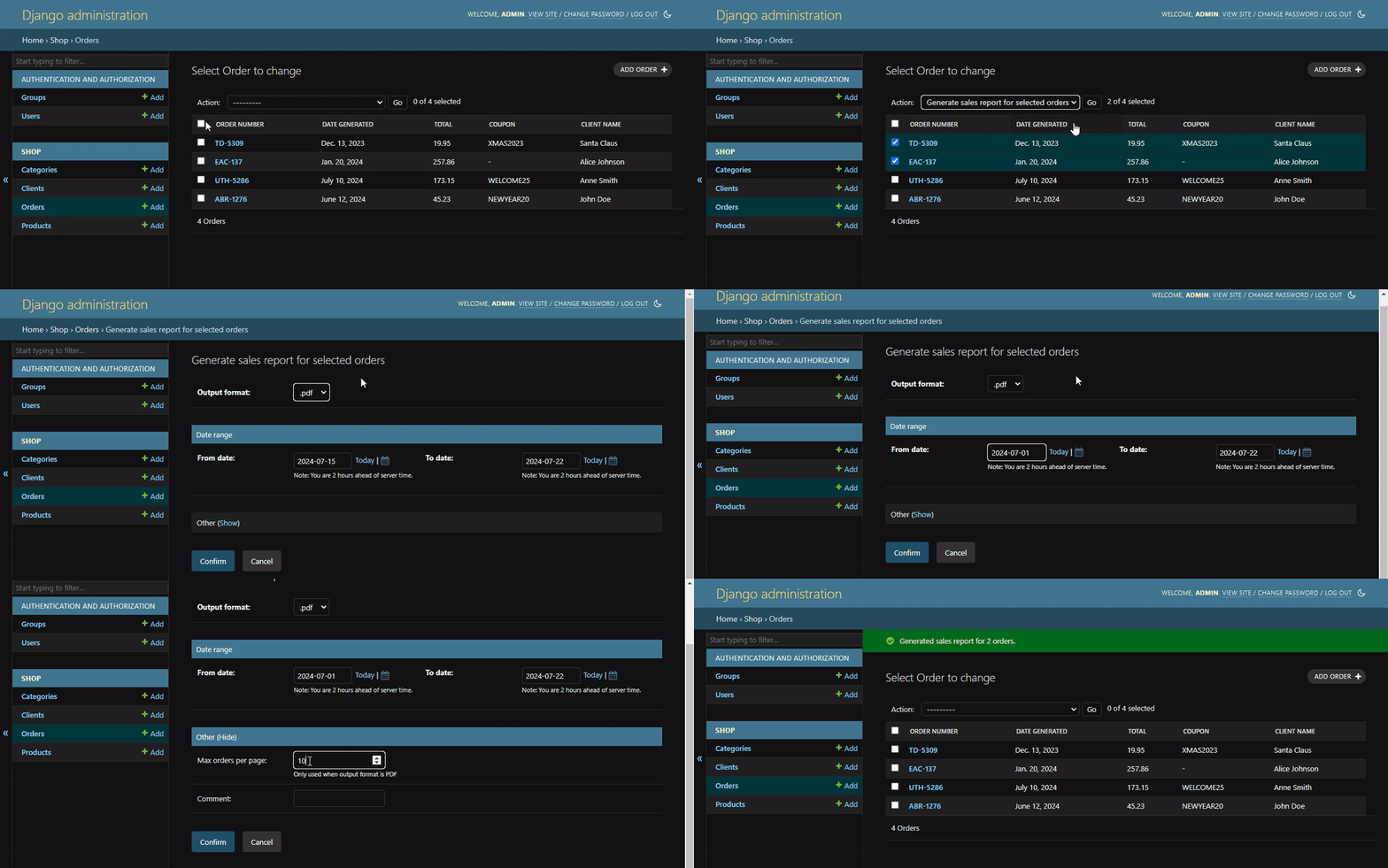
 By adding a few lines of code, you can create actions with custom forms that will be displayed in an intermediate page before the action is executed. Data from the form will be passed to the action as an additional argument.
Simple and powerful!
### 🎉 Features
- Requires minimal configuration, easy to use
- Supports all modern Django versions (3.2.x, 4.x.x, 5.x.x)
- Built on top of Django's templates and forms, matches the Django admin style
- No additional dependencies
- Supports `fields`/`fieldsets`, `filter_horizontal`/`filter_vertical` and `autocomplete_fields`
- Works with custom widgets, validators and other Django form features
- Formset support using inlines known from Django admin
- Easy to test using Django's testing tools
- Compatible with [django-no-queryset-admin-actions](https://pypi.org/project/django-no-queryset-admin-actions/)
## 🔌 Installation
1. Install using ``pip``:
```bash
$ pip3 install django-admin-action-forms
```
2. Add `'django_admin_action_forms'` to your `INSTALLED_APPS` setting.
```python
INSTALLED_APPS = [
...
'django_admin_action_forms',
]
```
3. Include `'django_admin_action_forms.urls'` in your `urls.py` file. This is needed only if you want to use autocomplete.
If you want to include them under the same path as admin site, make sure to place them **before** the admin URLs.
```python
from django.contrib import admin
from django.urls import path, include
urlpatterns = [
path("admin/action-forms/", include("django_admin_action_forms.urls")),
path("admin/", admin.site.urls),
...
]
```
...or include them under any other path.
```python
from django.contrib import admin
from django.urls import path, include
urlpatterns = [
path("admin/", admin.site.urls),
...
path("any/other/path/", include("django_admin_action_forms.urls")),
]
```
## ✏️ Examples
### Simple confirm form
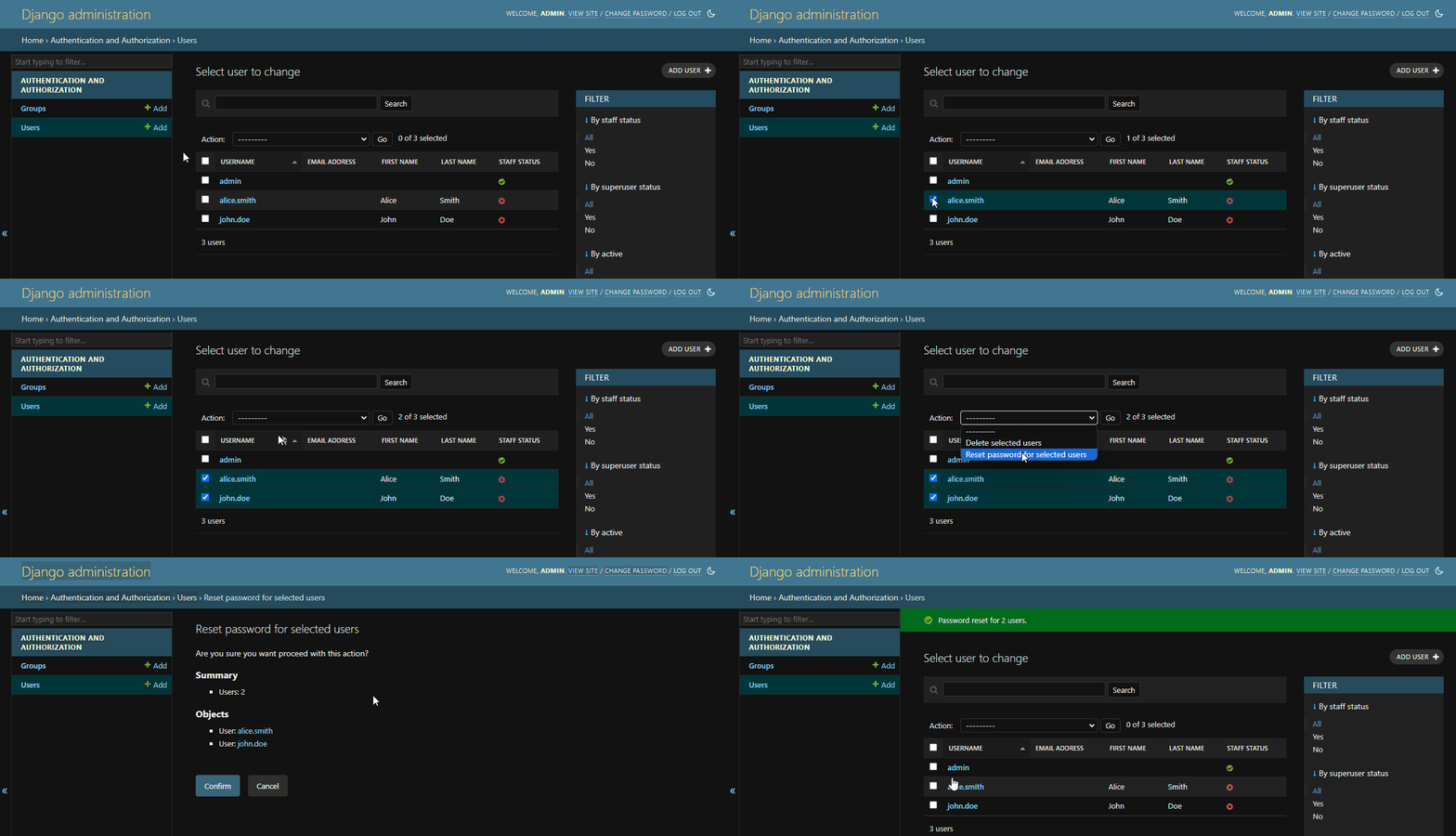
Sometimes you do not need any additional parameters, but you want to display a confirmation form before executing the action, just to make sure the user is aware of what they are doing. By default, Django displays such form for the built-in `delete_selected` action.
Let's create a simple action that will reset the password for selected users, but before that, we want to display a confirmation form.
```python
from django.contrib import admin
from django.contrib.auth.models import User
from django_admin_action_forms import AdminActionFormsMixin, AdminActionForm, action_with_form
class ResetUsersPasswordActionForm(AdminActionForm):
# No fields needed
class Meta:
list_objects = True
help_text = "Are you sure you want proceed with this action?"
@admin.register(User)
class UserAdmin(AdminActionFormsMixin, admin.ModelAdmin):
@action_with_form(
ResetUsersPasswordActionForm,
description="Reset password for selected users",
)
def reset_users_password_action(self, request, queryset, data):
self.message_user(request, f"Password reset for {queryset.count()} users.")
actions = [reset_users_password_action]
```
By doing this, we recreated the behavior of intermediate page from the built-in `delete_selected` action.
By adding a few lines of code, you can create actions with custom forms that will be displayed in an intermediate page before the action is executed. Data from the form will be passed to the action as an additional argument.
Simple and powerful!
### 🎉 Features
- Requires minimal configuration, easy to use
- Supports all modern Django versions (3.2.x, 4.x.x, 5.x.x)
- Built on top of Django's templates and forms, matches the Django admin style
- No additional dependencies
- Supports `fields`/`fieldsets`, `filter_horizontal`/`filter_vertical` and `autocomplete_fields`
- Works with custom widgets, validators and other Django form features
- Formset support using inlines known from Django admin
- Easy to test using Django's testing tools
- Compatible with [django-no-queryset-admin-actions](https://pypi.org/project/django-no-queryset-admin-actions/)
## 🔌 Installation
1. Install using ``pip``:
```bash
$ pip3 install django-admin-action-forms
```
2. Add `'django_admin_action_forms'` to your `INSTALLED_APPS` setting.
```python
INSTALLED_APPS = [
...
'django_admin_action_forms',
]
```
3. Include `'django_admin_action_forms.urls'` in your `urls.py` file. This is needed only if you want to use autocomplete.
If you want to include them under the same path as admin site, make sure to place them **before** the admin URLs.
```python
from django.contrib import admin
from django.urls import path, include
urlpatterns = [
path("admin/action-forms/", include("django_admin_action_forms.urls")),
path("admin/", admin.site.urls),
...
]
```
...or include them under any other path.
```python
from django.contrib import admin
from django.urls import path, include
urlpatterns = [
path("admin/", admin.site.urls),
...
path("any/other/path/", include("django_admin_action_forms.urls")),
]
```
## ✏️ Examples
### Simple confirm form
Sometimes you do not need any additional parameters, but you want to display a confirmation form before executing the action, just to make sure the user is aware of what they are doing. By default, Django displays such form for the built-in `delete_selected` action.
Let's create a simple action that will reset the password for selected users, but before that, we want to display a confirmation form.
```python
from django.contrib import admin
from django.contrib.auth.models import User
from django_admin_action_forms import AdminActionFormsMixin, AdminActionForm, action_with_form
class ResetUsersPasswordActionForm(AdminActionForm):
# No fields needed
class Meta:
list_objects = True
help_text = "Are you sure you want proceed with this action?"
@admin.register(User)
class UserAdmin(AdminActionFormsMixin, admin.ModelAdmin):
@action_with_form(
ResetUsersPasswordActionForm,
description="Reset password for selected users",
)
def reset_users_password_action(self, request, queryset, data):
self.message_user(request, f"Password reset for {queryset.count()} users.")
actions = [reset_users_password_action]
```
By doing this, we recreated the behavior of intermediate page from the built-in `delete_selected` action.
 ### Action with parameters
In many cases however, you will want to pass additional parameters to the action. This can be very useful for e.g.:
- Changing the status of `Order` to one of the predefined values
- Setting a discount that you input for selected `Product` objects
- Adding multiple tags to selected `Article` objects at once
- Sending mails to selected `User` objects with a custom message, title and attachments
...and many more!
Let's create an action that will change the status of selected `Order` to a value that we select using a dropdown.
```python
from django import forms
from django.contrib import admin
from django_admin_action_forms import AdminActionFormsMixin, AdminActionForm, action_with_form
from .models import Order
class ChangeOrderStatusActionForm(AdminActionForm):
status = forms.ChoiceField(
label="Status",
choices=[("new", "New"), ("processing", "Processing"), ("completed", "Completed")],
required=True,
)
@admin.register(Order)
class OrderAdmin(AdminActionFormsMixin, admin.ModelAdmin):
@action_with_form(
ChangeOrderStatusActionForm,
description="Change status for selected Orders",
)
def change_order_status_action(self, request, queryset, data):
for order in queryset:
order.status = data["status"]
order.save()
self.message_user(request, f'Status changed to {data["status"].upper()} for {queryset.count()} orders.')
actions = [change_order_status_action]
```
### Action with parameters
In many cases however, you will want to pass additional parameters to the action. This can be very useful for e.g.:
- Changing the status of `Order` to one of the predefined values
- Setting a discount that you input for selected `Product` objects
- Adding multiple tags to selected `Article` objects at once
- Sending mails to selected `User` objects with a custom message, title and attachments
...and many more!
Let's create an action that will change the status of selected `Order` to a value that we select using a dropdown.
```python
from django import forms
from django.contrib import admin
from django_admin_action_forms import AdminActionFormsMixin, AdminActionForm, action_with_form
from .models import Order
class ChangeOrderStatusActionForm(AdminActionForm):
status = forms.ChoiceField(
label="Status",
choices=[("new", "New"), ("processing", "Processing"), ("completed", "Completed")],
required=True,
)
@admin.register(Order)
class OrderAdmin(AdminActionFormsMixin, admin.ModelAdmin):
@action_with_form(
ChangeOrderStatusActionForm,
description="Change status for selected Orders",
)
def change_order_status_action(self, request, queryset, data):
for order in queryset:
order.status = data["status"]
order.save()
self.message_user(request, f'Status changed to {data["status"].upper()} for {queryset.count()} orders.')
actions = [change_order_status_action]
```
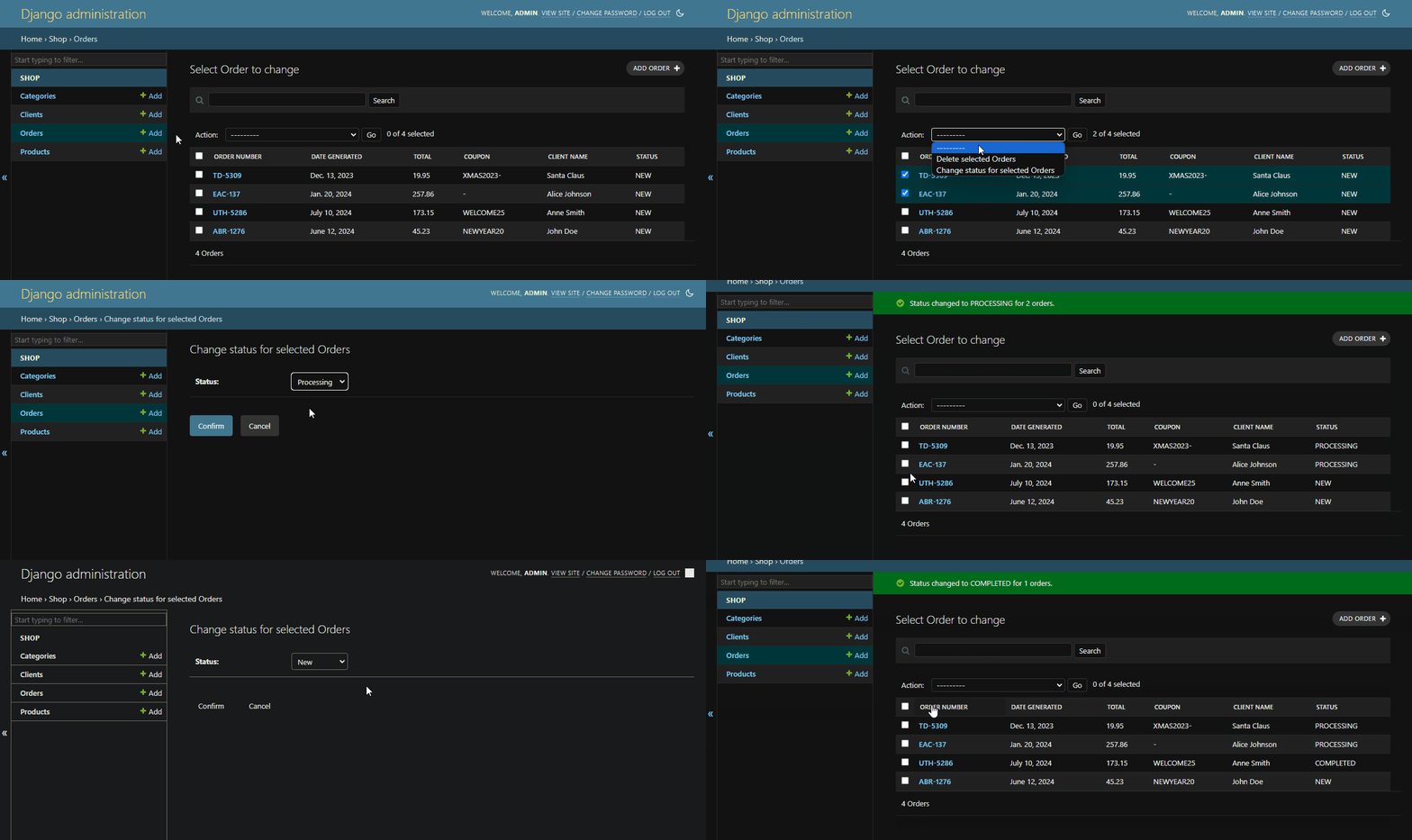 You may think that this could be achieved by creating an action for each status, but what if you have 10 statuses? 100? This way you can create a single action that will work for all of them.
And how about parameter, that is not predefined, like a date or a number? It would be impossible to create an action for each possible value.
Let's create an action form that will accept a discount for selected `Products` and a date when the discount will end.
```python
from django import forms
from django_admin_action_forms import AdminActionForm
class SetProductDiscountActionForm(AdminActionForm):
discount = forms.DecimalField(
label="Discount (%)",
min_value=0,
max_value=100,
decimal_places=2,
required=True,
)
valid_until = forms.DateField(
label="Valid until",
required=True,
)
```
You may think that this could be achieved by creating an action for each status, but what if you have 10 statuses? 100? This way you can create a single action that will work for all of them.
And how about parameter, that is not predefined, like a date or a number? It would be impossible to create an action for each possible value.
Let's create an action form that will accept a discount for selected `Products` and a date when the discount will end.
```python
from django import forms
from django_admin_action_forms import AdminActionForm
class SetProductDiscountActionForm(AdminActionForm):
discount = forms.DecimalField(
label="Discount (%)",
min_value=0,
max_value=100,
decimal_places=2,
required=True,
)
valid_until = forms.DateField(
label="Valid until",
required=True,
)
```
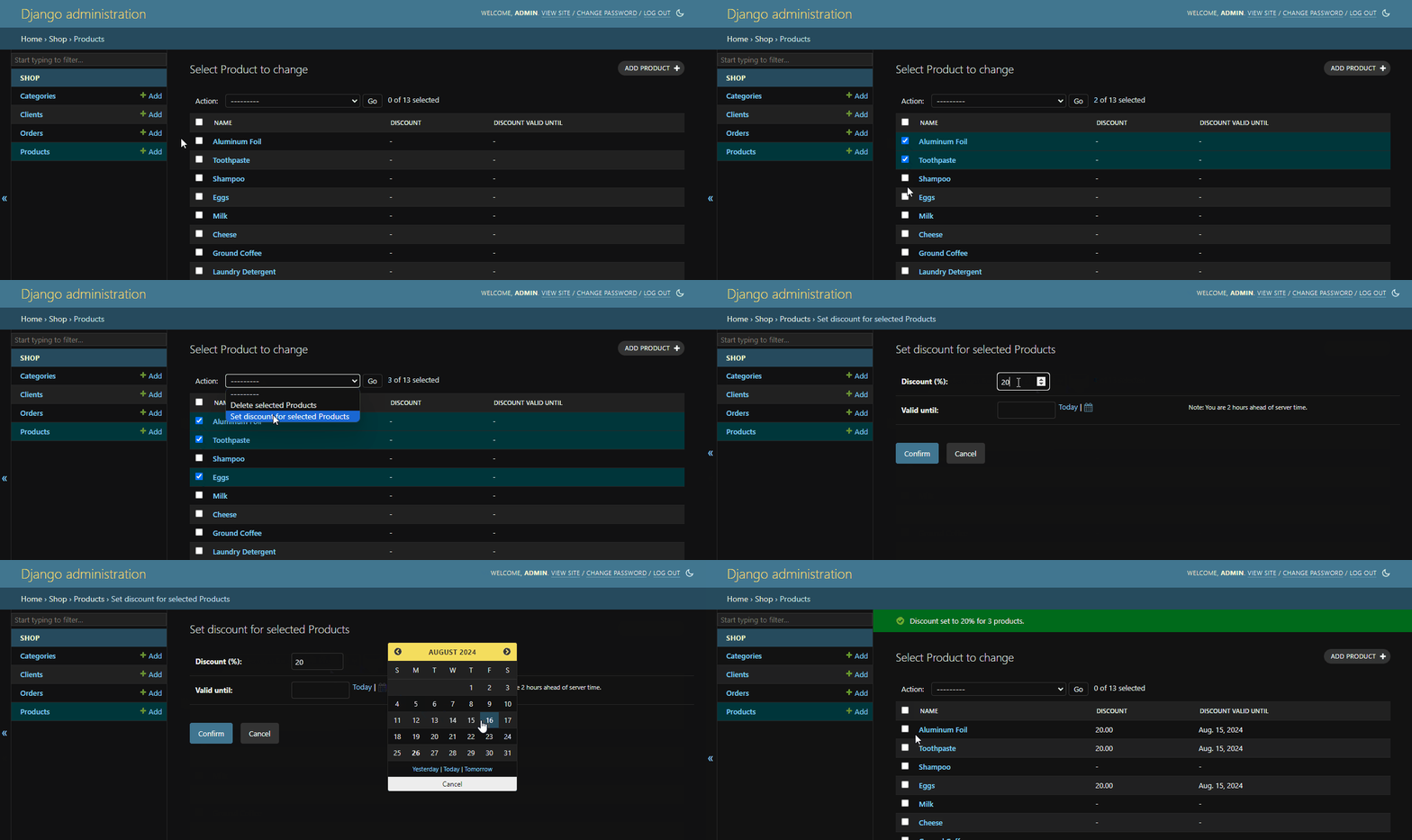 Now we can set any discount and any date, and because we subclassed [`AdminActionForm`](#adminactionform), we get a nice date picker.
### Customizing action form layout
If your form has many fields, you may want to group them into fieldsets or reorder them. You can do this by using the `fields`, `fieldsets`, or corresponding methods in `Meta`.
For `Model`-related fields, it might be useful to use `filter_horizontal`/`filter_vertical` or `autocomplete_fields`.
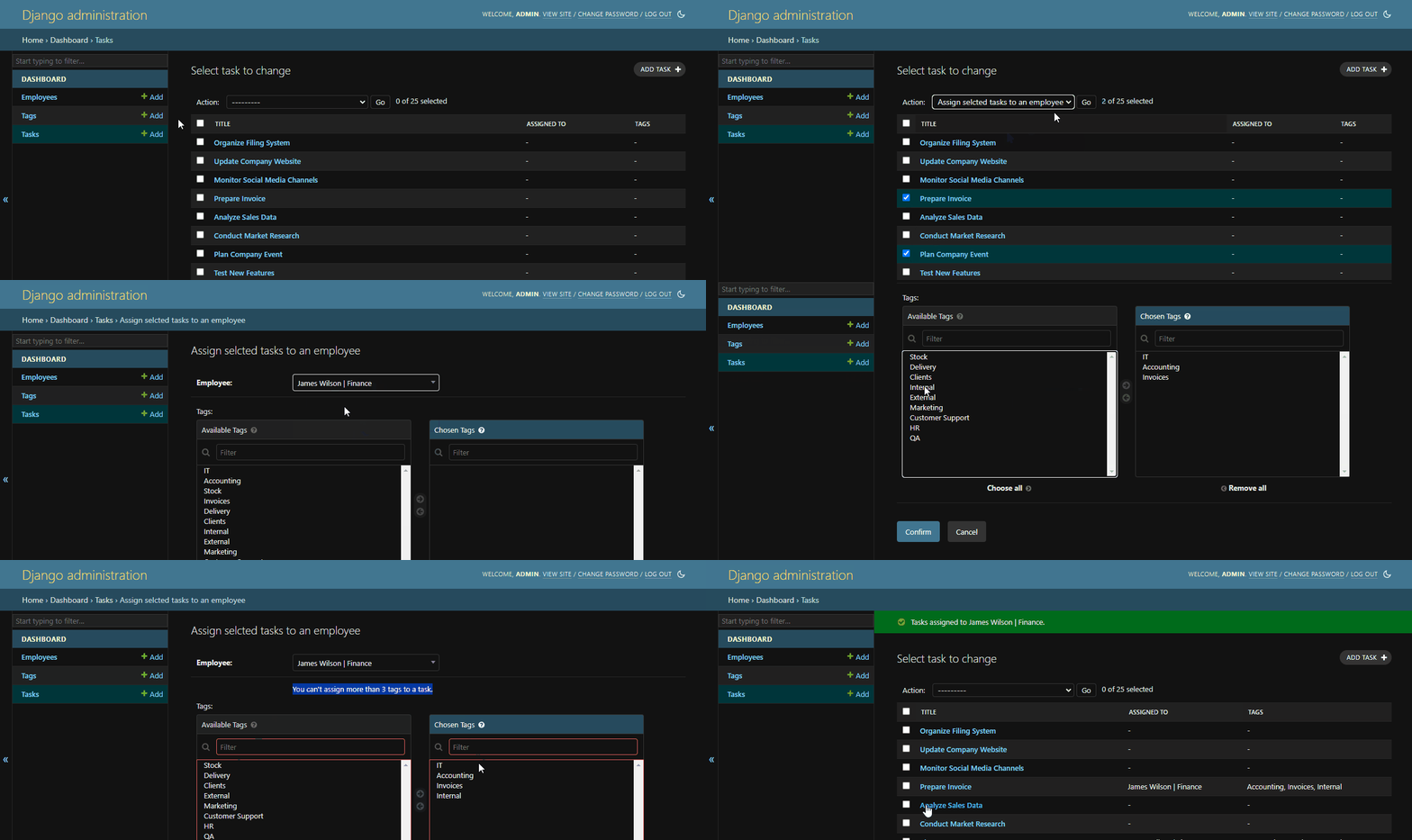
Let's create an action form for action that assigns selected `Tasks` to `Employee`, that we will select using autocomplete widget.
Also, let's add the field for setting the optional `Tags` for selected `Tasks`, and validate that no more than 3
are selected using Django's form validation.
```python
from django import forms
from django_admin_action_forms import AdminActionForm
class AssignToEmployeeActionForm(AdminActionForm):
employee = forms.ModelChoiceField(
queryset=Employee.objects.all(),
required=True,
)
tags = forms.ModelMultipleChoiceField(
queryset=Tag.objects.all(),
required=False,
)
def clean_tags(self):
tags = self.cleaned_data["tags"]
if tags.count() > 3:
raise forms.ValidationError("You can't assign more than 3 tags to a task.")
return tags
class Meta:
autocomplete_fields = ["employee"]
filter_horizontal = ["tags"]
```
Now we can set any discount and any date, and because we subclassed [`AdminActionForm`](#adminactionform), we get a nice date picker.
### Customizing action form layout
If your form has many fields, you may want to group them into fieldsets or reorder them. You can do this by using the `fields`, `fieldsets`, or corresponding methods in `Meta`.
For `Model`-related fields, it might be useful to use `filter_horizontal`/`filter_vertical` or `autocomplete_fields`.
Let's create an action form for action that assigns selected `Tasks` to `Employee`, that we will select using autocomplete widget.
Also, let's add the field for setting the optional `Tags` for selected `Tasks`, and validate that no more than 3
are selected using Django's form validation.
```python
from django import forms
from django_admin_action_forms import AdminActionForm
class AssignToEmployeeActionForm(AdminActionForm):
employee = forms.ModelChoiceField(
queryset=Employee.objects.all(),
required=True,
)
tags = forms.ModelMultipleChoiceField(
queryset=Tag.objects.all(),
required=False,
)
def clean_tags(self):
tags = self.cleaned_data["tags"]
if tags.count() > 3:
raise forms.ValidationError("You can't assign more than 3 tags to a task.")
return tags
class Meta:
autocomplete_fields = ["employee"]
filter_horizontal = ["tags"]
```
 ### Inlines
In some cases, you may need to pass a list of values to the action. These values could be as simple as numbers or they could have a more complex structure.
By using `inlines`, you can add formsets to your action form.
This is very useful when you need multiple values that share the same fields, but you do not know exactly how many there will be.
Let's say you want to set the power level plan for a fan, based on the temperature.
You can do this by creating an action form with inlines, where each inline will represent a range of temperatures and the corresponding power level.
```python
from django import forms
from django_admin_action_forms import InlineAdminActionForm, TabularAdminActionInline, AdminActionForm
class FanPowerLevelInlineForm(InlineAdminActionForm):
temperature_from = forms.IntegerField(required=True)
temperature_to = forms.IntegerField(required=True)
power = forms.IntegerField(
min_value=0,
max_value=100,
required=True,
)
class FanPowerLevelsInline(TabularAdminActionInline):
name = "fan_power_levels"
form = FanPowerLevelInlineForm
extra = 0
initial = [
{"temperature_from": 0, "temperature_to": 50, "power": 40},
{"temperature_from": 50, "temperature_to": 80, "power": 70},
{"temperature_from": 80, "temperature_to": 100, "power": 100},
]
class ConfigureFanPowerLevelsActionForm(AdminActionForm):
scale = forms.ChoiceField(
choices=[
("c", "Celsius"),
("f", "Fahrenheit"),
],
required=True,
label="Scale",
)
class Meta:
inlines = [
FanPowerLevelsInline,
]
```
### Inlines
In some cases, you may need to pass a list of values to the action. These values could be as simple as numbers or they could have a more complex structure.
By using `inlines`, you can add formsets to your action form.
This is very useful when you need multiple values that share the same fields, but you do not know exactly how many there will be.
Let's say you want to set the power level plan for a fan, based on the temperature.
You can do this by creating an action form with inlines, where each inline will represent a range of temperatures and the corresponding power level.
```python
from django import forms
from django_admin_action_forms import InlineAdminActionForm, TabularAdminActionInline, AdminActionForm
class FanPowerLevelInlineForm(InlineAdminActionForm):
temperature_from = forms.IntegerField(required=True)
temperature_to = forms.IntegerField(required=True)
power = forms.IntegerField(
min_value=0,
max_value=100,
required=True,
)
class FanPowerLevelsInline(TabularAdminActionInline):
name = "fan_power_levels"
form = FanPowerLevelInlineForm
extra = 0
initial = [
{"temperature_from": 0, "temperature_to": 50, "power": 40},
{"temperature_from": 50, "temperature_to": 80, "power": 70},
{"temperature_from": 80, "temperature_to": 100, "power": 100},
]
class ConfigureFanPowerLevelsActionForm(AdminActionForm):
scale = forms.ChoiceField(
choices=[
("c", "Celsius"),
("f", "Fahrenheit"),
],
required=True,
label="Scale",
)
class Meta:
inlines = [
FanPowerLevelsInline,
]
```
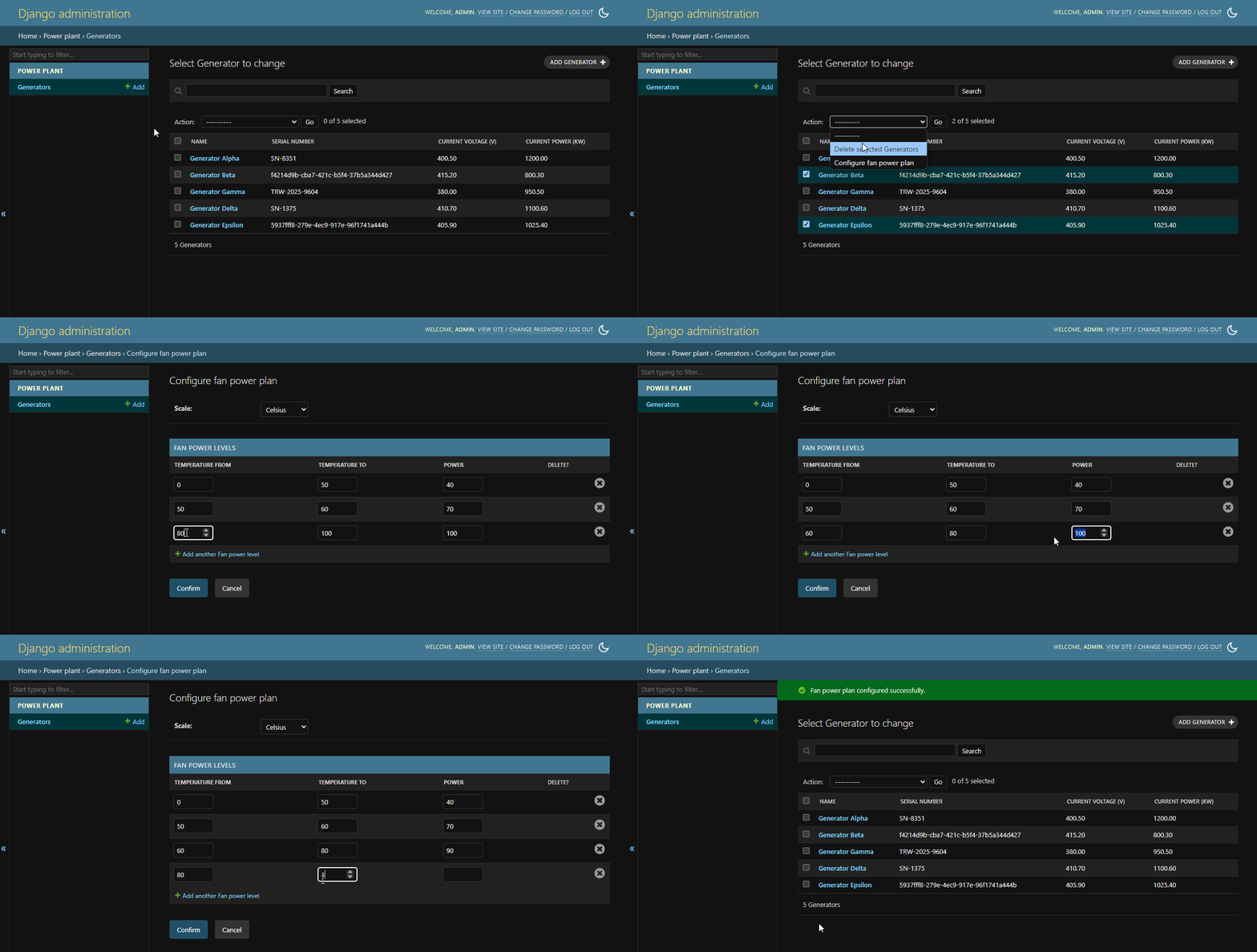 Multiple inlines can be used in the same action form, and they will be displayed in the order they are defined in `inlines`.
### Testing action forms
To test action forms, you can use Django's test client to send POST requests to model changelist with required data. The `action` and `_selected_action` fields are required, and the rest of the fields should match the action form fields.
```python
from django.contrib.auth.models import User
from django.test import TestCase
from django.urls import reverse
class ShopProductsTests(TestCase):
def setUp(self):
User.objects.create_superuser(username="admin", password="password")
self.client.login(username="admin", password="password")
def test_set_product_discount_action_form_submit(self):
change_url = reverse("admin:shop_product_changelist")
data = {
"action": "set_product_discount",
"_selected_action": [10, 12, 14],
"discount": "20",
"valid_until": "2024-12-05",
}
response = self.client.post(change_url, data, follow=True)
self.assertContains(response.rendered_content, "Discount set to 20% for 3 products.")
```
## 📄 Reference
- [`AdminActionFormsMixin`](#class-adminactionformsmixin)
- [`@action_with_form`](#action_with_formform_class--permissionsnone-descriptionnone)
- [`ActionForm`](#class-actionform)
- [`__init__()`](#def-__init__self-args-kwargs)
- [`admin_action_view()`](#def-action_form_viewself-request-extra_contextnone)
- [`AdminActionForm`](#class-adminactionform)
- [`ActionForm.Meta`](#class-actionformmeta)
- [`list_objects`](#list_objects)
- [`objects_summary`](#objects_summary)
- [`help_text`](#help_text)
- [`fields`](#fields)
- [`get_fields()`](#def-get_fieldsrequest)
- [`fieldsets`](#fieldsets)
- [`get_fieldsets()`](#def-get_fieldsetsrequest)
- [`filter_horizontal`](#filter_horizontal)
- [`filter_vertical`](#filter_vertical)
- [`autocomplete_fields`](#autocomplete_fields)
- [`radio_fields`](#radio_fields)
- [`inlines`](#inlines)
- [`get_inlines()`](#def-get_inlinesrequest)
- [`confirm_button_text`](#confirm_button_text)
- [`cancel_button_text`](#cancel_button_text)
- [`InlineActionForm`](#class-inlineactionform)
- [`InlineAdminActionForm`](#class-inlineadminactionform)
- [`InlineAdminActionFormSet`](#class-inlineadminactionformset)
- [`StackedAdminActionInline`](#class-stackedadminactioninline)
- [`TabularAdminActionInline`](#class-tabularadminactioninline)
- [`name`](#name)
- [`form`](#form)
- [`extra`](#extra)
- [`get_extra()`](#def-get_extrarequest)
- [`min_num`](#min_num)
- [`get_min_num()`](#def-get_min_numrequest)
- [`max_num`](#max_num)
- [`get_max_num()`](#def-get_max_numrequest)
- [`verbose_name`](#verbose_name)
- [`verbose_name_plural`](#verbose_name_plural)
- [`classes`](#classes)
- [`initial`](#initial)
### _class_ AdminActionFormsMixin
Class that should be inherited by all `ModelAdmin` classes that will use action forms. It provides the logic for displaying the intermediate page and handling the form submission.
```python
from django.contrib import admin
from django_admin_action_forms import AdminActionFormsMixin
class ProductAdmin(AdminActionFormsMixin, admin.ModelAdmin):
...
```
#### @action_with_form(form_class, *, permissions=None, description=None)
> Works similar to
Multiple inlines can be used in the same action form, and they will be displayed in the order they are defined in `inlines`.
### Testing action forms
To test action forms, you can use Django's test client to send POST requests to model changelist with required data. The `action` and `_selected_action` fields are required, and the rest of the fields should match the action form fields.
```python
from django.contrib.auth.models import User
from django.test import TestCase
from django.urls import reverse
class ShopProductsTests(TestCase):
def setUp(self):
User.objects.create_superuser(username="admin", password="password")
self.client.login(username="admin", password="password")
def test_set_product_discount_action_form_submit(self):
change_url = reverse("admin:shop_product_changelist")
data = {
"action": "set_product_discount",
"_selected_action": [10, 12, 14],
"discount": "20",
"valid_until": "2024-12-05",
}
response = self.client.post(change_url, data, follow=True)
self.assertContains(response.rendered_content, "Discount set to 20% for 3 products.")
```
## 📄 Reference
- [`AdminActionFormsMixin`](#class-adminactionformsmixin)
- [`@action_with_form`](#action_with_formform_class--permissionsnone-descriptionnone)
- [`ActionForm`](#class-actionform)
- [`__init__()`](#def-__init__self-args-kwargs)
- [`admin_action_view()`](#def-action_form_viewself-request-extra_contextnone)
- [`AdminActionForm`](#class-adminactionform)
- [`ActionForm.Meta`](#class-actionformmeta)
- [`list_objects`](#list_objects)
- [`objects_summary`](#objects_summary)
- [`help_text`](#help_text)
- [`fields`](#fields)
- [`get_fields()`](#def-get_fieldsrequest)
- [`fieldsets`](#fieldsets)
- [`get_fieldsets()`](#def-get_fieldsetsrequest)
- [`filter_horizontal`](#filter_horizontal)
- [`filter_vertical`](#filter_vertical)
- [`autocomplete_fields`](#autocomplete_fields)
- [`radio_fields`](#radio_fields)
- [`inlines`](#inlines)
- [`get_inlines()`](#def-get_inlinesrequest)
- [`confirm_button_text`](#confirm_button_text)
- [`cancel_button_text`](#cancel_button_text)
- [`InlineActionForm`](#class-inlineactionform)
- [`InlineAdminActionForm`](#class-inlineadminactionform)
- [`InlineAdminActionFormSet`](#class-inlineadminactionformset)
- [`StackedAdminActionInline`](#class-stackedadminactioninline)
- [`TabularAdminActionInline`](#class-tabularadminactioninline)
- [`name`](#name)
- [`form`](#form)
- [`extra`](#extra)
- [`get_extra()`](#def-get_extrarequest)
- [`min_num`](#min_num)
- [`get_min_num()`](#def-get_min_numrequest)
- [`max_num`](#max_num)
- [`get_max_num()`](#def-get_max_numrequest)
- [`verbose_name`](#verbose_name)
- [`verbose_name_plural`](#verbose_name_plural)
- [`classes`](#classes)
- [`initial`](#initial)
### _class_ AdminActionFormsMixin
Class that should be inherited by all `ModelAdmin` classes that will use action forms. It provides the logic for displaying the intermediate page and handling the form submission.
```python
from django.contrib import admin
from django_admin_action_forms import AdminActionFormsMixin
class ProductAdmin(AdminActionFormsMixin, admin.ModelAdmin):
...
```
#### @action_with_form(form_class, *, permissions=None, description=None)
> Works similar to
@admin.action
Decorator that can be used instead of `@admin.action` to create action with custom form.
Functions decorated with `@action_with_form` should accept additional argument `data` that will contain cleaned data from the form, `permissions` and `description` work the same.
```python
@action_with_form(
CustomActionForm,
description="Description of the action",
)
def custom_action(self, request, queryset, data):
value_of_field1 = data["field1"]
optional_value_of_field2 = data.get("field2")
...
```
### _class_ ActionForm
> Works similar to
Form
Base class for creating action forms responsible for all under the hood logic. Nearly always you will want to subclass `AdminActionForm` instead of `ActionForm`, as it provides additional features.
#### _def_ \_\_init\_\_(self, *args, **kwargs)
> From version 2.0.0 replaces `__post_init__` method
Constructor for action forms that can be used to dynamically modify the form based on the `modeladmin`, `request` and `queryset` that are passed to the constructor and accessible from `self`.
It is possible to add, modify and remove fields, change the layout of the form and other options from `Meta` class.
```python
class CustomActionForm(AdminActionForm):
def __init__(self, *args, **kwargs):
super().__init__(*args, **kwargs)
if self.request.user.is_superuser:
self.fields["field1"].required = False
self.opts.fields = ["field2", "field1"]
self.opts.list_objects = self.queryset.count() > 10
```
#### _def_ action_form_view(self, request, extra_context=None)
> Added in version 2.0.0
Method used for rendering the intermediate page with form. It can be used to do some checks before displaying the form and e.g. redirect to another page if the user is not allowed to perform the action.
It can also be used for providing `extra_context` to the template, which can be especially useful when extending the action form template.
```python
class CustomActionForm(AdminActionForm):
def action_form_view(self, request, extra_context=None):
if self.queryset.count() > 3:
self.modeladmin.message_user(
request, "No more than 3 objects can be selected.", "error"
)
return HttpResponseRedirect(request.path)
return super().action_form_view(request, {"custom_context_value": ...})
```
### _class_ AdminActionForm
In addition to `ActionForm`, it replaces default widgets for most field types with corresponding Django admin widgets that e.g. add a interactive date picker or prepend a clickable link above URL fields.
Most of the time this is a class you want to subclass when creating custom action forms.
```python
class CustomActionForm(AdminActionForm):
field1 = forms.ChoiceField(
label="Field 1",
choices=[(1, "Option 1"), (2, "Option 2"), (3, "Option 3")],
)
field2 = forms.CharField(
label="Field 2",
required=False,
widget=forms.TextInput
)
field3 = forms.DateField(label="Field 3", initial="2024-07-15")
...
```
### _class_ ActionForm.Meta
> Works similar to some
ModelAdmin options
Additional configuration for action forms. It can be used to customize the layout of the form, add help text, or display a list of objects that will be affected by the action.
```python
class CustomActionForm(AdminActionForm):
...
class Meta:
list_objects = True
help_text = "This is a help text"
...
```
Below you can find all available options:
#### list_objects
Default: `False`
If `True`, the intermediate page will display a list of objects that will be affected by the action similarly
to the intermediate page for built-in `delete_selected` action.
```python
class Meta:
list_objects = True
```
#### objects_summary
> _Added in version 2.2.0_
Default: `True` if `list_objects` is `True`, otherwise `False`
If `True`, the intermediate page will display a summary section showing the count of objects that will be affected by the action.
When `list_objects` is `True`, `objects_summary` defaults to `True` unless explicitly overridden.
```python
# Show both summary and individual objects (default behavior when list_objects=True)
class Meta:
list_objects = True
# objects_summary defaults to True
# Show only individual objects without summary
class Meta:
list_objects = True
objects_summary = False
# Show only summary without individual objects
class Meta:
list_objects = False
objects_summary = True
# Show neither summary nor objects
class Meta:
list_objects = False
objects_summary = False
```
#### help_text
Default: `None`
Text displayed between the form and the list of objects or form in the intermediate page.
```python
class Meta:
help_text = "This text will be displayed between the form and the list of objects"
```
#### fields
> Works similar to
ModelAdmin.fields
Default: `None`
Specifies the fields that should be displayed in the form. If `fieldsets` is provided, `fields` will be ignored.
```python
class Meta:
fields = ["field1", ("field2", "field3")]
```
#### _def_ get_fields(request)
> Works similar to
ModelAdmin.get_fields()
Method that can be used to dynamically determine fields that should be displayed in the form. Can be used to reorder, group or exclude fields based on the `request`. Should return a list of fields, as described above in the [`fields`](#fields).
```python
class Meta:
def get_fields(self, request):
if request.user.is_superuser:
return ["field1", "field2", "field3"]
else:
return ["field1", "field2"]
```
#### fieldsets
> Works similar to
ModelAdmin.fieldsets
Default: `None`
If both `fields` and `fieldsets` are provided, `fieldsets` will be used.
```python
class Meta:
fieldsets = [
(
None,
{
"fields": ["field1", "field2", ("field3", "field4")],
},
),
(
"Fieldset 2",
{
"classes": ["collapse"],
"fields": ["field5", ("field6", "field7")],
"description": "This is a description for fieldset 2",
},
),
]
```
#### _def_ get_fieldsets(request)
> Works similar to
ModelAdmin.get_fieldsets()
Method that can be used to dynamically determine fieldsets that should be displayed in the form. Can be used to reorder, group or exclude fields based on the `request`. Should return a list of fieldsets, as described above in the [`fieldsets`](#fieldsets).
```python
class Meta:
def get_fieldsets(self, request):
if request.user.is_superuser:
return [
(
None,
{
"fields": ["field1", "field2", ("field3", "field4")],
},
),
(
"Fieldset 2",
{
"classes": ["collapse"],
"fields": ["field5", ("field6", "field7")],
"description": "This is a description for fieldset 2",
},
),
]
else:
return [
(
None,
{
"fields": ["field1", "field2", ("field3", "field4")],
},
),
]
```
> [!NOTE]
> Only one of `get_fieldsets`, `fieldsets`, `get_fields` or `fields` should be defined in the `Meta` class.
> The order of precedence, from highest to lowest, is from left to right.
#### filter_horizontal
> Works similar to
ModelAdmin.filter_horizontal
Default: `None`
Sets fields that should use horizontal filter widget. It should be a list of field names.
```python
class Meta:
filter_horizontal = ["tags"]
```
#### filter_vertical
> Works similar to
ModelAdmin.filter_vertical
Default: `None`
Sets fields that should use vertical filter widget. It should be a list of field names.
```python
class Meta:
filter_vertical = ["tags"]
```
#### autocomplete_fields
> Works similar to
ModelAdmin.autocomplete_fields
Default: `None`
Sets fields that should use autocomplete widget. It should be a list of field names.
```python
class Meta:
autocomplete_fields = ["employee"]
```
> [!NOTE]
> Autocomplete requires including `'django_admin_action_forms.urls'` in your `urls.py` file.
> See [🔌 Installation](#-installation).
#### radio_fields
> Works similar to
ModelAdmin.radio_fields
> _Added in version 2.1.0_
Default: `{}`
Sets fields that should use a radio-button interface.
You have the choice of using `HORIZONTAL` or `VERTICAL` from the `django.contrib.admin` module.
Don’t include a field in `radio_fields` unless it’s a `ChoiceField` or its subclass.
```python
class Meta:
radio_fields = {
"field1": admin.HORIZONTAL,
"field2": admin.VERTICAL,
}
```
#### inlines
> Works similar to
ModelAdmin.inlines
> _Added in version 2.1.0_
Default: `[]`
Sets inlines that should used in the form.
It should be a list of classes based on `StackedAdminActionInline` or `TabularAdminActionInline`.
```python
class Meta:
inlines = [
CustomAdminActionInline,
]
```
#### _def_ get_inlines(request)
> Works similar to
ModelAdmin.get_inlines()
> _Added in version 2.1.0_
Method that can be used to dynamically determine inlines that should be used in the form.
Should return a list of classes based on `StackedAdminActionInline` or `TabularAdminActionInline`.
```python
class Meta:
def get_inlines(self, request):
if request.user.is_superuser:
return [
CustomAdminActionInline
]
else:
return []
```
#### confirm_button_text
> _Added in version 1.2.0_
Default: `"Confirm"`
Text displayed on the confirm button. It can be either a `str` or a lazy translation.
```python
from django.utils.translation import gettext_lazy as _
class Meta:
confirm_button_text = _("Proceed")
```
#### cancel_button_text
> _Added in version 1.2.0_
Default: `"Cancel"`
Text displayed on the cancel button. It can be either a `str` or a lazy translation.
```python
from django.utils.translation import gettext_lazy as _
class Meta:
cancel_button_text = _("Abort")
```
### _class_ InlineActionForm
### _class_ InlineAdminActionForm
> _Added in version 2.1.0_
Version of `ActionForm` and `AdminActionForm` that is used for inlines. Supports all of the features of `ActionForm` and selected `Meta` options.
Because some `Meta` options like `list_objects` or `help_text` do not make sense in the context of inlines, they do nothing.
That said, you can still use e.g. `fields`, `filter_horizontal`, or `autocomplete_fields`.
```python
class CustomInlineActionForm(InlineActionForm):
field1 = forms.ChoiceField(
label="Field 1",
choices=[(1, "Option 1"), (2, "Option 2"), (3, "Option 3")],
)
field2 = forms.CharField(
label="Field 2",
required=False,
widget=forms.TextInput
)
field3 = forms.DateField(label="Field 3", initial="2024-07-15")
...
```
### _class_ InlineAdminActionFormSet
### _class_ StackedAdminActionInline
### _class_ TabularAdminActionInline
> Works similar to
InlineModelAdmin
> _Added in version 2.1.0_
Class that defines the layout of inline formset as well as its other options not directly related to the form.
All subclasses of `InlineAdminActionFormSet` should have `prefix` and `form` defined, all other attributes are optional.
```python
class CustomAdminActionInline(StackedAdminActionInline):
name = "something"
form = CustomActionInlineForm
verbose_name = "..."
verbose_name_plural = "..."
extra = 3
min_num = 1
max_num = 5
classes = ["collapse"]
initial = [
{"field1": ..., "field2": ...},
{"field1": ..., "field2": ...},
]
```
#### name
A string used internally by the formset. It should be a valid python identifier, and when using multiple inlines inside one action form, each inline should have a unique `name`. It is used as a key in `data` dictionary that is passed to the action.
This is required.
#### form
> Works similar to
InlineModelAdmin.model
Form used in the formset. It should be a subclass of `InlineAdminActionForm` or `InlineActionForm`.
This is required.
#### extra
> Works similar to
InlineModelAdmin.extra
Default: `1`
Number of extra forms the formset will display in addition to the initial forms.
#### _def_ get_extra(request)
> Works similar to
InlineModelAdmin.get_extra()
Returns the number of extra inline forms to use. By default, returns the `InlineAdminActionFormSet.extra` attribute.
Override this method to programmatically determine the number of extra inline forms.
#### min_num
> Works similar to
InlineModelAdmin.min_num
Default: `0`
Minimum number of forms to show in the inline.
#### _def_ get_min_num(request)
> Works similar to
InlineModelAdmin.get_min_num()
Returns the minimum number of inline forms to use. By default, returns the `InlineAdminActionFormSet.min_num` attribute.
Override this method to programmatically determine the minimum number of inline forms.
#### max_num
> Works similar to
InlineModelAdmin.max_num
Default: `1000`
Maximum number of forms to show in the inline.
#### _def_ get_max_num(request)
> Works similar to
InlineModelAdmin.get_max_num()
Returns the maximum number of extra inline forms to use. By default, returns the `InlineAdminActionFormSet.max_num` attribute.
Override this method to programmatically determine the maximum number of inline forms.
#### verbose_name
> Works similar to
InlineModelAdmin.verbose_name
Used in inline template to display the name of the formset. It should be a string or a lazy translation. By default it uses the `InlineAdminActionFormSet.prefix` attribute.
#### verbose_name_plural
> Works similar to
InlineModelAdmin.verbose_name_plural
If this isn’t given and the `InlineAdminActionFormSet.verbose_name` is defined, it will be set to `InlineAdminActionFormSet.verbose_name` + `'s'`.
#### classes
> Works similar to
InlineModelAdmin.classes
Default: `[]`
A list or tuple containing extra CSS classes to apply to the fieldset that is rendered for the inlines. As with classes configured in `ModelAdmin.fieldsets`, inlines with a `"collapse"` class will be initially collapsed using an expandable widget.
#### initial
> Works similar to
FormSet.initial
Default: `None`
List of dictionaries used to prepopulate the formset with initial data. Each dictionary should contain the same keys as the fields in the formset.