# DisruptorRecomp
 A native PC static recompilation of **Disruptor (USA, SLUS-00224)**, built on
[PSXRecomp](https://github.com/mstan/psxrecomp). The original PlayStation code
is translated ahead of time and compiled into a native executable.
**In development.** Windows x64 is the primary target. This source repository
contains no game data or prebuilt game executable. You must supply the supported
disc revision; the redistributable OpenBIOS backend is used for booting.
## Features
- OpenGL rendering at 1x–8x internal resolution, with 4x as the default.
- Optional widescreen: 16:9, 21:9, 32:9, or Match window. The main menu fills
the screen too, movies stay at 4:3, and the HUD retains its proportions. A
HUD size setting shrinks it toward the screen edges.
- Optional geometry and perspective-texture correction.
- Optional gap filling, a depth-sorted world, and experimental ambient
occlusion on top of geometry correction.
- Optional 60 FPS gameplay and in-between frames.
- Keyboard/controller input and optional modern WASD/mouse controls.
- Optional smooth mouse turning between the game's 256 turn steps.
- Experimental vertical mouse look and weapon aim.
- In-game settings for controls, display, fullscreen, VSync, volume, and mute.
- Diagnostic views and a screen recorder for reports of a fault in the picture.
- Memory-card saves and twelve save-state slots.
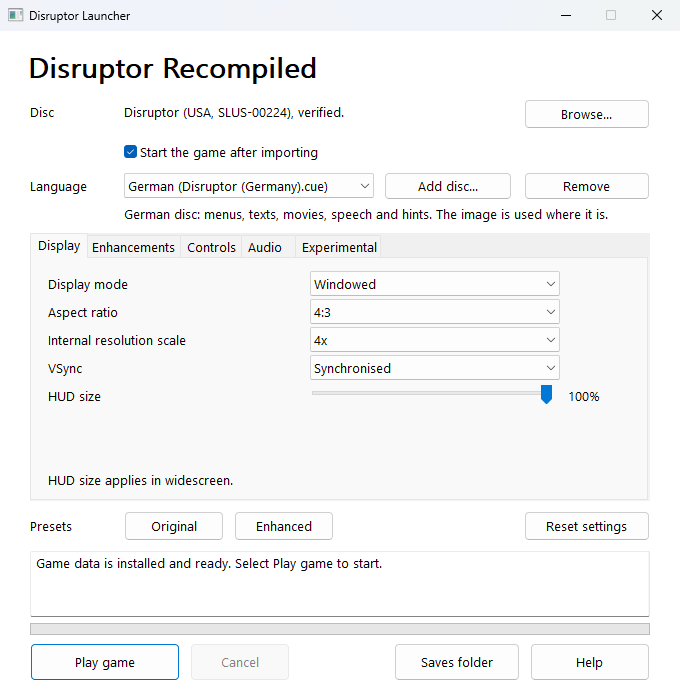
- Windows launcher with disc-image browsing, automatic copy/CUE setup,
full-disc SHA-256 verification, the game's settings with a hint for each,
and game launch.
- Optional French, German, and Japanese game content from an additional disc
image you own; the supported USA disc remains required.
- Optional intro skipping and a key to skip a logo or movie.
## Play the Windows alpha
[Download v0.1.0-alpha.4](https://github.com/micmea668/DisruptorRecomp/releases/tag/v0.1.0-alpha.4),
extract the Windows ZIP, and open **DisruptorLauncher.exe**. Browse to your
supported USA disc image; the launcher installs, verifies, and starts the game.
OpenBIOS is included; no build tools are needed. See the [getting-started guide](docs/PLAYING.md) for prerequisites,
controls, saves, and troubleshooting.
The launcher accepts USA CUE/BIN (or an identical raw ISO/IMG) and keeps your
original dump. It also holds the game's settings and can take the game's
language from a French, German or Japanese disc image that you add. Cooked
ISOs are not supported, and a PAL or Japanese disc cannot be the game disc itself.
A native PC static recompilation of **Disruptor (USA, SLUS-00224)**, built on
[PSXRecomp](https://github.com/mstan/psxrecomp). The original PlayStation code
is translated ahead of time and compiled into a native executable.
**In development.** Windows x64 is the primary target. This source repository
contains no game data or prebuilt game executable. You must supply the supported
disc revision; the redistributable OpenBIOS backend is used for booting.
## Features
- OpenGL rendering at 1x–8x internal resolution, with 4x as the default.
- Optional widescreen: 16:9, 21:9, 32:9, or Match window. The main menu fills
the screen too, movies stay at 4:3, and the HUD retains its proportions. A
HUD size setting shrinks it toward the screen edges.
- Optional geometry and perspective-texture correction.
- Optional gap filling, a depth-sorted world, and experimental ambient
occlusion on top of geometry correction.
- Optional 60 FPS gameplay and in-between frames.
- Keyboard/controller input and optional modern WASD/mouse controls.
- Optional smooth mouse turning between the game's 256 turn steps.
- Experimental vertical mouse look and weapon aim.
- In-game settings for controls, display, fullscreen, VSync, volume, and mute.
- Diagnostic views and a screen recorder for reports of a fault in the picture.
- Memory-card saves and twelve save-state slots.
- Windows launcher with disc-image browsing, automatic copy/CUE setup,
full-disc SHA-256 verification, the game's settings with a hint for each,
and game launch.
- Optional French, German, and Japanese game content from an additional disc
image you own; the supported USA disc remains required.
- Optional intro skipping and a key to skip a logo or movie.
## Play the Windows alpha
[Download v0.1.0-alpha.4](https://github.com/micmea668/DisruptorRecomp/releases/tag/v0.1.0-alpha.4),
extract the Windows ZIP, and open **DisruptorLauncher.exe**. Browse to your
supported USA disc image; the launcher installs, verifies, and starts the game.
OpenBIOS is included; no build tools are needed. See the [getting-started guide](docs/PLAYING.md) for prerequisites,
controls, saves, and troubleshooting.
The launcher accepts USA CUE/BIN (or an identical raw ISO/IMG) and keeps your
original dump. It also holds the game's settings and can take the game's
language from a French, German or Japanese disc image that you add. Cooked
ISOs are not supported, and a PAL or Japanese disc cannot be the game disc itself.
 Join the [community Discord](https://discord.gg/aeTQjaQUr) to discuss the project
and share feedback.
## Build and run
Install Git, Python 3.10+, CMake 3.20+, and a Windows x64 C++ toolchain. Visual Studio
with **Desktop development with C++** is supported; Ninja is recommended.
Place these files from your own supported disc in `input/`:
- `SLUS_002.24`
- `Disruptor (USA).cue` and the `.bin` track it references
Check the required hashes and disc format in [DISC.md](docs/DISC.md). Then run from
an x64 developer PowerShell:
```powershell
powershell -ExecutionPolicy Bypass -File .\build.ps1
.\run.ps1
```
To enable modern controls, widescreen, and texture/geometry correction at launch:
```powershell
.\run.ps1 -ModernControls -Widescreen -GeometryCorrection -PerspectiveTextures
```
See [build details](docs/BUILD.md) for Linux instructions, generated-code
requirements, and test commands.
## Controls and settings
Press **backquote** (`` ` ``) to open settings; **Escape** closes them. Gameplay
continues while the menu is open, but game input is blocked.
With modern controls enabled: **WASD** moves, **left mouse** fires, **right
mouse** uses psionics, **Space** jumps, and **E** interacts. **Middle-click**
captures the mouse; middle-click or Escape releases it. Add `-VerticalLook` to
enable experimental vertical aim.
**Alt+Enter** toggles fullscreen. **Shift+F1–F12** saves a state;
**F1–F12** loads it. Save states require a matching build and supported game.
Controls, Enhancements, Experimental, Language, System, Debug, and Cheats are
the available settings tabs.
Preferences are stored in `settings.toml` beside the executable. Explicit launch
options override saved preferences for that run. God Mode resets off on launch.
Granting all weapons and psionics marks the game as cheated and carries that
consequence into subsequent game saves.
## Status and documentation
The first mission has been exercised on Windows. The recent 8x / 32:9 training
retest and save-state restart check passed after fixing an ultrawide rendering
buffer overflow. Full campaign and release validation remain incomplete; minor
geometry and texture artifacts can remain.
- [Current status and known limits](docs/STATUS.md)
- [Build details](docs/BUILD.md)
- [Supported disc revision](docs/DISC.md)
- [Contributing](CONTRIBUTING.md)
- [Third-party notices](THIRD_PARTY_NOTICES.md)
Join the [community Discord](https://discord.gg/aeTQjaQUr) to discuss the project
and share feedback.
## Build and run
Install Git, Python 3.10+, CMake 3.20+, and a Windows x64 C++ toolchain. Visual Studio
with **Desktop development with C++** is supported; Ninja is recommended.
Place these files from your own supported disc in `input/`:
- `SLUS_002.24`
- `Disruptor (USA).cue` and the `.bin` track it references
Check the required hashes and disc format in [DISC.md](docs/DISC.md). Then run from
an x64 developer PowerShell:
```powershell
powershell -ExecutionPolicy Bypass -File .\build.ps1
.\run.ps1
```
To enable modern controls, widescreen, and texture/geometry correction at launch:
```powershell
.\run.ps1 -ModernControls -Widescreen -GeometryCorrection -PerspectiveTextures
```
See [build details](docs/BUILD.md) for Linux instructions, generated-code
requirements, and test commands.
## Controls and settings
Press **backquote** (`` ` ``) to open settings; **Escape** closes them. Gameplay
continues while the menu is open, but game input is blocked.
With modern controls enabled: **WASD** moves, **left mouse** fires, **right
mouse** uses psionics, **Space** jumps, and **E** interacts. **Middle-click**
captures the mouse; middle-click or Escape releases it. Add `-VerticalLook` to
enable experimental vertical aim.
**Alt+Enter** toggles fullscreen. **Shift+F1–F12** saves a state;
**F1–F12** loads it. Save states require a matching build and supported game.
Controls, Enhancements, Experimental, Language, System, Debug, and Cheats are
the available settings tabs.
Preferences are stored in `settings.toml` beside the executable. Explicit launch
options override saved preferences for that run. God Mode resets off on launch.
Granting all weapons and psionics marks the game as cheated and carries that
consequence into subsequent game saves.
## Status and documentation
The first mission has been exercised on Windows. The recent 8x / 32:9 training
retest and save-state restart check passed after fixing an ultrawide rendering
buffer overflow. Full campaign and release validation remain incomplete; minor
geometry and texture artifacts can remain.
- [Current status and known limits](docs/STATUS.md)
- [Build details](docs/BUILD.md)
- [Supported disc revision](docs/DISC.md)
- [Contributing](CONTRIBUTING.md)
- [Third-party notices](THIRD_PARTY_NOTICES.md)