


https://github.com/user-attachments/assets/015cb7d9-4363-4f9d-90e0-e6598e996f97
---
`wallapop` is a terminal cli for wallapop that lets you search with every filter the web has, watch searches, items, and sellers for changes, and chat with sellers, all from your own account. it compiles to one static Go binary. output is json by default so everything pipes into `jq`. `--format pretty` is for humans.
[documentation](https://wallapop.micr.dev/docs) | [command demos](https://wallapop.micr.dev/docs/examples) | [npm](https://www.npmjs.com/package/wallapop-cli) | [github](https://github.com/Microck/wallapop-cli)

## why
if you already use wallapop and want it in the terminal, this cli gives you a practical path without the browser. search once and keep the results as a stream of events, talk to sellers from your own account, and use every filter the site offers, all from one static binary with no daemon. output is json by default, so scripts, agents, and shell pipelines all read the same thing.
## quickstart
### linux or macos
install the binary with curl:
```bash
curl -fsSL https://wallapop.micr.dev/install.sh | sh
wallapop --version
```
the installer places `wallapop` in `~/.local/bin` (override with `WALLAPOP_INSTALL_DIR`).
### windows
install via scoop:
```powershell
scoop bucket add microck https://github.com/Microck/scoop-bucket
scoop install wallapop
wallapop --version
```
### using a package manager
```bash
# homebrew
brew install Microck/tap/wallapop
# npm
npm install -g wallapop-cli
# arch linux (aur)
yay -S wallapop-cli-bin
```
### go install
```bash
go install github.com/Microck/wallapop-cli/cmd/wallapop@latest
wallapop --version
```
release binaries include the pinned Galleton session engine; there is no separate install.
`go install` source builds prepare that same pinned engine on their first authenticated use,
using the Go toolchain and module cache (network is needed only if the module is not cached).
For a fully bundled source build, clone this repository and run `make install`.
every release ships `checksums.txt` with a github provenance attestation:
```sh
gh release download --repo Microck/wallapop-cli --pattern checksums.txt
gh attestation verify checksums.txt --repo Microck/wallapop-cli
```
check that the install works:
```bash
wallapop --version
wallapop doctor
```
`doctor` checks that the config parses, shows the proxy in use, checks that the session mints, wallapop is reachable, and the cli can fetch the chat token.
### auth
wallapop keeps your login in an http-only browser cookie, so the cli imports it instead of asking for a password. password, google, apple, and facebook accounts all work the same way.
1. log in at es.wallapop.com in your browser
2. export cookies with an extension such as cookie-editor, or copy the value of `__Secure-next-auth.session-token`
3. run `wallapop auth login` and paste the file path or the value, or pass `--cookies FILE`
the export can be a netscape `cookies.txt`, cookie-editor or editthiscookie json (array or `{"url", "cookies"}` wrapper), a devtools cookie list, a `Cookie:` header, or the bare cookie value. the format is detected (`--cookies-format` overrides it) and only wallapop.com cookies are read, so a whole-browser export works too.
```bash
# interactive prompt (paste cookie value or file path)
wallapop auth login
# import from an exported cookie file
wallapop auth login --cookies ~/Downloads/cookies.txt
wallapop auth login --cookies ~/Downloads/cookies.json
# read from stdin
cat cookies.txt | wallapop auth login --cookies-stdin
```
the cli imports the session and stores rotated credentials in a private encrypted vault. `credentials.toml` holds a session reference and account metadata, not the managed cookie. existing saved sessions migrate on their next authenticated use. your account location becomes the default search centre.
Wallapop can still expire or revoke a session, so you may need to log in again.
for renewal between commands, explicitly enable startup at OS login:
```bash
wallapop auth service enable
wallapop auth service status
wallapop auth service disable
```
`wallapop auth service run` is the foreground alternative for your own supervisor. the CLI never silently installs an OS startup service: after a successful `wallapop auth login` in a terminal it asks `keep this login alive in the background? [Y/n]`, and yes runs `wallapop auth service enable`. `--service` / `--no-service` answer without asking (`--service` works with `--no-input`); `--no-input`, CI, `WALLAPOP_SESSION_TOKEN` and a non-terminal skip the question. without the service, `wallapop auth status` and `wallapop doctor` warn (without failing) when the imported session cookie expires within 48 hours. see [session lifecycle and recovery](docs/galleton.md).
check session status or verify credentials:
```bash
wallapop auth status
wallapop auth refresh
```
run multiple accounts side by side using profiles:
```bash
wallapop auth login --cookies alt.txt --profile alt
wallapop profile list
wallapop profile use alt
wallapop search "bici" --profile alt
```
for ci, pass `WALLAPOP_SESSION_TOKEN` in the environment so the cli writes no credentials file to disk:
```bash
export WALLAPOP_SESSION_TOKEN="..."
wallapop search "bici" --format jsonl
```
### proxy
set `proxy` in config.toml or `WALLAPOP_PROXY` (`socks5h://127.0.0.1:1080`, `http://host:port`). all wallapop traffic then goes through it, session renewals included, and if it is unreachable the command fails with exit `6`; it never falls back to a direct connection. config.toml is world-readable, so a proxy with credentials goes in `WALLAPOP_PROXY` only.
```bash
wallapop config set proxy socks5h://127.0.0.1:1080
```
when wallapop's cloudfront blocks a request (its 403 page, or a 429), the command exits `5` and the cli pauses session renewals for 15 minutes so they stop knocking from the same address. `wallapop auth service status` shows the pause. see [session lifecycle and recovery](docs/galleton.md#blocks-and-pauses).
## updates
```bash
wallapop update
wallapop update --check
wallapop update --yes
```
eligible interactive commands check for a new stable release at most once a day and ask `Update? [Y/n]`. `auth`, `watch`, `completion`, `help`, and `update` are excluded from automatic checks. scripts, MCP, and `--no-input` never prompt or check automatically. set `WALLAPOP_NO_UPDATE_CHECK=1` to disable automatic checks. npm, Homebrew, Scoop, and AUR installs update through their package manager; direct binaries use checksum-verified release archives. development and prerelease builds are not replaced.
## auth model
| credential | where it comes from | what it unlocks |
|---|---|---|
| none | | `search`, `item show`, `user *`, `category list`, watches on public data |
| session cookie | browser export via `auth login` | favorites, own listings, chat, `me *` |
| `WALLAPOP_SESSION_TOKEN` | environment, for ci | same as above, never written to disk |
## command surface
| command | what it does |
|---|---|
| `auth login / status / refresh / logout` | import, inspect, renew or forget a managed session |
| `auth service enable / disable / status / run / stop` | explicitly manage unattended renewal and inspect the bundled engine |
| `profile list / use / remove` | several accounts side by side |
| `search [keywords] [--filter k=v]...` | search around your location; `search filters` lists valid keys |
| `category list` | category ids |
| `alert list` | your saved searches on wallapop; `watch add search --from-alert ID --name NAME` turns one into a watch |
| `item show / images / open / favorite / unfavorite` | inspect a listing by hash or url |
| `item reserve / sold / delete` | act on your own listings (`sold`, `delete` ask or need `--yes`) |
| `user show / items / reviews` | look at a seller by hash, url or slug |
| `me show / items / favorites` | your account |
| `chat list / show / send / start / open / archive` | messaging; `open` is a live line-mode chat |
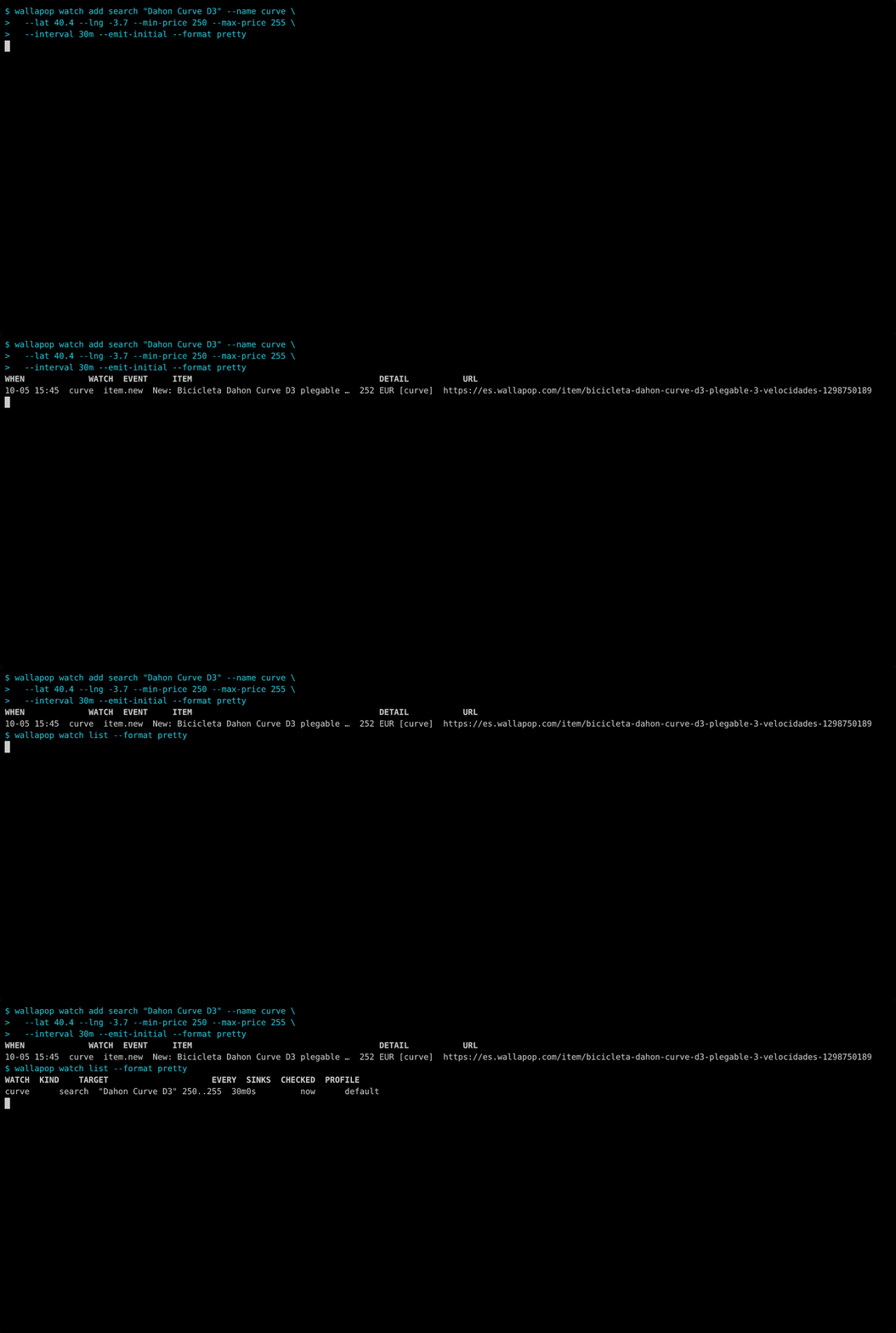
| `watch add search\|item\|seller` | create a watch (baselines silently, `--emit-initial` to report what exists) |
| `watch check / run / events / list / remove` | one-shot check, foreground loop, history |
| `watch service install / uninstall / status` | systemd user timer or launchd agent running `watch check` |
| `sink list / test` | notification targets from config |
| `config path / get / set / list` | config.toml |
| `doctor` | checks config, session, api, chat token, schedule |
| `skills list / get` | embedded docs for agents |
| `completion bash\|zsh\|fish\|powershell` | shell completion |
global flags: `--profile`, `--format json|jsonl|pretty|toon`, `--no-color`, `--error-format text|json`, `--no-input`, `--debug`.
## shell completion
```bash
# zsh
wallapop completion zsh > "${fpath[1]}/_wallapop"
# bash
wallapop completion bash > /etc/bash_completion.d/wallapop
# fish
wallapop completion fish > ~/.config/fish/completions/wallapop.fish
# powershell
wallapop completion powershell >> $PROFILE
```
## examples
```bash
wallapop search "thinkpad x1" --max-price 400 --sort newest --format pretty
wallapop search --category 100 --filter brand=Toyota --filter max_km=120000 --limit 20
wallapop item show https://es.wallapop.com/item/thinkpad-x1-carbon-1092837465
wallapop item images https://es.wallapop.com/item/thinkpad-x1-carbon-1092837465 --format pretty
wallapop watch add search "thinkpad x1" --max-price 400 --name x1 --notify phone
wallapop watch check --all --format jsonl | jq -r 'select(.type=="item.price_changed") | .item.url'
wallapop watch service install --interval 10m
wallapop chat list --unread --format pretty
wallapop chat start k2j3h4g5f6d7 "Hola, ¿sigue disponible?"
echo "Te lo dejo en 200" | wallapop chat send 8f1c2 -
wallapop chat open 8f1c2
```
## what it looks like
these recordings use public listings. the watch writes only to its isolated local demo database. see the [command demo gallery](https://wallapop.micr.dev/docs/examples) for search, filters, item details, and watch events.
### inspect a listing

### discover and apply category filters

### track changes with a watch
Watches save a Search locally; each Check reports changes.
## sinks config
a sink is a few lines of config:
```toml
[sinks.phone]
type = "ntfy"
url = "https://ntfy.sh"
topic = "wallapop-deals"
[sinks.discord]
type = "webhook"
url = "https://discord.com/api/webhooks/..."
template = "discord"
[sinks.script]
type = "exec"
command = ["~/bin/on-wallapop-event"] # event json on stdin
```
## exit codes
`0` ok, `1` generic, `2` usage, `3` auth, `4` not found, `5` blocked or rate limited, `6` network, `7` wallapop changed its api. stderr carries a prefilled issue link. `130` interrupted.
## building from source
```bash
git clone https://github.com/Microck/wallapop-cli && cd wallapop-cli
make build # bin/wallapop
make check # vet, staticcheck, tests, gofmt
```
## documentation
full docs live at [wallapop.micr.dev/docs](https://wallapop.micr.dev/docs). install, the cookie export walkthrough, the command reference generated from the binary, exit codes, sinks, and scheduling. the site source is in `docs-site`.
- [docs/cli-spec.md](docs/cli-spec.md): the interface contract and every endpoint the cli uses
- [CONTEXT.md](CONTEXT.md): vocabulary
- [docs/adr](docs/adr): decisions
## contributing
issues and pull requests are welcome. when wallapop changes something, the cli prints a prefilled issue link. that is the most useful report you can file.
## disclaimer
this is an unofficial client. wallapop has no public api for buyers, and its terms of use prohibit bots, scraping and reverse engineering. the stated remedy is account suspension. use it with an account you are willing to lose, keep the check interval reasonable, and do not use it to spam sellers. not affiliated with wallapop.
## license
[mit license](LICENSE)