# 初學者數據科學課程大綱
[](https://github.com/codespaces/new?hide_repo_select=true&ref=main&repo=344191198)
[](https://github.com/microsoft/Data-Science-For-Beginners/blob/master/LICENSE)
[](https://GitHub.com/microsoft/Data-Science-For-Beginners/graphs/contributors/)
[](https://GitHub.com/microsoft/Data-Science-For-Beginners/issues/)
[](https://GitHub.com/microsoft/Data-Science-For-Beginners/pulls/)
[](http://makeapullrequest.com)
[](https://GitHub.com/microsoft/Data-Science-For-Beginners/watchers/)
[](https://GitHub.com/microsoft/Data-Science-For-Beginners/network/)
[](https://GitHub.com/microsoft/Data-Science-For-Beginners/stargazers/)
[](https://discord.gg/nTYy5BXMWG)
[](https://aka.ms/foundry/forum)
微軟 Azure Cloud Advocates 很高興提供一個為期 10 週、共 20 課的數據科學課程。每課都包含課前與課後小測驗、完整的書面操作說明、解答以及作業。我們採用專案導向的教學方法,讓您邊學邊做,這是讓新技能「真正記住」的有效方法。
**衷心感謝我們的作者:** [Jasmine Greenaway](https://www.twitter.com/paladique)、[Dmitry Soshnikov](http://soshnikov.com)、[Nitya Narasimhan](https://twitter.com/nitya)、[Jalen McGee](https://twitter.com/JalenMcG)、[Jen Looper](https://twitter.com/jenlooper)、[Maud Levy](https://twitter.com/maudstweets)、[Tiffany Souterre](https://twitter.com/TiffanySouterre)、[Christopher Harrison](https://www.twitter.com/geektrainer)。
**🙏 特別感謝 🙏 我們的 [Microsoft Student Ambassador](https://studentambassadors.microsoft.com/) 作者、審閱者及內容貢獻者,** 尤其是 Aaryan Arora、[Aditya Garg](https://github.com/AdityaGarg00)、[Alondra Sanchez](https://www.linkedin.com/in/alondra-sanchez-molina/)、[Ankita Singh](https://www.linkedin.com/in/ankitasingh007)、[Anupam Mishra](https://www.linkedin.com/in/anupam--mishra/)、[Arpita Das](https://www.linkedin.com/in/arpitadas01/)、ChhailBihari Dubey、[Dibri Nsofor](https://www.linkedin.com/in/dibrinsofor)、[Dishita Bhasin](https://www.linkedin.com/in/dishita-bhasin-7065281bb)、[Majd Safi](https://www.linkedin.com/in/majd-s/)、[Max Blum](https://www.linkedin.com/in/max-blum-6036a1186/)、[Miguel Correa](https://www.linkedin.com/in/miguelmque/)、[Mohamma Iftekher (Iftu) Ebne Jalal](https://twitter.com/iftu119)、[Nawrin Tabassum](https://www.linkedin.com/in/nawrin-tabassum)、[Raymond Wangsa Putra](https://www.linkedin.com/in/raymond-wp/)、[Rohit Yadav](https://www.linkedin.com/in/rty2423)、Samridhi Sharma、[Sanya Sinha](https://www.linkedin.com/mwlite/in/sanya-sinha-13aab1200)、[Sheena Narula](https://www.linkedin.com/in/sheena-narua-n/)、[Tauqeer Ahmad](https://www.linkedin.com/in/tauqeerahmad5201/)、Yogendrasingh Pawar、[Vidushi Gupta](https://www.linkedin.com/in/vidushi-gupta07/)、[Jasleen Sondhi](https://www.linkedin.com/in/jasleen-sondhi/)
||
|:---:|
| 初學者數據科學 - _手繪筆記作者 [@nitya](https://twitter.com/nitya)_ |
### 🌐 多語言支援
#### 透過 GitHub Action 支援(自動且隨時更新)
[Arabic](../ar/README.md) | [Bengali](../bn/README.md) | [Bulgarian](../bg/README.md) | [Burmese (Myanmar)](../my/README.md) | [Chinese (Simplified)](../zh-CN/README.md) | [Chinese (Traditional, Hong Kong)](../zh-HK/README.md) | [Chinese (Traditional, Macau)](./README.md) | [Chinese (Traditional, Taiwan)](../zh-TW/README.md) | [Croatian](../hr/README.md) | [Czech](../cs/README.md) | [Danish](../da/README.md) | [Dutch](../nl/README.md) | [Estonian](../et/README.md) | [Finnish](../fi/README.md) | [French](../fr/README.md) | [German](../de/README.md) | [Greek](../el/README.md) | [Hebrew](../he/README.md) | [Hindi](../hi/README.md) | [Hungarian](../hu/README.md) | [Indonesian](../id/README.md) | [Italian](../it/README.md) | [Japanese](../ja/README.md) | [Kannada](../kn/README.md) | [Khmer](../km/README.md) | [Korean](../ko/README.md) | [Lithuanian](../lt/README.md) | [Malay](../ms/README.md) | [Malayalam](../ml/README.md) | [Marathi](../mr/README.md) | [Nepali](../ne/README.md) | [Nigerian Pidgin](../pcm/README.md) | [Norwegian](../no/README.md) | [Persian (Farsi)](../fa/README.md) | [Polish](../pl/README.md) | [Portuguese (Brazil)](../pt-BR/README.md) | [Portuguese (Portugal)](../pt-PT/README.md) | [Punjabi (Gurmukhi)](../pa/README.md) | [Romanian](../ro/README.md) | [Russian](../ru/README.md) | [Serbian (Cyrillic)](../sr/README.md) | [Slovak](../sk/README.md) | [Slovenian](../sl/README.md) | [Spanish](../es/README.md) | [Swahili](../sw/README.md) | [Swedish](../sv/README.md) | [Tagalog (Filipino)](../tl/README.md) | [Tamil](../ta/README.md) | [Telugu](../te/README.md) | [Thai](../th/README.md) | [Turkish](../tr/README.md) | [Ukrainian](../uk/README.md) | [Urdu](../ur/README.md) | [Vietnamese](../vi/README.md)
> **喜歡本地克隆?**
>
> 本倉庫包含 50 多種語言的翻譯,會大幅增加下載大小。若想不下載翻譯檔案,可以使用稀疏檢出:
>
> **Bash / macOS / Linux:**
> ```bash
> git clone --filter=blob:none --sparse https://github.com/microsoft/Data-Science-For-Beginners.git
> cd Data-Science-For-Beginners
> git sparse-checkout set --no-cone '/*' '!translations' '!translated_images'
> ```
>
> **CMD (Windows):**
> ```cmd
> git clone --filter=blob:none --sparse https://github.com/microsoft/Data-Science-For-Beginners.git
> cd Data-Science-For-Beginners
> git sparse-checkout set --no-cone "/*" "!translations" "!translated_images"
> ```
>
> 這樣就能以更快速度下載所需的完整課程內容。
**如果您想要更多翻譯語言的支援,請參考此連結 [here](https://github.com/Azure/co-op-translator/blob/main/getting_started/supported-languages.md)**
#### 加入我們的社群
[](https://discord.gg/nTYy5BXMWG)
我們有持續進行的 Discord AI 學習系列,詳情及加入請至 [Learn with AI Series](https://aka.ms/learnwithai/discord),活動日期為 2025 年 9 月 18 日至 30 日。您將學習使用 GitHub Copilot 進行數據科學的秘訣與技巧。

# 你是學生嗎?
開始使用以下資源:
- [學生中心頁面](https://docs.microsoft.com/en-gb/learn/student-hub?WT.mc_id=academic-77958-bethanycheum) 這頁會有入門資源、學生軟體包,甚至是免費考證券的獲取方法。這是您想加入書籤並不時查看的一頁,因為我們至少每月會更換一次內容。
- [Microsoft Learn Student Ambassadors](https://studentambassadors.microsoft.com?WT.mc_id=academic-77958-bethanycheum) 加入全球學生大使社群,這或許是您進入微軟的管道。
# 開始使用
## 📚 文件
- **[安裝指南](INSTALLATION.md)** - 初學者逐步設置說明
- **[使用指南](USAGE.md)** - 範例與常用工作流程
- **[故障排除](TROUBLESHOOTING.md)** - 常見問題解決方案
- **[貢獻指南](CONTRIBUTING.md)** - 如何參與本專案
- **[教師專區](for-teachers.md)** - 教學指引與課堂資源
## 👨🎓 學生專區
> 完全初學者:對數據科學陌生?從我們的[入門範例](examples/README.md)開始!這些簡易且有良好註解的範例將幫助您理解基礎,再進一步學習完整的課程大綱。
> **[學生](https://aka.ms/student-page)**:若想使用本課程自學,請 fork 整個倉庫並自行完成練習,從課前小測驗開始。接著閱讀講義並完成後續活動。努力理解課程內容並嘗試自行完成專案,而非直接複製解答代碼;不過解答在各專案導向課程的 /solutions 資料夾中皆可查閱。另一種做法是與朋友組成學習小組,共同研讀內容。若想進一步學習,我們推薦 [Microsoft Learn](https://docs.microsoft.com/en-us/users/jenlooper-2911/collections/qprpajyoy3x0g7?WT.mc_id=academic-77958-bethanycheum)。
**快速開始:**
1. 查看[安裝指南](INSTALLATION.md)設置開發環境
2. 複習[使用指南](USAGE.md)了解如何操作課程內容
3. 從第一課開始並依序學習
4. 加入我們的[Discord 社群](https://aka.ms/ds4beginners/discord)尋求支援
## 👩🏫 教師專區
> 教師們:我們[包含了一些建議](for-teachers.md)來協助使用這套課程。非常期待您在[討論論壇](https://github.com/microsoft/Data-Science-For-Beginners/discussions)上的回饋!
## 認識團隊
[](https://youtu.be/8mzavjQSMM4 "宣傳影片")
**Gif 製作** [Mohit Jaisal](https://www.linkedin.com/in/mohitjaisal)
> 🎥 點擊上方圖片觀看關於本專案及創作者的影片!
## 教學法
我們在設計本課程時選擇了兩項教學原則:確保其以項目為基礎以及包含頻繁的測驗。在本系列結束時,學生將學習到資料科學的基本原理,包括倫理概念、資料準備、不同的資料操作方式、資料視覺化、資料分析、資料科學的實際應用案例等等。
此外,在課程前進行低壓力測驗,有助於學生設定學習主題的目標,而課程後的第二次測驗則確保進一步鞏固。此課程設計靈活有趣,可以整體或部分學習。項目起初較簡單,並在10週循環結束時逐漸變得較複雜。
> 請參閱我們的[行為守則](CODE_OF_CONDUCT.md)、[貢獻指南](CONTRIBUTING.md)、[翻譯指引](TRANSLATIONS.md)。歡迎您提出建設性意見!
## 每節課包含:
- 選擇性的手繪筆記
- 選擇性補充影片
- 課前熱身測驗
- 書面課程內容
- 對於以項目為基礎的課程,提供逐步指導以完成項目
- 知識檢測
- 挑戰任務
- 補充閱讀資料
- 作業
- [課後測驗](https://ff-quizzes.netlify.app/en/)
> 關於測驗的小提醒:所有測驗均包含在 Quiz-App 資料夾中,總計40個測驗,每個三題。它們從課程中連結,但測驗應用可在本地執行或部署到 Azure;請參考 `quiz-app` 資料夾中的教學。測驗正在逐步本地化中。
## 🎓 新手友善範例
**剛接觸資料科學?** 我們製作了特別的[範例目錄](examples/README.md),包含簡單且註解詳盡的程式碼,助您起步:
- 🌟 **Hello World** - 您的第一個資料科學程式
- 📂 讀取資料 - 學習讀取與探索資料集
- 📊 簡單分析 - 計算統計並尋找模式
- 📈 基礎視覺化 - 製作統計圖表
- 🔬 實際專案 - 從頭到尾完成工作流程
每個範例均有詳細註解解說每步驟,非常適合初學者!
👉 **[從範例開始](examples/README.md)** 👈
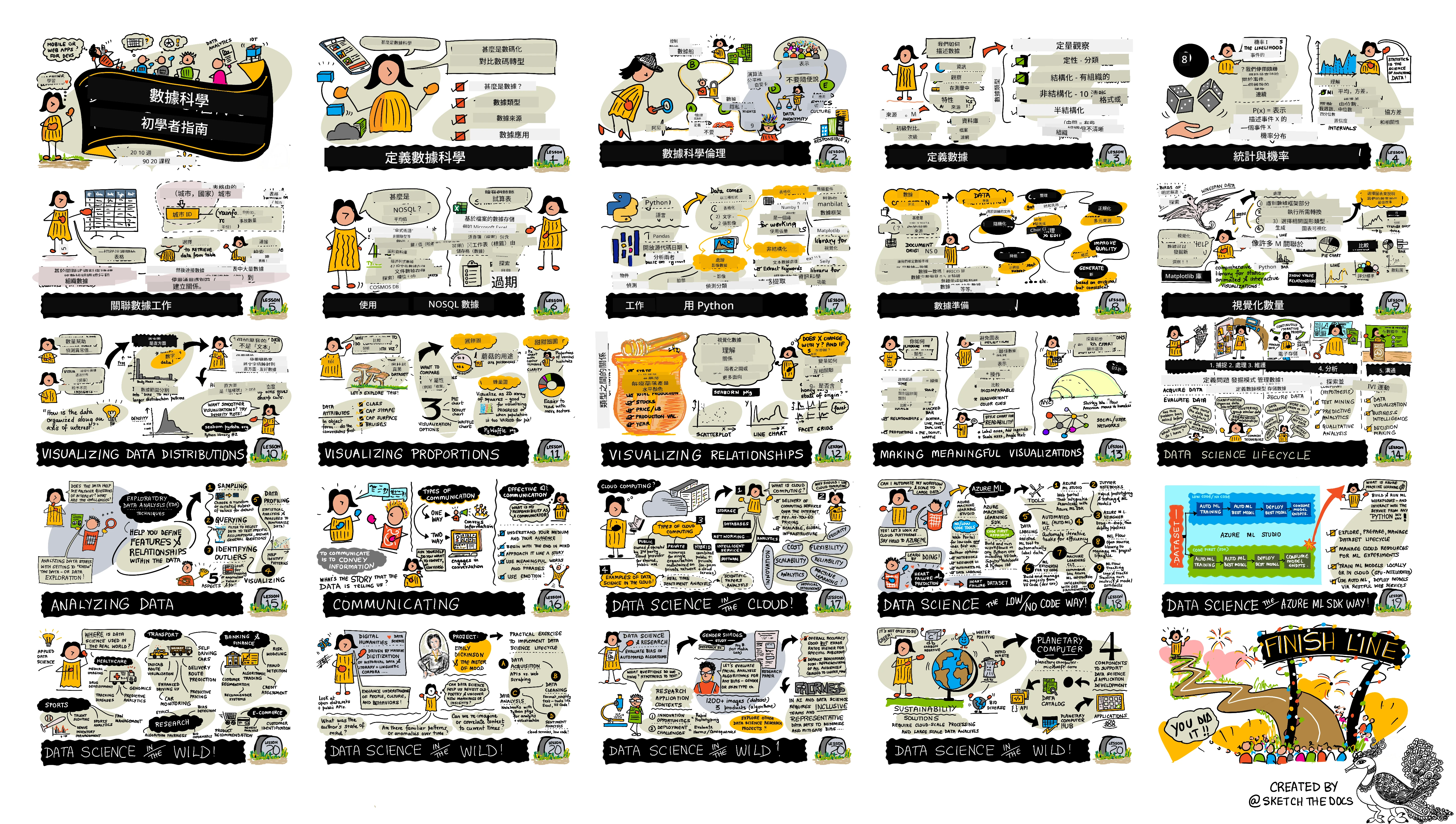
## 課程列表
||
|:---:|
| 初學者資料科學:路線圖 - _手繪筆記由 [@nitya](https://twitter.com/nitya) 製作_ |
| 課程編號 | 主題 | 課程群組 | 學習目標 | 連結課程 | 作者 |
| :-------: | :-------------------------------------: | :----------------------------------------: | :--------------------------------------------------------------------------------------------------------------------------------------------------------------------------------------: | :----------------------------------------------------: | :----: |
| 01 | 定義資料科學 | [介紹](1-Introduction/README.md) | 了解資料科學背後的基本概念及其與人工智慧、機器學習和大數據的關聯。 | [課程](1-Introduction/01-defining-data-science/README.md) [影片](https://youtu.be/beZ7Mb_oz9I) | [Dmitry](http://soshnikov.com) |
| 02 | 資料科學倫理 | [介紹](1-Introduction/README.md) | 資料倫理的概念、挑戰與框架。 | [課程](1-Introduction/02-ethics/README.md) | [Nitya](https://twitter.com/nitya) |
| 03 | 定義資料 | [介紹](1-Introduction/README.md) | 探討資料的分類及其常見來源。 | [課程](1-Introduction/03-defining-data/README.md) | [Jasmine](https://www.twitter.com/paladique) |
| 04 | 統計學與機率入門 | [介紹](1-Introduction/README.md) | 使用機率與統計的數學技巧來理解資料。 | [課程](1-Introduction/04-stats-and-probability/README.md) [影片](https://youtu.be/Z5Zy85g4Yjw) | [Dmitry](http://soshnikov.com) |
| 05 | 使用關聯資料 | [資料操作](2-Working-With-Data/README.md) | 關聯資料介紹與使用結構化查詢語言(SQL,發音為「see-quell」)探索和分析關聯資料的基本知識。 | [課程](2-Working-With-Data/05-relational-databases/README.md) | [Christopher](https://www.twitter.com/geektrainer) | | |
| 06 | 使用非關聯資料 | [資料操作](2-Working-With-Data/README.md) | 介紹非關聯資料、各種類型及探索和分析文件資料庫的基本知識。 | [課程](2-Working-With-Data/06-non-relational/README.md) | [Jasmine](https://twitter.com/paladique)|
| 07 | 使用 Python | [資料操作](2-Working-With-Data/README.md) | 使用 Python 及像 Pandas 這類函式庫進行資料探索的基礎。建議有 Python 程式基礎。 | [課程](2-Working-With-Data/07-python/README.md) [影片](https://youtu.be/dZjWOGbsN4Y) | [Dmitry](http://soshnikov.com) |
| 08 | 資料準備 | [資料操作](2-Working-With-Data/README.md) | 資料清理與轉換技術,處理遺漏、不準確或不完整資料的挑戰。 | [課程](2-Working-With-Data/08-data-preparation/README.md) | [Jasmine](https://www.twitter.com/paladique) |
| 09 | 數量視覺化 | [資料視覺化](3-Data-Visualization/README.md) | 學習如何使用 Matplotlib 來視覺化鳥類資料 🦆 | [課程](3-Data-Visualization/09-visualization-quantities/README.md) | [Jen](https://twitter.com/jenlooper) |
| 10 | 數據分佈視覺化 | [資料視覺化](3-Data-Visualization/README.md) | 視覺化區間內的觀察值與趨勢。 | [課程](3-Data-Visualization/10-visualization-distributions/README.md) | [Jen](https://twitter.com/jenlooper) |
| 11 | 比例視覺化 | [資料視覺化](3-Data-Visualization/README.md) | 視覺化離散與分群比例。 | [課程](3-Data-Visualization/11-visualization-proportions/README.md) | [Jen](https://twitter.com/jenlooper) |
| 12 | 關係視覺化 | [資料視覺化](3-Data-Visualization/README.md) | 視覺化資料集與變數間的連結和相關性。 | [課程](3-Data-Visualization/12-visualization-relationships/README.md) | [Jen](https://twitter.com/jenlooper) |
| 13 | 有意義的視覺化 | [資料視覺化](3-Data-Visualization/README.md) | 製作有效理解問題與洞察的圖像的技巧與指導。 | [課程](3-Data-Visualization/13-meaningful-visualizations/README.md) | [Jen](https://twitter.com/jenlooper) |
| 14 | 資料科學生命週期入門 | [生命週期](4-Data-Science-Lifecycle/README.md) | 資料科學生命週期介紹,以及取得與擷取資料的第一步。 | [課程](4-Data-Science-Lifecycle/14-Introduction/README.md) | [Jasmine](https://twitter.com/paladique) |
| 15 | 分析階段 | [生命週期](4-Data-Science-Lifecycle/README.md) | 資料科學生命週期中聚焦資料分析的階段。 | [課程](4-Data-Science-Lifecycle/15-analyzing/README.md) | [Jasmine](https://twitter.com/paladique) | | |
| 16 | 傳達階段 | [生命週期](4-Data-Science-Lifecycle/README.md) | 資料科學生命週期中聚焦於以易懂方式傳達分析見解給決策者的階段。 | [課程](4-Data-Science-Lifecycle/16-communication/README.md) | [Jalen](https://twitter.com/JalenMcG) | | |
| 17 | 雲端資料科學 | [雲端資料](5-Data-Science-In-Cloud/README.md) | 探討雲端資料科學及其優勢的系列課程。 | [課程](5-Data-Science-In-Cloud/17-Introduction/README.md) | [Tiffany](https://twitter.com/TiffanySouterre) 與 [Maud](https://twitter.com/maudstweets) |
| 18 | 雲端資料科學 | [雲端資料](5-Data-Science-In-Cloud/README.md) | 使用低程式碼工具訓練模型。 |[課程](5-Data-Science-In-Cloud/18-Low-Code/README.md) | [Tiffany](https://twitter.com/TiffanySouterre) 與 [Maud](https://twitter.com/maudstweets) |
| 19 | 雲端資料科學 | [雲端資料](5-Data-Science-In-Cloud/README.md) | 使用 Azure Machine Learning Studio 部署模型。 | [課程](5-Data-Science-In-Cloud/19-Azure/README.md)| [Tiffany](https://twitter.com/TiffanySouterre) 與 [Maud](https://twitter.com/maudstweets) |
| 20 | 實地資料科學 | [實地](6-Data-Science-In-Wild/README.md) | 實際世界中由資料科學推動的項目。 | [課程](6-Data-Science-In-Wild/20-Real-World-Examples/README.md) | [Nitya](https://twitter.com/nitya) |
## GitHub Codespaces
按照以下步驟在 Codespace 中開啟此範例:
1. 點擊 Code 下拉選單並選取 Open with Codespaces 選項。
2. 在窗格底部選擇 + New codespace。
更多資訊請參閱[GitHub 文件](https://docs.github.com/en/codespaces/developing-in-codespaces/creating-a-codespace-for-a-repository#creating-a-codespace)。
## VSCode 遠端 - 容器
使用您的本地機器和 VSCode 透過 VS Code Remote - Containers 擴展,按以下步驟在容器中開啟此倉庫:
1. 若是首次使用開發容器,請確保系統符合[快速入門文件](https://code.visualstudio.com/docs/devcontainers/containers#_getting-started)中所述的先決條件(例如安裝 Docker)。
要使用此儲存庫,可以選擇在隔離的 Docker 卷中開啟此儲存庫:
注意:底層將使用 Remote-Containers: **Clone Repository in Container Volume...** 命令,將原始碼克隆到 Docker 卷內,而非本地檔案系統。[卷](https://docs.docker.com/storage/volumes/)是持久化容器資料的首選機制。
或是開啟本地克隆或下載的儲存庫版本:
- 將此儲存庫克隆到本地檔案系統。
- 按 F1,選擇 **Remote-Containers: Open Folder in Container...** 命令。
- 選擇已克隆的資料夾,等待容器啟動,然後開始使用。
## 離線存取
您可使用 [Docsify](https://docsify.js.org/#/) 離線執行此文件。先 fork 此儲存庫,於本地安裝 [Docsify](https://docsify.js.org/#/quickstart),然後在此儲存庫根目錄輸入 `docsify serve`。網站將於本地主機的 3000 埠口服務:`localhost:3000`。
> 注意,筆記本不會透過 Docsify 呈現,若需執行筆記本,請另外在 VS Code 以 Python 核心執行。
## 其他課程
我們團隊亦提供其他課程!歡迎參考:
### LangChain
[](https://aka.ms/langchain4j-for-beginners)
[](https://aka.ms/langchainjs-for-beginners?WT.mc_id=m365-94501-dwahlin)
[](https://github.com/microsoft/langchain-for-beginners?WT.mc_id=m365-94501-dwahlin)
---
### Azure / Edge / MCP / Agents
[](https://github.com/microsoft/AZD-for-beginners?WT.mc_id=academic-105485-koreyst)
[](https://github.com/microsoft/edgeai-for-beginners?WT.mc_id=academic-105485-koreyst)
[](https://github.com/microsoft/mcp-for-beginners?WT.mc_id=academic-105485-koreyst)
[](https://github.com/microsoft/ai-agents-for-beginners?WT.mc_id=academic-105485-koreyst)
---
### 生成式 AI 系列
[](https://github.com/microsoft/generative-ai-for-beginners?WT.mc_id=academic-105485-koreyst)
[-9333EA?style=for-the-badge&labelColor=E5E7EB&color=9333EA)](https://github.com/microsoft/Generative-AI-for-beginners-dotnet?WT.mc_id=academic-105485-koreyst)
[-C084FC?style=for-the-badge&labelColor=E5E7EB&color=C084FC)](https://github.com/microsoft/generative-ai-for-beginners-java?WT.mc_id=academic-105485-koreyst)
[-E879F9?style=for-the-badge&labelColor=E5E7EB&color=E879F9)](https://github.com/microsoft/generative-ai-with-javascript?WT.mc_id=academic-105485-koreyst)
---
### 核心學習
[](https://aka.ms/ml-beginners?WT.mc_id=academic-105485-koreyst)
[](https://aka.ms/datascience-beginners?WT.mc_id=academic-105485-koreyst)
[](https://aka.ms/ai-beginners?WT.mc_id=academic-105485-koreyst)
[](https://github.com/microsoft/Security-101?WT.mc_id=academic-96948-sayoung)
[](https://aka.ms/webdev-beginners?WT.mc_id=academic-105485-koreyst)
[](https://aka.ms/iot-beginners?WT.mc_id=academic-105485-koreyst)
[](https://github.com/microsoft/xr-development-for-beginners?WT.mc_id=academic-105485-koreyst)
---
### Copilot 系列
[](https://aka.ms/GitHubCopilotAI?WT.mc_id=academic-105485-koreyst)
[](https://github.com/microsoft/mastering-github-copilot-for-dotnet-csharp-developers?WT.mc_id=academic-105485-koreyst)
[](https://github.com/microsoft/CopilotAdventures?WT.mc_id=academic-105485-koreyst)
## 獲取幫助
**遇到問題?** 請查看我們的[疑難排解指南](TROUBLESHOOTING.md),獲取常見問題的解決方案。
如果您在構建 AI 應用時遇到困難或有任何問題,歡迎加入我們的學習者和經驗豐富的開發者社群,一起討論 MCP。這是個支持性的社區,歡迎提問並自由分享知識。
[](https://discord.gg/nTYy5BXMWG)
如果您在構建過程中有產品反饋或發現錯誤,請訪問:
[](https://aka.ms/foundry/forum)
---
**免責聲明**:
本文件係使用 AI 翻譯服務 [Co-op Translator](https://github.com/Azure/co-op-translator) 進行翻譯。雖然我們力求準確,但請注意,自動翻譯可能包含錯誤或不準確之處。原始文件之原文版本應被視為權威來源。對於重要資訊,建議採用專業人工翻譯。我們不對因使用本翻譯而引起的任何誤解或誤釋承擔責任。