[](https://github.com/microsoft/IoT-For-Beginners/blob/master/LICENSE)
[](https://GitHub.com/microsoft/IoT-For-Beginners/graphs/contributors/)
[](https://GitHub.com/microsoft/IoT-For-Beginners/issues/)
[](https://GitHub.com/microsoft/IoT-For-Beginners/pulls/)
[](http://makeapullrequest.com)
[](https://GitHub.com/microsoft/IoT-For-Beginners/watchers/)
[](https://GitHub.com/microsoft/IoT-For-Beginners/network/)
[](https://GitHub.com/microsoft/IoT-For-Beginners/stargazers/)
### 加入 Azure AI Foundry 社群
如果您在建立 AI 應用程式時遇到困難或有任何問題,歡迎加入志同道合的學習者與經驗豐富的開發者,一起討論 MCP。這是一個支持性強的社群,歡迎提出問題並自由分享知識。
[](https://discord.gg/nTYy5BXMWG)
如果您在使用產品時有任何反饋或遇到錯誤,請造訪:
[](https://aka.ms/foundry/forum)
依照以下步驟開始使用這些資源:
1. 分叉程式庫:點擊 [](https://GitHub.com/microsoft/IoT-For-Beginners/fork)
2. 克隆程式庫:`git clone https://github.com/microsoft/IoT-For-Beginners.git`
3. [**加入 Microsoft Foundry Discord,與專家及其他開發者交流**](https://discord.com/invite/ByRwuEEgH4)
### 🌐 多語言支援
#### 透過 GitHub Action 支援(自動化且保持最新)
[阿拉伯語](../ar/README.md) | [孟加拉語](../bn/README.md) | [保加利亞語](../bg/README.md) | [緬甸語 (Myanmar)](../my/README.md) | [中文 (簡體)](../zh-CN/README.md) | [中文 (繁體,香港)](../zh-HK/README.md) | [中文 (繁體,澳門)](../zh-MO/README.md) | [中文 (繁體,台灣)](./README.md) | [克羅地亞語](../hr/README.md) | [捷克語](../cs/README.md) | [丹麥語](../da/README.md) | [荷蘭語](../nl/README.md) | [愛沙尼亞語](../et/README.md) | [芬蘭語](../fi/README.md) | [法語](../fr/README.md) | [德語](../de/README.md) | [希臘語](../el/README.md) | [希伯來語](../he/README.md) | [印地語](../hi/README.md) | [匈牙利語](../hu/README.md) | [印尼語](../id/README.md) | [義大利語](../it/README.md) | [日語](../ja/README.md) | [卡納達語](../kn/README.md) | [高棉語](../km/README.md) | [韓語](../ko/README.md) | [立陶宛語](../lt/README.md) | [馬來語](../ms/README.md) | [馬拉雅拉姆語](../ml/README.md) | [馬拉地語](../mr/README.md) | [尼泊爾語](../ne/README.md) | [奈及利亞皮欽語](../pcm/README.md) | [挪威語](../no/README.md) | [波斯語 (Farsi)](../fa/README.md) | [波蘭語](../pl/README.md) | [葡萄牙語 (巴西)](../pt-BR/README.md) | [葡萄牙語 (葡萄牙)](../pt-PT/README.md) | [旁遮普語 (Gurmukhi)](../pa/README.md) | [羅馬尼亞語](../ro/README.md) | [俄語](../ru/README.md) | [塞爾維亞語 (西里爾字母)](../sr/README.md) | [斯洛伐克語](../sk/README.md) | [斯洛維尼亞語](../sl/README.md) | [西班牙語](../es/README.md) | [斯瓦希里語](../sw/README.md) | [瑞典語](../sv/README.md) | [他加祿語 (菲律賓語)](../tl/README.md) | [泰米爾語](../ta/README.md) | [泰盧固語](../te/README.md) | [泰語](../th/README.md) | [土耳其語](../tr/README.md) | [烏克蘭語](../uk/README.md) | [烏爾都語](../ur/README.md) | [越南語](../vi/README.md)
> **想要本機克隆嗎?**
>
> 此程式庫包含 50 多種語言翻譯,會顯著增加下載大小。若想在不包含翻譯的情況下克隆,請使用稀疏檢出:
>
> **Bash / macOS / Linux:**
> ```bash
> git clone --filter=blob:none --sparse https://github.com/microsoft/IoT-For-Beginners.git
> cd IoT-For-Beginners
> git sparse-checkout set --no-cone '/*' '!translations' '!translated_images'
> ```
>
> **CMD (Windows):**
> ```cmd
> git clone --filter=blob:none --sparse https://github.com/microsoft/IoT-For-Beginners.git
> cd IoT-For-Beginners
> git sparse-checkout set --no-cone "/*" "!translations" "!translated_images"
> ```
>
> 這樣能以更快速度下載並完整取得本課程所需內容。
# IoT 初學者課程
微軟的 Azure 雲端推廣員很高興提供一個為期 12 週、共 24 課的 IoT 基礎課程。每堂課皆包含課前與課後的測驗、完成課程的書面指示、解答、作業等多項內容。我們採用以專案為基礎的教學法,讓您在實作中學習,這是證實有效的新技能學習方式。
這些專案涵蓋了從農場到餐桌的食物旅程。範圍包含農業、物流、製造、零售與消費者,都是 IoT 裝置廣泛應用的熱門產業領域。
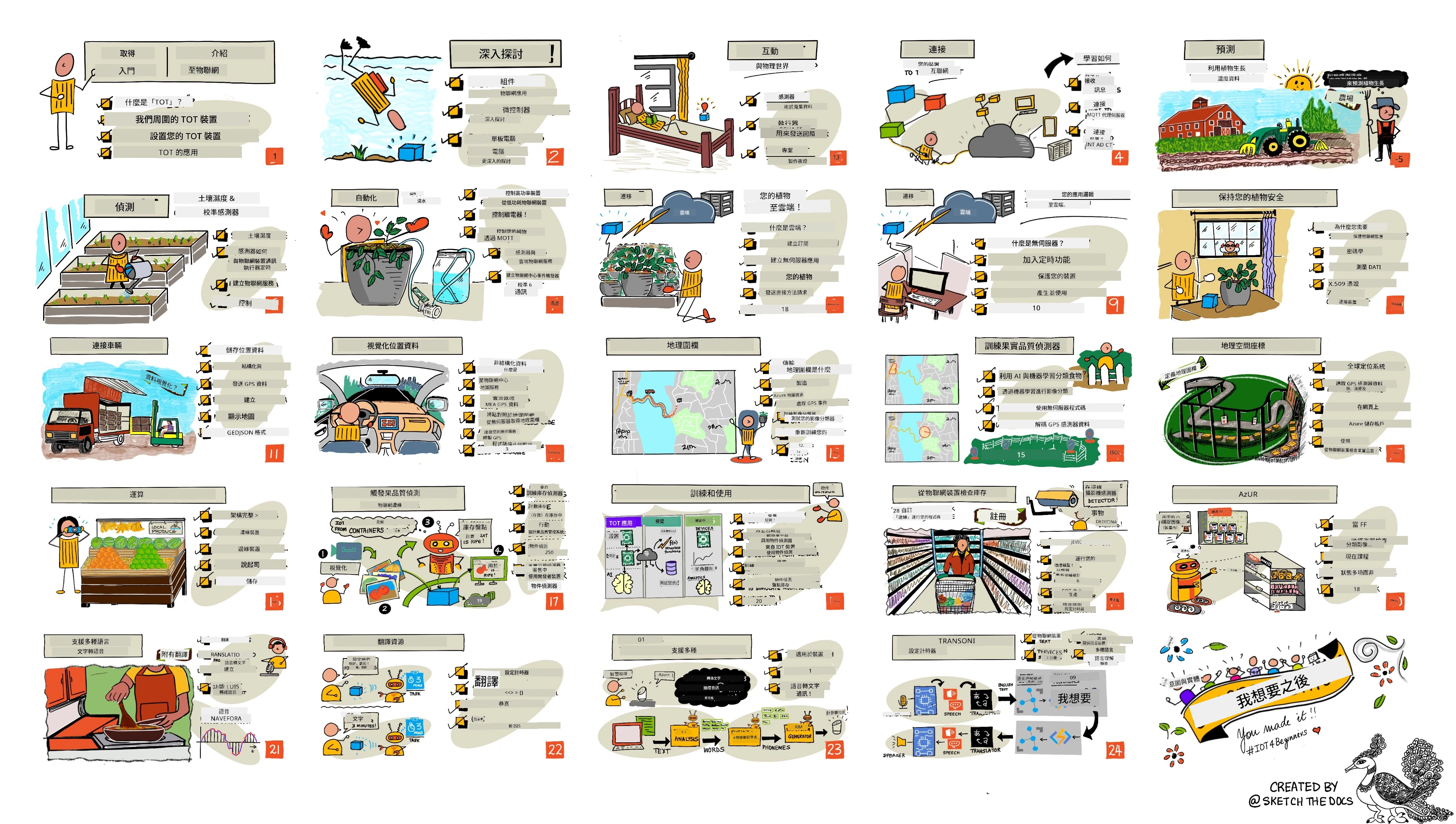
> 速寫圖由 [Nitya Narasimhan](https://github.com/nitya) 製作。點擊圖片可看放大版。
**非常感謝我們的作者 [Jen Fox](https://github.com/jenfoxbot)、[Jen Looper](https://github.com/jlooper)、[Jim Bennett](https://github.com/jimbobbennett) 以及速寫圖藝術家 [Nitya Narasimhan](https://github.com/nitya)。**
**也感謝我們由 [Microsoft Learn 學生大使](https://studentambassadors.microsoft.com?WT.mc_id=academic-17441-jabenn) 組成的團隊,他們協助審查與翻譯此課程 —— [Aditya Garg](https://github.com/AdityaGarg00), [Anurag Sharma](https://github.com/Anurag-0-1-A), [Arpita Das](https://github.com/Arpiiitaaa), [Aryan Jain](https://www.linkedin.com/in/aryan-jain-47a4a1145/), [Bhavesh Suneja](https://github.com/EliteWarrior315), [Faith Hunja](https://faithhunja.github.io/), [Lateefah Bello](https://www.linkedin.com/in/lateefah-bello/), [Manvi Jha](https://github.com/Severus-Matthew), [Mireille Tan](https://www.linkedin.com/in/mireille-tan-a4834819a/), [Mohammad Iftekher (Iftu) Ebne Jalal](https://github.com/Iftu119), [Mohammad Zulfikar](https://github.com/mohzulfikar), [Priyanshu Srivastav](https://www.linkedin.com/in/priyanshu-srivastav-b067241ba), [Thanmai Gowducheruvu](https://github.com/innovation-platform), 以及 [Zina Kamel](https://www.linkedin.com/in/zina-kamel/)。**
認識團隊!
[](https://youtu.be/-wippUJRi5k)
**Gif 由** [Mohit Jaisal](https://linkedin.com/in/mohitjaisal)
> 🎥 點擊上方圖片觀看專案介紹影片!
> 老師們,我們有[提供一些建議](for-teachers.md)關於如何使用此課程。如果您想自行設計課程,也有一份[課程範本](lesson-template/README.md)可供參考。
> **[學生們](https://aka.ms/student-page)**,若想自行使用此課程,請先分叉整個儲存庫,並從課前小測開始,然後閱讀課程內容並完成其他活動。請盡量透過理解課程內容自行製作專案,而非直接複製解答程式碼;不過解答程式碼皆存放於每個專案導向課程的 /solutions 資料夾中。另一種做法是與朋友組成讀書小組,共同研讀教材。若想進一步學習,推薦使用 [Microsoft Learn](https://docs.microsoft.com/users/jimbobbennett/collections/ke2ehd351jopwr?WT.mc_id=academic-17441-jabenn)。
關於本課程的影片介紹,請看:
[](https://youtube.com/watch?v=bccEMm8gRuc "宣傳影片")
> 🎥 點擊上方圖片觀看專案介紹影片!
## 教學理念
我們在設計本課程時採用了兩項教學原則:確保課程以專案為核心,並包含頻繁的測驗。完成此系列課程後,學生將打造一套植物監測與澆水系統、車輛追蹤器、一個可追蹤與檢查食品的智慧工廠設置,還有一個語音控制的烹飪計時器,並學習物聯網基礎知識,包括如何撰寫裝置程式碼、連接雲端、分析遙測資料及在邊緣運行 AI。
透過確保內容與專案相符,使學生更投入學習,並加強概念的理解與記憶。
此外,課前的低風險測驗能幫助學生設定學習目標,課後的測驗則加深記憶。此課程設計靈活且有趣,可整體學習或分段選擇。專案起初規模小,隨著 12 週課程進行逐步增強難度。
每個專案皆基於學生與愛好者可取得的真實硬體。專案將探討特定領域,提供相關背景知識。成為成功開發者,瞭解解決問題的領域相當重要,提供這些背景可協助學生在真實世界問題情境中思考其物聯網方案與學習內容。學生能理解所建立方案的「原因」,並體會最終使用者的需求。
## 硬體
我們有兩種 IoT 硬體可供專案使用,依個人喜好、程式語言知識或偏好、學習目標及可用性選擇。我們也提供了「虛擬硬體」版本,適合沒有硬體設備的人,或想在購買前學習更多。您可以在[硬體頁面](./hardware.md)閱讀更多資訊,並找到「購物清單」,內含來自我們 Seeed Studio 朋友的完整套件購買連結。
> 💁 請參閱我們的[行為守則](CODE_OF_CONDUCT.md)、[貢獻指南](CONTRIBUTING.md)及[翻譯指南](..)。歡迎您的建設性回饋!
>
> 🔧 遇到問題?請查看我們的[疑難排解指南](TROUBLESHOOTING.md),尋找常見問題解決方案。
## 每節課包含:
- 簡潔筆記
- 選用的補充影片
- 課前暖身測驗
- 文字課程內容
- 以專案為基礎的課程,附逐步建置專案指南
- 知識檢測
- 挑戰題
- 補充閱讀
- 作業
- [課後測驗](https://ff-quizzes.netlify.app/en/)
> 關於測驗的說明:所有測驗都在 quiz-app 資料夾中,共有 48 個測驗,每個測驗包含三個問題。測驗從課程中連結,也可在本地執行或部署於 Azure;請依 quiz-app 資料夾中的說明操作。測驗內容正逐步翻譯在地化。
## 課程
| | 專案名稱 | 教授概念 | 學習目標 | 相關課程 |
| :---: | :---------------------------------: | :-------------------------------------------------: | ------------------------------------------------------------------------------------------------------------------------------------------------------------------------ | :-----------------------------------------------------------------------------------------------------------------: |
| 01 | [Getting started](./1-getting-started/README.md) | IoT 入門介紹 | 在設定您的第一個 IoT 裝置時,了解 IoT 的基本原理以及 IoT 解決方案的基本構成元素,如感測器與雲端服務 | [IoT 入門介紹](./1-getting-started/lessons/1-introduction-to-iot/README.md) |
| 02 | [Getting started](./1-getting-started/README.md) | 深入 IoT 概念介紹 | 更進一步了解 IoT 系統的元件,以及微控制器與單板電腦 | [深入 IoT 概念介紹](./1-getting-started/lessons/2-deeper-dive/README.md) |
| 03 | [Getting started](./1-getting-started/README.md) | 使用感測器與執行器與物理世界互動 | 了解感測器如何從物理世界收集資料,以及執行器如何回饋,並建立一個夜燈 | [使用感測器與執行器與物理世界互動](./1-getting-started/lessons/3-sensors-and-actuators/README.md) |
| 04 | [Getting started](./1-getting-started/README.md) | 連接裝置至網際網路 | 了解如何連接 IoT 裝置至網際網路,透過 MQTT 代理發送和接收訊息,並將夜燈連接到 MQTT 代理 | [連接裝置至網際網路](./1-getting-started/lessons/4-connect-internet/README.md) |
| 05 | [Farm](./2-farm/README.md) | 預測植物生長 | 了解如何使用 IoT 裝置擷取的溫度數據來預測植物生長 | [預測植物生長](./2-farm/lessons/1-predict-plant-growth/README.md) |
| 06 | [Farm](./2-farm/README.md) | 偵測土壤濕度 | 了解如何偵測土壤濕度並校準土壤濕度感測器 | [偵測土壤濕度](./2-farm/lessons/2-detect-soil-moisture/README.md) |
| 07 | [Farm](./2-farm/README.md) | 自動化植物澆水 | 學習如何利用繼電器與 MQTT 自動安排澆水時間 | [自動化植物澆水](./2-farm/lessons/3-automated-plant-watering/README.md) |
| 08 | [Farm](./2-farm/README.md) | 將植物資料遷移到雲端 | 了解雲端及雲端托管的 IoT 服務,以及如何將植物連接到這些服務,而非公共 MQTT 代理 | [將植物資料遷移到雲端](./2-farm/lessons/4-migrate-your-plant-to-the-cloud/README.md) |
| 09 | [Farm](./2-farm/README.md) | 將應用程式邏輯遷移到雲端 | 了解如何在雲端撰寫應用程式邏輯來回應 IoT 訊息 | [將應用程式邏輯遷移到雲端](./2-farm/lessons/5-migrate-application-to-the-cloud/README.md) |
| 10 | [Farm](./2-farm/README.md) | 保護您的植物安全 | 了解 IoT 安全性,並如何利用金鑰與憑證來保障植物安全 | [保護您的植物安全](./2-farm/lessons/6-keep-your-plant-secure/README.md) |
| 11 | [Transport](./3-transport/README.md) | 位置追蹤 | 認識 GPS 位置追蹤技術與 IoT 裝置 | [位置追蹤](./3-transport/lessons/1-location-tracking/README.md) |
| 12 | [Transport](./3-transport/README.md) | 儲存位置資料 | 學習如何儲存 IoT 資料以供後續視覺化或分析 | [儲存位置資料](./3-transport/lessons/2-store-location-data/README.md) |
| 13 | [Transport](./3-transport/README.md) | 視覺化位置資料 | 了解如何在地圖上視覺化位置資料,以及地圖如何以二維方式代表現實中的三維世界 | [視覺化位置資料](./3-transport/lessons/3-visualize-location-data/README.md) |
| 14 | [Transport](./3-transport/README.md) | 地理圍欄 | 了解地理圍欄技術,及如何用來提醒供應鏈中的車輛接近目的地 | [地理圍欄](./3-transport/lessons/4-geofences/README.md) |
| 15 | [Manufacturing](./4-manufacturing/README.md) | 訓練水果品質偵測器 | 了解如何在雲端訓練影像分類器來檢測水果品質 | [訓練水果品質偵測器](./4-manufacturing/lessons/1-train-fruit-detector/README.md) |
| 16 | [Manufacturing](./4-manufacturing/README.md) | 從 IoT 裝置檢查水果品質 | 學習如何使用水果品質偵測器從 IoT 裝置檢查水果品質 | [從 IoT 裝置檢查水果品質](./4-manufacturing/lessons/2-check-fruit-from-device/README.md) |
| 17 | [Manufacturing](./4-manufacturing/README.md) | 在邊緣設備執行水果偵測器 | 了解如何在 IoT 裝置邊緣運算水果偵測器 | [在邊緣設備執行水果偵測器](./4-manufacturing/lessons/3-run-fruit-detector-edge/README.md) |
| 18 | [Manufacturing](./4-manufacturing/README.md) | 由感測器觸發水果品質檢測 | 了解如何由感測器觸發水果品質檢測 | [由感測器觸發水果品質檢測](./4-manufacturing/lessons/4-trigger-fruit-detector/README.md) |
| 19 | [Retail](./5-retail/README.md) | 訓練庫存偵測器 | 了解如何利用物件偵測訓練庫存偵測器來統計商店中的庫存 | [訓練庫存偵測器](./5-retail/lessons/1-train-stock-detector/README.md) |
| 20 | [Retail](./5-retail/README.md) | 從 IoT 裝置檢查庫存 | 了解如何使用物件偵測模型從 IoT 裝置檢查庫存 | [從 IoT 裝置檢查庫存](./5-retail/lessons/2-check-stock-device/README.md) |
| 21 | [Consumer](./6-consumer/README.md) | 使用 IoT 裝置語音辨識 | 學習如何從 IoT 裝置識別語音,建立智能計時器 | [使用 IoT 裝置語音辨識](./6-consumer/lessons/1-speech-recognition/README.md) |
| 22 | [Consumer](./6-consumer/README.md) | 語言理解 | 了解如何理解對 IoT 裝置講出的句子 | [語言理解](./6-consumer/lessons/2-language-understanding/README.md) |
| 23 | [Consumer](./6-consumer/README.md) | 設定計時器並提供語音回饋 | 了解如何在 IoT 裝置上設定計時器,並在計時開始及結束時給予語音回饋 | [設定計時器並提供語音回饋](./6-consumer/lessons/3-spoken-feedback/README.md) |
| 24 | [Consumer](./6-consumer/README.md) | 支援多種語言 | 學習如何支援多種語言,包含使用者語音輸入與智能計時器的多語言回應 | [支援多種語言](./6-consumer/lessons/4-multiple-language-support/README.md) |
## 離線存取
您可以使用 [Docsify](https://docsify.js.org/#/) 離線執行這份文件。將本儲存庫分支出一份,在您的本機安裝 [Docsify](https://docsify.js.org/#/quickstart),然後在此儲存庫的根目錄輸入 `docsify serve`。網站會在您本機的 3000 埠提供服務:`localhost:3000`。
## 測驗
感謝社群舉辦互動式測驗,檢測您每章節的知識。您可以在[這裡](https://ff-quizzes.netlify.app/en/)測試您的知識。
### PDF
若需要離線存取,您可以生成此內容的 PDF。請確保您已安裝 [npm](https://docs.npmjs.com/downloading-and-installing-node-js-and-npm),並在此儲存庫根目錄執行下列指令:
```sh
npm i
npm run convert
```
### 投影片
部分課程有投影片,位於 [slides](../../slides) 資料夾中。
## 其他課程
我們團隊還推出其他課程!歡迎參考:
### LangChain
[](https://aka.ms/langchain4j-for-beginners)
[](https://aka.ms/langchainjs-for-beginners?WT.mc_id=m365-94501-dwahlin)
[](https://github.com/microsoft/langchain-for-beginners?WT.mc_id=m365-94501-dwahlin)
---
### Azure / Edge / MCP / Agents
[](https://github.com/microsoft/AZD-for-beginners?WT.mc_id=academic-105485-koreyst)
[](https://github.com/microsoft/edgeai-for-beginners?WT.mc_id=academic-105485-koreyst)
[](https://github.com/microsoft/mcp-for-beginners?WT.mc_id=academic-105485-koreyst)
[](https://github.com/microsoft/ai-agents-for-beginners?WT.mc_id=academic-105485-koreyst)
---
### 生成式 AI 系列
[](https://github.com/microsoft/generative-ai-for-beginners?WT.mc_id=academic-105485-koreyst)
[-9333EA?style=for-the-badge&labelColor=E5E7EB&color=9333EA)](https://github.com/microsoft/Generative-AI-for-beginners-dotnet?WT.mc_id=academic-105485-koreyst)
[-C084FC?style=for-the-badge&labelColor=E5E7EB&color=C084FC)](https://github.com/microsoft/generative-ai-for-beginners-java?WT.mc_id=academic-105485-koreyst)
[-E879F9?style=for-the-badge&labelColor=E5E7EB&color=E879F9)](https://github.com/microsoft/generative-ai-with-javascript?WT.mc_id=academic-105485-koreyst)
---
### 核心學習
[](https://aka.ms/ml-beginners?WT.mc_id=academic-105485-koreyst)
[](https://aka.ms/datascience-beginners?WT.mc_id=academic-105485-koreyst)
[](https://aka.ms/ai-beginners?WT.mc_id=academic-105485-koreyst)
[](https://github.com/microsoft/Security-101?WT.mc_id=academic-96948-sayoung)
[](https://aka.ms/webdev-beginners?WT.mc_id=academic-105485-koreyst)
[](https://aka.ms/iot-beginners?WT.mc_id=academic-105485-koreyst)
[](https://github.com/microsoft/xr-development-for-beginners?WT.mc_id=academic-105485-koreyst)
---
### Copilot 系列
[](https://aka.ms/GitHubCopilotAI?WT.mc_id=academic-105485-koreyst)
[](https://github.com/microsoft/mastering-github-copilot-for-dotnet-csharp-developers?WT.mc_id=academic-105485-koreyst)
[](https://github.com/microsoft/CopilotAdventures?WT.mc_id=academic-105485-koreyst)
## 圖像出處
您可以在[Attributions](./attributions.md)找到本課程中使用的所有圖片出處說明。
---
**免責聲明**:
本文件係使用 AI 翻譯服務 [Co-op Translator](https://github.com/Azure/co-op-translator) 進行翻譯。雖然我們致力於保持準確性,仍請注意,自動翻譯可能包含錯誤或不準確之處。原文件之母語版本應視為權威版本。對於關鍵資訊,建議尋求專業人工翻譯。我們對於因使用本翻譯所引起的任何誤解或誤釋不負任何責任。