[](https://youtu.be/kPfJ2BrBCMY?si=9pYpPXp0sSbK91Dr)
> _(Click the image above to view video of this lesson)_
# Planning Design
## Introduction
This lesson will cover
* Defining a clear overall goal and breaking a complex task into manageable tasks.
* Leveraging structured output for more reliable and machine-readable responses.
* Applying an event-driven approach to handle dynamic tasks and unexpected inputs.
## Learning Goals
After completing this lesson, you will have an understanding about:
* Identify and set an overall goal for an AI agent, ensuring it clearly knows what needs to be achieved.
* Decompose a complex task into manageable subtasks and organize them into a logical sequence.
* Equip agents with the right tools (e.g., search tools or data analytics tools), decide when and how they are used, and handle unexpected situations that arise.
* Evaluate subtask outcomes, measure performance, and iterate on actions to improve the final output.
## Defining the Overall Goal and Breaking Down a Task
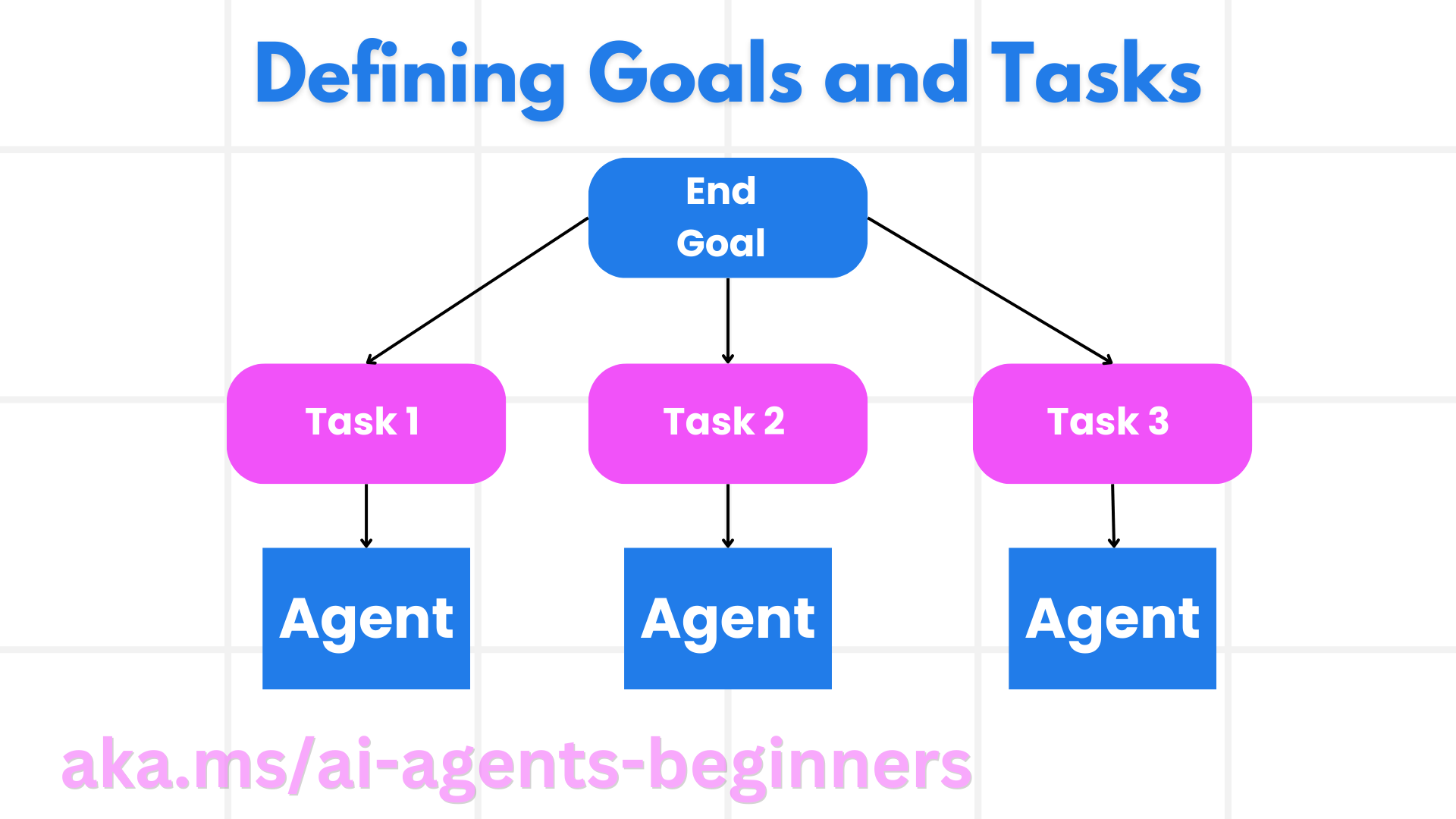
Most real-world tasks are too complex to tackle in a single step. An AI agent needs a concise objective to guide its planning and actions. For example, consider the goal:
"Generate a 3-day travel itinerary."
While it is simple to state, it still needs refinement. The clearer the goal, the better the agent (and any human collaborators) can focus on achieving the right outcome, such as creating a comprehensive itinerary with flight options, hotel recommendations, and activity suggestions.
### Task Decomposition
Large or intricate tasks become more manageable when split into smaller, goal-oriented subtasks.
For the travel itinerary example, you could decompose the goal into:
* Flight Booking
* Hotel Booking
* Car Rental
* Personalization
Each subtask can then be tackled by dedicated agents or processes. One agent might specialize in searching for the best flight deals, another focuses on hotel bookings, and so on. A coordinating or “downstream” agent can then compile these results into one cohesive itinerary to the end user.
This modular approach also allows for incremental enhancements. For instance, you could add specialized agents for Food Recommendations or Local Activity Suggestions and refine the itinerary over time.
### Structured output
Large Language Models (LLMs) can generate structured output (e.g. JSON) that is easier for downstream agents or services to parse and process. This is especially useful in a multi-agent context, where we can action these tasks after the planning output is received.
The following Python snippet demonstrates a simple planning agent decomposing a goal into subtasks and generating a structured plan:
```python
from pydantic import BaseModel
from enum import Enum
from typing import List, Optional, Union
import json
import os
from typing import Optional
from pprint import pprint
from agent_framework.azure import AzureAIProjectAgentProvider
from azure.identity import AzureCliCredential
class AgentEnum(str, Enum):
FlightBooking = "flight_booking"
HotelBooking = "hotel_booking"
CarRental = "car_rental"
ActivitiesBooking = "activities_booking"
DestinationInfo = "destination_info"
DefaultAgent = "default_agent"
GroupChatManager = "group_chat_manager"
# Travel SubTask Model
class TravelSubTask(BaseModel):
task_details: str
assigned_agent: AgentEnum # we want to assign the task to the agent
class TravelPlan(BaseModel):
main_task: str
subtasks: List[TravelSubTask]
is_greeting: bool
provider = AzureAIProjectAgentProvider(credential=AzureCliCredential()),
endpoint=os.getenv("AZURE_OPENAI_ENDPOINT"),
model="gpt-4o-mini",
)
# Define the user message
system_prompt = """You are a planner agent.
Your job is to decide which agents to run based on the user's request.
Provide your response in JSON format with the following structure:
{'main_task': 'Plan a family trip from Singapore to Melbourne.',
'subtasks': [{'assigned_agent': 'flight_booking',
'task_details': 'Book round-trip flights from Singapore to '
'Melbourne.'}
Below are the available agents specialised in different tasks:
- FlightBooking: For booking flights and providing flight information
- HotelBooking: For booking hotels and providing hotel information
- CarRental: For booking cars and providing car rental information
- ActivitiesBooking: For booking activities and providing activity information
- DestinationInfo: For providing information about destinations
- DefaultAgent: For handling general requests"""
user_message = "Create a travel plan for a family of 2 kids from Singapore to Melbourne"
response = client.create_response(input=user_message, instructions=system_prompt)
response_content = response.output_text
pprint(json.loads(response_content))
```
### Planning Agent with Multi-Agent Orchestration
In this example, a Semantic Router Agent receives a user request (e.g., "I need a hotel plan for my trip.").
The planner then:
* Receives the Hotel Plan: The planner takes the user’s message and, based on a system prompt (including available agent details), generates a structured travel plan.
* Lists Agents and Their Tools: The agent registry holds a list of agents (e.g., for flight, hotel, car rental, and activities) along with the functions or tools they offer.
* Routes the Plan to the Respective Agents: Depending on the number of subtasks, the planner either sends the message directly to a dedicated agent (for single-task scenarios) or coordinates via a group chat manager for multi-agent collaboration.
* Summarizes the Outcome: Finally, the planner summarizes the generated plan for clarity.
The following Python code sample illustrates these steps:
```python
from pydantic import BaseModel
from enum import Enum
from typing import List, Optional, Union
class AgentEnum(str, Enum):
FlightBooking = "flight_booking"
HotelBooking = "hotel_booking"
CarRental = "car_rental"
ActivitiesBooking = "activities_booking"
DestinationInfo = "destination_info"
DefaultAgent = "default_agent"
GroupChatManager = "group_chat_manager"
# Travel SubTask Model
class TravelSubTask(BaseModel):
task_details: str
assigned_agent: AgentEnum # we want to assign the task to the agent
class TravelPlan(BaseModel):
main_task: str
subtasks: List[TravelSubTask]
is_greeting: bool
import json
import os
from typing import Optional
from agent_framework.azure import AzureAIProjectAgentProvider
from azure.identity import AzureCliCredential
# Create the client
provider = AzureAIProjectAgentProvider(credential=AzureCliCredential()),
endpoint=os.getenv("AZURE_OPENAI_ENDPOINT"),
model=os.getenv("AZURE_OPENAI_CHAT_DEPLOYMENT_NAME"),
)
from pprint import pprint
# Define the user message
system_prompt = """You are a planner agent.
Your job is to decide which agents to run based on the user's request.
Below are the available agents specialized in different tasks:
- FlightBooking: For booking flights and providing flight information
- HotelBooking: For booking hotels and providing hotel information
- CarRental: For booking cars and providing car rental information
- ActivitiesBooking: For booking activities and providing activity information
- DestinationInfo: For providing information about destinations
- DefaultAgent: For handling general requests"""
user_message = "Create a travel plan for a family of 2 kids from Singapore to Melbourne"
response = client.create_response(input=user_message, instructions=system_prompt)
response_content = response.output_text
# Print the response content after loading it as JSON
pprint(json.loads(response_content))
```
What follows is the output from the previous code and you can then use this structured output to route to `assigned_agent` and summarize the travel plan to the end user.
```json
{
"is_greeting": "False",
"main_task": "Plan a family trip from Singapore to Melbourne.",
"subtasks": [
{
"assigned_agent": "flight_booking",
"task_details": "Book round-trip flights from Singapore to Melbourne."
},
{
"assigned_agent": "hotel_booking",
"task_details": "Find family-friendly hotels in Melbourne."
},
{
"assigned_agent": "car_rental",
"task_details": "Arrange a car rental suitable for a family of four in Melbourne."
},
{
"assigned_agent": "activities_booking",
"task_details": "List family-friendly activities in Melbourne."
},
{
"assigned_agent": "destination_info",
"task_details": "Provide information about Melbourne as a travel destination."
}
]
}
```
An example notebook with the previous code sample is available [here](07-python-agent-framework.ipynb).
### Iterative Planning
Some tasks require a back-and-forth or re-planning, where the outcome of one subtask influences the next. For example, if the agent discovers an unexpected data format while booking flights, it might need to adapt its strategy before moving on to hotel bookings.
Additionally, user feedback (e.g. a human deciding they prefer an earlier flight) can trigger a partial re-plan. This dynamic, iterative approach ensures that the final solution aligns with real-world constraints and evolving user preferences.
e.g sample code
```python
from agent_framework.azure import AzureAIProjectAgentProvider
from azure.identity import AzureCliCredential
#.. same as previous code and pass on the user history, current plan
system_prompt = """You are a planner agent to optimize the
Your job is to decide which agents to run based on the user's request.
Below are the available agents specialized in different tasks:
- FlightBooking: For booking flights and providing flight information
- HotelBooking: For booking hotels and providing hotel information
- CarRental: For booking cars and providing car rental information
- ActivitiesBooking: For booking activities and providing activity information
- DestinationInfo: For providing information about destinations
- DefaultAgent: For handling general requests"""
user_message = "Create a travel plan for a family of 2 kids from Singapore to Melbourne"
response = client.create_response(
input=user_message,
instructions=system_prompt,
context=f"Previous travel plan - {TravelPlan}",
)
# .. re-plan and send the tasks to respective agents
```
For more comprehensive planning do checkout Magnetic One Blogpost for solving complex tasks.
## Summary
In this article we have looked at an example of how we can create a planner that can dynamically select the available agents defined. The output of the Planner decomposes the tasks and assigns the agents so they can be executed. It is assumed the agents have access to the functions/tools that are required to perform the task. In addition to the agents you can include other patterns like reflection, summarizer, and round robin chat to further customize.
## Additional Resources
Magentic One - A Generalist multi-agent system for solving complex tasks and has achieved impressive results on multiple challenging agentic benchmarks. Reference: Magentic One. In this implementation the orchestrator creates task specific plans and delegates these tasks to the available agents. In addition to planning the orchestrator also employs a tracking mechanism to monitor the progress of the task and re-plans as required.
### Got More Questions about the Planning Design Pattern?
Join the [Microsoft Foundry Discord](https://aka.ms/ai-agents/discord) to meet with other learners, attend office hours and get your AI Agents questions answered.
## Previous Lesson
[Building Trustworthy AI Agents](../06-building-trustworthy-agents/README.md)
## Next Lesson
[Multi-Agent Design Pattern](../08-multi-agent/README.md)