# Microsoft C++ Language Server
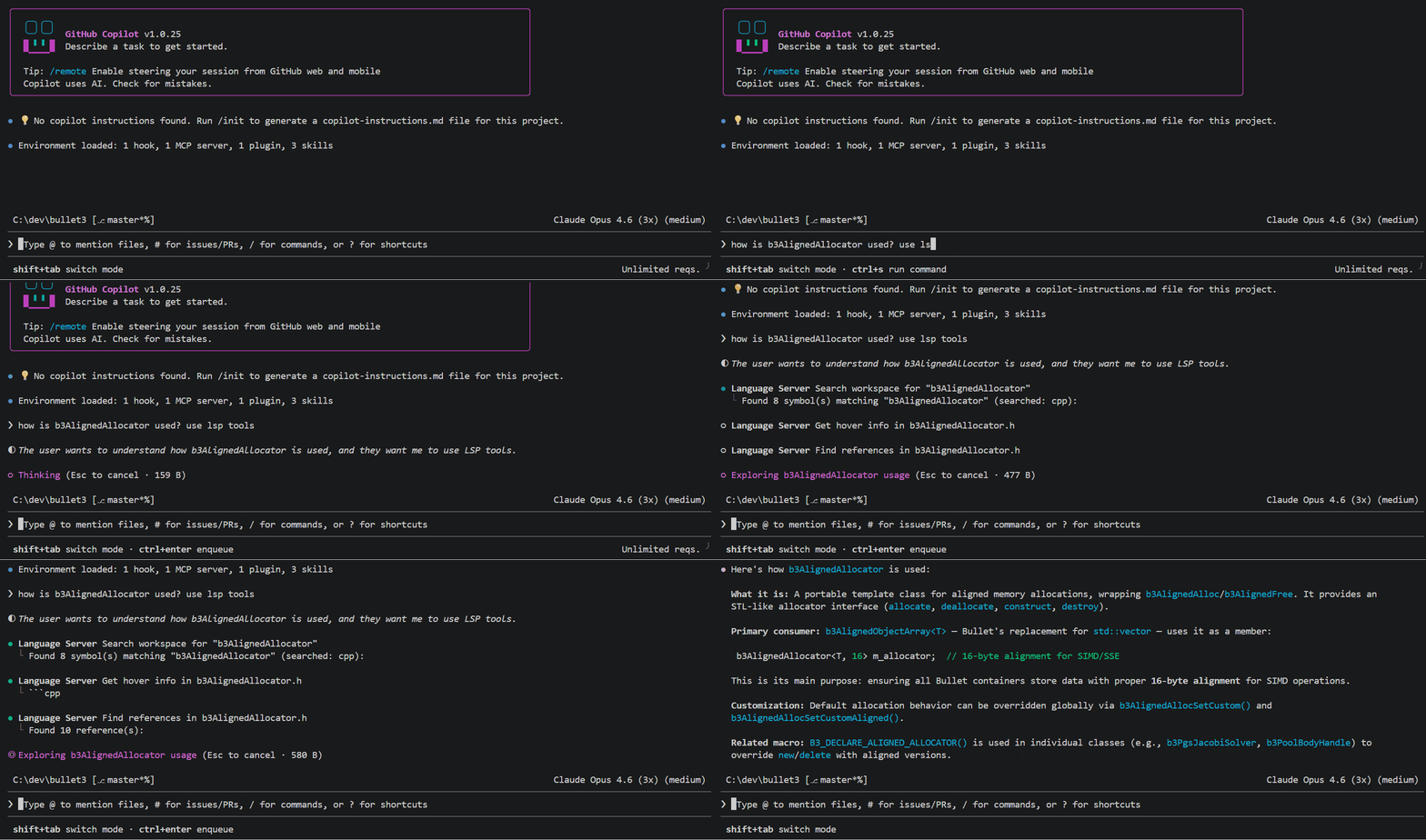
_The Microsoft C++ Language Server is currently in preview and may be subject to change in future releases._
**Microsoft C++ Language Server** brings the same C++ code intelligence used in Visual Studio and VS Code to GitHub Copilot CLI on Windows, macOS, and Linux. It provides fast, accurate understanding of C++ codebases with features like symbol search and semantic navigation.
## Prerequisites
Before you get started, make sure you have:
- An active [GitHub Copilot](https://github.com/features/copilot) subscription
- [GitHub Copilot CLI](https://docs.github.com/en/copilot/how-tos/copilot-cli/set-up-copilot-cli/install-copilot-cli) with session-directory support, tested with prerelease `1.0.106-5`
- [npm](https://www.npmjs.com/package/npm?activeTab=readme)
## Quick start
1. Install the [`cpp-language-server` plugin from the copilot-plugins marketplace](https://github.com/github/copilot-plugins). From within GitHub Copilot CLI, run:
```text
/plugin install cpp-language-server@copilot-plugins
```
This bundles the language server and auto-updates with the latest version, so you don't need to install the npm package manually.
2. Run `npx @microsoft/cpp-language-server --accept-eula --login` to accept the [license terms](https://www.npmjs.com/package/@microsoft/cpp-language-server?activeTab=code) and login to GitHub. An active GitHub Copilot subscription is required.
3. Create a [`compile_commands.json` file](./docs/compile-commands.md) for your project. For CMake or MSBuild (vcxproj) projects, run the [`generate-compile-commands` skill](./plugins/cpp-language-server/skills/generate-compile-commands/SKILL.md) in GitHub Copilot CLI with a prompt like "regenerate compile commands" or "load project" to generate the file and configure the language server. See the [build-system guides](./docs/compile-commands.md) for manual setup and custom builds.
4. Launch GitHub Copilot CLI from your project directory.
5. Within GitHub Copilot CLI, run `/lsp show`. You should see a "cpp" server running.
6. Use GitHub Copilot CLI like normal, now with enhanced C++ capabilities. To nudge the agent to use the tools, try adding phrases like "use LSP tools" to your prompt.
## Documentation
Browse the [documentation index](./docs/index.md) or jump to a topic:
-
[Installation and supported platforms](./docs/installation.md)
-
[Authentication and GitHub Enterprise Cloud](./docs/authentication.md)
-
[Generating compile commands](./docs/compile-commands.md)
-
[Configuration](./docs/configuration.md)
-
[Indexing and disabling WCI](./docs/indexing.md)
-
[Command line options](./docs/command-line-options.md)
-
[Supported LSP features](./docs/lsp-features.md)
- [Troubleshooting and feedback](./docs/troubleshooting.md)
## Reporting feedback
To report a problem or suggest an improvement, [open an issue on this repo](https://github.com/microsoft/cpp-language-server/issues/new). See [troubleshooting and feedback](./docs/troubleshooting.md) for setup checks, log locations, and what to include in your report.
## Data collection
The software may collect information about you and your use of the software and send it to Microsoft. Microsoft may use this information to provide services and improve our products and services. You may turn off the telemetry as described in the repository. There are also some features in the software that may enable you and Microsoft to collect data from users of your applications. If you use these features, you must comply with applicable law, including providing appropriate notices to users of your applications together with a copy of Microsoft’s privacy statement. Our privacy statement is located at https://go.microsoft.com/fwlink/?LinkID=824704. You can learn more about data collection and use in the help documentation and our privacy statement. Your use of the software operates as your consent to these practices.
For instructions, see [disabling telemetry](./docs/command-line-options.md#disable-telemetry).
## Trademarks
This project may contain trademarks or logos for projects, products, or services. Authorized use of Microsoft trademarks or logos is subject to and must follow [Microsoft's Trademark & Brand Guidelines](https://www.microsoft.com/en-us/legal/intellectualproperty/trademarks/usage/general). Use of Microsoft trademarks or logos in modified versions of this project must not cause confusion or imply Microsoft sponsorship. Any use of third-party trademarks or logos are subject to those third-party’s policies.