# makeStyles spec
## Background
`makeStyles` is a way how CSS is applied to core components and their variants as well as a utility used to implement style overrides for those components.
## Prior Art
This section summarises previous approaches and their pros and cons.
### v0 approach
`@fluentui/react-northstar` (aka v0 aka Stardust) uses CSS-in-JS. [Fela](https://github.com/robinweser/fela) CSS-in-JS library is used.
#### Fela uses atomic CSS classes
- one CSS property = one CSS class
- all selectors have one class specificity
- the same classes are reused anywhere in the application = smaller DOM
#### CSS classes are added to DOM when used for the first time
- only the classes that are used are added to DOM
- that means those are added in non-deterministic order
#### Two CSS classes setting the same property cannot be applied to the same element
If there are two classes setting the same CSS property (`.r {color: red}` and `.b {color: blue}`) those can never be applied to the same element.
As both classes have the same one class specificity, the rule defined later in the DOM will win. As the insertion order is non-deterministic, the resulting style would be non-deterministic as well.
As a consequence, there is a couple of restrictions:
- Shorthand css properties (`margin`) must be expanded before merging (to `margin-top`, `margin-right`, `margin-bottom`, `margin-left`).
- To apply any overrides, it is not possible to just concatenate classes. Style object are deeply nested as they can contain styles for pseudo elements (`::before`), pseudo classes (`:hover`) or nested elements (`& .indicator`). Therefore style objects must be always deep merged and then the classes can be computed.
- Due to the previous point, when parent component is passing style overrides to a child component it needs to know what kind of component the child is.
If that is a non-FUI component, parent must pass the overrides as a list of classnames. If the child is a FUI component, the overrides must be passed as `styles` object so that the child can merge the styles correctly.
This can be complicated as there are scenarios where the parent does not know what child it will render (especially when the styles are not applied by the direct child but somewhere else down the tree).
- When overrides are passed from parent to child, the whole styles must be re-evaluated in runtime every time. Child can cache evaluated styles and classnames based on (limited) set of input props and state. And FUI components do that. But once style overrides are passed to the component, the overrides (`styles` or `variables`) and component styles object must be deep merged.
#### Application overrides are part of the theme object
All application-owned style overrides are part of the Theme object. Most of those are just one-off overrides.
This results in a huge object (several files and thousands of lines per component) which is not tree-shakeable.
There is also unnecessary and confusing indirection when defining overrides and no support for dead code elimination.
Overrides are defined far away from their usage, see the example below.
```jsx
// App
// Component usage - I need to go to a completely different file to find out what styles the variable overrides.
// Theme overrides
const lightOverrides = {
componentStyles: {
Button: {
root: ({variables}) => ({
// hundreds of overrides
...(variables.isMuteButton && {
minWidth: '64px',
}),
// another hundreds of overrides
})
}
// all other components
}
}
const darkOverrides = {
// can have separate overrides for isMuteButton variable.
}
```
#### Specificity is controlled by JS
This is the biggest benefit of CSS-in-JS approach, whatever is applied last in JS code always wins the CSS specificity war. As the library is used by developers and JS is their primary language (not CSS) this is expected and intuitive behavior.
### `useCSS` in v0
One of the biggest pain points in v0 are the overrides. `useCSS` tries to solve that.
Basic components still use Fela with atomic CSS classes and 1 class specificity. `useCSS` is used for overrides and always generates classes with 2 classes specificity. Also, instead of using atomic CSS, monolithic classes are used for overrides (Emotion CSS-in-JS is used for that).
#### No special prop for passing overrides to children
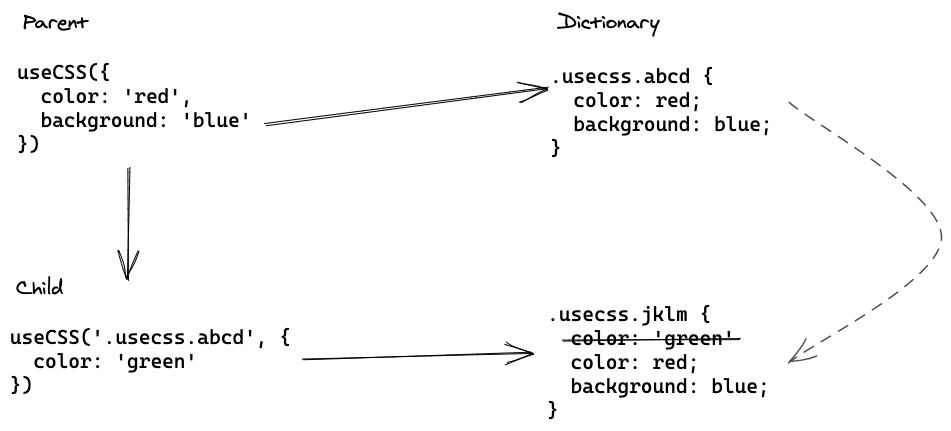
For handling multiple levels of overrides, instead of using a special prop with all its problems (see above), `useCSS` just returns a class which can be passed to a child using `className`. If there is another `useCSS` call in the child, it takes the `className` from parent.
1. `useCSS` call in parent generates a classname, and adds mapping from the classname to a style object to a global dictionary.
2. Parent takes the class returned by the `useCSS` call and passes it to its child.
3. The child calls `useCSS` to apply its own overrides and also passes it the class from parent.
4. `useCSS` finds the style object in the dictionary, merges the original style object with the child's style overrides and returns the new classname. Instead of performing an expensive object deep merge, it just concatenates the two stringified style objects and depends on the-latest-wins CSS rule.
#### Limitations
This approach looks good for style overrides, we are not sure this approach works the best for core component styles. Without that, we would have two different styling approaches in place.
Although the string concatenation is performant, it results in a lot of CSS code.
### v8 `makeStyles`
In order to improve rendering performance, v8 approach is closer to static CSS.
There are two main functions in this approach `makeStyles` and `useStyles`.
`makeStyles` is a factory which takes style object as input and returns a `useStyles` hook. `makeStyles` does not accept any theme or React context and should be called in a module scope, not in a scope of a React component.
When rendering a component, `useStyles` hook is called passing a theme to it. The `useStyles` function injects the styles into DOM (if not done yet) and maps props to classnames.
#### Multiple classes are applied to a single element
As in static CSS approach, multiple semantic classes are applied to an element.
For example `