---
title: Logging and telemetry
sidebar_position: 2
---
import { ApiLink } from "@site/src/components/shortLinks";
Telemetry is an essential part of maintaining the health of modern applications. Fluid Framework provides a way to plug
in your own logic to handle telemetry events sent by Fluid. This enables you to integrate the Fluid telemetry along with
your other telemetry, and route the event data in whatever way you need.
## Collect Fluid Framework logs with a custom `ITelemetryBaseLogger`
The `ITelemetryBaseLogger` is an interface within the `@fluidframework/common-definitions` package. This interface can
be implemented and passed into the service client's constructor via the `props` parameter.
All Fluid service clients (for example, [AzureClient][] and [TinyliciousClient][]) allow passing a `logger?: ITelemetryBaseLogger`
into the service client props. Both `createContainer()` and `getContainer()` methods will then create an instance of the `logger`.
`TinyliciousClientProps` interface definition takes an optional parameter `logger`.
```ts
const loader = new Loader({
urlResolver: this.urlResolver,
documentServiceFactory: this.documentServiceFactory,
codeLoader,
logger: tinyliciousContainerConfig.logger,
});
```
The `Loader` constructor is called by both `createContainer()` and `getContainer()`, and requires a `ILoaderProps`
interface as its constructor argument. `ILoaderProps` interface has an optional logger parameter that will take the
`ITelemetryBaseLogger` defined by the user.
is used by `Loader` to pipe to container's telemetry system.
### Properties and methods
The interface contains a `send()` method as shown:
```ts
export interface ITelemetryBaseLogger {
send(event: ITelemetryBaseEvent): void;
}
```
- `send()`
- The `send()` method is called by the container's telemetry system whenever a telemetry event occurs. This method
takes in an ITelemetryBaseEvent type parameter, which is also within the `@fluidframework/common-definitions`
package. Given this method is part of an interface, users can implement a custom telemetry logic for the container's
telemetry system to execute.
### Customizing the logger object
In some cases you may wish to add custom attributes to the object implementing the `ITelemetryBaseLogger` interface. For
example, you may wish to handle some categories differently than others, or you may want to label categories based on
the input.
Regardless of your logic, `ITelemetryBaseLogger` must be implemented, and you must call the `send()` method ultimately
since it is the actual method that is piped to the container's telemetry system and sends the telemetry events.
To see an example of building custom logic into the telemetry implementation, see the `ITelemetryLogger` interface
snippets below, or in the `@fluidframework/common-definitions` package for full details.
```ts
// @public
export interface ITelemetryLogger extends ITelemetryBaseLogger {
send(event: ITelemetryBaseEvent): void;
sendErrorEvent(event: ITelemetryErrorEvent, error?: any): void;
sendPerformanceEvent(event: ITelemetryPerformanceEvent, error?: any): void;
sendTelemetryEvent(event: ITelemetryGenericEvent, error?: any): void;
}
```
`ITelemetryLogger` interface breaks down telemetry events into different categories, and will contains different logic
for different events.
```ts
/**
* Send a telemetry event with the logger
*
* @param event - the event to send
* @param error - optional error object to log
*/
public sendTelemetryEvent(event: ITelemetryGenericEvent, error?: any) {
const newEvent: ITelemetryBaseEvent = {
...event,
category: event.category ?? (error === undefined ? "generic" : "error"),
};
if (error !== undefined) {
TelemetryLogger.prepareErrorObject(newEvent, error, false);
}
this.send(newEvent);
}
```
Like demonstrated here, it is imperative to ensure `send()` is ultimately called at the end of custom properties.
This ensures that information is piped to the container's telemetry system, and that the telemetry event is correctly fired.
## ITelemetryBaseEvent interface
All Fluid telemetry events are sent as `ITelemetryBaseEvent`s via the `send()` method in `ITelemetryBaseLogger`. This
interface can be augmented, allowing you to add additional properties that will be serialized as JSON. The default
required properties, `eventName` and `category`, are set by the telemetry system.
```ts
export interface ITelemetryBaseEvent extends ITelemetryProperties {
category: string;
eventName: string;
}
export interface ITelemetryProperties {
[index: string]: TelemetryEventPropertyType | ITaggedTelemetryPropertyType;
}
export interface ITaggedTelemetryPropertyType {
value: TelemetryEventPropertyType;
tag: string;
}
export type TelemetryEventPropertyType = string | number | boolean | undefined;
```
The `ITelemetryBaseEvent` interface contains `category` and `eventName` properties for labeling and defining a telemetry event,
and extends `ITelemetryProperties` which has a string index signature. The values of the index signature are
either tagged (`ITaggedTelemetryPropertyType`) or untagged (`TelemetryEventPropertyType`) primitives (`string`,
`boolean`, `number`, `undefined`).
### Understanding Tags
Tags are strings used to classify the properties on telemetry events. By default, telemetry properties are untagged. However,
the Fluid Framework may emit events with some properties tagged, so implementations of `ITelemetryBaseLogger` must be
prepared to check for and interpret any tags. Generally speaking, when logging to the user's console, tags can
be ignored and tagged values logged plainly, but when transmitting tagged properties to a telemetry service,
care should be taken to only log tagged properties where the tag is explicitly understood to indicate the value
is safe to log from a data privacy standpoint.
### Category
The Fluid Framework sends events in the following categories:
- error -- used to identify and report error conditions, e.g. duplicate data store IDs.
- performance -- used to track performance-critical code paths within the framework. For example, the summarizer tracks
how long it takes to create or load a summary and reports this information in an event.
- generic -- used as a catchall for events that are informational and don't represent an activity with a duration like a
performance event.
### EventName
This property contains a unique name for the event. The name may be namespaced, delimited by a colon ':'.
Additionally, some event names (not the namespaces) contain underscores '\_', as a free-form subdivision of
events into different related cases. Once common example is `foo_start`, `foo_end` and `foo_cancel` for
performance events.
### Customizing logged events
Similar to the `ITelemetryBaseLogger` interface mentioned above, different levels of event complexity can also be
achieved by adding other attributes to the object implementing the `ITelemetryBaseEvent` interface. Below are some
examples:
```ts
if (chunk.version !== undefined) {
logger.send({
eventName: "MergeTreeChunk:serializeAsMinSupportedVersion",
category: "generic",
fromChunkVersion: chunk.version,
toChunkVersion: undefined,
});
}
```
The code snippet here implements a telemetry event without adding much complexity. The telemetry event object here adds
only a few other attributes to the `ITelemetryBaseEvent`.
```ts
/**
* Send a telemetry event with the logger
*
* @param event - the event to send
* @param error - optional error object to log
*/
public sendTelemetryEvent(event: ITelemetryGenericEvent, error?: any) {
const newEvent: ITelemetryBaseEvent = {
...event,
category: event.category ?? (error === undefined ? "generic" : "error"),
};
if (error !== undefined) {
TelemetryLogger.prepareErrorObject(newEvent, error, false);
}
this.send(newEvent);
}
```
However, the code snippet here shows a telemetry event object that adds much more complex logic to determine the event
that has occurred, then passes the resulting event to the `send()` method for the container's telemetry system to
output.
Here is the above telemetry event object in action:
```ts
this.logger.sendTelemetryEvent({
eventName: "connectedStateRejected",
source,
pendingClientId: this.pendingClientId,
clientId: this.clientId,
hasTimer: this.prevClientLeftTimer.hasTimer,
inQuorum:
protocolHandler !== undefined &&
this.pendingClientId !== undefined &&
protocolHandler.quorum.getMember(this.pendingClientId) !== undefined,
});
```
Because you can customize the logic, you can send these events to your own external telemetry system to have them logged. This enables you to integrate Fluid Framework logging with your other telemetry.
## Code example
With the interface already hooked up to the container's telemetry system, it is easy for users to write a custom
telemetry object by implementing the `ITelemetryBaseLogger` interface and defining the `send()` method. Below is an
example custom telemetry logger, `ConsoleLogger`, that implements the `ITelemetryBaseLogger` interface. As the name
suggests, the `ConsoleLogger` defined the `send()` method to stringify the entire event object and print it to the
browser console.
```ts
import { ITelemetryBaseLogger, ITelemetryBaseEvent } from "@fluidframework/core-interfaces";
// Define a custom ITelemetry Logger. This logger will be passed into TinyliciousClient
// and gets hooked up to the Tinylicious container telemetry system.
export class ConsoleLogger implements ITelemetryBaseLogger {
constructor() {}
send(event: ITelemetryBaseEvent) {
console.log("Custom telemetry object array: ".concat(JSON.stringify(event)));
}
}
```
This custom logger should be provided in the service client constructor. Fluid will create an instance of the logger when creating or getting the container. The custom logger is hooked up to the container's telemetry system by the time the container is returned.
```ts
async function start(): Promise {
// Create a custom ITelemetryBaseLogger object to pass into the Tinylicious container
// and hook to the Telemetry system
const client = new TinyliciousClient({logger: new ConsoleLogger()});
let container: FluidContainer;
let services: TinyliciousContainerServices;
// Get or create the document depending if we are running through the create new flow
const createNew = !location.hash;
if (createNew) {
// The client will create a new detached container using the schema
// A detached container will enable the app to modify the container before attaching it to the client
({container, services} = await client.createContainer(containerSchema));
// Assign the returned ID to the URL hash for subsequent load flow
const id = await container.attach();
location.hash = id;
}
}
```
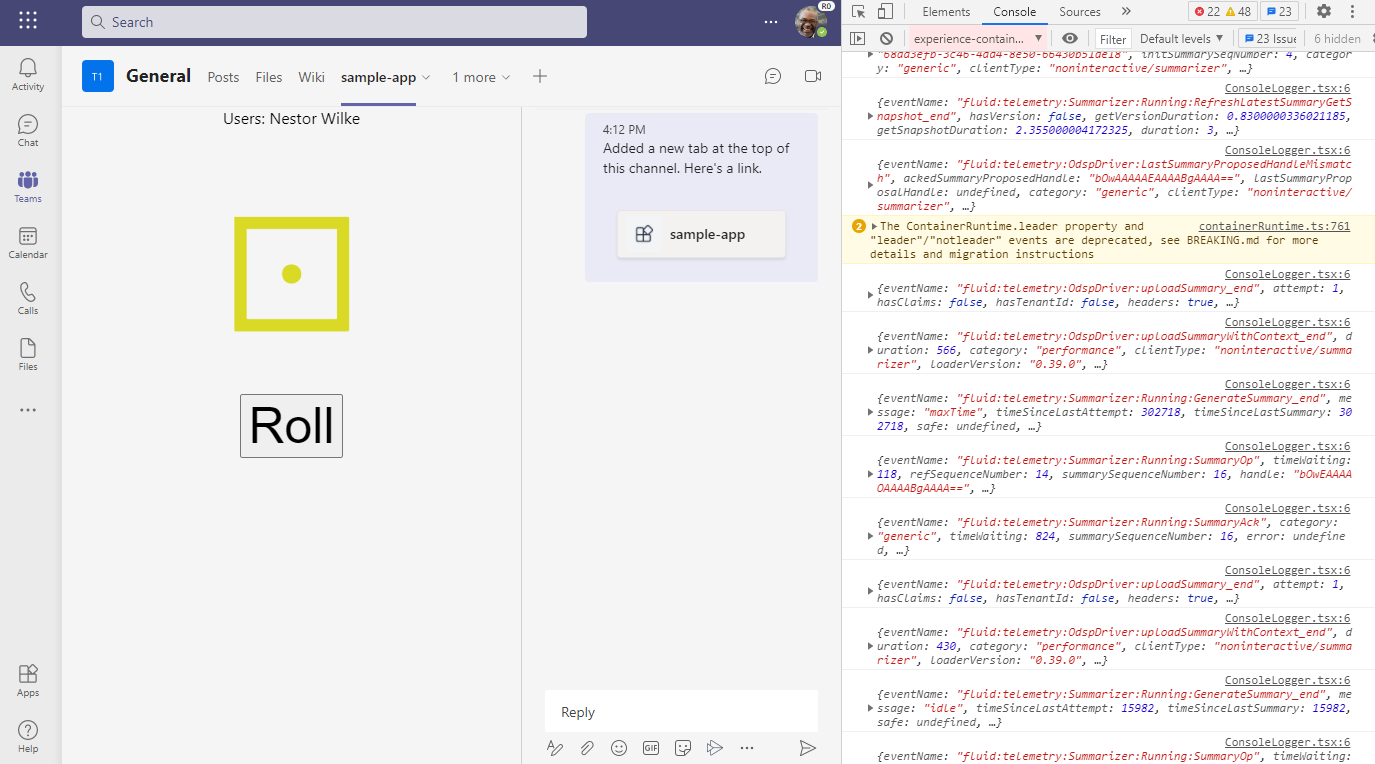
Now, whenever a telemetry event is encountered, the custom `send()` method gets called and will print out the entire
event object.
 :::warning
The purpose of `ConsoleLogger` is to demonstrate how the `ITelemetryBaseLogger` interface should be implemented. In typical usage, developers should instead use the `DebugLogger`, which is provided by default by the Fluid Framework. See [Using DebugLogger](#using-debuglogger) below instead of implementing something similar to `ConsoleLogger`.
:::
### Using `DebugLogger`
The `DebugLogger` offers a convenient way to output all telemetry events to the console. `DebugLogger` is present by default when creating/getting a container, and no extra steps are required to use it.
Under the hood, `DebugLogger` uses the [debug](https://github.com/visionmedia/debug) library. The `debug` library enables Fluid to send to a unique 'namespace,' `fluid`. By default these messages are hidden but they can be enabled
in both Node.js and a web browser.
**To enable Fluid Framework logging in the browser,** set the `localStorage.debug` variable in the JavaScript console,
after which you will need to reload the page.
```js
localStorage.debug = "fluid:*";
```
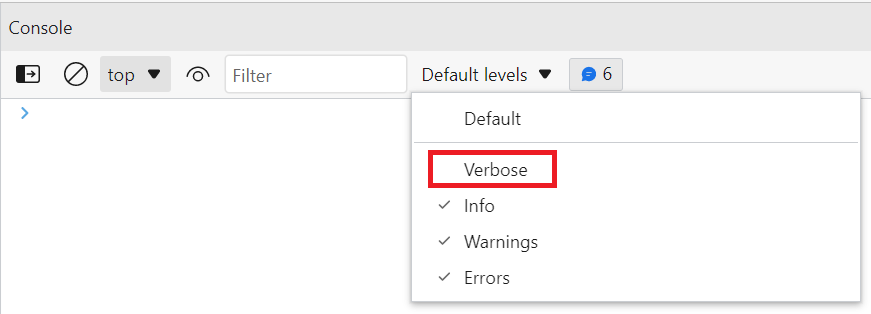
You'll also need to enable the `Verbose` logging level in the console. The dropdown that controls that is just above it,
to the right of the Filter input box (it might say "Default Levels").
It's not recommended to set `localStorage.debug` in code; your users will see a very spammy console window if you do.
**To enable Fluid Framework logging in a Node.js application,** set the `DEBUG` environment variable when running the app.