Wassette
A security-oriented runtime that runs WebAssembly Components via MCP
[Quick Start] | [FAQ] | [Documentation] | [Releases] | [Contributing] | [Discord]
> [!WARNING]
> **Early Development**: This repository is not production ready yet. It is in early development and may change significantly.
## Why Wassette?
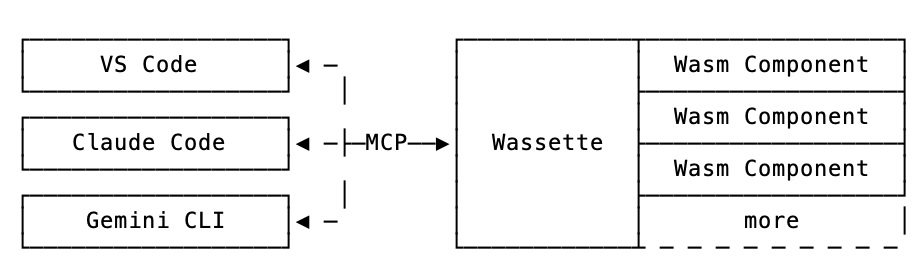
- **Convenience**: Wassette makes it easy to extend AI agents with new tools,
all without ever having to leave the chat window.
- **Reusability**: Wasm Components are generic and reusable;
there is nothing MCP-specific about them.
- **Security**: Wassette is built on the Wasmtime security sandbox, providing
browser-grade isolation of tools.
## Architecture
## Installation
**Quick start:** For Linux/macOS, use our one-liner install script:
```bash
curl -fsSL https://raw.githubusercontent.com/microsoft/wassette/main/install.sh | bash
```
**For complete installation instructions** for all platforms (including Windows, Homebrew, Nix, Docker, and more), see our **[Installation Guide](https://microsoft.github.io/wassette/latest/installation.html)**.
## Using Wassette
With Wassette installed, the next step is to register it with your agent of choice. See our [Quick Start] guide (3 simple steps), or check the [MCP Clients guide](https://microsoft.github.io/wassette/latest/mcp-clients.html) for detailed setup instructions for GitHub Copilot, Cursor, Claude Code, and Gemini CLI.
Once configured, you can start loading WebAssembly components. To teach your agent to tell the time, ask it to load a time component:
```text
Please load the time component from oci://ghcr.io/microsoft/time-server-js:latest
```
Now that the time component is loaded, we can ask your agent to tell you the current time:
```text
What is the current time?
```
The agent will respond with the current time, which is fetched from the time component running in a secure WebAssembly sandbox:
```output
The current time July 31, 2025 at 10:30 AM UTC
```
Congratulations! You've just run your first Wasm Component and taught your agent how to tell time!
## Demo
https://github.com/user-attachments/assets/8e5a371c-ac72-406d-859c-03833ee83963
## Discord
You can join us via the `#wassette` channel on the [Microsoft Open Source Discord](https://discord.gg/microsoft-open-source):
[](https://discord.gg/microsoft-open-source)
## Contributing
Please see [CONTRIBUTING.md][Contributing] for more information on how to contribute to this project.
## License
This project is licensed under the