# stagedings
An API to navigate scenes and subscenes that has been configured in a [mididings](https://github.com/mididings/mididings) script
[](https://pypi.org/project/stagedings/)

[](https://swagger.io/specification/)
[](https://mididings.discourse.group/)
---
### What does stagedings allow?
* A web-based interface
* Alternative of the legacy **`livedings UI`**, which was based on Tkinter 🪓
* A HTTP layer that facilitates control and navigation allowing the abstraction of OSC subcalls
* An OpenAPI specification making possible to generate a client SDK in multiple language with a code generator like [Kiota](https://github.com/microsoft/kiota) making possible to use the API in .NET, Go, Java, PHP, Python, Ruby and TypeScript.
⚠️ *A scene patch dictionary defined in the `run` section of your mididings script is required to work correctly, check the [`run` function documentation for more information](https://mididings.github.io/mididings/main.html#mididings.run) on how to structure your patch.*
## 📘 API documentation
- [stagedings manual](https://mididings.github.io/stagedings)
- [mididings manual](https://mididings.github.io/mididings)
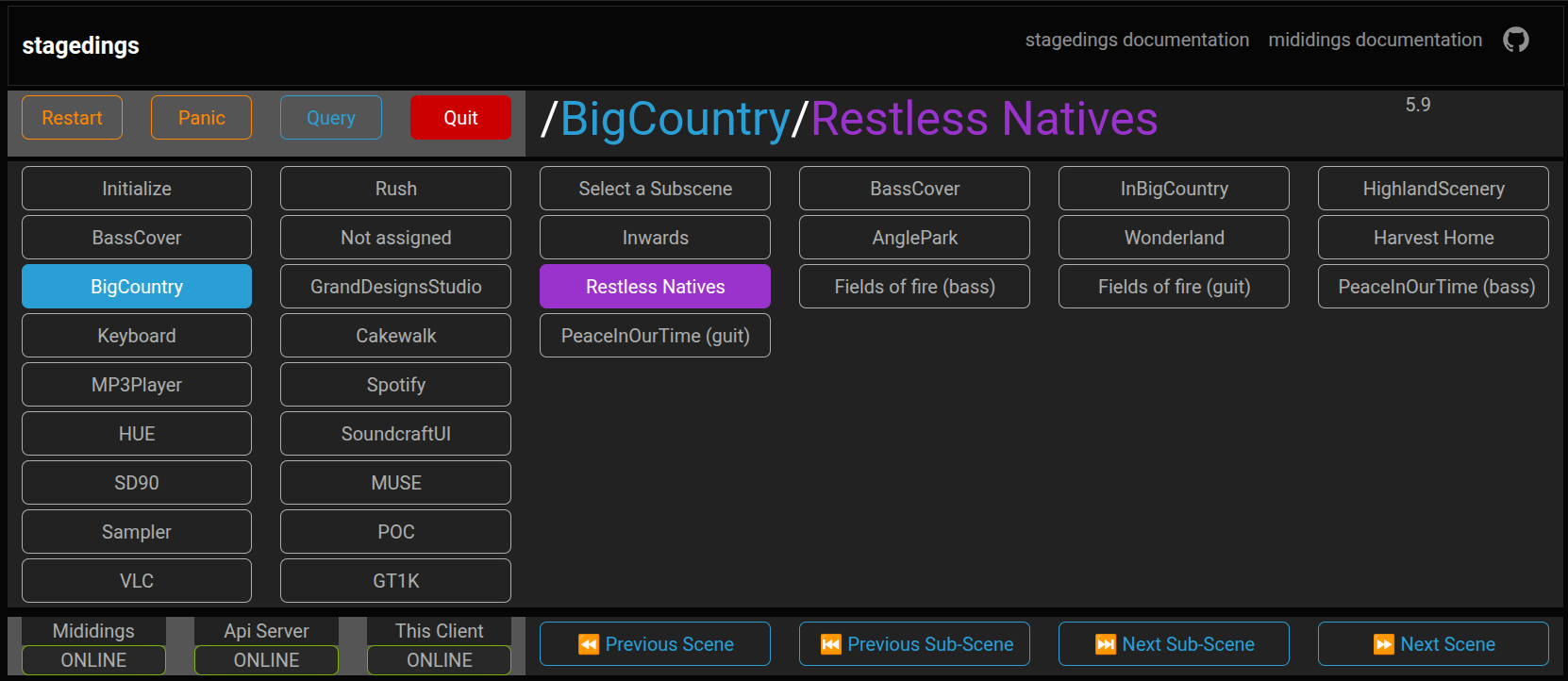
## Frontend
### A responsive multiclient, real-time interface for scene/subscene navigation
 ---
## Features
- Web UI with real-time scene/subscene updates
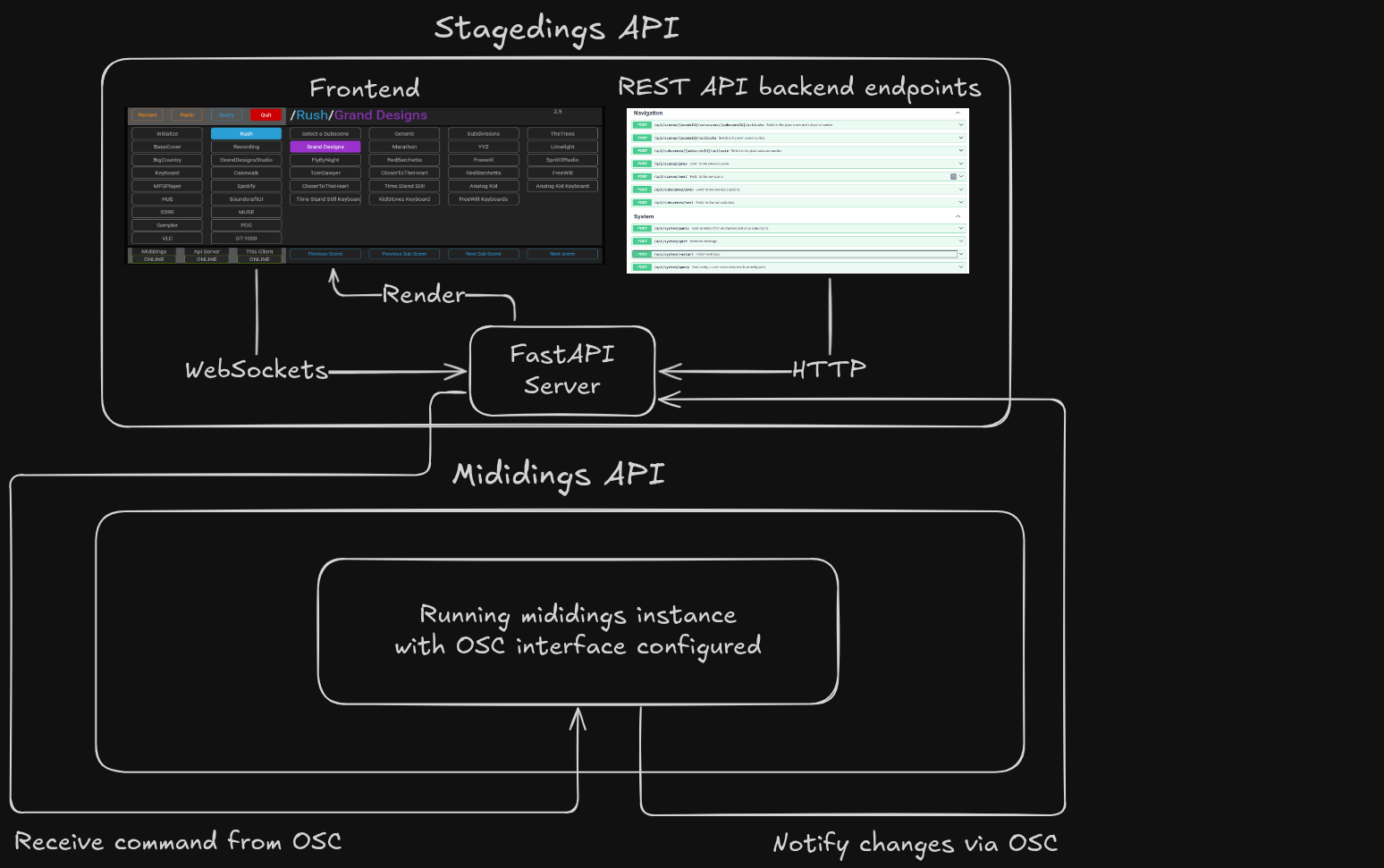
- FastAPI backend with full REST and WebSocket support
- Multiple clients supported
- Use the mididings OSC interface
- It exposes a **fully compliant OpenAPI spec** for easy generation of SDK clients in any language, enabling flexible remote control of mididings
---
### The frontend allow
* Direct navigation through scenes and subscenes
* Exposes the Restart, Panic, Query and Quit commands
### The backend allow
* Endpoints for direct navigation through scenes and subscenes
* Endpoints to the Restart, Panic, Query and Quit commands
#### ℹ️ About commands
* ***Restart*** will restart mididings process
* ***Panic*** send note off to all ports and all channels
* ***Quit*** stop mididings, be carefull
---
## ⚒️ Installation from PyPI
**NOTE:** This will also install mididings with OSC and AutoRestart support allowing a full working stack.
```sh
# Create a Python virtual environment
$ python3 -m venv .venv
$ source .venv/bin/activate
# Install stagedings including mididings as a dependency
$ pip install stagedings
```
## ▶️ Running the application
```sh
$ stagedings [--host HOST] [--port PORT] [--control-port CONTROL_PORT] [--listen-port LISTEN_PORT]
```
## Options
* --host
* FastAPI server bind address
* Default: localhost
* Use 0.0.0.0 to allow network access or the server IP address
* --port
* FastAPI + WebSocket server port
* Default: 5000
* --control-port
* OSC port where mididings listens for commands.
* Default: 56418
* --listen-port
* OSC port where stagedings listens for notifications from mididings.
* Default: 56419
## Use cases
### Local setup (single machine)
```sh
$ stagedings
```
This runs everything locally on:
```sh
http://localhost:5000 by default
```
### Network / multi-client setup
When clients access the server from other machines, you must expose the backend:
```sh
$ stagedings --host 0.0.0.0
```
or:
```sh
$ stagedings --host 192.168.1.100
```
### Sandbox setup (for debugging)
```sh
$ python scripts/run_cli.py [--host HOST] [--port PORT]
```
This runs everything locally on:
```sh
http://localhost:5000 by default
```
### Accessing the UI
Once running, open in a browser:
```sh
http://your-hostname:5000
```
or:
```sh
http://192.168.1.100:5000
```
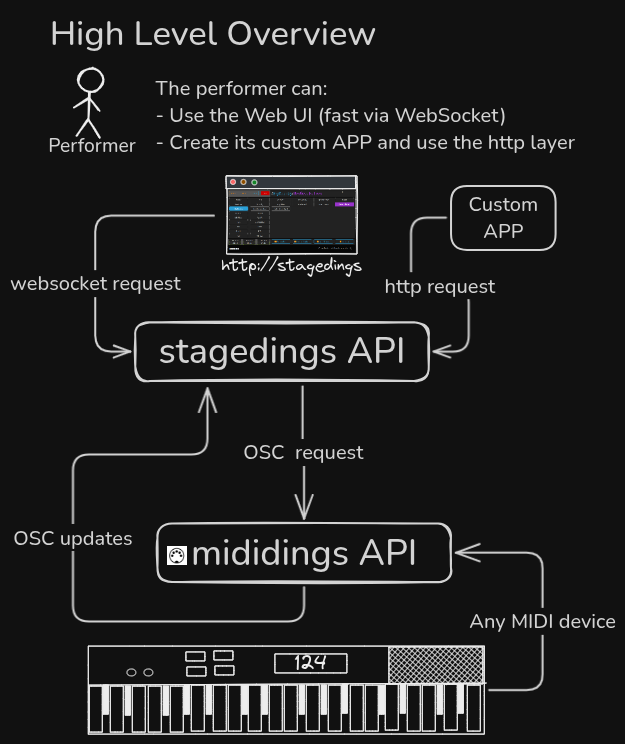
## High Level Overview
 ## 🔗 Communication Workflow
 ### 💬 Feedback & Contributions
We welcome bug reports, feature ideas, and contributions! Please open an issue or discussion
### 📜 License
All files in this repository are released under the terms of the GNU
General Public License as published by the Free Software Foundation;
either version 2 or later of the License.
# Made in Québec 🇨🇦