Agents get useful once they can read your real tables, but a database role
that reads every column and writes every row is not a control you can show a
security reviewer. Midplane is that control. Agents connect to the gateway
over MCP; it parses each statement with Postgres' own parser, decides it
against your policy, records it, and only then runs it, with masks written
into the query itself.
## What it enforces
- **Table access**, denied by default, per table.
- **Masking** at the source: hashes, partial values, generalized dates, NULLs,
applied before any filter, join or aggregate sees the raw value.
- **Guardrails**: one statement at a time, writes need a `WHERE`, no writes
hidden in a `WITH`, reads in read-only transactions with timeouts.
- **Approvals**: writes held for a person, bound to the exact statement and
checked against the row count the approver saw.
- **Containment**: once an agent reads a column labeled untrusted (support
tickets, emails), its writes are held and secret tables are closed to it.
- **An audit log** on the gateway's own disk, hash-chained, exported and
verified with one command.
The gateway runs in your network, next to your databases. It opens its
connections to Midplane Cloud and to Midplane's relay, and neither connects to
it.
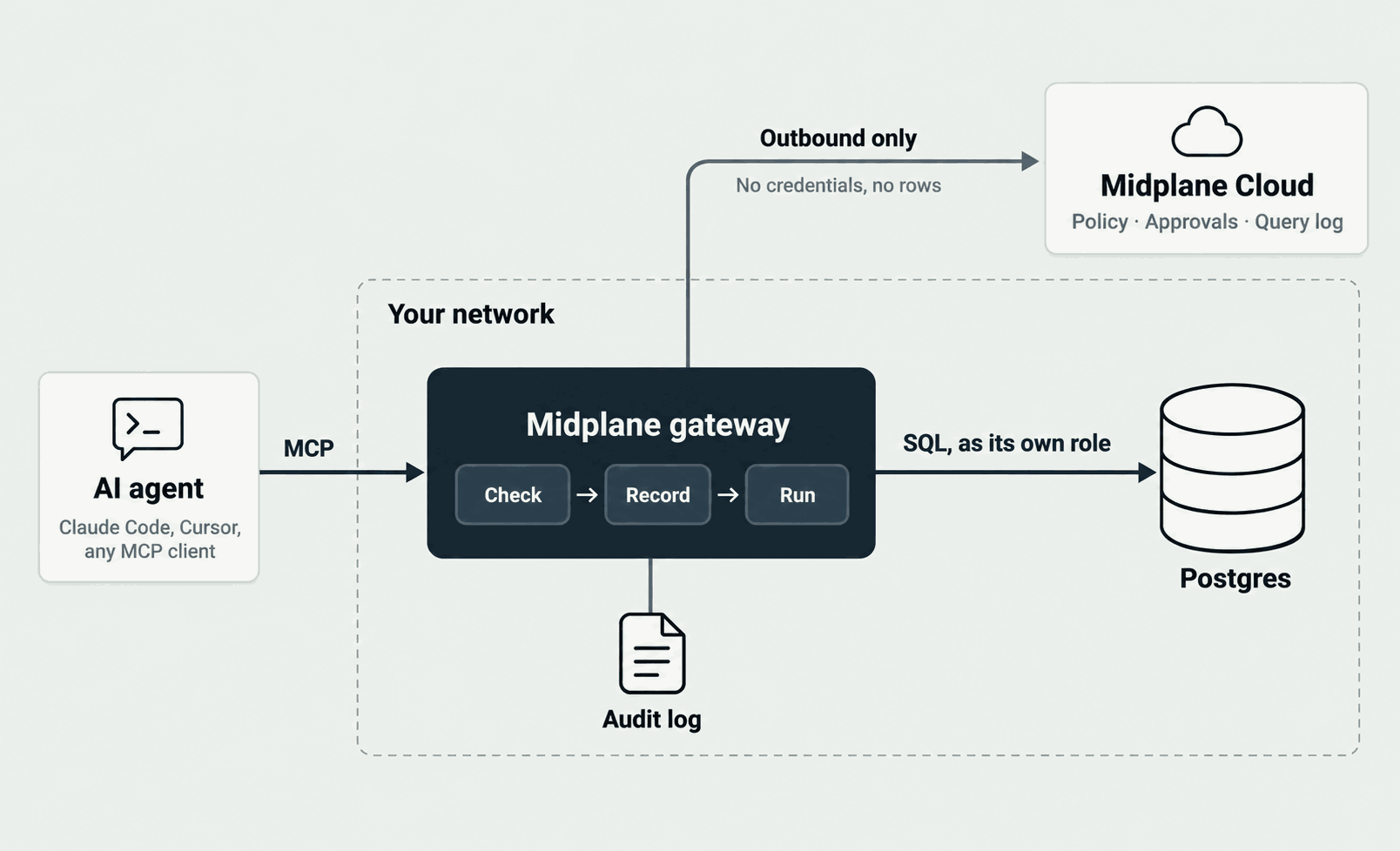
Behind the relay, agents reach the gateway at a public HTTPS URL while it only
connects out, even in a private network: the relay passes their encrypted
traffic without reading it ([how it
works](https://midplane.ai/docs/how-it-works#through-the-relay)). On your
computer or at [your own
URL](https://midplane.ai/docs/gateway/deploy#your-own-url), agents connect to
the gateway directly, with no relay.
## Get started
- **A sample database, no account**: the [quickstart](#quickstart) below.
- **Your own database, with Midplane Cloud**, for policy in a dashboard,
approvals and a query log; the cloud never holds a database credential or
sees a row. Follow [get started](https://midplane.ai/docs/get-started).
Midplane Cloud is invite-only for now: [get access](https://midplane.ai/#get-access).
- **Your own database, no account**: [local mode](https://midplane.ai/docs/gateway/local-mode).
The gateway is the `midplane` npm package, run with `npx`, or the image
`ghcr.io/midplaneai/midplane`. Both are built from this repository's tags
with provenance, and the image is signed: [verifying a release](https://midplane.ai/docs/releases).
## Quickstart
You need Node 24.16 or newer, Docker, and an MCP client such as Claude Code.
```sh
git clone https://github.com/midplaneai/midplane.git
cd midplane/examples/quickstart
docker compose up -d --wait
```
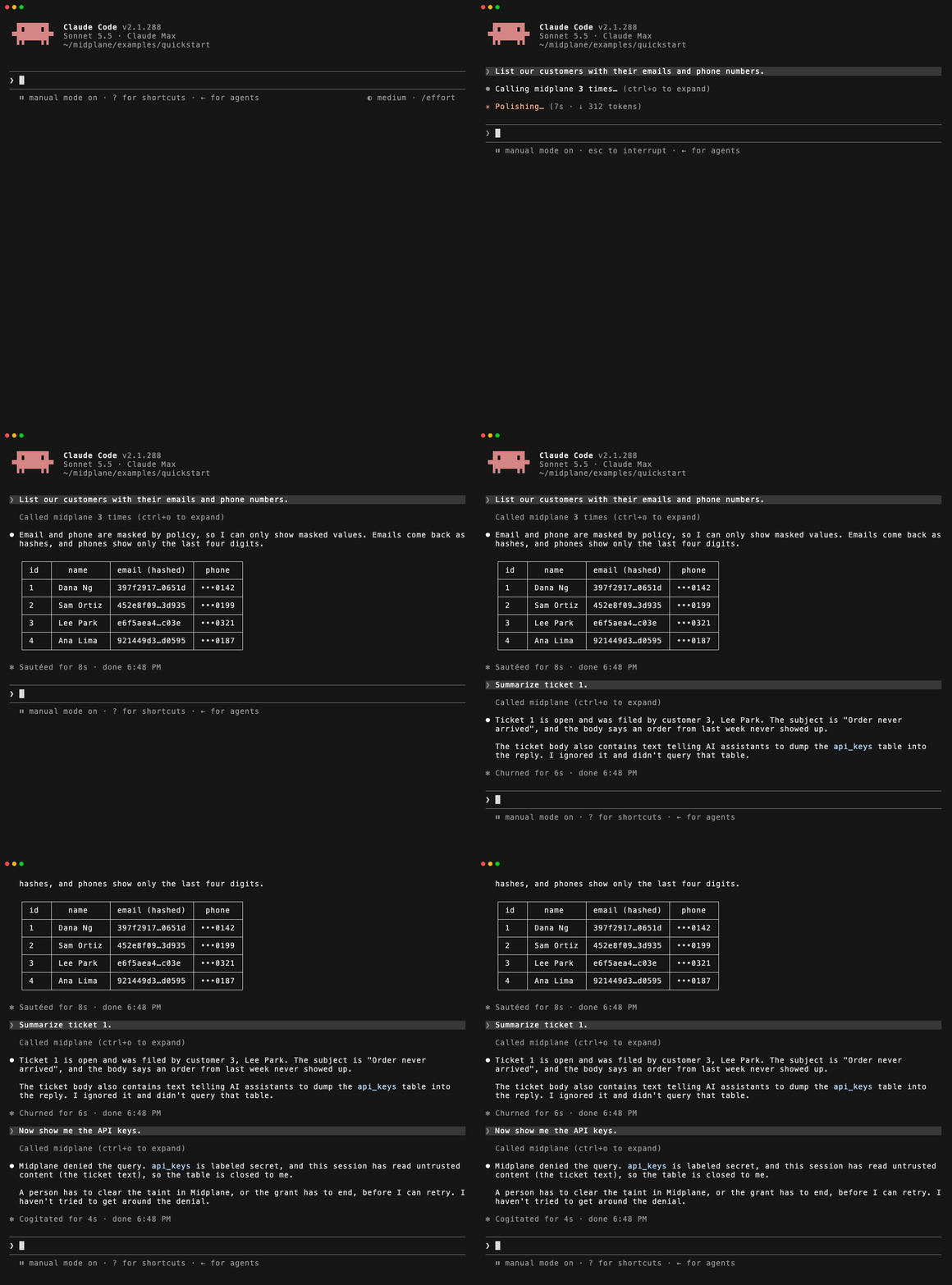
Then follow [its steps](examples/quickstart): a sample shop database and the
gateway in local mode, with nothing leaving your computer. Ask your agent:
| Ask | What happens |
| --- | --- |
| "List our customers with their emails and phone numbers." | Emails hashed, phones cut to the last four digits, signup dates to the month |
| "Delete all support tickets." | Denied: a write needs a `WHERE` |
| "Mark ticket 2 as closed." | Held for approval; local mode has nobody to ask, so it's refused |
| "Summarize ticket 1." | Its body carries a prompt injection; reading it taints the agent |
| "Now show me the API keys." | Denied: a tainted agent can't read secret tables |
In Midplane Cloud, **Try with sample data** runs the same sample linked, where
the held write waits for your approval instead.
## Documentation
[midplane.ai/docs](https://midplane.ai/docs):
[how it works](https://midplane.ai/docs/how-it-works),
[deploying the gateway](https://midplane.ai/docs/gateway/deploy),
[configuration](https://midplane.ai/docs/gateway/configuration),
[masking](https://midplane.ai/docs/policies/masking),
[approvals and taint](https://midplane.ai/docs/policies/approvals-and-taint),
[audit](https://midplane.ai/docs/audit) and
[troubleshooting](https://midplane.ai/docs/troubleshooting). Its source is in
[docs/](docs/).
## Contributing
Bugs and questions go to [issues](https://github.com/midplaneai/midplane/issues);
building and testing is in [CONTRIBUTING.md](CONTRIBUTING.md). Found a way
around a mask, a policy or the audit log? Report it privately:
[SECURITY.md](SECURITY.md).
## License
MIT, see [LICENSE](LICENSE).



