[](https://www.metmuseum.org/)
# Met Museum MCP Server
A Model Context Protocol (MCP) server that provides access to the Metropolitan Museum of Art Collection through natural language interactions. This server allows AI models to search The Met's art collection and retrieve artwork details (including images) via tool results.
 [](https://mseep.ai/app/mikechao-metmuseum-mcp)
[](https://mseep.ai/app/ccc75a48-9b33-4a9a-8ef7-8dc3848db263)
## Table of Contents
- [Features](#features)
- [List Departments](#1-list-departments-list-departments)
- [Search Museum Objects](#2-search-museum-objects-search-museum-objects)
- [Get Museum Object](#3-get-museum-object-get-museum-object)
- [Open Met Explorer App](#4-open-met-explorer-app-open-met-explorer)
- [MCP Apps](#mcp-apps)
- [Prerequisites](#prerequisites)
- [Quick Start](#quick-start)
- [Configuration](#configuration)
- [Transports](#transports)
- [Streamable HTTP Transport](#streamable-http-transport)
- [Usage with ChatGPT](#usage-with-chatgpt)
- [Usage with Claude Desktop](#usage-with-claude-desktop)
- [Usage with LibreChat](#usage-with-librechat)
- [Example Queries](#example-queries)
- [Development](#development)
- [Contributing](#contributing)
- [License](#license)
- [Disclaimer](#disclaimer)
## Hosted deployment
A hosted deployment is available on [Fronteir AI](https://fronteir.ai/mcp/mikechao-metmuseum-mcp).
## Features
This server provides AI models the following tools to interact with the art collection of The Met:
### 1. List Departments (list-departments)
Lists all the valid departments at The Met
- Inputs:
- None
- Output:
```
Department ID: 1, Display Name: American Decorative Arts
Department ID: 3, Display Name: Ancient Near Eastern Art
...
```
### 2. Search Museum Objects (search-museum-objects)
Search for various objects in The Met based on the inputs.
- Inputs:
- `q` (string): The search term e.g. sunflowers
- `hasImages` (boolean, optional, default: false): Only search for objects with images
- `title` (boolean, optional, default: false): Returns objects that match the query, specifically searching against the title field for objects.
- `departmentId` (number, optional): Returns objects that are a part of a specific department.
- `page` (number, optional, default: 1): 1-based page number for results.
- `pageSize` (number, optional, default: 24): Number of Object IDs per page (max 100).
- Outputs:
```
Total objects found: 54
Page: 1/3
Object IDs: 436532, 789578, 436840, 438722,...
```
### 3. Get Museum Object (get-museum-object)
Get a specific object from The Met containing all open access data about that object, including its image (if the image is available under Open Access).
If there is an image and `returnImage` is true, it is returned as an image content block in the tool result (base64-encoded JPEG).
Use this tool when the user asks for deeper details on a specific artwork and you already have an `objectId`.
- Inputs:
- `objectId` (number): The id of the object to retrieve
- `returnImage` (boolean, optional, default: true): Whether to include the object's image (if available) in the tool result
- Outputs:
```
Title: Self-Portrait with a Straw Hat (obverse: The Potato Peeler)
Artist: Vincent van Gogh
Artist Bio: Dutch, Zundert 1853–1890 Auvers-sur-Oise
Department: European Paintings
Credit Line: Bequest of Miss Adelaide Milton de Groot (1876-1967), 1967
Medium: Oil on canvas
Dimensions: 16 x 12 1/2 in. (40.6 x 31.8 cm)
Primary Image URL: https://images.metmuseum.org/CRDImages/ep/original/DT1502_cropped2.jpg
Tags: Men, Self-portraits
```
If returnImage is true
```
**base64 encoding of jpeg image**
```
### 4. Open Met Explorer App (open-met-explorer)
Launches an interactive MCP App (`ui://met/explorer.html`) that can search, filter, and inspect objects from within MCP clients that support Apps.
Recommended flow:
- Use `open-met-explorer` to launch and browse live search results (pass `q` to start searching immediately).
- After creating a curated list from current results, use `get-museum-object` only for items the user wants to explore in depth.
- Inputs (all optional):
- `q` (string): Initial search term.
- `hasImages` (boolean, default: true): Prefer objects with images.
- `title` (boolean, default: false): Search titles only.
- `departmentId` (number): Pre-select a department filter.
- Output:
```
Opens the Met Explorer app in the client UI.
```
## MCP Apps
[](https://mseep.ai/app/mikechao-metmuseum-mcp)
[](https://mseep.ai/app/ccc75a48-9b33-4a9a-8ef7-8dc3848db263)
## Table of Contents
- [Features](#features)
- [List Departments](#1-list-departments-list-departments)
- [Search Museum Objects](#2-search-museum-objects-search-museum-objects)
- [Get Museum Object](#3-get-museum-object-get-museum-object)
- [Open Met Explorer App](#4-open-met-explorer-app-open-met-explorer)
- [MCP Apps](#mcp-apps)
- [Prerequisites](#prerequisites)
- [Quick Start](#quick-start)
- [Configuration](#configuration)
- [Transports](#transports)
- [Streamable HTTP Transport](#streamable-http-transport)
- [Usage with ChatGPT](#usage-with-chatgpt)
- [Usage with Claude Desktop](#usage-with-claude-desktop)
- [Usage with LibreChat](#usage-with-librechat)
- [Example Queries](#example-queries)
- [Development](#development)
- [Contributing](#contributing)
- [License](#license)
- [Disclaimer](#disclaimer)
## Hosted deployment
A hosted deployment is available on [Fronteir AI](https://fronteir.ai/mcp/mikechao-metmuseum-mcp).
## Features
This server provides AI models the following tools to interact with the art collection of The Met:
### 1. List Departments (list-departments)
Lists all the valid departments at The Met
- Inputs:
- None
- Output:
```
Department ID: 1, Display Name: American Decorative Arts
Department ID: 3, Display Name: Ancient Near Eastern Art
...
```
### 2. Search Museum Objects (search-museum-objects)
Search for various objects in The Met based on the inputs.
- Inputs:
- `q` (string): The search term e.g. sunflowers
- `hasImages` (boolean, optional, default: false): Only search for objects with images
- `title` (boolean, optional, default: false): Returns objects that match the query, specifically searching against the title field for objects.
- `departmentId` (number, optional): Returns objects that are a part of a specific department.
- `page` (number, optional, default: 1): 1-based page number for results.
- `pageSize` (number, optional, default: 24): Number of Object IDs per page (max 100).
- Outputs:
```
Total objects found: 54
Page: 1/3
Object IDs: 436532, 789578, 436840, 438722,...
```
### 3. Get Museum Object (get-museum-object)
Get a specific object from The Met containing all open access data about that object, including its image (if the image is available under Open Access).
If there is an image and `returnImage` is true, it is returned as an image content block in the tool result (base64-encoded JPEG).
Use this tool when the user asks for deeper details on a specific artwork and you already have an `objectId`.
- Inputs:
- `objectId` (number): The id of the object to retrieve
- `returnImage` (boolean, optional, default: true): Whether to include the object's image (if available) in the tool result
- Outputs:
```
Title: Self-Portrait with a Straw Hat (obverse: The Potato Peeler)
Artist: Vincent van Gogh
Artist Bio: Dutch, Zundert 1853–1890 Auvers-sur-Oise
Department: European Paintings
Credit Line: Bequest of Miss Adelaide Milton de Groot (1876-1967), 1967
Medium: Oil on canvas
Dimensions: 16 x 12 1/2 in. (40.6 x 31.8 cm)
Primary Image URL: https://images.metmuseum.org/CRDImages/ep/original/DT1502_cropped2.jpg
Tags: Men, Self-portraits
```
If returnImage is true
```
**base64 encoding of jpeg image**
```
### 4. Open Met Explorer App (open-met-explorer)
Launches an interactive MCP App (`ui://met/explorer.html`) that can search, filter, and inspect objects from within MCP clients that support Apps.
Recommended flow:
- Use `open-met-explorer` to launch and browse live search results (pass `q` to start searching immediately).
- After creating a curated list from current results, use `get-museum-object` only for items the user wants to explore in depth.
- Inputs (all optional):
- `q` (string): Initial search term.
- `hasImages` (boolean, default: true): Prefer objects with images.
- `title` (boolean, default: false): Search titles only.
- `departmentId` (number): Pre-select a department filter.
- Output:
```
Opens the Met Explorer app in the client UI.
```
## MCP Apps
▶️ Click to watch the demo video
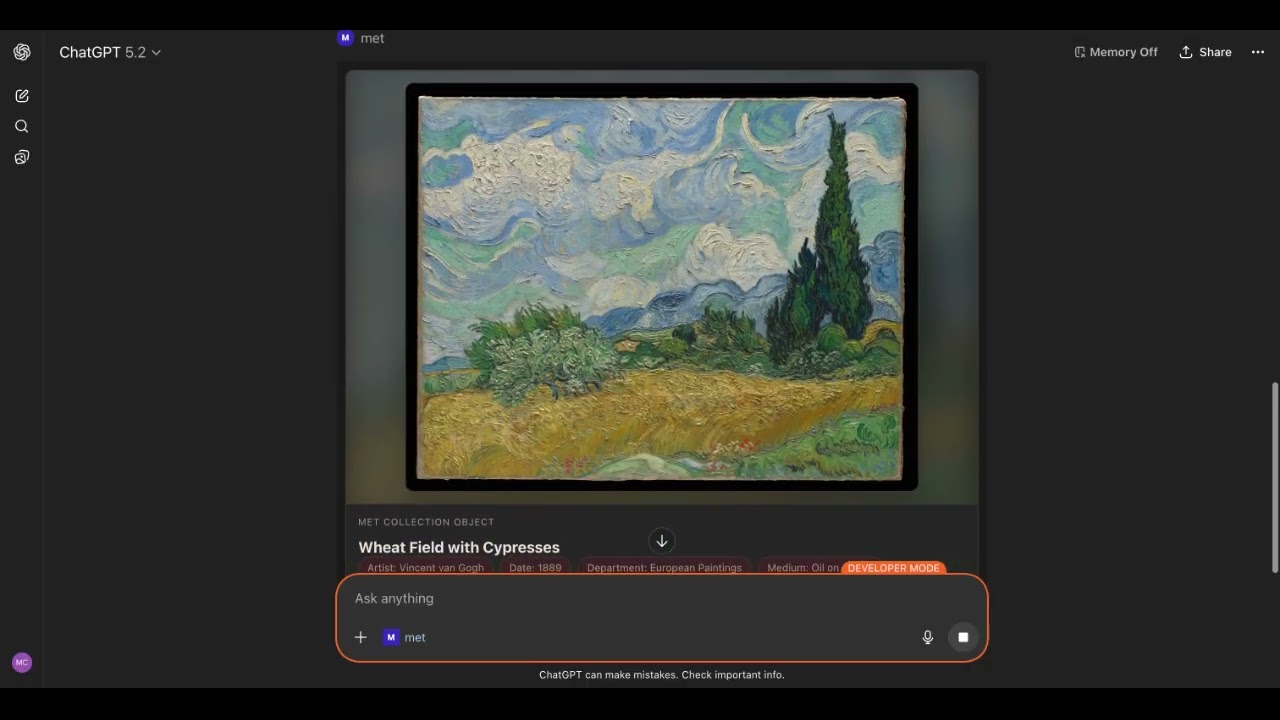
There are now [MCP Apps](https://modelcontextprotocol.io/docs/extensions/apps) in this MCP Server. There is a UI component for the [Open Met Explorer App](#4-open-met-explorer-app-open-met-explorer) tool and the [Get Museum Object](#3-get-museum-object-get-museum-object) tool.
## Prerequisites
- [Node.js](https://nodejs.org/) v18 or later
## Quick Start
Run the server directly with `npx` — no install required:
```bash
npx -y metmuseum-mcp
```
This starts the server using **stdio transport**, which is what most MCP desktop clients expect.
For client-specific setup, see:
- [Usage with Claude Desktop](#usage-with-claude-desktop)
- [Usage with ChatGPT](#usage-with-chatgpt) (requires [Streamable HTTP transport](#streamable-http-transport))
- [Usage with LibreChat](#usage-with-librechat)
## Configuration
The following environment variable applies to **all transports**:
| Variable | Default | Description |
| -------------------- | ------- | -------------------------------------------------------------------------------------------------------------------- |
| `MET_API_TIMEOUT_MS` | `10000` | Timeout in milliseconds for outbound requests to the Met Collection API. |
| `MET_API_DEBUG` | `false` | Enables debug logging to `stderr` for schema validation failures (accepted truthy values: `1`, `true`, `yes`, `on`). |
## Transports
This server supports two transports:
- **Stdio transport (default):** Used by MCP desktop clients (Claude Desktop, LibreChat MCP, etc.).
- **Streamable HTTP transport:** Run with `--http` to expose an MCP endpoint at `/mcp`.
### Streamable HTTP Transport
Run with `npx` (recommended for end users):
```bash
npx -y metmuseum-mcp --http
```
Or run from a local clone:
```bash
pnpm run build
node dist/index.js --http
```
The server listens on:
```text
http://localhost:3001/mcp
```
You can control HTTP server behavior with environment variables:
| Variable | Default | Description |
| --------------- | --------------------- | --------------------------------------------------------------------------------------------------------- |
| `PORT` | `3001` | HTTP port used by the Streamable HTTP server. |
| `HOST` | `127.0.0.1` | Network interface the HTTP server binds to. |
| `ALLOWED_HOSTS` | `localhost,127.0.0.1` | Comma-separated host allowlist for host header validation (example: `localhost,127.0.0.1,my-domain.com`). |
Example:
```bash
HOST=127.0.0.1 PORT=8080 ALLOWED_HOSTS=localhost,127.0.0.1 npx -y metmuseum-mcp --http
```
## Usage with ChatGPT
The following steps allow you to use Met Museum MCP with the web UI of ChatGPT
### 1. Enable Developer Mode in ChatGPT
Settings → Apps → Advanced settings → Developer mode
Additional instructions [here](https://platform.openai.com/docs/guides/developer-mode)
### 2. Run the Met Museum MCP Server with Streamable HTTP Transport
```bash
npx -y metmuseum-mcp --http
```
By default the server will be listening on
http://127.0.0.1:3001/mcp
### 3. Create a local tunnel to expose the MCP Server to ChatGPT
Sign up and configure [ngrok](https://ngrok.com/), the free plan works.
```bash
ngrok http http://127.0.0.1:3001 --host-header=rewrite
```
Take note of the forwarding URL.
```bash
...
Forwarding https://john-joe-asdf.ngrok-free.dev -> http://localhost:3001
...
```
### 4. Add Met Museum MCP as a Connector to ChatGPT
Open [ChatGPT Apps settings](https://chatgpt.com/#settings/Connectors)
Click Apps
Click Create Apps
Fill out the form using the URL from step 3 as the MCP Server URL, but add `/mcp`.
```
https://john-joe-asdf.ngrok-free.dev/mcp
```
For Authentication, select 'No Auth'
Tick the checkbox for 'I understand and want to continue'
Then click Create.
### 5. Using the Met Museum MCP Server
In the prompt input field you can use @name-of-server-from-step3 or
In the ChatGPT UI, click the '+' button, scroll to '...more', select the newly created Met app, and enter your query.
## Usage with Claude Desktop
### Via MCP Bundle (MCPB)
1. Download the `mcpb` file from the [Releases](https://github.com/mikechao/metmuseum-mcp/releases)
2. Open it with Claude Desktop
or
Go to File -> Settings -> Extensions and drag the .mcpb file to the window to install it
### Via npx
Add this to your `claude_desktop_config.json`:
```json
{
"mcpServers": {
"met-museum": {
"command": "npx",
"args": [
"-y",
"metmuseum-mcp"
]
}
}
}
```
## Usage with LibreChat
Add the following in your `librechat.yaml`
```yaml
mcpServers:
metmuseum:
command: npx
args:
- -y
- metmuseum-mcp
```
## Example Queries
Here are some questions you can ask the AI model when this server is connected:
```
Can you help me explore the works of Vincent Van Gogh?
Can you help me explore the Met?
Can you show me a few paintings from the Asian Art department?
Can you find the painting titled "Corridor in the Asylum"?
Can you find any art that has "cat" in the title or features "cats"?
```
## Development
This project uses `pnpm` for local development and CI.
```bash
corepack enable
pnpm install
pnpm run build
pnpm run check
```
For non-interactive shells/CI runners, use `CI=true pnpm install --frozen-lockfile`.
## Contributing
Contributions are welcome! Please feel free to submit a Pull Request.
## License
This MCP server is licensed under the MIT License. This means you are free to use, modify, and distribute the software, subject to the terms and conditions of the MIT License. For more details, please see the LICENSE file in the project repository.
## Disclaimer
This library is not officially associated with The Metropolitan Museum of Art in New York. It is a third-party implementation of the [The Metropolitan Museum of Art Collection API](https://metmuseum.github.io/) with a MCP Server.