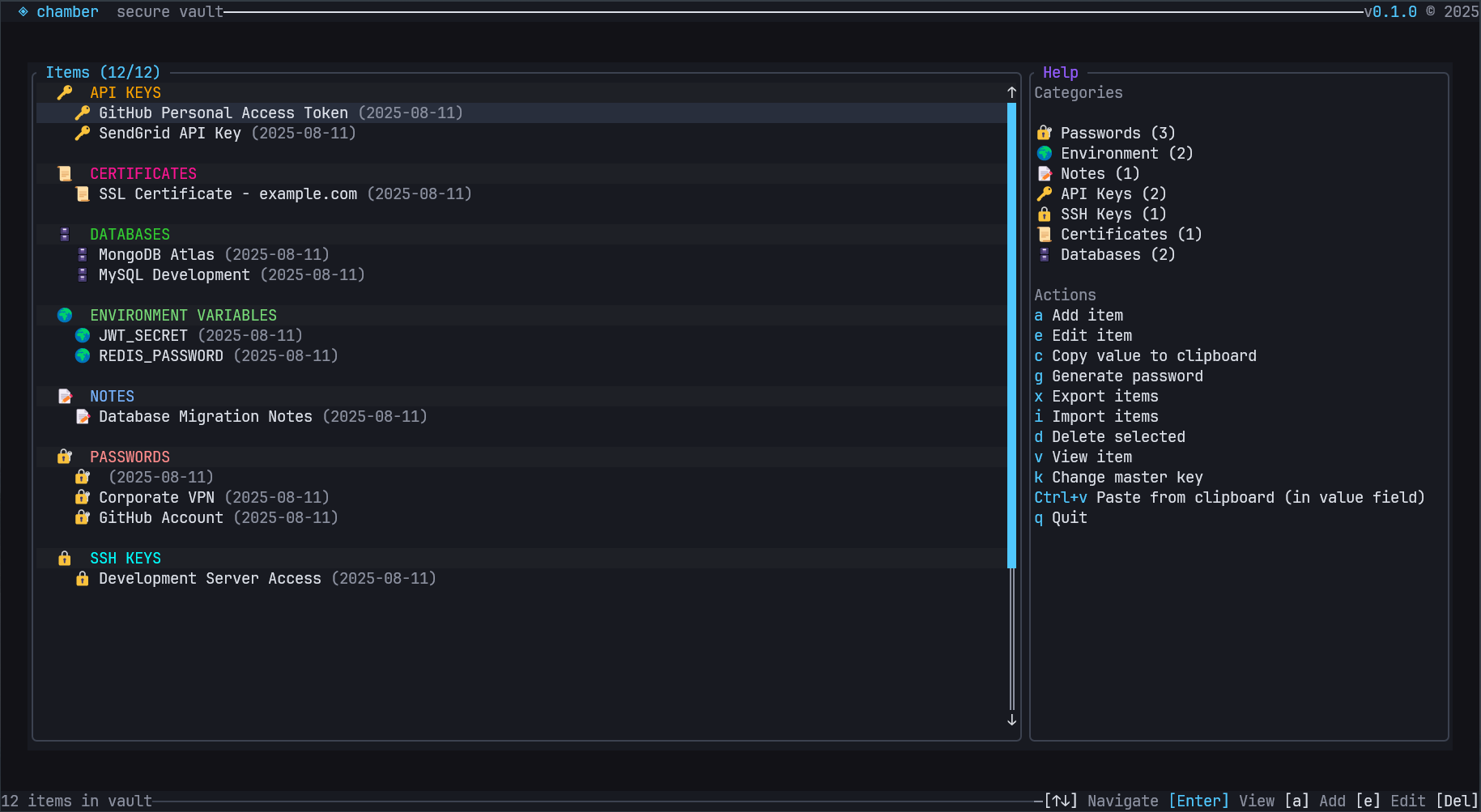
 Chamber's Main Page with Items

 ## 🌟 Overview
Chamber is a modern secret management solution designed for developers and security-conscious users who need reliable,
encrypted storage for sensitive information. Built entirely in Rust, Chamber provides a robust foundation for
managing passwords, API keys, certificates, database credentials,
and other secrets with strong cryptographic guarantees.
### ✨ Features
- **🔐 Strong Encryption**: ChaCha20-Poly1305 authenticated encryption with Argon2 key derivation
- **💾 SQLite Backend**: Reliable, ACID-compliant storage with WAL mode and foreign key constraints
- **📱 Terminal UI**: Beautiful, responsive interface built with Ratatui and Crossterm
- **📊 Multiple Export Formats**: JSON, CSV, and Chamber Backup formats with robust parsing
- **🔄 Backup**: a comprehensive backup system that ensures your sensitive data is automatically protected
- **🔄 Import/Export**: Seamless data migration and backup capabilities
- **🏷️ Flexible Item Types**: Support for passwords, environment variables, API keys, SSH keys, certificates, and more
- **🛡️ Security-First Design**: Zero-knowledge architecture with local-only storage
### 📸 Screenshots
## 🌟 Overview
Chamber is a modern secret management solution designed for developers and security-conscious users who need reliable,
encrypted storage for sensitive information. Built entirely in Rust, Chamber provides a robust foundation for
managing passwords, API keys, certificates, database credentials,
and other secrets with strong cryptographic guarantees.
### ✨ Features
- **🔐 Strong Encryption**: ChaCha20-Poly1305 authenticated encryption with Argon2 key derivation
- **💾 SQLite Backend**: Reliable, ACID-compliant storage with WAL mode and foreign key constraints
- **📱 Terminal UI**: Beautiful, responsive interface built with Ratatui and Crossterm
- **📊 Multiple Export Formats**: JSON, CSV, and Chamber Backup formats with robust parsing
- **🔄 Backup**: a comprehensive backup system that ensures your sensitive data is automatically protected
- **🔄 Import/Export**: Seamless data migration and backup capabilities
- **🏷️ Flexible Item Types**: Support for passwords, environment variables, API keys, SSH keys, certificates, and more
- **🛡️ Security-First Design**: Zero-knowledge architecture with local-only storage
### 📸 Screenshots
Chamber's Main Page with Items
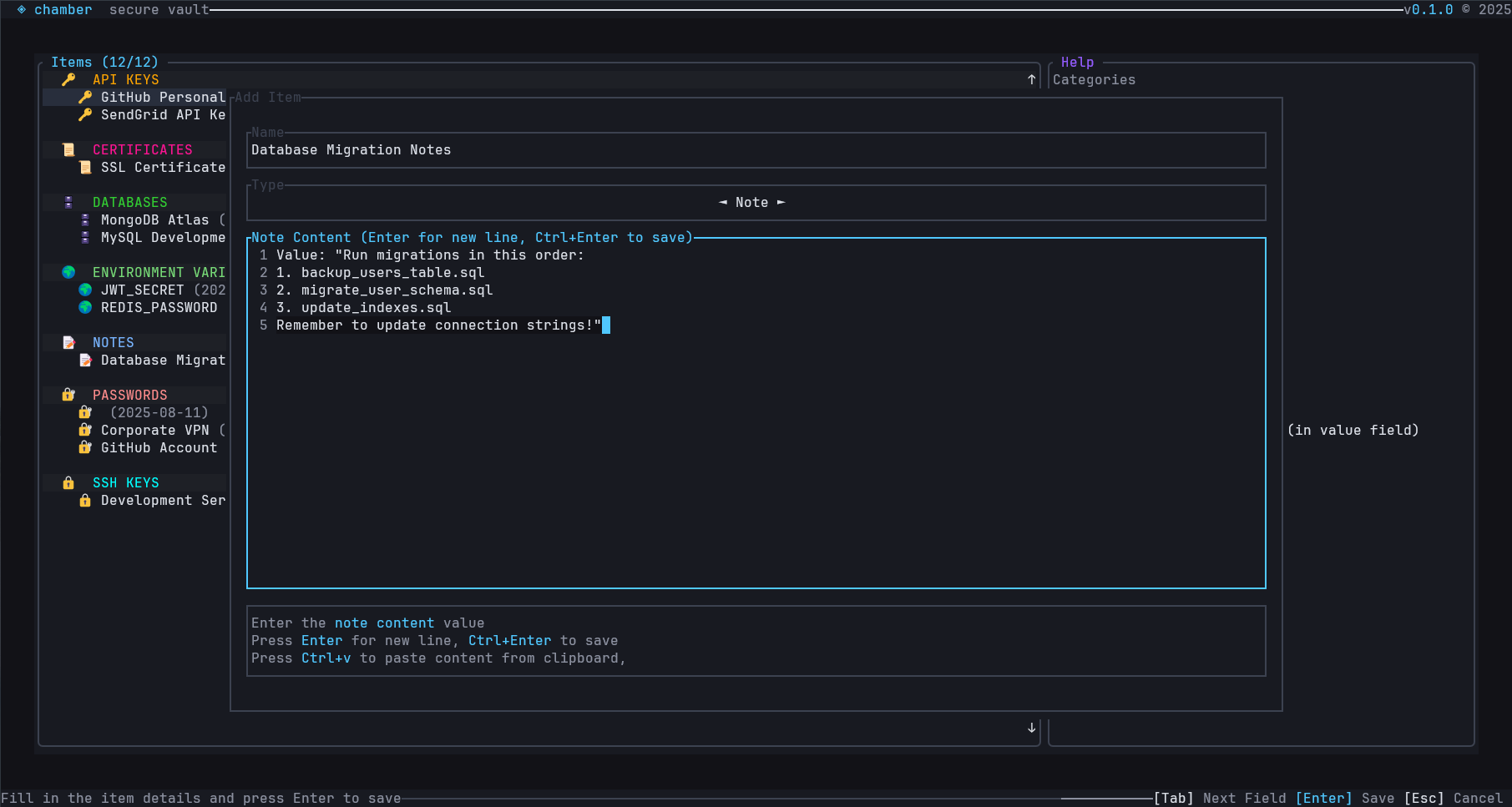 Chamber's Add Item Dialog
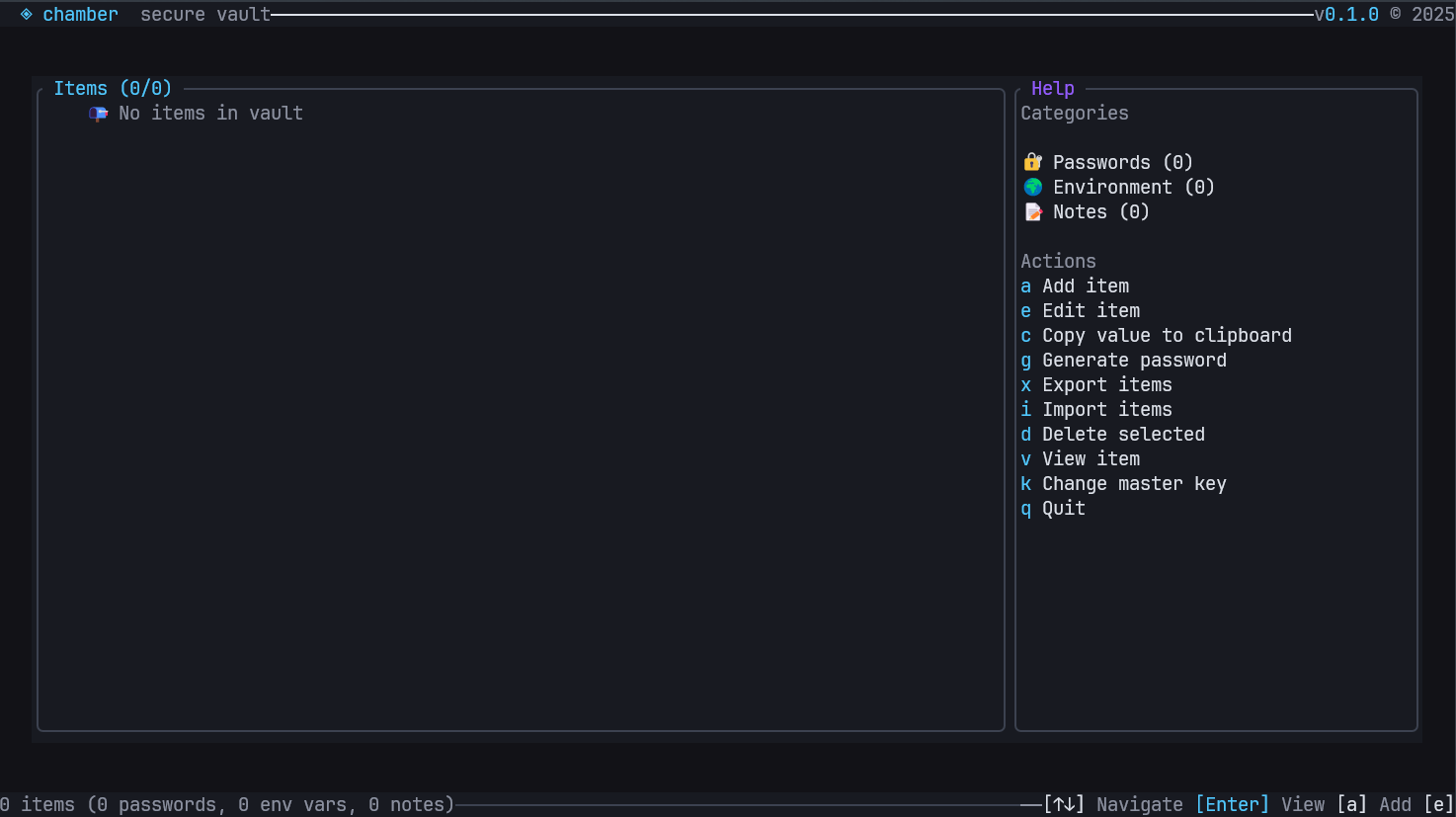 Chamber's Main Page
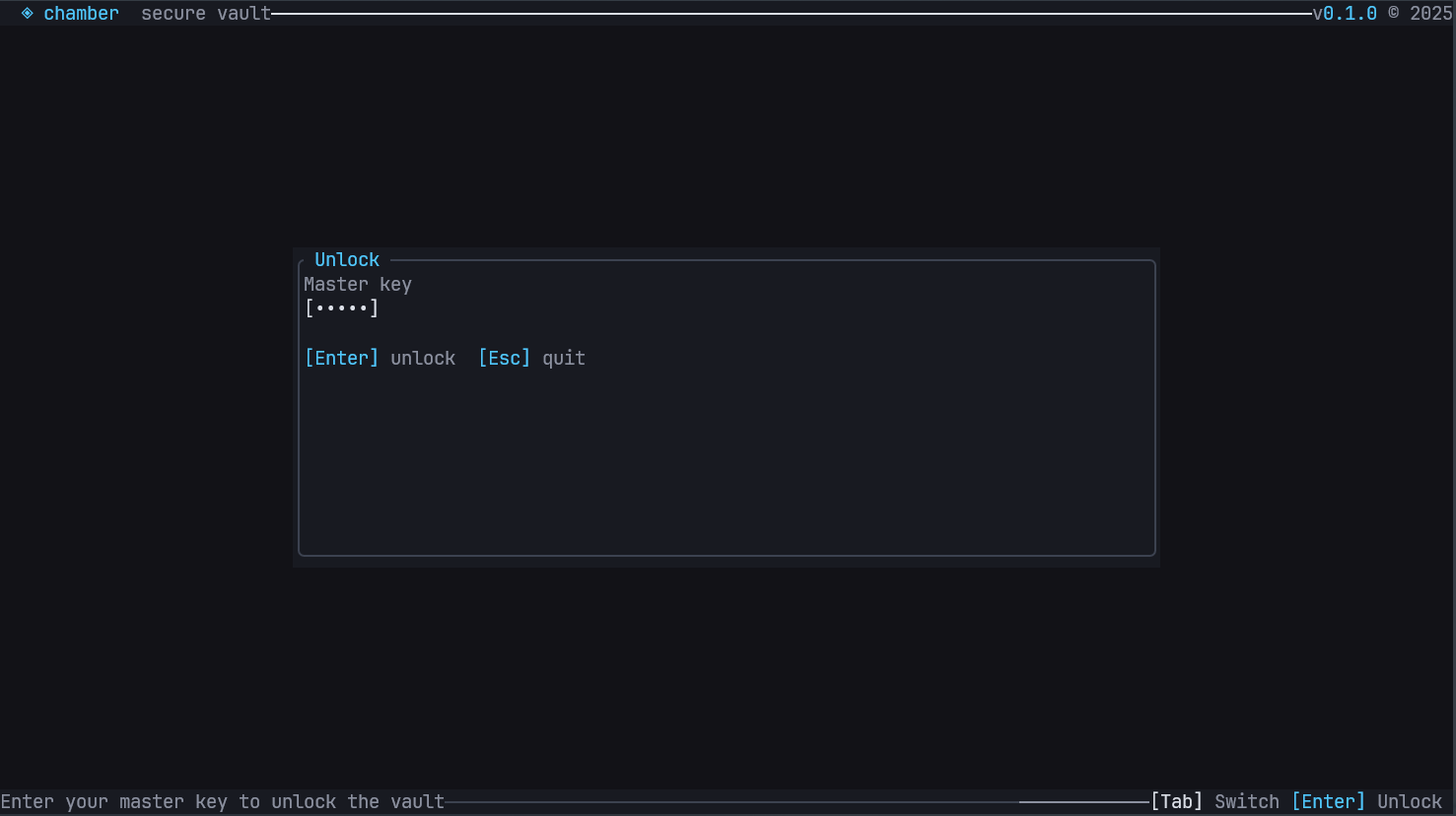 Chamber's Login Page
Click the image above to watch a quick introduction to Chamber
## 📚 Table of Contents - [Getting Started](#-getting-started) - [Development Setup](#-development-setup) - [Architecture](#-architecture) - [Usage](#-usage) - [Testing](#-testing) - [Security](#-security) - [Contributing](#-contributing) - [License](#-license) ## 🚀 Getting Started ### Prerequisites - **Rust**: Version 1.85.0 or newer - **Operating System**: Windows 11, macOS, or Linux - **Terminal**: Modern terminal with Unicode support (recommended) ### Installation #### From Source ```bash # Clone the repository git clone https://github.com/mikeleppane/chamber.git cd chamber # Build the project cargo build --release # Run Chamber ./target/release/chamber ``` #### Using Cargo ```bash cargo install chamber-tui ``` #### Pre-built Binaries We provide pre-built binaries for multiple platforms as part of each release: **Supported Platforms:** - **Linux**: x86_64 (Intel/AMD 64-bit), ARM64 (Apple Silicon/ARM64) - Standard glibc builds: `chamber-linux-amd64`, `chamber-linux-arm64` - Static MUSL builds: `chamber-linux-amd64-static` (no dependencies required) - **Windows**: x86_64 (Intel/AMD 64-bit) - `chamber-windows-amd64.exe` - **macOS**: x86_64 (Intel 64-bit) - `chamber-macos-amd64` Download the latest release from [GitHub Releases](https://github.com/mikeleppane/chamber/releases). #### Docker Support We provide official Docker images for containerized deployments: **Supported Architectures:** - **linux/amd64** (x86_64 Intel/AMD) - **linux/arm64** (ARM64/Apple Silicon) ### Quick Start 1. **Initialize a new vault**: ```bash chamber init ``` 1. **Create your first secret**: ```bash chamber add --name "github-token" --kind apikey --value "your-token-here" ``` 1. **List your secrets**: ```bash chamber list ``` 1. **Launch the interactive UI**: ```bash chamber ui ``` #### CLI Commands ```bash Quick start: 1. chamber init # Initialize your first vault 2. chamber add -n "github-token" -k apikey -v "your-token" 3. chamber list # View your secrets 4. chamber ui # Launch terminal interface Usage: chamber [COMMAND] Commands: init Initialize a new Chamber vault with master password encryption add Add a new secret item to the vault list List all secrets in the vault (names and types only) get Retrieve and display a specific secret by name generate Generate secure passwords with customizable options export Export vault contents to a file for backup or migration import Import secrets from a file into the vault stats backup Backup management commands for automatic data protection registry Multiple vault management commands for organizing secrets help Print this message or the help of the given subcommand(s) ``` ## Chamber REST API Chamber provides a comprehensive REST API that enables programmatic access to all vault operations. The API features JWT-based authentication, session management, and full CRUD operations for secrets and vaults. ### 🚀 Getting Started with the API #### Starting the API Server ```bash # Start with default settings (localhost:3000) chamber api # Specify custom bind address and port chamber api --bind 0.0.0.0 --port 8080 # Bind to specific address chamber api --bind 192.168.1.100:3000 ``` #### Quick Test ```bash # Health check curl http://localhost:3000/api/v1/health # Expected response: { "data": { "status": "ok", "version": "0.5.0", "vault_status": "locked" } } ``` ### 🔐 Authentication & Authorization The API uses JWT (JSON Web Token) based authentication with scope-based authorization. #### Login ```bash POST /api/v1/auth/login ``` Request Body ```json { "master_password": "your_master_password" } ``` Response ```json { "data": { "token": "...", "expires_at": "2025-08-18T06:47:29.538661800Z", "scopes": [ "read:items", "write:items", "reveal:values", "generate:passwords", "vault:health", "vault:read", "vault:list", "vault:create", "vault:update", "vault:delete", "vault:switch", "manage:vaults" ] } } ``` #### Using the Token Include the JWT token in the `Authorization` header for all protected endpoints: ```bash curl -H "Authorization: Bearer YOUR_JWT_TOKEN" http://localhost:3000/api/v1/items ``` Response ```json { "data": { "items": [ { "id": 1, "name": "MY_PASSWORD", "kind": "password", "created_at": "2025-08-17T06:44:26Z", "updated_at": "2025-08-17T06:44:26Z", "has_value": true, "value_length": 10 } ], "total": 1 } } ``` #### Available Scopes | Scope | Description | |-------|-------------| | `read:items` | List and view secret metadata | | `write:items` | Create, update, and delete secrets | | `reveal:values` | Access secret values and copy to clipboard | | `generate:passwords` | Generate secure passwords | | `vault:health` | Access security reports and health checks | | `vault:read` | View vault statistics and information | | `manage:vaults` | Create, switch, and manage multiple vaults | ### 📊 Session Management #### Lock Session Locks the vault while keeping the JWT token valid: ```bash POST /api/v1/session/lock Authorization: Bearer YOUR_JWT_TOKEN ``` Response ```json { "data": "Session locked successfully" } ``` #### Unlock Session Unlocks the vault with master password: ```bash POST /api/v1/session/unlock Authorization: Bearer YOUR_JWT_TOKEN { "master_password": "your_master_password" } ``` Response ```json { "data": "Session unlocked successfully" } ``` #### Logout Locks the vault and invalidates the session: ```bash POST /api/v1/auth/logout Authorization: Bearer YOUR_JWT_TOKEN ``` ### 🗂️ Secrets Management #### List Secrets ```bash GET /api/v1/items?limit=50&offset=0&sort=name&order=asc Authorization: Bearer YOUR_JWT_TOKEN ``` Response ```json { "data": { "items": [ { "id": 1, "name": "MY_PASSWORD", "kind": "password", "created_at": "2025-08-17T06:44:26Z", "updated_at": "2025-08-17T06:44:26Z", "has_value": true, "value_length": 10 } ], "total": 1 } } ``` **Query Parameters:** - `limit` (default: 50) - Maximum number of items to return - `offset` (default: 0) - Number of items to skip for pagination - `sort` (default: name) - Sort field: `name`, `kind`, `created_at`, `updated_at` - `order` (default: asc) - Sort order: `asc` or `desc` - `kind` - Filter by item type (e.g., `password`, `apikey`) - `query` - Search in item names #### Create Secret ```bash POST /api/v1/items Authorization: Bearer YOUR_JWT_TOKEN { "name": "Database Password", "kind": "password", "value": "super_secure_password_123" } ``` Response ```json { "data": { "id": 2, "name": "Database Password", "kind": "password", "created_at": "2025-08-17T07:02:01Z", "updated_at": "2025-08-17T07:02:01Z", "has_value": true, "value_length": 25 } } ``` **Supported Item Types:** - `password` - User passwords - `apikey` - API tokens and keys - `note` - Secure notes - `sshkey` - SSH private keys - `certificate` - SSL/TLS certificates - `database` - Database credentials - `envvar` - Environment variables #### Get Secret Details ```bash GET /api/v1/items/{id} Authorization: Bearer YOUR_JWT_TOKEN ``` Response ```json { "data": { "id": 2, "name": "Database Password", "kind": "password", "created_at": "2025-08-17T07:02:01Z", "updated_at": "2025-08-17T07:02:01Z", "has_value": true, "value_length": 25, "preview": "super_secure_pass..." } } ``` #### Get Secret Value ```bash GET /api/v1/items/{id}/value Authorization: Bearer YOUR_JWT_TOKEN ``` Response ```json { "data": { "id": 2, "name": "Database Password", "kind": "password", "value": "super_secure_password_123", "created_at": "2025-08-17T07:02:01Z", "updated_at": "2025-08-17T07:02:01Z" } } ``` #### Update Secret ```bash PUT /api/v1/items/{id} Authorization: Bearer YOUR_JWT_TOKEN { "value": "updated_password_value" } ``` Response ```json { "data": { "id": 2, "name": "Database Password", "kind": "password", "created_at": "2025-08-17T07:02:01Z", "updated_at": "2025-08-17T09:36:38Z", "value_length": 26, "has_value": true } } ``` #### Delete Secret ```bash DELETE /api/v1/items/{id} Authorization: Bearer YOUR_JWT_TOKEN ``` #### Copy Secret to Clipboard ```bash POST /api/v1/items/{id}/copy Authorization: Bearer YOUR_JWT_TOKEN ``` Response ```json { "data": "Item deleted successfully" } ``` ### 🔍 Advanced Search #### Search Secrets ```bash GET /api/v1/items/search?q=MY_PASSWORD&limit=10&fuzzy=true Authorization: Bearer YOUR_JWT_TOKEN ``` Response ```json { "data": { "items": [ { "id": 1, "name": "MY_PASSWORD", "kind": "password", "created_at": "2025-08-17T06:44:26Z", "updated_at": "2025-08-17T06:44:26Z", "has_value": true, "value_length": 10, "preview": "secret-123" } ], "total_found": 1, "total_available": 1, "query_time_ms": 1, "has_more": false, "next_offset": null } } ``` **Query Parameters:** - `q` - Search query (searches name, kind, and value preview) - `query` - Alias for `q` - `kind` - Filter by item type - `name` - Search in item names only - `limit` (default: 50) - Maximum results - `offset` (default: 0) - Pagination offset - `sort` - Sort field: `name`, `kind`, `created_at`, `updated_at`, `value_length` - `order` - Sort order: `asc` or `desc` - `fuzzy` (default: false) - Enable fuzzy matching - `case_sensitive` (default: false) - Case sensitive search ### 🔑 Password Generation #### Generate Secure Password ```bash POST /api/v1/passwords/generate Authorization: Bearer YOUR_JWT_TOKEN { "length": 16, "include_uppercase": true, "include_lowercase": true, "include_digits": true, "include_symbols": true, "exclude_ambiguous": true } ``` Response ```json { "data": { "password": "bM4VFVf*R7p*-sHZ", "strength": "Strong" } } ``` ### 🏛️ Multi-Vault Management #### List Vaults ```bash GET /api/v1/vaults Authorization: Bearer YOUR_JWT_TOKEN ``` Response ```json { "data": [ { "id": "main", "name": "Main Vault", "category": "Personal", "description": "Main vault", "favorite": false, "is_active": true } ] } ``` #### Create New Vault ```bash POST /api/v1/vaults Authorization: Bearer YOUR_JWT_TOKEN { "name": "Work Secrets", "category": "work", "description": "Corporate credentials and API keys", "master_password": "secure_vault_password" } ``` Response ```json { "data": { "id": "94ff3c6f-e653-4a6c-a5e3-fc1c2fd836b5", "name": "Work Secrets", "category": "Work", "description": "Corporate credentials and API keys", "favorite": false, "is_active": false } } ``` #### Switch Active Vault ```bash POST /api/v1/vaults/{vault_id}/switch Authorization: Bearer YOUR_JWT_TOKEN ``` Response ```json { "data": "Switched to vault: 94ff3c6f-e653-4a6c-a5e3-fc1c2fd836b5" } ``` #### Update Vault ```bash PATCH /api/v1/vaults/{vault_id} Authorization: Bearer YOUR_JWT_TOKEN { "name": "Updated Vault Name", "description": "Updated description", "favorite": true } ``` Response ```json { "data": { "id": "94ff3c6f-e653-4a6c-a5e3-fc1c2fd836b5", "name": "Updated Vault Name", "category": "Work", "description": "Updated description", "favorite": true, "is_active": true } } ``` #### Delete Vault ```bash DELETE /api/v1/vaults/{vault_id} Authorization: Bearer YOUR_JWT_TOKEN { "delete_file": false } ``` Response ```json { "data": "Deleted vault: 94ff3c6f-e653-4a6c-a5e3-fc1c2fd836b5" } ``` ### 📤📥 Import/Export #### Export Secrets ```bash POST /api/v1/export Authorization: Bearer YOUR_JWT_TOKEN { "format": "json", "path": "/path/to/export.json", "filter": { "kind": "password", "query": "github" } } ``` Response ```json { "data": { "count": 1, "path": "./export.json" } } ``` **Supported Formats:** - `json` - Standard JSON format - `csv` - Comma-separated values - `backup` - Chamber's enhanced backup format #### Import Secrets ```bash POST /api/v1/import Authorization: Bearer YOUR_JWT_TOKEN { "format": "json", "path": "/path/to/import.json" } ``` ### 📊 Analytics & Health #### Vault Statistics ```bash GET /api/v1/stats Authorization: Bearer YOUR_JWT_TOKEN ``` Response ```json { "data": { "total_items": 1, "password_items": 1, "note_items": 0, "card_items": 0, "other_items": 0, "vault_size_bytes": 29, "oldest_item_age_days": 0, "newest_item_age_days": 0, "average_password_length": 10.0 } } ``` #### Security Health Report ```bash GET /api/v1/health/report Authorization: Bearer YOUR_JWT_TOKEN ``` Response ```json { "data": { "weak_passwords": [ "MY_PASSWORD" ], "reused_passwords": [], "old_passwords": [], "short_passwords": [ "MY_PASSWORD" ], "common_passwords": [], "total_items": 1, "password_items": 1, "security_score": 0.0 } } ``` #### Item Counts by Type ```bash GET /api/v1/items/counts Authorization: Bearer YOUR_JWT_TOKEN ``` Response ```json { "data": { "total": 1, "by_kind": { "password": 1 } } } ``` ### 🚨 Error Handling The API uses a consistent error response format: ```json { "error": { "code": "UNAUTHORIZED", "message": "Authentication required" } } ``` **HTTP Status Codes:** - `200` - Success - `400` - Bad Request (validation errors, vault locked) - `401` - Unauthorized (missing/invalid token) - `403` - Forbidden (insufficient scopes) - `404` - Not Found (item/vault not found) - `422` - Unprocessable Entity (validation errors) - `500` - Internal Server Error ### 🔒 Security Considerations #### Production Deployment - **HTTPS Required**: Always use HTTPS in production - **Local Binding**: API binds to localhost by default for security - **Token Security**: JWT tokens contain sensitive scopes - treat as secrets - **Network Security**: Use firewall rules to restrict API access - **Vault Encryption**: Vault data remains encrypted at rest #### Best Practices ```bash # Use environment variables for sensitive data export CHAMBER_API_TOKEN="your_jwt_token_here" # Always verify SSL certificates curl --fail --show-error --silent -H "Authorization: Bearer $CHAMBER_API_TOKEN" [https://your-domain.com/api/v1/health](https://your-domain.com/api/v1/health) # Implement proper error handling if ! response=(curl -s -w "%{http_code}" \ -H "Authorization: BearerCHAMBER_API_TOKEN" [https://your-domain.com/api/v1/items](https://your-domain.com/api/v1/items)); then echo "API request failed" exit 1 fi ``` ## 📚 OpenAPI Specification The Chamber API follows the OpenAPI 3.0 specification. Key endpoints summary: | Method | Endpoint | Description | Scopes Required | |----------|-------------------------------|-----------------------------------|----------------------| | `GET` | `/api/v1/health` | Health check | None | | `POST` | `/api/v1/auth/login` | Authenticate with master password | None | | `POST` | `/api/v1/auth/logout` | Logout and lock vault | Any | | `POST` | `/api/v1/session/lock` | Lock vault session | Any | | `POST` | `/api/v1/session/unlock` | Unlock vault session | Any | | `GET` | `/api/v1/items` | List secrets | `read:items` | | `POST` | `/api/v1/items` | Create secret | `write:items` | | `GET` | `/api/v1/items/{id}` | Get secret metadata | `read:items` | | `GET` | `/api/v1/items/{id}/value` | Get secret value | `reveal:values` | | `PUT` | `/api/v1/items/{id}` | Update secret | `write:items` | | `DELETE` | `/api/v1/items/{id}` | Delete secret | `write:items` | | `GET` | `/api/v1/items/search` | Search secrets | `vault:read` | | `GET` | `/api/v1/items/counts` | Get item counts | `read:items` | | `POST` | `/api/v1/items/{id}/copy` | Copy to clipboard | `reveal:values` | | `POST` | `/api/v1/passwords/generate` | Generate password | `generate:passwords` | | `POST` | `/api/v1/passwords/memorable` | Generate memorable password | `generate:passwords` | | `GET` | `/api/v1/vaults` | List vaults | `read:items` | | `POST` | `/api/v1/vaults` | Create vault | `manage:vaults` | | `POST` | `/api/v1/vaults/{id}/switch` | Switch active vault | `manage:vaults` | | `PATCH` | `/api/v1/vaults/{id}` | Update vault | `manage:vaults` | | `DELETE` | `/api/v1/vaults/{id}` | Delete vault | `manage:vaults` | | `POST` | `/api/v1/import` | Import secrets | `write:items` | | `POST` | `/api/v1/export` | Export secrets | `read:items` | | `POST` | `/api/v1/import/dry-run` | Preview import | `read:items` | | `GET` | `/api/v1/stats` | Vault statistics | `vault:read` | | `GET` | `/api/v1/health/report` | Security health report | `vault:health` | **Ready to integrate?** Start your API server with `chamber api` and begin building secure applications with Chamber's REST API! 🚀 ## 🛠️ Development Setup ### Environment Setup 1. **Install Rust toolchain**: ```bash curl --proto '=https' --tlsv1.2 -sSf https://sh.rustup.rs | sh rustup update ``` 1. **Clone and setup the project**: ```bash git clone https://github.com/your-org/chamber.git cd chamber # Install development dependencies cargo install cargo-nextest cargo-watch ``` 1. **Verify installation**: ```bash cargo check --all-targets cargo test ``` ### Development Workflow ```bash # Watch for changes and run tests cargo watch -x "test --all-features" # Format code cargo fmt # Run linter cargo clippy --all-targets --all-features -D warnings # Run tests with detailed output cargo nextest run ``` ### Project Structure ```text chamber/ ├── crates/ │ ├── vault/ # Core vault logic and crypto │ ├── cli/ # Command-line interface │ ├── tui/ # Terminal user interface │ └── import-export/ # Data serialization utilities ├── src/ # Main binary ├── tests/ # Integration tests ├── docs/ # Additional documentation └── examples/ # Usage examples ``` ## 🏗️ Architecture Chamber follows a modular architecture with a clear separation of concerns: ``` mermaid graph TB CLI[CLI Interface] --> Core[Chamber Core] TUI[Terminal UI] --> Core Core --> Vault[Vault Module] Core --> Import[Import/Export] Core --> Backup[Backup Manager] Core --> VaultMgr[Multiple Vault Manager] Vault --> Crypto[Crypto Layer] Vault --> Storage[Storage Layer] VaultMgr --> VaultA[Vault A] VaultMgr --> VaultB[Vault B] VaultMgr --> VaultN[Vault N...] VaultA --> StorageA[(SQLite A)] VaultB --> StorageB[(SQLite B)] VaultN --> StorageN[(SQLite N)] Storage --> SQLite[(SQLite Database)] Backup --> BackupStorage[(Backup Files)] Backup --> Scheduler[Backup Scheduler] Backup --> Retention[Retention Policy] Crypto --> Argon2[Key Derivation] Crypto --> ChaCha20[Encryption] style Backup fill:#e1f5fe style VaultMgr fill:#f3e5f5 style BackupStorage fill:#e8f5e8 style Scheduler fill:#fff3e0 style Retention fill:#fce4ec ``` ### Core Components #### Vault Module (`crates/vault`) - **Purpose**: Core business logic and data models - **Key Types**: `Vault`, `Item`, `ItemKind`, `NewItem` - **Responsibilities**: - Vault lifecycle management (create, initialize, unlock) - CRUD operations for secrets - Master key rotation - Data encryption/decryption #### Multiple Vault Manager - **Purpose**: Manage multiple independent vaults - **Key Features**: - Vault discovery and registration - Context switching between vaults - Per-vault configuration management - Concurrent vault operations - **Use Cases**: - Personal vs. work secrets separation - Project-specific vault organization - Team collaboration with shared vaults #### Backup Manager - **Purpose**: Automated backup and recovery operations - **Key Components**: - **Backup Scheduler**: Interval-based automatic backup creation - **Retention Policy**: Automatic cleanup of old backups based on configured limits - **Format Support**: Multiple export formats (JSON, CSV, Chamber Backup) - **Integrity Verification**: Backup validation and corruption detection - **Features**: - Background service for non-intrusive operation - Configurable backup intervals and retention - Compression and encryption support - Cross-vault backup capabilities #### Crypto Layer - **Key Derivation**: Argon2id with configurable parameters - **Encryption**: ChaCha20-Poly1305 AEAD with random nonces - **Authentication**: HMAC-SHA256 for integrity verification - **Memory Safety**: Automatic zeroization of sensitive data #### Storage Layer - **Database**: SQLite with WAL mode for better concurrency - **Schema**: - `meta`: Stores encrypted vault key and KDF parameters - : Encrypted secrets with metadata `items` - **Features**: ACID transactions, foreign key constraints, automatic migrations #### Terminal UI (`crates/tui`) - **Framework**: Ratatui for cross-platform terminal interfaces - **Features**: - Interactive secret management - Real-time search and filtering - Secure password input - Clipboard integration - Multi-vault navigation - Backup status monitoring ### Data Flow ``` mermaid sequenceDiagram participant User participant CLI participant VaultMgr participant Vault participant Backup participant Crypto participant Storage User->>CLI: chamber add --name "secret" --vault "work" CLI->>VaultMgr: select_vault("work") VaultMgr->>Vault: get_vault("work") CLI->>Vault: create_item(NewItem) Vault->>Crypto: encrypt(value, nonce) Crypto-->>Vault: ciphertext Vault->>Storage: insert_item(encrypted_data) Storage-->>Vault: success Vault->>Backup: trigger_backup_check() Backup->>Backup: evaluate_schedule() Vault-->>CLI: success CLI-->>User: "Secret added successfully" ``` ### Backup Architecture ``` mermaid flowchart TD A[Backup Manager] --> B[Scheduler Service] A --> C[Retention Manager] A --> D[Format Handler] B --> E{Check Interval} E -->|Due| F[Create Backup] E -->|Not Due| G[Wait] F --> H[Export Data] H --> I[Apply Compression] I --> J[Verify Integrity] J --> K[Store Backup File] C --> L[List Existing Backups] L --> M[Apply Retention Policy] M --> N[Cleanup Old Backups] D --> O[JSON Format] D --> P[CSV Format] D --> Q[Chamber Backup Format] style A fill:#e1f5fe style F fill:#e8f5e8 style C fill:#fce4ec style D fill:#fff3e0 ``` ### Multiple Vault Architecture ``` mermaid flowchart TD A[Vault Manager] --> B[Vault Registry] A --> C[Context Manager] A --> D[Configuration Store] B --> E[Discover Vaults] B --> F[Register New Vaults] B --> G[Validate Vault Paths] C --> H[Active Vault Context] C --> I[Switch Vault Context] C --> J[Multi-Vault Operations] D --> K[Per-Vault Settings] D --> L[Global Preferences] D --> M[Backup Configurations] E --> N[(Personal Vault)] E --> O[(Work Vault)] E --> P[(Project Vault)] style A fill:#f3e5f5 style B fill:#e8f5e8 style C fill:#fff3e0 style D fill:#fce4ec ``` ### Security Model ``` mermaid flowchart TD A[Master Password] --> B[Argon2 KDF] B --> C[Master Key] C --> D[Decrypt Vault Key] D --> E[Vault Key] E --> F[Encrypt/Decrypt Items] G[Item Data] --> H[Associated Data] H --> I[name + kind] I --> F F --> J[ChaCha20-Poly1305] J --> K[Encrypted Item] L[Multiple Vaults] --> M[Independent Keys] M --> N[Per-Vault Encryption] N --> O[Isolated Security Domains] ``` ## 🛠️ Usage ### Command Line Interface Chamber provides a comprehensive CLI for all operations: ``` bash # Initialize a new vault chamber init [--path /custom/path] # Add a secret chamber add --name "api-key" --kind apikey --value "secret-value" # List all secrets chamber list [--kind password] # Get a specific secret chamber get "api-key" # Update a secret chamber update "api-key" --value "new-value" # Delete a secret chamber delete "api-key" # Export data chamber export --format json --output backup.json # Import data chamber import --format csv --input data.csv # Change master password chamber change-password ``` ### Terminal User Interface Launch the interactive TUI with: ``` bash chamber ui ``` **TUI Features:** - Navigate with arrow keys or vim-style bindings - Search secrets with `/` - Add new secrets with `a` - Edit secrets with `e` - Delete secrets with `d` - Copy to clipboard with `c` - Quit with `q` ### Supported Item Types Chamber supports various types of secrets with intelligent parsing: | Type | Aliases | Description | | --- | --- | --- | | `password` | , `pwd` `pass` | User passwords | | `apikey` | , `token` `api-key` | API tokens and keys | | `envvar` | , `environment` `env` | Environment variables | | `sshkey` | `ssh`, `ssh-key` | SSH private keys | | `certificate` | `cert`, `ssl`, `tls` | SSL/TLS certificates | | `database` | , `db``connection` | Database credentials | | `note` | - | General text notes | ### Import/Export Formats #### JSON Format ``` json [ { "name": "github-token", "kind": "apikey", "value": "ghp_xxxxxxxxxxxx", "created_at": "2024-01-15T10:30:00Z", "updated_at": "2024-01-15T10:30:00Z" } ] ``` #### CSV Format ``` csv name,kind,value,created_at,updated_at "github-token","apikey","ghp_xxxxxxxxxxxx","2024-01-15T10:30:00Z","2024-01-15T10:30:00Z" ``` #### Chamber Backup Format ``` json { "version": "1.0", "exported_at": "2024-01-15T10:30:00Z", "item_count": 1, "items": [ { "name": "github-token", "kind": "apikey", "value": "ghp_xxxxxxxxxxxx", "created_at": "2024-01-15T10:30:00Z", "updated_at": "2024-01-15T10:30:00Z" } ] } ``` ## Chamber Backup System Chamber provides a comprehensive backup system that ensures your sensitive data is automatically protected with configurable retention policies, multiple export formats, and integrity verification. ### 🔄 Backup Features #### **Automated Backup System** - **Scheduled Backups**: Configurable interval-based automatic backups (hourly, daily, weekly) - **Background Service**: Non-intrusive background process that runs backup checks - **Smart Scheduling**: Only creates backups when needed based on your configured interval - **Retention Management**: Automatic cleanup of old backups with configurable retention limits #### **Multiple Export Formats** - **JSON**: Human-readable structured data format - **CSV**: Spreadsheet-compatible format for easy viewing and manipulation - **Chamber Backup**: Enhanced format with metadata including version info and export timestamps #### **Data Integrity & Security** - **Compression**: Optional gzip compression to reduce backup file sizes - **Verification**: Automatic backup integrity verification after creation - **Timestamped Files**: Each backup includes precise timestamp for easy identification - **Format Detection**: Automatic format detection based on file extensions and content ### 🚀 Quick Start #### Enable Automatic Backups ``` bash # Enable daily backups with 7-day retention chamber backup configure --enable true --interval 24 --max-backups 7 # Set custom backup directory chamber backup configure --backup-dir ~/.chamber/backups # Enable compression and verification chamber backup configure --compress true --verify true ``` #### Manual Backup Operations ``` bash # Create a backup immediately chamber backup now # Force backup even if one was recently created chamber backup now --force # Create backup with custom output location chamber backup now --output /path/to/custom/backup.json ``` #### Backup Management ``` bash # List all existing backups chamber backup list # Show detailed backup information chamber backup list --verbose # Check current backup status and configuration chamber backup status # Verify a backup file's integrity chamber backup verify /path/to/backup.json ``` #### Data Recovery ``` bash # Restore from a backup file chamber backup restore /path/to/backup.json # Skip confirmation prompt (use with caution) chamber backup restore /path/to/backup.json --yes ``` #### Maintenance ``` bash # Clean up old backups manually chamber backup cleanup # Preview what would be deleted (dry run) chamber backup cleanup --dry-run # Keep only 3 most recent backups chamber backup cleanup --keep 3 ``` ### ⚙️ Configuration Options #### Backup Settings | Setting | Default | Description | | --- | --- | --- | | `enabled` | `false` | Enable/disable automatic backups | | `interval` | `24` hours | How often to create backups | | `max_backups` | `7` | Maximum number of backups to retain | | `backup_dir` | `~/.chamber/backups` | Directory to store backup files | | `format` | `backup` | Export format (, , ) `json``csv``backup` | | `compress` | `true` | Enable gzip compression | | `verify` | `true` | Verify backup integrity after creation | #### Configuration Examples ``` bash # Professional setup - frequent backups with long retention chamber backup configure \ --enable true \ --interval 6 \ --max-backups 28 \ --format backup \ --compress true \ --verify true # Minimal setup - daily backups with short retention chamber backup configure \ --enable true \ --interval 24 \ --max-backups 3 \ --format json \ --compress false # Development setup - CSV format for easy inspection chamber backup configure \ --enable true \ --interval 12 \ --max-backups 5 \ --format csv \ --backup-dir ./backups ``` ### 📁 Backup File Format #### Filename Convention Backups use a standardized naming convention: ```bash chamber_backup_YYYY-MM-DD_HH-MM-SSZ_TIMESTAMP.format[.gz] ``` Examples: - `chamber_backup_2024-01-15_14-30-00Z_1705327800.backup.gz` - `chamber_backup_2024-01-15_14-30-00Z_1705327800.json` - `chamber_backup_2024-01-15_14-30-00Z_1705327800.csv.gz` #### Chamber Backup Format The enhanced Chamber backup format includes metadata: ```json { "version": "1.0", "exported_at": "2024-01-15T14:30:00Z", "item_count": 42, "items": [ { "name": "github-token", "kind": "apikey", "value": "ghp_xxxxxxxxxxxx", "created_at": "2024-01-15T10:30:00Z", "updated_at": "2024-01-15T10:30:00Z" } ] } ``` ### 🔧 Background Service When automatic backups are enabled, Chamber runs a lightweight background service that: 1. **Checks backup schedule** every hour 2. **Creates backups** when the configured interval has passed 3. **Verifies backup integrity** (if enabled) 4. **Applies compression** (if enabled) 5. **Manages retention** by cleaning up old backups 6. **Logs errors** to help diagnose issues The background service is automatically started when you launch the TUI mode with backups enabled. ### 🛡️ Security Considerations #### Data Protection - **Encrypted at Rest**: Your vault data remains encrypted; backups export the decrypted secrets - **Local Storage**: Backups are stored locally, maintaining Chamber's zero-knowledge architecture - **File Permissions**: Backup files inherit your system's file permissions - **Master Password**: You must enter your master password to create or restore backups ### Best Practices - **Secure Backup Location**: Store backups in a secure location (encrypted drive, secure cloud storage) - **Regular Testing**: Periodically test backup restoration to ensure data integrity - **Access Control**: Limit access to backup files using appropriate file system permissions - **Offsite Storage**: Consider copying backups to offsite locations for disaster recovery ### 📊 Backup Status and Monitoring #### Status Command Output ```bash $ chamber backup status 🔒 Backup Configuration Status ━━━━━━━━━━━━━━━━━━━━━━━━━━━━━━━━━━ Status: ✅ Enabled Directory: /home/user/.chamber/backups Interval: 24 hours Max backups: 7 Format: backup Compression: ✅ Enabled Verification: ✅ Enabled 📁 Most Recent Backup: File: chamber_backup_2024-01-15_14-30-00Z_1705327800.backup.gz Date: 2024-01-15 14:30:00 UTC Size: 2048 bytes ``` #### Listing Backups ```bash $ chamber backup list --verbose Found 7 backup(s): 1. chamber_backup_2024-01-15_14-30-00Z_1705327800.backup.gz Path: /home/user/.chamber/backups/chamber_backup_2024-01-15_14-30-00Z_1705327800.backup.gz Size: 2048 bytes (0.00 MB) Date: 2024-01-15 14:30:00 UTC Timestamp: 2024-01-15T14:30:00Z 2. chamber_backup_2024-01-14_14-30-00Z_1705241400.backup.gz Path: /home/user/.chamber/backups/chamber_backup_2024-01-14_14-30-00Z_1705241400.backup.gz Size: 1987 bytes (0.00 MB) Date: 2024-01-14 14:30:00 UTC Timestamp: 2024-01-14T14:30:00Z ``` ## Multiple Vault Management System Chamber's multiple vault management system allows you to organize your secrets into separate, independent vaults. This powerful feature enables you to maintain clear boundaries between different contexts like personal and work secrets, project-specific credentials, or team-shared vaults. ### 🔐 Multiple Vault Features #### **Independent Vault Management** - **Isolated Storage**: Vaults are stored as independent SQLite databases - **Context Switching**: Seamlessly switch between vaults without losing your workflow - **Concurrent Access**: Work with multiple vaults simultaneously #### **Vault Organization** - **Categories**: Organize vaults by purpose (personal, work, project, team) - **Descriptions**: Add detailed descriptions to identify vault purposes - **Favorites**: Mark frequently used vaults as favorites for quick access - **Flexible Naming**: Use meaningful names to identify vault contents #### **Vault Discovery & Import** - **Automatic Discovery**: Chamber automatically discovers existing vault files - **Import Existing**: Import vault files from different locations - **Copy or Link**: Choose to copy vault files or reference them in place - **Migration Support**: Migrate from single-vault to multi-vault setups ### 🚀 Getting Started with Multiple Vaults #### Create Your First Additional Vault ```bash # Create a work-specific vault chamber registry create "work-secrets" --category work --description "Corporate credentials and API keys" # Create a project-specific vault with custom location chamber registry create "project-alpha" --category project --path ~/projects/alpha/.chamber/vault.db --description "Alpha project development secrets" # Create a shared team vault chamber registry create "team-shared" --category team --description "Shared team credentials for staging environments" ``` #### List and Manage Vaults ```bash # List all available vaults chamber registry list # Show detailed information about a specific vault chamber registry info work-secrets # Show currently active vault chamber registry active ``` ### 🔄 Working with Multiple Vaults #### Switching Between Vaults ```bash # Switch to work vault chamber registry switch work-secrets # Switch to personal vault (default) chamber registry switch personal # Switch using vault ID (shown in list command) chamber registry switch vault-abc123 ``` #### Adding Secrets to Different Vaults ```bash # Make sure you're in the right vault context chamber registry active # Add work-related secrets chamber registry switch work-secrets chamber add --name "github-enterprise-token" --kind apikey --value "ghe_xxxxxxxxxxxx" chamber add --name "slack-bot-token" --kind apikey --value "xoxb-xxxxxxxxxxxx" # Switch to personal vault and add personal secrets chamber registry switch personal chamber add --name "personal-gmail" --kind password --value "my-secure-password" chamber add --name "home-wifi-password" --kind password --value "wifi-password-123" # Switch to project vault for project-specific secrets chamber registry switch project-alpha chamber add --name "staging-db-password" --kind database --value "staging-db-secret" chamber add --name "alpha-api-key" --kind apikey --value "alpha-api-xxxxxxxxxxxx" ``` #### Vault Operations Within Context ```bash # All standard operations work within the active vault context # List secrets in current vault chamber list # Get secret from current vault chamber get "github-enterprise-token" # Export current vault chamber export --output work-backup.json --format json # Import into current vault chamber import --input team-secrets.csv --format csv ``` ### 📁 Vault Categories and Organization #### Predefined Categories Chamber supports several predefined categories to help organize your vaults: | Category | Purpose | Example Use Cases | | --- | --- | --- | | `personal` | Personal secrets and passwords | Email passwords, personal API keys, home network credentials | | `work` | Professional/corporate secrets | Work email, corporate API keys, enterprise credentials | | `project` | Project-specific secrets | Development API keys, staging credentials, project tokens | | `team` | Shared team credentials | Shared service accounts, team API keys, common passwords | | `client` | Client-specific secrets | Client API keys, customer credentials, client environments | #### Creating Organized Vault Structures ```bash # Personal vaults chamber registry create "personal-main" --category personal --description "Primary personal passwords" chamber registry create "personal-finance" --category personal --description "Banking and investment credentials" chamber registry create "personal-social" --category personal --description "Social media and entertainment accounts" # Work vaults chamber registry create "work-dev" --category work --description "Development environment credentials" chamber registry create "work-prod" --category work --description "Production system access" chamber registry create "work-client-acme" --category client --description "ACME Corp client credentials" # Project vaults chamber registry create "project-web-app" --category project --description "Web application secrets" chamber registry create "project-mobile-app" --category project --description "Mobile app API keys and certificates" ``` ### 🔧 Advanced Vault Management #### Importing Existing Vaults ```bash # Import a vault file and copy it to Chamber's directory chamber registry import /path/to/existing/vault.db "legacy-vault" \ --category work \ --copy # Import a vault file but keep it in its original location chamber registry import /shared/team/vault.db "team-vault" \ --category team \ --description "Shared team vault on network drive" # Import without copying (creates a reference) chamber registry import ~/old-chamber/vault.db "old-personal" \ --category personal ``` #### Updating Vault Information ```bash # Update vault name and description chamber registry update work-secrets \ --name "corporate-credentials" \ --description "Updated corporate credentials and tokens" # Mark a vault as favorite for quick access chamber registry update personal-main --favorite true # Change vault category chamber registry update old-project --category personal ``` #### Vault Cleanup and Maintenance ```bash # Show detailed vault information including file paths and sizes chamber registry info --verbose # Delete a vault from registry but keep the file chamber registry delete old-project # Delete a vault and its associated file permanently chamber registry delete old-project --delete-file # This is destructive - the vault file will be permanently deleted! ``` ### 🎯 Workflow Examples #### Developer Workflow ```bash # Morning routine - check what vaults are available chamber registry list # Switch to work vault for the day chamber registry switch work-dev # Add a new API key for today's work chamber add --name "new-service-api" --kind apikey --value "api-key-value" # Work with secrets in work context chamber list chamber get "database-password" # Switch to personal vault for personal tasks chamber registry switch personal-main chamber get "personal-email-password" # End of day - switch back to work for any final tasks chamber registry switch work-dev ``` #### Project-Based Organization ```bash # Set up vaults for a new client project chamber registry create "client-xyz-dev" \ --category client \ --description "XYZ Corp development environment" chamber registry create "client-xyz-prod" \ --category client \ --description "XYZ Corp production environment" # Populate development vault chamber registry switch client-xyz-dev chamber add --name "dev-db-url" --kind database --value "postgresql://..." chamber add --name "dev-api-key" --kind apikey --value "dev-api-xxxxx" # Populate production vault chamber registry switch client-xyz-prod chamber add --name "prod-db-url" --kind database --value "postgresql://..." chamber add --name "prod-api-key" --kind apikey --value "prod-api-xxxxx" # Export for client handover chamber registry switch client-xyz-prod chamber export --output client-xyz-prod-handover.json ``` #### Team Collaboration ```bash # Import shared team vault chamber registry import /shared/network/team-vault.db "team-staging" \ --category team \ --description "Shared staging environment credentials" # Work with team vault chamber registry switch team-staging chamber list # Add a new shared credential chamber add --name "new-staging-service" --kind apikey --value "shared-api-key" # Export for team member who needs offline access chamber export --output team-staging-export.json ``` ### 🔍 Vault Status and Information #### Quick Status Overview ```bash # See which vault is currently active chamber registry active # Output: Currently active vault: work-secrets (Corporate credentials and API keys) # List all vaults with status indicators chamber registry list ``` Sample output: ```bash 📁 Available Vaults: ━━━━━━━━━━━━━━━━━━━━━━━━━━━━━━━━━━━━━━━━━━━━━━━━━━━━━━━━━━━━━━━━ ID: personal-main Name: Personal Main Category: personal Status: Closed Description: Primary personal passwords and accounts Path: /home/user/.chamber/vaults/personal-main.db ━━━━━━━━━━━━━━━━━━━━━━━━━━━━━━━━━━━━━━━━━━━━━━━━━━━━━━━━━━━━━━━━ ID: work-secrets Name: Work Secrets ⭐ ← Active Category: work Status: Open Description: Corporate credentials and API keys Path: /home/user/.chamber/vaults/work-secrets.db ━━━━━━━━━━━━━━━━━━━━━━━━━━━━━━━━━━━━━━━━━━━━━━━━━━━━━━━━━━━━━━━━ ID: project-alpha Name: Project Alpha Category: project Status: Closed Description: Alpha project development secrets Path: /home/user/projects/alpha/.chamber/vault.db ``` #### Detailed Vault Information ```bash # Show comprehensive information about a specific vault chamber registry info work-secrets ``` Sample output: ```bash 🔐 Vault Information: work-secrets ━━━━━━━━━━━━━━━━━━━━━━━━━━━━━━━━━━━━━━━━━━━━━━━━━━━━━━━━━━━━━━━━ Name: Corporate Credentials Category: work Description: Corporate API keys, database credentials, and service tokens Status: ✅ Open (Unlocked) Favorite: ⭐ Yes File Path: /home/user/.chamber/vaults/work-secrets.db File Size: 24.5 KB Created: 2024-01-10 09:15:32 UTC Modified: 2024-01-15 14:22:18 UTC Secret Count: 12 items Categories: apikey (8), password (3), database (1) ``` ### 🛠️ Terminal UI with Multiple Vaults When using Chamber's TUI (`chamber ui`), the multiple vault system provides: - **Vault Selector**: Quick vault switching with keyboard shortcuts - **Context Indicators**: Clear visual indication of which vault is active - **Vault-Specific Operations**: All TUI operations work within the active vault context - **Status Bar**: Current vault information displayed at all times ### ⚙️ Configuration and Customization #### Default Vault Behavior ```bash # Set a default vault to open on startup chamber registry switch personal-main # The last active vault is remembered between sessions ``` #### Vault File Locations By default, Chamber stores vault files in: - **Windows**: `%APPDATA%\chamber\vaults\` - **macOS**: `~/Library/Application Support/chamber/vaults/` - **Linux**: `~/.chamber/vaults/` ## 🧪 Testing Chamber includes comprehensive test coverage across all components: ### Running Tests ```bash # Run all tests cargo test # Run tests with detailed output cargo nextest run # Run specific test suite cargo test --package chamber-vault # Run integration tests cargo test --test integration # Generate coverage report cargo tarpaulin --out html ``` ### Test Categories - **Unit Tests**: Test individual functions and modules - **Integration Tests**: Test component interactions - **Cryptographic Tests**: Verify encryption/decryption correctness - **Database Tests**: Test SQLite operations and migrations - **CLI Tests**: Test command-line interface behavior ### Performance Tests ```bash # Benchmark cryptographic operations cargo bench --bench crypto # Benchmark database operations cargo bench --bench storage # Profile memory usage cargo run --bin chamber --features profiling ``` ## 🛡️ Security ### Cryptographic Specifications - **Key Derivation**: Argon2id with minimum 64MB memory, 3 iterations - **Encryption**: ChaCha20-Poly1305 with 256-bit keys and 96-bit nonces - **Authentication**: HMAC-SHA256 for integrity verification - **Random Number Generation**: OS-provided entropy via `getrandom` ### Security Best Practices 1. **Master Password**: Use a strong, unique master password 2. **Storage**: Vault files are stored locally only 3. **Memory**: Sensitive data is zeroized after use 4. **Backups**: Export files contain plaintext - handle with care 5. **Updates**: Keep Chamber updated for security patches ### Threat Model **Protected Against:** - Disk-based attacks (encrypted at rest) - Memory dumps (key zeroization) - Database tampering (authenticated encryption) - Offline brute-force (strong KDF) **Not Protected Against:** - Malware with root access - Hardware keyloggers - Shoulder surfing during password entry - Side-channel attacks on the host system ## 🤝 Contributing We welcome contributions! Please see our [Contributing Guide](CONTRIBUTING.md) for details. ### Development Process 1. Fork the repository 2. Create a feature branch: `git checkout -b feature/amazing-feature` 3. Make your changes and add tests 4. Ensure all tests pass: `cargo test` 5. Format code: `cargo fmt` 6. Run linter: `cargo clippy` 7. Commit changes: `git commit -m "Add amazing feature"` 8. Push to branch: `git push origin feature/amazing-feature` 9. Open a Pull Request ### Code Style - Follow standard Rust formatting (`cargo fmt`) - Use meaningful variable and function names - Add documentation for public APIs - Include tests for new functionality - Keep commits atomic and well-described ## 🤝 Community [](CODE_OF_CONDUCT.md) We have a [Code of Conduct](CODE_OF_CONDUCT.md) that all contributors and participants are expected to follow. ## ⚖️ License This project is licensed under the MIT License—see the [LICENSE](LICENSE) file for details. ## 🙏 Acknowledgments - built with Ratatui - Terminal UI frameworkWritten with ❤️ in Rust & built with Ratatui